TidBITS#885/25-Jun-07
=====================
  Issue link: <http://db.tidbits.com/issue/885>
Most of us take it on faith that a Web browser's secure connection
is actually secure. But what's going on behind the scenes to protect
our valuable data in transit? Chris Pepper looks at SSL/TLS
encryption: how it works, how to make sure it's working correctly,
and how it can impact communications in the future. Also this week,
as the iPhone nears its June 29th release (watch for photos!), new
details are appearing from Apple, including the addition of a
YouTube application; Apple also made good on its promise to deliver
YouTube videos to the Apple TV. We round out the week with the
release of Mac OS X 10.4.10, updates to Safari, and the long-awaited
universal binary Snapz Pro X 2.1 update.
Articles
Mac OS X 10.4.10 Released
Pictures from the iPhone Line
YouTube Comes to iPhone and Apple TV
A Pair of Updates Fix Safari 2 and 3
Snapz Pro X 2.1 Goes Universal
DealBITS Drawing: Win a 4 GB iPod nano from Small Dog
Securing Communications with SSL/TLS: A High-Level Overview
Hot Topics in TidBITS Talk/25-Jun-07
------------ This issue of TidBITS sponsored in part by: --------------
* READERS LIKE YOU! Support TidBITS with a contribution today!
<http://www.tidbits.com/about/support/contributors.html>
Special thanks this week to Virginia Caine, Russell Bush,
Toshimi Koeda, and Louis Woisard for their generous support!
* SMALL DOG ELECTRONICS: TidBITS Exclusive for June 25 - July 2:
MacBook 13" 1.83 GHz Core 2 Duo, 512 MB RAM, 60/combo/AP/BT,
white, new, never used. Includes FREE 512 MB iPod shuffle (R).
Now only $999, order at <http://www.smalldog.com/tb/>
* FETCH SOFTWORKS: Fetch 5.2 introduces WebView, the easy way
to view files in a browser and copy Web addresses from Fetch.
Also with FTPS support, droplet shortcuts, and more.
Download your free trial version! <http://fetchsoftworks.com/>
* WebCrossing Neighbors Creates Private Social Networks
Create a complete social network with your company or group's
own look. Scalable, extensible and extremely customizable.
Take a guided tour today <http://www.webcrossing.com/tour>
* Bare Bones Software's BBEdit 8.6 -- Latest version offers a
major interface overhaul, new prefs, text clippings, improved
JavaScript, new Ruby/SQL/YAML/Markdown support, code folding.
Over 160 new features in all! <http://www.barebones.com/>.
* MARK/SPACE, INC: Introducing SyncTogether, Mac-to-Mac syncing
of contacts, calendar events and tasks, notes and more. Perfect
for a single user with multiple Macs or groups that need to sync
selected iCal calendars. <http://www.markspace.com/bits>
* Microsoft's MacBU: Supporting Mac users with Office 2004.
Supporting the Mac community through tech support newsgroups,
user group appearances, our new team blog, and more!
Check out our team blog at <http://blogs.msdn.com/macmojo/>
* DealBITS: Get the word out about your product AND generate sales!
It's easy: give away a few copies and offer a discount to entrants.
A DealBITS drawing is quick to set up and can easily pay for itself.
For more info and rates, visit <http://www.tidbits.com/dealbits/>.
---------- Help support TidBITS by supporting our sponsors ------------
Mac OS X 10.4.10 Released
-------------------------
by Jeff Carlson <[EMAIL PROTECTED]>
article link: <http://db.tidbits.com/article/9047>
Boldly marching into double-digit version number territory, Apple
has released Mac OS X 10.4.10, a maintenance update that adds more
RAW image support, fixes issues with Bluetooth and USB, and
addresses a few other issues. The delta update from 10.4.9 is
available via Software Update or it can be downloaded for
Intel-based Macs (a 72 MB download) and PowerPC-based Macs (a 25 MB
download). A combo update (weighing in at a 293 MB for Intel Macs
and 165 MB for PowerPC Macs) updates any version of Mac OS X 10.4.
<http://docs.info.apple.com/article.html?artnum=305533>
<http://www.apple.com/support/downloads/macosx10410updateintel.html>
<http://www.apple.com/support/downloads/macosx10410updateppc.html>
<http://docs.info.apple.com/article.html?artnum=305534>
<http://www.apple.com/support/downloads/macosx10410comboupdateintel.html>
<http://www.apple.com/support/downloads/macosx10410comboupdateppc.html>
This new version of Tiger fixes a problem where a Bluetooth headset
may not be correctly removed from Bluetooth preferences, improves
reliability when using the Apple Remote after waking from sleep and
when mounting external USB drives, and resolves an issue with the
TomTom GO 910 GPS navigation device on Intel-based Macs. It also
fixes distortion and discoloration of DNG images, and adds support
for RAW images created by the following cameras: Panasonic DMC-LX1,
Panasonic DMC-LX2, Leica M8, Leica D-LUX 2, Leica D-LUX 3, Fuji S5
Pro, Nikon D40x, and Canon EOS 1D Mk III. The release notes also
claim improved compatibility with Mathematica 6 on 64-bit Macs and a
fix for a specific issue with dropped frames while importing video
from a DV camera, among other changes.
Mac OS X Server 10.4.10 has also been released as a delta update for
PowerPC-based Macs (a 58 MB download), and as a combo update in
universal (391 MB download) and PowerPC (218 MB download) versions.
<http://www.apple.com/support/downloads/macosxserver10410updateppc.html>
<http://www.apple.com/support/downloads/macosxserver10410comboupdateuniversal.html>
<http://www.apple.com/support/downloads/macosxserver10410comboupdateppc.html>
Pictures from the iPhone Line
-----------------------------
by Glenn Fleishman <[EMAIL PROTECTED]>
article link: <http://db.tidbits.com/article/9055>
I plan on standing in line this Friday night to buy an iPhone. Now,
I have a professional reason for it, as I make money writing about
computer technology. I was also in the market for a smartphone when
Steve Jobs dropped the iBomb in January. My current phone, about
four years old, knew that change was in the wind and promptly
stopped working as well. It knows the end is near.
I'll be taking pictures at Seattle's University Village mall, which
contains both a corporate-run AT&T Store and an Apple Store. If
you'd like to see the photos I take - which I hope to upload
directly while on location through a free Wi-Fi network or cell data
connection - you can visit this Flickr photo group. You can also add
your own iPhone photos to it. There's an RSS feed option if you want
to subscribe, as well.
<http://www.uvillage.com/>
<http://www.apple.com/retail/universityvillage/week/20070624.html>
<http://www.flickr.com/groups/tidbits_iphone_launch/>
<http://api.flickr.com/services/feeds/[EMAIL
PROTECTED]〈=en-us&format=rss_200>
I have no idea if the line of people waiting to purchase an iPhone
will be 20 people long, or if it will stretch around the block. I
expect that many people waiting at the Apple Store will merely want
to play with one, while the AT&T Store's customers will more likely
be purchasers. I may walk away empty-handed, forced to try again
another day.
YouTube Comes to iPhone and Apple TV
------------------------------------
by Jeff Carlson <[EMAIL PROTECTED]>
article link: <http://db.tidbits.com/article/9046>
As the iPhone nears release, Apple has unveiled another previously
unannounced feature: a YouTube application that will download and
play back YouTube videos directly on the iPhone. (Earlier, the
company revealed that the iPhone would sport improved battery life
and a glass - not plastic - screen; see "Apple Announces iPhone
Changes," 2007-06-18.) Apple also released a promised update for the
Apple TV that enables YouTube video playback (see "Apple TV Gains
160 GB Drive, YouTube Downloads," 2007-06-04).
<http://www.apple.com/pr/library/2007/06/20youtube.html>
<http://db.tidbits.com/article/9045>
<http://db.tidbits.com/article/9015>
YouTube (which is owned by Google) has been encoding its video
library into H.264 format, so I'm assuming that the Apple TV and the
iPhone are somehow tapping directly into the H.264 feeds, since
normally YouTube delivers its content using Flash.
At one point, Apple's press release talks about H.264 video in the
context of the iPhone's Wi-Fi capability, suggesting perhaps that
YouTube downloads could be quite sizable. Using Wi-Fi, that's not a
problem, but downloading over a cell data connection could be
costly. Neither Apple nor AT&T have announced pricing for the
iPhone's phone and data services.
The Apple TV 1.1 update also patches a potential security
vulnerability in UPnP IGD (Internet Gateway Device Standardized
Device Control Protocol) where a remote party could cause a
denial-of-service attack. The update is available via the Apple TV
itself, not as a standalone download. From the device's main screen,
choose Settings, and then choose Update Software. It's unclear at
this time whether other enhancements are included in the update.
<http://docs.info.apple.com/article.html?artnum=305631>
A Pair of Updates Fix Safari 2 and 3
------------------------------------
by Adam C. Engst <[EMAIL PROTECTED]>
article link: <http://db.tidbits.com/article/9054>
Late last week, Apple released Security Update 2007-006 to address
bugs in the WebCore and WebKit code upon which Safari and many other
Web-savvy Macintosh applications rely. The details are unimportant,
but both exploits required the user to be enticed into visiting a
maliciously crafted Web page, emphasizing the advice to be aware of
what sort of Web sites you're reading. Security Update 2007-006 is
available via Software Update and as standalone downloads for Mac OS
X 10.3.9 (2.2 MB) and for Mac OS X 10.4.9 or later in both PowerPC
(2.7 MB) and universal (4.5 MB) versions. Note that if you've
installed the Safari 3 beta, you won't see Security Update 2007-006
in Software Update.
<http://www.apple.com/downloads/macosx/apple/security_updates/securityupdate20070061039.html>
<http://www.apple.com/downloads/macosx/apple/security_updates/securityupdate2007006ppc.html>
<http://www.apple.com/downloads/macosx/apple/security_updates/securityupdate2007006universal.html>
That's because Safari 3 Beta Update 3.0.2 includes the fixes in
Security Update 2007-006 and addresses two other security problems,
one that's specific to the Windows version of Safari 3 and another
that can affect both Macintosh and Windows users of the beta-release
Web browser. Apple also claims that Safari 3.0.2 features improved
stability and provides better WebKit support for Mail, iChat, and
Dashboard (several TidBITS staff members had to uninstall the
initial beta of Safari 3 because of annoying interactions with
iChat). The 9.5 MB Safari 3 Beta Update 3.0.2 is available only
through Software Update, although downloading a new copy of the
Safari beta also gets you the fixes.
<http://www.apple.com/safari/download/>
Snapz Pro X 2.1 Goes Universal
------------------------------
by Adam C. Engst <[EMAIL PROTECTED]>
article link: <http://db.tidbits.com/article/9048>
Ambrosia Software has released Snapz Pro X 2.1, making the popular
still image and video screen capture utility a universal binary for
native performance on Intel-based Macs. Other changes provide
generally improved performance, support for QuickTime compression
sessions, compatibility with the Mac OS X 10.5 Leopard beta from
WWDC, the (restored) capability to use "Save Later" when
post-processing movie captures, and various bug fixes. The update is
free to registered users; it's an 11.8 MB download. New copies of
Snapz Pro X cost $30 for still image capture only, or $70 if you
want to add movie capture capabilities.
<http://www.ambrosiasw.com/utilities/snapzprox/>
DealBITS Drawing: Win a 4 GB iPod nano from Small Dog
-----------------------------------------------------
by Adam C. Engst <[EMAIL PROTECTED]>
article link: <http://db.tidbits.com/article/9052>
If you haven't been reading the top of each TidBITS issue carefully,
you may not realize that our sponsor Small Dog Electronics regularly
offers an exclusive deal for TidBITS readers. This week they're
going one step further, and giving away a blue 4 GB iPod nano
(refurbished) with a Mophie case, together worth $136.99. Entrants
who aren't among our lucky winners will receive a discount on an
identical iPod with a Mophie case, so be sure to enter at the
DealBITS page.
<http://www.smalldog.com/product/43381>
<http://www.tidbits.com/dealbits/smalldog2/>
Securing Communications with SSL/TLS: A High-Level Overview
-----------------------------------------------------------
by Chris Pepper <[EMAIL PROTECTED]>
article link: <http://db.tidbits.com/article/9049>
SSL (Secure Sockets Layer) and TLS (Transport Layer Security) are
systems for providing security to Internet communications,
particularly Web browsing. Specifically, they use encryption to
provide confidentiality (privacy) and authentication
(authorization).
There are three major versions of SSL; the fourth version was
renamed, becoming TLS version 1. SSL and TLS are based upon public
key encryption and decryption, simple identifying information, and
trust relationships. In combination, these three elements make
SSL/TLS suitable for protecting a broad range of Internet
communications.
<http://en.wikipedia.org/wiki/Public_key>
If you are concerned about phishing scams and identity theft (and
everybody should be, to some degree), this article should help you
understand one of the more important protections from online
criminals. For those who manage Web sites, information about working
with SSL/TLS and certificates may be helpful, both for providing
privacy and security, and also for deciding whether it is
appropriate or worthwhile to purchase your own digital certificate.
The certificate is, in essence, an electronic guarantee from a
trusted authority that your site is legitimate, and under the
control of a legitimate organization.
To establish an SSL/TLS connection, one or both parties must have a
certificate, which includes start and end dates for validity, the
name of the entity certified, and a digital "signature" attesting to
its validity. In addition to this identification function,
certificates are also tied to a "private key" used for encryption
(see below). In HTTPS communications (encrypted Web browsing,
signified by URLs that start with "https"), the server always
provides a certificate; the client may as well, although client
certificates are not yet common.
**Public Key Encryption: The Short Version** -- Regular (symmetric)
encryption works by using a key (a password) to transform text
mathematically into gibberish. Only the same password can be used to
reverse the process and recreate the original text. However,
symmetric encryption requires both parties to know both the password
and the encryption/decryption algorithms, and to keep the password
secret from everybody else. This clearly doesn't scale well - it
wouldn't be possible to visit every person or organization with whom
you communicate, create a new secret password, and use that password
to communicate with just that party. Establishing and tracking a
unique and secret password for each bank, online vendor, and
community site in this way would be extremely difficult.
In contrast, public key encryption (also called "private key
cryptography") uses pairs of keys (called "private" and "public"),
each of which can reverse the other. In other words, data encrypted
with a public key can be decrypted only with the corresponding
private key, and data encrypted with a private key can only be
decrypted with the paired public key. This is a strange concept to
those who are familiar with symmetric encryption, but it proves
extremely useful, because paired keys solve several problems of
privacy and identification.
Possession of a private key can "prove" identity: As a rule, only a
private key's creator can encrypt and decrypt with that private key
(private keys are never shared). For an over-simplified example,
imagine a Citibank customer uses her private key to encrypt her
account number, and sends it to www.citibank.com. If Citibank has
her public key on file and linked to an account, successful
decryption provides strong assurance that the party who sent the
encrypted account number is the right customer - private keys are
much harder to steal or forge than ink signatures on paper. As a
bonus, digital signatures work instantaneously across the Internet.
Digital signatures have one highly unusual characteristic. Most
secrets tend to leak out if they're used too frequently, but digital
signatures (and private keys in general) become more valuable as
they are used, building up credibility. In public key terms, this is
called "trust." Private keys start out with no trust, since no one
knows that a given private key actually does correspond to a
particular person, and can gain trust in a number of ways:
* Blind faith: "Nobody would bother to break into my personal webmail
server."
* Assurance: If I vouch for your key, then people may trust either me
or you to identify other people's keys (this "web of trust" is the
basis for PGP). People normally exchange key "fingerprints" rather
than full keys because public keys are long numbers and hard to
transcribe exactly; fingerprints are shorter and easier to use, and
identify their corresponding keys effectively.
* Out-of-band verification: A bank could put its public key
fingerprint on ATM cards or checks, or provide an 800 number that
simply reads a recording of the fingerprint.
* Experience: If I have performed successful money transfers through
my bank's Web site, the experience builds confidence in that Web
site.
* Personal verification: If you give me your key fingerprint in
person, I gain a great deal of confidence in that key. Each such key
exchange event adds value to the keys exchanged. Personal
verification is really a special case of out-of-band verification.
It can get tricky in primarily electronic communities, where people
may not even recognize each other on sight.
In reality, sending account numbers is not a good use of encryption,
because if an attacker knows both the encrypted "ciphertext" (which
we have to assume could be intercepted - if we knew nobody could tap
our communications, we wouldn't need encryption!) and the
unencrypted "plaintext," it might help them find a correlation
between the two to help break the encryption. Real encryption tends
to use lots of random numbers and disposable keys, to defend against
"known plaintext" attacks.
Unfortunately, the actual process of private/public key encryption
and decryption is slow - it's much more difficult to compute than
conventional single-key algorithms, due to the exotic mathematics
underpinning asymmetric algorithms of public-key cryptography. Most
public-key cryptography systems (including SSL/TLS) actually encrypt
the data to be exchanged with symmetric encryption, which is fast
and efficient. Asymmetric encryption is reserved for exchange of the
short-lived symmetric keys. As a bonus, this combination frustrates
cryptanalysis by not providing large amounts of data encrypted with
any single key to analyze. Symmetric keys are used only for a short
time and then discarded, while asymmetric keys are only used for the
exchange of symmetric keys, rather than for user data.
Imagine an idealized and simplified example:
1. Citibank and I each separately create our own private/public key
pairs, which we can use with each other and also to communicate with
others.
2. I create a new bank account, and Citibank and I exchange _public_
keys (in addition to, or instead of, my handwritten signature). Note
that we never give our _private_ keys to anyone else; having a
private key could be considered a limited power-of-attorney.
3. I visit www.citibank.com with my Web browser.
4. Citibank's Web server randomly generates a very large number
between 0 and 2^1024-1 ("a 1024-bit number"), which we will call
"randomServerKey."
5. Citibank encrypts randomServerKey with my public key, and sends
it to my browser.
6. My browser decrypts randomServerKey with my private key.
7. My browser generates another 1024-bit random number, encrypts it
with Citibank's public key, and sends it to Citibank (call this
"randomClientKey").
8. Now that Citibank's Web server and my browser both know two
secret numbers (and nobody else can, because they don't have our
private keys to decrypt and discover the secrets, even if they are
eavesdropping on our communications), we can combine randomServerKey
and randomClientKey and some additional random data to create a
"sessionKey" that will be good only for a short time.
9. Each time either of us wants to send information to the other -
whether a URL, account number, dollar amount, or a whole Web page -
we use symmetric encryption such as AES-128 (the Advanced Encryption
Standard with 128-bit blocks) to encrypt it with sessionKey before
sending; the recipient decrypts using AES-128 with the sessionKey.
<http://en.wikipedia.org/wiki/Advanced_Encryption_Standard>
10. Every two minutes, my browser and Citibank's Web server
automatically repeat the key exchange procedure to generate a
brand-new session key. This counters decryption attacks based on
analyzing large amounts of ciphertext, by ensuring that a
cryptanalyst never has much encrypted data from any one sessionKey
to analyze.
It's important to keep in mind that I can safely use the same
procedure with any number of different Web sites, discarding the
session keys after use, reusing the same private key for all my
communications.
As I noted, this is an idealized example of how online bank account
creation could work. Banks and customers don't actually exchange
their public keys when creating new bank accounts, but instead still
rely on passwords and sometimes other methods such as scratch-off
password sheets and physical password generators, called "hard
tokens" (an example would be a SecurID key fob). In the future,
public key exchanges as part of opening accounts could provide
strong cryptographic identification and secure communications. Banks
do some of this today with each other, but generally not for their
customers.
<http://en.wikipedia.org/wiki/SecurID>
How does having a public and private key pair identify me, though?
Anyone could generate a set of keys and claim any identity they
wanted. Certificates are one way of answering this question. A
certificate combines three elements: 1) identification, 2) a public
key, and 3) external assurance. Let's look at how these elements can
be combined to make keys useful in the real world.
**Who Do You Trust?** Keeping in mind that public keys are really just
large numbers, how can we connect a public key with a human being or
corporate entity? I could create a certificate and claim it belongs
to the Pope, so there needs to be some cross-checking. SSL/TLS
handles this with trusted certificate authorities, where a trusted
party vouches for a given certificate. Every Web browser includes
its own bundle of trusted "root" SSL/TLS certificates, and every
certificate signed by any of those root certificates is trusted by
the browser.
Additionally, the entities that own these certificates (called
"certificate authorities", or "CAs") may delegate their trust to
additional companies, signing "intermediate" certificates which are
then also trusted to sign further certificates; this hierarchy of
trust is called a "certificate chain." So long as you visit only Web
sites certified (directly or indirectly) by CAs trusted by your
browsers, you need not worry about this. If you want to step outside
the lines, however, things become more complicated.
CAs are not the only way to establish trust, of course. In
particular, PGP/GPG (Pretty Good Privacy/GNU Privacy Guard, popular
tools for public key cryptography) uses a "web of trust" concept,
eschewing commercial authorities in favor of people signing each
other's public keys.
**SSL for Surfers** -- In real-world terms, people use SSL/TLS for two
reasons: privacy and identity assurance. First, the encryption helps
prevent criminals from prying into electronic communications, and
particularly from capturing passwords that could provide access to
email, PayPal, bank accounts, and the like. Second, SSL/TLS
certificates provide a fairly good guarantee that a Web site branded
with the browser's lock icon is legitimate and trustworthy.
Anyone who ever enters sensitive information at a Web site, whether
it's a credit card number, phone number, home address, or supposedly
anonymous rant, should check for "https" in the URL, and consider
seriously any warnings about expired, misnamed, or otherwise
untrusted certificates. If your browser warns you about a site,
**please** consider the warning carefully, and decide if it means
you should go elsewhere or proceed with your eyes open.
Unfortunately, there are easier ways to attack SSL/TLS-protected Web
sites than actually breaking the encryption, including creating new
sites with names confusingly similar to legitimate popular sites
(with foreign alphabets, they may even be visually indistinguishable
from the legitimate name), or putting a lock icon into the Web page.
The browser is supposed to show the lock outside the HTML display
area, so a lock _inside_ the HTML area of the page is a design
element by someone who wants you to trust this site, rather than an
assurance from your browser that it is in fact trustworthy. People
sometimes do not notice that the lock is in the wrong place, and
blindly trust the site. They are often unhappy soon afterwards.
To see a Web site's SSL/TLS certificate details, visit the site in a
Web browser (URLs of SSL/TLS Web sites start with "https://";), and
click the lock icon (Safari shows it in the upper-right corner;
Firefox and Internet Explorer use the lower-right corner). As an
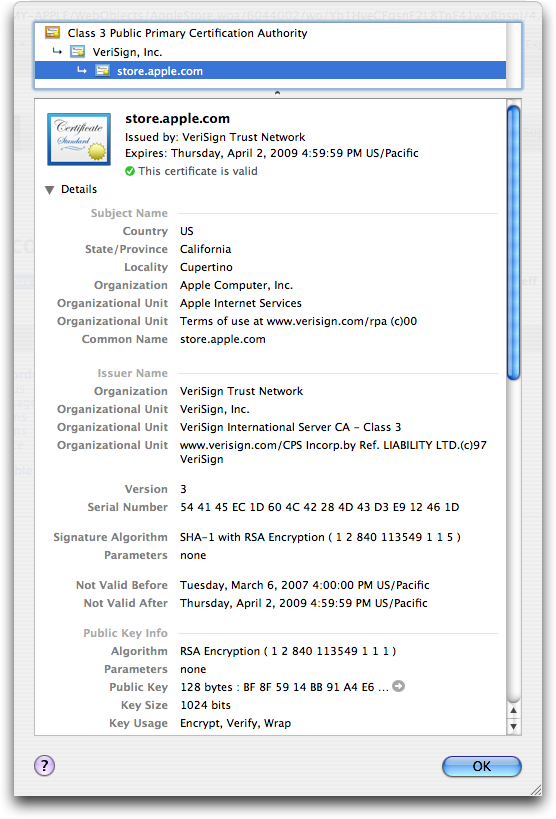
example, Apple's https://store.apple.com/ certificate was issued by
the "VeriSign Trust Network" and signed by "VeriSign, Inc." That
VeriSign certificate was in turn signed by VeriSign's "Class 3
Public Primary Certification Authority". The "Class 3" root
certificate is trusted by most browsers in use today. In Mac OS X,
you can see this certificate in Keychain Access, in the
"X509Anchors" keychain (SSL/TLS certificates are based on the X.509
digital certificate standard); Firefox stores its bundle of X.509
root certificates in its application package, because Firefox
doesn't use the Apple Keychain. Because the Class 3 certificate is
built in, Safari and Firefox users see a lock icon instead of scary
warnings when using SSL/TLS sites authorized by that Class 3
certificate, such as https://store.apple.com/.
<http://en.wikipedia.org/wiki/X.509>
<http://www.tidbits.com/resources/2007-06/store.apple.com.png>
SSL/TLS isn't limited to securing Web sites. To be secure, email
communications can also use encryption, and SSL/TLS is one of the
easier ways to accomplish this. Unfortunately, support for SSL/TLS
varies widely, and server-to-server SMTP connections are rarely
encrypted. On the other hand, Apple Mail, Apple's .Mac mail service,
and Mac OS X Server all support SSL/TLS for secure IMAP, although
unfortunately .Mac does not support SSL/TLS for webmail. To
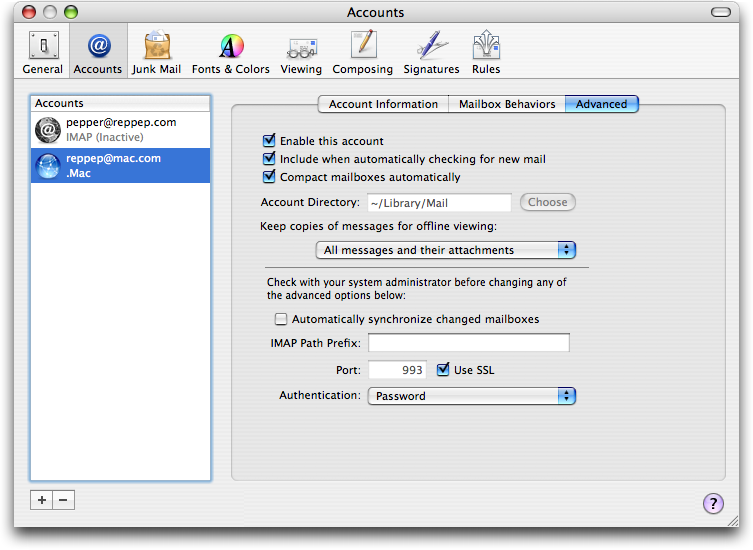
configure a Mail account to use SSL/TLS for checking email, open
Preferences, click Accounts, select the desired account, and click
the Advanced tab; there check "Use SSL". If your mail server runs on
a dedicated IMAP/SSL or POP/SSL port (like Mac.com), enter the
appropriate port number (993 for IMAP/SSL; 995 for POP/SSL). To
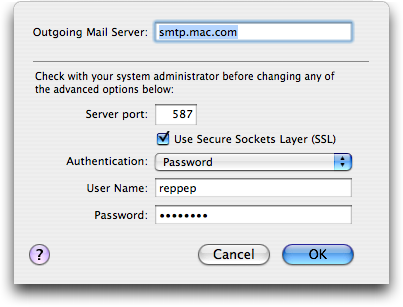
encrypt sending mail, click the Account Information tab, then the
Server Settings button at the bottom under "Outgoing Mail Server
(SMTP)"; check "Use Secure Sockets Layer (SSL)." If you need a
special port for SMTP, it's probably 587 (this works for Mac.com).
<http://www.tidbits.com/resources/2007-06/mail-advanced.png>
<http://www.tidbits.com/resources/2007-06/mail-smtp.png>
**Getting a Certificate for Your Site** -- To set up a secure Web
site, you must first create a public/private key pair. Keep your
private key secret and never share it with anyone. Next, combine the
public key with your identifying information, including the site's
domain name and owner, to create a "certificate signing request"
(CSR). CSRs themselves aren't useable for encryption, but the
process of signing a CSR creates an X.509 certificate, which
identifies a site and its claim to trustworthiness (the signature),
and ties the site's public key to its private key (normally kept in
a separate file).
When a CA (typically a commercial security company) receives a CSR,
it is reviewed to determine if the request is acceptable. Is it
properly formatted? Was the request made by a customer with
authorization to make requests for that domain name, in good
financial standing? If the request passes all the CA's checks, which
vary broadly between organizations, the CA folds in additional
information, such as dates of issue and expiration (which ensure
that old certificates don't last, and also that CAs keep getting
paid), and signs the whole thing (CSR data, CA data, and
customer-provided public key), producing the certificate, which it
then returns to the customer, formatted for the particular software
used by the requester. Components of Mac OS X Server (specifically
the included Apache Web server, Cyrus and Postfix mail servers, and
Jabber chat server) all use the same certificate formats, and can
share certificates. Of course, a certificate is useless without its
matching private key (created with the CSR), since the certificate
is based upon a particular public key.
Because CAs vouch for the identity of the certificate's owner, they
tend to be picky about the details of the certificate request.
Misspelling a name can delay certificate issuance, and requests for
certificates under different business names can be even more
troublesome.
Since people trust signed certificates to identify Web sites and
protect their confidentiality, SSL/TLS keys (the secret part) must
be kept secret and safe. In the best case, if your key is destroyed,
you could be out a few hundred dollars and offline while processing
a brand-new CSR, private key, and certificate. In the worst case, if
a hostile party (a cracker, an FBI agent, or your ex) gets a copy of
your SSL/TLS certificate and private key, they could either
impersonate the real site, or decrypt all supposedly secure
communications sent to that site - a phisher's dream. There is a
U.S. federal standard (FIPS 140) dealing with how to secure such
confidential data, and it describes tamper-proof hardware and
multi-party authorization, but most people secure their private keys
either with a password that must be entered to start the SSL/TLS
service after a reboot, or simply by protecting the computer
containing the unencrypted key, which enables rebooted computers to
resume serving SSL/TLS services (including HTTPS Web sites) without
human intervention. This is important to think about when first
venturing into SSL/TLS, and much more so for certificate
authorities.
<http://en.wikipedia.org/wiki/FIPS_140-2>
Theft of a private key gets very complicated. If you lose your car
or house keys it's a nuisance, but changing locks is
straightforward. For SSL/TLS the equivalent is certificate
revocation, identifying a key pair as compromised and informing
others not to use it. Unfortunately, revocation is an extremely
difficult problem for several reasons. For one, revocations must be
managed as carefully as certificate signatures - it would be
unacceptable if a competitor could revoke Amazon's SSL/TLS
certificate. Additionally, since private keys are tightly
restricted, what if the computer containing the only copy of the key
is stolen? Finally, the SSL/TLS design doesn't make any assumptions
or demands about timeliness, but if a certificate has been
compromised, the revocation should happen before anyone is able to
commit fraud with the stolen certificate and key. As a result,
although there are many revocation systems, they are largely unused.
**All about Certificate Authorities** -- A certificate authority is
responsible for verifying that each request comes from the party
described in the certificate, that this organization has legitimate
ownership of the domain, and that the requester is authorized to
make the request. The details of what is required and how it is
verified vary widely between CAs.
There are many CAs, but working with a new CA is problematic
compared to using a better established authority. In this case
"better established" means bundled into more browsers, because when
a browser connects to a site with an unknown certificate, it
presents a deliberately scary warning that security cannot be
assured, and nobody wants that to be the first user experience of
their Web site - especially when selling online. This applies
equally to self-signed certificates, those signed by private CAs
(such as universities and corporations for internal use), and
certificates signed by upstart commercial CAs not yet bundled in the
user's particular browser.
<http://news.netcraft.com/SSL-survey>
With Internet Explorer 7, Microsoft introduced "Extended Validation"
(EV) for "High Assurance" SSL/TLS certificates, stipulating
additional checks on all EV CSRs and Web sites in an attempt to
bring some consistency to the somewhat chaotic range of CAs and CA
policies. Mozilla has stated that Firefox will support EV
certificates, and Safari is expected to as well. These certificates
are of course more expensive. EV certificates are particularly
welcomed by CAs, as they provide an opportunity to re-raise
certificate prices, which had been trending downward with
competition.
<http://en.wikipedia.org/wiki/Extended_Validation_Certificate>
Prices vary widely among the different certificate authorities.
VeriSign is one of the largest and most expensive, charging $1,000
for a 128-bit certificate lasting a year, or $1,500 with EV. When
Thawte undercut VeriSign's prices and threatened their market share,
VeriSign bought Thawte, retaining the brand for cheaper
certificates. Thawte charges $700 or $900 (with or without EV) for a
1-year 128-bit certificate, but the process of installing a Thawte
certificate is more difficult, because an intermediate certificate
must also be installed; this appears to be an attempt by VeriSign to
prevent the cheaper Thawte certificates from being as functional as
VeriSign-branded certificates. Recently, when GeoTrust threatened
VeriSign's popularity and pricing with 1-year 128-bit certificates
for $180, VeriSign repeated the performance and bought GeoTrust,
preventing them from seriously undercutting VeriSign EV
certificates. Cheaper options do exist, though, such as RapidSSL,
which charges only $62.
<http://www.verisign.com/ssl/buy-ssl-certificates/secure-site-services/>
<http://www.thawte.com/ssl-digital-certificates/buy-ssl-certificates/>
<http://www.geotrust.com/buy/geotrust_ssl_certs.asp>
<http://simplessl.com/rapid_ssl.shtml>
Because certificates are so expensive, CAs offer various discounts
for longer-lasting certificates or multiple purchases, and renewals
typically cost less than new certificates. Most CAs are
conscientious about reminding their users to renew certificates
before they expire (and pay for the privilege), but they are also
generally good about carrying any unused time onto renewed
certificates so there is no penalty for early renewal. A late
renewal can be quite embarrassing, as Web site visitors are asked if
they trust the expired certificate; putting certificate expirations
into a calendar can help avoid these problems.
All CAs offer the same basic service of signing CSRs to produce
trusted certificates, but there are many variables including CA
reputation, complexity of the certification process, ease of
installation and use for certificates, user convenience in accessing
certified sites, and CA policies. In an attempt to justify their
prices, many CAs offer guarantees of integrity for the certificates
(and thus the associated Web sites) that they certify, such as
VeriSign's Secured Seal program.
What kind of certificates should you use? Public ecommerce sites,
and those dealing with other highly sensitive information, should be
using 128-bit commercial certificates. The details of which
certificate you should buy depend on the site itself, but it's worth
keeping in mind that the main differentiators revolve around visitor
confidence (EV certificates, well-established root keys, etc.) and
ease of use for administrators, while the actual signing process is
cryptographically equivalent for all CAs. Remember that you provide
the private and public keys yourself; the certification authority
vouches for the certificate's owner, but isn't involved at the
encryption level. All 128-bit SSL/TLS certificates are
cryptographically equivalent, although browsers treat EV sites
differently.
**Alternatives to Commercial CAs** -- There are alternatives to paying
a CA up to $1,500 per year to sign your certificate. First, you
create a new CSR and use it to sign itself; such a "self-signed
certificate" lacks a third party's assurance of authenticity but
provides exactly the same encryption as a "real" certificate with a
proper signature. For one or two host names (since certificates are
tied to host names) and for sites where consumer confidence isn't
important, using self-signed certificates is a good option. It's
perfect for personal sites, where a few hundred dollars could be a
waste of money. Even for sites which do not provide SSL/TLS access
for visitors, securing administrative access (updating blogs,
checking statistics online, etc.) is a perfect use for self-signed
certificates.
If you have many sites, such as might be true at a university or
corporation, it may make more sense to create your own CA, and use
that to sign individual certificates, avoiding all CA fees. The
downside is that visitors to your site must both deal with
legitimate security warnings from their browsers, and manually trust
your private CA certificate. The procedures for dealing with private
CAs vary across browsers, and because criminals can be CAs as easily
as anyone else, some browsers make it deliberately difficult to
trust a new private CA. However, users must trust your CA only once,
and never again have to deal with untrusted certificate warnings
(unless they switch computers or browsers, in which case the process
must be repeated).
If you opt to follow this path, you should first think seriously
about both electronic and physical security of your root
certificate's key, including backups and staff turnover.
Fortunately, being a CA is not technically much more complicated
than self-signing a certificate, although assisting users with
installing root certificates is deliberately more complicated than
simply trusting a self-signed certificate in some browsers.
Establishing your own private CA costs nothing - the free OpenSSL
can do it all. It just takes an investment of time to learn the
procedures and a security commitment to protect the root key, which
is the security linchpin for all child certificates. The details are
outside the scope of this article, but there are several online
resources to get started, and the procedure can be automated and
streamlined quite effectively.
OpenSSL includes CA.pl, a Perl script to automate these tasks; it's
effective but not perfect. Dissatisfied with CA.pl and manual
procedures, I have produced two simple scripts, cert.command to
create and sign new certificates, and sign.command to sign existing
certificates. Using either of these scripts, I provide the host name
twice, enter the root key's passphrase, and hit Return a bunch of
times; the rest is automated.
<http://www.openssl.org/>
**Secure in My Conclusions** -- SSL/TLS is by no means the only way to
secure Web and email communications on the Internet, but it does
yeoman service every day for millions of people, protecting credit
card numbers, online banking sessions, email, and more. For normal
users, seeing the lock icon and "https" in URLs provides confidence
that SSL/TLS is keeping us safe. For admins, although the technology
behind SSL/TLS definitely falls into the realm of cryptography (the
software equivalent of rocket science), the cost and effort of
implementation are well within the means of anyone capable of
running a Web server.
[Chris Pepper is a Unix System Administrator in New York City. He's
still amused that Mac OS X has turned out to be such a great
management workstation for the Unix systems he works with. Chris's
invisible signature block reads "Editing the Web, one page at a
time." After banging his head against the issues discussed in this
article, Chris has written an additional article on how to use
OpenSSL's CA.pl script (included with Mac OS X) to manage SSL/TLS
certificates. He has also developed a pair of double-clickable
scripts to help run a private CA.]
<http://www.reppep.com/~pepper/ssl/>
Hot Topics in TidBITS Talk/25-Jun-07
------------------------------------
by TidBITS Staff <[EMAIL PROTECTED]>
article link: <http://db.tidbits.com/article/9051>
**Demand for iPhone** -- Is Apple's goal of selling 10 million iPhones
by the end of 2008 a realistic number, or is the number
intentionally low to make sure Apple hits the mark? And when will we
see iPhones in other countries? (13 messages)
<http://emperor.tidbits.com/TidBITS/Talk/1339/>
**1Passwd Eases Password Pain** -- Responding to Joe Kissell's article
on 1Passwd, readers discuss Palm synchronization. (8 messages)
<http://emperor.tidbits.com/TidBITS/Talk/1340/>
**Thoughts spurred by Loki, Google Street Views, etc.** -- Are these
location-aware applications crossing the line into your personal
privacy? (2 messages)
<http://emperor.tidbits.com/TidBITS/Talk/1341/>
**Replacing Eudora** -- Mail? Thunderbird? And is there anything that
can easily replicate Eudora's capability to open particular messages
in new windows when they arrive? (7 messages)
<http://emperor.tidbits.com/TidBITS/Talk/1342/>
**YouTube Comes to iPhone and Apple TV** -- Has anyone encountered an
Apple TV problem with a router that doesn't have UPnP enabled? (1
message)
<http://emperor.tidbits.com/TidBITS/Talk/1344/>
**imagining iPhone** -- A reader imagines a future buying experience
where custom data is piped into one's iPhone while shopping. (2
messages)
<http://emperor.tidbits.com/TidBITS/Talk/1345/>
$$
This is TidBITS, a free weekly technology newsletter providing timely
news, insightful analysis, and in-depth reviews to the Macintosh and
Internet communities. Feel free to forward to friends; better still,
please ask them to subscribe!
Non-profit, non-commercial publications and Web sites may reprint or
link to articles if full credit is given. Others please contact us. We
do not guarantee accuracy of articles. Caveat lector. Publication,
product, and company names may be registered trademarks of their
companies. TidBITS ISSN 1090-7017.
Copyright 2007 TidBITS: Reuse governed by Creative Commons license.
Contact us at: <[EMAIL PROTECTED]>
TidBITS Web site: <http://www.tidbits.com/>
License terms: <http://www.tidbits.com/terms/>
Full text search: <http://www.tidbits.com/search/>
Subscriptions: <http://www.tidbits.com/about/list.html>
Account help: <http://www.tidbits.com/about/account-help.html>
--
If you want to unsubscribe or change your address, use this link
http://emperor.tidbits.com/webx?unsub@@.3c557dc4!u=306a67f9