TidBITS#893/20-Aug-07
=====================
  Issue link: <http://db.tidbits.com/issue/893>
  The MacHack conference may be history, but its spirit lives on in
  C4, an event for indie Mac programmers. Adam reports on the
  proceedings (where he was also a speaker) and discovers some gems
  such as Lights Off, a native game for the iPhone, and the
  software-updating framework Sparkle. Elsewhere in this issue, Glenn
  Fleishman notes improvements to the AirPort admin utility, Jorg
  Brown looks at the preposterous international data-roaming charges
  that some iPhone users are being asked to pay, Matt Neuburg adds
  some audible cues to his keys with Keyclick, and Joe Kissell updates
  his coverage of the Safe Sleep feature of current Apple laptops.

Articles
    AirPort Base Station Update Tweaks Admin Utilities
    Lights Off for the iPhone
    iPhone Billing and International Issues
    C4 Conference Rethinks MacHack
    Sparkle Improves Application Update Experience
    The Subliminal Snap of Keyclick
    Safe Sleep Revisited
    Hot Topics in TidBITS Talk/20-Aug-07


------------ This issue of TidBITS sponsored in part by: --------------

* READERS LIKE YOU! Support TidBITS with a contribution today!
  <http://www.tidbits.com/about/support/contributors.html>
  Special thanks this week to Joel Ness, BestLocal Agent LLC,
  Masaya Higashijima, and Jim Banks for their generous support!

* FETCH SOFTWORKS: Fetch 5.2 introduces WebView, the easy way
  to view files in a browser and copy Web addresses from Fetch.
  Also with FTPS support, droplet shortcuts, and more.
  Download your free trial version! <http://fetchsoftworks.com/>

* WebCrossing Neighbors Creates Private Social Networks
  Create a complete social network with your company or group's
  own look. Scalable, extensible and extremely customizable.
  Take a guided tour today <http://www.webcrossing.com/tour>

* Bare Bones Software's BBEdit 8.7 -- Latest version offers a
  major interface overhaul, new prefs, text clippings, improved
  JavaScript, new Ruby/SQL/YAML/Markdown support, code folding.
  Over 160 new features in all! <http://www.barebones.com/>.

* MARK/SPACE, INC: The Missing Sync provides the very best in
  synchronization for Mac users with BlackBerry, Palm OS, or
  Windows Mobile devices. Integrates with Address Book, iCal,
  Entourage, iPhoto, and iTunes. <http://www.markspace.com/bits>

* Microsoft's MacBU: Supporting Mac users with Office 2004.
  Supporting the Mac community through tech support newsgroups,
  user group appearances, our new team blog, and more!
  Check out our team blog at <http://blogs.msdn.com/macmojo/>

* VMware Fusion. The most seamless way to run Windows on your Mac.
  Buy VMware Fusion today and get $20 off the purchase price.
  Rebate offer valid through December 31, 2007.
  Visit: <http://www.tidbits.com/about/support/vmware-fusion.html>

* New Parallels Desktop 3.0: Run Windows on your Mac natively!
  We erased the border between the Windows and Mac worlds. 10% Off
  Upgrade! <http://www.tidbits.com/about/support/parallels-upgrd.html>
  $10 Off New! <http://www.tidbits.com/about/support/parallels.html>

---------- Help support TidBITS by supporting our sponsors ------------


AirPort Base Station Update Tweaks Admin Utilities
--------------------------------------------------
  by Glenn Fleishman <[EMAIL PROTECTED]>
  article link: <http://db.tidbits.com/article/9119>

  An update for the AirPort Utility software offers what Apple
  describes as "general fixes and compatibility updates" for the
  802.11n-capable AirPort Extreme Base Station. The AirPort Base
  Station Update 2007-002 for Mac also updates the AirPort Disk
  Utility and adds the AirPort Base Station Agent. The AirPort Disk
  Utility manages mounting volumes attached via USB to a new base
  station; the AirPort Base Station Agent provides monitoring of base
  stations on the network.

<http://www.apple.com/support/downloads/airportbasestationupdate2007002formac.html>

  Apple is shipping a revised version of its new AirPort Extreme Base
  Station shortly - some people may have received it already - with
  the only stated upgrade being a move from "Fast Ethernet" (100 Mbps)
  to gigabit Ethernet (1000 Mbps). (See "AirPort Base Station Upgraded
  to Gigabit Ethernet," 2007-08-13.) I expect a firmware upgrade will
  follow this software upgrade as there are many documented bugs and
  inconsistencies in the 802.11n AirPort Extreme. I've described them
  and a number of workarounds in "Take Control of Your 802.11n AirPort
  Extreme Network." (I'll be updating the book if there are enough
  changes beyond gigabit Ethernet to warrant it.)

<http://db.tidbits.com/article/9110>
<http://www.takecontrolbooks.com/airport-n.html?14@@!pt=TB893>

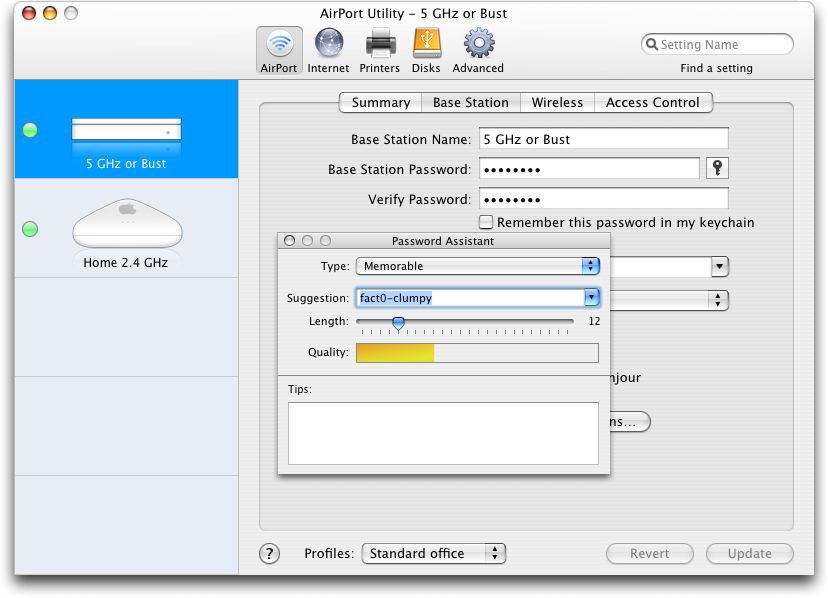
  A quick look at the AirPort Utility 5.2.1 that's part of this update
  shows that Apple added a couple of controls near password entries
  for administrative access (Base Station Password) and Wi-Fi security
  (Wireless Password). There are now checkboxes to choose
  independently whether either password is stored in the Mac OS X
  keychain. Apple also added a Password Assistant icon to help choose
  a strong password.

<http://www.tidbits.com/resources/2007-08/airport-password-asst.jpg>

  Beware, though: if you click the key icon just to see what the
  assistant looks like, the password that the assistant initially
  recommends is placed in the main password field when you click the
  assistant's Close button. You can restore the previous password by
  clicking the Revert button at the bottom of the AirPort Utility.

  The software also expands the Preferences dialog, adding choices
  about when to check for updates (daily, weekly, or monthly), and to
  "monitor base stations for problems." That last option relies on a
  daemon, the AirPort Base Station Agent, which is installed with this
  update and keeps track of the health of base stations that are
  either configured by AirPort Utility or reachable on the network.
  You can check a box to ignore base stations you didn't configure,
  potentially useful on larger networks.

  AirPort Utility is backwards compatible with all AirPort Extreme and
  AirPort Express models, but can be obtained only by installing it
  from the disc that comes with a new 802.11n AirPort Extreme base
  station.


Lights Off for the iPhone
-------------------------
  by Adam C. Engst <[EMAIL PROTECTED]>
  article link: <http://db.tidbits.com/article/9120>

  Apologies for the potentially alarming headline! Lights Off is
  actually an iPhone game, but unlike PopCap's Web-based Bejeweled
  (see "PopCap Pops iPhone Productivity," 2007-08-06), Lights Off is
  the first truly native iPhone game. Created by Lucas Newman and Adam
  Betts of Delicious Monster for the Iron Coder Live hack contest at
  the recent C4 conference (it took second place), the free Lights Off
  provides a deceptively simple set of puzzles to solve. You're faced
  with a grid of lights, some lit, some not. Tapping a light toggles
  it, along with the four adjacent lights. Your goal is to switch all
  the lights off, at which point you move on to the next level - there
  are 200 levels all told.

<http://deliciousmonster.org/>
<http://db.tidbits.com/article/9093>

  Lucas and Adam developed Lights Off with Apple's UIKit development
  framework, which is what Apple used to create the iPhone's built-in
  applications, but they also leveraged the various community efforts
  to open the iPhone to independent developers. So although Lights Off
  is an entirely native iPhone application, installing it requires
  opening access to your iPhone with iActivator, uploading Lights Off
  to the iPhone with iPHUC, installing an SSH server on the iPhone,
  and changing the permissions of the Lights Off application (full
  instructions are available on the Lights Off Web page). Of course,
  because Lights Off is such a hack, it's likely that installing an
  update to the iPhone software will render Lights Off inoperative.
  Installing Lights Off could also violate the iPhone's warranty, but
  it seems to me that in the worst case, you could simply reset the
  iPhone to factory defaults and restore data from your computer.

<http://iphone.fiveforty.net/wiki/index.php/Main_Page>
<http://iphone.fiveforty.net/wiki/index.php/IActivator>
<http://iphone.fiveforty.net/wiki/index.php/IPHUC>
<http://www.kdbdallas.com/index.php/2007/08/04/iphone-ssh-install-for-mac-shell-script/>

  I've heard a number of early iPhone users complain about the lack of
  games, though most seem a bit embarrassed by their desire to play
  games when Apple didn't see fit to include any. Perhaps Lights Off -
  and other native iPhone applications that are coming - will be
  sufficiently popular to encourage Apple to open up the iPhone to
  developers of both games and more useful programs that can't be
  developed as Web 2.0 applications.

  And, with apologies to Arlo Guthrie, if just one iPhone user walks
  into an Apple Store and says, "Why can't I get anything I want on my
  iPhone?" they'll think he's really sick and won't help him reinstall
  his game after updating the iPhone. And if two iPhone users do it,
  in harmony, they'll think it's a stunt, and they won't help either
  one of them. And if three people do it, three, can you imagine,
  three people walking into an Apple Store and asking why they can't
  install anything they want on an iPhone, and walking out, they may
  think it's an organization. And can you imagine fifty people a day,
  I said fifty people a day walking in and asking why they can't
  install anything they want and walking out, why friends, they may
  think it's a movement. And that's what it is, the iPhone Application
  Anti-Massacre Movement. And all you got to do to join is sing it the
  next time it comes around on the guitar. With feeling.

<http://www.arlo.net/resources/lyrics/alices.shtml>


iPhone Billing and International Issues
---------------------------------------
  by Jorg Brown
  article link: <http://db.tidbits.com/article/9116>

  There are two big controversies brewing in the iPhone world right
  now, both squarely in AT&T's purview.

  The first is that AT&T defaults to sending you detailed information
  about your phone use, including a printout, arriving through the
  mail, of every text message you send or receive, as well as every
  block of data; they do this even if you have unlimited service. The
  canonical example is a customer whose 300-page phone bill cost AT&T
  $10 to send.

<http://youtube.com/watch?v=UdULhkh6yeA>

  This is an idiotic waste of paper (blogger Muhammad Saleem estimated
  it at nearly 75,000 trees per year), but reportedly customers
  signing up after 10-Aug-07 will instead receive summary bills that
  basically just say how much you owe. You can also ask AT&T to switch
  your account to summary billing or to paperless billing, though an
  email message sent to Muhammad purportedly from an AT&T call center
  employee claimed that paperless billing would cost $1.99 per month.

<http://muhammadsaleem.com/2007/08/15/att-goes-on-a-rampage-will-destroy-74535-trees-to-make-iphone-service-bills/>
<http://blog.wired.com/gadgets/2007/08/att-saves-the-t.html>

  But that's not a big deal - AT&T will work it out eventually.

  The bigger problem is that, while iPhone data usage is flat-rate in
  the United States, in every other country it's charged by the byte,
  and the charges are quite high. Same thing with text messages.

  On top of that, many people have their iPhones set to check email
  automatically every few minutes, something that's not a problem when
  in the United States, but which generates huge charges when you're
  in another country.

  Consider, for example, that in Canada the charge for outgoing text
  messages is 50 cents per message, while the data rate is about $1
  for every 50K, or $20 per megabyte. Now go to Home > Settings >
  Usage on the iPhone and multiply your data use, in megabytes, by
  $20, and contemplate how high your phone bill might be.

  There are a few ways you can avoid the high bills that jet-setting
  iPhone users have been seeing:

* Turn off Mail in Home > Settings, which should reduce the use of
  EDGE data to nearly zero (just a few packets when you move between
  EDGE and Wi-Fi). Then, before you check on stock quotes, use Google
  Maps, watch a video at YouTube, or check the weather, make sure you
  have a good Wi-Fi connection.

* Remove the SIM card while you're away (see Apple's instructions).
  You won't be able to make calls or use EDGE, but you will be able to
  use Wi-Fi. You can even put the iPhone SIM that you just removed
  into some old AT&T phone, and use that for communicating while you
  use your iPhone for everything else.

<http://docs.info.apple.com/article.html?artnum=305746>

* Put the iPhone into Airplane Mode. That way, you can still listen to
  music and play video, but you can't make calls or do anything
  requiring Internet access.

* Call AT&T and sign up for the International Data Global Plan for
  iPhone, which, for $24.99 per month, provides 20 MB of data usage
  per month in 29 countries, with overage at half a cent per kilobyte
  ($1 for 200K) and other countries at the usual $.0195 per kilobyte
  (about $1 for 50K). A friend was told by AT&T that the International
  Data Global Plan _replaces_ the domestic data plan, but AT&T's Web
  site seems to contradict that, so be sure to confirm with AT&T. You
  do have to sign up for 12 months at a time.

<http://www.wireless.att.com/learn/international/roaming/affordable-world-packages.jsp#5b>
<http://www.wireless.att.com/learn/international/dataconnect-global.jsp>


C4 Conference Rethinks MacHack
------------------------------
  by Adam C. Engst <[EMAIL PROTECTED]>
  article link: <http://db.tidbits.com/article/9121>

  I recently returned from a weekend in Chicago, attending the second
  C4 conference for independent developers. Created by Jonathan "Wolf"
  Rentzsch, a Chicago-area developer, occasional TidBITS contributor,
  and all-around good guy, C4 in many ways picks up where the
  venerable MacHack programmer's conference left off several years ago
  while rethinking and refining the things about MacHack that caused
  it to fade away.

<http://c4.rentzsch.com/1/>
<http://www.rentzsch.com/>
<http://db.tidbits.com/author/Jonathan+Rentzsch>

  Holding C4 in Chicago, rather than MacHack's traditional location of
  Dearborn, Michigan, made it easy for many people to attend, given
  Chicago's central location and massive airports. Plus, Chicago is a
  bit more of a destination than Dearborn (though I'll never speak ill
  of Dearborn again, after having been given a personal tour by the
  head of the Chamber of Commerce; see "Adieu ADHOC," 2005-08-01).

<http://db.tidbits.com/article/8197>

  Wolf organized a number of excellent sessions in a single track,
  starting off with Wil Shipley's (Delicious Monster) tremendously
  amusing keynote entitled "On the Creation and Maintenance of Hype."
  A number of other sessions focused on the business end of things,
  including Daniel Jalkut's (Red Sweater Software) talk about
  acquiring applications, my updated talk about "Hacking the Press,"
  Allen Odgaard's discussion of the development of TextMate, and Cabel
  Sasser's wonderful recounting of the story behind the founding of
  Panic and the creation of their Coda Web development software (see
  "Coda Plays Web Developers a New Tune," 2007-04-30).

<http://www.delicious-monster.com/>
<http://www.red-sweater.com/>
<http://db.tidbits.com/series/1172>
<http://macromates.com/>
<http://www.panic.com/>
<http://www.panic.com/coda/>
<http://db.tidbits.com/article/8969>

  On the more technical end, Shawn Morel of VMware gave a good
  explanation of virtualization that was highly technical but
  understandable to the non-programmer. Several other talks were
  totally over my head, such as Bob Ippolito's introduction to Erlang,
  a new language and environment that provides hot code reloading,
  fault-tolerant runtimes, concurrency-oriented programming, and
  function pattern matching. I haven't the foggiest idea what that
  means, but some of the capabilities Bob talked about certainly
  sounded impressive. Tim Burks also talked about bridging between
  Ruby and Objective-C, though I have to admit to glazing over
  somewhat in the aftermath of my own talk and my lack of programming
  knowledge. For a better description of Tim's talk and other thoughts
  on the C4 conference, see Mike Zornek's coverage.

<http://www.vmware.com/products/fusion/>
<http://en.wikipedia.org/wiki/Erlang_%28programming_language%29>
<http://www.rubycocoa.com/>
<http://blog.clickablebliss.com/2007/08/13/c41-retrospective/>

  The most valuable part of conferences often comes outside the formal
  sessions, and C4 was no exception. There wasn't a lobby that
  attendees could take over as happened with MacHack, but Wolf
  cleverly set things up so there were a number of group meals and
  receptions for ad hoc networking. I enjoyed being able to catch up
  with numerous friends who I see only at industry trade shows, and I
  met lots of developers who hadn't been part of the MacHack
  community. Others commented on this as well, and if anything, the
  next C4 (assuming there will be one, since Wolf hasn't said anything
  either way) could use some time between sessions for people to
  gather, discuss the talk they just heard, and generally network.

  One thing I hadn't anticipated was the constant use of Twitter,
  buoyed by the presence of Craig Hockenberry of Iconfactory, who
  wrote the Twitterrific client that provides a nice Macintosh
  interface to Twitter, along with Growl notifications. I haven't been
  a fan of Twitter, since most of what I've seen has been truly inane,
  but C4 used Twitter to create a group chat room with persistent
  messages. In other words, anyone could send a Twitter message that
  would be seen by everyone else who was following the C4 user; since
  messages are kept, that made it possible to follow what was said not
  just while you were connected, but the entire time. Such a use isn't
  entirely innovative; there are plenty of group chat systems, but the
  Twitter system was used heavily, whereas a parallel IRC chat room
  received much less attention. In a discussion toward the end of the
  conference, several Twitter fans explained to me that the trick with
  Twitter was to follow only those people who had something
  interesting to say (as opposed to updates on their meal choices or
  transportation woes), to limit it largely to non-working hours, and
  to be ruthless about ignoring missed messages (called "tweets").
  Heck, I'll give it a try; for anyone who's using Twitter, feel free
  to follow me, or, if you want instant notification when we post new
  TidBITS articles, follow TidBITS.

<http://twitter.com/>
<http://iconfactory.com/software/twitterrific>
<http://growl.info/>
<http://twitter.com/adamengst>
<http://twitter.com/TidBITS>

  C4 closed with Iron Coder Live, a hack contest along the lines of
  the MacHax Best Hack Contest from MacHack. Most of the 11 hacks
  involved the iPhone, that having been the proposed theme, though the
  third place hack, independent consultant Dave Dribin's The Bouncer
  was instead an Input Manager hack that caused a selected
  application's Dock icon to bounce. While that wasn't too impressive
  on its own, Dave then showed how he could make multiple Dock icons
  bounce in various synchronized ways, and then made them bounce to
  music, all to loud applause. Second place went to Lucas Newman and
  Adam Betts of Delicious Monster for Lights Off, the first native
  iPhone game (see "Lights Off for the iPhone," 2007-08-14) which they
  released to the public. Impressive as Lights Off was, first place -
  and Wolf's Golden Dog Tags prize - went to Ken and Glen Aspeslagh of
  Ecamm Network for Squidge, a hack that enabled two-way
  video-conferencing on the iPhone, using its built-in camera.
  Impressive stuff! The main problem with their demo is that Glen and
  Ken are identical twins, so it wasn't easy to see who was who on the
  tiny iPhone screens projected on the wall.

<http://www.dribin.org/dave/blog/archives/2007/08/14/the_bouncer/>
<http://deliciousmonster.org/>
<http://db.tidbits.com/article/9120>
<http://www.ecamm.com/>
<http://macdaddyworld.com/?p=38>

  Overall, and from the comments I heard from other attendees, C4 was
  a smashing success. The first one last year attracted 98 attendees
  (Wolf had initially capped attendance at 75, but had to expand due
  to interest), and I gather this year's attendance grew to about 140.
  That's a good size, and if there are future incarnations, we'll have
  to see if Wolf and his crew - who did an excellent job with the
  logistics of scheduling, food, audio, and room setup - can handle
  more people as the word continues to spread.


Sparkle Improves Application Update Experience
----------------------------------------------
  by Adam C. Engst <[EMAIL PROTECTED]>
  article link: <http://db.tidbits.com/article/9122>

  At the C4 conference, I ran into David Teare, who publishes the
  1Passwd utility, and I complimented him on how smoothly 1Passwd
  updates itself. Although it does have to interact with the user to
  quit open browsers (since 1Passwd is a browser plug-in), the rest of
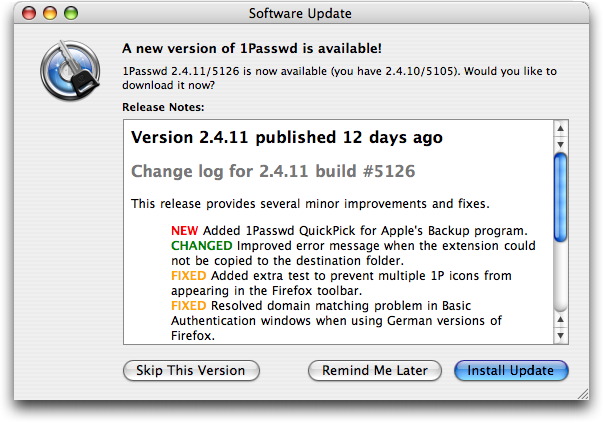
  the process is nearly seamless. When you launch the 1Passwd
  application and an update is available, it displays a window showing
  release notes for the latest version, nicely color-coding the
  headings for new features, changed features, and fixed bugs. You're
  given the choice of being reminded of the update again later, if
  you're too busy to think about it, skipping the update entirely, or
  installing it. If you choose to install the update, 1Passwd
  automatically downloads the new version, copies it over the old one,
  and relaunches itself to load the new code. It's ever so easy.

<http://www.tidbits.com/resources/2007-08/1Passwd-Sparkle-window.jpg>

  When I expressed my admiration for his update process, David looked
  a little embarrassed and said, "Oh, that's the open source Sparkle.
  We just added it to 1Passwd." Not being a developer, I'd simply
  never run across Sparkle before, so I went spelunking for it on the
  Web. It turns out that Sparkle is used in a large number of
  applications, including SubEthaEdit, iStumbler, MarsEdit, and nearly
  200 other Macintosh programs.

<http://sparkle.andymatuschak.org/>

  From what developers at C4 told me, and from what I see on the
  Sparkle Web site, it's a well-thought-out implementation of
  self-updating. Most important, the user doesn't have to do anything
  at all, although it's more common (and generally more respectful) to
  give the user the option of updating at a later time. Sparkle
  displays release notes in a detailed update status window via
  WebKit, supports DSA signatures for secure updates, and can extract
  updates from a number of different archive formats. Also key is the
  fact that Sparkle integrates into applications seamlessly and can be
  added to an application without any code whatsoever (it's all done
  via Interface Builder and plists). Although Sparkle itself works
  only in Cocoa applications, a separate version has been created for
  use in Carbon applications.

  I of course realize that most people reading TidBITS are not
  developers with applications that need self-updating capabilities,
  but I'll bet that almost all of you have had to deal with the usual
  upgrade rigamarole: learn about an update (perhaps from the
  application, perhaps elsewhere), go to its Web site, find the right
  page, download and expand the file, copy the new version of the
  application over the old one (quitting first, if the old application
  was active), launching the new version, and then cleaning up all the
  downloaded files.

  It's not rocket science, but it is tedious and time-consuming. The
  only good part about it is that you remain in control the entire
  time and can decide when to install the update, whether to keep the
  old version of the application around, and if it's worth keeping the
  downloaded archive as well. Realistically, the main downside of
  self-updating, whether done through Sparkle or any home-brewed
  mechanism, is that you would have a hard time reverting to the
  previous version if the update suffered from some unexpected
  problem.

  So, if you'd like the applications you use on a regular basis to
  update themselves with a minimum of fuss or interaction from you,
  much as happens with Mac OS X and Apple's applications via Software
  Update, tell the developers to check out Sparkle. It's free, it's
  easy, and it's a boon to users everywhere.


The Subliminal Snap of Keyclick
-------------------------------
  by Matt Neuburg <[EMAIL PROTECTED]>
  article link: <http://db.tidbits.com/article/9102>

  Long before I owned a personal computer, I had an IBM Selectric
  typewriter, and all was right with the world. What I loved wasn't
  just its changeable fonts (though these were essential to my work,
  letting me type in both Ancient Greek and English); something about
  the feel of the keyboard, shared also with IBM's card-punch machines
  of a slightly earlier era, was uniquely satisfying, clear, and
  positive. With it, I could type very fast and accurately. In a way,
  I've sought ever since to recover that same keyboard feel.

<http://en.wikipedia.org/wiki/Selectric>
<http://www.columbia.edu/acis/history/029.html>

  Here at TidBITS, we're all heavy keyboard users, and we've run
  occasional stories about keyboards we found particularly satisfying.
  In "The Majestic Alps and the King of Keyboards," 2004-03-29, Adam
  waxes nostalgic about the Apple Extended Keyboard and enthusiastic
  about its reincarnation in the Matias Tactile Pro. But when you're
  on the road with your portable (and "the road" could be merely one
  end of your living room), and can't attach an external keyboard, you
  must "dance with the one that brought you." I'm not particularly
  negative about my new MacBook's keyboard (discussed, when the first
  model appeared, in "MacBook Fills Out Laptop Line," 2006-05-22), but
  I'm not all that positive about it either. That's why I'm so
  enthusiastic about Keyclick, by Peter Sichel, a developer best known
  for his networking utilities, but who is also just an all-around
  nice fellow, always willing to share his expertise with total
  strangers who approach him at trade shows (guess how I know that?).

<http://db.tidbits.com/article/7607>
<http://db.tidbits.com/article/8534>
<http://www.sustworks.com/site/prod_keyclick_overview.html>
<http://www.sustworks.com/site/prod.html>

  Keyclick is a System Preference pane. It doesn't affect your
  physical keyboard at all; it just makes noise when you type. So how
  can it be helpful, as claimed on the product's Web site, "if your
  keyboard seems mushy, or you've ever longed for the crisp feel of an
  older keyboard"? Why does it make me a better typist on my MacBook?
  It's because the noise it makes, though little more than a faintly
  detectable pop each time I press a key, tells me almost subliminally
  that I _have_ pressed a key. Even more, Keyclick tells me (by its
  silence) when I've _failed_ to press a key, or when I've held down a
  key long enough to produce multiple, repeated characters. Thus, as
  if I were a rat in a maze being rewarded for my successes, my brain
  and my fingers are guided to press just the right amount to produce
  that satisfying pop. And so, in short order, I run the maze better
  and better.

  Actually, Keyclick helps me even more with two further bits of
  functionality. First, it makes a noise when I click the trackpad
  button, and when I release it. That's very important, because the
  MacBook trackpad button is extremely firm, so I often think I've
  clicked it when I haven't. Before Keyclick, in such a situation I
  was left slowly noticing that nothing on the screen had changed and
  wondering why; now I get instant feedback. Second, Keyclick makes a
  noise when I use the scroll wheel. On the MacBook, that means
  stroking the trackpad with two fingers; thus, it's important to
  distinguish this from a single finger, which moves the cursor.
  Again, sometimes this fails, and I used to wonder why: was the
  cursor not over the window I thought it was, or was my gesture not
  understood as scrolling? Thanks to Keyclick, I now know much better,
  and much sooner, what the computer thinks I did. I make fewer
  miscommunications with my machine, and when I do make one, I know
  immediately and can react quickly.

  Only experimentation can tell you how to set Keyclick's various
  options in order to make it most useful. You can turn the keystroke
  noise on or off, and adjust its volume and pitch; you can turn the
  scroll wheel noise on or off, and adjust _its_ volume and pitch; and
  you can turn the mouse click noise on or off, and adjust its volume.
  (You can also elect to have a different pitch produced when a
  keystroke includes a modifier key such as Command or Shift, and you
  can elect to silence Keyclick when certain applications are
  frontmost.) The matter is purely one of psychology. Indeed, on my
  iMac G5, where I have a clicky keyboard, trackball, and scroll
  wheel, Keyclick's noises feel like an annoying distraction, and I
  don't use it! Yet on my MacBook the very same noises seem both
  essential and all but unnoticeable. So download it and give it a
  try; that's the only way you'll discover whether Keyclick is that
  little extra that you needed all along to increase your happiness
  and productivity.

  You can try Keyclick free for 21 days. It's a 312K download, and
  requires Mac OS X 10.4 or later. (Incidentally, Keyclick performs
  its magic through a little-known technology, new in Tiger, called
  Quartz Event Taps; these are essentially hooks that let the
  programmer receive and modify user input before it reaches any
  application's event loop. A neat tool for experimenting with event
  taps is PreFab Software's freeware Event Taps Testbench.) You can
  register Keyclick for a mere $5, yet another example of Peter
  Sichel's generosity. Plus, Peter is very responsive to his users'
  feature requests and suggestions for Keyclick. This utility is a
  pleasure to use and the developer is delightful to work with; what
  could be better?

<http://www.sustworks.com/site/downloads.html>
<http://developer.apple.com/documentation/Carbon/Reference/QuartzEventServicesRef/Reference/reference.html>
<http://prefabsoftware.com/eventtapstestbench/>


Safe Sleep Revisited
--------------------
  by Joe Kissell <[EMAIL PROTECTED]>
  article link: <http://db.tidbits.com/article/9115>

  My recent article "Stewing Over Safe Sleep" (2007-07-30) seems to
  have touched a nerve. It provoked lots of discussion on TidBITS
  Talk, not to mention numerous email messages, prompting me to write
  a follow-up post on my personal blog. Now it seems that even the
  follow-up needs a follow-up, as new information has emerged and
  various helpful hints have been offered. Here, then, is the rest of
  the story (or as much of it as I know at the moment).

<http://db.tidbits.com/article/9090>
<http://alt.cc/jk/118>


**A Quick Review** -- In Apple's current implementation of Safe Sleep,
  simply putting your laptop into (ordinary) sleep mode triggers it to
  save a copy of your RAM onto disk - taking up as much as 4 GB of
  disk space and delaying the onset of sleep by as long as 49 seconds
  (depending on your laptop's configuration), during which, Apple's
  documentation cautions, you must not move your computer. The RAM is
  cached so that if, later on, your battery drains completely, you can
  return to your previous state quickly (a bit slower than waking up
  from ordinary sleep, but much faster than restarting), without
  having lost any unsaved work. This default setting can be modified
  only by mucking around in Terminal or with third-party hacks. If you
  don't like waiting almost a minute before moving your computer every
  time you put it to sleep (and I certainly don't), you must go to
  considerable effort to change that behavior.


**When Safe Sleep Is Good** -- In my earlier article, I complained
  that cases where Safe Sleep would actually be valuable are rare, at
  least for me, making it all the more irritating that saving RAM to
  disk is the default. However, several people pointed out usage
  scenarios in which someone might be delighted to have a copy of
  their RAM cached to disk, even if it meant taking a minute extra for
  their laptop to sleep. Although I may not encounter these situations
  myself, I grant that they make Safe Sleep more useful. A
  trans-Pacific flight during which you might burn through several
  batteries, for example, is a good time to have Safe Sleep available.
  The same is true if you know your laptop's battery is easily jostled
  out of place (losing electrical contact and thus depriving your
  computer of power) during travel to or from work.

  Another good example: swapping batteries. If I put my Titanium
  PowerBook G4 to sleep, I can swap batteries (even without an AC
  adapter attached) and not lose the contents of my RAM. However, some
  Mac laptops (including the new MacBook Pros) lack any sort of
  short-term power supply that can enable a live swap like that. With
  these models, if you can't connect an AC adapter or put them into
  Safe Sleep, your only other alternative is to shut down completely
  before changing batteries and restart afterward - quite a hassle,
  not to mention a step backward in usability. (One could even imagine
  that the Safe Sleep feature was someone's idea for saving a few
  cents on hardware components - why have extra parts to preserve the
  RAM when we can accomplish the same thing in software? - but I sure
  hope that wasn't the case.)

  In addition, a number of readers mentioned that if your battery
  drains completely without a RAM cache being created, you'll lose
  more than unsaved documents. Window and palette positions, the
  contents of the Clipboard, open tabs in your Web browser, and
  various other things might disappear too. Even the time required to
  restart and open a bunch of applications again can be a drag, and
  recovering from Safe Sleep is much faster, even if you've previously
  lost some time waiting for the RAM to be saved to disk.

  So on the one hand, there are times when a typical user might
  greatly benefit from Safe Sleep; on the other hand, during periods
  when you know you won't need it, it's still preferable to be able to
  put your computer to sleep instantly (and save a few gigabytes of
  space on your hard disk). And although you could enter commands in
  Terminal whenever you wanted to switch modes, that's not very
  convenient. Greg Nicholson emailed me with a solution he uses, which
  I thought was quite clever. He has cron run a shell script every 10
  minutes. But unlike the simple script I provided in my earlier
  article, Greg's has some smarts: it does different things depending
  on your battery level. If your battery is running low, it turns
  hibernatemode on, so that when your computer sleeps, it will save
  the RAM cache. But when your battery level is high enough again, it
  turns hibernatemode off and deletes your RAM cache. That way, you
  can have the best of both worlds, more or less.

  My version of Greg's script follows; you can change the values 30
  and 50 (as in, activate hibernatemode when battery level is less
  than 30 percent and deactivate it when battery level is over 50
  percent) to your preferences.

    #!/bin/sh
    MODE=`/usr/bin/pmset -g | awk '/hibernatemode/ { print $2 }'`
    LEFT=`/usr/bin/pmset -g batt | grep Internal | awk '{ print $2 }' | awk -F
% '{ print $1 }'`

    if [ $LEFT -lt 30 ] && [ $MODE != 3 ] ; then
      {
         /usr/bin/logger -t "hibernatemode" "Battery level less than 30%;
setting hibernatemode to 3"
         /usr/bin/pmset -a hibernatemode 3
      }
    elif  [ $LEFT -gt 50 ] && [ $MODE != 0 ]; then
      {
         /usr/bin/logger -t "hibernatemode" "Battery level greater than 50%;
setting hibernatemode to 0"
         /usr/bin/pmset -a hibernatemode 0
         rm /var/vm/sleepimage
      }
    fi

  As with any shell script, you must save this as a plain text file
  and make it executable. One way to do that is to type:

    sudo chmod ug+x your-script-name

  In addition, if you plan to use cron to schedule this script to run
  automatically, bear in mind that it requires root privileges. My own
  solution is to put the file in my system crontab (in which all
  scripts run with root privileges), but a safer tactic (and the one
  Greg recommends) would be to add the following to your
  /private/etc/sudoers file:

    ALL ALL=(ALL) NOPASSWD: /usr/bin/pmset -a hibernatemode 3
    ALL ALL=(ALL) NOPASSWD: /usr/bin/pmset -a hibernatemode 0
    ALL ALL=(ALL) NOPASSWD: /bin/rm /var/vm/sleepimage

  Safer still would be to replace the first ALL in each line with your
  short user name.


**A Question of Encryption** -- In my earlier article, I mentioned
  that when changing the hibernatemode setting manually, you should
  use a value of 0 to turn it off; 3 to return it to its default state
  (on only when needed, but always save the RAM state when sleeping);
  or 1 to make your computer use Safe Sleep, rather than ordinary
  sleep, all the time. Then I went on to say, "And if you have Use
  Secure Virtual Memory selected in the Security pane of System
  Preferences, replace the 1 or 3 with 5 or 7, respectively." That
  last sentence, it turns out, was not merely mistaken but a very bad
  recommendation indeed. Please forget that I suggested it. Don't ever
  use 5 or 7.

  Ordinarily, when Mac OS X uses virtual memory (VM) - temporarily
  storing a portion of your RAM on disk - it writes out the data
  unencrypted. The problem with this is that if your RAM happened to
  contain something confidential, such as a password, then even after
  you shut down your computer someone could extract that data from the
  VM swap file on your disk. Security experts regard this as a huge
  risk, and recommend that virtual memory always be encrypted when
  written to disk. In Mac OS X Tiger, you can do this by opening the
  Security pane of System Preferences and checking Use Secure Virtual
  Memory. (In fact, everyone go do this right now. I'll wait.)

  How does Secure VM relate to hibernatemode? Well, with hibernatemode
  settings of 1 or 3, your RAM is saved to disk according to the
  Secure VM setting you're using. So, if Secure VM is off, a setting
  of 1 or 3 writes your RAM cache unencrypted, whereas if Secure VM is
  on, a setting of 1 or 3 encrypts your RAM cache. That is as it
  should be.

  Once upon a time, however, when hibernatemode was new, it didn't
  work correctly with Secure VM. So the 5 and 7 settings were added to
  *prevent* your RAM cache from being encrypted even if Secure VM was
  turned on! That problem, however, was short-lived, and now that
  modes 1 and 3 work as they ought to, you should avoid using 5 or 7,
  which would effectively eliminate the value of Secure VM in the
  first place.

  Suppose, however, that you not unreasonably took my earlier advice
  and thereby unwittingly wrote an unencrypted RAM cache to your disk
  - or that you never had Secure VM turned on in the first place and
  have an unencrypted RAM cache for that reason. Merely erasing that
  sleepimage file won't overwrite its contents; any moderately skilled
  hacker could still read its contents quite easily. So instead of
  issuing this command:

    sudo rm /var/vm/sleepimage

  use this one:

    sudo srm -s /var/vm/sleepimage

  The srm command is the secure version of rm ("remove"). By default,
  srm overwrites files 35 times (just like the most secure version of
  the Erase Free Space feature in Disk Utility). And that's definitely
  secure, but it also takes forever, and probably has no practical
  benefits for most of us. The -s flag is for simple security - a
  one-pass overwrite - which should be adequate for most ordinary
  citizens. If you prefer to be more cautious, you can replace -s with
  -m ("medium") for a 7-pass overwrite.

  Note, however, that if you're running a script (either Greg's or
  mine) to turn off hibernatemode when needed, you need not use the
  srm command in that script. The reason is that when hibernatemode
  turns on, it creates a blank sleepimage file. Although that file is
  as large as the amount of RAM you have installed, it contains no
  data until your computer enters sleep mode. So as long as your
  script catches it and deletes it before your computer sleeps, you
  need not spend the extra time to overwrite a blank file securely.


Hot Topics in TidBITS Talk/20-Aug-07
------------------------------------
  by TidBITS Staff <[EMAIL PROTECTED]>
  article link: <http://db.tidbits.com/article/9127>

**Plastic bags vs Canvas Bags** -- An off-topic comment in another
  thread starts a discussion of how plastic bags are harmful to the
  environment. (20 messages)

<http://emperor.tidbits.com/TidBITS/Talk/1423/>


**56Kbps modem options for MacBook Pros** -- Now that Apple no longer
  builds modems into its machines, does the Apple Modem perform well
  enough, or are there other options? (7 messages)

<http://emperor.tidbits.com/TidBITS/Talk/1425/>


**Music composition for the music illiterate** -- A musical goober
  (and friend of TidBITS) wants to create a ringtone; can GarageBand
  do what he wants? (4 messages)

<http://emperor.tidbits.com/TidBITS/Talk/1426/>


**DVD to iMovie?** Readers suggest options for capturing footage from
  Hi8 tapes to DVDs and then to iMovie. (7 messages)

<http://emperor.tidbits.com/TidBITS/Talk/1427/>


**Replacing Microsoft Office with iWork '08** -- Apple's new
  production suite looks to be a more serious contender to Microsoft
  Office, but does it stack up as a replacement? The lack of Visual
  Basic in the next version of Office could be a deciding factor. (34
  messages)

<http://emperor.tidbits.com/TidBITS/Talk/1428/>


**iPhoto '08 and shared galleries** -- In anticipation of buying iLife
  '08, a reader asks about the Web gallery features in the new iPhoto
  '08. (3 messages)

<http://emperor.tidbits.com/TidBITS/Talk/1429/>


**Safe Sleep Revisited** -- Joe Kissell's ongoing look at the Safe
  Sleep feature of Mac laptops brings up a minor scripting correction
  and clarification on when the computer is actually going to sleep.
  (3 messages)

<http://emperor.tidbits.com/TidBITS/Talk/1430/>


**iPhone Billing and International Issues** -- A reader gives his
  first-hand account of being charged for international data usage:
  $1,700! (6 messages)

<http://emperor.tidbits.com/TidBITS/Talk/1432/>


$$

This is TidBITS, a free weekly technology newsletter providing timely
news, insightful analysis, and in-depth reviews to the Macintosh and
Internet communities. Feel free to forward to friends; better still,
please ask them to subscribe!

Non-profit, non-commercial publications and Web sites may reprint or
link to articles if full credit is given. Others please contact us. We
do not guarantee accuracy of articles. Caveat lector. Publication,
product, and company names may be registered trademarks of their
companies. TidBITS ISSN 1090-7017.

Copyright 2007 TidBITS: Reuse governed by Creative Commons license.

Contact us at:    <[EMAIL PROTECTED]>
TidBITS Web site: <http://www.tidbits.com/>
License terms:    <http://www.tidbits.com/terms/>
Full text search: <http://www.tidbits.com/search/>
Subscriptions:    <http://www.tidbits.com/about/list.html>
Account help:     <http://www.tidbits.com/about/account-help.html>


--
If you want to unsubscribe or change your address, use this link
http://emperor.tidbits.com/webx?unsub@@.3c557dc4!u=306a67f9