TidBITS#894/27-Aug-07
=====================
  Issue link: <http://db.tidbits.com/issue/894>
  As the iPhone and other devices keep us connected to the Internet in
  more locations, are we opening ourselves up to malicious data
  attacks? Glenn Fleishman explains sidejacking, a potentially
  damaging weakness in the way Web traffic is handled, and why the
  easiest solution is the least likely to be utilized. Also in this
  issue, Adam appears with a look at Teleport, a utility that lets him
  share two machines easily, along with a revised version of the
  TidBITS AutoCorrect Dictionary for use with Typinator. And how do
  you get six tons of uninterruptible power supply into a top-floor
  data center? Glenn points to the top-down solution employed by our
  Internet host digital.forest. We round out this issue with news of
  the releases of Microsoft Office 2004 11.3.7, iPhone 1.0.2, iMovie
  7.0.1, and iWeb 2.0.1.

Articles
    No Issue on 03-Sep-07
    iPhone, iLife '08 Receive Bug-Fix Updates
    AT&T Simplifies iPhone Bills
    Erlang Nearly at Drinking Age
    Office 2004 11.3.7 Blocks Malicious Memories
    DealBITS Drawing: Win a Copy of Nisus Writer Pro
    Tools We Use: Teleport
    UPS, I Did It Again: Bits Versus Atoms
    TidBITS AutoCorrect Dictionary Enhances Typinator
    Sidejack Attack Jimmies Open Gmail, Other Services
    Hot Topics in TidBITS Talk/20-Aug-07


------------ This issue of TidBITS sponsored in part by: --------------

* READERS LIKE YOU! Support TidBITS with a contribution today!
  <http://www.tidbits.com/about/support/contributors.html>
  Special thanks this week to Callitrope, Raymond Perrault,
  Charles Kuttner, and David Teplow for their generous support!

* SMALL DOG ELECTRONICS: TidBITS Exclusives for Aug 27 - Sep 10
  FC Studio 2: Instant $150 Rebate AND Free 3-Day Shipping: $1150!
  iMac, eMac AppleCare: $139.99! iPod nano + CarTune nano: $149.99
  Learn more and order today at <http://www.smalldog.com/tb/>

* FETCH SOFTWORKS: With Fetch 5.2, FTP and SFTP are simpler
  than ever. Use it on Mac OS X to upload, download, mirror,
  and manage your Web site, eBay images, and data sets.
  Download your free trial version! <http://fetchsoftworks.com/>

* WebCrossing Neighbors Creates Private Social Networks
  Create a complete social network with your company or group's
  own look. Scalable, extensible and extremely customizable.
  Take a guided tour today <http://www.webcrossing.com/tour>

* MARK/SPACE, INC: The Missing Sync provides the very best in
  synchronization for Mac users with BlackBerry, Palm OS, or
  Windows Mobile devices. Integrates with Address Book, iCal,
  Entourage, iPhoto, and iTunes. <http://www.markspace.com/bits>

* Microsoft's MacBU: Supporting Mac users with Office 2004.
  Supporting the Mac community through tech support newsgroups,
  user group appearances, our new team blog, and more!
  Check out our team blog at <http://blogs.msdn.com/macmojo/>

* VMware Fusion. The most seamless way to run Windows on your Mac.
  Buy VMware Fusion today and get $20 off the purchase price.
  Rebate offer valid through December 31, 2007.
  Visit: <http://www.tidbits.com/about/support/vmware-fusion.html>

* New Parallels Desktop 3.0: Run Windows on your Mac natively!
  We erased the border between the Windows and Mac worlds. 10% Off
  Upgrade! <http://www.tidbits.com/about/support/parallels-upgrd.html>
  $10 Off New! <http://www.tidbits.com/about/support/parallels.html>

---------- Help support TidBITS by supporting our sponsors ------------


No Issue on 03-Sep-07
---------------------
  by Jeff Carlson <[EMAIL PROTECTED]>
  article link: <http://db.tidbits.com/article/9137>

  Next Monday is the Labor Day holiday in the United States, which is
  celebrated as a three-day weekend. We won't be publishing an issue
  that day, though that doesn't mean we're laboring any less. We'll be
  taking this opportunity to work on the TidBITS infrastructure, and
  of course we'll continue to post news and other articles of interest
  to the TidBITS Web site. Our next issue will arrive the following
  Monday, September 10th. See you then!

<http://en.wikipedia.org/wiki/Labor_Day>
<http://www.tidbits.com/>


iPhone, iLife '08 Receive Bug-Fix Updates
-----------------------------------------
  by Jeff Carlson <[EMAIL PROTECTED]>
  article link: <http://db.tidbits.com/article/9132>

  Apple recently updated the iPhone and two iLife '08 applications,
  fixing mostly unspecified bugs. iPhone 1.0.2 offers no details as to
  what's changed other than "bug fixes" and, like all iPhone updates,
  is available only through iTunes. iMovie 7.0.1, available both via
  Software Update and as a standalone download, not only offers
  unknown fixes, but also solves an issue with publishing movies to
  .Mac Web galleries; the updater is a 9 MB download. Speaking of
  publishing Web sites, iWeb 2.0.1 (a 12 MB download) tackles problems
  when upgrading and publishing sites created using iWeb 1.x.

<http://docs.info.apple.com/article.html?artnum=305744>
<http://www.apple.com/support/downloads/imovie701.html>
<http://www.apple.com/support/downloads/iweb201.html>


AT&T Simplifies iPhone Bills
----------------------------
  by Jeff Carlson <[EMAIL PROTECTED]>
  article link: <http://db.tidbits.com/article/9131>

  iPhone owners last week received a bit of good news from provider
  AT&T via text message: "AT&T free msg: We are simplifying your paper
  bill, removing itemized detail. To view all detail go to
  att.com/mywireless. Still need full paper bill? Call 611."

  Last week, Jorg Brown wrote about AT&T's insane itemization of data
  charges, which has resulted in huge paper statements (see "iPhone
  Billing and International Issues," 2007-08-20). The situation
  garnered widespread press attention after a woman created a video on
  YouTube showing off the 300-page bill she received (which cost AT&T
  $10 to mail).

<http://db.tidbits.com/article/9116>
<http://youtube.com/watch?v=UdULhkh6yeA>

  AT&T's solution as of last week was to point out that iPhone owners
  could opt to receive electronic statements. Apparently, reality set
  in, and now the full print bill is an optional item.


Erlang Nearly at Drinking Age
-----------------------------
  by Adam C. Engst <[EMAIL PROTECTED]>
  article link: <http://db.tidbits.com/article/9134>

  Thanks to our friend Ned Holbrook for the correction of the week. In
  "C4 Conference Rethinks MacHack" (2007-08-20), I described Erlang as
  a "new" language, but it turns out that, although it was released as
  open source in 1998 and has seen more interest recently, Erlang was
  first used within Ericsson around 1987, making it about 20 years
  old. "And," as Ned said, "if you enjoyed this correction, you might
  also enjoy 'Erlang: The Movie'." Don't miss the martial arts "Erlang
  Quan: Basic Applications" movie that YouTube thinks is related. Now
  if only the audio for the former could be synced to the video of the
  latter...

<http://db.tidbits.com/article/9121>
<http://en.wikipedia.org/wiki/Erlang_%28programming_language%29>
<http://www.youtube.com/watch?v=uKfKtXYLG78>
<http://www.youtube.com/watch?v=AmtOraYA4p0>


Office 2004 11.3.7 Blocks Malicious Memories
--------------------------------------------
  by Adam C. Engst <[EMAIL PROTECTED]>
  article link: <http://db.tidbits.com/article/9128>

  Just a month after releasing a security update to Microsoft Office
  2004 (see "Microsoft Office 2004 11.3.6 Addresses Security Issues,"
  2007-07-16), Microsoft has done it again, releasing Microsoft Office
  2004 for Mac 11.3.7 Update. The 8.5 MB update, which you can also
  install directly from within the Microsoft AutoUpdate utility,
  reportedly fixes a vulnerability that an attacker could use "to
  overwrite the contents of your computer's memory with malicious
  code." The 11.3.7 update requires that you have already updated to
  11.3.6, which in turn requires 11.3.5. Just use the Microsoft
  AutoUpdate utility, which does all the heavy lifting for you.

<http://db.tidbits.com/article/9078>
<http://www.microsoft.com/mac/downloads.aspx?pid=download&location=/mac/download/Office2004/Office2004_1137.xml>


DealBITS Drawing: Win a Copy of Nisus Writer Pro
------------------------------------------------
  by Adam C. Engst <[EMAIL PROTECTED]>
  article link: <http://db.tidbits.com/article/9138>

  When Apple made the huge leap from Mac OS 9 to Mac OS X, many
  well-loved applications were left behind, generally because the
  effort of rewriting extremely old code was simply too great. The
  last application for which I kept Classic running was Nisus
  Software's Nisus Writer, in which I had written macros that were a
  key part of the TidBITS production process. We have an entirely
  different system now, but it has been great to see Nisus's
  persistence in bringing back the powerful Nisus Writer Pro with its
  attribute sensitive searching, macros, glossaries, tables of
  contents, indexing, bookmarks, widow and orphan control, line
  numbering, multi-lingual text support, character and paragraph
  styles, non-contiguous selection, and more. We've seen plenty of
  small word processors in Mac OS X so far, but nothing aside from
  Word that was aiming at a professional feature set, and it's great
  to see the choice of serious word processors in the Mac world
  expanding.

<http://www.nisus.com/pro/>

  In this week's DealBITS drawing, you can enter to win one of three
  copies of Nisus Writer Pro 1.0, each worth $79. Entrants who aren't
  among our lucky winners will receive a discount on Nisus Writer Pro,
  so be sure to enter at the DealBITS page. All information gathered
  is covered by our comprehensive privacy policy. Be careful with your
  spam filters and challenge-response systems, since you must be able
  to receive email from my address to learn if you've won. Remember
  too, that if someone you refer to this drawing wins, you'll receive
  the same prize as a reward for spreading the word.

<http://www.tidbits.com/dealbits/nisus-writer-pro/>
<http://www.tidbits.com/about/privacy.html>


Tools We Use: Teleport
----------------------
  by Adam C. Engst <[EMAIL PROTECTED]>
  article link: <http://db.tidbits.com/article/9125>

  Life has been hectic of late, with lots of guests, the C4 conference
  in Chicago, Tonya and Tristan off on vacation, and oodles of things
  to do. I realized I was going to have trouble finding time to ready
  my MacBook for a trip (basically a matter of copying my Eudora
  folder over so I can read email on the laptop rather than my desktop
  Mac), so I did it a few days before leaving. And since I've gotten
  back, I've been sufficiently busy - and I've had a few instances
  where I needed to use the MacBook away from the house - that I
  haven't yet moved my email back to my G5. (And yes, I know that
  using IMAP to pick up mail could eliminate the need to move my
  Eudora folder around; with the amount of stored email I have and the
  importance email plays in my life, I've never been comfortable
  attempting a switch away from POP.)

  Normally, I find working on two computers awkward, since email
  remains by far my primary means of communication with the outside
  world, but I generally prefer to write, use the Web, and test
  software on the G5, with its two 17-inch screens. Moving files and
  clipboard data back and forth is awkward at best with file sharing
  and remote control software, and using separate keyboards and
  pointing devices interrupts my flow of thought. But during the last
  few weeks, I've been relying on a tremendously clever and useful
  piece of freeware that solves all of these problems in a simple and
  elegant fashion.

  Teleport, written by Julien Robert of Abyssoft, enables multiple
  Macs to share a single keyboard and mouse over a network. I have my
  MacBook on the desk in front of my G5's keyboard, with the G5's
  screens above it on a shelf. When I want to move the cursor from the
  G5 to the MacBook, I hold down the Control key and throw the cursor
  to the bottom of the G5's main screen. With no delay (even over
  Wi-Fi), Teleport transfers control of the MacBook to my G5's
  keyboard and pointing device (the Contour Designs RollerMouse Pro),
  showing the cursor appearing from the top of the MacBook's screen.
  Every mouse action and keystroke from the G5's keyboard and
  RollerMouse is from then on aimed at the MacBook, and not at the G5.
  While controlling the MacBook, a translucent display on the G5's
  main screen indicates that the MacBook is in control. To point the
  keyboard and mouse back at the G5, I hold down Control and throw the
  cursor to the top of the MacBook's screen, such that the cursor pops
  out from the bottom of the G5's main monitor.

<http://www.abyssoft.com/software/teleport/>

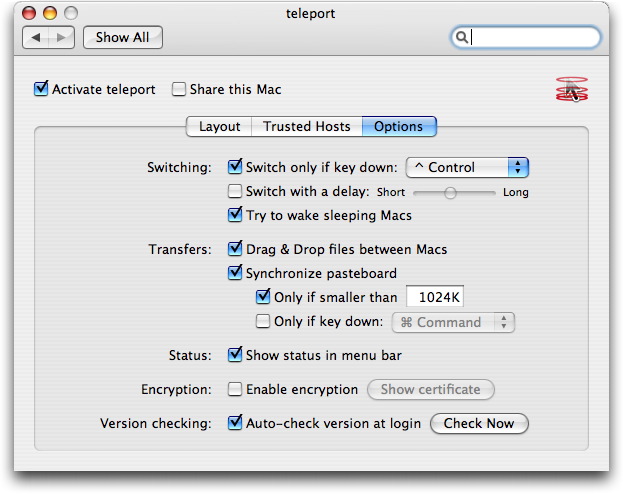
  Teleport's interface is minimal, just a menu bar icon for quick
  sharing and deactivation, and a pane in System Preferences that
  enables you to set the virtual layout of your Macs' monitors; set
  trusted hosts (since you don't want just anyone controlling your
  Macs remotely); and a variety of options related to switching among
  Macs, transferring files and clipboard data, and more.

<http://www.tidbits.com/resources/2007-08/Teleport-interface.jpg>

  That's right, Teleport can also transfer files (just drag the file
  as you move the cursor to the other machine) and an optional setting
  automatically transfers clipboard data along with the cursor. So, if
  I'm sent an attachment in email, but I want to put it on my G5, I
  just Control-drag it to the top of the screen and drop it on the
  G5's Desktop. Similarly, if I need to move some text from Eudora on
  the MacBook to BBEdit on the G5, I just copy, transfer the cursor,
  and paste - it's seamless.

  Other interesting features include the capability to encrypt the
  entire data stream, the capability to wake sleeping Macs when you
  try to control them, keyboard modifier control of when the clipboard
  contents are transferred, and more.

  In heavy use over the last few weeks, I've noticed a few problems
  with Teleport. Figuring out the most convenient virtual screen setup
  took some time, and although I initially wanted to avoid relying on
  a modifier key to switch screens, I ran into usage difficulties with
  every side I tried. Even now, when controlling the MacBook, if I
  click on the topmost pixel of the menu bar when trying to access a
  menu, something causes the current window to lose focus and the menu
  doesn't drop. (Julien tells me this is a known problem related to
  having drag & drop of files enabled.) Once or twice, Teleport
  stopped responding while I was controlling the MacBook, and I had to
  put the MacBook to sleep to restore control to the G5; after waking
  the MacBook up, I was able to control it properly again. Although
  the contents of the clipboard do transfer from one Mac to another, I
  suspect that some clipboard metadata that identifies what sort of
  data is in the clipboard is ignored, since pasting styled text from
  one machine to another sometimes results in odd behavior. This may
  be related to the fact that I'm moving data between a PowerPC-based
  Mac and an Intel-based Mac; I'll be testing a new version to confirm
  that soon. These problems are little more than occasional
  annoyances, though, and haven't posed significant trouble.

  Although Julien publishes Teleport under the Abyssoft name, he's
  been working at Apple for the last three and a half years, and while
  that may have slowed his work on Teleport, it has by no means
  stopped it, and Julien is working on a Leopard-compatible version
  right now. In sum, Teleport works today with Panther and Tiger, it's
  free, and it's extremely useful for anyone who wants to work quickly
  among multiple Macs. It's a 523K download.


UPS, I Did It Again: Bits Versus Atoms
--------------------------------------
  by Glenn Fleishman <[EMAIL PROTECTED]>
  article link: <http://db.tidbits.com/article/9133>

  Lest you think that the Internet is solely a medium of light beams
  and electricity, this illustrated tale should remind you that the
  Internet is full of heavy machinery (and electricity), too.

  Our long-time co-location facility, digital.forest - the folks that
  house our servers and provide juice, cooling, and connectivity -
  needed to add additional capacity for their power backup. I'm used
  to seeing uninterruptible power supplies (UPSes) that are the size
  of a shoebox or a little larger. They contain batteries or sometimes
  flywheels that feed out power as needed.

<http://www.forest.net/>

  UPSes are part of the conditioning process in making sure that power
  is nice and clean, too, with spikes and drops shaved off. The
  largest one I ever owned could supply about 1,400 watts, running a
  set of servers for tens of minutes in the event of a power drop or
  outage; it weighed maybe 40 or 50 pounds. (Backing up the UPS units
  at digital.forest is a diesel generator the size of several tanks
  that takes over before the battery power runs out.)

  digital.forest's new multi-unit UPS system weighs a total of 11,500
  pounds, or nearly six standard tons, and can provide 180,000 watts
  of power. That size and weight prompted the company's staff first to
  construct a wood-frame model to make sure they had clearance within
  their data center. Then, in consultation with their building's
  owners, one of the world's largest data center builders, the
  technicians decided that even though the units could slide through
  the building, it was unclear whether certain paths along the way
  were engineered to handle that much point weight.

<http://www.forest.net/support/archives/2007/08/000874.php#000874>
<http://www.forest.net/support/archives/2007/08/000883.php#000883>

  Why not rip open the roof, instead? (That's what the Apple Store
  thieves thought in a nearby part of Seattle recently, too.) To quote
  They Might Be Giants, "They'll need a crane, they'll need a crane."
  Some peeling off of the roof, a new cap, a couple forklifts, and a
  crane, and the UPSes settled into place.

<http://www.forest.net/support/archives/2007/08/000884.php#000884>
<http://db.tidbits.com/article/9130>
<http://phobos.apple.com/WebObjects/MZStore.woa/wa/viewAlbum?playlistId=162545370&s=143441&i=162545693>

  It's easy to forget that the Internet relies heavily not just on
  ethereal bits of data, but also on loads of atoms.


TidBITS AutoCorrect Dictionary Enhances Typinator
-------------------------------------------------
  by Adam C. Engst <[EMAIL PROTECTED]>
  article link: <http://db.tidbits.com/article/9124>

  When Ergonis Software released Typinator 2.0 with the capability to
  correct typos on the fly _and_ import text files of errors and their
  corrections (see "Typinator Turns Two," 2007-06-11), I immediately
  thought of the TidBITS AutoCorrect Dictionary, a huge public domain
  list of misspelled words and their correct variants that we made
  available for Eudora users who wanted to take advantage of Eudora's
  hidden auto-correction feature (see "An ATypoKill Eudora Hack,"
  2000-09-04). That dictionary, created largely by Micah Alpern, has
  made my email messages significantly faster and easier to write,
  since I'm the sort who corrects mistakes in messages. For others who
  are less retentive, it undoubtedly ensures that messages are more
  correctly written.

<http://www.ergonis.com/products/typinator/>
<http://db.tidbits.com/article/9026>
<http://db.tidbits.com/article/6103>

  I immediately grabbed a copy of the TidBITS AutoCorrect Dictionary,
  made sure it was in a format that Typinator could import, and
  brought it in. It appeared to import correctly, and Typinator
  immediately started correcting more typos in all of my applications,
  but things weren't quite right. It turns out that Typinator has some
  per-word settings that govern how the expansion takes place. In
  particular, Typinator can modify the case of the replacement based
  on the case of the mistake, but the default that was set for my
  imported words was incorrect for most of them. Figuring Ergonis
  would have some magic tools that could fix things up quickly, I sent
  the word list to Christoph Reichenberger, asking if he could reset
  all the words quickly and noting that because we and Micah
  intentionally placed the TidBITS AutoCorrect Dictionary in the
  public domain, Ergonis - like anyone else - was welcome to publish
  the fixed list.

  Needless to say, Christoph jumped at the chance to add over 2,300
  more typos and their corrections to Typinator, and a few days later,
  I had my Typinator-formatted word list back. I've been using it ever
  since, and I can say with some assurance that I would sorely miss
  Typinator's assistance now that I have auto-correction capabilities
  in every application I use. There's a flash and a sound as Typinator
  fixes a misspelling, making it extremely clear just how often my
  fingers slip on the keys.

  If you're using Typinator 2.0, then, I strongly encourage you to
  download the free TidBITS AutoCorrect Dictionary for Typinator. And
  if you're not currently using Typinator, Christoph created a special
  discount for TidBITS readers to thank us for allowing Ergonis to
  distribute the dictionary. Through 31-Aug-07, you can save 25
  percent off Typinator's usual price of 19.99 euros with this special
  link.

<http://www.ergonis.com/downloads/products/typinator/TidBITSAutoCorrectDictionary10.zip>
<https://store.ergonis.com/store/typinator/ordertidbits.html>


Sidejack Attack Jimmies Open Gmail, Other Services
--------------------------------------------------
  by Glenn Fleishman <[EMAIL PROTECTED]>
  article link: <http://db.tidbits.com/article/9129>

  "Sidejacking" has entered the lexicon of network attacks. This newly
  defined term refers to a method of hijacking an in-progress Web
  session with a remote service - like Gmail - by intercepting and
  re-using the credentials that identify you to that server. A
  sidejacker can read and send email from your Gmail account, update
  MySpace pages, and potentially steal your identity and make your
  friends and colleagues think you're evil, insane, or criminal. And
  that's just for starters.

  These credentials can be grabbed without using encryption cracking
  tools, and often can be intercepted and used even if you logged into
  a site in a secure manner. Sidejacking doesn't require that a
  cracker gain remote access to your computer, nor does having session
  information sidejacked necessarily make your computer more
  vulnerable. Protecting against sidejacking may take a rethink on the
  part of Web site operators, users, and browser makers.

  Robert Graham, one of the principals of Errata Security, presented
  his research at the Black Hat security conference early this month
  and released a proof-of-concept program shortly thereafter called
  Hamster. He earned kudos by showing sidejacking using live sessions
  within the room, rather than just a canned demo, showing how he
  could take control of a Gmail session, and send email from the
  person's account stating, "I like sheep." (Errata's other principal
  is David Maynor, by the way.)

<http://www.erratasec.com/>
<http://erratasec.blogspot.com/2007/08/sidejacking-with-hamster_05.html>
<http://db.tidbits.com/series/1268>

  Sidejacking is the jimmy that slides into the small gap between a
  browser and a server, enabling a cracker to pop the lock. He can't
  necessarily steal your Internet car, but he can grab the
  registration without leaving a mark.

  Graham's presentation didn't reveal anything about this kind of
  man-in-the-middle attack that hadn't been talked about before, but
  he showed the scope of it and provided tools to automate the
  process. He moved it from a known problem, the severity of which
  wasn't appreciated, to a serious liability that needs to be
  addressed urgently.


**State Your Name and Password** -- Sidejacking works because there's
  a disconnect between the level of security on most Web-based
  services (other than banking and truly high-security services)
  applied to the step in which you provide authentication information
  - usually a login name or account coupled with a password - and to
  the session that follows while you're logged in.

  This typically isn't an issue on a home network, in which the risk
  of interception is low or none, and the odds of data being captured
  between your computer and remote servers by parties other than
  governments is vanishingly low. The use of public Wi-Fi networks,
  especially with handheld devices like the iPhone, vastly increases
  the odds that someone could be monitoring your transmissions over
  open Wi-Fi networks.

  Many webmail and other services require or allow you to log in over
  an SSL/TLS (Secure Sockets Layer/Transport Layer Security) protected
  session. SSL/TLS describes a neat dance that ensures you have an
  encrypted connection between your browser and the server on the
  other end. (For more about how SSL/TLS works, read Chris Pepper's
  exhaustive "Securing Communications with SSL/TLS: A High-Level
  Overview," 2007-06-25.)

<http://db.tidbits.com/article/9049>

  Not all services require an encrypted login, but I strongly
  recommend that you attempt to use such logins exclusively. You can
  tell whether a login uses SSL/TLS or not by checking for two
  characteristics: the URL for the location starts with https rather
  than http, and a lock icon appears. Some sites include locks in
  their site design, often near log-in windows or in navigation bars.
  Those don't mean diddly. If a proper SSL/TLS connection is
  established, your browser shows a lock icon outside the page area.
  In Safari, you find the lock in the upper right corner of the window
  (it's subtle); in Firefox, it's in both the Location field (on the
  right but within the field) and in the lower right corner of the
  window.

  (Some sites that offer secured logins foolishly present a regular
  Web page on which you enter data; when you click the login button,
  the data is sent to a secure page. This makes the login susceptible
  to hijacking at Wi-Fi hotspots, too, by giving crackers a chance to
  present a fake login page. Multiple techniques allow a ne'er-do-well
  to set up a fake hotspot or poison information on an actual hotspot
  in such a way that they fake the appearance of common banking and
  ecommerce sites. You can't fake a secured site without a browser
  prompting you with a warning about a certificate problem, but if you
  present a fake unsecured page, you can redirect a user to a real
  login on the secured side while capturing their credentials in the
  process.)

  Here's the tricky part, and why sidejacking works. Once you have
  proven yourself to the service, and it has pulled up your account
  details, what happens next? If you're not using a banking or other
  site that secures the entire session with SSL/TLS, you may be dumped
  back into an unsecured Web session. It's all about tokens.


**Prove Yourself with Tokens** -- The Web is, by its nature,
  stateless. That means that there's no inherent connection from one
  action to the next as you click through links on a given Web site.
  Cookies provide a sense of state, enabling a Web site to request
  that your browser store bits and pieces of information that identify
  you on each subsequent page view, whether in quick succession or
  separated by days. Site developers can also require a special kind
  of Web password that can retain state, too, although it's little
  used, and I'll explain why in a moment.

  What typically happens when you log into a Web site is the following
  sequence:

  1. You visit a secure site or are redirected to a secure login page.
  (A lock icon appears in the browser window.)

  2. You enter your user name or email address and a password. A
  limited number of sites may also then request additional information
  to confirm your identity.

  3. The Web site's software confirms your identity (if you entered
  your information correctly), and generates a token, a sequence of
  text, that's stored in a database associated with the site.

  4. The Web server sends you the token in a cookie, which your
  browser accepts. (If you don't accept these tokens, you are unlikely
  to be able to use most Web sites that require maintaining state. A
  very small number of sites - including Amazon.com in its early years
  - rewrite every link on a Web page to include a token so that
  cookie-refusing browsers can still use the site.)

  5. On subsequent page requests, your browser sends the cookie
  containing the token, which enables the server to retrieve the state
  of your connection and provide the right details on pages you're
  viewing.

  After a predetermined period of time, often as little as 30 minutes
  without activity such as viewing additional pages, the token
  expires. The Web server may have set the cookie to expire, meaning
  your browser will delete the cookie on your next visit to the Web
  site rather than transmitting it; or the server may delete the token
  from its own database, and reject the one provided by your browser.
  Or both.

  The token can be combined with an IP address to prevent random
  attempts to generate tokens, although tokens are usually long enough
  that trillions or quadrillions of possibilities are available.

  Since that token is passed in the clear and used consistently
  throughout a session over a period of time, that leads to
  sidejacking's modus operandi: replaying (re-using) the same
  authentication information that a legitimate party uses.


**Tokens Lead to Cracks in the Process** -- What Graham demonstrated
  is that these tokens aren't bound up with any specific information
  about the browser - nor can they be. If you intercept the tokens
  over an open Wi-Fi link, even a paid Wi-Fi network or one with
  security that has shared users you don't know, you can replay those
  tokens in a fashion expected by the service, and create a fully
  valid session at a Web site.

  The reason tokens can't be associated with a given browser or user
  is that there's no real binding between cookies, information stored
  in them, the browser, and its environment. It's no use to check
  whether the cookie came from a certain IP address, because many
  service providers bind up all outgoing requests through proxy
  servers or single IP addresses. Browser characteristics - the
  "user-agent" string - can be faked easily.

  It's possible that future browsers and servers could include the
  capability of offering some form of encrypted cookies in unsecured
  sessions. This binding could rely on SSL/TLS as well, but instead of
  encrypting an entire session, would protect only the cookies. It
  would reduce computational load while improving security. Browsers
  and servers would both require updates to make this happen, and I'm
  unaware of any such initiative.

  To see how hard it is to sidejack a session, I fired up Ferret and
  Hamster, the two software packages Graham used; Ferret has been out
  for a while. Using a virtual Windows XP machine under Parallels
  Desktop, I started capturing data with Ferret. I visited Gmail and
  some other sites. Then I turned to Hamster, which acts as a Web
  proxy to present you with captured information. You can also simply
  enter the Web address for a site for which tokens have been grabbed,
  and Hamster inserts them as cookies. I logged into my own account at
  Gmail quite easily via this means.

  Running Ferret and Hamster require a little bit of Windows
  command-line knowledge, and a small understanding of how cookies and
  proxies work. Graham didn't intend for these to be polished
  applications, just workable examples of how easy it is to automate
  this process.

  The weakness here is that the plain bit of text is sent in the clear
  if not protected by SSL/TLS. So why don't sites just use SSL/TLS or
  other means to keep you safe? Let's answer that.


**Server Load and User Experience Lead to Less Security** -- In a
  draft of this article, I posed the question: Why don't Web sites
  that rely on tokens just use SSL/TLS for all pages to protect them?
  Google's Gmail, for instance, offers this as an option. Instead of
  typing in gmail.com and being redirected to
  http://mail.google.com/mail/, you can type in
  https://mail.google.com/mail/ and have a secure experience
  throughout. Gmail is the exception, though, and doesn't even offer
  this option by default.

<https://mail.google.com/mail/>

  As we often do here at TidBITS, I circulated the draft among a group
  of experienced Macintosh writers, professionals, and information
  technology experts, asking them specifically - why isn't there more
  SSL/TLS? The answer, quite simply, is cost.

  Having run secure servers myself, I knew there was an additional
  load in terms of bandwidth (encryption adds bits for handshaking and
  other details), latency (encrypted and decrypting adds time on both
  ends of the link), and computational load (encryption burns
  processor cycles).

  What I didn't know is that the cost isn't, say, 20 percent or 50
  percent higher, but could be 1,000 percent higher or more when you
  are running Web sites of any scale. For a smaller operation, like
  TidBITS, we might see a tiny incremental cost, or our secured pages
  might load slightly slower than unsecured ones for the average user.

  Once you reach a level where you have tens of thousands or even
  millions of visitors an hour, however, the scale tends to explode,
  our colleagues said. Because the number of SSL/TLS transactions per
  second that a given server can handle is much lower than the number
  of unsecured transactions - perhaps as few as one-fifth as many! - a
  moderately busy firm will need to increase the number of its
  customer-facing servers dramatically to provide the same response
  time and handle the same number of users.

  Typically, the SSL/TLS servers face the customer, and then relay
  requests for information over plain Web connections within the local
  network. That, of course, adds complexity, with many different
  secure servers asking internal servers for information.

  A company can, alternatively, add specialized encryption hardware to
  their servers, speeding up SSL/TLS handling and reducing additional
  server needs, but that adds more cost and complexity per box, and
  more points of failure. It might also require more expensive servers
  if the current boxes lack enough open card slots for the encryption
  cards.

  Either method increases power consumption, and thus operating
  expenses. And increasing complexity means things are more likely to
  break, and break for reasons that cannot be reduced to the component
  parts of failure.

  SSL/TLS is also a kind of blunt instrument. If you're not already
  protecting your behavior and data on open networks, you probably
  don't care too much about someone seeing the contents of what you're
  reading or browsing. But you don't want to have your identity stolen
  or accounts misused. Isn't there a way that doesn't involve
  SSL/TLS's complexity and cost, but still protects tokens? Yes. And
  you'll laugh when you find out why it's not being used.


**The Method That Works Best Is Avoided** -- As I mentioned earlier,
  there's a special kind of Web password that can be sent in a secure
  fashion and can maintain state like a token passed via a cookie.
  HTTP (Hypertext Transfer Protocol) is the standard that defines how
  Web browsers and servers request and exchange data. HTTP
  authentication lets a server request a user name and password for
  entry. There are both basic (unsecured) and "digest" (secured)
  methods of HTTP authentication. (Digest refers to a form of
  encryption that lets a sender confirm to a recipient that they both
  share the same password without revealing that password.)

  With digest authentication, both the Web server and browser can pass
  the user's identity without the encrypted messages used to define
  identity being valuable when sniffed. In a well-designed
  implementation - not all of them are - the browser and server
  increment a shared number with each request passed so that previous
  digests can't be replayed by a sniffer storing and later using the
  digest equivalent of a token.

<http://en.wikipedia.org/wiki/Digest_access_authentication>

  Now this combines the best of both worlds, right? So why isn't it
  widely used? Because the presentation of a login dialog box is so
  darned awful. You've probably encountered an HTTP authentication
  dialog when you've visited a site that you didn't have access to by
  accident, or didn't know you needed a password to use. The dialog
  pops up with some limited information, such as a little text that
  describes the site you're visiting. It asks for a user name and
  password, and some browsers offer to store credentials for a
  subsequent visit.

  There's no way to modify the appearance of that dialog box. And any
  failure to enter the information correctly results in the box
  appearing again each time you click OK. If you click Cancel, an
  error page - which can be customized - appears.

  From the very beginning, Web companies generally decided HTTP
  authentication was just too hard for the average user to navigate.
  They instead used Web-based logins with stateful cookies. Thus, no
  one applied pressure to Apple, Microsoft, Opera, Mozilla, and other
  browser developers and projects to improve the presentation of the
  HTTP login, such as using JavaScript hooks to enable control through
  a custom Web page.

  Now, it's more or less too late. Unless every browser suddenly
  supported Web page-based HTTP digest authentication, no site could
  count on this as a method to log in. So we're stuck with the current
  system. Let's look at the risks, and then some alternative
  solutions.


**Risks of Sidejacking** -- The risks from having a session sidejacked
  can be quite high. With access to your primary email via a webmail
  account, a sidejacker could go to various sites that you use and
  state that he has "forgotten your password." Foolish sites then send
  your password in email to re-enter, putting it into the hands of the
  miscreant. Smart sites instead send an email message with a Web link
  for you to follow to provide additional confirmation details that
  validate your ability to retrieve the password or set a new one.
  (You may have noticed that most banking and many ecommerce sites
  have asked you to provide additional information for this purpose in
  the last year. It's not a coincidence.)

  Smart ecommerce sites won't allow you to change your shipping
  address or retrieve a stored credit card number without
  authenticating again, so you're okay there. For instance, Amazon.com
  requires a new, secured login session whenever you check out, and
  once re-authenticated, the session is entirely protected by SSL/TLS,
  hiding the details from local sniffers.

  Sidejacking can't extract an Amazon.com password, so it doesn't
  allow a malefactor to have items shipped to his address at your
  expense. He could, however, have stuff sent to you via the 1-Click
  ordering feature. Once logged into 1-Click on a given browser, you
  stay logged in and require no additional authentication. Amazon
  warns, in a remote help page, that you shouldn't leave 1-Click
  enabled after using a "public terminal" (how quaint) to place an
  order. But sidejacking may cause Amazon to rethink 1-Click's
  implementation.

  Amazon never sends your credit card number back to you in a secured
  or unsecured session, by the way. Other sites' protections vary
  widely, but no site accepting credit cards should ever pass the
  number back. I recall an incident during the brief time I worked at
  Amazon.com in late 1996 when a well-known technology executive and
  regular Amazon customer complained that if he entered his credit
  card incorrectly, he was forced to re-enter it entirely on the
  subsequent page. Jeff Bezos was adamant that this wasn't a bug -
  rather, it was a feature. He and the rest of management were far
  ahead of the curve in worrying about in-transit theft of card
  numbers.

  Sites with less clever developers and managers will be easier for
  crackers to burst open using the sidejacking wedge. Graham and
  others have suggested that with the wide use of social networking
  sites like MySpace, a sidejacker could distribute a viral load to a
  large audience by having a tool that automated grabbing MySpace
  tokens, retrieving existing pages, and re-uploading those pages with
  attacks built in.

  Contact information on any site that contains email addresses is
  equally exposed. When I used Ferret and Hamster to grab my Gmail
  session, I noticed in browsing the useful information Hamster had
  intercepted that my entire list of email addresses for my Gmail
  contacts was present - that's information Google passes to enable
  JavaScript-based instant fill-in as you start typing an email
  address or name.

  Your likelihood of being sidejacked depends entirely on location. If
  no one ever runs sidejacking software while you're using Wi-Fi in a
  public location, or if you seldom use public Wi-Fi hotspots, your
  data (and your identity) are in little danger. But with automated
  tools and some benefit - identity theft or virus spreading via email
  - your likelihood shoots way up. Any popular hotspot could become
  the site of a sidejacking. Adam Engst's take on this from several
  years ago in "Evaluating Wireless Security Needs: The Three L's"
  (2004-04-05), is still a good study.

<http://db.tidbits.com/article/7626>


**Protecting Yourself from the Sidejacker** -- You can avoid being
  sidejacked through any of three means:

* Avoidance. Don't use any Web sites that don't offer full SSL/TLS
  security or that require a login while you're at a Wi-Fi hotspot or
  using any untrusted network also used by other unknown users.

* Use a virtual private network (VPN). A VPN can encrypt all the data
  entering and leaving your machine, which prevents any local sniffer
  from gaining anything of utility, including tokens. Several services
  offer VPN "rentals," where you pay a monthly or yearly fee to have a
  tunnel from your computer to their servers, out in a network
  operation center far away from the network you're using. A couple of
  services are particularly Mac-friendly: WiTopia.net's personalVPN
  ($39.99 per year for an SSL/TLS VPN) and publicVPN ($5.95 per month
  or $59.95 per year for an L2TP/IPsec VPN).

<http://witopia.net/personalmore.html>
<http://publicvpn.com/>

* Secure browsing, email, and other services through port forwarding.
  Secure-Tunnel is the only firm I can find that offers secure
  proxying and relaying that enables you to tunnel from your computer
  to secure servers without requiring a VPN. While VPNs generally work
  reliably, Secure-Tunnel's approach - which uses SSH port forwarding
  - may be more appropriate for some users. (Gold level service
  required: $7.95 per month or $79.95 per year.)

<https://www.secure-tunnel.com/signup/signup_1.cfm>


**Protecting Web Sites from the Sidejacker** -- How could a Web site
  alter its behavior to help protect its users from sidejacking? The
  Web site could require SSL/TLS for all connections. As noted above,
  this could be expensive, but it's extremely secure. Many systems
  that involve payment and account management - such as our partner,
  eSellerate, which handles Take Control book ordering and payment -
  choose to encrypt everything.

  More realistically, a site could chain tokens and monitor for
  attempts to capture and reuse tokens. Here are my ideas about this,
  which I'll be implementing in all future designs that maintain state
  through tokens.

  First, a server could chain tokens by providing and updating a new
  token each time a user requests a page. Tokens could persist only as
  long as it takes for the newer token to be used. Thus a time-limited
  token might last for a few pages, but as soon as a new token is
  generated, the old one expires, significantly reducing the chance of
  your session being sidejacked. Encouraging a logout to delete a
  token at the end of a session is a good idea, too. Unless the
  sidejacker is following your session and constantly changing his
  token, he'll be locked out. This adds some additional computational
  load on database servers, but nothing exceptional. It is essentially
  a poor man's version of HTTP digest authentication, but it could
  work.

  Second, when a token is used by what appears to be a different
  browser or when expired tokens are consistently used, a user in an
  active session could be warned. "Hey," you tell them the next time
  they load a page. "It looks to us like someone is trying to hijack
  your session. Are you on a public network? You may want to log out
  now, and resume your session later. In the meantime, here is some
  security reading." This could result in false positives, but it's
  one potential strategy.

  Ultimately, the Web is still an open means of exchanging data.
  Unless you use encryption as a means to reinforce identity, identity
  becomes something that's easily stolen.


Hot Topics in TidBITS Talk/20-Aug-07
------------------------------------
  by TidBITS Staff <[EMAIL PROTECTED]>
  article link: <http://db.tidbits.com/article/9136>

**iMovie '08 impressions, library size problems** -- iMovie '08 now
  displays your entire video library, the way iPhoto stores your
  library of digital photos. But that leads to an enormous video
  collection. Can the source material be compressed, or is it worth
  storing the library on external drives? (9 messages)

<http://emperor.tidbits.com/TidBITS/Talk/1434/>


**Any Good Books on AirPort Express** -- A reader is looking for a
  reference that goes beyond the surface features of Apple's AirPort
  Express such as, say, Glenn Fleishman's "Take Control of Your
  AirPort Network." (6 messages)

<http://emperor.tidbits.com/TidBITS/Talk/1436/>


**TidBITS AutoCorrect Dictionary Enhances Typinator** -- Adam's
  article about the TidBITS AutoCorrect Dictionary prompts discussion
  of similar auto-typing utilities such as TypeIt4Me, TextExpander,
  and SpellCatcher X. (9 messages)

<http://emperor.tidbits.com/TidBITS/Talk/1437/>


**Tools We Use: Teleport** -- Readers point out more recent
  development on this utility, as well as a similar program. (3
  messages)

<http://emperor.tidbits.com/TidBITS/Talk/1438/>


**IPhone issue?** Are the power pins in the iPhone different from
  iPods such that a third-party car charger could damage it? (9
  messages)

<http://emperor.tidbits.com/TidBITS/Talk/1439/>


**Mail not using default browser?** Apple's Mail seems to favor
  Safari, despite a reader's default Web browser being set to Firefox.
  Other programs, such as iCal, appear to act the same. (6 messages)

<http://emperor.tidbits.com/TidBITS/Talk/1441/>


**iPhone update oddness?** A reader discovers that the latest iPhone
  update isn't friendly to third-party iPhone hacks, resulting in a
  restored device. (4 messages)

<http://emperor.tidbits.com/TidBITS/Talk/1442/>


$$

This is TidBITS, a free weekly technology newsletter providing timely
news, insightful analysis, and in-depth reviews to the Macintosh and
Internet communities. Feel free to forward to friends; better still,
please ask them to subscribe!

Non-profit, non-commercial publications and Web sites may reprint or
link to articles if full credit is given. Others please contact us. We
do not guarantee accuracy of articles. Caveat lector. Publication,
product, and company names may be registered trademarks of their
companies. TidBITS ISSN 1090-7017.

Copyright 2007 TidBITS: Reuse governed by Creative Commons license.

Contact us at:    <[EMAIL PROTECTED]>
TidBITS Web site: <http://www.tidbits.com/>
License terms:    <http://www.tidbits.com/terms/>
Full text search: <http://www.tidbits.com/search/>
Subscriptions:    <http://www.tidbits.com/about/list.html>
Account help:     <http://www.tidbits.com/about/account-help.html>


--
If you want to unsubscribe or change your address, use this link
http://emperor.tidbits.com/webx?unsub@@.3c557dc4!u=306a67f9