TidBITS#903/05-Nov-07
=====================
  Issue link: <http://db.tidbits.com/issue/903>
  Mac OS X 10.5 Leopard is still fresh in our minds, for good and ill.
  Adam examines the revelation that Apple's software license agreement
  for Leopard Server now allows virtualization, a change that could
  save significant resources for those running Xserves. In less
  encouraging news, Rich Mogull finds Leopard's new firewall wanting
  in multiple ways, and  a Trojan horse called OSX.RSPlug.A is in the
  wild and targeting Mac OS X (but there's an easy way to avoid it).
  Even after shipping Leopard, Apple has been busy, releasing minor
  updates to the MacBook and MacBook Pro, pushing out new versions of
  iTunes and QuickTime, and preparing for this week's launch of the
  iPhone in the UK. Elsewhere, Glenn Fleishman relates the (possibly
  momentary) availability of AppSnapp for installing applications onto
  the iPhone; Mark Anbinder ponders what IMAP access for Gmail means
  for Mac and iPhone users; Adam uses GrandPerspective and WhatSize to
  identify large files on our server and explains why we've had some
  downtime; and we give away copies of SmileOnMyMac's TextExpander 2.
  Finally, the jig is up! Crazy Apple Rumors discovered the TidBITS
  secret agenda, and, yes, it involves killer beavers.

Articles
    Apple Releases Minor MacBook and MacBook Pro Upgrades
    iTunes 7.5 and QuickTime 7.3 Released
    OSX.RSPlug.A Trojan Horse Targets Mac OS X
    Install Applications with iPhone 1.1.1 Software
    O2 Clarifies UK iPhone Data Limits
    Gmail's New IMAP Support a Boon to Mac and iPhone Users
    DealBITS Drawing: Win a Copy of TextExpander 2
    CARS Discovers Our Secret Agenda
    GrandPerspective and WhatSize Identify Disk Pigs
    Explaining Our Recent Server Woes
    Apple to Allow Virtualization of Leopard
    Leopard Firewall Takes One Step Forward, Three Steps Back
    Hot Topics in TidBITS Talk/05-Nov-07


------------ This issue of TidBITS sponsored in part by: --------------

* READERS LIKE YOU! Support TidBITS with a contribution today!
  <http://www.tidbits.com/about/support/contributors.html>
  Special thanks this week to Pierce J. Flynn, Christopher Schmidt,
   Irwin Mortman, and Kenneth Prager for their generous support!

* TidBITS Exclusives from Small Dog for Nov 5 - 19:
  More screen than you can handle - save on the 24" iMac
  2.16 GHz machine with RAM + Hard Drive specials.
  Learn more and order today at <http://www.smalldog.com/tb/>

* FETCH SOFTWORKS: Fetch 5.2 makes FTP and SFTP easy!
  Upload, download, mirror, and manage your Web site. Dozens of
  new features to make file transfers easier and more reliable.
  Get your free trial version at <http://fetchsoftworks.com/>!

* WebCrossing Neighbors Creates Private Social Networks
  Create a complete social network with your company or group's
  own look. Scalable, extensible and extremely customizable.
  Take a guided tour today <http://www.webcrossing.com/tour>

* Bare Bones Software's BBEdit 8.7 -- Latest version offers a
  major interface overhaul, new prefs, text clippings, improved
  JavaScript, new Ruby/SQL/YAML/Markdown support, code folding.
  Over 160 new features in all! <http://www.barebones.com/>.

* MARK/SPACE, INC: New, from the makers of The Missing Sync, comes
  SyncTogether, a brand new app for syncing contacts, calendars,
  notes and more between multiple Macs and one or more user
  accounts. $49.95 for 3 Macs. <http://www.markspace.com/bits>

* Microsoft's MacBU: Supporting Mac users with Office 2004.
  Supporting the Mac community through tech support newsgroups,
  user group appearances, our new team blog, and more!
  Check out our team blog at <http://blogs.msdn.com/macmojo/>

* Seamlessly run Windows on your Mac with VMware Fusion! Run
  Windows, Linux, and Solaris simultaneously without rebooting.
  Customizable toolbars, easy to manage virtual packages, and more.
  VMware Fusion: $69.99! <http://www.allume.com/mac/vmware/tb/>

---------- Help support TidBITS by supporting our sponsors ------------


Apple Releases Minor MacBook and MacBook Pro Upgrades
-----------------------------------------------------
  by Adam C. Engst <[EMAIL PROTECTED]>
  article link: <http://db.tidbits.com/article/9284>

  Apple has quietly updated the MacBook and the MacBook Pro, although
  the upgrades are so minor that they didn't warrant a press release.

<http://www.apple.com/macbook/macbook.html>
<http://www.apple.com/macbookpro/>

  The MacBook Pro's upgrade is limited to two new build-to-order
  options for the high-end 15-inch MacBook Pro and the 17-inch MacBook
  Pro models: a 2.6 GHz Intel Core 2 Duo processor for $250 (up from
  2.4 GHz) and a 250 GB hard drive running at 5400 rpm for $150.
  Otherwise, prices remain the same, $1,999 for the low-end 15-inch
  model, $2,499 for the high-end 15-inch model, and $2,799 for the
  17-inch model.

  The MacBook's update is slightly more interesting. The mid- and
  high-end models of the MacBook now come with a 2.2 GHz Intel Core 2
  Duo processor, up from the 2.16 GHz processor in the previous
  incarnation. The new models also feature a RAM ceiling of 4 GB, up
  from 2 GB; a frontside bus of 800 MHz, up from 667 MHz; and a new
  graphics chip, the Intel GMA X3100 with 144 MB of DDR2 SDRAM shared
  with main memory that replaces the previous Intel GMA 950 with 64
  MB. The new MacBook also features new media control keys along the
  function key row.

<http://docs.info.apple.com/article.html?artnum=306843>

  Although the new MacBook processors are only infinitesimally faster,
  the faster frontside bus should provide some performance boost, the
  new graphics chip could help in certain situations (although it also
  has some compatibility issues with advanced gaming applications),
  and being able to add more memory is always welcome. Prices remain
  the same, ranging from $1,099 for the low-end model up to $1,499 for
  the high-end black unit. The 250 GB hard drive is also available as
  a build-to-order option.

<http://docs.info.apple.com/article.html?artnum=306764>

  Both the MacBook and MacBook Pro now ship with Mac OS X 10.5
  Leopard, which is generally a good thing. However, in places like
  universities and large corporations, where the just-released Leopard
  has not yet been approved for use, a tech note from Apple about the
  MacBook is causing some consternation. It states that the new
  MacBook (which Apple calls "Late 2007") comes with a version of
  Leopard that can be installed only on this particular model, and
  that other Mac OS X 10.5 installation disks will not work on this
  model. It does not comment on compatibility with Mac OS X 10.4.10,
  but the fact that other 10.5 installation disks won't work implies
  that 10.4.10 won't either. There's a rumored 10.4.11 that could in
  theory enable the MacBook (Late 2007) to use Tiger, if and when
  Apple releases it.

<http://docs.info.apple.com/article.html?artnum=306766>


iTunes 7.5 and QuickTime 7.3 Released
-------------------------------------
  by Glenn Fleishman <[EMAIL PROTECTED]>
  article link: <http://db.tidbits.com/article/9293>

  In its usual shot across the proverbial TidBITS bow - or so we
  egomaniacally believe - Apple released updates for QuickTime and
  iTunes this afternoon. Details on both updates are sparse, which we
  have come to expect.

  iTunes 7.5 adds the capability to activate an iPhone "wherever
  service is offered," which is a reference to this week's launch of
  the iPhone in the UK, and subsequent launches in Germany and France.
  iTunes 7.5 is available for Mac OS X 10.3.9 or later (41.1 MB) and
  Windows XP SP2 and Vista (51.8 MB).

<http://www.apple.com/support/downloads/itunes75formac.html>
<http://www.apple.com/support/downloads/itunes75forwindows.html>

  The update vaguely mentions "support for Phase, a new interactive
  music game" that's meant for the third-generation iPod nano, the
  iPod classic, and the fifth-generation iPod. I synced a 5G iPod with
  iTunes 7.5, and saw no game nor a firmware update appear. I have no
  idea what "support for" means - perhaps an upcoming release on
  Tuesday, when Apple usually refreshes the iTunes Store content?
  Maddening.

  Apple also released QuickTime 7.3 for Panther (51.5 MB), Tiger (49.3
  MB), Leopard (52.6 MB), and Windows (20.3 MB). The update improves
  creating iPhone-compatible Web content without an explanation of
  what precisely was improved, works with iTunes 7.5, updates
  QuickTime plug-in JavaScript support, and fixes security-related
  bugs. The bugs included several that could allow "arbitrary code
  execution," which is how an attacker could insert a payload into an
  attack.

<http://www.apple.com/support/downloads/quicktime73forpanther.html>
<http://www.apple.com/support/downloads/quicktime73fortiger.html>
<http://www.apple.com/support/downloads/quicktime73forleopard.html>
<http://www.apple.com/support/downloads/quicktime73forwindows.html>

  Apple thanks researchers, as usual, but also notes in several cases
  that researchers were working with one of several projects that pay
  for zero-day exploits - exploitable flaws that haven't been patched
  - to avoid those exploits from being weaponized and used by
  malicious parties. The details of the security updates are detailed
  on this security update page.

<http://docs.info.apple.com/article.html?artnum=61798>


OSX.RSPlug.A Trojan Horse Targets Mac OS X
------------------------------------------
  by Jeff Carlson <[EMAIL PROTECTED]>
  article link: <http://db.tidbits.com/article/9278>

  Security software firm Intego is warning Mac OS X users about a
  Trojan horse that targets the Mac. OSX.RSPlug.A is showing up on
  pornography sites disguised as a video plug-in. When someone clicks
  the link to watch certain video clips, a Web page states that a new
  QuickTime codec must be installed. Opening the disk image that
  downloads results in the installer asking for an administrator
  password (which is the first serious sign of trouble); if the option
  to Open "Safe" Files After Downloading is enabled in Safari, the
  disk image opens automatically (you should disable that feature in
  Safari; see "Significant Safari Exploit Discovered," 2007-09-07).

<http://www.intego.com/news/ism0705.asp>
<http://db.tidbits.com/article/8436>

  Once given root access, the Trojan horse changes the computer's DNS
  settings to point to phishing sites or ads for other pornography
  sites. Even if the DNS is reset manually, a background task added by
  the Trojan horse changes the DNS again automatically.

  Rob Griffiths at Macworld has written up instructions for removing
  OSX.RSPlug.A manually; Intego's VirusBarrier X4 with updated virus
  definitions for 31-Oct-07 also identifies and removes the Trojan
  horse. Griffith writes: "This is really bad. Really. And even though
  it's targeted at porn surfers today, the malware could easily be
  associated with anything else, like a new viral video site, or a
  site that purports to show commercials from the upcoming Super
  Bowl."

<http://www.macworld.com/2007/10/firstlooks/trojanhorse/>
<http://www.intego.com/virusbarrier/>

  As always, the best defense against such attacks is to avoid
  installing third-party software with which you're unfamiliar,
  especially any that requires an administrator password. Although the
  Mac has proven remarkably resilient to the threat of viruses and
  other malware, it's not immune.


Install Applications with iPhone 1.1.1 Software
-----------------------------------------------
  by Glenn Fleishman <[EMAIL PROTECTED]>
  article link: <http://db.tidbits.com/article/9286>

  The story around installing third-party applications on the iPhone
  changes every few days, so we at TidBITS have avoided trying to
  stick a pin in the process, as it were. But a few days ago, one set
  of the clever folks working in loosely organized teams produced
  AppSnapp, a successor to AppTapp (from a different group), which can
  "jailbreak" the iPhone 1.1.1 software, enabling third-party programs
  to be installed.

<http://www.jailbreakme.com/>
<http://iphone.nullriver.com/beta/>

  AppSnapp has an even simpler installation process: Just visit the
  Web site with an iPhone, select the installation options from the
  Web page, and the software is installed. You can then use the
  Installer application to choose other packages to install, including
  the Connect program for automated Wi-Fi hotspot connections that we
  talked about a few months ago (see "Connect More Easily to Wi-Fi
  Hotspots with the iPhone," 2007-09-17). I tried the process and it
  was fast and seamless.

<http://db.tidbits.com/article/9182>

  Now a word to the wary: AppSnapp makes use of an exploit in the TIFF
  image format rendering library. A buffer overflow allows a properly
  crafted TIFF image to install software, essentially. (AppSnapp also
  patches the exploit, which is rather nice of its developers.)

  This exploit and installer provides unrestricted access to the
  operating system, which means you should take care in choosing the
  sources from which you install additional iPhone software.

  Apple is certainly going to fix this flaw in their TIFF
  interpretation - it's a significant one which could be exploited by
  any malicious Web site - which will then prevent releases of iPhone
  software after 1.1.1 from using this vector to install. Early
  reports from the UK, where Apple starts selling the iPhone via O2 on
  November 9th at 6 p.m. (actually 6:02 or "six O2"), indicate that a
  patched 1.1.2 release is installed on those phones.

<http://www.t3.co.uk/news/247/communications/mobile_phone/iphone-firmware-update-2>

  Given the near-term arrival of an iPhone SDK, the motivation to
  jailbreak an iPhone will wane, unless the SDK turns out to be so
  lame as to push developers once again into unsupported pathways (see
  "iPhone Software Development Kit Set for February 2008,"
  2007-10-17).

<http://db.tidbits.com/article/9247>


O2 Clarifies UK iPhone Data Limits
----------------------------------
  by Glenn Fleishman <[EMAIL PROTECTED]>
  article link: <http://db.tidbits.com/article/9289>

  The UK cell carrier O2 will not enforce a "fair usage" policy on
  iPhone data plans, the British newspaper The Telegraph reports.
  Although I could never nail down precisely what "fair usage" meant
  in this context, the Telegraph writes that O2 was planning a 200 MB
  per month limit (see "iPhone Launch Set for UK and Germany, with
  Murky Data Plan," 2007-09-20). That limit has now been lifted, and
  the contract terms on the O2 Web site changed.

<http://www.telegraph.co.uk/money/main.jhtml?xml=/money/2007/11/03/cniphone103.xml>
<http://db.tidbits.com/article/9189>

  The O2 head said, "Customers find 'unlimited with limits'
  confusing," which shouldn't be a surprise. Verizon Wireless just
  settled with the Attorney General of New York over the firm's
  advertising its cell data service as unlimited, while limiting
  customers to 5 GB per month and restricting permitted activities in
  certain ways.

<http://www.oag.state.ny.us/press/2007/oct/oct23a_07.html>


Gmail's New IMAP Support a Boon to Mac and iPhone Users
-------------------------------------------------------
  by Mark H. Anbinder <[EMAIL PROTECTED]>
  article link: <http://db.tidbits.com/article/9275>

  Google's announcement last week that its free, Web-based Gmail
  service would now support IMAP access in addition to the existing
  POP3 and Web methods is fantastic news for everyone, but especially
  for Mac and iPhone users. The new feature makes Gmail a great choice
  for those who want to access email on the road but have never liked
  webmail solutions.

<http://gmailblog.blogspot.com/2007/10/sync-your-inbox-across-devices-with.html>

  iPhone users in particular will benefit from Gmail's top-notch spam
  filtering. Since the stripped-down Mail program on the iPhone lacks
  any spam-handling whatsoever, iPhone users are especially reliant on
  server-side filtering, which not all providers offer. Some Gmail
  users thus use it only as a middleman between their existing mail
  server and mail client, taking advantage of Gmail's settings that
  let the world see whatever email address you specify for outgoing
  messages.

  This change makes Gmail a practical email solution for iPhone users.
  Previously, the options included using Gmail's Web interface, which
  works in iPhone Safari but is quite cramped; or using Mail as a POP
  client, which defeats the purpose of Gmail keeping all your mail in
  one place. Google even features iPhone setup instructions, along
  with instructions for Mail, Thunderbird, and other clients.

  For Mac users and iPhone users alike, IMAP support also means you
  can access your "labels" in Gmail as IMAP folders, and take full
  advantage of the rules-based filtering Gmail offers without losing
  mobile access to some of your mail.


DealBITS Drawing: Win a Copy of TextExpander 2
----------------------------------------------
  by Adam C. Engst <[EMAIL PROTECTED]>
  article link: <http://db.tidbits.com/article/9287>

  We've written often about utilities for expanding abbreviations,
  including SmileOnMyMac's TextExpander, which has just seen an update
  to version 2. Notable new features in this release include support
  for grouping abbreviations (which TextExpander calls snippets), the
  capability to add snippet groups from external files,
  synchronization of snippet groups via .Mac, AppleScript snippets
  that expand to the results of the script, updating of snippet groups
  from URLs or external files, and lots of user interface
  improvements. Plus, our TidBITS AutoCorrect Dictionary is available
  for TextExpander users who wish to add a few thousand common
  typographical errors to their abbreviation lists (see "TidBITS
  AutoCorrect Dictionary for TextExpander and TypeIt4Me," 2007-09-10).

<http://smileonmymac.com/textexpander/>
<http://www.smileonmymac.com/textexpander/snippets.html>
<http://db.tidbits.com/article/9144>

  In this week's DealBITS drawing, you can enter to win one of three
  copies of TextExpander 2, each worth $29.95. Entrants who aren't
  among our lucky winners will receive a discount on TextExpander, so
  be sure to enter at the DealBITS page. All information gathered is
  covered by our comprehensive privacy policy. Be careful with your
  spam filters and challenge-response systems, since you must be able
  to receive email from my address to learn if you've won. Remember
  too, that if someone you refer to this drawing wins, you'll receive
  the same prize as a reward for spreading the word.

<http://www.tidbits.com/dealbits/textexpander2/>
<http://www.tidbits.com/about/privacy.html>


CARS Discovers Our Secret Agenda
--------------------------------
  by Adam C. Engst <[EMAIL PROTECTED]>
  article link: <http://db.tidbits.com/article/9280>

  The investigative "reporters" at Crazy Apple Rumors Site have been
  poking around our corporate dumpster again, and it pains me to admit
  that they've come across our secret plans for, well, just about
  everything. Curses! I hope they also stumbled across the carcass
  left over from last week's roast chicken dinner - it should have
  been pretty ripe by then.

<http://www.crazyapplerumors.com/?p=962>


GrandPerspective and WhatSize Identify Disk Pigs
------------------------------------------------
  by Adam C. Engst <[EMAIL PROTECTED]>
  article link: <http://db.tidbits.com/article/9233>

  I connected to my Xserve the other day to check on something, only
  to see the dreaded "The startup disk is almost full" error message.
  Mac OS X doesn't like running low on disk space, so I immediately
  went looking for the culprits. I was trying to track a crashing
  problem in the current Web Crossing build, and it had indeed created
  a 1.3 GB core dump after a crash, leaving me with only 440 MB free
  on my 60 GB disk. But even after I archived the core dump to the
  Xserve's second drive, sent it to the developers, and deleted the
  core file, I had only 1.8 GB of free space, which is still pretty
  tight. Curious as to what was chewing up the space, I turned to a
  pair of free tools I often find myself using in this situation: the
  open source GrandPerspective and id-design's free WhatSize.

<http://grandperspectiv.sourceforge.net/>
<http://www.id-design.com/software/whatsize/>

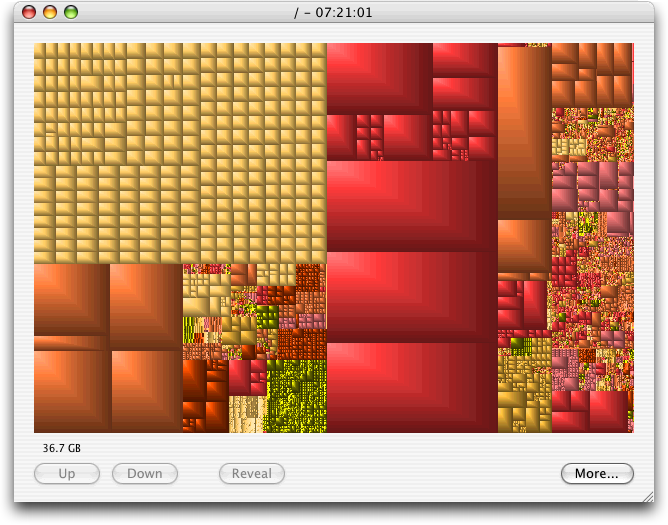
  I like to use GrandPerspective first, because it shows a graphical
  map of how disk space is being used, with the rectangle size
  corresponding to file size. So, as you can see, my server's disk has
  some really large files on it. Unfortunately, I forgot to take the
  screenshot before deleting files (I had server disk health on my
  mind at the time, not an article). With GrandPerspective, it's
  trivial to see when a couple of very large files are responsible for
  the disk filling up; it's less useful if you have a huge number of
  smaller files. When you mouse over a rectangle, GrandPerspective
  shows you its path; if you click a rectangle to select it, you can
  then click a Reveal button to display the file in the Finder.
  Filters enable GrandPerspective to limit its view to just files of
  certain types or sizes, which could be helpful in some situations.

<http://www.tidbits.com/resources/2007-10/GrandPerspective.png>

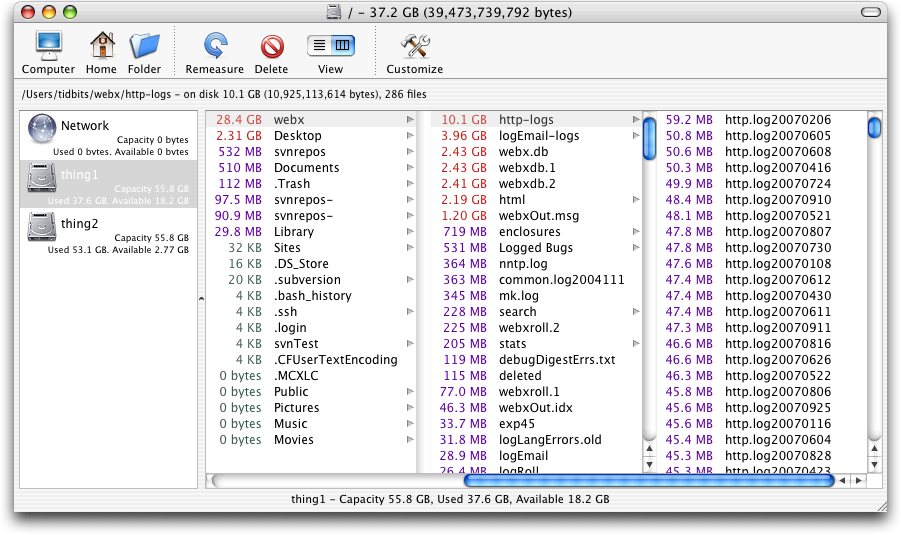
  However, when I need to focus on the specific directories and files
  that can be pruned to recover disk space, I switch over to WhatSize.
  By default, it uses a Mac OS X-like column view, with files and
  folders sorted by size, rather than name, although it also offers a
  number of other views that I don't find useful. You can also move
  files and folders to the Trash from within WhatSize.

<http://www.tidbits.com/resources/2007-10/WhatSize.png>

  I'm sure there are plenty of other applications that aim to shine
  light into the dark corners of your hard disk (including a new one
  in beta, called Baseline, that promises to show you just the files
  that have changed since a previous scan was saved), but you won't go
  wrong with GrandPerspective and WhatSize. Neither is particularly
  speedy at scanning your disk initially, but otherwise they work as
  advertised. And since both are free, there's no excuse for not
  trying them the next time you need to free up some disk space. Oh,
  and the culprits on my server? Back in August I had repacked the
  multi-gigabyte Web Crossing database, and to be safe, I had retained
  all the copies generated during that process. Deleting them freed up
  about 16 GB of space. Server crisis averted.

<http://www.mildmanneredindustries.com/baseline/>


Explaining Our Recent Server Woes
---------------------------------
  by Adam C. Engst <[EMAIL PROTECTED]>
  article link: <http://db.tidbits.com/article/9290>

  My apologies to anyone who has run into problems accessing the
  TidBITS and Take Control Web sites over the last few days. We've
  been experiencing some very weird errors, some of which have caused
  downtime, and in an attempt to isolate the cause, I've had to reboot
  the server numerous times and work with the extremely clued-in
  technicians at digital.forest to run hardware tests. Most notably,
  the machine was busy running memtest for most of Sunday night. The
  good news is that the RAM showed no problems across five passes
  (close to 12 hours of testing) so it can be eliminated as a possible
  cause; the bad news is that we're still struggling to figure out
  what might be happening.

<http://forest.net/>
<http://www.memtestosx.org/>

  We've tried to minimize the effect of this testing through four
  tricks:

* Since most TidBITS-related article traffic is actually served by
  Glenn's Web server, which identifies itself as db.tidbits.com, we
  repointed the DNS settings at easyDNS (which we recommend highly for
  being easy to use and reliable) for www.tidbits.com to
  db.tidbits.com. That way, anyone visiting our home page wouldn't see
  anything out of the ordinary. However, that worked for only the
  www.tidbits.com home page; other pages further down in the hierarchy
  just returned an error.

<http://www.easydns.com/>

* For TidBITS Talk, the Check for Updates links in our ebooks, and
  other things that use emperor.tidbits.com, we again repointed DNS at
  Glenn's machine, and he set it so any emperor.tidbits.com request
  was served a page explaining the situation. Not ideal, but better
  than a generic error.

* For Take Control, where we didn't want to lock out potential ebook
  customers, we repointed DNS at Glenn's machine and set it up so any
  www.takecontrolbooks.com request loaded a custom page that looked
  much like the normal Take Control home page and made it easy for
  people to buy our Leopard titles via eSellerate. For other books, I
  linked to the version of our catalog on the eSellerate site. To
  judge from the number of orders that came in during the downtime,
  this approach worked fine.

* Since all of our incoming mail goes through Postini (now owned by
  Google, though we haven't seen any changes for better or worse since
  the acquisition) before arriving at our server, I tweaked Postini's
  settings so it sends email to the IP number of our server, rather
  than the domain name. That way, when I took our server down, Postini
  just held onto the mail (since it couldn't contact our server at its
  IP address) until I brought the server back online. Had I not made
  that change, Postini would have tried to deliver to Glenn's machine
  (when it was responding to emperor.tidbits.com). Since Glenn's
  machine doesn't accept mail for tidbits.com addresses, it would have
  rejected the messages.

  Alas, we're still unsure as to the cause of the problems, but we
  have more things to try, all while attempting to minimize downtime.
  The server has great connectivity at digital.forest, and the
  technicians are helpful, but it's still difficult to troubleshoot a
  remote production server that's constantly modifying a 2.5 GB
  database file. I certainly hope we can fix things without anyone
  noticing, but if you do have trouble connecting, now you know why.
  For more detail, check my Twitter page, since I tend to post updates
  about what's going on even while the machine (and thus my email) is
  down.

<http://twitter.com/adamengst>


Apple to Allow Virtualization of Leopard
----------------------------------------
  by Adam C. Engst <[EMAIL PROTECTED]>
  article link: <http://db.tidbits.com/article/9277>

  In a notable about-face, Apple has changed its stance with regard to
  allowing Mac OS X Server to be run inside a virtual machine (VM),
  much as Parallels Desktop and VMware Fusion make it possible to run
  Windows and other PC-based operating systems on a Mac. Until the
  release of Mac OS X 10.5 Leopard Server, Apple's software license
  agreement explicitly forbade running multiple copies of Mac OS X
  Server on a single Mac, preventing Parallels and VMware from
  including Mac OS X Server among the operating systems that could be
  virtualized legally. Apple's Tiger Server software license agreement
  reads:

<http://www.apple.com/server/macosx/>
<http://images.apple.com/legal/sla/docs/macosxserver104.pdf>

  This License allows you to install and use one copy of the Mac OS X
  Server software (the "Mac OS X Server Software") on a single
  Apple-labeled computer at a time.

  However, a sharp-eyed systems engineer noticed that Leopard Server's
  software license agreement is significantly different. Dave
  Schroeder, Senior Systems Engineer at the University of
  Wisconsin-Madison, posted to the MacEnterprise.org mailing list
  about his finding, calling out this change:

<http://images.apple.com/legal/sla/docs/macosxserver105.pdf>
<http://www.doit.wisc.edu/>
<http://www.macenterprise.org/>
<http://lists.psu.edu/cgi-bin/wa?A2=ind0710&L=macenterprise&D=1&O=D&T=0&P=65020&D=0>

  This License allows you to install and use one copy of the Mac OS X
  Server software (the "Mac OS X Server Software") on a single
  Apple-labeled computer. You may also install and use other copies of
  Mac OS X Server Software on the same Apple-labeled computer,
  provided that you acquire an individual and valid license from Apple
  for each of these other copies of Mac OS X Server Software.

  This change applies only to Leopard Server, not to the desktop
  version of Leopard. Apple has not changed the software license
  agreements for either version of Tiger.


**Virtualization Software Coming Soon?** Both Parallels and VMware had
  said that making it possible to run multiple copies of Mac OS X in
  virtual machines was technically feasible, but neither company was
  interested in jeopardizing their relationship with Apple to create
  software that would help users violate their license agreements with
  Apple.

  That has now changed, as apparently has Apple's opinion of
  virtualization (Apple PR failed to respond to my calls and email by
  publication time). Ben Rudolph, Director of Corporate Communications
  for Parallels, told me, "Enabling Leopard Server to run in a virtual
  machine may take some time, but we're working closely with Apple on
  it and will make it public as quickly as possible."

<http://www.parallels.com/>

  Pat Lee, Senior Product Manager at VMware, concurred, saying "We
  applaud Apple for the exciting licensing changes implemented in
  Leopard Server. Apple customers can now run Mac OS X Server,
  Windows, Linux and other x86 operating systems simultaneously on
  Apple hardware, so we are excited about the possibilities this
  change presents."

<http://www.vmware.com/>

  Although neither company committed to specific features or
  timetables, it appears as though we should be seeing virtualization
  products from both that will enable an Xserve to run multiple copies
  of Leopard Server in virtual machines.

<http://www.apple.com/xserve/>


**Why Virtualize Servers?** VMware's Pat Lee said, "We have seen
  customers gain tremendous ROI in terms of better utilization, lower
  power consumption and ease of provisioning and management by
  deploying server virtualization." In other words, server
  virtualization provides:

* More efficient use of server hardware. Dave Schroeder of the
  University of Wisconsin-Madison said, "For a variety of reasons,
  some technical and some organizational, we need to have individual
  Xserves hosting distinct instances of Mac OS X Server. Often, these
  individual modern servers are greatly underutilized. With
  virtualization, we could more effectively manage our computing
  resources, and combine several of these Mac OS X Server environments
  into virtual environments on one server."

* Reduced costs. Schroeder explained, "With virtualization, we could
  likely cut costs by half or more, in terms of hardware, support, and
  other savings. Utility costs like power and cooling are shielded
  from us in our organization, but the savings in power, cooling,
  space, and so on from virtualization will be felt at other levels of
  the university."

* Easier management and better security. By isolating each service
  (Web, email, FileMaker Pro, etc.) in a separate virtual machine, it
  becomes easier to move services between physical servers, prevent
  services from interacting in undesired ways, and reduce
  vulnerability should one service be exploited.

* The capability to run multiple platform services simultaneously. An
  Xserve could run not just several Mac OS X-based services in
  separate virtual machines, it could also host Windows- or
  Linux-based services in other virtual machines.

  Ben Rudolph of Parallels emphasized this final point, saying, "We're
  hearing from our customers - like you are from your readers - that
  the 'holy grail' of Xserves is to run multiple, isolated,
  near-native instances of Mac OS X Server on the same box, at the
  same time. If you couple that with the ability to run Windows and
  Linux next to those instances of Mac OS X, you've just made Xserves
  even more compelling for enterprises large and small, even
  non-traditional Apple shops."

  However, not everyone is an unalloyed fan of virtualization. IT
  analyst John Welch noted that virtualization is most important in
  the Windows world and isn't as necessary with Unix-based operating
  systems like Mac OS X. "Normally, running more than one major
  service on a Windows box is a recipe for disaster. Windows simply
  doesn't hold up well under continual heavy load. Unix allows for far
  higher utilization per box, so virtualization isn't as big a deal.
  It comes down to use case and operational philosophy. Virtualization
  is great for some, not so great for others."

  Dave Schroeder responded, "Virtualization isn't perfect for every
  task, but for distinct services that require their own servers and
  don't utilize the hardware to its fullest, virtualization can more
  effectively utilize these hardware resources. This cuts costs not
  only on hardware, but on duplication of labor and other support
  costs. Each individual server, even in a virtualized environment,
  still has some baseline costs associated with it, but virtualization
  will help Mac OS X Server compete with the lower costs of some of
  our other virtualized platforms, such as Linux and Windows."


**Good News for the Xserve?** Rudolph's comment about making the
  Xserve even more compelling is important, and may hold the key to
  Apple's change of heart. Although Apple is generally thought of as a
  hardware company, and there's no doubt that the company wants to
  sell more Xserves, preventing virtualization may have been working
  against that goal. Dave Schroeder commented, "Right now, Mac OS X
  Server is the only platform we can't virtualize, which is really
  beginning to limit its applications alongside more inexpensive
  general purpose virtual environments."

  The Leopard Server license agreement restricts virtualization to
  "Apple-labeled hardware," preventing its use on non-Apple hardware.
  Although Leopard Server will run fine on most current Macs, those
  interested in virtualizing servers are most likely relying on the
  Xserve already.

  So even though Xserve buyers currently need to buy more Xserves than
  they would if virtualization was available, the lack of
  virtualization is driving some customers to other server hardware.
  Plus, with virtualization, if Apple sells two additional ten-client
  copies of Mac OS X Server for $499 each, the profit on that software
  is nearly identical to the estimated $1,000 profit of a stock $2,999
  Xserve (using Apple's latest 33.6 percent gross margin for the
  Xserve profit estimate). Additionally, without virtualization, some
  groups might be tempted to rely on multiple cheap Mac minis rather
  than an Xserve that could run multiple virtual machines.

  Paradoxically, then, enabling customers to buy fewer Xserves by
  supporting virtualization could result in Apple selling more Xserves
  overall, since the Xserve could become the server platform of choice
  in organizations that need to run multiple Mac OS X-based services
  alongside Windows- and Linux-based services. With virtualization,
  that could be all on one machine.

  Or could it? According to John Welch, "You need big physical
  resources for virtualization. Our average VM server is an 8-way box
  tied to a SAN via Fibre Channel with a ton of RAM and network I/O.
  For me to virtualize my Xserves, I'd need some big VMs, with 4 GB or
  more of RAM each, and they'd be putting a serious load on the VM
  server. Apple doesn't yet make a box that's big enough to be an
  effective VM server for more than a handful of VMs if they're
  heavily loaded."

  The current incarnation of the Xserve hasn't been updated since
  August 2006, when it moved to an Intel-based architecture and
  increased the maximum amount of RAM to 32 GB, up from 8 GB in the
  PowerPC G5-based Xserve. The current Intel-based Xserve has been out
  for 14 months now, which, as you can see in the Xserve release
  timeline below, indicates that an update is likely to arrive soon,
  perhaps in January or February 2008.

* July 2002: Xserve G4 release

* February 2003: Xserve G4 update (7 months)

* March 2004: Xserve G5 release (13 months)

* January 2005: Xserve G5 update (8 months)

* August 2006: Xserve Intel Xeon release (19 months)

  In the end, it appears that Apple may have been planning this all
  along. The change in Leopard Server's license agreement now, coupled
  with ongoing development cooperation with Parallels and likely
  VMware, could lead to an early-2008 release of both a beefed-up
  Xserve designed to work as a VM server and virtualization products
  from Parallels and VMware. So although Apple's recalcitrance in
  allowing earlier versions of Mac OS X to be virtualized has proven
  troublesome to system engineers like Dave Schroeder up to this
  point, these changes point to Apple becoming ever more of a player
  in the enterprise server space.


Leopard Firewall Takes One Step Forward, Three Steps Back
---------------------------------------------------------
  by Rich Mogull <[EMAIL PROTECTED]>
  article link: <http://db.tidbits.com/article/9294>

  An improved firewall was one of the 300+ features Apple touted
  before the release of Leopard, but a mix of design choices and
  functionality changes reduces its effectiveness compared to the
  firewall in Tiger, something I had heard only rumblings about when I
  wrote "How Leopard Will Improve Your Security," 2007-10-22. While
  it's not concerning enough that you shouldn't upgrade, it
  is something Apple will need to address fairly quickly with an
  update.

<http://db.tidbits.com/article/9251>


**What's a Firewall?** For you non-security-geeks out there, a
  firewall is a tool that blocks traffic to a system or network based
  on rules (for a more-detailed description, see Chris Pepper's
  "What's a Firewall, and Why Should You Care?," 1999-02-22).
  Firewalls have existed since the late 1980s and were developed in
  response to the first Internet worms, particularly the Morris Worm,
  as a way of protecting systems and networks by blocking any unwanted
  traffic. Before firewalls, if you placed a computer on a network
  (including the Internet), anyone else on that network could remotely
  probe your system for open connections and send you traffic
  directly. Since all computers tend to have some vulnerabilities, and
  some of those vulnerabilities are remotely exploitable over a
  network, this gives attackers an easy way to play on your network
  and potentially exploit your systems. Some of these attacks are self
  propagating - where malicious code takes over a system and then uses
  that system to take over other systems. This is what distinguishes
  a worm from a virus - a virus needs user interaction, while a worm
  "worms" its way through the network from system to system. Some of
  you might remember the Code Red worm from 2001 that took down major
  portions of the commercial Internet by hopping from computer to
  computer.

<http://db.tidbits.com/article/5291>
<http://en.wikipedia.org/wiki/Morris_worm>
<http://en.wikipedia.org/wiki/Code_red>

  In the information security field we use many different kinds of
  firewalls. The most basic is a network firewall, typically a
  stateful packet inspection firewall, installed in a router. That's a
  fancy way of saying we use network firewalls that are a little
  smarter and can track inbound and outbound connections. The way
  Internet protocols work is that when you make a connection to a
  remote computer, you do it over a port. These ports are
  standardized, such as FTP on port 21, HTTP (the Web) on port 80, and
  SSH on port 22. The remote system needs to communicate back to you,
  so when you set up the initial connection your computer gives the
  remote computer an arbitrarily high port number for the return
  traffic. Otherwise, you would be limited to talking to only one Web
  site or FTP server at a time. A stateful packet inspection firewall
  keeps track of all these connections so it can allow traffic back to
  your system only if you have an open session, on those seemingly
  random ports that would normally be blocked.

  Another kind of firewall, the one on our Macs, is a host-based
  firewall. Since our computers aren't always behind big network
  firewalls, it makes sense to build a firewall into our computers to
  protect us from attack as we wander between different networks,
  something that's increasingly common thanks to laptops. If you
  connect a laptop to any public network, such as at a wireless
  hotspot or a hotel, some person or automated program will almost
  certainly be scanning you.


**The Tiger Firewall** -- In Mac OS X 10.4 Tiger, Apple used a good
  open-source firewall called ipfw. ipfw is software that sits deep
  inside Mac OS X and filters network traffic before it makes it to
  the rest of the operating system, providing the same protection on
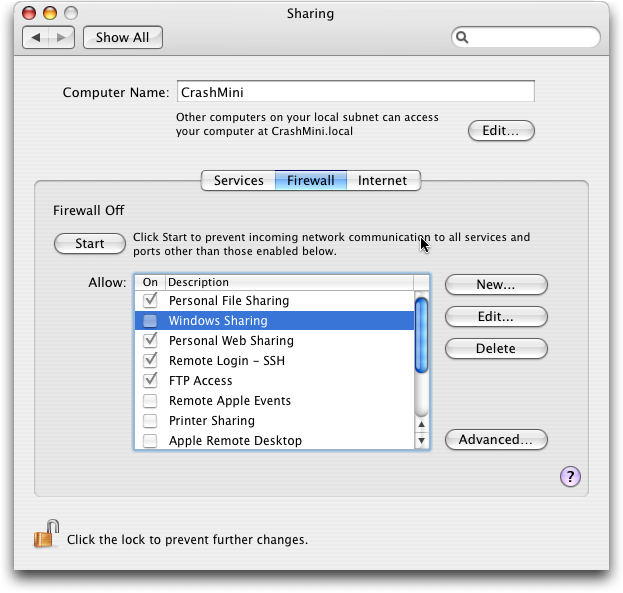
  the road as we have at home. When you opened the Firewall view of
  the Sharing preference pane in Tiger, that was just a graphical
  front end to ipfw. Tiger didn't let you adjust the really granular
  settings without writing your own configuration files, but the
  available controls were reasonably effective. When you enabled the
  firewall you could select which network services you wanted to let
  run. For example, if you had enabled file sharing, the Firewall view
  would show that file sharing was enabled and that you had to disable
  it in the Services view. The firewall functioned in a "deny all"
  mode that blocked everything except ports you specifically enabled,
  and it offered some advanced options to block all UDP traffic and
  ignore requests to filtered ports (what's called "stealth mode").

<http://www.tidbits.com/resources/2007-11/Tiger-Firewall-view.png>

  This approach wasn't perfect, but was good enough for the average
  user. It lacked any outbound filtering - a nice feature that lets
  you lock down your system to ensure that unapproved services on your
  Mac can't connect to the outside world, and a good technique to help
  limit attackers or talkative applications. It also lacked
  application control, a useful feature common in most host firewalls
  that lets only approved applications talk to the outside world, no
  matter what port they use.


**Firewalls in Leopard** -- Leopard still includes ipfw, but it's no
  longer the default firewall. Instead, Apple has replaced it with a
  black box - a firewall program that is unknown to security
  researchers - that behaves a little oddly. From what we can tell,
  Apple developed the new firewall themselves to add application
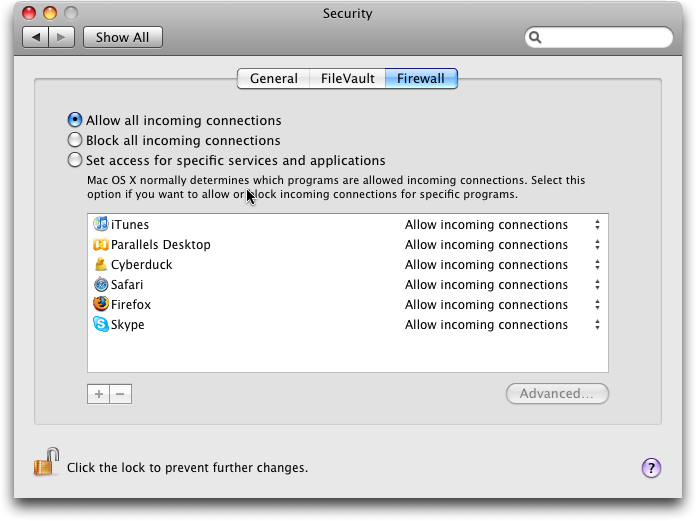
  control. The firewall now lives in the Security pane of System
  Preferences and has some new options. You now have three options for
  the firewall: Allow All Incoming Connections, Block All Incoming
  Connections, and Set Access for Specific Services and Applications.
  Apple made the decision to move the firewall in an entirely new
  direction, which isn't necessarily bad, but makes it more difficult
  to understand what's being filtered, and seems to leave some
  potential holes open.

<http://www.tidbits.com/resources/2007-11/Leopard-Security-pane.png>

  The first problem with the Leopard firewall is that it's difficult
  to tell what the Set Access option does. It starts the new
  application-level firewall and lists in the Sharing pane any
  services you've opened, but it doesn't indicate if they are allowed
  or blocked. There's also no option for you to add your own open
  services or ports anymore. Instead, you can add or remove individual
  applications, but not network services. Stealth mode is still
  available in the Advanced settings, but the UDP blocking, useful to
  stop port scanning and some other attacks, is gone.

  Worse yet, when you install Leopard, the firewall is turned off,
  even if you're upgrading and the firewall was previously enabled.
  Say what you want about Windows, but the firewall is enabled by
  default. Finally, the firewall can actually break your applications,
  which I'll explain more about shortly.

  Further investigation revealed some really strange (for a firewall)
  behavior. Some applications ask for permission to access the network
  the first time you use them, like Safari, Firefox, and Cyberduck,
  while others are ignored, like Colloquy and Twitterrific. If you
  have a service enabled in the Sharing pane, but select Block All, it
  still appears open to the outside world when you scan the ports, but
  you can't connect to it. Some services seem to be open all the time,
  no matter what you do. If you ever connect to another computer for
  file sharing, TCP port 88 (for Kerberos authentication) is opened
  and stays that way until you reboot, no matter what you set on the
  firewall, even if you enable stealth mode. Bonjour (mDNS) is hidden
  in stealth mode but available even if you select Block All. Finally,
  the firewall is a black box - the only way I could learn what was
  opened or closed was to scan it from the outside using networking
  tools (such as Nmap, the same tool Trinity used in "The Matrix
  Reloaded"). Unlike in previous versions of Mac OS X, you can't check
  settings by looking in a configuration file.

<http://insecure.org/nmap/>

  There's one behavior that caught me completely by surprise and calls
  for an immediate fix. If you have the firewall set to control
  applications, those applications that don't already have their code
  signed are signed by Leopard when they access the network. (Code
  signing is the process of affixing a digital signature to an
  application, such that the operating system can tell if the
  application has been modified by malware, because the application's
  checksum would no longer match the checksum in the signature.) If
  the application changes itself while running, as Skype does (and as
  some other applications do too), it won't match the signature the
  next time you go to run it and your application won't launch. There
  are no warnings or errors, and the average user might assume
  something is seriously wrong with their system. I experienced this
  myself when I was recording a podcast with Glenn Fleishman: Skype
  failed to launch; I reinstalled, and it launched. The next time I
  tried to launch it, Skype failed again, and a reinstall fixed it. I
  looked in my console and saw a weird error. A quick Google search
  provided the answer.

<http://securosis.com/2007/11/01/leopard-firewall-code-signing-breaks-skype-and-other-applications/>

  All of these behaviors are considered "bad" on the whole firewall
  good/bad scale. Leopard breaks a number of conventions. First, if
  you select Block All, no network services should be enabled, even if
  you've turned them on somewhere else. Apple either needs to relabel
  that setting to "Block All Except...", or change the behavior to
  block _all_ traffic, especially Bonjour. Application control
  behavior also needs to be more consistent - having some active
  applications appear in the settings, but not others, is confusing
  and could lead to wrong assumptions. I may think I'm only allowing a
  few applications, when, in reality, all sorts of applications are
  accepting network connections without my permission. More seriously,
  Kerberos shouldn't linger on an open port just because you connected
  to another computer. Having a firewall arbitrarily break approved
  applications is also unacceptable. Finally, firewall rules need to
  be user-accessible to allow customized configurations or just to
  allow the more-advanced users to understand expected behavior.

  I've listed some of the more technical details I've discovered on
  the firewall on my blog at Securosis.com

<http://securosis.com/2007/11/01/investigating-the-leopard-firewall/>

  These are all problems Apple is perfectly capable of fixing and I'll
  be surprised if they don't address them sooner rather than later.
  Until then, I still recommend you activate the firewall in Block All
  Incoming Connections mode so you don't break applications. If you
  need to enable file sharing or other remote access, you'll need to
  either select the Set Access method, or turn your firewall off. One
  last option is to use ipfw and manually configure firewall rules, or
  use a GUI tool like the free WaterRoof, and skip the Leopard
  firewall completely. In WaterRoof, just click Rules Sets to pick
  your rules, and then go to Tools > Startup Script and install a
  startup script to run those rules when you reboot.

<http://www.hanynet.com/waterroof/>

  The good news is that I don't know of any active remote exploits for
  the Mac, and if you have to take the risk you should be OK for now
  even without your firewall running, especially if you avoid AFP for
  file sharing and use SMB instead (selectable with the options button
  in the Sharing preference pane). This isn't ideal, but it does give
  Apple a little time to fix up the firewall so it protects users
  without breaking applications.


Hot Topics in TidBITS Talk/05-Nov-07
------------------------------------
  by Jeff Carlson <[EMAIL PROTECTED]>
  article link: <http://db.tidbits.com/article/9292>

**Time Machine** -- How does Time Machine work with several hard
  disks, and how does it differ from a similar Windows solution? (3
  messages)

<http://emperor.tidbits.com/TidBITS/Talk/1589/>


**Desktop pictures in Leopard** -- An early Leopard bug seems to be
  related to making custom Desktop pictures stick. (1 message)

<http://emperor.tidbits.com/TidBITS/Talk/1590/>


**Booting separate computers from one drive** -- It's possible to boot
  Leopard onto both PowerPC- and Intel-based Macs from a single
  external drive. (3 messages)

<http://emperor.tidbits.com/TidBITS/Talk/1591/>


**What Classic software is still in use?** Leopard dropped support for
  Classic applications, but does that really affect many people? And
  how will people with data in Classic applications migrate it to Mac
  OS X? (28 messages)

<http://emperor.tidbits.com/TidBITS/Talk/1592/>


**Scanning problems in Leopard** -- One compatibility issue that's
  arisen with Leopard is operating scanners. (1 message)

<http://emperor.tidbits.com/TidBITS/Talk/1593/>


**AirPort during installation?** For some reason, the Leopard
  installer can see and connect to Wi-Fi networks, though actually
  establishing a connection has led to troubles for some people. (1
  message)

<http://emperor.tidbits.com/TidBITS/Talk/1594/>


**Time Machine: The Good, the Bad, and the Missing Features** -- A
  reader shares a link to how you can change Time Machine's backup
  schedule. (1 message)

<http://emperor.tidbits.com/TidBITS/Talk/1595/>


**Too many text editors, text storage, outliners out there** -- Text
  is a basic, near-universal medium, and yet there seem to be an
  infinite number of programs for manipulating it, all with different
  solutions and synchronization issues. (1 message)

<http://emperor.tidbits.com/TidBITS/Talk/1597/>


**Six Things I Hate about Leopard** -- Readers respond to Matt
  Neuburg's article on what Leopard does poorly. (7 messages)

<http://emperor.tidbits.com/TidBITS/Talk/1598/>


**Installing Leopard on an Unsupported G4** -- A reader shares his
  experience installing Leopard on a PowerPC G4-based Mac that falls
  outside Leopard's compatibility range. (3 messages)

<http://emperor.tidbits.com/TidBITS/Talk/1599/>


**Screen Sharing with Leopard Extends to Tiger** -- The capability to
  share the screen of a Tiger computer to a Mac running Leopard brings
  up questions of getting it to work through NAT and whether you can
  control in the opposite direction. (4 messages)

<http://emperor.tidbits.com/TidBITS/Talk/1600/>


**Downgrade new iMac to Tiger from Leopard** -- Is it possible to take
  a new Mac that came installed with Leopard and downgrade it to
  Tiger? (5 messages)

<http://emperor.tidbits.com/TidBITS/Talk/1601/>


**Leopard's firewall is broken** -- Although the security features in
  Leopard look promising, the firewall appears to be a mess in 10.5.0.
  (3 messages)

<http://emperor.tidbits.com/TidBITS/Talk/1602/>


**Gmail vs .Mac mail** -- Now that Gmail can handle IMAP messaging,
  how does it compare to Apple's .Mac email? (6 messages)

<http://emperor.tidbits.com/TidBITS/Talk/1603/>


**Encrypted disk images and Subversion** -- Using an encrypted disk
  image seems problematic when paired with the Subversion document
  sharing service. (1 message)

<http://emperor.tidbits.com/TidBITS/Talk/1604/>


**Apple to Allow Virtualization of Leopard** -- Should Apple extend
  its license to run virtual copies of Mac OS X 10.5 Server to
  non-Apple hardware? (3 messages)

<http://emperor.tidbits.com/TidBITS/Talk/1605/>


**Reporting bugs to Apple** -- Finding bugs in Leopard? Chris Pepper
  explains how to report them to Apple. (2 messages)

<http://emperor.tidbits.com/TidBITS/Talk/1608/>


**Leopard and AppleWorks** -- Although unsupported, AppleWorks seems
  to run under Leopard. (6 messages)

<http://emperor.tidbits.com/TidBITS/Talk/1609/>


**Skype and Leopard (with a dash of Time Machine)** -- Another early
  casualty of Leopard is Skype compatibility (until an update is
  released, of course). Can Time Machine get an old version back? (4
  messages)

<http://emperor.tidbits.com/TidBITS/Talk/1612/>


**Safari 3 update?** When will the release version (instead of the
  current beta) of Safari 3 be made available to users of Tiger and
  Windows? (4 messages)

<http://emperor.tidbits.com/TidBITS/Talk/1613/>


**Spaces & Time Machine, near great features** -- Readers report their
  experiences with these two new Leopard features, specifically how
  they operate with Coda and Parallels Desktop. (4 messages)

<http://emperor.tidbits.com/TidBITS/Talk/1614/>


**Leopard Compatibility List Updated** -- In addition to our list of
  recently updated applications for Leopard, a reader notes some
  important applications which are not yet compatible. (3 messages)

<http://emperor.tidbits.com/TidBITS/Talk/1615/>


**Very Odd Wi-Fi Connection problems** -- Odd wireless connection
  issues prompt suggestions for troubleshooting using different
  AirPort profiles. (2 messages)

<http://emperor.tidbits.com/TidBITS/Talk/1616/>


**Apple Mail's importing support in Leopard** -- Apple Mail under
  Leopard can no longer import some other email formats, so if you're
  still using Claris Emailer or Outlook Express mail, you'd best
  import their messages before upgrading to Leopard. (1 message)

<http://emperor.tidbits.com/TidBITS/Talk/1617/>


$$

This is TidBITS, a free weekly technology newsletter providing timely
news, insightful analysis, and in-depth reviews to the Macintosh and
Internet communities. Feel free to forward to friends; better still,
please ask them to subscribe!

Non-profit, non-commercial publications and Web sites may reprint or
link to articles if full credit is given. Others please contact us. We
do not guarantee accuracy of articles. Caveat lector. Publication,
product, and company names may be registered trademarks of their
companies. TidBITS ISSN 1090-7017.

Copyright 2007 TidBITS: Reuse governed by Creative Commons license.

Contact us at:    <[EMAIL PROTECTED]>
TidBITS Web site: <http://www.tidbits.com/>
License terms:    <http://www.tidbits.com/terms/>
Full text search: <http://www.tidbits.com/search/>
Subscriptions:    <http://www.tidbits.com/about/list.html>
Account help:     <http://www.tidbits.com/about/account-help.html>


--
If you want to unsubscribe or change your address, use this link
http://emperor.tidbits.com/webx?unsub@@.3c557dc4!u=306a67f9