TidBITS#904/12-Nov-07
=====================
  Issue link: <http://db.tidbits.com/issue/904>
  It took a few years, but Apple finally got Spotlight right,
  according to Matt Neuburg, who takes a deep look at the improved
  search technology in Mac OS X 10.5 Leopard. In other Leopard news,
  we're tracking Leopard-specific updates on our Web site, and print
  versions of our Take Control ebooks about Leopard are now available.
  Changing gears, Glenn Fleishman analyzes Google Android, the Open
  Handset Alliance, and how it all affects Apple and the iPhone.
  Speaking of cell phones, AT&T has begun offering international data
  plans designed to avoid bankrupting iPhone users. We also note the
  releases of BBEdit 8.7.1, Microsoft Office 2004 for Mac 11.3.9, and
  VMware Fusion 1.1 (along with VMware Importer). Plus, we pass on
  links to new Apple ads (along with a great parody) and welcome
  Freeverse as our newest TidBITS sponsor!

Articles
    Stay Up to Date on Leopard Compatibility
    BBEdit 8.7.1 Adds Features, Fixes Bugs, Saves Data
    Freeverse Sponsoring TidBITS
    Word 2004 Crashing Bug Squashed
    New Apple Ads: Real, Fake, and Funny
    VMware Releases Fusion 1.1 Update, VMware Importer
    AT&T Offers New International iPhone Data Plans
    Design Tools Monthly Hits 15 Years in Print
    DealBITS Winners: SmileOnMyMac's TextExpander 2
    Google's View of Our Cell Phone Future Is an Android, Not a GPhone
    Spotlight Strikes Back: In Leopard, It Works Great
    Take Control News: All Leopard Titles Available in Print
    Hot Topics in TidBITS Talk/12-Nov-07


------------ This issue of TidBITS sponsored in part by: --------------

* READERS LIKE YOU! Support TidBITS with a contribution today!
  <http://www.tidbits.com/about/support/contributors.html>
  Special thanks this week to Andrew Watson, Casey James,
   Edward Ruder, and Jack Hughes for their generous support!

* GET FETCH 5 FOR FREE! Fetch Softworks makes Fetch, the original
  Macintosh FTP client, free for educational and charitable use.
  Fetch 5.2 includes WebView, FTPS, and droplet shortcuts.
  Apply today at <http://fetchsoftworks.com/edapply>!

* WebCrossing Neighbors Creates Private Social Networks
  Create a complete social network with your company or group's
  own look. Scalable, extensible and extremely customizable.
  Take a guided tour today <http://www.webcrossing.com/tour>

* MARK/SPACE, INC: Introducing SyncTogether, Mac-to-Mac syncing
  of contacts, calendar events and tasks, notes and more. Perfect
  for a single user with multiple Macs or groups that need to sync
  selected iCal calendars. <http://www.markspace.com/bits>

* Microsoft's MacBU: Supporting Mac users with Office 2004.
  Supporting the Mac community through tech support newsgroups,
  user group appearances, our new team blog, and more!
  Check out our team blog at <http://blogs.msdn.com/macmojo/>

* Seamlessly run Windows on your Mac with VMware Fusion! Run
  Windows, Linux, and Solaris simultaneously without rebooting.
  Customizable toolbars, easy to manage virtual packages, and more.
  VMware Fusion: $69.99! <http://www.allume.com/mac/vmware/tb/>

* Freeverse, Inc.'s SOUND STUDIO 3.5.5 - Sound Studio is for anyone
  who needs to record or edit audio with a professional tool, but at
  a consumer price. Perfect for Podcasts, Music, More! Now updated
  for OS X 10.5 Leopard. <http://www.freeverse.com/soundstudio>

---------- Help support TidBITS by supporting our sponsors ------------


Stay Up to Date on Leopard Compatibility
----------------------------------------
  by Adam C. Engst <[EMAIL PROTECTED]>
  article link: <http://db.tidbits.com/article/9307>

  We're maintaining an online-only article called "Leopard
  Compatibility List Updated" to bring together news of products that
  have been updated for Leopard compatibility. It doesn't make sense
  to publish this article in the email editions of TidBITS each week,
  since it changes constantly, so check our Web site for updates, or
  subscribe to our RSS feed using a program like NetNewsWire that can
  call out changed articles. We're focusing on products we consider
  important or interesting, which means things that we've covered in
  the past or are thinking about writing about in the future - there's
  no way this list could hope to be comprehensive. That said, if you
  know of something that's not on the list but has appeared in TidBITS
  or Take Control in the past, let us know so we can add it!

<http://db.tidbits.com/article/9281>
<http://www.tidbits.com/>

  While you're at our Web site, be sure to notice our new Leopard
  Information Center in the upper right, with links to all sorts of
  useful Leopard-related stuff we've done, including the Leopard
  Compatibility List.


BBEdit 8.7.1 Adds Features, Fixes Bugs, Saves Data
--------------------------------------------------
  by Adam C. Engst <[EMAIL PROTECTED]>
  article link: <http://db.tidbits.com/article/9300>

  Bare Bones Software has released BBEdit 8.7.1, adding a few new
  features and squashing a bunch of minor bugs. The new features
  include the capability to insert time stamps from the Edit > Insert
  menu, support for dropping items from disk browsers into
  applications like Terminal that expect file URLs, and the capability
  in language modules to turn off spell checking for code runs. For a
  full list of new features, changes to existing features, and bug
  fixes, see the extremely detailed BBEdit Current Release Notes page
  (and contrast it with Apple's terse release notes, which could be
  performed by a mime). BBEdit 8.7.1 is a free update for users of
  BBEdit 8.5 or later; it's a 15.2 MB download. Mac OS X 10.4 or later
  - including Mac OS X 10.5 Leopard - is required, and the program is
  a universal binary.

<http://www.barebones.com/products/bbedit/>
<http://www.barebones.com/support/bbedit/current_notes.shtml>
<http://www.crazyapplerumors.com/?p=969>
<http://www.barebones.com/support/updates.shtml>

  And while I have your attention about BBEdit, I want to tell you
  about a little-known feature in the program that saved me from data
  loss last week. I encountered some server problems that resulted in
  nearly every static file in my server's Web directory being deleted.
  Ugly, but I have Retrospect set to duplicate the main disk in our
  Xserve to the second disk every night. I run other backups too, but
  it was easy to move the active database over to the second disk, set
  the second disk as the startup disk, and reboot. The server was
  offline for an hour or two, since I was working very carefully and
  making copies of important data in case of further problems, but the
  overall approach of switching to a duplicate was simple.

  The only problem was that this happened in the afternoon, and I had
  been editing files on the server all day, work that I didn't want to
  recreate. Since I was editing directly on the server, I didn't have
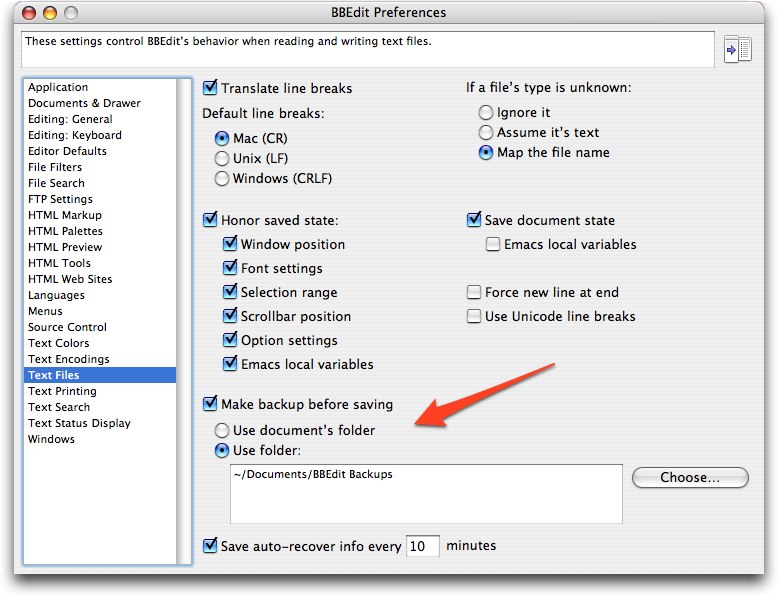
  local copies of those files. Luckily, in the Text Files pane of
  BBEdit's Preference window, there's an option to make a backup of
  each file before saving. Since I had long ago set that option, I was
  able to go into my BBEdit Backups folder and recover the most recent
  version of each of the files I had changed during the day. If you
  regularly edit remote files live, I strongly encourage you to turn
  on BBEdit's backups.

<http://www.tidbits.com/resources/2007-11/BBEdit-prefs.jpg>

  The only downside? Since I forget about that BBEdit Backups folder
  regularly, it currently contains over 17,000 files dating back to
  2004. Oops... time to delete anything before 2007.


Freeverse Sponsoring TidBITS
----------------------------
  by Adam C. Engst <[EMAIL PROTECTED]>
  article link: <http://db.tidbits.com/article/9301>

  We're pleased to welcome our newest long-term sponsor, Freeverse.
  They're a bit unusual in the Macintosh world because they both
  develop their own software and publish applications from other
  companies. Freeverse is probably best known for their offbeat games
  - the Big Bang Board Games, the Burning Monkey card games, the
  arcade games Airburst Extreme and Neon Tango, and more. But the
  company has a serious side as well, with their vector-based drawing
  program Lineform, the webcam software Periscope, and a kid-specific
  Web browser called BumperCar. Not content just to develop their own
  software, they also publish Felt Tip Software's Sound Studio 3,
  Plasq's Comic Life Deluxe Edition, Ubisoft's Heroes of Might and
  Magic V, and more. What's perhaps most impressive is that the
  company has won more Apple Design Awards than anyone else - six so
  far. So whether you're looking for a little light diversion or
  powerful tools for sound and graphics, check out the Freeverse Web
  site.

<http://www.freeverse.com/>

  Thanks to Freeverse for their support of TidBITS and the Mac
  community!


Word 2004 Crashing Bug Squashed
-------------------------------
  by Adam C. Engst <[EMAIL PROTECTED]>
  article link: <http://db.tidbits.com/article/9297>

  Despite being hard at work on Office 2008 for a Macworld Expo
  release, Microsoft has just made available the Microsoft Office 2004
  for Mac 11.3.9 Update, which solves a crashing bug in Word 2004 when
  you try to print a document. The update is a 2.5 MB download and
  requires that you have already installed the 11.3.8 update (a 9.1 MB
  download), which eliminated a buffer overflow in Word 2004. If you
  haven't been keeping up with all the Office updates, I recommend
  using the Microsoft AutoUpdate utility to get each one in turn,
  since each requires the previous one.

<http://www.microsoft.com/mac/downloads.aspx?pid=download&location=/mac/download/Office2004/Office2004_1139.xml>
<http://www.microsoft.com/mac/downloads.aspx?pid=download&location=/mac/download/Office2004/Office2004_1138.xml>


New Apple Ads: Real, Fake, and Funny
------------------------------------
  by Adam C. Engst <[EMAIL PROTECTED]>
  article link: <http://db.tidbits.com/article/9305>

  Apologies if I'm behind the times on this, now that we watch TV only
  via a Netflix subscription, but Apple has posted a new set of Get a
  Mac TV ads that poke fun at Windows Vista. Sure, for most TidBITS
  readers, the ads are preaching to the converted, but I admit that I
  still enjoy seeing Apple point out the Mac's advantages like this.

<http://www.apple.com/getamac/ads/>

  An unexpected bonus to Apple's minimalist style has been the ease
  with which it can be parodied, as in this hilarious Saturday Night
  Live version of an iPhone commercial, linked to by Gizmodo. The
  sketch reportedly never aired, having been cut when another sketch
  ran long. (Check Apple's site for the original iPhone ads that are
  being parodied.)

<http://gizmodo.com/gadgets/leaked/the-snl-iphone-sketch-that-never-aired-321328.php>
<http://www.apple.com/iphone/ads/>


VMware Releases Fusion 1.1 Update, VMware Importer
--------------------------------------------------
  by Joe Kissell <[EMAIL PROTECTED]>
  article link: <http://db.tidbits.com/article/9303>

  VMware has released Fusion 1.1, a free upgrade for registered users
  of their virtualization software for running Windows on an
  Intel-based Mac. This release finalizes a number of features that
  first appeared in the public beta version of Fusion 1.1 about seven
  weeks ago, including Leopard support, experimental support for
  DirectX 9.0, improvements to the Unity mode in which windows from
  Windows applications intermingle with those from Mac OS X, improved
  Boot Camp integration (including support for Windows Vista Boot Camp
  installations), and iPhone syncing with Microsoft Outlook. Fusion
  1.1 is a 176 MB download.

<http://www.vmware.com/mac>

  Also available as a free (1 MB) download is a beta version of VMware
  Importer, a new drag-and-drop program that enables Fusion users to
  import virtual machines created in Parallels Desktop version 2.5 or
  3.0. This tool makes Fusion more parallel with Parallels, which
  already offered Parallels Transporter, a utility for importing
  virtual machines from VMware and Virtual PC.

<http://www.vmware.com/download/fusion/importer_tool.html>
<http://www.parallels.com/en/products/desktop/features/transporter/>


AT&T Offers New International iPhone Data Plans
-----------------------------------------------
  by Adam C. Engst <[EMAIL PROTECTED]>
  article link: <http://db.tidbits.com/article/9295>

  Likely due to the complaints from travelling iPhone users hit with
  astonishingly high data charges (see "iPhone Billing and
  International Issues," 2007-08-20), AT&T has implemented new
  international iPhone data plans that apply in 29 countries. For
  $24.99, you get 20 MB of usage, and for $59.99, you get 50 MB of
  usage. If you go over the usage limit, you're charged $0.005 per
  kilobyte within the 29 discounted countries. For the 50 MB plan, you
  pay $0.010 per kilobyte outside those countries, except for a
  selection of neighboring countries listed at AT&T's site, where
  you'll pay $0.0195 per kilobyte. People on the 20 MB plan pay
  $0.0195 per kilobyte in all parts of the world outside of the 29
  included countries. Keep in mind that these new plans come on top of
  your existing iPhone monthly bill, and we recommend you verify the
  details of your plan with AT&T before leaving on your trip.

<http://db.tidbits.com/article/9116>
<http://www.wireless.att.com/learn/international/roaming/affordable-world-packages.jsp?WT.svl=calltoaction#iphone-international>
<http://www.wireless.att.com/learn/international/dataconnect-global.jsp>


Design Tools Monthly Hits 15 Years in Print
-------------------------------------------
  by Adam C. Engst <[EMAIL PROTECTED]>
  article link: <http://db.tidbits.com/article/9296>

  Congratulations to our friend Jay Nelson, who has been pulling
  together information of interest to the graphic design community in
  Design Tools Monthly since 1992, not long after we started TidBITS.
  Each issue of the monthly 12-page newsletter contains about 100
  short articles covering news, upgrades, bug fixes, hardware, and
  more. Subscribers can also access an online "Software Closet" that
  collects what Jay feels are the best free utilities, plug-ins, and
  fonts for designers. With Jeff Gamet, Jay has also started the
  Design Tools Weekly podcast. Design Tools Monthly contains no ads
  and is available only by subscription for $229 per year if you want
  paper issues, along with quarterly CDs of software and PDFs by mail,
  or $199 per-year for online-only access. A free sample issue is
  available, and anyone who buys Sharon Zardetto's "Take Control of
  Fonts in Leopard" can use a coupon in the back to receive three free
  issues.

<http://www.design-tools.com/>
<http://www.design-tools.com/podcast/>
<http://www.design-tools.com/html/free-sample.htm>
<http://www.takecontrolbooks.com/leopard-fonts.html>


DealBITS Winners: SmileOnMyMac's TextExpander 2
-----------------------------------------------
  by Adam C. Engst <[EMAIL PROTECTED]>
  article link: <http://db.tidbits.com/article/9288>

  Congratulations to Susan Varney of roadrunner.com, Chris Lozac'h of
  ilovelife.com, and Bill Bauer of mac.com, whose entries were chosen
  randomly in the last DealBITS drawing and who received a copy of
  SmileOnMyMac's TextExpander 2, worth $29.95. Thanks to the 783
  people who entered this DealBITS drawing (and received a discount on
  TextExpander 2), and we hope you'll continue to participate in the
  future!

<http://db.tidbits.com/article/9287>
<http://smileonmymac.com/textexpander/>


Google's View of Our Cell Phone Future Is an Android, Not a GPhone
------------------------------------------------------------------
  by Glenn Fleishman <[EMAIL PROTECTED]>
  article link: <http://db.tidbits.com/article/9291>

  I never expected Google to get into the consumer cell phone
  business, just like I never expected Google to build a national
  Wi-Fi network, nor, even if they win a spectrum auction in January
  2008, do I expect Google to build a national cellular network.
  Google doesn't do hardware - they build ways in which to use
  hardware to reach more people to feed those people more ads. (Two
  minor exceptions, before you cavil: their Mountain View Wi-Fi
  network, serving their headquarters' town, and Google search
  appliances - server hardware for businesses.)

  Last week's announcement of a consortium of cell carriers,
  chipmakers, and phone handset makers collaborating on a new cell
  phone platform confirms my worldview. Phones using this new platform
  will start shipping in the second half of 2008.

<http://www.nytimes.com/2007/11/05/technology/05cnd-gphone.html>


**Control What Runs on the Phone** -- The Open Handset Alliance is a
  response to the cell operating systems and associated software that
  dominate ordinary handsets and smartphones worldwide. While many
  platforms and carriers allow customization of phones by carriers, as
  well as post-purchase installation of software or utilities by
  customers - the iPhone so far being a rare exception - the
  underlying platforms are generally locked down. There are also
  licensing fees.

<http://www.openhandsetalliance.com/>

  Google and its 33 partners will launch a platform named Android; a
  preview for developers is now available. Android uses Linux as a
  base, Java as the glue, and open-source components throughout
  (Android was the name of a firm Google acquired that was working on
  such a platform). The platform will be free to handset makers and
  end users for development and distribution, which explains the
  composition of the partnership. The Symbian platform has dominance
  worldwide, and the company that develops it is owned just a fraction
  under 50 percent by Nokia, the biggest handset maker worldwide.
  Microsoft's Windows Mobile, the Palm OS, and RIM's BlackBerry
  dominate in the United States. Linux-based cellular platforms are
  picking up steam worldwide, however, and this will accelerate that
  trend.

<http://www.openhandsetalliance.com/android_overview.html>
<http://code.google.com/android/>
<http://www.openhandsetalliance.com/images/AndroidSDK.png>

  The marketplace for cell handsets is confusing, because we do things
  differently here in the United States than in much of the world.
  Most phones are subsidized through multi-year service plan
  commitments and cannot be freely interchanged across networks. In
  Europe and in many other countries, consumers mostly buy phones at
  full cost and then sign up for services. We also have two
  incompatible network standards in use in the United States - GSM and
  CDMA - and thus you cannot switch easily from Verizon or Sprint
  Nextel (CDMA) to T-Mobile or AT&T (GSM). CDMA is found in South
  Korea, too, while GSM is used by most of the rest of the world
  except China, which has its own variant. While you can unlock a CDMA
  or GSM phone after a contract expires and activate that phone with a
  given American network, or purchase a GSM phone from abroad that's
  unlocked, these are relatively rare in practice. (Even more rare are
  specialized GSM/CDMA dual-protocol phones, which are typically
  expensive and designed for frequent international travelers.)

  What this means is that cell carriers in the United States control
  access to their networks by allowing only a certain range of phones
  and other devices to connect. Microsoft may be a giant company, but
  it is still beholden to Verizon, AT&T, and the other carriers to get
  phones into people's hands; Apple, likewise, discovered this in
  having to commit to a single carrier and seemingly acquiesce to
  limits sought by AT&T in order to get the iPhone released. In
  Europe, Nokia has a slightly different position, because although it
  can't dictate features and phones to carriers, it can market
  directly to consumers, which enables it to offer a wide variety of
  phones.

  In both marketplaces, the carriers rule. Innovative features from
  chipmakers may be ignored by the carriers, while handset makers
  other than Nokia are usually directed into making products that the
  carriers want. Even if Nokia inserts a feature it wants, carriers
  can keep that feature from being enabled on their networks; Nokia
  has plenty of phones that stream video, but that feature typically
  works only over Wi-Fi. Companies that are more involved with
  software than hardware find themselves stymied in getting their Web
  services or applications installed because of carrier objections.


**Partners and Interests** -- Who's involved in the Open Handset
  Alliance and why? Alliance members Broadcom, Intel, Marvell,
  Qualcomm, and TI are all chipmakers who are beholden to handset
  manufacturers to push their products into phones. By having a
  platform that they can build their own reference designs around,
  they have much more flexibility to find manufacturing partners
  outside the mainstream, or to deliver more interesting products to
  existing handset makers.

  While Qualcomm controls a lot of fundamental cell technology through
  patents, notably on the CDMA standard, it doesn't control platforms.
  It's a rare move for Qualcomm to be part of an alliance promoting
  greater variety and less control, frankly.

  What's also interesting about the alliance is that it includes major
  handset makers LG, Motorola, and Samsung, which are largely locked
  out of the current smartphone market. It's not that they don't have
  offerings, but they don't own any segment of the market. This is an
  attempt for them to leverage a new platform that no one controls,
  and that they can extend.

  Carriers are also part of the alliance, with the two U.S. carriers
  who need a clue (T-Mobile and Sprint Nextel) along with some giants
  in Asia (China Mobile, KDDI, and NTT DoCoMo), and Telefónica, which
  has 212 million customers across Africa, Europe, and Latin America.

  Other alliance members include eBay, which owns Skype, and which
  could potentially leverage this platform to produce a true Skype
  phone that could combine support for cell networks, Wi-Fi, and other
  wireless technologies; and Sirf, which is the biggest maker of GPS
  receiver chips in the world, and which would like to have more of
  them put into phones with more capabilities enabled.

  Let's look next at how this fits together in different parts of the
  world.


**What Do Carriers Gain?** Of all the partners, you might wonder why
  carriers would find this alliance interesting. Self-preservation,
  among other reasons. Carriers want to be able to keep more of the
  revenue, and to be able to release more interesting phones more
  quickly to encourage upgrades. They want to tailor their offerings
  to particular markets and niches. All of these desires conflict with
  the slower pace, monolithic offerings, and centralized control of
  existing platforms.

  In the United States, although Sprint Nextel is the third-largest
  carrier, the company is in a weak position. The company is losing
  subscribers in an awkward transition of former Nextel customers to
  new systems, and it mishandled an expensive and still-ongoing
  transition in a swap of frequencies with public-safety agencies.
  (It's a very long story.) Sprint Nextel's chief resigned a few weeks
  ago, and the company just scrapped its current plans to launch a
  mobile WiMax network alongside competitor and co-operator (in both
  senses of the word) Clearwire. (The deal may be off for now, but
  both firms say they're committed to mobile WiMax, and when a new CEO
  is hired at Sprint, a new deal could be put together. In fact, some
  reports indicated Sprint might purchase Clearwire or spin off its
  mobile WiMax division to merge with Clearwire.)

  Mobile WiMax offers the potential for ubiquitous broadband wireless
  at rates matching today's wired broadband, and with higher speeds
  and fewer restrictions than current cell data networks. The WiMax
  commitment represents a huge risk for Sprint, and one that would
  cost billions to execute. Sprint Nextel needs a platform for its new
  WiMax network, which uses new spectrum, and had already inked a deal
  that would enable Google to offer services over this new network.

  T-Mobile, the distant fourth-place U.S. carrier, has been pursuing
  different strategies for years, as they lacked sufficient spectrum
  to compete in the 3G market. In 2006, T-Mobile purchased licenses
  over which they can deploy 3G, but it still won't be enough to
  compete head-to-head with other carriers.

  So T-Mobile has been investing heavily in a Wi-Fi network since
  acquiring the assets of an early firm that went into bankruptcy in
  2002. The company now has one of the largest Wi-Fi networks in the
  world with over 8,500 U.S. locations, and thousands more worldwide.
  T-Mobile was the first to launch converged Wi-Fi/cell calling in the
  United States, too, using handsets that can seamlessly move calls in
  progress from a Wi-Fi network to a cell network and back again.
  Clearly T-Mobile needs to think different, too.

  In China, there's always been a desire to have technology that isn't
  dependent on companies from other countries. It's why China has its
  own cell standard, but also why third-generation (3G) cellular is so
  delayed there while their homegrown specifications hit snags. It's
  not at all strange that a carrier in China would want a platform
  they didn't have to export currency to use, and one that could be
  entirely within their power to mold to local needs. (And,
  potentially, to local government control. I don't mean to introduce
  politics; it's simply a fact that Chinese telecommunications is
  designed for monitoring and interception. And I can't be smug about
  that anymore in the United States, can I?)

  In other parts of Asia, I have less of an explanation, as I
  understand competition there less well. There's been a much
  longer-running trend in Japan for phones to have more advanced
  features, for network operators to allow more independent activity,
  and for consumers to pay for specific software features. That may
  all tie in together, too.


**iPhone Versus GPhone** -- Android will have much in common with the
  iPhone at the base level, but likely less so in terms of user
  interface and cell carrier experience.

  Internally, the iPhone runs the Unix-based OS X; Android will use
  Linux. The iPhone uses swaths of open-source and free software from
  GNU and other foundations, associations, and independent
  programmers. Android will, too.

  But pop up one more layer, and you find that while Android will give
  developers access to all those innards, ostensibly providing even
  kernel software code, the iPhone will never give up those secrets.

  Handsets that use Android will have to adhere to a set of principles
  and be tested operationally against those ideas, and by passing
  tests should be allowed to operate on the network of a carrier
  that's part of the alliance. The iPhone is designed to work on a
  limited number of networks worldwide.

  The iPhone software development kit (SDK) will allow some kinds of
  programs to be developed, but programs may require approval or
  certification from Apple and/or AT&T and other partner carriers
  before those programs can be distributed. The Android SDK will
  apparently allow any form of development and installation.

  There's a lot of risk for carriers with Android; they must design
  their networks to isolate bad actors rapidly in order to avoid
  spreading viruses or having phones that suddenly act up and take the
  network down. That's a real fear, and one that Steve Jobs cited in
  Apple's interest in delaying an SDK for the iPhone until security
  issues were well-characterized and covered.

  The Internet still works despite armies of zombie computers and vast
  quantities of spam because it's resilient. Cell networks aren't
  quite as tough and will need to become more hardened before Android
  phones can be let loose.


**Google's Spectrum Bid** -- To circle back around to Google, I
  mentioned early on that I didn't expect that even if they won a
  spectrum auction next year they'd run a cell network. This is where
  it all comes around.

  By January 2008, the FCC will auction the last bit of prime
  frequencies that will be freed up on completion of the transition of
  television stations from the UHF band. This is the end of analog
  television broadcasting, set for 17-Feb-09. The so-called Upper 700
  MHz auction has a number of licenses, but the one to watch is the "C
  Block" auction for 24 MHz of prime territory.

  The 700 MHz band penetrates walls easily and a single base station
  can transmit over four times the area using the same power as a base
  station in the 2.5 GHz range, the spectrum that Sprint Nextel and
  Clearwire will use for mobile WiMax.

  Google and other firms - some of which are in this alliance -
  lobbied the FCC to require open access rules that would mean three
  things:

* Any winning bidder of the frequency would have to sell access to the
  network on a non-discriminatory wholesale basis to any reseller

* Any device could gain access to the network

* Any device could access any service or run any application

  None of the provisions could be construed to allow unlimited
  bandwidth at fixed prices or uses that would disrupt the network.

  The FCC turned down the open-resale provision, but adopted most of
  the others, and has fought back carriers who opposed the rules. (The
  FCC has a backdoor, though. They required a minimum bid of over $4
  billion for the C Block and $10 billion for the entire auction. If
  those minimums aren't met, the auctions will be conducted again
  without the open access requirements.)

  Google indicated its willingness to bid on the spectrum,
  guaranteeing the minimum bid necessary, if all the rules were
  adopted. But they stated at the same time that even if they won,
  they'd be more likely to work with a partner that would build and
  run the network.

  It was clear all along that Google wanted a national broadband
  wireless network that would be unimpeded by gatekeepers. Recall that
  Google feeds enormous amounts of data to customers of telephone
  companies and cable firms via DSL, cable, and fiber, and that those
  telephone and cable companies are interested in establishing a
  tiered network in which Google and others would have to pay to push
  their content through at the highest possible rates on each network.

  Is it any wonder Google is promoting an open phone platform and some
  measure of openness in the last great wireless broadband spectrum
  auction?

  Some folks we respect, including John Gruber, wondered or stated
  that Android was vaporware, which I found odd. Vaporware implies
  that you're announcing a product well in advance of shipping with
  nothing really in hand beyond a demo and with the intention of
  sabotaging competitors who are forced to explain to customers why
  they don't have The Amazing Feature that's in the vaporware - even
  though the vaporware isn't available. The iPhone would have been
  vaporware if Apple hadn't set specific expectations on availability
  and then lived up to those expectations. (Leopard had a few
  vaporware features that may return in later updates, especially in
  regard to Time Machine's support of networked drives.)

  Given that the Android SDK shipped as promised in a form that anyone
  with developer chops can download and work with, that removes some
  of the vaporware taint. Whether a product can and will ship with
  Android software is, of course, another matter that only the future
  can prove to us.

  Fake Steve Jobs, however, might have put it best, as he often does:
  "Companies don't form alliances and consortia when they're winning."

<http://fakesteve.blogspot.com/2007/11/its-not-phone-its-alliance.html>


**Tying It All Together** -- Google is promoting something that's in
  its best interest, of course, but as a firm that generally attempts
  to make money by disseminating information as widely as possible,
  it's in our best interests, too. Google doesn't like gatekeepers or
  walled gardens.

  In the end, it's conceivable that we could wind up with hundreds of
  companies making handsets that work across wireless networks of all
  sorts worldwide, providing us access to the latest software and
  technology at a fraction of what we pay now. That's one vision of
  the future, it's Google's vision, and Google seems to have the
  momentum to make a real go at it.


Spotlight Strikes Back: In Leopard, It Works Great
--------------------------------------------------
  by Matt Neuburg <[EMAIL PROTECTED]>
  article link: <http://db.tidbits.com/article/9283>

  In earlier articles, we've talked about some of the great new
  features of Leopard that might make an upgrade worthwhile. I wrote
  an article about Spaces, Glenn Fleishman explained how File Sharing
  is light years better than it used to be, and Joe Kissell gave us
  the low-down on Time Machine. (The best way to reference that
  coverage is from our "Leopard Arrives" series.) In this article, I
  want to tell you about what I think is the last big piece of the
  Leopard improvement puzzle - the all-new, all-singing, all-dancing
  Spotlight.

<http://db.tidbits.com/series/1269>

  In order to explain why Spotlight in Leopard is so good, I have to
  talk briefly about why Spotlight in Tiger was so bad. If you already
  know that, or if your teeth can't handle any gnashing, you might
  want to skip this next section, where I recount a bit of regrettable
  history.


**Tiger Spotlight: The Good, the Bad, and the Ugly** -- When Spotlight
  was introduced in Mac OS X 10.4 Tiger, it was touted as a major
  improvement for users, and it's not hard to see why. Finding things
  on your hard disk(s) has always been hard - my mother can't find a
  newly created Word document five seconds after she's saved it - and
  now that your hard disk is really big and you've got lots of files,
  it's getting harder. The old-style Finder Find involves searching
  through the hard disk, file by file and folder by folder, so it's
  slow; and besides, it requires that you know, with a fair degree of
  correctness, the name of the item you're looking for, which is often
  exactly what you do _not_ know.

  Back in the old System 7 days, on the other hand, a lot of us were
  crazy about a wonderful utility called ON Location, from ON
  Technology. It generated an index of the names of your files, so
  searching for a file by its name was very fast. What's more, it used
  third-party translators to look inside your files (regardless of
  their format), read their content, and index that as well, so you
  could do a fast search for a file based on some words used inside
  the file. Well, Spotlight promised to bring that kind of technology
  to Mac OS X, only even better. ON Location had to build its index,
  and to keep the index up to date, it had to rebuild it periodically.
  Spotlight, on the other hand, once its initial index was built,
  would _always_ be up to date, because every time you made any change
  to the hard disk, Spotlight would be notified right then and would
  modify the index accordingly. Small wonder that Glenn's article
  introducing Spotlight to our readers was so hopeful ("Spotlight on
  Spotlight", 2005-05-02).

<http://db.tidbits.com/article/8087>

  Right from the beginning, however, there was trouble. Some features
  didn't work; for example, there was an option to search for
  invisible files, but no invisible files were ever found. Some areas
  of the hard drive were excluded from the index, so files in those
  places couldn't be found, even by name; this exclusion was
  hard-coded into Spotlight (it wasn't a preference the user could
  access), so there was no way even of learning what the problematic
  places were. Files of certain types were not found properly; I
  experienced this particularly with some font files, and Apple
  confirmed that this was a bug (perhaps caused by the distinction
  between a file's visible name and its "display name," which was
  sometimes a weird string to which the user had no access). The
  indexing would mysteriously stop working, and would have to be
  restarted using the Terminal command line.

  Worst of all, however, was the interface through which you actually
  performed a search and viewed your found results. There were three
  such interfaces: the Spotlight menu, the Spotlight window, and the
  Finder search window.

* The Spotlight menu didn't act like a real menu, it often froze up as
  you were typing your search, and it displayed only a limited number
  of results. To see all the results, you had to open the Spotlight
  window.

* The Spotlight window was annoying in every conceivable way. It
  belonged to no application; it just hung there mysteriously on your
  computer, refusing to come to the front when you cycled through your
  windows or your applications. Its interface was unlike any other
  window; if anything, it seemed like something out of a Web browser,
  or a Windows machine. Results were clumped by default into annoying
  categories; getting information about found results (such as, "Where
  _is_ this file?") required a great deal of clicking; results could
  not be easily manipulated; and the search could not easily be
  refined (beyond the simple default refinements listed down the right
  side of the window).

* The Finder search window had one big advantage: a search could be
  refined though a Location Bar and multiple Criteria Bars that could
  be summoned to describe in detail what you wanted to look for.
  However, you were inconveniently forced to do this even for
  something as simple and common as searching for a file by name; you
  could use the Finder search window only to look for files (not, for
  example, iCal events); and things were still clumped into groups
  (mysteriously, not the same groups as in the Spotlight window),
  though you could ask for a flat list. When you _did_ ask for a flat
  list, the Finder search window became almost downright good: it
  started acting quite like a normal Finder window, a familiar and
  effective interface for working with your results.

  The upshot was that none of Apple's Spotlight search interfaces was
  very pleasant, and none of them gave you access to anything like the
  full power of Spotlight as implemented through the "mdfind"
  command-line syntax. For example, mdfind lets you specify wild
  cards, case sensitivity, and sophisticated Boolean criteria
  combinations. That's why a host of third-party alternative Spotlight
  interfaces sprang up, including my own NotLight. But even these were
  restricted in what they could do by the underlying Spotlight
  indexing technology (for example, NotLight couldn't find invisible
  files, because neither could Spotlight); and many users preferred to
  revive the pre-Tiger search behavior with a free utility such as
  EasyFind.

<http://www.versiontracker.com/dyn/moreinfo/macosx/29015>
<http://www.devon-technologies.com/products/freeware/>


**A New Deal** -- In Leopard, Spotlight is faster, less biased, and
  far more compliant. Under the hood, the index is both constructed
  and consulted more quickly, so you spend less time listening to your
  hard disk thrash and more time looking at search results. Everything
  within the scope of your permissions is indexed and searchable (or
  if something isn't, I've yet to hear about it). Searches that are
  supposed to work (like searching for invisible files, or searching
  for a file by the name the user believes it has) do work. And the
  search interface is so good that it might just put third-party
  interfaces out of business.

  The Spotlight window is completely gone. If you want to move quickly
  and see the top results, you use the Spotlight menu; if you want to
  see all results, or get some interface assistance in constructing
  elaborate search criteria, you use the Finder window. Those are your
  only options. The Finder window is now _really_ close to being a
  normal Finder window: it comes in all the normal Finder views except
  Column view (though, unfortunately, in List view you can't ask for
  extra columns of information, such as Size), and you can do in it
  nearly anything you can do elsewhere in the Finder, so you'll hardly
  know you're in a special Spotlight-oriented world. And yet, you
  _are_ in a special Spotlight-oriented world, as is proven by the
  fact that you can search in the Finder search window for things that
  aren't files or folders, such as iCal events and Safari history
  items. (The main difference I've noticed so far between what you can
  search for in the Spotlight menu versus the Finder search window is
  that only the former lets you look up a word in the built-in
  Dictionary.) Plus, the Finder search window's criteria-construction
  interface lets you say nearly anything you'd be able to say using
  mdfind in the command line.

  So, for the rest of this article I'm going to explain how to
  construct a search. There are actually two different "languages" for
  doing this: there's the textual language of what you type in the
  search field, which works either in the Spotlight menu or in the
  search field of a Finder window, and there's the more gestural,
  interface-based language of manipulating the Finder search window's
  various options.


**The Search Term** -- When you type "tonya" into the Spotlight menu's
  search field, that's a search term. Spotlight interprets this as a
  request to seek matches in a fairly broad way. Capitalization is
  ignored, so a document containing "Tonya" will match. Diacritical
  markings are ignored too, sort of; a document containing "Tónya"
  will match, but if your search term had been "Tönya" then the
  document containing "Tónya" would match but documents containing
  "Tonya" would not, as if your use of a diacritical in the search
  term had indicated a kind of diacritical wild card. You're doing a
  word-based search, but what you're searching for is the start of a
  word; so, you'll also match a document containing "tonyatastic",
  though not a document containing "retonyafication". (To specify that
  you want to match _entire_ words, put "tonya" in quotes; now you
  won't match "tonyatastic". Quotes can also be used to search for
  exact multi-word phrases.)  But the notion of a word includes
  camel-cased word components, so you'll also match a document called
  "HelloTonya". Oh, and the search is performed over every kind of
  metadata, so you'll match documents with "tonya" in their names, in
  their contents, in their Spotlight comments, and so on.

  Two kinds of modification permit to you restrict the search term's
  application. First, you can specify the kind of metadata you're
  interested in searching. This is done using a colon-based syntax.
  For example, to find files that have "tonya" in their Spotlight
  comments in the Finder, but _not_ files with "tonya" in other types
  of metadata, you'd put "comment:tonya". The Help documentation gives
  several other examples of this syntax, some of which are
  surprisingly powerful. For example, you can ask for files modified
  on or before a certain date by saying "modified:<=8/10/2007", or
  files created in a certain range of dates with
  "created:8/10/2007-8/12/2007". The trouble, though, is that as usual
  Apple spurns the notion of stooping to provide you with any _real_
  documentation: there is no complete conspectus or systematic
  explanation of the syntax, or even a list of the metadata terms you
  can specify in this way. (The way I found out about "comment:" in
  the first example was by trial and error.)

  Second, you can combine terms using the Boolean operators AND and OR
  (in capitals), and modify a term with NOT; a minus sign before a
  term, with no space, means "and not". The default operator, supplied
  if you use multiple words without quotation marks or an intervening
  Boolean operator, is AND. Thus, on my machine, searching on "tonya
  tidbits" finds 103 items, those that contain both terms; "tonya OR
  tidbits" finds 530 items; "tonya -tidbits" finds just 15 items,
  because it's so rare on my computer for Tonya to be mentioned
  without also mentioning TidBITS.


**The Finder Search Window** -- To summon the Finder search window,
  click Show All in the Spotlight menu after a search, or press
  Command-Option-Space, or (in the Finder) choose File > Find
  (Command-F), or just start typing in a Finder window's search field.
  You can use the search term syntax I described in the previous
  section, but you can also use the Location Bar and the Criteria Bars
  to restrict and specify your search in a more graphical fashion.

  The first question to ask yourself is whether you want to restrict
  the search location to one particular folder. If you do, then you
  must start by being _in_ that folder in the Finder before starting
  the search by pressing Command-F or typing in the search field. When
  the window changes to a Finder search window, the Location Bar will
  display the name of the folder you started in; click that name to
  restrict the search to that folder.

  Another nice feature of the Location Bar is that it offers an option
  to restrict the search to the "File Name", as opposed to the
  "Contents" - the latter being a misleading term which actually means
  the default of searching all the metadata at once. These two
  choices, search by name or search by all metadata, are the two most
  common forms of search, so it's very sensible of Apple to provide
  some simple, up-front interface for choosing between them.

  To tweak your search further, click the + button at the right end of
  the Location Bar. This reveals a Criteria Bar. Here you can choose a
  metadata type in the leftmost pop-up menu. By default, there are
  just six sorts of metadata listed here: Kind, Last Opened Date, Last
  Modified Date, Created Date, Name, and Contents. (Here, "contents"
  really does mean contents.) When you choose one, other operators,
  fields, and pop-up menus appropriate to your choice appear. So, with
  "Contents" the only operator is "contains" and you get a text field
  for typing some text. With "Name" you get a pop-up menu of five
  operators: "matches", "contains", "begins with", "ends with", and
  "is". (The difference between "matches" and "is" is that "matches"
  is word-based; thus, "tonya" matches a file named "Adam and Tonya"
  using "matches" but not using "is".) With "Kind" you get a pop-up of
  subtypes, and some of those subtypes have subtypes of their own;
  thus, the "Kind" called "Music" can be "All", "MP3", "AAC", or
  "Purchased".

  There is also a seventh item in the leftmost pop-up menu of a
  Criteria Bar: Other. This is where things really start to get good.
  When you choose Other, you get a dialog listing _all_ the kinds of
  metadata the Spotlight index knows about. You can just pick one to
  use it; you can also select a checkbox to specify that that option
  should appear in the menu from now on, so you don't have to pass
  through the Other dialog to access it. I recommend that you
  immediately check two items that I think you'll be using quite a
  lot:

* System files. When set to Include, files are sought even in special
  locations such as /Library/Caches and ~/Library/Preferences. For
  example, if you search on "com.apple" you won't find much, but if
  you include system files, you'll find hundreds of preference files.

* Spotlight items. When set to Include, searches are expanded beyond
  files and folders to include other sorts of entities, such as iCal
  events, Safari history items, and preference panes.

  A huge power user tip: When you summon the Finder search window with
  Command-Option-Space, or from the Spotlight menu, Spotlight items
  _is_ set to Include. When you summon the Finder search window with
  Command-F or by typing in a Finder window's search field, Spotlight
  items _is not_ set to Include. This is actually quite brilliant.
  Spotlight is making a very reasonable distinction and assumption
  here: if you started in the Finder, you probably just want to look
  for files and folders, but if you summoned the search window in a
  more global way, you probably want to look at all kinds of entities.
  Of course you can always summon a Criteria Bar and change the
  setting if the initial default isn't what you intended.

  You specify additional criteria by showing and configuring
  additional Criteria Bars; to do so, just click the + button in any
  existing Criteria Bar. But here's the real trick: if you click the +
  button while holding the Option key, you get a special Boolean
  Operator Criteria Bar. The pop-up menu here says Any, All, or None
  (the equivalents of the Boolean OR, AND, and NOT operators), and it
  applies to the Criteria Bars that are grouped just after the
  Operator Bar and indented to the right. Such groups can themselves
  include a Boolean Operator Criteria Bar, and so you can form Boolean
  expressions of any depth and complexity (the equivalent of using
  parentheses in a logical expression). The default operation, used if
  you simply set multiple criteria without grouping them, is AND (that
  is, all the criteria must be true at once to get a match).


**Conclusions** -- Spotlight in Leopard is what Spotlight in Tiger
  should have been but wasn't. (Don't get me started on a rant about
  why Apple has so much trouble getting these things right the first
  time out.) How good is it? Maybe not quite good enough to put
  NotLight completely out of business. NotLight will need modification
  in order to take advantage of some of the new features of
  Spotlight's underlying technology, but it has three features that
  the built-in Spotlight interfaces do not:

  1. With NotLight, the search is _not_ live, so things don't keep
  flashing and bogging down while you're typing a search term; you
  type until you're ready, then do the search.

  2. The Finder Path Bar is great for determining where a found item
  is by selecting it, but with NotLight you know where _every_ found
  item is, _without_ having to select it.

  3. NotLight lets you choose between case-sensitive and
  case-insensitive term matching; sometimes that's actually useful.

  Nevertheless, the improvement in Leopard's Spotlight is very, very
  dramatic - so dramatic that, whereas, in Tiger, once I'd written
  NotLight, I _never_ used any of the built-in Spotlight interfaces,
  but used NotLight exclusively for all searching, in Leopard it is
  quite probable that I will very rarely turn to NotLight. Coming from
  me, that's big praise. The fact is that the difference from Tiger to
  Leopard is like night and day: from being a pain and a trial to use,
  Spotlight is now a joy; from a wretched, ill-advised interface, we
  now have a model of how interface ought to be, a gorgeous,
  easy-to-use graphical expression of a powerful and complex
  underlying syntax. In short, Spotlight could be another major reason
  for upgrading to Leopard.


Take Control News: All Leopard Titles Available in Print
--------------------------------------------------------
  by Adam C. Engst <[EMAIL PROTECTED]>
  article link: <http://db.tidbits.com/article/9306>

  If you've been wanting to get printed versions of our Take Control
  books about Mac OS X 10.5 Leopard, you need wait no longer. Each of
  the books' Web pages in our Web catalog now has a Buy Print Book
  button on the left side, and anyone who has already purchased an
  ebook version can now click the Print link at the top of the PDF's
  first page to order a discounted print copy. We recommend purchasing
  the print version from within the ebook so you'll get both the ebook
  - with its Check for Updates link - and the print version for the
  same price as a directly purchased print copy.

<http://www.takecontrolbooks.com/>


Hot Topics in TidBITS Talk/12-Nov-07
------------------------------------
  by Jeff Carlson <[EMAIL PROTECTED]>
  article link: <http://db.tidbits.com/article/9304>

**Can't Delete Mail from Apple Mail** -- When Mail starts acting up,
  one solution is to rebuild your mailboxes, but don't rule out the
  possibility of accidentally displaying deleted messages. (7
  messages)

<http://emperor.tidbits.com/TidBITS/Talk/1619/>


**Cellphone Jammer, Anyone?** If you know someone who can't stop
  nattering on their iPhone (or other cell phone), you can buy a
  device that kills the connection. It's illegal, but the satisfaction
  might just be worth it. (2 messages)

<http://emperor.tidbits.com/TidBITS/Talk/1620/>


**Are preferences good or bad?** Following Matt Neuburg's plea for
  preferences in Leopard's Stacks feature, a reader argues that too
  many preferences leads to user confusion. (16 messages)

<http://emperor.tidbits.com/TidBITS/Talk/1621/>


**Leopard Simplifies File Sharing** -- A change in Leopard to how
  passwords are sent leads to problems connecting to NetWare servers.
  (3 messages)

<http://emperor.tidbits.com/TidBITS/Talk/1622/>


**Leopard and FileMaker Pro 6** -- Leopard and the latest version of
  FileMaker aren't yet friendly, but what about running older versions
  of the database application? (7 messages)

<http://emperor.tidbits.com/TidBITS/Talk/1623/>


**GMail and IMAP** -- After setting up Gmail to work using IMAP, a
  reader has encountered a number of odd incidents in Mail. Any
  advice, or is Gmail's IMAP undercooked? (33 messages)

<http://emperor.tidbits.com/TidBITS/Talk/1578/>


**Tab, Delete & Return keys just beep in Leopard text boxes** -- When
  obviously wrong behavior starts happening, it's time to test against
  a new user account in Mac OS X to find the culprit. If you don't
  have a test account on your machine, set one up; instructions here.
  (6 messages)

<http://emperor.tidbits.com/TidBITS/Talk/1627/>


**"Time Machine" caught in a time warp?** Is Time Machine responsible
  for hanging a reader's Mac mini, or is the problem with something
  else, like FileVault? (4 messages)

<http://emperor.tidbits.com/TidBITS/Talk/1628/>


**Leopard Apple Mail--Universal, but not quite** -- Sometimes not
  knowing something can help. After encountering problems with Mail
  under Leopard, a woman marked the Open Using Rosetta option in the
  Get Info window, which solved her issue - probably the last thing
  most people would try. (1 message)

<http://emperor.tidbits.com/TidBITS/Talk/1630/>


**Aperture insists that I reregister it continually** -- Repeatedly
  being asked to register Aperture has driven one reader to the point
  where he may no longer buy Apple software (and don't ask him about
  telephone tech support). (1 message)

<http://emperor.tidbits.com/TidBITS/Talk/1631/>


**Google Used 70 Times More than Yahoo** -- Google's dominance in the
  search engine field is backed up by some dramatic numbers. (3
  messages)

<http://emperor.tidbits.com/TidBITS/Talk/1632/>


**Cloggy keyboard on MacBook Pro?** Do the keys of the MacBook Pro
  require a firmer touch than past Apple laptops? (2 messages)

<http://emperor.tidbits.com/TidBITS/Talk/1633/>


**Installing Leopard on a 24" iMac** -- A reader shares his experience
  installing Leopard on a brand new iMac (which hadn't yet been
  pre-loaded with Leopard, though he got the system update for free).
  (1 message)

<http://emperor.tidbits.com/TidBITS/Talk/1634/>


**TinkerTool available for Leopard** -- A venerable utility for
  accessing hidden preferences has been updated for Mac OS X 10.5. (1
  message)

<http://emperor.tidbits.com/TidBITS/Talk/1635/>


$$

This is TidBITS, a free weekly technology newsletter providing timely
news, insightful analysis, and in-depth reviews to the Macintosh and
Internet communities. Feel free to forward to friends; better still,
please ask them to subscribe!

Non-profit, non-commercial publications and Web sites may reprint or
link to articles if full credit is given. Others please contact us. We
do not guarantee accuracy of articles. Caveat lector. Publication,
product, and company names may be registered trademarks of their
companies. TidBITS ISSN 1090-7017.

Copyright 2007 TidBITS: Reuse governed by Creative Commons license.

Contact us at:    <[EMAIL PROTECTED]>
TidBITS Web site: <http://www.tidbits.com/>
License terms:    <http://www.tidbits.com/terms/>
Full text search: <http://www.tidbits.com/search/>
Subscriptions:    <http://www.tidbits.com/about/list.html>
Account help:     <http://www.tidbits.com/about/account-help.html>


--
If you want to unsubscribe or change your address, use this link
http://emperor.tidbits.com/webx?unsub@@.3c557dc4!u=306a67f9