TidBITS#917/03-Mar-08
=====================
  Issue link: <http://db.tidbits.com/issue/917>
  After its January introduction at Macworld Expo, Apple's Time
  Capsule - a combination AirPort base station and networked Time
  Machine backup disk - is finally shipping. Glenn Fleishman takes a
  look at the device and wonders why the company doesn't extend the
  backup functionality to hard drives connected to existing AirPort
  Extreme base stations. In other hardware news, Apple added the
  multi-touch trackpad introduced on the MacBook Air to new MacBook
  Pro models, but not new MacBooks. And do you ever wonder if those
  end-of-year software deals are worth it for developers? Adam looks
  at some results from the MacSanta 2007 promotion. We round out this
  issue with a look at the maintenance utility CheckUp 1.0, the
  wonders of iChat screen sharing, a few minimally described updates
  from Apple, and the latest news in the cellular carriers' rush to
  flat-rate pricing.

Articles
    iPhone 1.1.4 Update Preps for SDK?
    iPhoto 7.1.3 Fixes Books and Cards
    Time Capsule Ships with Support for USB Drive Backups
    New MacBook Pro Gains Multi-Touch Trackpad, MacBook Speed Bumped
    Sprint Nextel Adds $90 and $100 Unlimited Monthly Plans
    Leopard's iChat Screen Sharing Perfect for Quick Collaboration
    Analyzing the MacSanta Promotion
    CheckUp 1.0: A Beautiful but Unripe Maintenance Utility
    Hot Topics in TidBITS Talk/03-Mar-08


------------ This issue of TidBITS sponsored in part by: --------------

* READERS LIKE YOU! Support TidBITS with a contribution today!
  <http://www.tidbits.com/about/support/contributors.html>
  Special thanks this week to Duane Williams, Michael Bradley,
  William Ching, and Shinichi Hashimoto for their generous support!

* Fetch Softworks: With Fetch 5.3, FTP and SFTP are simpler
  than ever. Use it on Mac OS X to upload, download, mirror,
  and manage your Web site, eBay images, and data sets.
  Download your free trial version! <http://fetchsoftworks.com/>

* WebCrossing Neighbors Creates Private Social Networks
  Create a complete social network with your company or group's
  own look. Scalable, extensible and extremely customizable.
  Take a guided tour today <http://www.webcrossing.com/tour>

* Bare Bones Software's BBEdit 8.7 -- Latest version offers a
  major interface overhaul, new prefs, text clippings, improved
  JavaScript, new Ruby/SQL/YAML/Markdown support, code folding.
  Over 160 new features in all! <http://www.barebones.com/>.

* MARK/SPACE, INC: The Missing Sync provides the very best in
  synchronization for Mac users with BlackBerry, Palm OS, or
  Windows Mobile devices. Integrates with Address Book, iCal,
  Entourage, iPhoto, and iTunes. <http://www.markspace.com/bits>

* VMware Fusion. The most seamless way to run Windows on your Mac.
  Backed by nearly a decade of proven virtualization technology.
  Try VMware Fusion today for free, or order online for only $79.
  Visit: <http://www.tidbits.com/about/support/vmware-fusion.html>

* StuffIt Deluxe 12: breakthrough compression of MP3 files, PDFs,
  iWork and MS Office files! Reduce JPEG file sizes with no loss in
  quality, burn to CD/DVD, back up archives to iDisk and more. Buy
  today for only $59.99! <http://www.stuffit.com/mac/deluxe/tb/>

* Used to working with Microsoft Office Visio on a PC but have a Mac?
  ConceptDraw 7 is professional technical drawing and business
  graphics software. It supports Leopard and can import Visio files.
  TidBITS readers save $50! <http://www.conceptdraw.com/tb>

* DealBITS: Get the word out about your product AND generate sales!
  It's easy: give away a few copies and offer a discount to entrants.
  A DealBITS drawing is quick to set up and can easily pay for itself.
  For more info and rates, visit <http://www.tidbits.com/dealbits/>.

---------- Help support TidBITS by supporting our sponsors ------------


iPhone 1.1.4 Update Preps for SDK?
----------------------------------
  by Adam C. Engst <[EMAIL PROTECTED]>
  article link: <http://db.tidbits.com/article/9486>

  Apple has released a 1.1.4 update for both the iPhone and iPod touch
  with absolutely no details on what changed, although users of the
  iPhone Atlas site are reporting improved signal strength in some
  cases, a fix to incorrectly ordered SMS messages, fixes to Bluetooth
  problems introduced in 1.1.3, and a fix for sent email disappearing
  into the ether.

<http://www.iphoneatlas.com/2008/02/26/iphone-114-boosts-cell-signal-strength/>
<http://docs.info.apple.com/article.html?artnum=307364>
<http://www.iphoneatlas.com/2008/02/26/iphone-114-fixes-bluetooth-sms-ordering-bugs/>

  Our suspicion is that the 1.1.4 update may also contain some
  foundation work to ready the iPhone and iPod touch for the upcoming
  software development kit announcement scheduled for 06-Mar-08.
  According to rumors reported by iLounge, we'll see only a beta of
  the SDK later this week, with the final release scheduled for
  Apple's World Wide Developer Conference later in 2008.

<http://www.ilounge.com/index.php/news/comments/iphone-ipod-sdk-apple-to-approve-distribute-apps-limit-add-ons/>


iPhoto 7.1.3 Fixes Books and Cards
----------------------------------
  by Adam C. Engst <[EMAIL PROTECTED]>
  article link: <http://db.tidbits.com/article/9485>

  Apple has released iPhoto 7.1.3 with a one-line description, "This
  update addresses issues with wire-bound books and cards." The update
  is available via Software Update or as a standalone 16.9 MB
  download.

<http://www.apple.com/support/downloads/iphoto713.html>

  Needless to say, I recommend you download this essential update
  right away, even if you don't plan to print wire-bound books or
  cards, and even if you're not planning on using iPhoto in the near
  future. If these "issues" are actually psychological problems, who
  knows what sort of a rampage iPhoto could embark upon, although I
  would personally worry about the permissions of your photo
  thumbnails; iPhoto has long been overly possessive about those
  files.


Time Capsule Ships with Support for USB Drive Backups
-----------------------------------------------------
  by Glenn Fleishman <[EMAIL PROTECTED]>
  article link: <http://db.tidbits.com/article/9479>

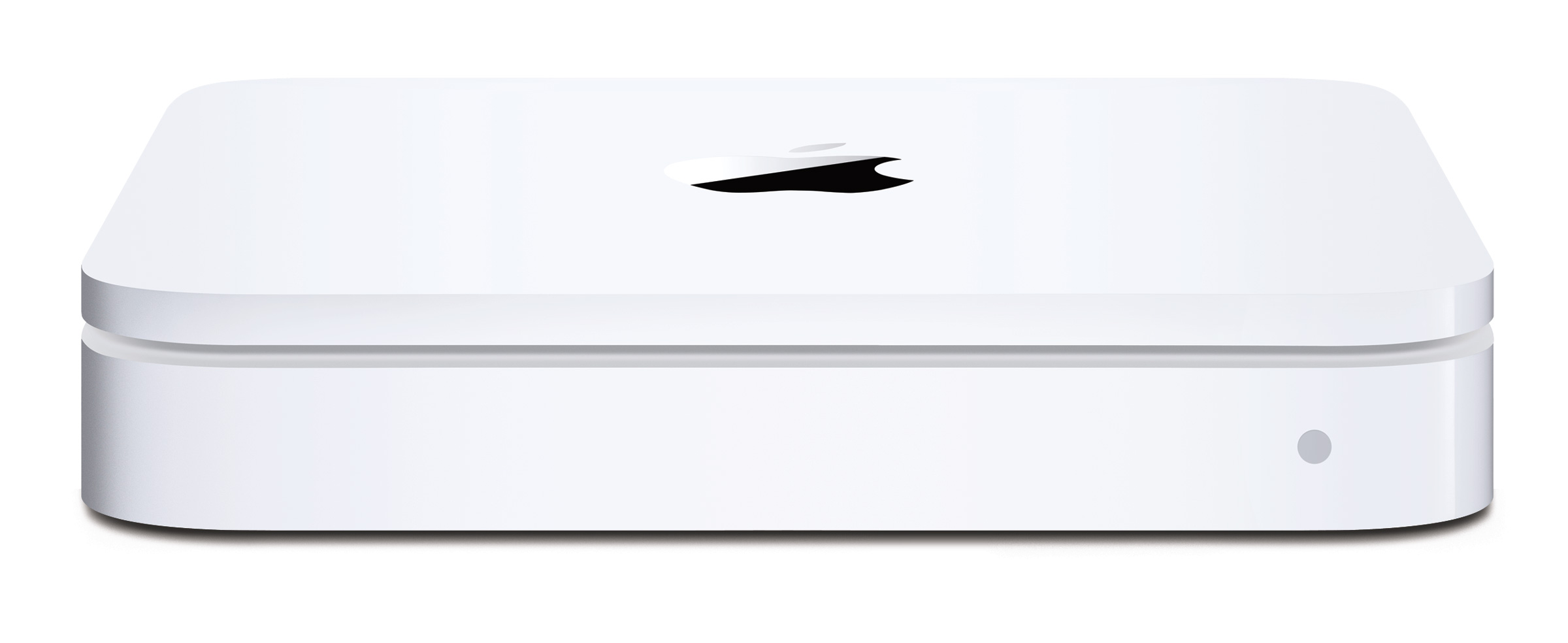
  Apple has shipped its Time Capsule hardware appliance, a combination
  of its AirPort Extreme Base Station with 802.11n and a hard drive,
  integrated into a single case with an internal power supply instead
  of an external power brick. The drive is not removable. Time Capsule
  costs $299 with a 500 GB drive and $499 with a 1 TB drive, somewhat
  less than the cost of a separate Extreme N base station ($179) and
  an external hard drive of those capacities and performance. (See
  "Time Capsule Bundles AirPort Base Station and Backup Disk,"
  2008-01-15.)

<http://www.tidbits.com/resources/2008-02/tc_front.jpg>
<http://db.tidbits.com/article/9402>

  Time Capsule works with Leopard's Time Machine backup software,
  which treats the base station's internal drive as a networked volume
  appropriate for archiving files from multiple computers, each of
  which has Mac OS X 10.5.2 installed. (Earlier versions of Leopard
  won't work with Time Capsule.)

  The new device supports using Time Machine for backups to drives
  attached to the Time Capsule via USB. This feature was once promised
  for the combination of the AirPort Extreme Base Station and Leopard,
  but pulled from Leopard's feature list before it shipped. This
  angered a lot of early AirPort Extreme base station buyers; see
  "Time Capsule and Its Associated Rage Factor," 2008-01-17, and Peter
  Cohen of Macworld. Apple must have tracked down and fixed whatever
  technical difficulties led them to pull this option in order to
  enable it - without any specific announcement or fanfare - on Time
  Capsule. We certainly hope to see a revision to the AirPort Extreme
  that incorporates this capability.

<http://db.tidbits.com/article/9407>
<http://www.macworld.com/article/132299/2008/02/airportbackup.html>

  I received a review unit last week that I ran through its paces for
  a First Look article for Macworld. I'm writing a full review for
  them that will appear next week. The short take on my first look is
  that Time Capsule generally meets the mark: it's pretty simple to
  set up, and it just works.

<http://www.macworld.com/article/132317/2008/02/timecapsule.html?t=220>

  In a briefing, senior product manager Jai Chulani explained that
  AirPort Utility 5.3, which ships with Time Capsule, includes new
  options for managing the internal drive. The drive can be formatted
  via AirPort Utility, with an option to format securely. AirPort
  Utility 5.3 also adds setup features that enable you to migrate
  settings from an existing base station into the Time Capsule; to set
  up a dual-band network, with an older base station operating at 2.4
  GHz and the Time Capsule set to 5 GHz; and to set up a roaming
  network with multiple base stations connected over Ethernet. (These
  last two additions address many of the questions I receive regularly
  from readers, answers to which are found in my book "Take Control of
  Your 802.11n AirPort Extreme Network.")

<http://www.takecontrolbooks.com/airport-n.html>

  Time Capsule appears on individual Macs running Leopard as a backup
  target in the Time Machine preference pane. A Time Capsule drive,
  which can also be mounted as a regular AFP (Apple Filing Protocol)
  networked volume, works the same as a volume shared from a Leopard
  system using File Sharing, or a Leopard Server with its Time Machine
  option enabled.

  Time Machine always first performs a full system backup to any new
  disk, including a networked disk, unless you've used its preference
  pane to exclude parts of local volumes. For this reason, Chulani
  recommends that you start your first backup by connecting to a Time
  Capsule drive via Ethernet before going to bed. He also noted that
  interrupting the first full system backup adds considerable time
  when that backup is resumed due to integrity checking on the files
  that were already stored by Time Machine. A machine set to sleep on
  inactivity in the Energy Saver preference pane won't rest if a Time
  Machine backup is underway, which happens once per hour.

  Time Capsule works at its fastest over Wi-Fi with a Mac that has
  802.11n built in (most but not all systems introduced starting in
  October 2006), and with the base station set to 5 GHz, a largely
  unused band that can deliver the best networked performance. If your
  setup doesn't meet these criteria, you might try plugging in a
  computer via Ethernet - the Time Capsule is all gigabit Ethernet,
  like the latest AirPort Extreme Base Station - to speed the first
  full system backup.

  Chulani clarified that the "server-grade" drives in a Time Capsule
  are the same 7200 rpm drives used for Apple's Xserve servers, and
  that they have a higher mean time between failure (MTBF) rating than
  consumer drives. The MTBF for server-grade drives is often 1 million
  hours (114 years), which is a measure of probability; in this case,
  that out of a set of drives with similar properties, an extremely
  high percentage will still be fully functional after several years.

  The backups stored on Time Capsule are in the same format as all
  other Time Machine backups, and can be used by the newer versions of
  Migration Assistant and Leopard's DVD installer: you can select the
  Wi-Fi network created by the Time Capsule or be directly plugged in
  via Ethernet to its network switch, and then choose a backup to
  migrate settings, files, and applications to a new computer. You can
  also boot a computer with the Leopard DVD, and then choose the Time
  Capsule as a network and a source of backups to restore a computer.
  In the latter case, Chulani said, "it actually gives you snapshots
  going back in time, and you can pick the specific day and time."

  While Time Capsule doesn't offer swappable hard drives, Chulani
  noted that to make a copy of existing backups for offsite storage -
  in a safe-deposit box, for instance - one simply mounts the volume
  on a Mac and copies any or all of the backups stored on it to
  another drive. I suggested that a future firmware upgrade should
  enable a Time Capsule to clone itself to a drive attached to the
  device's USB port.


New MacBook Pro Gains Multi-Touch Trackpad, MacBook Speed Bumped
----------------------------------------------------------------
  by Adam C. Engst <[EMAIL PROTECTED]>
  article link: <http://db.tidbits.com/article/9477>

  Let your fingers do more mousing with Apple's new multi-touch
  trackpad, which debuted in January 2008 with the MacBook Air and has
  now worked its way into the MacBook Pro line. Based on brief testing
  on a MacBook Air at Macworld Expo, I was impressed with the
  multi-touch trackpad, which uses easily learned gestures for a
  variety of common scrolling and clicking tasks. Even the simple
  two-finger scrolling on my older MacBook trackpad has become so
  ingrained that I find myself trying to use it on an elderly iBook
  that lacks the feature entirely.

<http://www.apple.com/pr/library/2008/02/26mbp.html>

  The multi-touch trackpad supports two-finger scrolling, pinch,
  rotate, swipe, tap, double-tap, and drag capabilities, and you can
  control which gestures it recognizes (but not how they're mapped to
  system functions).

<http://www.apple.com/macbookpro/features.html>


**MacBook Pro** -- Available immediately, the new MacBook Pro also
  gains the latest Intel Core 2 Duo processors running at a top speed
  of 2.6 GHz and the Nvidia GeForce 8600M GT graphics chip with up to
  512 MB of GDDR3 memory. The 17-inch model can also now take a 4200
  rpm, 300 GB hard drive as a build-to-order option. The new
  processors are available in 2.4, 2.5, and 2.6 GHz speeds, and
  although the MacBook Pro gained a 2.6 GHz Intel Core 2 Duo back in
  November 2007 (see "Apple Releases Minor MacBook and MacBook Pro
  Upgrades," 2007-11-02), these processors use a new architecture that
  may provide a slight amount of additional performance with lower
  power consumption. Standard features on all MacBook Pro models
  include 2 GB of RAM (expandable to 4 GB), double-layer SuperDrive,
  802.11n AirPort Extreme wireless networking, Bluetooth 2.1+EDR,
  gigabit Ethernet, backlit keyboard, USB 2.0, FireWire 400/800, and
  built-in iSight video camera.

<http://www.apple.com/macbookpro/>
<http://db.tidbits.com/article/9284>
<http://www.apple.com/macbookpro/performance.html>
<http://www.apple.com/macbookpro/specs.html>

  Pricing remains the same for the following base models:

* $1,999 for the 15-inch model with a 2.4 GHz processor, 200 GB hard
  drive, 2 GB of RAM, and 256 MB of GDDR3 video memory

* $2,499 for the 15-inch model with a 2.5 GHz processor, 250 GB hard
  drive, 2 GB of RAM, and 512 MB of GDDR3 video memory

* $2,799 for the 17-inch model with a 2.5 GHz processor, 250 GB hard
  drive, 2 GB of RAM, and 512 MB of GDDR3 video memory


**MacBook** -- Unfortunately, the new MacBook does not get the
  multi-touch trackpad, but Apple did increase processor speeds and
  hard drive sizes across the line. Processors come in either 2.1 GHz
  or 2.4 GHz speeds, and hard drive options include 120 GB, 160 GB,
  and 250 GB sizes. Other standard features include 802.11n AirPort
  Extreme wireless networking, Bluetooth 2.1+EDR, gigabit Ethernet,
  USB 2.0, FireWire 400, and built-in iSight video camera.

<http://www.apple.com/macbook/>
<http://www.apple.com/macbook/specs.html>

  Again, pricing remains the same, giving this lineup:

* $1,099 for the white 13.3-inch model with a 2.1 GHz processor, 120
  GB hard drive, 1 GB of RAM, and a Combo drive

* $1,299 for the white 13.3-inch model with a 2.4 GHz processor, 160
  GB hard drive, 2 GB of RAM, and a double-layer SuperDrive

* $1,499 for the black 13.3-inch model with a 2.4 GHz processor, 250
  GB hard drive, 2 GB of RAM, and a double-layer SuperDrive


**More Multi-Touch in the Future?** Overall, these new models are
  merely nice incremental upgrades that continue to make the MacBook
  and MacBook Pro highly desirable options for the ever-increasing
  number of people who rely entirely on laptops. It's unsurprising to
  see Apple putting the multi-touch trackpad in the MacBook Pro,
  although I'm surprised that they didn't include it in the MacBook in
  this revision, since it seems like the sort of thing that should be
  standard across the line. What I'd really like to see is a new
  keyboard for desktop Macs that also integrates a multi-touch
  trackpad.

  I recently had to replace my Contour Designs RollerMouse Pro, and
  while waiting for the replacement unit to arrive, I discovered that
  I far preferred using my MacBook's trackpad to control both it and
  my dual 2 GHz Power Mac G5 via Abyssoft's excellent Teleport utility
  (see "Tools We Use: Teleport," 2007-08-27). Using a normal mouse or
  trackball with a standalone keyboard just wasn't as fluid as the
  MacBook's integrated keyboard and trackpad. That said, my favorite
  controller combination remains the Matias Tactile Pro keyboard - the
  now-discontinued original one, not the troubled 2.0 model (see "The
  Majestic Alps and the King of Keyboards," 2004-03-29) - and the
  RollerMouse Pro, which also places the pointing device in front of
  the keyboard, rather than off to the side (see "Rolling Faster,
  Farther with the RollerMouse Pro," 2006-12-11).

<http://www.abyssoft.com/software/teleport/>
<http://db.tidbits.com/article/9125>
<http://db.tidbits.com/article/7607>
<http://db.tidbits.com/article/8784>


Sprint Nextel Adds $90 and $100 Unlimited Monthly Plans
-------------------------------------------------------
  by Glenn Fleishman <[EMAIL PROTECTED]>
  article link: <http://db.tidbits.com/article/9478>

  Verizon Wireless lobbed tear gas into its competitors' business
  plans by offering a $100-per-month unlimited voice calling plan last
  week. Spurred into action, AT&T and T-Mobile followed suit with
  their own offerings the same day. Sprint said it would wait and see;
  last week, the company saw the light at the end of the tunnel, which
  was the headlamp of an oncoming train, not open skies. In response,
  Sprint announced a vast writedown - reducing the value of its merger
  with Nextel to 10 percent of its acquisition price - and matched its
  competitors' unlimited offers with $90 and $100 plans. (For details,
  see "Three Cell Carriers Offer Unlimited Minutes for $100 per
  Month," 2008-02-19.)

<http://db.tidbits.com/article/9467>

  Sprint's apparently unnamed $90-per-month plan beats its competitors
  on included services and price: for that fee, you get unlimited
  voice minutes, push-to-talk service (an immediate talk,
  walkie-talkie like feature pioneered by Nextel in the United
  States), and unlimited text messages. Verizon charges $100 for
  unlimited minutes of voice calling and $20 extra per month for
  unlimited text messages; T-Mobile includes data and text messages in
  its $100 per month plan; and AT&T has $5 to $35 options on top of
  $100 for a variety of data and text options.

  For $100 per month, Sprint will offer Simply Everything, which
  matches Verizon's $100 plus $40 add-on offering. Sprint includes
  unlimited data and text messages, as well as its streaming media TV
  service, its music service, GPS navigation, and the unlimited text
  messaging and push-to-talk that's part of its $90 monthly plan. No
  contract renewal or extension is required to switch. Multiple lines
  in a family plan also are somewhat cheaper than Sprint's
  competitors.

<http://newsreleases.sprint.com/phoenix.zhtml?c=127149&p=irol-newsArticle_newsroom&ID=1113525>

  The combination of services and the all-inclusive price make it more
  likely that existing Sprint customers with any data or
  text-messaging usage would save between $20 and $150 per month. But
  it's also more likely they'll stay, and Sprint might be able to stop
  the horrible loss of customers it's facing - announced yesterday
  during an earnings call - that threatens its future.

  Sprint said it would take a one-time writedown of $29.7 billion, or
  most of the value of Nextel at the time of its acquisition two years
  ago. The company's execution has been terrible, and a recently hired
  CEO announced a series of efforts to shed employees, close stores,
  and stop the hemorrhaging of customers. This writedown is the fifth
  largest in history.

<http://www.bloomberg.com/apps/news?pid=20601087&sid=a7_R4j_pD3cg>

  While charging less seems a bad way to earn more, cell carriers can
  spend between $200 and $600 to acquire a single customer among all
  their expenses: subsidies of cell phones, promotions, incentives (I
  was once offered $400 by T-Mobile to pay cancellation fees on my
  Cingular lines), and marketing. Due to cellular number portability,
  which lets a customer move the same phone number among carriers and
  landline operators, subscribers stay for ever-shorter periods of
  time. Keeping a customer an extra year means Sprint _makes_ money in
  that extra year, even while charging less per month.

  Charging the same amount each month also benefits both carriers and
  customers. The carrier can book revenue and collect it more
  efficiently with less focus on accounting, and less customer service
  expense when call and data records go awry (a frequent complaint).
  Customers can budget their monthly usage fees ahead of time, and
  stop worrying about going over and facing huge "gotcha!" charges.

  Next, let's see the credit-card industry voluntarily choose to
  restructure itself around making sure those with good credit aren't
  charged ridiculous fees when they're one day late, those with bad
  credit get less credit and tools to pre-pay and manage credit, and
  those who are working their way up be charged appropriate fees and
  rates as they prove themselves.

  Sounds like a joke, right? But who thought the Berlin Wall would
  fall in our lifetime; the Soviet Union and apartheid in South Africa
  would collapse relatively bloodlessly; that a man born in Panama
  (John McCain), a woman, and a man of color would have equal chances
  at the White House; and that cell carriers would give up crazy
  overage charges in the name of competition and simplicity?


Leopard's iChat Screen Sharing Perfect for Quick Collaboration
--------------------------------------------------------------
  by Matt Neuburg <[EMAIL PROTECTED]>
  article link: <http://db.tidbits.com/article/9483>

  Last week, Take Control Books editor-in-chief Tonya Engst and I were
  putting the finishing touches on an upgrade to my "Take Control of
  Customizing Leopard" ebook (mostly to take account of changes
  wrought by the Mac OS X 10.5.2 update; see "Leopard 10.5.2: TidBITS
  Complains, Apple Listens, Sort Of," 2008-02-12), when Tonya had a
  sudden idea. Instead of our normal routine of her emailing me the
  Microsoft Word file, my editing it, and then my having to mail it
  back to her, why not use iChat's new screen sharing feature? All we
  needed, after all, was to fix a few verbal fine points here and
  there.

<http://www.takecontrolbooks.com/leopard-customizing.html>
<http://db.tidbits.com/article/9456>

  So that's just what we did. I went on iChat, found Tonya in my Buddy
  List, started a text chat with her to make sure she had a moment
  free, and a few minutes later (after some rather silly kerfuffle
  that I'll tell you about in a moment), presto, there was Tonya's
  computer screen occupying my computer screen. She'd opened the Word
  document in question, and iChat was also automatically keeping us in
  voice contact. So she'd scroll down to a passage that needed
  tweaking and explain the problem. She could edit the passage and let
  me look at it, or _I_ could edit the passage and let _her_ look at
  it (we _both_ had control of her computer's mouse, but voice
  communication kept us from quarreling over it). So she'd say, "How
  about _this_?" and I'd say, "Good, but what about _this_?", and in a
  few seconds we'd agree and move on to the next passage, and in a
  couple of minutes it was all over. We'd debated and made the edits;
  the task was finished, performed by both of us working together.

  Collaborative editing isn't new to TidBITS. We've made plenty of use
  of SubEthaEdit, and Tonya's mind was already in a collaborative
  space from playing recently with Google Docs and Zoho Writer. But
  iChat screen sharing adds voice contact, and you're not merely
  sharing a document, you're editing and reading the same document
  simultaneously in real time, so it's perfect for quick, lightweight
  brainstorming and cooperation. Not to mention the instant
  gratification of solving, in five minutes, with excellent
  communication, a problem that might have taken our heavyweight email
  correspondence system two days, with far clunkier communication. In
  short, it was efficient, satisfying, successful, fast, and fun. You
  should try it!

<http://www.codingmonkeys.de/subethaedit/>
<http://www.google.com/google-d-s/intl/en/tour2.html>
<http://writer.zoho.com/jsp/home.jsp?serviceurl=%2Findex.do>

  Here are just a couple of hints. First, on the target machine,
  screen sharing has to be turned on! We went nowhere until Tonya
  remembered to check Video > Screen Sharing Enabled. Second, when I
  chose Buddies > Ask To Share Tonya's Screen, I got a little dialog
  with a spinning progress indicator, but Tonya's screen didn't appear
  until she had a brainwave and disconnected her second monitor. Then
  things went fine. Evidently certain multiple monitor setups can
  overwhelm the screen sharing feature, but annoyingly, neither
  iChat's Connection Doctor nor any dialog lets you know what the
  trouble is.


Analyzing the MacSanta Promotion
--------------------------------
  by Adam C. Engst <[EMAIL PROTECTED]>
  article link: <http://db.tidbits.com/article/9480>

  Back in December 2007, Rogue Amoeba organized MacSanta, a promotion
  for companies selling Mac-related downloadable products (see "Mac
  Developers Launch Two Software Discount Promotions," 2007-12-01).
  The deal was simple. To be a part of MacSanta, you had to donate at
  least $50 to the Electronic Frontier Foundation and offer a
  20-percent-off discount for your featured day and a 10-percent-off
  discount for most of the month of December. Each participating
  company was encouraged to alert their customers to MacSanta as a way
  of increasing sales for everyone.

<http://www.macsantadeals.com/>
<http://db.tidbits.com/article/9340>

  After MacSanta was over, participating companies were asked to share
  the number of units sold in an anonymous survey; of the 124
  participants, 62 responded. Dollar sales weren't reported, although
  I'd guess that most products promoted via MacSanta range from $10 to
  $50 in price, with a few closer to $100. Here are a few other
  interesting statistics from the anonymous results:

* The total number of sales reported was 5,072, with 3,519
  20-percent-off sales and 1,553 10-percent-off sales.

* The average number of sales per participant was 83, with 58 of those
  sales being at 20 percent off and 25 at 10 percent off.

* A few companies sold way more than the average, perhaps due to being
  better known or having a larger number of less-expensive products.
  If we remove the top 11 respondents, each of the remaining companies
  sold fewer than 100 units. Recalculating the average number of sales
  for these companies, the average sales come out at 41, with 30 at 20
  percent off and 11 at 10 percent off.

* Some concern was raised that appearing later in the month was less
  advantageous, because fewer people would see the 10-percent-off
  discount offer (which appeared only after each participant's
  20-percent-off featured day). However, 10-percent-off sales
  accounted for an average of only 28 percent of the overall sales,
  and only 3 companies had more than half of their sales at 10 percent
  off.

* Paul Kafasis of Rogue Amoeba noted that MacSanta raised over $10,000
  for the EFF (at least some companies, including us, donated more
  than the minimum $50).

<http://www.rogueamoeba.com/utm/posts/Article/EFF-2008-01-23-14-00>

  The question is, if you're a Mac developer, is MacSanta worthwhile?
  Any revenue projections based on these averages would be piling
  guesswork on supposition, although you can do the simple math with
  your product prices to come up with a conservative income estimate.
  But it's safe to say that the answer is yes (unless creating a
  graphic and offering discounts in your shopping cart is just too
  hard). For a $50 tax-deductible donation to the EFF, you get free
  publicity and an almost-guaranteed profit. What's not to like?

  More to the point, participating in MacSanta is one of those rising
  tides that lifts all boats. The more companies that alert their
  customers to the existence of MacSanta, the better the holiday
  season will be for both Mac developers and Mac users. Kudos to Rogue
  Amoeba for making MacSanta a reality for the Mac community.


CheckUp 1.0: A Beautiful but Unripe Maintenance Utility
-------------------------------------------------------
  by Joe Kissell <[EMAIL PROTECTED]>
  article link: <http://db.tidbits.com/article/9481>

  Some people collect coins or stamps. Me, I collect utilities. Partly
  because I've written so much about things like maintenance,
  troubleshooting, and backups, and partly just because that's the
  kind of guy I am, I have countless (OK, I counted: 130) programs on
  my main Mac that I'd categorize as utilities. Number 130, the one I
  installed most recently, is called CheckUp. It's a multipurpose
  maintenance utility that monitors numerous aspects of your Mac's
  configuration and performance and performs several useful
  housekeeping tasks. CheckUp may eventually enable me to reduce the
  overall size of my utility collection without sacrificing any
  features. But although version 1.0 shows potential, it also has
  enough flaws that I won't be deleting my other tools any time soon.

<http://www.app4mac.com/checkup.html>

  The most salient feature of CheckUp is its slick interface. The
  graphics are beautiful, transitions between tabs feature an optional
  3D cube or move effect, and there's plenty of eye candy at every
  turn. The interface is functional, too: almost anything the software
  does can be accomplished within two or three clicks - no tedious
  hierarchies to wade through or endless guessing about what might be
  where. Whatever else you can say about CheckUp, it's certainly
  pleasant to look at and straightforward to use, at least in its main
  functions.

<http://www.tidbits.com/resources/2008-02/CheckUp_CPU.png>

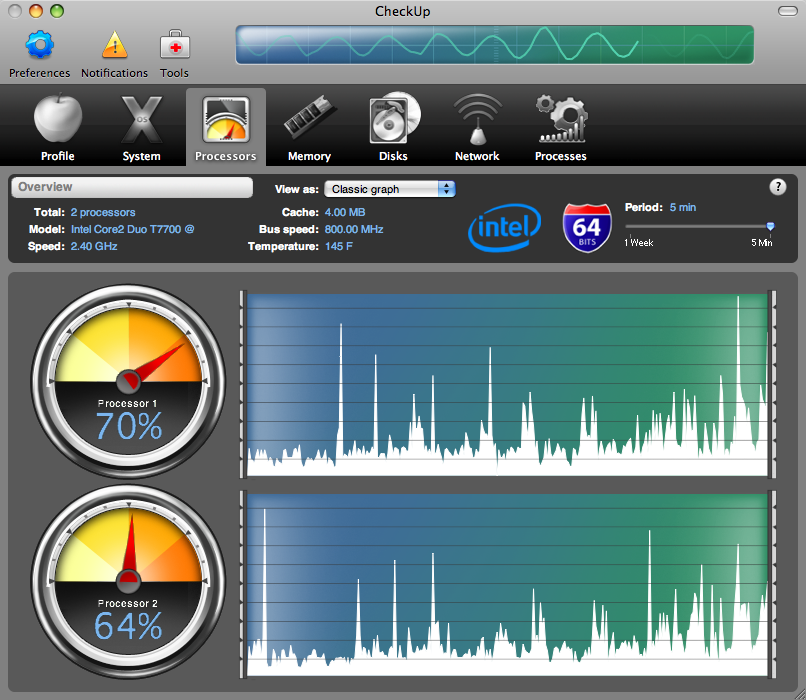
  So what exactly does CheckUp do? For starters, it displays many of
  the same pieces of information as System Profiler, such as your
  Mac's serial number, processor specs, and RAM configuration, plus
  your installed fonts, drivers, Internet plug-ins, preference panes,
  and applications. It also has most of the capabilities as Activity
  Monitor, showing real-time CPU, RAM, disk, and network usage (and
  with much spiffier graphics than Activity Monitor, I might add); it
  displays all your running processes, too, and allows you to pause or
  quit _some_ of them. (The developer says that some processes can't
  be quit or paused because doing so might be dangerous, and that a
  future version may have an "expert mode" in which this limitation
  disappears. I find it annoying that CheckUp imposes this limitation
  arbitrarily and without explanation, especially since Activity
  Monitor will let you quit anything.)

  CheckUp also gives you one-click access to a number of common
  commands that would otherwise require a trip to Terminal or Disk
  Utility - repairing disk permissions; running the daily, weekly, and
  monthly periodic maintenance scripts; updating prebinding; browsing
  hidden files and folders; and rebuilding the Spotlight database. It
  can warn you (even when CheckUp itself is not running) if your disk
  space becomes too low, your CPU or RAM usage gets too high, the
  inside of your Mac overheats, or any of several other potentially
  problematic conditions occurs.

  Although I can think of many utilities (most of them free) that
  offer similar capabilities, CheckUp is unusual in providing this
  information not only for the Mac it's running on but for remote Macs
  as well. The CheckUp license permits you to install a single copy of
  the application on two computers, so you can monitor your Mac and
  another Mac on your local network or anywhere on the Internet
  (assuming any intervening firewalls and routers have port 15550 open
  and have port forwarding configured if necessary). You can remotely
  monitor any Mac with a licensed copy of CheckUp (as long as the
  feature is turned on and you have the password), but you can see
  only one at a time. Even though app4mac offers volume discounts for
  purchases of five or more units of CheckUp, each of which supports
  two Macs, you can't add on licenses for individual computers at a
  reduced cost.


**What's Up, Doc?** When it comes to documentation, CheckUp
  alternately delights and disappoints. On the plus side, the help
  windows that pop up when you click the "?" icons on various screens
  are among the most helpful I've ever read. They provide interesting
  history and background information, and unlike many applications'
  contextual help, aren't terse and patronizing. If you're using
  CheckUp to browse hidden files and folders, you can not only see
  those items (/etc, /sbin, /var, and the like) but find out what many
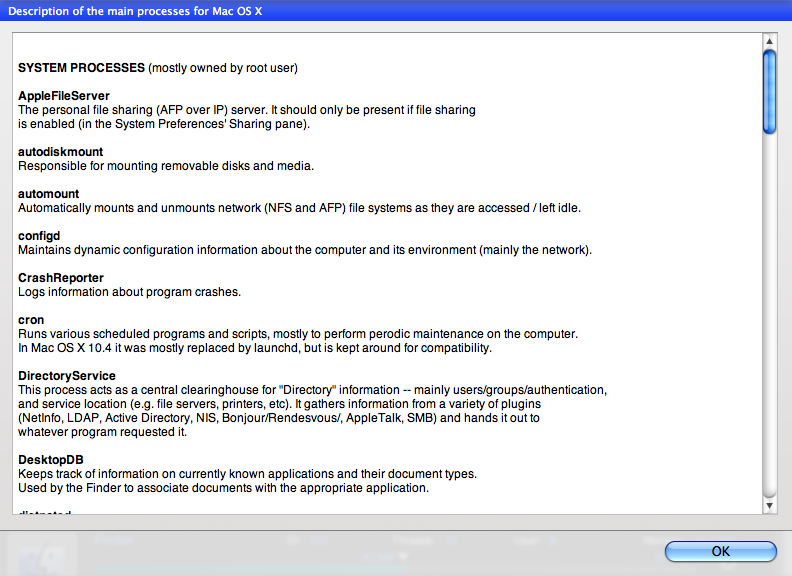
  of them are for. And if you click the Descriptions of Processes
  button on the Processes tab, CheckUp displays a surprisingly
  readable, plain-English description of many of the ordinarily
  inscrutable background processes that make up Mac OS X, such as
  mDNSResponder and ATSServer.

<http://www.tidbits.com/resources/2008-02/CheckUp_Processes.png>

  Unfortunately, these contextual help screens are the only
  documentation the program has - and they failed to provide me with
  the answers to several important questions about the program's
  operation. CheckUp's Help menu referred me to the Web-based FAQ,
  which had only a handful of questions and answers. When I went to
  app4mac's Web site and clicked Documentation, and then CheckUp,
  nothing happened other than the page reloading. The developer said
  that documentation would appear in version 1.1, but that they have
  had very few support requests, implying that everyone understands
  the program well enough as it is. Sorry, but no. The program
  urgently needs real documentation. To illustrate the problem, let me
  mention a set of interface oddities that left me scratching my head
  (and writing to the developer for help).


**Un-Intel-ligent Design** -- A few features - or perhaps I should say
  "features" - require an Intel-based Mac. In each case, the design
  decisions are questionable at best. First, the checkbox Display the
  Temperature as Celsius Instead of Fahrenheit claims it's available
  only if you have an Intel processor. I asked the developer what was
  so complicated about converting Fahrenheit to Celsius that a PowerPC
  processor couldn't do it, and the reply was that the method they use
  to check temperatures doesn't work at all on PowerPC-based Macs. Ah.
  So it's not the scale that's the problem but the process of reading
  the temperature itself. Of course, there are ways of reading the
  temperature on PowerPC-based Macs, but apparently that would have
  required extra coding (and may appear in a future version).

  So, assuming you have an Intel-based Mac, you can set an alert to
  appear when your Mac's internal temperature exceeds a specified
  temperature for a specified period of time. That sounds useful, but
  there's a catch. You can enter any temperature and any number of
  minutes, but what temperature, and what duration, should you enter?
  For all I know, maybe my Mac is running too hot if the temperature
  rises above 100 degrees Fahrenheit for 2 minutes, or maybe it's
  perfectly fine running at 200 degrees for a half hour. Nothing in
  CheckUp's interface, help system, or online FAQ gives users any
  clues here - which means the feature is effectively useless unless
  you can dig up that information on your own somewhere. (By the way,
  most Mac models have more than one temperature sensor inside, each
  of which may have a different safe operating range; according to the
  developer, CheckUp monitors only the CPU temperature, though more
  options will appear in the future.)

  The other "feature" requiring an Intel-based Mac is an oscilloscope
  animation that appears on the toolbar. The animation is merely
  ornamental, not functional. You can turn it off, but doing so
  requires you to relaunch the application. According to the
  developer, the reason it works only on Intel-based Macs is that it
  relies on OpenGL, which isn't supported on the graphics cards
  included with _some_ PowerPC-based Macs. But there are lots of other
  ways to do PowerPC-compatible animations - and the animation could
  just as easily have been left out altogether or replaced with a
  static graphic. The current implementation is silly.


**More Issues** -- I experienced several other aggravations with
  CheckUp. When I sorted the list of running processes by name, for
  example, CheckUp put all the items beginning with uppercase letters
  first, followed by all the items with lowercase letters. So
  something like 100 items separated AppleSpell and autofsd. When I
  asked for an alert if disk space got too low, the alert appeared,
  all right - but not just for my startup disk; it warned me even when
  a mounted disk image had less than the threshold I'd specified,
  making the feature completely meaningless. (The developer says that
  greater control over disk space alerts is their most requested
  feature, and will be addressed in a future version.) And when I
  clicked the Run Maintenance Scripts button, I expected that I'd be
  asked which one(s) I wanted to run - daily, weekly, or monthly - but
  CheckUp simply ran them all, without saying what it was about to do
  or asking for further confirmation. This, too, is on the developer's
  list to address in the future.

  A more serious problem was simply opening the program and keeping it
  running. In version 1.0, every time I launch CheckUp, I get an error
  message stating that the program has lost contact with the
  CheckUpAgent background process and therefore can't run; it suggests
  that I try again, and if that doesn't work, restart my Mac.  If I
  immediately try to relaunch CheckUp, the message no longer appears,
  but then the next time I launch it, it comes back. The message also
  always appears if I put my computer to sleep while CheckUp is
  running and then wake it back up - in which case, clicking OK causes
  CheckUp to quit. The developer acknowledged this bug and sent me a
  beta version of CheckUp 1.0.1 (due out in early March 2008) that
  fixes this problem. (Version 1.0.1 also fixes a number of other
  performance and stability problems.) But it does seem rather
  noteworthy that a maintenance utility - even version 1.0 -
  essentially crashes every time it's launched. App4mac says that
  besides adding documentation, numerous other improvements are
  planned for CheckUp 1.1, currently scheduled for late April 2008.


**Bottom Line** -- When I started using CheckUp, I was so impressed by
  its lovely and clear interface that I assumed I'd be very fond of
  it. The more I used it, the more those shiny happy feelings wore
  off. For one thing, I'm troubled by the fact that a maintenance
  utility has so many areas that are in need of maintenance! For
  another, the $49 price is hard to justify given that everything
  CheckUp does can also be done with free utilities (and in most
  cases, utilities built into Mac OS X). Sure, you might have to look
  at a command line now and then or at least put up with a
  less-elegant graphical presentation, but still... you're not getting
  _that_ much more for your money.

  I also, of course, thought about CheckUp in terms of the maintenance
  tasks I recommend in "Take Control of Maintaining Your Mac."
  Although CheckUp certainly performs several of the ongoing
  monitoring tasks I suggest, it won't help you clear cruft out of
  your computer, back up your important files, keep your software up
  to date, clear caches, or do dozens of other things that are part of
  a sensible maintenance strategy. So while CheckUp is useful in some
  ways, you shouldn't think of it as a complete maintenance utility.

<http://www.takecontrolbooks.com/maintaining-mac.html>

  CheckUp unquestionably shows promise, but version 1.0 is weak in
  almost every respect except its looks. I suspect that within a few
  versions, the serious bugs will be gone and enough new features will
  have been added to justify the price. For now, you'll get better
  results - at a much lower cost - by learning to use Activity
  Monitor, downloading a free utility such as OnyX to serve as a front
  end for some of those Unix-y tasks, and reading a good book on
  maintenance.

<http://www.titanium.free.fr/>

  CheckUp 1.0 is a 12.6 MB download. You can run it indefinitely as a
  trial version, with some features disabled, or buy a license to
  activate all the program's features.


Hot Topics in TidBITS Talk/03-Mar-08
------------------------------------
  by Jeff Carlson <[EMAIL PROTECTED]>
  article link: <http://db.tidbits.com/article/9484>

**Take Control Books** -- A reader wants to know if a pair of Take
  Control books can help him migrate his data to a new Mac
  efficiently. (3 messages)

<http://emperor.tidbits.com/TidBITS/Talk/1866>


**Problems with administrator access** -- If applications are asking
  for administrator access that normally shouldn't, check the status
  of the user account. (4 messages)

<http://emperor.tidbits.com/TidBITS/Talk/1867>


**Can the iPod shuffle get any smaller?** Technology is ever
  shrinking, but is it realistic that the iPod shuffle will actually
  drop in size? A reader makes the case that we're seen the smallest
  iPod now, at least for the near future. (3 messages)

<http://emperor.tidbits.com/TidBITS/Talk/1868>


**First key press problems on other Macs** -- The recent keyboard
  firmware upgrade for recent MacBook and MacBook Pro models fixes a
  problem that affects other Macs. (3 messages)

<http://emperor.tidbits.com/TidBITS/Talk/1870>


**Setting the time format isn't sticking** -- The date and time
  display won't change to another format on a reader's Mac, no matter
  what solution is tried. (7 messages)

<http://emperor.tidbits.com/TidBITS/Talk/1872>


**Using Time Machine with SuperDuper** -- Now that SuperDuper is now
  compatible with Leopard, readers discuss the capability to use it
  along with Time Machine. (10 messages)

<http://emperor.tidbits.com/TidBITS/Talk/1876>


**TurboTax 2007 doesn't run on MacOSX 10.3.9** -- We're shocked,
  really. Fortunately, there are alternatives to TurboTax. (3
  messages)

<http://emperor.tidbits.com/TidBITS/Talk/1877>


**Critical update to Office 2008 AutoUpdate (MAU)** -- Microsoft has
  updated its update utility, but some readers discover that the
  updater doesn't see the update - you need to check for an update in
  one of the Office 2008 applications. (2 messages)

<http://emperor.tidbits.com/TidBITS/Talk/1878>


**Syncing Now Up-to-Date & Contact with an iPod touch** -- Is it easy
  or even possible to synchronize this data, or is it time to move to
  Apple's combination of iCal and Address Book? (1 message)

<http://emperor.tidbits.com/TidBITS/Talk/1879>


**Permissions on a second internal drive** -- Permissions were never a
  problem for a reader who used a second drive for loose files, but
  will it be an issue to install Leopard on that disk? (2 messages)

<http://emperor.tidbits.com/TidBITS/Talk/1880>


**Why would Apple not fully enable iCal on the iPhone?** Since the
  iPhone runs Mac OS X, why are multiple calendars in iCal all crammed
  together into one on the device? (1 message)

<http://emperor.tidbits.com/TidBITS/Talk/1881>


**Max Amount of RAM for "Mid 2007" MacBook?** Can this machine support
  more memory than what is noted in the specifications? (7 messages)

<http://emperor.tidbits.com/TidBITS/Talk/1882>


$$

This is TidBITS, a free weekly technology newsletter providing timely
news, insightful analysis, and in-depth reviews to the Macintosh and
Internet communities. Feel free to forward to friends; better still,
please ask them to subscribe!

Non-profit, non-commercial publications and Web sites may reprint or
link to articles if full credit is given. Others please contact us. We
do not guarantee accuracy of articles. Caveat lector. Publication,
product, and company names may be registered trademarks of their
companies. TidBITS ISSN 1090-7017.

Copyright 2008 TidBITS: Reuse governed by Creative Commons license.

Contact us at:    <[EMAIL PROTECTED]>
TidBITS Web site: <http://www.tidbits.com/>
License terms:    <http://www.tidbits.com/terms/>
Full text search: <http://www.tidbits.com/search/>
Subscriptions:    <http://www.tidbits.com/about/list.html>
Account help:     <http://www.tidbits.com/about/account-help.html>


--
If you want to unsubscribe or change your address, use this link
http://emperor.tidbits.com/webx?unsub@@.3c557dc4!u=306a67f9