TidBITS#915/18-Feb-08
=====================
  Issue link: <http://db.tidbits.com/issue/915>
Three themes permeate this issue: Mac OS X 10.5.2, iTunes movie
rentals, and AT&T's increasing role in the lives of Apple users. The
release of Mac OS X 10.5.2 Leopard generates an overview from Glenn,
after which Matt revisits his "Six Things I Hate about Leopard"
article to see what has improved and what remains broken. Glenn then
rants about how the new iTunes movie rental model doesn't meet the
needs of an overworked and under-served class of people: tired
parents of young children. Mark Boszko joins us with a look into how
to extend the rental time beyond 24 hours, slightly ameliorating
Glenn's annoyance. But Glenn's much happier about the new deal AT&T
has to provide Wi-Fi service in Starbucks stores, and with the new
AT&T ExpressCard for 3G cellular data connections. And speaking of
new parents of young children, Jeff manages to sneak off to the Mac
long enough to write about what's new in Apple's Aperture 2.
Articles
Apple Releases Aperture 2
AT&T Adds ExpressCard 3G Cell Data Option for MacBook Pro
Leopard Emerges from Beta as 10.5.2 Ships
Leopard 10.5.2: TidBITS Complains, Apple Listens, Sort Of
Linotype FontExplorer Broken by 10.5.2, Fixed Already
iTunes Fails the Parental Rental
Extend iTunes Movie Rentals Beyond 24 Hours
Starbucks Deal Brewed with AT&T Has Hints of Apple
Hot Topics in TidBITS Talk/18-Feb-08
------------ This issue of TidBITS sponsored in part by: --------------
* READERS LIKE YOU! Support TidBITS with a contribution today!
<http://www.tidbits.com/about/support/contributors.html>
Special thanks this week to Howard Heaton, Kevin Murray,
Bob Arnold, and Robert (Skip) Hayes for their generous support!
* Fetch Softworks: Fetch 5.3 has a new look for Leopard,
and new support for Leopard technologies. And you can
upload with the oldest technology of all, Copy and Paste!
Download your free trial version! <http://fetchsoftworks.com/>
* WebCrossing Neighbors Creates Private Social Networks
Create a complete social network with your company or group's
own look. Scalable, extensible and extremely customizable.
Take a guided tour today <http://www.webcrossing.com/tour>
* Bare Bones Software's BBEdit 8.7 -- Latest version offers a
major interface overhaul, new prefs, text clippings, improved
JavaScript, new Ruby/SQL/YAML/Markdown support, code folding.
Over 160 new features in all! <http://www.barebones.com/>.
* MARK/SPACE, INC: The Missing Sync provides the very best in
synchronization for Mac users with BlackBerry, Palm OS, or
Windows Mobile devices. Integrates with Address Book, iCal,
Entourage, iPhoto, and iTunes. <http://www.markspace.com/bits>
* VMware Fusion. The most seamless way to run Windows on your Mac.
Backed by nearly a decade of proven virtualization technology.
Try VMware Fusion today for free, or order online for only $79.
Visit: <http://www.tidbits.com/about/support/vmware-fusion.html>
* StuffIt Deluxe 12: breakthrough compression of MP3 files, PDFs,
iWork and MS Office files! Reduce JPEG file sizes with no loss in
quality, burn to CD/DVD, back up archives to iDisk and more. Buy
today for only $59.99! <http://www.stuffit.com/mac/deluxe/tb/>
* Freeverse, Inc.'s SOUND STUDIO 3.5.5 - Sound Studio is for anyone
who needs to record or edit audio with a professional tool, but at
a consumer price. Perfect for Podcasts, Music, More! Now updated
for OS X 10.5 Leopard. <http://www.freeverse.com/soundstudio>
* Used to working with Microsoft Office Visio on a PC but have a Mac?
ConceptDraw 7 is professional technical drawing and business
graphics software. It supports Leopard and can import Visio files.
TidBITS readers save $50! <http://www.conceptdraw.com/tb>
* DealBITS: Get the word out about your product AND generate sales!
It's easy: give away a few copies and offer a discount to entrants.
A DealBITS drawing is quick to set up and can easily pay for itself.
For more info and rates, visit <http://www.tidbits.com/dealbits/>.
---------- Help support TidBITS by supporting our sponsors ------------
Apple Releases Aperture 2
-------------------------
by Jeff Carlson <[EMAIL PROTECTED]>
article link: <http://db.tidbits.com/article/9459>
When the PMA (Photo Marketing Association) conference came and went
at the end of January without mention of a new version of Aperture,
photographers started to worry about Apple's plans for its
photo-management application. With more than a year having passed
since version 1.5 was released and with healthy competition from
Adobe's Photoshop Lightroom, a major Aperture update seemed overdue.
<http://www.pmai.org/>
<http://www.adobe.com/products/photoshoplightroom/>
Apple has finally stepped back into frame with Aperture 2. The new
version appears to answer a number of criticisms of version 1.5 -
most notably related to performance - while revamping the interface
and adding several new features.
<http://www.apple.com/aperture/>
Among the extensive list of new features in Aperture 2, some
highlights jump out right away. The Projects, Metadata, and
Adjustments panes are now included in one Inspector and HUD
(heads-up display); and an All Projects view brings iPhoto-like
image skimming for rapid review of projects (moving the mouse over a
Key Photo thumbnail displays the project's other thumbnails). To
improve performance, Aperture 2 uses embedded JPEG previews during
import and offers a Quick Preview mode for reviewing the JPEG
previews, rather than processing RAW files constantly. Speaking of
RAW, this version adds Moire and Radius sliders to correct color
fringing, now supports RAW 2.0 features such as Hue Boost, and -
thanks to the recent Mac OS X 10.5.2 and 10.4.11 updates - now
supports the RAW output of the latest digital cameras.
<http://www.apple.com/aperture/features/100.html>
For image correction, there's a new Repair brush tool, a Clone brush
tool, a Vibrancy slider, Vignette controls, and the capability to
display hot and cold (all white or all black) areas of an image.
Other improvements include customizable keyboard shortcuts, tethered
shooting support (to capture directly from the camera to Aperture),
16-bit printing support for Epson and Canon printers, Google Maps
integration for images tagged with GPS data on capture, the
capability to search for images based on broader criteria such as
adjustments, and much more.
<http://docs.info.apple.com/article.html?artnum=307260>
Aperture 2 is available now for $199, or as a $99 upgrade for owners
of version 1.0 or later. A 30-day trial version is available as a
77.2 MB download; note that if Aperture 1.5 currently resides in
your Applications folder, you need to move or rename that
application file before installing the trial, and that you may also
need to re-enter the 1.x serial number the next time you launch it.
<http://www.apple.com/aperture/trial/>
AT&T Adds ExpressCard 3G Cell Data Option for MacBook Pro
----------------------------------------------------------
by Glenn Fleishman <[EMAIL PROTECTED]>
article link: <http://db.tidbits.com/article/9461>
MacBook Pro owners have typically had to rely on USB-based modems to
use third-generation (3G) cellular networks. Nova Media offers an
ExpressCard HSUPA option which can work with a MacBook Pro on AT&T's
U.S. 3G network (and tons of networks in Europe), but which costs
299 ($438). The advantage of an ExpressCard is really the form
factor, which hides most of the device other than the antenna -
sometimes with an external booster option.
<http://www.novamedia.de/e_pages/e_produkte_gt_express_72.html>
AT&T has now introduced what looks to be the same item from device
maker Option, but fully within its subsidized grasp. AT&T's GT Ultra
Express works with Mac OS X 10.4.10 and later, and costs nothing
(after two rebates are sent in) with a two-year subscription to
AT&T's data service; that subscription runs $60 per month for
unlimited usage. The card will cost $49 with the same contract terms
after the second rebate stops being part of a limited-time
promotion.
<http://www.option.com/images/presskit/LR_GT_Express_401.jpg>
<http://www.option.com/products/globetrotter_express_hsupa.shtml>
<http://www.prnewswire.com/cgi-bin/stories.pl?ACCT=109&STORY=/www/story/02-14-2008/0004755866&EDATE=>
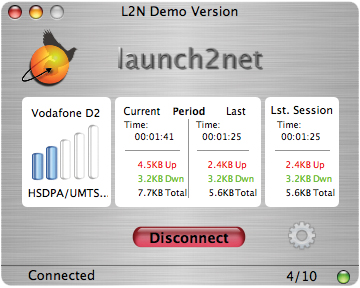
In an unrelated move, Nova Media announced at the same time that
their launch2net software (75/$110) can provide a bit more control
over these "new" devices from AT&T than does the free downloadable
Mac OS X software. The Nova Media software provides statistics to
monitor bandwidth rates and usage, as well as various connection
controls.
<http://www.novamedia.de/e_pages/e_produkte_mac_l2n.html>
<http://www.tidbits.com/resources/2008-02/l2n_main_back_en.jpg>
The timing is nice, because this new card coincides with AT&T's
announcement that they would increase upload speeds and add 80
cities (for a total of 350 cities) to their American 3G network
deployment. (See "More Mileposts Along Road to 3G iPhone,"
2008-02-06. For an explanation of the various technology used in
AT&T's network, see "Starbucks Deal Brewed with AT&T Has Hints of
Apple," 2008-02-12.)
<http://db.tidbits.com/article/9448>
<http://db.tidbits.com/article/9458>
The GT Ultra Express, along with an identically priced PC Card
version called the GT Ultra, is tri-band for 3G flavors and
quad-band for EDGE. This lets it work in what AT&T describes as 140
countries - watch those international roaming fees, however!
The Mac OS X software - in one version for 10.4.10, and another for
10.4.11 and 10.5.0 or later - can be downloaded from AT&T's support
site.
<http://support.option.com/att/>
Leopard Emerges from Beta as 10.5.2 Ships
-----------------------------------------
by Glenn Fleishman <[EMAIL PROTECTED]>
article link: <http://db.tidbits.com/article/9455>
I don't mean to be cruel with my headline, but Apple's release of
Mac OS X 10.5.2 marks the real beginning of Leopard for me, although
testing will be required to bear this out. While I'm using Leopard
full-time at home on an old PowerBook G4, I haven't been ecstatic
about it due to rough edges.
I beta tested Leopard, and while much was fixed at the last minute
to work properly for the 10.5.0 release, using 10.5.0 and 10.5.1 was
at times feeling like an extension of that beta program. Most
egregiously, I had to re-install Leopard due to a known problem that
resulted in an inescapable Setup Assistant at startup (see "For Want
of a File, an Operating System Was Lost," 2008-02-01). With 10.5.2,
I may be ready to upgrade my primary work computer.
<http://db.tidbits.com/article/9436>
The 10.5.2 release is available through Software Update as a
universal incremental release, updating 10.5.1 to 10.5.2, and weighs
in at 180 MB on my PowerPC-based PowerBook, but Apple notes size
will vary from machine to machine. No incremental updater was
available from Apple's site as I write this. The universal Combo
updater, which combines 10.5.1 and 10.5.2, is 343 MB for the desktop
version, and 382 MB for Leopard Server. There's also a 49 MB Leopard
Graphics Update 1.0 to install, but only after 10.5.2 is installed
and the computer restarted. The graphics update has a generic note
that it improves stability and compatibility.
<http://www.apple.com/support/downloads/macosx1052comboupdate.html>
<http://www.apple.com/support/downloads/macosxserver1052comboupdate.html>
<http://www.apple.com/support/downloads/leopardgraphicsupdate10.html>
With the release of 10.5.2, Apple has fixed a number of things that
I, other reviewers, and legions of actual users have complained
about. Plus, 10.5.2 makes it possible to stop using utilities and
hacks created by developers and Terminal-level clever folk to work
around problems in earlier releases.
The update takes an inordinate amount of time to install - it took
nearly 30 minutes on my PowerBook G4, and, for some reason, powered
the laptop down even though it was fully charged and plugged in. The
startup took another good 10 minutes to complete.
Let's walk through the big stuff first from the extensive release
notes.
<http://docs.info.apple.com/article.html?artnum=307109>
**Setup Assistant and Login Problems Fixed** -- While Apple's notes
are rather brief, they speak volumes. "Addresses an issue in which
Setup Assistant could unexpectedly appear each time Mac OS X 10.5
starts up" is one; the other, "Improves stability and performance
during log in."
The first resolves the problem I experienced, in which a particular
setup file failing to be updated correctly would lead to Setup
Assistant launching repeatedly at startup. Apple had posted a
technical note on fixing the problem using Safe Boot, but this
didn't work for me, nor for several readers who wrote in to me with
similar problems; for many others, Apple's technique did fix the
error.
<http://docs.info.apple.com/article.html?artnum=107392>
What's clear from this note is that the login routine is now
checking more extensively as to the state of the computer,
especially if an upgrade fails - the root of the infinite Setup
Assistant bug.
**AirPort Landing Gear Finally Retracted** -- Apple's and other forums
are full of people finding that their Wi-Fi networks mysteriously
work ever more slowly the longer they use Leopard. I haven't been
able to find or determine the cause of this, but Apple promises
10.5.2 "Improves connection reliability and stability" and "Resolves
certain kernel panics." Let's hope that does the trick.
**Applying Lipstick** -- Two cosmetic choices by Apple irked a lot of
folks, TidBITS editors included. Perhaps the title "Transparent Menu
Bar, Die Die Die!" (2007-11-16) in an article by Matt Neuburg wasn't
quite direct enough about his feelings. Tell us what you really
think, Matt.
<http://db.tidbits.com/article/9320>
The translucent menu bar was a misguided effort at showing off alpha
transparency - or something. We're still not sure what. But it sure
made the menu bar less useful. In 10.5.2, there's a checkbox to
disable this feature: System Preferences, Desktop & Screen Saver,
Desktop tab, uncheck Translucent Menu Bar. Ah, that's better!
The other irksome change involved disabling a simple list of items
when clicking on a docked folder. The Stacks feature was supposed to
show us everything at a glance. But it also showed folders as a pile
of documents, and wasn't an efficient way in any of its modes to
scan through a lot of stuff. (Matt explained his displeasure with
that, with less mortality involved, in "Six Things I Hate about
Leopard," 2007-10-26.)
<http://db.tidbits.com/article/9265>
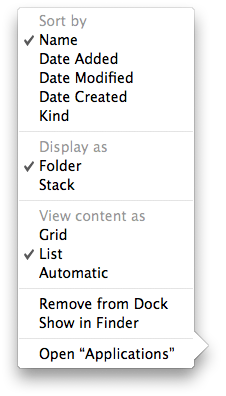
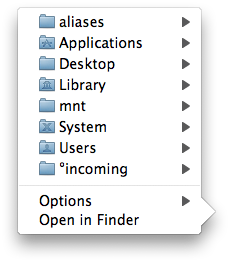
The 10.5.2 release restores Tiger goodness by adding the option to
display a folder as, you know, a folder (instead of a stack), and to
view items as a list. Even in the Tiger-familiar mode, you can still
sort items by kind, or date added, modified, or created.
<http://www.tidbits.com/resources/2008-02/folder_options_1052.png>
<http://www.tidbits.com/resources/2008-02/folder_list_1052.png>
**No, Really, Get Back to My Mac** -- My particular focus in Leopard
is Back to My Mac, which has worked erratically or not at all for
some people, due to the necessity of having particular router and
Internet service provider configurations. (I wrote about this in
"Punching a Hole for Back to My Mac," 2007-11-17.)
<http://db.tidbits.com/article/9322>
Version 10.5.2 ostensibly adds more compatibility through support
for more routers, but it's not clear how that will translate into
actual use. I'm hoping for more reader reports, please.
**Bits and Pieces** -- Time Machine now offers a menu in the system
menu bar to show the status of backups, note the date and time of
the last backup, start a backup immediately, and open the preference
pane. Hold down the Option key and a menu item changes so you can
browse to find other Time Machine backup disks, too. If your last
backup was several days ago, an exclamation point appears within the
menu's icon to emphasize the point.
There are also a number of security-related fixes in 10.5.2 that are
sufficiently important that Apple also made them available to users
of Mac OS X 10.4 Tiger as Security Update 2008-001. It's available
via Software Update and as standalone downloads for PowerPC- (16.7
MB) and Intel-based (28.8 MB) Macs.
<http://docs.info.apple.com/article.html?artnum=307430>
<http://www.apple.com/support/downloads/securityupdate2008001ppc.html>
<http://www.apple.com/support/downloads/securityupdate2008001universal.html>
Numerous other small bug fixes - Apple lists over 100 changes in the
release notes - should improve a lot of the little stuff in each
program and service that was causing crashes or that didn't work
quite right. It's worth reading the release notes to see if
something bugging you is now corrected.
But, Apple, please, can't you give us more detail than "Improves
general stability when running third-party applications"? Thanks
loads! I'll look for General Stability and salute him the next time
I see him walking down the street with General Protection Fault.
**What's Not Fixed** -- Matt runs through what items were fixed out of
his list of six things he hated in a companion article, "Leopard
10.5.2: TidBITS Complains, Apple Listens, Sort Of," 2008-02-12.
<http://db.tidbits.com/article/9456>
An item he didn't mention originally is something that both Jeff
Carlson and I were incredulous about when Apple told us: the fact
that you have to double-click a calendar event in iCal to see and
modify its details via a pop-up menu. In Tiger, iCal offers the Info
panel, which contextually displays details - that you can modify if
it's a local calendar - about whatever you currently select, whether
an entire calendar or an individual appointment. This "bug" is still
in place.
Leopard 10.5.2: TidBITS Complains, Apple Listens, Sort Of
---------------------------------------------------------
by Matt Neuburg <[EMAIL PROTECTED]>
article link: <http://db.tidbits.com/article/9456>
With the release of the recent 10.5.2 update (see Glenn Fleishman's
"Leopard Emerges from Beta as 10.5.2 Ships", 2008-02-11), how does
Leopard stand up under the criticisms I leveled at it in my article
"Six Things I Hate About Leopard" (2007-10-26)? Is Leopard less
hateful nearly four months after its original release, as it slowly
emerges (as Glenn rightly expresses it) from what has felt like a
public beta to some?
<http://db.tidbits.com/article/9455>
<http://db.tidbits.com/article/9265>
Yes and no. Or, to put it another way, two out of six. Well, two out
of six isn't bad, and, to be perfectly frank, one of the six (the
loss of Classic) is something I never expected to be remedied; but
one of the remaining three is so drop-dead awful that Leopard
remains painful to use. Plus, some bugs I didn't bother to complain
about in my "Six Things" article remain unfixed.
**Positive Opacity** -- Let's start with the two things that are
fixed. First, menu bar transparency. The way I decorate my
computer's desktop with my own photographs, the menu bar's
transparency rendered it all but illegible, the text in the menu bar
being drowned out by the photo colors showing through from behind.
For what seemed an eternity, this was just something I had to live
with; then an ingenious hack was discovered for overriding the
translucent menu bar, an achievement I reported and celebrated in
"Transparent Menu Bar, Die Die Die!" (2007-11-16). In 10.5.2,
however, you can turn off menu bar translucency by far simpler means
- a checkbox! Yes, there's actually a preference now (in the Desktop
& Screen Saver preference pane), as there should have been all
along.
<http://db.tidbits.com/article/9320>
If you've actually implemented the hack I reported in "Die Die Die!"
be sure to remove it before installing the 10.5.2 update. Otherwise,
there is a slight chance you might wind up with the system in an
unpleasantly irregular state. The instructions are in that article,
but I'll repeat them. Start with these lines:
sudo defaults delete
/System/Library/LaunchDaemons/com.apple.WindowServer
'EnvironmentVariables'
Copy that into TextEdit and carefully remove the Return characters
so that those three expressions are all on a single line, separated
by a space (in other words, there should be a space after "delete"
and a space after "WindowServer", but no return characters - make
the TextEdit window really wide to prove to yourself that the whole
thing really is on a single line). Now copy that line and paste it
into the Terminal. If necessary, press Return. Enter your password
when prompted. Immediately restart the computer. That's it! Now you
can safely install 10.5.2.
**Dock, Dock, Goose** -- Next, let's talk about stacks in the Dock. A
"stack" is the new unpleasant behavior of a folder in the Dock. The
old pleasant behavior was that a folder in the Dock looked like a
folder, its menu contained a hierarchical display of its contents,
and you could click it to open the actual folder. I reported a
workaround in "Quay Sticks It to Stacks" (2007-11-27). Thanks to the
10.5.2 update, that workaround is no longer necessary; a folder in
the dock can now behave like a folder once again. As Glenn has
already explained, Control-click on the folder in the Dock to bring
up its contextual menu, and make these choices: Sort by Name,
Display as Folder, View Content as List. Now the folder looks like a
folder; click it (without holding down the mouse) to bring up a
hierarchical menu of its contents; Command-click it to open the
actual folder in the Finder. This is not identical to the
pre-Leopard behavior, but it will do just fine, thank you.
<http://db.tidbits.com/article/9332>
Those are the only two out of the "Six Things" that are fixed by the
10.5.2 update. The glittering, reflective Dock is still not
officially fixed, so if you want a nice, dark, legible, compact,
non-reflective Dock at the bottom of your screen, you'll have to go
on using the hack I reported in "Six Things." The tiny, illegible
type and icons in the Finder sidebar are still tiny and illegible,
with no workaround in sight. And the absolutely horrible,
frustrating, insanely brainless floating Help window, which lives in
no particular application and blocks your view of the application
you are trying to learn about, remains as a major blot on the
Leopard landscape.
In addition, many bugs remain unfixed; for example, whether my
computer, on waking from sleep, will automatically connect to my
wireless network, or will even be _able_ to connect to it, manually,
without a restart or other drastic measures, remains a total gamble.
And there are other bugs whose state I won't know until I've used
the updated Leopard for a while longer. The jury is still out, for
instance, on whether the first keystroke in a text field after a
short period of inactivity will be randomly ignored, and on whether
Spaces will continue to demonstrate occasional irrationalities such
as lost windows or the wrong window coming forward when you switch
from one space to another, and on whether certain applications, such
as Photoshop Elements, will remain effectively unusable. Doubtless
you have your own Leopard pet bugs for whose squashing your fingers
will be crossed as you install this update.
Meanwhile, in a desperate attempt to end on a positive note, I
should mention that menus themselves are now also considerably less
transparent than before, which is a very pleasant improvement. Also,
Time Machine now sports a status menu which, in addition to
providing some status information about recent and current backups,
provides two menu items - Back Up Now and Enter Time Machine - so
you can safely remove the Time Machine icon from your Dock, knowing
that you can still access the functionality that the application's
Dock menu was providing.
Linotype FontExplorer Broken by 10.5.2, Fixed Already
-----------------------------------------------------
by Glenn Fleishman <[EMAIL PROTECTED]>
article link: <http://db.tidbits.com/article/9457>
If you use Linotype's FontExplorer X for Leopard font management and
you installed the Mac OS X 10.5.2 update, you might find that Word
and InDesign hang on launch. Linotype's programmers were obviously
nearly done with a Leopard compatibility update, and released
version 1.1.3 shortly after 10.5.2 appeared. This revision lets the
program work better with Leopard, and happens to fix the 10.5.2
glitch; TidBITS reader Peter Trinder sent email to say that the
1.1.3 update solved his problems with Word and InDesign.
<http://www.linotype.com/2631/freedownloadmac.html>
iTunes Fails the Parental Rental
--------------------------------
by Glenn Fleishman <[EMAIL PROTECTED]>
article link: <http://db.tidbits.com/article/9441>
My first reaction to Steve Jobs's announcement at the Macworld Expo
keynote that Apple would offer downloadable rentals was, oh, good,
my wife and I can finally give up on the pretense that we actually
watch movies via our Netflix subscription, rather than simply let
the discs gather dust for weeks at a time. (See "iTunes Movie
Rentals and Apple TV, Take 2," 2008-01-15.) But after hearing the
terms - 30 days after download to watch (an unlimited number of
times), in any 24-hour window you choose - I thought, crud, we can't
use it.
<http://db.tidbits.com/article/9403>
As many others observed that day, watching movies all the way
through is the province of the young, the single, those without
kids, or those with somewhat grown children. As the father of two
kids (10 months and 3 1/2 years), my wife and I typically have at
most 2 to 3 hours to ourselves in evening before collapsing in bed,
and watching a 2-hour movie takes 2 to 3 nights.
We are not, my wife noted, Apple's target demographic.
For expediency, Apple accepted the odd terms imposed by the movie
industry on all on-demand rentals. Movies are typically released to
theaters, then on DVD, then to pay-per-view and hotel viewing, then
on pay television like HBO, and - much later - on broadcast TV
(usually with commercials). Digital downloads have been put into the
pay-per-view category, with all the limitations and odd licensing
that goes with it.
Each of those release windows is typically exclusive to maximize the
profit from each segment. The time from theatrical to DVD release
has become shorter and shorter over the last few years, sometimes
being a matter of days instead of months. Pay-per-view release is
typically about 30 days after the DVD ships to stores. (There's a
blackout window, too, when the movie goes into premium cable, where
you can't get it on pay-per-view or movie download services for
sometimes as long as a year.)
This is also partly why digital downloads don't usually have any
extras. Part of that is technology; part is file and download size;
and part is how downloads are licensed compared to, say, DVDs.
Hotels don't give you director's commentary options and deleted
scenes, and neither do the iTunes Store, Vudu, Amazon Unbox, or
CinemaNow, to name a few.
As we know, Apple often starts an industry and then sets the terms
for it. iTunes music rights initially allowed a song to be played on
up to 3 authorized computers and burned to an identical playlist up
to 10 times. That later changed to 5 computers and 7 copies of an
identical playlist. And now the big push is for unprotected music
sales, as Apple and Amazon contend for the biggest library of such
songs (see "Amazon MP3 Scores DRM-Free Music: What About Apple?,"
2008-01-10).
<http://db.tidbits.com/article/9394>
A couple of our colleagues have discovered that "24 hours" isn't
exactly accurate, by the way, which may show some of Apple's
negotiating strength. If you pause playback on a given supported
device before 24 hours is up, you can resume playing after that
period, according to Mark Boszko in "Extend iTunes Movie Rentals
Beyond 24 Hours," 2008-02-18. So that's at least not as horrible as
running out of time at 23 hours 59 minutes and having to repurchase
_and_ redownload the entire movie.
<http://db.tidbits.com/article/9462>
(Side rant: The 30 GB and 80 GB 5th generation iPods released in
2006 and sold through the middle of 2007 aren't capable of playing
movie rentals, only the September 2007 and later models: the nano,
classic, and touch, as noted in their document, "iTunes Store Movie
Rental Usage Rights." See Apple's bird watcher's guide to iPod
models. This fact eluded not just a colleague, trying to rent
"Herbie" for her 3-year-old to watch on his birthday using her 30 GB
5G iPod, but also Apple tech support, which spent an inordinate
amount of time before they asked what model of iPod she had. The
iPod didn't inform her - though one might expect firmware could be
configured to do so - that she had an unsupported model.)
<http://docs.info.apple.com/article.html?artnum=307246>
<http://docs.info.apple.com/article.html?artnum=61688>
One can only hope that when Apple moves from its current set of
roughly 150 movies for rental up to the thousands that other
services offer, they'll become the biggest such seller, and be able
to negotiate better terms. I'd be happy with a 15-day or even 10-day
periods if I could have 48 or 72 hours to play the movie. Or a
50-cent surcharge to get 72 hours. Or something more esoteric like
"watch once through with limited rewind but unlimited pause within
30 days." Who needs "watch unlimited times," anyway?
Whatever. All I know is that if Apple wants to eat Netflix's lunch
and have a competitive edge against other services, just having the
Apple TV and portability won't be enough to capture the entire
audience. There are millions of parents in my position, and my wife
and I are just waiting for the opportunity to pull the trigger.
Extend iTunes Movie Rentals Beyond 24 Hours
-------------------------------------------
by Mark Boszko <[EMAIL PROTECTED]>
article link: <http://db.tidbits.com/article/9462>
First, a quick summary of Apple's new movie rental option available
on the iTunes Store (see "iTunes Movie Rentals and Apple TV, Take
2," 2008-01-15). The movie rental experience is good, even without
an Apple TV. Of course the resolution isn't HD, though it is
slightly above DVD standards by pixel size - 933 by 470 pixels for
the particular film I watched, all picture and no black bars.
Unfortunately, that's offset by the highly compressed low-data-rate
H.264 codec, and the movie looked a bit soft for the resolution.
(I'd still like to know just why we non-Apple TV owners are snubbed
on the HD point, but I'm betting on it being a perceived piracy risk
on the part of the studios.) However, the rental process itself is
painless and your time remaining before the expiration is clearly
laid out in the Rented Movies section of iTunes.
<http://db.tidbits.com/article/9403>
Transfer back and forth to portable devices (at least with the
iPhone I tested) is also clearly laid out in the Movies tab of your
media sync preferences for the portable device. The only pain
experienced is waiting for a roughly 1 GB file to copy over USB,
even when you're transferring back to your Mac from the portable
device.
The one exception to ease of use would be that you can't get to your
rentals from Front Row - you must play them from iTunes and swap
into full screen mode by pressing Command-F if you want a big screen
experience from your Mac mini jukebox. Then, at the end of the
movie, iTunes doesn't kick you out of full screen mode either - it
just sits there on the post-credit black screen until you press
Escape to switch back to a normal window, but that's a trivial
complaint.
**Looking through the Rental Window** -- I've heard several people
complain that they need at least a 27-hour window to account for
starting a rented movie at 9 PM one evening, then having to pause it
to deal with some interruption (like kids or the need for sleep),
only to come back at 9 PM the next night and be out of luck because
the rental has expired. To test this concern, I started watching a
rental movie for a second time with only about 30 minutes left in
the 24-hour rental window. Glenn Fleishman moans more about this
problem in "iTunes Fails the Parental Rental" (2008-02-04).
<http://db.tidbits.com/article/9441>
A good 70 minutes into the movie, and it's still playing. Does that
mean you have 24 hours to start watching a movie, and once you've
started, you get to keep watching it until it's done? Does it expire
if you pause it in the middle or try to rewind? These are all good
questions. But let's see if it lets me watch all the way to the end
first...
Awesome. I was able to watch all the way to the end, credits and
all, and then it stopped on the black screen as usual, with no
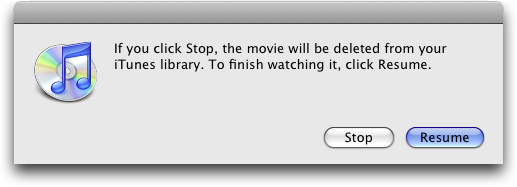
alerts of any sort. Once I pressed Escape to leave full screen mode,
I was greeted with this dialog, warning me that if I didn't resume
watching, the movie would be deleted. In other words, I was easily
able to finish watching the movie even though doing so put the total
time beyond the 24-hour window.
<http://www.tidbits.com/resources/2008-02/iTunes-rental-stop-resume.png>
With another movie, I tested the question of whether you could pause
an in-progress movie and then resume watching _after_ the 24-hour
rental window had closed. It turns out that so long as you pause
_before_ the rental expiration, a paused movie remains accessible
past the expiration time, so long as the movie window stays open.
Keeping that window open requires that iTunes not be used to play
back any other media until you choose to resume playback, after
which you can continue playing at your leisure. When it's done,
though, it's really done, and iTunes deletes the file.
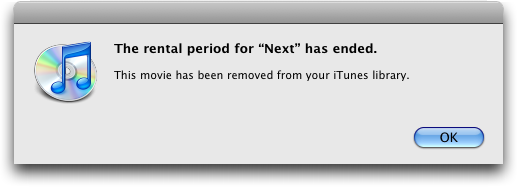
<http://www.tidbits.com/resources/2008-02/iTunes-rental-ended.png>
If you attempt to pause again after the expiration time has passed,
the movie continues playing while you are presented with a dialog
where iTunes notifies you that your rental has expired, and your
only choice is to resume or delete your rental. However, you can
rewind the currently playing movie even after the expiration time
has elapsed, which could allow you to extend your viewing time a
little further (or catch up if you have to visit the bathroom in the
middle of the post-expiration viewing).
Chris Breen of Macworld has also discovered that there is an
identical viewing time extension available if you have transferred
your rental to a 3G iPod nano with TV playback. One might assume
this would also apply to other iPod/iPhone models, although I've
heard that the reason movie rentals aren't supported on 5G iPods is
that it's possible to reset their clocks in such a way as to prolong
rentals (something that reportedly doesn't work in iTunes).
<http://www.macworld.com/article/131790/2008/01/longerrentals.html>
The upshot of all this would seem to be that Apple is trying hard to
provide a reasonable user experience, even while meeting the desire
to limit the time in which a rental can be watched, presumably
something that was necessary to get the studios to license their
content for viewing in iTunes. Why Apple doesn't document this
behavior, at least in a Knowledge Base article, is left as an
exercise for the reader to ponder.
[Mark Boszko is a broadcast TV editor, film buff, and Mac addict
living in the Maryland suburbs of Washington, DC. In his "copious
spare time," he produces HowTube, a fun tech how-to podcast, and
BeerMediaTech, a spirited fortnightly discussion of tech and media
news.]
<http://howtube.com/>
<http://beermediatech.com/>
Starbucks Deal Brewed with AT&T Has Hints of Apple
--------------------------------------------------
by Glenn Fleishman <[EMAIL PROTECTED]>
article link: <http://db.tidbits.com/article/9458>
I'm not an oenophile, but I do like wine. I've never mastered the
vocabulary of oaky, brawny, tannic, and so forth. But I do know a
whiff of fruit when I smell it. The recent announcement that
Starbucks would switch its in-store Wi-Fi provider from long-time
partner T-Mobile to AT&T had a strong smell of Apple about it. (You
can read my coverage of this event at my Wi-Fi Networking News site,
or in the article I filed for The Seattle Times.)
<http://wifinetnews.com/archives/008175.html>
<http://seattletimes.nwsource.com/html/businesstechnology/2004177549_starbucks12.html>
In fact, I think the putative 3G iPhone plays a part here as well,
and that we'll see the 3G iPhone rolled out as part of a larger play
that involves downloading movies in Starbucks over AT&T's new
network. That puts the 3G iPhone launch between March and June of
2008. Let me back up a minute first.
**AT&T Brings Millions of Subscribers to Starbucks** -- The deal
brings Wi-Fi at 7,000 U.S. company-owned Starbucks stores at no
additional cost to 7 million AT&T DSL and U-Verse fiber subscribers
- all DSL customers with 1.5 Mbps downstream or faster connections -
and 5 million business customers who use a remote-access service
from AT&T. It also offers free Wi-Fi for two hours a day for a
period of 30 days starting each time you make a purchase of any
amount using a Starbucks Card, the company's stored-value swipe
card.
Pay-as-you-go service costs $3.95 for two hours, down from $6.00 per
hour or $10.00 per day with T-Mobile.
Monthly unlimited service is also available, although that requires
a little explanation. AT&T splits its hotspot network into Basic and
Premier tiers. The Basic network currently includes McDonald's
(8,500 stores), Barnes & Noble, and several airports; Starbucks will
be added to that tier. Qualifying DSL and all fiber customers get
Basic service for free.
<http://www.att.com/gen/general?pid=5949>
The Premier tier adds access to roughly 1,000 locations in the
United States, such as hotels, airports run by other providers, and
convention centers, as well as to 53,000 international roaming
locations. Premier costs $19.95 per month for everyone except the
qualifying DSL and all fiber customers, who can upgrade to Premier
by paying an extra $9.95 per month.
Subscribers to aggregator hotspot services like Boingo Wireless that
already have a roaming relationship with AT&T will get Starbucks
access at no additional cost, too. Boingo charges $21.95 for
unlimited U.S. access, which includes pretty much all domestic
airports and tens of thousands of other U.S. locations, making it
the best bargain. (Boingo hasn't updated their software client for
Leopard, but a company spokesperson told me some months ago that
nearly all Boingo partner locations allow a Web page login with
Boingo credentials.)
<http://boingo.com/>
The rollout starts in the second quarter of 2008 in major cities,
and will continue through the year. (This deal covers only U.S.
company-owned Starbucks, not the kiosks found in airports or
licensed purveyors in places like Barnes & Noble, and also doesn't
affect T-Mobile's arrangements with Starbucks outside the United
States.)
Starbucks has never publicly expressed dissatisfaction with
T-Mobile, which purchased a bankrupt firm's assets and took over the
Starbucks Wi-Fi buildout in early 2002. It's quite clear that the
company made sure existing T-Mobile HotSpot subscribers wouldn't be
disconnected when AT&T takes over: anyone with a T-Mobile data
subscription that includes Wi-Fi or who uses their Wi-Fi/cell plan
to place calls using special handsets has unlimited, long-term
access to all Starbucks locations.
Rather, T-Mobile couldn't offer Starbucks anything particularly
special, and couldn't further its relationship with Apple. When
Apple announced that Starbucks would be a partner in a special
branded service available on the iPhone and iPod touch and within
iTunes to extend the iTunes Wi-Fi Music Store, the press release
didn't mention T-Mobile or AT&T, Apple's multi-year exclusive iPhone
reseller in the United States.
<http://www.apple.com/itunes/starbucks/>
**Overwhelming 3G** -- AT&T operates a 3G (third generation) cellular
network, and last week announced that the telecom firm would be
expanding and upgrading that network this year. (See "More Mileposts
Along Road to 3G iPhone," 2008-02-06.). The company also owns a huge
amount of copper and fiber-optic cable in its territory stretching -
with a southwestern gap - from California to Florida. (Qwest owns
the Northwest, mountain time zone, and Midwest; Verizon, the
northeast down to Virginia.)
<http://db.tidbits.com/article/9448>
The company is using Wi-Fi as a bridge between wired service, which
increasingly includes fiber-optic connections to neighborhoods, and
its wireless service. You can push a lot of data over copper and
glass, and have essentially as much of that as you want to build.
Wireless spectrum is finite, and there's never as much as you want.
The current set of auctions for retiring analog television frequency
shows how much interest there is: $20 billion and counting for an
excellent swath, which includes nearly $5 billion for a single set
of national licenses suitable for broadband wireless. AT&T just
finalized a separate purchase of about half the amount of national
spectrum currently up for bid from a firm that bought it in a
previous auction.
The long debate over whether 3G or Wi-Fi is "better" ignores the
fact that Wi-Fi has a far higher carrying capacity. While most
hotspots backhaul no more than 3 to 6 Mbps downstream, and most are
closer to 768 Kbps to 1.5 Mbps downstream, an 802.11g Wi-Fi network
can push 20 Mbps across a single base station, and the new 802.11n
standard tops out at rates over 90 Mbps. (The raw data rates for G
and N are 54 Mbps and 300 Mbps, respectively; the rates I'm citing
are for real-world throughput in close proximity to a base station.)
AT&T's current flavor of 3G, HSPA, can carry only 3.6 Mbps
downstream and about half that upstream; each phone or device in
range is likely to see the upper 100s of Kbps downstream and half
that upstream, with higher peak rates for sustained transfers. And
the more people using 3G connections, the less likely peak speeds
will be achieved.
Reports state that when the current iPhone models were released,
usage of EDGE - a moderate speed "2.5G" network standard that
straddles second- and third-generation standards - tripled in cities
like San Francisco. You can imagine that the release of a 3G iPhone
might bring AT&T's still-expanding 3G network to its knees.
Which is where Starbucks comes in. AT&T and Apple clearly cut a deal
where Starbucks benefits from becoming a digital media hub: It's
going to be the place where people congregate to use Wi-Fi as part
of the monthly service fee that they already pay AT&T - this wasn't
announced yesterday, but it's absolutely coming - and where they
download media from Apple.
**It's Not about EDGE, It's about the Edge** -- Here's where it all
comes together. Starbucks already has media servers in its stores.
These servers host the songs that Starbucks plays. But they aren't
simply jukeboxes. They also have magic that allows a customer in a
Starbucks cafe to purchase a song they just heard or that was
recently played and have that song downloaded _locally_ - not
downloaded over the Internet from Apple's iTunes Store. That means
that Apple is wrapping DRM (digital rights management) around songs
that require that protection in each store. Neither Starbucks nor
Apple had previously discussed this, but I interviewed Starbucks's
chief technical officer Chris Bruzzo yesterday for The Seattle
Times.
Even though there was no mention of Apple in this deal, Bruzzo and I
spoke about the iTunes Wi-Fi Music Store arrangement in Starbucks. I
asked him if there were any plans to stick media servers in the
stores, and he said, "Right now in our stores that have the iTunes
Wi-Fi Music Store, you go and buy the song that's playing directly
overhead, and see how fast it transfers."
He wasn't being coy; the company isn't talking explicitly about
this. But he said, compare the transfer speed between songs that
were recently played and those available through Apple's broader
iTunes catalog, and you can see the difference.
He noted of the iTunes Wi-Fi Music Store, "That's a great example of
a location-based service that's highly contextual. And the ability
to use the superior speeds of 802.11g to deliver a file that's
relevant to a particular environment." This isn't very subtle. They
have servers in the stores.
If you were to put, say, a server with a couple of terabytes of
storage, which is now maybe a $2,000 to $3,000 expense, and load
that with the 100,000 most popular songs and the 500 most frequently
rented films and the few hundred most recent and popular TV show
episodes, suddenly people can download those files at the local
network's speed, not at the speed of the Internet connection.
If I'm downloading a 1.3 GB movie file on my home network at 3 Mbps
downstream, it's going to take about an hour. Not bad. If I instead
purchase and download it over an otherwise non-busy 802.11g network,
it's suddenly more like _nine minutes_. If that network were
upgraded by AT&T, say, to use 802.11n, and I'm downloading it to my
fancy MacBook, MacBook Air, or MacBook Pro with 802.11n (Core 2 Duo
versions), we're now talking about...wait for it...perhaps _two_
minutes.
Did I mention that a 3G iPhone is likely to include a new low-power
802.11n chip as well? No? That's almost certainly part of the delay
in producing it, as those chips are just hitting the market now.
The edge network, the network that feeds data locally at local
network speeds, becomes extremely important in this scenario.
**Your New Living Room** -- Starbucks has always cultivated an
artificial living room: a place probably more comfortable and
convivial than most of our actual living rooms (if we had them); for
Generation Xers, it's also an extension of the ranch house they
might have grown up in but can't afford to rent now.
It's not at all a leap that Starbucks, already a big music producer
and seller, and one interested in revitalizing its business after a
few years of drifting from its core coffee mission, would embrace
the idea of being the place people who don't even like their coffee
come to fill up on media, use the network, and hang out.
All Starbucks stores in the United States are closing later this
month for three hours to retrain the staff on making coffee better.
The baking ovens for breakfast "sandwiches" have started to be
ripped out. And this deal is now in place. It's no coincidence.
Starbucks is poised to be the launch partner for the 3G iPhone, and
they're getting their living rooms cleaned up for the coming hordes.
Hot Topics in TidBITS Talk/18-Feb-08
------------------------------------
by Joe Kissell <[EMAIL PROTECTED]>
article link: <http://db.tidbits.com/article/9463>
**Scan Mac News Headlines at Alltop** -- A reader comments on the
selection of Mac news available at Alltop. (1 message)
<http://emperor.tidbits.com/TidBITS/Talk/1835>
**Beachballitis** -- Readers discuss possible causes of a frequently
occurring spinning beachball of death. (6 messages)
<http://emperor.tidbits.com/TidBITS/Talk/1836>
**More Mileposts Along Road to 3G iPhone** -- What does AT&T's recent
announcement mean to people who live outside major urban areas? (4
messages)
<http://emperor.tidbits.com/TidBITS/Talk/1838>
**Please Welcome Eliana Wren Carlson** -- The youngest member of the
TidBITS family receives some of her first email messages. (3
messages)
<http://emperor.tidbits.com/TidBITS/Talk/1839>
**10.5.2 Wait or Try?** Is it finally safe for anyone to install
Leopard, or are there remaining issues that might induce someone to
wait for a later release? (23 messages)
<http://emperor.tidbits.com/TidBITS/Talk/1840>
**Leopard 10.5.2: TidBITS Complains, Apple Listens, Sort Of** -- The
pluses and minuses of Mac OS X 10.5.2's improvements get a detailed
going-over. (7 messages)
<http://emperor.tidbits.com/TidBITS/Talk/1841>
**Starbucks Deal Brewed with AT&T** -- The new Starbucks-AT&T alliance
provokes speculation and commentary from readers. (14 messages)
<http://emperor.tidbits.com/TidBITS/Talk/1842>
**Leopard Emerges from Beta as 10.5.2 Ships** -- Readers ask about
solutions for continued annoyances in Mac OS X 10.5.2. (8 messages)
<http://emperor.tidbits.com/TidBITS/Talk/1843>
**Transparent Menu Bar, Die Die Die!** At least one reader was quite
content with the transparent menu bar. (1 messages)
<http://emperor.tidbits.com/TidBITS/Talk/1844>
**Slide show presentation software** -- What's the best Mac software
for creating a slide show presentation with video content? (8
messages)
<http://emperor.tidbits.com/TidBITS/Talk/1846>
**Mac OS X 10.5.2 Update: Dock Stacks Go Bye-bye** -- Apple does
appear to listen to its users, at least on some occasions; readers
discuss the welcome return of proper folders to the Dock. (9
messages)
<http://emperor.tidbits.com/TidBITS/Talk/1847>
**Keyboard characters jumbled** -- A reader's keyboard characters
mysteriously become rearranged, leading to an inability to type
passwords (among other things). (5 messages)
<http://emperor.tidbits.com/TidBITS/Talk/1848>
**AirTunes added to Apple TV** -- The newly improved Apple TV now
apparently has AirTunes support, though with a catch or two. (1
message)
<http://emperor.tidbits.com/TidBITS/Talk/1849>
**Vagaries of Apple's DVI-to-ADC adapter** -- Why won't an external
display work on a MacBook Pro when its lid is closed, as Apple says
it should? (1 message)
<http://emperor.tidbits.com/TidBITS/Talk/1850>
**Backing up/moving Time Machine data sets/drives** -- The process of
moving a Time Machine volume to another disk is fraught with peril.
(2 messages)
<http://emperor.tidbits.com/TidBITS/Talk/1851>
**AT&T Express Card** -- The new 3G AT&T Express Card is nice, but
will you get a discount if you're already paying for an iPhone plan?
(1 message)
<http://emperor.tidbits.com/TidBITS/Talk/1852>
$$
This is TidBITS, a free weekly technology newsletter providing timely
news, insightful analysis, and in-depth reviews to the Macintosh and
Internet communities. Feel free to forward to friends; better still,
please ask them to subscribe!
Non-profit, non-commercial publications and Web sites may reprint or
link to articles if full credit is given. Others please contact us. We
do not guarantee accuracy of articles. Caveat lector. Publication,
product, and company names may be registered trademarks of their
companies. TidBITS ISSN 1090-7017.
Copyright 2008 TidBITS: Reuse governed by Creative Commons license.
Contact us at: <[EMAIL PROTECTED]>
TidBITS Web site: <http://www.tidbits.com/>
License terms: <http://www.tidbits.com/terms/>
Full text search: <http://www.tidbits.com/search/>
Subscriptions: <http://www.tidbits.com/about/list.html>
Account help: <http://www.tidbits.com/about/account-help.html>
--
If you want to unsubscribe or change your address, use this link
http://emperor.tidbits.com/webx?unsub@@.3c557dc4!u=306a67f9