TidBITS#919/17-Mar-08
=====================
  Issue link: <http://db.tidbits.com/issue/919>
  You've seen the commercials and read the early reviews, but how does
  the MacBook Air perform in real-world usage? And by "real-world,"
  contributor Angus Wong means, how well does it work from bed on a
  lazy weekend morning (among other places and times)? On that note,
  Joe Kissell reconsiders sleep - the sleep feature of his laptop,
  that is - with the utility SmartSleep. Jeff Carlson meets a new
  sultry text-to-speech voice being used by Apple, and Glenn takes a
  quick look at Apple's new 802.11n-savvy AirPort Express Base
  Station. This week also includes plenty of update news, as we look
  at important updates for Microsoft Office 2008 and Office 2004, a
  standalone AirPort Utility update, a new AppleScript solution for
  pasting plain text into Word 2008, and a new version of the ebook
  "Take Control of Switching to the Mac," plus a quick list of other
  notable updates. Lastly, we note an unlimited AT&T voice plan for
  iPhone owners, give away several copies of the IPNetMonitorX network
  utility, and peek at email messages expressing dissatisfaction with
  Windows Vista system requirements, as written by Microsoft execs.

Articles
    Apple Releases 802.11n AirPort Express
    AT&T Offers Unlimited Voice Use iPhone Plan
    Apple Releases Updated AirPort Utility for Tiger, Leopard, Windows
    DealBITS Drawing: Win a Copy of IPNetMonitorX
    Updated Paste Plain Text AppleScript for Word 2008
    SmartSleep Solves Safe Sleep Situation
    Automating Text-to-Speech Video Narration
    Vista Woes Aired in Internal Microsoft Email
    Take Control News: Updated Help for Switching to the Mac
    Important Updates Released for Office 2008 and 2004
    Bedding Down with a MacBook Air
    TidBITS Watchlist: Notable Software Updates for 17-Mar-08
    Hot Topics in TidBITS Talk/17-Mar-08


------------ This issue of TidBITS sponsored in part by: --------------

* READERS LIKE YOU! Support TidBITS with a contribution today!
  <http://www.tidbits.com/about/support/contributors.html>
  Special thanks this week to Richard G. Mulligan, Jr., Juerg Fehr,
  Karen Schroeder, and David T. Harvey, Jr. for their support!

* GET FETCH 5 FOR FREE! Fetch Softworks makes Fetch, the original
  Macintosh FTP client, free for educational and charitable use.
  Fetch 5.3 includes a new look and Leopard technology support.
  Apply today at <http://fetchsoftworks.com/edapply>!

* WebCrossing Neighbors Creates Private Social Networks
  Create a complete social network with your company or group's
  own look. Scalable, extensible and extremely customizable.
  Take a guided tour today <http://www.webcrossing.com/tour>

* Bare Bones Software's BBEdit 8.7 -- Latest version offers a
  major interface overhaul, new prefs, text clippings, improved
  JavaScript, new Ruby/SQL/YAML/Markdown support, code folding.
  Over 160 new features in all! <http://www.barebones.com/>.

* MARK/SPACE, INC: The Missing Sync provides the very best in
  synchronization for Mac users with BlackBerry, Palm OS, or
  Windows Mobile devices. Integrates with Address Book, iCal,
  Entourage, iPhoto, and iTunes. <http://www.markspace.com/bits>

* VMware Fusion. The most seamless way to run Windows on your Mac.
  Backed by nearly a decade of proven virtualization technology.
  Try VMware Fusion today for free, or order online for only $79.
  Visit: <http://www.tidbits.com/about/support/vmware-fusion.html>

* StuffIt Deluxe 12: breakthrough compression of MP3 files, PDFs,
  iWork and MS Office files! Reduce JPEG file sizes with no loss in
  quality, burn to CD/DVD, back up archives to iDisk and more. Buy
  today for only $59.99! <http://www.stuffit.com/mac/deluxe/tb/>

* ConceptDraw Business Suite: Take control over your business
  workflow with this powerful set of tools. Mind Mapping, Project
  Management, Business Graphics - all easily created on your Mac!
  Right now Special Price: $449! <http://www.conceptdraw.com/tb>

* DealBITS: Get the word out about your product AND generate sales!
  It's easy: give away a few copies and offer a discount to entrants.
  A DealBITS drawing is quick to set up and can easily pay for itself.
  For more info and rates, visit <http://www.tidbits.com/dealbits/>.

---------- Help support TidBITS by supporting our sponsors ------------


Apple Releases 802.11n AirPort Express
--------------------------------------
  by Glenn Fleishman <[EMAIL PROTECTED]>
  article link: <http://db.tidbits.com/article/9506>

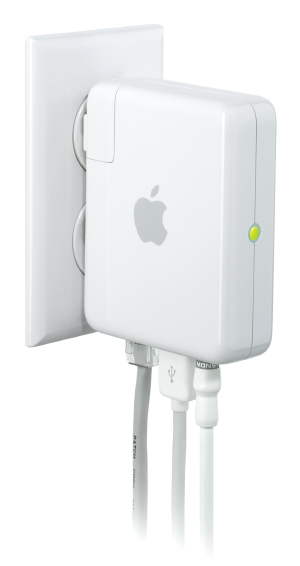
  The venerable AirPort Express now sports 802.11n, the fastest flavor
  of Wi-Fi, while weighing in at a light-on-the-pockets $99 in the
  United States. Apple released its revised compact base station
  today. The AirPort Express can also stream music from iTunes over a
  network through a built-in combo analog and digital optical audio
  port using AirTunes, a protocol that Rogue Amoeba's Airfoil extends
  to allow any streaming audio output from a Mac or Windows system
  (see "Airfoil Plays Home Audio Wirelessly," 2008-03-10).

<http://www.apple.com/airportexpress/>
<http://www.tidbits.com/resources/2008-03/airportexpress2.jpg>
<http://www.rogueamoeba.com/airfoil/mac/>
<http://db.tidbits.com/article/9492>

  The AirPort Express was introduced in 2004 as a cheaper alternative
  - at $129 - to the then-pricey AirPort Extreme Base Station
  (introduced the previous year at $299), while adding the audio
  streaming option. When the 802.11n AirPort Extreme was released in
  February 2007 at the current $179, the AirPort Express remained in
  the catalog with no changes, except a drop in price to $99.

  The 802.11n draft standard, currently certified by industry trade
  group The Wi-Fi Alliance, has reached enough equilibrium that you
  should be able to mix and match so-called "Draft N" devices with the
  certified label from different manufacturers. Increased range is a
  key advantage of 802.11n: multiple internal antennas can extend the
  distance by which you can get a useful signal by a factor of two to
  four (Apple is claiming just "up to...twice the range").

  The AirPort Express is among the cheapest devices to handle both the
  2.4 and 5 GHz frequency bands. The 5 GHz band is notably useful
  because of the relatively low usage by consumers; the 2.4 GHz band
  is in heavy use by Wi-Fi networks, shares its space with other
  purposes, and has less spectrum allotted to it than the 5 GHz band.

  The new version of the AirPort Express still has the same
  limitations as the old: the built-in USB port handles just a single
  printer that you can share over a network. This 802.11n model can't
  share hard drives or multiple printers; for that, you still need the
  $179 AirPort Extreme or a $299 (500 GB) or $499 (1 TB) Time Capsule.
  Apple promises that up to 10 users can access the base station at
  the same time; 50 can ostensibly simultaneously use an AirPort
  Extreme or Time Capsule.

  The AirPort Express also includes just 10/100 Mbps Ethernet, which
  will shave off the top possible speeds available with 802.11n. In my
  testing of the AirPort Extreme and Time Capsule with gigabit
  Ethernet, I found that using 100 Mbps Ethernet could shave as much
  as 50 percent off the the top rate and impose other internal speed
  limitations among Ethernet and Wi-Fi devices.


AT&T Offers Unlimited Voice Use iPhone Plan
-------------------------------------------
  by Glenn Fleishman <[EMAIL PROTECTED]>
  article link: <http://db.tidbits.com/article/9498>

  Ars Technica helped clear up some confusion related to the new
  unlimited voice calling plans offered by the four major cellular
  carriers in the United States (see "Three Cell Carriers Offer
  Unlimited Minutes for $100 per Month," 2008-02-19, and "Sprint
  Nextel Adds $90 and $100 Unlimited Monthly Plans," 2008-02-28).
  Initially, it seemed as if iPhone purchasers wouldn't be eligible
  for the $100-per-month rate AT&T was offering (exclusive of data and
  text messaging).

<http://db.tidbits.com/article/9467>
<http://db.tidbits.com/article/9478>

  David Chartier at Ars Technica heard from AT&T that there was a
  delay of more than two weeks between the general AT&T offer and its
  appearance on the Apple pricing page for the iPhone. A new $120 per
  month plan includes unlimited voice minutes, unlimited EDGE data,
  and a paltry 200 text messages. Another $20 per month gets you
  unlimited text messages. Chartier reports that customers with
  current AT&T plans or those that signed up during that period can
  call the carrier for a no-charge switch to the unlimited voice plan.
  Additional lines cost another $120 per month in a family plan.
  (Alaskans, sadly, can't get unlimited voice service from AT&T.)

<http://arstechnica.com/journals/apple.ars/2008/03/10/att-shows-iphone-some-unlimited-calling-love>
<http://www.apple.com/iphone/easysetup/rateplans.html#individual>


Apple Releases Updated AirPort Utility for Tiger, Leopard, Windows
------------------------------------------------------------------
  by Glenn Fleishman <[EMAIL PROTECTED]>
  article link: <http://db.tidbits.com/article/9494>

  AirPort Utility 5.3.1 is now available for Mac OS X 10.4 Tiger, Mac
  OS X 10.5 Leopard, and Windows XP and Vista. This is the first time
  that Tiger and Windows users can simply download the utility and
  install it. Up to now, you had to use an installer CD from supported
  hardware to obtain AirPort Utility, or install Leopard. AirPort
  Utility can configure any AirPort Extreme Base Station, AirPort
  Express Base Station, or Time Capsule. (The update was unavailable
  for several hours after it was initially posted, reappearing by
  Wednesday morning.)

<http://www.apple.com/support/downloads/airportutility531fortiger.html>
<http://www.apple.com/support/downloads/airportutility531forleopard.html>
<http://www.apple.com/support/downloads/airportutility531forwindows.html>

  The software first appeared with the 802.11n AirPort Extreme Base
  Station model released in February 2007, and the AirPort Express
  retail packaging was updated by mid-2007 to include it as well.
  AirPort Utility shipped as part of Leopard and comes with Time
  Capsule as well. The software is more neatly designed than its
  predecessor, AirPort Admin Utility, and reveals more configuration
  options even on older models.

  AirPort Utility can optionally install a software agent that runs in
  the background and monitors the network for the addition of USB
  drives connected to an AirPort Extreme Base Station or Time Capsule
  and for problems with base stations on the local network. It can
  also check automatically for updates to itself and firmware updates.
  AirPort Utility makes it much simpler to roll back to earlier
  versions of base station firmware when you encounter troubles.

  The most notable change starting with AirPort Utility 5.3 is the
  ability to set the Bonjour name of a base station separately from
  its descriptive name: choose the AirPort pane and in the Base
  Station or Time Capsule tab click Edit beneath the Name field.
  Formerly, you could set just one name that was used for both
  purposes. The descriptive name is used to identify the base station
  within AirPort Utility, but also to name its attached volumes.

  The Bonjour name is used to advertise the base station across the
  network and could be changed to something short and sweet or long
  and more technical. Wide-area Bonjour configuration is now found in
  the same place that you modify the device's Bonjour name. Wide-area
  Bonjour is ironically not yet widely supported; it's a way of
  publishing local networking information to a DNS server.

  I discuss AirPort Utility, wide-area Bonjour, and other
  AirPort-related subjects fairly extensively in my book, Take Control
  of Your 802.11n AirPort Extreme Network.

<http://www.takecontrolbooks.com/airport-n.html>


DealBITS Drawing: Win a Copy of IPNetMonitorX
---------------------------------------------
  by Adam C. Engst <[EMAIL PROTECTED]>
  article link: <http://db.tidbits.com/article/9507>

  Networking is one of those topics that generates a vast number of
  questions. How fast is my Internet connection? What IP addresses are
  in use on my network? How can I improve the performance of my
  wireless network by adjusting the position and orientation of my
  AirPort base station? Is my ISP on a DNS blacklist that's preventing
  my mail from getting through? Are there any services running on my
  Mac (and creating a security vulnerability) that I didn't realize
  were active? Is my server crashing regularly in the middle of the
  night?

  There are a variety of tools that can answer some of these
  questions, particularly if you're extremely comfortable at the Unix
  command line, but if you're a Mac user who prefers a graphical
  interface, a better option is Sustainable Softworks' IPNetMonitorX.
  Run by networking guru Peter Sichel, Sustainable Softworks has built
  up a reputation for creating networking tools that look deep into
  the guts of the Mac OS to answer all the above questions and many
  more.

<http://www.sustworks.com/site/prod_ipmx_overview.html>

  In this week's DealBITS drawing, you can enter to win one of two
  copies of IPNetMonitorX. Entrants who aren't among our lucky winners
  will receive a discount on IPNetMonitorX, so be sure to enter at the
  DealBITS page. All information gathered is covered by our
  comprehensive privacy policy. Remember too, that if someone you
  refer to this drawing wins, you'll receive the same prize as a
  reward for spreading the word.

<http://www.tidbits.com/dealbits/ipnetmonitorx/>
<http://www.tidbits.com/about/privacy.html>


Updated Paste Plain Text AppleScript for Word 2008
--------------------------------------------------
  by Joe Kissell <[EMAIL PROTECTED]>
  article link: <http://db.tidbits.com/article/9503>

  In "Word 2008 and the Paste Plain Text Dance" (2008-01-19), I
  described a tiny AppleScript I use in Word 2008 to paste text
  without style information, so that the pasted text adopts the style
  of whatever is around it. From the feedback I've received, the lack
  of a built-in command to do this with one click had irritated quite
  a few people. Since then, I've found that very occasionally - I
  can't quite discern a pattern to why or when - text pasted with my
  script takes on the default font of Word's Normal template
  (Cambria), rather than the actual font of the surrounding text.

<http://db.tidbits.com/article/9408>

  So I experimented further, and I've come up with a revised script
  that not only solves this problem but takes an entirely different
  approach that results in a shorter and more elegant solution. Thus
  far I haven't seen any occasions in which the new script fails. As
  before, you can either paste this into Script Editor or download the
  completed script, unzip it, and put it in ~/Documents/Microsoft User
  Data/Word Script Menu Items. Here's the script:

<http://www.tidbits.com/resources/2008-03/PastePlainTextII.zip>

    tell application "Microsoft Word"
        tell selection
            try
                set theClip to Unicode text of (the clipboard as record)
                type text text theClip
            end try
        end tell
    end tell

  Now, instead of counting the number of characters on the clipboard
  and moving the insertion point, the script uses the "type text"
  command to simulate typing, which automatically puts the insertion
  point in the right place.


SmartSleep Solves Safe Sleep Situation
--------------------------------------
  by Joe Kissell <[EMAIL PROTECTED]>
  article link: <http://db.tidbits.com/article/9502>

  Several months ago I complained in "Stewing Over Safe Sleep"
  (2007-07-30) that my laptop took far too long to go to sleep, thanks
  to Apple's default Safe Sleep settings; I also shared a shell script
  that I used to disable Safe Sleep and return my computer to a more
  sane state. After quite a bit of reader feedback, I followed that up
  a month later with "Safe Sleep Revisited" (2007-08-20), in which I
  presented a more sophisticated script that turns Safe Sleep on or
  off dynamically based on your current battery level. But I still
  felt it was a shame that it required command-line fiddling to
  achieve the sort of behavior I wanted.

<http://db.tidbits.com/article/9090>
<http://db.tidbits.com/article/9115>

  Now, thanks to a free preference pane by Patrick Stein called
  SmartSleep, those of us with Mac laptops that sleep in what we
  regard as the "wrong" way can tailor sleep settings to our liking
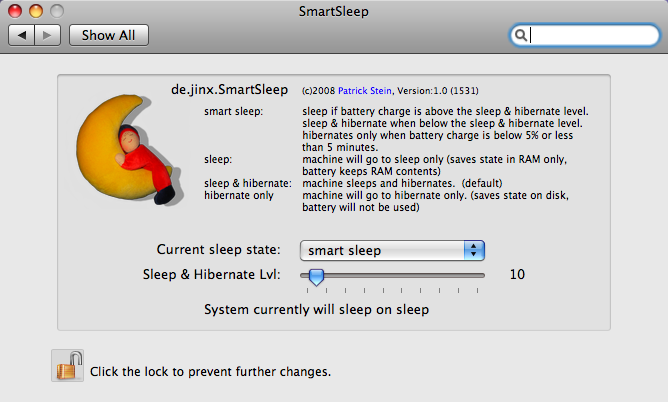
  with just a couple of clicks. SmartSleep lets you choose exactly
  what happens when you put your computer to sleep. The default
  behavior ("sleep & hibernate") is to save your computer's RAM to
  disk before sleeping - that's what I dislike because it takes too
  long, though it lets your Mac recover almost instantly from a
  complete loss of power. You can also choose "sleep" (the default on
  earlier Mac laptops) which sleeps immediately without copying RAM to
  disk; "hibernate," which saves the RAM and then powers down
  completely when the computer sleeps; and my favorite, "smart sleep,"
  which dynamically turns "hibernate and sleep" mode on or off
  depending on your battery's current charge (the threshold is
  adjustable with a slider), and goes straight to "hibernate" only
  when your battery's charge is less than 5 percent. In other words,
  the "smart sleep" setting goes a step further than my script did,
  and with a lot less effort. There's even a button to delete your
  sleepimage file, if any.

<http://www.tidbits.com/resources/2008-03/SmartSleep.png>
<http://www.jinx.de/SmartSleep.html>

  One tip: if you double-click the preference pane file to install it,
  Mac OS X asks whether you want to install it for all users, or just
  the current user. You _must_ select Install for All Users of This
  Computer, which puts the file in /Library/PreferencePanes - the only
  location in which it works properly.


Automating Text-to-Speech Video Narration
-----------------------------------------
  by Jeff Carlson <[EMAIL PROTECTED]>
  article link: <http://db.tidbits.com/article/9497>

  In last week's article about the Aperture 2.0.1 update and its
  improved AppleScript support, I mentioned in passing that the
  narration used in some accompanying demonstration videos was
  artificial - the product of Mac OS X text-to-speech technology
  instead of a human voiceover (see "Aperture 2.0.1 Update Enhanced by
  AppleScript," 2007-09-07).

<http://db.tidbits.com/article/9491>

  However, I made one mistake, for which I must apologize to the women
  living inside my computer: the voice used in the video is not
  Victoria. I made a guess based on listening to the ladies in the
  Speech preference pane, but Sal Soghoian, product manager for
  automation technologies at Apple, set me straight. She's Lucy, the
  female British English voice from Acapela (and available in
  AssistiveWare's Infovox iVox; see "Macs Speak Clearly with Infovox
  iVox," 2007-09-07).

<http://www.acapela-group.com/english-uk-35-text-to-voice.html>
<http://www.assistiveware.com/infovox_ivox.php>
<http://db.tidbits.com/article/9155>

  Soghoian noted that his training podcasts all employ non-human
  voices. To learn how he's making it work, check out the "Rendered
  Narrations" video at Automator.us.

<http://automator.us/leopard/video/>


Vista Woes Aired in Internal Microsoft Email
--------------------------------------------
  by Adam C. Engst <[EMAIL PROTECTED]>
  article link: <http://db.tidbits.com/article/9495>

  Early in my mother's email career at Cornell University, someone
  accidentally sent a rather embarrassing personal reply to a mailing
  list she was on. She was quite taken with the situation, and since
  then, whenever a story of misdirected email is told, she comes out
  with one of her favorite sayings: "Never put anything into email
  that you wouldn't want to appear on the front page of the New York
  Times."

  It turns out that you don't even have to make an addressing mistake
  for this to be true, as is amusingly related in Randall Stross's New
  York Times article "They Criticized Vista. And They Should Know."
  Stross relates quotes from users unhappy because their new PCs,
  advertised as being "Windows Vista Capable" via Microsoft stickers,
  can't actually run all versions of Vista and have numerous other
  problems with the latest version of Windows. But the catch is, these
  complaints aren't random Internet users moaning into the ether of a
  public discussion forum. Instead, they're written by Microsoft
  executives and are internal email discussions that have been
  subpoenaed as part of a class-action lawsuit complaining that those
  "Windows Vista Capable" stickers were misleading.

<http://www.nytimes.com/2008/03/09/business/09digi.html>

  At least one of the Microsoft executives had an opportunity to learn
  from my mother's favorite saying. Steven Sinofsky, Microsoft's
  senior vice president responsible for Windows, was a student at
  Cornell in the 1980s. And how do I know this? He was Tonya's dorm
  resident adviser during her freshman year. Yes, it's a small world.

  Ironically, my mother is now Cornell University Archivist, and I
  expect that contributions to the Cornell Archives will increasingly
  include email and other digital communications, just as they have
  for many years included personal letters. So consider the
  implications of what you write in email not only ending up in the
  New York Times, but also being preserved for posterity if the
  recipient donates his or her email to a digital archive.


Take Control News: Updated Help for Switching to the Mac
--------------------------------------------------------
  by Adam C. Engst <[EMAIL PROTECTED]>
  article link: <http://db.tidbits.com/article/9501>

  Author Scott Knaster and editor Caroline Rose, who have collectively
  written and edited for Apple, NeXT, Microsoft, and Google, have been
  hard at work on a major update to "Take Control of Switching to a
  Mac," and the fruits of their labors are now available for us all to
  enjoy.

<http://www.takecontrolbooks.com/switching.html?14@@!pt=TB919>

  What's to enjoy about switching if you already use a Mac? If you've
  switched only recently, you may still be having withdrawal symptoms
  that Scott and Caroline can assuage. Or, if you're anything like us,
  you periodically hear from far-flung friends and relatives who are
  considering switching and who would like to pick your brain on the
  best way to go about it. Instead of spending hours going over the
  basics, simply point them to this ebook, which is packed with advice
  that will take them every step of the way. Like all Take Control
  ebooks, it works fine on either a PC or a Mac, and it's easy to tote
  it around on a laptop, unlike the print tomes on the topic. The
  ebook covers what's cool (and what's not - we're not whitewashing
  anything here) about the Mac, setting up a new Mac, moving Windows
  files to the Mac, learning Mac basics from the perspective of
  someone who is already knows Windows, using networks and printers,
  five key Mac features no one should live without, and five
  especially useful tips. There's also a glossary of Macintosh terms
  that should help any switcher feel more comfortable with unfamiliar
  jargon.

  "Take Control of Switching to the Mac" 1.5 now covers switching from
  Windows XP or Vista to Mac OS X 10.4 Tiger or 10.5 Leopard. The
  differences in the various operating systems were sufficiently minor
  that Scott was able to wrap them all into one book without turning
  it into a cumbersome reading experience.


Important Updates Released for Office 2008 and 2004
---------------------------------------------------
  by Adam C. Engst <[EMAIL PROTECTED]>
  article link: <http://db.tidbits.com/article/9496>

  Two months after the initial release of Microsoft Office 2008 for
  Mac, Microsoft's Macintosh Business Unit has pushed out the first
  update to the software suite, fixing a wide variety of bugs.
  Refreshingly, Microsoft described the changes in an entirely
  reasonable amount of detail. The Microsoft Office 2008 12.0.1 Update
  requires Mac OS X 10.4.9 or later, and  you can get it from the
  Microsoft AutoUpdate utility or download it from Microsoft's Web
  site as a 114.1 MB download.

<http://support.microsoft.com/kb/948057>
<http://www.microsoft.com/downloads/details.aspx?FamilyId=8FE8C32A-6D7A-482B-97C6-42562F089EE4>

  (Microsoft updated the Office 2008 Microsoft AutoUpdate utility
  itself to version 2.1.1 back in February 2008, and you must have
  that version to be able to download future updates, according to the
  Entourage Help Blog. The Office 2008 version of Microsoft AutoUpdate
  is located in /Library/Application Support/MAU2.0, and can either
  update itself, or can be updated if you choose Check for Updates in
  the Help menu of any Office application. Keep in mind that the
  Office 2004 version of Microsoft AutoUpdate, which you must keep if
  you want it to continue to update Office 2004 applications
  automatically, is located in the /Applications folder.)

<http://blog.entourage.mvps.org/2008/02/office_2008_autoupdate_mau_updated_to_211.html>

  For Word 2008, Microsoft squashed the crash on first launch bug
  triggered when Word 2008 tried to import settings from previous
  versions of the program. Blank pages are no longer printed to
  certain printers, documents with Word 2007 for Windows equations
  open properly, citation deletion has been improved, and font
  substitution has been improved for people running on PowerPC-based
  Macs who are importing Word for Windows documents. And, in the
  "Mamma mia!" bug, Word 2008 no longer crashes when you try to check
  spelling and grammar when using an Italian keyboard.

<http://support.microsoft.com/kb/948489/>

  Excel 2008 sees overall stability improvements, better support for a
  second monitor positioned above the primary display, improved
  handling of ledger sheets, proper formatting of rotated text after
  deleting columns, a fix for the bug that caused the formatting of
  empty cells to change unexpectedly in .xls files, and increased
  reliability when copying and pasting linked data and charts. But
  most important for working stiffs who rely on Excel, the WORKDAY
  function now calculates correctly when used on a sheet that uses the
  Mac's default 1904 date system.

  With PowerPoint 2008, Microsoft improved the launch time and fixed a
  bug that caused some characters to be spaced too close together.
  More critically, the update eliminates a problem that caused
  possible data loss under Mac OS X 10.5 when saving a PowerPoint file
  to a network volume using the SMB protocol. Competing for importance
  is another fix for a bug that could cause a .ppt PowerPoint file
  containing a link to a sound file such as an MP3 to become corrupted
  and unreadable.

  Entourage 2008 features several enterprise-level improvements,
  including a fix for a problem that prevented Entourage from
  connecting to IBM Lotus Domino servers via IMAP, and improvements
  when synchronizing calendar events and contacts with Microsoft
  Exchange Server. All Entourage users will appreciate sounds working
  properly in Leopard, better import of rules and identities from
  Entourage 2004 (especially if you're Swedish!), improved stability
  when syncing via Sync Services, and better reliability in the
  Database Utility when rebuilding a large database.

  On the security side, Office 12.0.1 includes fixes for security
  vulnerabilities that could have allowed remote code execution if the
  user opened a specially crafted Excel file. This problem affects
  Windows versions of Excel as well, and for those using Excel 2000
  SP3 on Windows, Microsoft considers it of critical severity.

<http://www.microsoft.com/technet/security/bulletin/ms08-014.mspx>

  Lastly, the update fixes a problem in the Office Installer that
  caused Office 2008 program files to be improperly installed using
  User ID 502. Since the first user on a Mac is generally UID 501,
  this could have given the second user unwarranted permissions. Dan
  Frakes covered this issue well over at Macworld. Although
  Microsoft's otherwise-excellent release notes don't state this
  explicitly, the update does go through and change all the Office
  program files so they are owned by UID 0 rather than UID 502. (If
  this doesn't make much sense to you, either don't worry about it or
  read Brian Tanaka's "Take Control of Permissions in Leopard," which
  is what I did to figure out how to verify the change.)

<http://support.microsoft.com/kb/948488/>
<http://www.macworld.com/article/131822/2008/01/office2008issues.html>
<http://www.takecontrolbooks.com/leopard-permissions.html>

  The Microsoft Office 2004 11.4.1 Update fixes the Excel
  vulnerability along with another security vulnerability that could
  enable remote code execution if the user opened a malformed file. It
  too can be retrieved from Microsoft either via Microsoft AutoUpdate
  or as a 13.2 MB standalone download. Mac OS X 10.4.9 or later is
  required, as is a completely up-to-date version of Office 11.4.0,
  which is most easily acquired by running Microsoft AutoUpdate and
  installing updates repeatedly until you have the latest version.

<http://www.microsoft.com/technet/security/bulletin/ms08-016.mspx>
<http://www.microsoft.com/downloads/details.aspx?FamilyId=95DCEB37-B35F-46DB-B280-DB0F3B298AA9>


Bedding Down with a MacBook Air
-------------------------------
  by Angus Wong <[EMAIL PROTECTED]>
  article link: <http://db.tidbits.com/article/9499>

  I know, there must be a special place in hell for people who use an
  ultra-portable laptop in bed, but I don't care: it's like having Mac
  OS X served to you on a tray. The MacBook Air has a great feel to
  it, and its instant power on and sleep makes it easy to use in
  places where a longer startup or power down would be tedious. The
  MagSafe power adapter ingeniously mitigates dangers from a wayward
  blanket or pillow.

  The real bonus? The Air could also be useful on the road, not just
  in bed.

  I ordered my MacBook Air almost immediately after watching the
  Macworld Expo keynote in January. I'd been waiting ages for a
  lightweight computer that would lighten my backpack. I wasn't happy
  with any of the super-portable alternatives I'd toyed with before -
  including trying to work on business documents using only a Treo and
  a full-sized Bluetooth keyboard.

  I also hated the non-Macintosh sub-notebooks. These computers always
  seemed to waste cycles carrying out mysterious Windows tasks
  precisely when battery power was lowest and I most urgently needed
  to finish my work. And although I could run Linux on those tiny PCs,
  the operating system remains too rough around the edges for me to
  depend on. So, on the road, I'd been making do with a 12-inch iBook
  G4, my last PowerPC-based Mac before I bought my current main
  computer, a 17-inch MacBook Pro. The MacBook Pro is a fine machine,
  but I find it just too unwieldy to haul around town or work with in
  the compressed space of an airplane seat.

  When I saw Steve Jobs demo the MacBook Air, my gut told me it would
  be in heavy demand. So after some furious scrambling to justify the
  purchase to my soon-to-be-wife (with the main rationale being, it's
  mostly for her!), I quickly placed an order on Apple's Web site,
  figuring that would be the fastest way to get in line.

  It seemingly took ages for the MacBook Air to be delivered, almost
  as long as for the iPhone. While my fiancee was eager to embrace the
  sleek aesthetics, I was just as anxious for her to be rid of the
  previously sleek Sony Vaio so that I could break free of my role as
  in-house Windows technical support.

  While waiting, I signed on to write a review for TidBITS, figuring I
  could give my early-adopter perspective and hopefully help others
  figure out if it's the right machine for them. Eventually the Air
  came, and after we'd become familiar with it for a few weeks, I
  found myself faced with another challenge: the glut of reviews
  already out. I didn't want to produce yet another MacBook Air review
  because it would be neither fun to write nor of service to readers
  who had already pored over the other reviews.

  So, instead of trying to replicate what other reviewers have
  written, I'd suggest that if you're considering a MacBook Air, it's
  worthwhile not only to read the other reviews but also to consider
  the type of user you are, and whether a particular review addresses
  the points most salient to your use cases. The coverage I'd most
  recommend you start with is Gizmodo's Review Matrix, which
  summarizes the opinions of Walt Mossberg of the Wall Street Journal,
  Steven Levy of Newsweek, Ed Baig of USA Today, and David Pogue of
  the New York Times. For more detail, you can read Gizmodo's own
  review, as well as Jason Snell's analysis for Macworld.

<http://gizmodo.com/348361/our-macbook-air-review-matrix>
<http://ptech.allthingsd.com/20080124/apples-macbook-air-is-beautiful-and-thin-but-omits-features/>
<http://www.usatoday.com/tech/columnist/edwardbaig/2008-01-23-macbook-air-review_N.htm>
<http://www.newsweek.com/id/101113>
<http://www.nytimes.com/2008/01/17/technology/personaltech/17pogue.html?pagewanted=all>
<http://gizmodo.com/348753/macbook-air-review>
<http://www.macworld.com/article/131864/2008/01/macbookair.html>

  Having said that, allow me to present my take on the MacBook Air
  from the perspective of an owner with several weeks of real-world
  experience.


**Primarily a Secondary** -- I don't think the MacBook Air should be
  your sole Macintosh. If you already have another Mac, especially an
  Intel-based Mac, the Air can be a good second, a highly portable
  addition to your computing arsenal. But thanks to its relatively
  underpowered specifications, the MacBook Air may not deliver a
  satisfactory Macintosh experience, and even in comparison to Apple's
  other laptops, it suffers. The MacBook Pro balances portability and
  power perfectly, while the MacBook reduces cost and size
  considerably by giving up some power-user features.

  Trying to compose music in GarageBand or edit in iMovie on the
  MacBook Air could be quite frustrating due to the sluggish CPU
  speed. Large iPhoto and iTunes libraries will also be problematic,
  with the largest available internal storage maxing out at 80 GB.
  External storage options are constrained because of the absence of
  FireWire. No matter what the marketing folks say about USB 2.0, it
  is just not as fast as FireWire, and this is especially noticeable
  when the CPU is under heavy load.

  Remote Disc, Apple's wireless virtual optical disc access
  technology, is sweet but does not fully replicate the functionality
  of a true optical drive, making the physical SuperDrive a necessity
  if the MacBook Air is to be your only Macintosh. Only the SuperDrive
  can rip CDs and play DVDs on an Air.

  If you're vacillating between a MacBook Air and a non-Apple laptop,
  however, the MacBook Air is a better choice, even though it will be
  a constrained Macintosh experience. In terms of productivity, Mac OS
  X 10.5 Leopard is light-years ahead of any other operating system on
  the market - so much so that I can get more work done on my aging 1
  GHz iBook G4 than on any top-of-the-line Windows or Linux PC. (Of
  course, that's just me.) [Editor's note: Several TidBITS staffers
  use laptops of similar vintage without complaint, too!]

  But if you already have a Mac, even a PowerPC-based one, the MacBook
  Air could be an ideal second Mac. In my case, my primary work (and
  play) happens on my MacBook Pro. My fiancee uses the MacBook Air
  most of the time, largely for her email and a small iPhoto library.

  We store our main photographic repository on a 500 GB FireWire drive
  shared via my MacBook Pro, which is our main home Mac. The MacBook
  Air views the larger collection via Wi-Fi using iPhoto sharing, and
  we also centralize our music, videos, and work documents on that
  computer. This reduces the need for local storage on the MacBook
  Air. The Air's speedy 802.11n Wi-Fi combined with Mac OS X's file
  sharing makes remote file access a cinch.

  Leopard's Screen Sharing also acts as a powerful enabler for the
  MacBook Air. Case in point: I am in bed, with the MacBook Air on the
  bedside table. It being a lazy Sunday, my fiancee and I want to
  watch a movie without getting up. The movie file is on my MacBook
  Pro in the other room, and although it's turned on, iTunes isn't
  running. I flip open the MacBook Air. The LED backlit display
  instantly comes up, and AirPort connects in about three seconds. I
  open a new Finder window and locate the MacBook Pro. Clicking its
  icon gives me the option either to share its screen or browse its
  file structure. I choose Screen Sharing and, after authenticating,
  see my MacBook Pro interface virtualized on the MacBook Air. I
  launch iTunes on the MacBook Pro, make sure it's sharing media over
  the network, launch iTunes on the MacBook Air, and start watching
  the movie. All without leaving bed! Screen sharing on a MacBook Air
  brings new meaning to the term "thin client."

  More and more, I find myself using the MacBook Air as a remote
  control panel to my MacBook Pro to manage tasks like ripping DVDs
  and downloading new podcasts that are processor-intensive, lengthy,
  or require significant amounts of disk space. And when I'm not using
  the MacBook Air, it is the perfect computer for my fiancee, who does
  not need to run Final Cut Studio.

  Of course, any portable Mac could act as this sort of remote control
  (and you can share screens using free VNC tools if you don't have
  Leopard), but the MacBook Air is super portable and great-looking,
  and those are in fact the primary reasons I would recommend one. The
  portability factor goes beyond just the 3.0 pound (1.36 kg) weight,
  encompassing the incredibly thin and sleek profile and, for those
  who order it, a 64 GB solid state drive. Although the solid state
  drive adds $999 to the price for a drive that is 16 GB smaller than
  the standard 80 GB drive, it offers at least somewhat better
  performance, possibly slightly lower power consumption, and most
  importantly, less susceptibility to knocks that could crash a hard
  drive head against the disc platter. (No, I didn't spring for the
  solid state drive; it may be a sign of the future, but it's just not
  worth an extra grand.)

  As for the MacBook Air's appearance, spec-driven gear aficionados
  might scoff at such seemingly superficial factors, but many people
  are happy with any computer able to run standard applications and
  don't mind paying more (or getting less) in exchange for a more
  aesthetically pleasing design. I'd go further - the MacBook Air's
  design is a key aspect of the machine's ergonomics, which you
  experience every moment you use it. It's lightweight, making it easy
  to pick up and put down. It fits nicely on top of a stack of books,
  or inside a backpack, the way a small stack of paper does, and it's
  easily stowed or relocated (so much so that Newsweek writer Steven
  Levy believes his lost MacBook Air may have been recycled with the
  Sunday New York Times). The MagSafe connector makes recharging as
  easy as or even easier than recharging a cell phone or iPod. In
  fact, that's exactly how we use the MacBook Air at home. We recharge
  it when we need to but otherwise bring it around wherever we happen
  to be so we can check email or read news in the living room,
  kitchen, or bathroom, on the dining table, or in bed.

<http://www.newsweek.com/id/120052>

  Outside of the home, the story's a tad less positive from me. The
  MacBook Air is still a highly portable device, but I am unhappy with
  the battery life, especially because it's impossible to swap in
  another battery when one runs low. On average, I get about 3.5 hours
  of use between recharges, which is somewhat better than some
  reviewers have reported, but well less than the 5 hours Apple
  claims. With Wi-Fi off, I can watch two feature-length movies on the
  Air. With Wi-Fi on, I can rely on about 2 to 3 hours of computing
  time for important business tasks before I need to start thinking
  about rationing power consumption and recharging. As a result, I use
  the MacBook Air on the road as I did any other previous laptop.
  Consider the MacBook Air a transportable computer that you can take
  between home, office, and hotel, with a couple of hours of usability
  between electrical outlets at the airport or on an airplane (unless
  you buy the MagSafe airline adapter and happen to get a seat with
  power). Plus, if you can't fit all the files you need on the
  internal hard disk while traveling, you'll need to bring a couple of
  flash drives or an external hard disk (or enable disk use on your
  iPod). Of course, there's always just rolling the dice and betting
  you'll be able to get remote broadband access to your files.

  Here are a few other nits:

* I miss not having an Enter key on the right side of the Air's
  spacebar.

* I have been told, but cannot confirm, that the built-in iSight is
  less than 1.3 megapixel. However, I've found it more than adequate
  for video conferencing.

* Physical access to the USB port is hit-and-miss. Some plugs might
  not fit into the tiny gap between the computer frame and the lip of
  the flip-out cover. You can solve this with a USB extension cord or
  a portable USB hub, but then you have to remember to carry it with
  you at all times.

* I strongly recommend that you get the wired Ethernet dongle for
  hotel use, in case Wi-Fi is not offered or badly received in your
  room. Plus, if you're using the Remote Disc software, you'll want
  the best network speeds possible.

  One feature I've not yet talked about is the wonderful multi-touch
  trackpad. The Air has the biggest and best trackpad I've yet had the
  pleasure to use. While the multi-touch functions are cool, on a
  pragmatic level the only gestures I find myself using constantly are
  the two-fingered scrolling and two-fingered right-clicking. The
  three-fingered back/forward swipes seem to work only with Safari (I
  usually use Firefox because I need certain add-ons, such as those
  for Google Notebook and del.icio.us) and the pinch zooming is, for
  me, a bit hard to get hold of. I use the two-fingered rotate
  function occasionally, but our digital cameras seem to do well at
  advising iPhoto of the proper orientation for photos. But I don't
  mean to detract from the Air's trackpad. It is absolutely a delight
  to use and the two-fingered scrolling feels even easier and smoother
  than on my pre-multi-touch MacBook Pro. I hope Apple makes this
  trackpad standard on the MacBook models going forward as well.

  To wrap up, the MacBook Air is, like this review of it, not for
  everyone. If what I've written strikes a chord with you, and you can
  see yourself using the MacBook Air in similar ways, it may be the
  ideal machine for you. If my domestic antics with the new Mac seem
  frivolous, or if you're not sold on paying extra for less storage,
  less processing power, and less connectivity, then you should stick
  with a MacBook or MacBook Pro, either of which offer more bang for
  the buck. In other words, the MacBook Air is a bit like a finely
  tailored suit - elegant, perfectly form-fitting, and even exotic,
  but by no means a cost-effective way to dress for all seasons or all
  eventualities.

  As for my fiancee, she likes the new Mac. She enjoys using it and
  told me she hasn't found it any different from her old Sony Vaio.

  Being free of Windows headaches has never looked so good.

  [Angus Wong is a long-time Apple user and technology business
  professional. To read more of his offbeat industry ramblings, please
  drop by his blog.]

<http://www.anguswong.net/>


TidBITS Watchlist: Notable Software Updates for 17-Mar-08
---------------------------------------------------------
  by Adam C. Engst <[EMAIL PROTECTED]>
  article link: <http://db.tidbits.com/article/9508>

  We're overwhelmed with great software that we'd like to cover right
  away, but we're simply running out of time in any given week. Rather
  than let these excellent programs go unnoticed or make you wait
  until we get around to more thorough coverage, we're going to
  experiment with telling you about it in an article that we'll update
  throughout the week, and then close and publish in the next week's
  TidBITS issue. These articles won't attempt to be comprehensive, but
  will instead focus on just those applications we think you'll find
  most interesting. This week we'd like to present:


* Things 0.9 from Cultured Code adds recurring to-dos and projects to
  the task management utility, along with the capability to create and
  switch among multiple Things libraries.

<http://culturedcode.com/things/>

* SubEthaEdit 3.1 from TheCodingMonkeys adds more collaborative
  features to the text editor, including automatic port forwarding (so
  you don't need a static IP address to share a document), integration
  with iChat for collaboration invitations, and "friendcasting" that
  lets you connect with the friends of your friends.

<http://www.subethaedit.de/>

* PopChar 3.4 from Ergonis Software offers an enhanced search feature
  for finding special characters by name, Unicode number, or example.
  Also, a new contextual menu simplifies copying characters to the
  clipboard in various formats, automatic update checking has been
  added, and compatibility with Leopard and various applications has
  been improved.

<http://www.ergonis.com/products/popcharx/>

* WireTap Studio 1.0.5 from Ambrosia Software improves tagging
  support, supports up to 4 GB WAVE and AIFF files, and adds more bit
  rates to AIFF and AIFC.

<http://www.ambrosiasw.com/utilities/wiretap/>

* ScreenFlow 1.0.2 from Vara Software is a new program that looks to
  provide an excellent set of tools for recording, editing, and
  exporting screencasts, something that's been difficult in the past.

<http://www.varasoftware.com/products/screenflow/>

* Enclose 1.0.1 from Gracion Software lets you give files to anyone by
  simplifying the task of uploading files to your Web server or .Mac
  iDisk and sending a download link to one or more recipients via
  email.

<http://www.gracion.com/enclose/>

* Parallels Server Beta 2 from Parallels adds a full bare-metal
  hypervisor to run multiple virtual machines without relying on the
  host operating system, support for four-way symmetric
  multiprocessing, and experimental support for Intel VT-d for better
  hardware acceleration of virtual machines.

<http://www.parallels.com/en/products/server/beta/>

* The Missing Sync for Palm OS 6.0.3 from Mark/Space improves Palm
  synchronization with Bare Bones Software's Yojimbo 1.5, enhances
  handling of recurring tasks, and offers better support for custom
  field synchronization with Entourage, along with deletion of
  individual or selected calls and text messages from the archive on
  your Mac.

<http://www.markspace.com/missingsync_palmos.php>


Hot Topics in TidBITS Talk/17-Mar-08
------------------------------------
  by Jeff Carlson <[EMAIL PROTECTED]>
  article link: <http://db.tidbits.com/article/9505>

**Victoria voice for text to speech** -- A reader correctly points out
  that the voice of an Apple video mentioned in a recent article is
  not Victoria. That leads to pointers to other text-to-speech voices
  available for the Mac. (4 messages)

<http://emperor.tidbits.com/TidBITS/Talk/1896>


**Grooming a Jobs replacement?** During the recent Apple event to
  unveil the iPhone development roadmap, Steve Jobs shared the stage
  with other Apple employees. Does this signal an effort to find
  someone to step into the CEO's shoes at some point? (And really, is
  Jobs actually a good presenter?) (11 messages)

<http://emperor.tidbits.com/TidBITS/Talk/1897>


**Cox.net Will Not Send from iPhone** -- Sending email from a reader's
  iPhone abruptly stopped working. Does the problem lie with his
  provider, or a technical glitch? (23 messages)

<http://emperor.tidbits.com/TidBITS/Talk/1898>


**Forcing wireless to connect on 802.11a** -- The AirPort Extreme base
  station supports the 802.11a variation of wireless networking, but
  how do you actually take advantage of it? (2 messages)

<http://emperor.tidbits.com/TidBITS/Talk/1899>


**Anyone has experience with Cisco VPN?** A reader asks for help in
  configuring a Cisco virtual private network, and of course the
  TidBITS Talk community is able to provide suggestions. (7 messages)

<http://emperor.tidbits.com/TidBITS/Talk/1900>


**iPod Touch as Palm Replacement** -- Not so long ago the idea of
  replacing a Palm organizer with an iPod would have been ridiculous.
  Now, the iPod touch may be a viable stand-in. (8 messages)

<http://emperor.tidbits.com/TidBITS/Talk/1901>


**My "loaded" Mac Pro Intel Tower overheats** -- How hot is too hot? A
  Mac Pro with all of its expansion ports occupied starts to behave
  erratically, leading a reader to ask about cooling options. (1
  message)

<http://emperor.tidbits.com/TidBITS/Talk/1902>


**Can't verify disk from boot volume** -- Early versions of Mac OS X
  10.4 did not allow Disk Utility to perform a Verify Disk operation
  on the boot volume, but versions 10.4.5 and later do. (4 messages)

<http://emperor.tidbits.com/TidBITS/Talk/1904>


$$

This is TidBITS, a free weekly technology newsletter providing timely
news, insightful analysis, and in-depth reviews to the Macintosh and
Internet communities. Feel free to forward to friends; better still,
please ask them to subscribe!

Non-profit, non-commercial publications and Web sites may reprint or
link to articles if full credit is given. Others please contact us. We
do not guarantee accuracy of articles. Caveat lector. Publication,
product, and company names may be registered trademarks of their
companies. TidBITS ISSN 1090-7017.

Copyright 2008 TidBITS: Reuse governed by Creative Commons license.

Contact us at:    <[EMAIL PROTECTED]>
TidBITS Web site: <http://www.tidbits.com/>
License terms:    <http://www.tidbits.com/terms/>
Full text search: <http://www.tidbits.com/search/>
Subscriptions:    <http://www.tidbits.com/about/list.html>
Account help:     <http://www.tidbits.com/about/account-help.html>


--
If you want to unsubscribe or change your address, use this link
http://emperor.tidbits.com/webx?unsub@@.3c557dc4!u=306a67f9