TidBITS#920/24-Mar-08
=====================
  Issue link: <http://db.tidbits.com/issue/920>
  The Mac platform is not magically immune to the threat of viruses
  and other malware, but should you install antivirus software to stay
  protected? Security expert Rich Mogull weighs in on when antivirus
  tools are right for Mac users. In other news, Apple finally appears
  to have enabled Time Machine backups to a hard drive connected to an
  AirPort Extreme base station with the latest AirPort updates, and
  Adam passes along information about the popularity of the iPhone in
  countries that lack an official carrier. The staff has also been
  busy in other venues: you can watch Adam's Hacking the Press talk
  from the C4 conference; Glenn Fleishman chats in a podcast with Clay
  Shirky, author of the book "Here Comes Everybody"; and Adam
  speculates about the iPhone SDK on the MacNotables podcast. Also
  this week, Michael Ash explains why software updates tend to be
  multi-megabyte downloads, Adam explains his workflow for verifying
  Web links in PDF files, we look at the new Safari 3.1 and Photoshop
  Elements 6, and we release "Take Control of iWeb: iLife '08
  Edition." Lastly, in the TidBITS Watchlist, we note updates to
  Airfoil, Audio Hijack Pro, Nicecast, PDFpen, Dejal Narrator,
  BeLight's Disc Cover, Toast 9 Titanium, 1Password, and Geophoto,
  along with the release of Security Update 2008-002.

Articles
    AirPort Update Extends Time Capsule, Adds AirDisk Support
    Adobe Ships Photoshop Elements 6 for Mac OS X
    iPhone the Hot Ticket Item in... Syria?
    DealBITS Discount: Save 25% on IPNetMonitorX
    Discussing the Importance of the iPhone SDK on MacNotables
    Watch Adam's Hacking the Press Talk from C4
    Safari 3.1 Enhances Performance and Web Standards Support
    The Internet Organizes Itself: Here Comes Everybody
    Why Do Simple Updates Require Big Downloads?
    Verifying Web Links in PDF Files
    Should Mac Users Run Antivirus Software?
    Take Control News: Produce Professional-Looking Sites with iWeb
    TidBITS Watchlist: Notable Software Updates for 24-Mar-08
    Hot Topics in TidBITS Talk/24-Mar-08


------------ This issue of TidBITS sponsored in part by: --------------

* READERS LIKE YOU! Support TidBITS with a contribution today!
  <http://www.tidbits.com/about/support/contributors.html>
  Special thanks this week to Gene Reeves, Paul Johnson,
  Rick Cricow, and Samuel S. Phillips for their generous support!

* Fetch Softworks: Fetch 5.3 has a new look for Leopard,
  and new support for Leopard technologies. And you can
  upload with the oldest technology of all, Copy and Paste!
  Download your free trial version! <http://fetchsoftworks.com/>

* WebCrossing Neighbors Creates Private Social Networks
  Create a complete social network with your company or group's
  own look. Scalable, extensible and extremely customizable.
  Take a guided tour today <http://www.webcrossing.com/tour>

* MARK/SPACE, INC: The Missing Sync provides the very best in
  synchronization for Mac users with BlackBerry, Palm OS, or
  Windows Mobile devices. Integrates with Address Book, iCal,
  Entourage, iPhoto, and iTunes. <http://www.markspace.com/bits>

* VMware Fusion. The most seamless way to run Windows on your Mac.
  Backed by nearly a decade of proven virtualization technology.
  Try VMware Fusion today for free, or order online for only $79.
  Visit: <http://www.tidbits.com/about/support/vmware-fusion.html>

* StuffIt Deluxe 12: breakthrough compression of MP3 files, PDFs,
  iWork and MS Office files! Reduce JPEG file sizes with no loss in
  quality, burn to CD/DVD, back up archives to iDisk and more. Buy
  today for only $59.99! <http://www.stuffit.com/mac/deluxe/tb/>

* ConceptDraw Business Suite: Take control over your business
  workflow with this powerful set of tools. Mind Mapping, Project
  Management, Business Graphics - all easily created on your Mac!
  Right now Special Price: $449! <http://www.conceptdraw.com/tb>

* DealBITS: Get the word out about your product AND generate sales!
  It's easy: give away a few copies and offer a discount to entrants.
  A DealBITS drawing is quick to set up and can easily pay for itself.
  For more info and rates, visit <http://www.tidbits.com/dealbits/>.

---------- Help support TidBITS by supporting our sponsors ------------


AirPort Update Extends Time Capsule, Adds AirDisk Support
---------------------------------------------------------
  by Glenn Fleishman <[EMAIL PROTECTED]>
  article link: <http://db.tidbits.com/article/9517>

  The 7.3.1 firmware update for Time Capsule and AirPort Extreme Base
  Station network gateways, released last week, adds two significant
  improvements, neither of them mentioned in Apple's release notes.
  You can now archive the internal drive in a Time Capsule appliance -
  copying its contents, including backup images of networked systems -
  to an externally connected USB drive at full USB speeds, without
  round-tripping the backup through a mounted AFP server. And,
  apparently, USB-connected drives on an AirPort Extreme Base Station
  are available for Time Machine backups in Mac OS X 10.5 Leopard.

<http://www.apple.com/support/downloads/timecapsuleandairportbasestation80211nfirmware731.html>

  The firmware update (labeled "Time Capsule and AirPort Base Station
  (802.11n) Firmware 7.3.1") has no real release notes, and the same
  is true for a matched update, Time Machine and AirPort Updates 1.0,
  released earlier in the day. The former updates three models of base
  station (Time Capsule and the two 802.11n models), while the latter
  updates Leopard. The notes mention bug fixes, driver fixes, and
  compatibility improvements without enumeration or description. One
  security improvement that affects just the AirPort Extreme Base
  Station with 802.11n (both models) is mentioned and detailed, having
  to do with maliciously crafted AFP packets.

<http://www.apple.com/support/downloads/timemachineandairportupdatesv10.html>
<http://support.apple.com/kb/HT1226>

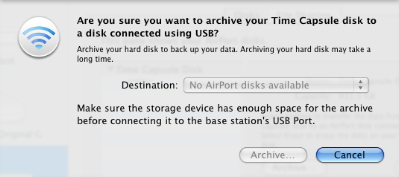
  The Archive option, found in the Disks tab of AirPort Utility 5.3.1
  (available for download for Mac OS X 10.4 Tiger, Leopard, and
  Windows XP/Vista) should ameliorate a primary flaw in the Time
  Capsule conception: it has an internal drive that you could
  previously copy only over the network via AFP, which can be slow.
  This new option lets you archive the drive, copying its contents to
  a drive you connect via USB. The internal drive - like all networked
  Time Machine backup volumes - contains sparse disk images with the
  Time Machine backups of networked Leopard volumes; it can also hold
  other data, because Time Capsule shares the internal drive as an
  ordinary volume over AFP. These sparse images can be mounted like
  normal disk images, or used to restore systems via Time Machine,
  move data with Migration Assistant, or set up a system with the
  Leopard installation DVD.

<http://www.tidbits.com/resources/2008-03/tc_archive_small.jpg>

  The other improvement is a little sketchier. Before Leopard shipped,
  Apple listed a Time Machine feature that would let you back up
  Leopard systems to a USB drive connected to an 802.11n AirPort
  Extreme Base Station. When Leopard appeared, that feature was
  missing; no explanation has ever been forthcoming from Apple as to
  why (see "Time Capsule and Its Associated Rage Factor," 2008-01-17).
  Networked backups using Time Machine work only with AFP volumes that
  are shared by Leopard clients or Leopard Server. Time Capsule's
  externally connected USB drives are also valid target volumes, which
  added insult to injury.

<http://db.tidbits.com/article/9407>

  Without any fanfare, Apple appears to have added AirPort Extreme
  external drive backups in this firmware release. If you open the
  Time Machine preference pane in System Preferences, you can click
  Change Disk and see all networked AFP volumes and Time Capsule
  volumes. If you first mount an AFP volume from an AirPort Extreme
  gateway, that volume is now a valid selection for Time Machine; this
  wasn't the case before this update.

  It's unclear if this was intentional or an error. If intentional,
  it's odd that you can't see the base station just as Time Capsule
  shows up; if unintentional, it's an odd slip for a contentious issue
  with base station buyers.


Adobe Ships Photoshop Elements 6 for Mac OS X
---------------------------------------------
  by Glenn Fleishman <[EMAIL PROTECTED]>
  article link: <http://db.tidbits.com/article/9522>

  A major overhaul of Photoshop Elements for Mac OS X shipped today,
  Adobe Systems announced. Version 6 of the software reaches parity
  with the same-numbered Windows version, released last year.
  Photoshop Elements 6 offers  an interface - almost identical across
  Mac OS X and Windows versions - which is simpler than Photoshop's
  and includes a number of useful new features for those who don't
  want to master Photoshop.

<http://www.adobe.com/products/photoshopelmac/>

  Photomerge is a fascinating feature that I wouldn't have believed
  had I not seen fellow TidBITS editor Jeff Carlson working with it.
  It allows you to take two or more similarly composed images and mark
  the best parts of each. The software then creates a merged image
  that appears seamless. Jeff used it to create a composite photo of
  his nephew and niece who were too wiggly to sit still at the same
  time. Photoshop Elements 6 also improves a magic brush option for
  painting a selection by color, has better automated tools for
  adjusting exposure, and has a batch adjustment option.

  (Jeff, by the way, recently completed "Photoshop Elements 6 for
  Windows: Visual QuickStart Guide." Since the Mac OS X and Windows
  version are nearly identical in features and interface, have no
  fears about buying this book to get up to speed on the new Mac
  release. The most significant difference between the two platforms
  is in organizing photos: The Windows version uses a separate mode
  called the Organizer to manage and tag images; the Mac version uses
  Bridge CS3 to handle those tasks. The next biggest difference? The
  appearance of the document title bar!)

<http://www.amazon.com/dp/0321524632/?tag=tidbitselectro00>

  Photoshop Elements 6 requires a Mac with a PowerPC G4 or G5 or Intel
  multi-core processor - that leaves out one model of Mac mini? - and
  Mac OS X 10.4.8 or later. It's available as a universal binary. It
  costs $89.99 retail, or $69.99 when upgrading from any version of
  Photoshop Elements (the last was version 4), Photoshop Album,
  Photoshop LE, or Adobe PhotoDeluxe.

<http://www.adobe.com/products/photoshopelmac/upgrade/>


iPhone the Hot Ticket Item in... Syria?
---------------------------------------
  by Adam C. Engst <[EMAIL PROTECTED]>
  article link: <http://db.tidbits.com/article/9514>

  TidBITS reader Julian Allason reports that the iPhone has spread
  well beyond Apple's supported countries, even to places that might
  not come to mind as Apple's next major iPhone launch market, like
  Syria. Julian writes, "You will be amused to hear that the hottest
  topic everywhere I have been in Syria is - the iPhone. Almost
  everyone recognises mine and rushes over (well, not the women, who
  merely ululate from a distance). It is freely available with, I
  think, v. 1.1.4 unlocked. Prices are US$600-625 with a 'bulletproof'
  guarantee! The two Syrian cell networks offer very cheap minutes,
  but then prices outside the Four Seasons Hotel are low here. Where
  do these iPhones come from? One theory is that the iPhones originate
  with U.S. forces in Iraq and come back on the empty convoys of
  lorries."

  After this piece was posted on the Web and I commented about it on
  Twitter, I heard from readers in other countries as well. In Kenya
  the iPhone goes for about $1,000, and in Brazil (traditionally a
  Macintosh stronghold), an estimated 10,000 to 30,000 iPhones have
  been sold unofficially.

  Internationally, BusinessWeek estimates that between 800,000 and
  1,000,000 iPhones have been sold on the gray market, and the Market
  Share site by Net Applications shows that Web browsing from the
  iPhone is taking place in nearly every country at rates that likely
  exceed the amount used by travelers.

<http://www.businessweek.com/technology/content/feb2008/tc20080211_152894.htm>
<http://marketshare.hitslink.com/report.aspx?qprid=21>


DealBITS Discount: Save 25% on IPNetMonitorX
--------------------------------------------
  by Adam C. Engst <[EMAIL PROTECTED]>
  article link: <http://db.tidbits.com/article/9509>

  Congratulations to Gabriel Jolivet at gmail.com and Simon Horn at
  gmail.com, whose entries were chosen randomly in last week's
  DealBITS drawing and who received a copy of the $60 IPNetMonitorX.
  If you didn't win, don't fret, because you can save 25 percent on
  IPNetMonitorX; it's only $45 through 03-Apr-08 if you use coupon
  code "TidBitsPromo" when ordering from Sustainable Softworks. Thanks
  to the 984 people who entered this DealBITS drawing, and we hope
  you'll continue to participate in the future!

<http://db.tidbits.com/article/9507>
<http://www.sustworks.com/site/prod_ipmx_overview.html>


Discussing the Importance of the iPhone SDK on MacNotables
----------------------------------------------------------
  by Adam C. Engst <[EMAIL PROTECTED]>
  article link: <http://db.tidbits.com/article/9516>

  On a recent two-part MacNotables podcast, Chuck Joiner and I talked
  for a while about the iPhone SDK. In the first part, we examined the
  level of control Apple is exercising, the positive response from
  developers, and the future of the jailbreaking community. In the
  second part, we talked about the business model of the iPhone App
  Store, the enterprise aspects of the announcement, and why the
  iPhone makes sense mostly in urban environments.

<http://www.macnotables.com/wordpress/macnotables-813-adam-engst-and-chuck-joiner-analyze-the-iphone-sdk-announcement/>
<http://www.macnotables.com/wordpress/macnotables-814-the-iphone-as-a-new-platform-the-iphone-apps-store-and-more-with-adam-engst-and-chuck-joiner/>


Watch Adam's Hacking the Press Talk from C4
-------------------------------------------
  by Adam C. Engst <[EMAIL PROTECTED]>
  article link: <http://db.tidbits.com/article/9515>

  Back in the late 1990s, I came up with an idea for a presentation
  that I, as a non-programmer, could give at the MacHack programmers
  conference. I called it "Hacking the Press," and it was designed to
  explain to software developers running their own businesses how to
  work with the press. It was always big fun to give, since I made
  sure to ask for an open-ended block of time, and my session usually
  went at least 3 hours, or until people stopped asking questions. I
  later turned some of the contents of the talk into a series of
  articles, and I've heard from many developers over the years that my
  talks and articles were helpful to them as they launched products.
  But with the demise of MacHack (and its renamed form, ADHOC), it had
  been a while since I'd given the talk.

<http://db.tidbits.com/series/1172>

  That's when I got email from Wolf Rentzsch, with whom I'd shared a
  room one year at MacHack and who was the mastermind behind the C4
  conference for independent developers that served much the same need
  as MacHack (see "C4 Conference Rethinks MacHack," 2007-08-20). Wolf
  wanted me to reprise my Hacking the Press talk at C4, and I jumped
  at the chance. I had a great time at C4, but I didn't attempt to
  describe the sessions in great detail, given that many of them were
  over my head anyway. Since then, however, Wolf has gradually been
  releasing the videos of the talks on Viddler, and the video of my
  talk is now up for viewing along with the rest. Be sure to watch Wil
  Shipley's talk on marketing as well, if only for his opening joke
  about the iPhone (I disagree with some of Wil's advice, but it's a
  hilarious talk).

<http://db.tidbits.com/article/9121>
<http://www.viddler.com/explore/rentzsch/videos/12>
<http://www.viddler.com/explore/rentzsch/videos/4/>


Safari 3.1 Enhances Performance and Web Standards Support
---------------------------------------------------------
  by Adam C. Engst <[EMAIL PROTECTED]>
  article link: <http://db.tidbits.com/article/9510>

  Boasting about blazing performance, Apple has released Safari 3.1,
  the latest version of the company's free Web browser for Mac OS X
  and Windows. In its press release, Apple claims that Safari 3.1 is
  1.9 times faster than Internet Explorer 7 and 1.7 times faster than
  Firefox 2, at least on a 2.4 GHz Intel Core 2 Duo-based iMac with 1
  GB of RAM running Windows XP. What, you're not running Windows XP as
  the primary operating system on your iMac? Luckily, on the main
  Safari page, Apple presents other benchmarks run under Mac OS X
  10.5.2 claiming that Safari loads pages up to 3 times faster than
  Firefox 2, and executes JavaScript up to 4.5 times faster than
  Firefox. JavaScript performance is an increasingly big deal as more
  and more sites provide interactivity in their interfaces by using
  JavaScript. Unfortunately, nowhere does Apple compare Safari 3.1's
  performance with that of Safari 3.0, so there's no telling how much
  of a speed boost current Safari users might see.

<http://www.apple.com/pr/library/2008/03/18safari.html>
<http://www.apple.com/safari/>

  Apple also made a big push to support cutting-edge Web standards,
  enhancing Safari 3.1 to support CSS Web fonts that let designers
  specify fonts that will be downloaded on the fly as needed, CSS
  animations, HTML 5 media, and HTML offline storage. Improved too is
  Safari's support for dynamic SVG (Scalable Vector Graphics) images.
  (See the Safari Product Overview PDF for more details.) Along with
  those features, Safari 3.1 includes fixes for a number of security
  vulnerabilities. Of course, since lots of other browsers don't
  support these standards, Safari's support is merely a welcome paving
  stone on the road to future Web improvements.

<http://images.apple.com/safari/docs/Safari_Product_Overview.pdf>
<http://docs.info.apple.com/article.html?artnum=307563>

  Of particular interest to us is HTML 5 offline storage support,
  which should help to enable Web applications like Google Docs or
  Zoho Writer to provide optional offline access to data, storing it
  in a local SQLite database. Google has started to address this
  problem with Google Gears, an open-source approach to offline
  storage that, on the Mac, works only in Firefox. The two are
  similar, but incompatible, though there may be ways of bringing them
  together.

<http://webkit.org/blog/126/webkit-does-html5-client-side-database-storage/>
<http://glazkov.com/blog/html5-gears-wrapper/>

  Safari 3.1 is available via Software Update or as a 40 MB standalone
  download. Panther users need not bother clicking through, since
  Safari 3.1 requires Mac OS X 10.4.11 or later. Presumably due to the
  fixes in Safari's underlying WebCore and WebKit frameworks, which
  are used by a wide variety of programs, the update does require a
  restart.

<http://www.apple.com/support/downloads/safari31.html>


The Internet Organizes Itself: Here Comes Everybody
---------------------------------------------------
  by Glenn Fleishman <[EMAIL PROTECTED]>
  article link: <http://db.tidbits.com/article/9512>

  I started using the Internet in one of its early forms in the late
  1980s, and full time in 1993 just as it started to commercialize. It
  was clear from the earliest days of my use that putting tens of
  thousands of people together in a medium that didn't restrict the
  way in which we connected would lead to emergent behavior. That is,
  there would be no way to predict the forms of communication or the
  new kinds of interaction that people would engage in with an
  unfettered ability to exchange information, record that information,
  and build upon it.

  Clay Shirky has been thinking about these issues for over a decade
  as a journalist, consultant, and professor, currently at New York
  University. His book "Here Comes Everybody" (The Penguin Press,
  2008) explains his views on the power of individuals to organize
  into groups without companies, hierarchies, or outside efforts.
  Without borders, with few limits, and with almost no social
  approbation, the Internet is disruptive in ways that are just now
  being understood. It's not just about MySpace, ecommerce, and
  Google; rather, students protesting in Belarus, anorexics
  self-un-helping each other, and ex-Jehovah's Witness members meeting
  are all part of the new mix.

<http://www.shirky.com/bio.html>
<http://www.amazon.com/dp/1594201536/?tag=tidbitselectro00>

  In his book, Clay recounts many anecdotes about how groups of people
  behave in new ways, and he expands upon these stories with
  statistics, research, and observation. For instance, he notes that
  when the TV network that aired Buffy the Vampire Slayer decided to
  shut down a long-running Buffy discussion board, the community
  raised their own funds to build a system to continue their
  existence. Shirky notes in the book that the group had one request:
  "no major changes." The group didn't want to disrupt the way in
  which they had learned to communicate, using simple but effective
  tools for discussion.

  I sat down with Clay on 14-Mar-08 to talk about the book for a short
  article that appeared in the Seattle Times, focused on the business
  side of his book. However, the Seattle Times allowed me to publish a
  podcast of our roughly 40-minute conversation.

<http://seattletimes.nwsource.com/html/businesstechnology/2004286876_btshirky17.html>
<http://www.tidbits.com/podcasts/Clay_Shirky_Interview.m4a>

  Shirky and I were at Yale together, and we both majored in art, Clay
  four years ahead of me. We knew each other in passing then from
  working on a play (he lighting, me sound), and were amused to
  discover our mutual interest in this topic several years ago. I tend
  to write more about the how-to and underpinnings; Clay about the
  bigger picture.


Why Do Simple Updates Require Big Downloads?
--------------------------------------------
  by Michael Ash
  article link: <http://db.tidbits.com/article/9519>

  [Editor's note: I was foolhardy enough to ask Michael Ash, a
  software engineer at Rogue Amoeba, why the company kept pushing me
  10 MB updates of Airfoil for every micro-release. After reading my
  comment on the company's blog entry about an update to their
  products, Mike sent me an expanded explanation that slightly boggled
  me.  He agreed to adapt it into this article, which explains why we
  download so much. Consider this a look inside the sausage factory of
  software development. -Glenn]

<http://www.rogueamoeba.com/company/staff/>
<http://www.rogueamoeba.com/utm/2008/03/19/security-update-2008-002-compatibility-fix/>

  It would be nice to push out just tiny update packages to our
  customers when we make minor updates to our software, but it's not
  practical. Because we've built the Sparkle software updater into our
  system, we've traded a lot of ease-of-use for our users and
  ourselves for the extra overhead. It works out in the end. There are
  three approaches for integral software updaters that we could have
  taken, and we chose the last of them.

<http://sparkle.andymatuschak.org/>

  At the very bottom of the options, you have true binary "diff"
  updates, where only the changed portions of the changed files are
  included. This can be done by preprocessing the differences between
  the new version and the previous version, but this approach is
  unreliable and tough to pull off well. On Leopard, adding an
  unsigned program to the firewall list will alter the binary, causing
  problems for any such delta or difference-based updater. The same is
  true for any other modification or inadvertent corruption to the
  program, as the updater is now trying to apply changes to a file
  which doesn't match. An alternative approach is to add more
  server-side smarts so that the updater computes the differences on
  the fly using checksums - a kind of shorthand that uniquely
  identifies a stream of data - like the Unix utility rsync does. This
  ensures that you always end up with what we have. But more server
  smarts means more server resources and maintenance. At this point,
  carrying out updating using plain HTTP stops working and you have to
  use fancier protocols, which means more points of failure and more
  cases in which users need help.

  As an intermediate level, you have file-granular updates, where the
  updater  downloads only changed files. I've personally written two
  such systems at other companies, and they work decently well. The
  server gives the application the capability to download each file
  individually, something which can be done with a regular Web server,
  and a list of files and checksums. The app compares the checksums
  against what it has stored locally, downloads anything that has
  changed, and you end up with an updated program. The problem with
  this approach is that the largest files in an application are also
  those which are virtually guaranteed to change with any new build:
  the actual program binaries themselves. This intermediate approach
  saves you from having to re-download any resources which haven't
  changed from one release to the next, but the savings aren't as big
  as you might hope.

  And then at the end you have whole-app updaters such as Sparkle,
  which is what we use (for more on Sparkle, see "Sparkle Improves
  Application Update Experience," 2007-08-20). The Mac developer
  community seems to have more or less standardized around Sparkle
  these days. I'm amazed at how often I open an application and find
  that it's using Sparkle to keep itself up to date. Aside from the
  programs where I implemented it myself, I don't recall the last time
  I saw an application using a more granular updater. Even Apple seems
  to publish monster updates for their applications. Apple does use
  more granular packages for sequential updates to the operating
  system itself, but in some situations, these seem to cause problems
  that are fixed by reinstalling using the latest Mac OS X combo
  updaters.

<http://db.tidbits.com/article/9122>


Verifying Web Links in PDF Files
--------------------------------
  by Adam C. Engst <[EMAIL PROTECTED]>
  article link: <http://db.tidbits.com/article/9500>

  Our ebooks have tons of Web links in them, and for a long time, one
  of the most tedious production tasks was verifying that the links
  were still valid since the author added them in the manuscript. In
  an effort to simplify this task, I came up with the following
  process.

  Unfortunately for those trying to replicate it, my process relies on
  an expensive plug-in, the $699 Aerialist Pro from ARTS PDF. I
  initially purchased Aerialist Pro because it can generate PDF links
  from page numbers to the associated pages in a PDF; I used it to
  link up all the page numbers in the index of the ebook version of
  iPhoto '08: Visual QuickStart Guide. That task would have taken many
  hours using the astonishingly bad linking tool in Acrobat
  Professional 8, so I was able to justify the price. On the Mac,
  Aerialist Pro runs only in Acrobat Professional 7, so I was glad I
  kept that version around, and copies still seem to be available via
  Amazon.com.

<http://www.artspdf.com/arts_pdf_aerialist_pro.asp>
<http://www.takecontrolbooks.com/iphoto7-vqs.html>
<http://www.adobe.com/products/acrobatpro/>
<http://www.amazon.com/dp/B00069E7IQ/?tag=tidbitselectro00>

  Aerialist Pro has other useful features, including the capability to
  produce a report listing all external links, which gave me what I
  needed to develop the rest of my process. (Unhappily, another
  Aerialist Pro feature that I would love to use - the capability to
  set link properties like zoom level and appearance en masse - turns
  out to have a bug that causes problems with documents viewed in
  Continuous mode. ARTS PDF has confirmed the bug, and I hope they fix
  it, along with enabling Aerialist Pro to work inside Acrobat
  Professional 8.)

  Aerialist Pro's external link report is itself a PDF, so my first
  step is to save the report from Acrobat as a plain text file, called
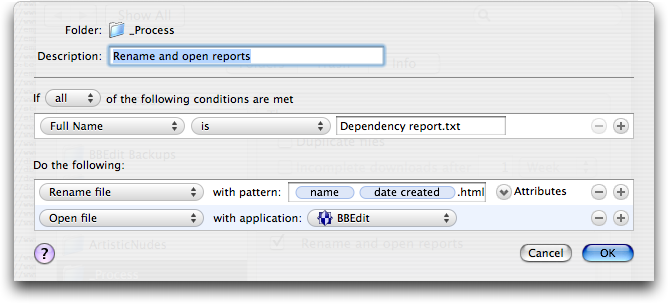
  Dependency Report.txt (the extension isn't optional). But in the
  end, I need a .html file, so I set up Noodlesoft's Hazel to look for
  a file called Dependency Report.txt in a specific folder, rename it
  uniquely and with a .html extension, and open it in BBEdit.

<http://www.noodlesoft.com/hazel.php>
<http://www.tidbits.com/resources/2008-03/PDF-link-checking-Hazel.png>

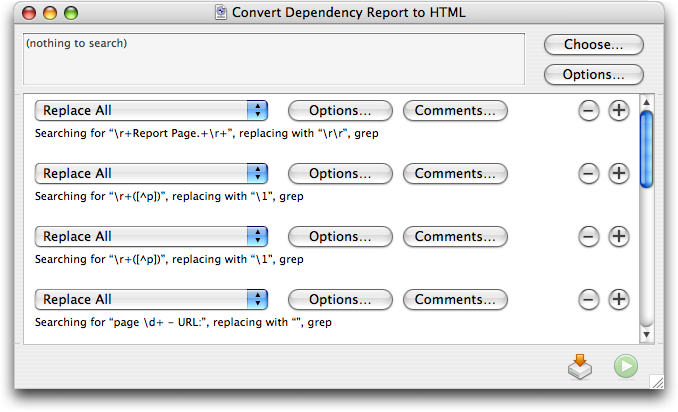
  Once I have the file in BBEdit, I run a text factory that takes the
  rather plain output from Aerialist Pro, strips out the cosmetic
  parts, and turns all of the links into proper HREFs. It's a lot of
  grep pattern matching, and while it wasn't trivial to create, it
  wasn't all that hard.

<http://www.barebones.com/products/bbedit/>
<http://www.tidbits.com/resources/2008-03/PDF-link-checking-BBEdit.png>

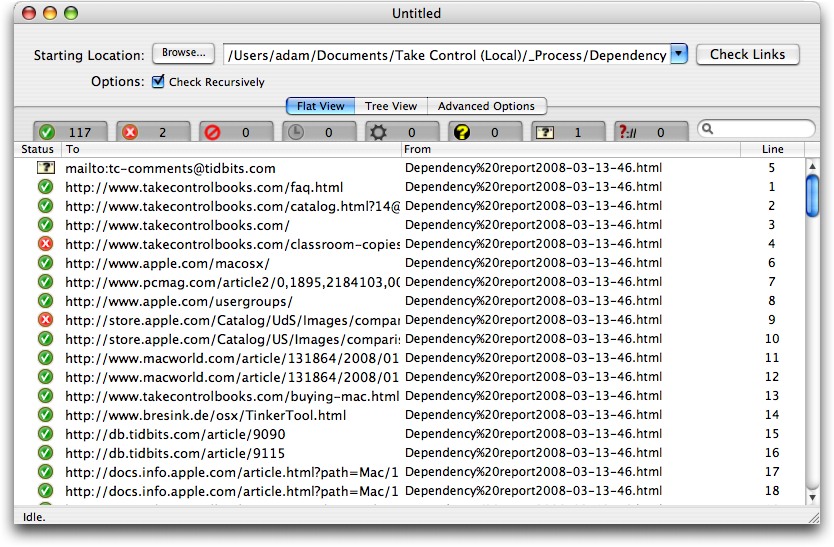
  The next trick is to check all the links. After much searching and
  testing, I found a $25 utility called Braxton's Link Tester (BLT)
  that does a nice job of checking links and reporting back on which
  ones have problems. After running the BBEdit text factory and saving
  the file, I drag the file's proxy icon (the little icon in the title
  bar of every window; just click, hold, and drag to use it just as
  though you were dragging the file's Finder icon) to BLT's Dock icon.
  In BLT, I then click the Check Links button and go do something else
  for a few minutes while it visits all the links.

<http://www.bltformac.com/>

  What I like about BLT is that it's easy to deselect the green
  checkmark tab that shows all the good links, since I don't care
  about those, and focus in on broken links (for the screenshot below,
  I left the good ones showing). BLT goes beyond a simple
  thumbs-up/thumbs-down display, identifying failed links, forbidden
  links, links that time out, links forbidden by robots.txt, server
  errors, email links that must be verified manually, and protocols
  that BLT doesn't recognize.

<http://www.tidbits.com/resources/2008-03/PDF-link-checking-BLT.png>

  Most of the time there are only a couple of broken links, if any,
  and then it's just a matter of going back into the original Word
  document and the working PDF file and either removing the links or
  replacing them with correct links.

  I won't pretend this is the only way to automate link checking. It
  might be possible, for instance, to write an AppleScript that would
  identify and check the links, reporting back on which ones had
  troubles. But I do hope this will give you a sense of how you might
  be able to eliminate a manual step in producing PDF files that work
  as they should.


Should Mac Users Run Antivirus Software?
----------------------------------------
  by Rich Mogull <[EMAIL PROTECTED]>
  article link: <http://db.tidbits.com/article/9511>

  When people find out I'm a security expert, I can almost guarantee
  the ensuing conversation will evolve in one of three ways. If they
  are technologically illiterate, I'll have to explain I don't know
  anything about trading securities and can't help them with any hot
  tips. If they use Windows, I'll tell them to back up their data and
  reformat the system. But if they use Macs, the discussion usually
  becomes a little more complicated.

  There is a misperception among much of the security community that
  Mac users don't care about security. Since joining TidBITS I've
  learned that Mac users are just as concerned about their security as
  their Windows brethren, but they aren't really sure what they need
  to know. Even the most naive Windows user understands that their
  system is under a constant barrage of attacks, but the Mac user
  rarely encounters much beyond the occasional pop-under browser ad
  and, of course, oodles of spam.

  When people find out I'm a Mac security expert, they ask, "Oh, so do
  I need to worry more about security?", quickly followed by, "Do I
  need antivirus software?" While the antivirus answer isn't
  completely straightforward, it's also not all that difficult.

  The reality is that today the Mac platform is relatively safe.
  Hundreds of thousands of viruses and other malicious software
  programs are floating around for Windows, but less than 200 are
  known to target the Mac, and many of those are aimed at versions of
  the Mac OS prior to Mac OS X (and thus have no effect on a modern
  Mac).

  It's not that Mac OS X is inherently more secure against viruses
  than current versions of Windows (although it was clearly more
  secure than Windows prior to XP SP2); the numerous vulnerabilities
  reported and patched in recent years are just as exploitable as
  their Windows equivalents. But most security experts agree that
  malicious software these days is driven by financial incentives, and
  it's far more profitable to target the dominant platform.

  Desktop antivirus software is also only a limited defense, and one
  that's typically very resource intensive. By even the most positive
  assessments, antivirus software catches only 85 to 95 percent of
  known malicious software (viruses, worms, trojans, and other nasty
  stuff) in the wild. This leaves a significant level of exposure,
  especially considering you're running software that brings your
  system to its knees whenever you have a full scan scheduled.
  Antivirus tools are intrusive by nature, don't offer nearly the
  security they advertise, and can be costly to maintain over time. I
  personally rely on other defenses to prevent malicious code from
  ending up on my computers in the first place, and so far (fingers
  crossed) have never had antivirus software find anything on any of
  my Windows XP systems. I don't even bother to run it on my Windows
  Vista systems, due to that platform's stronger security and the
  limited number of malicious programs that target Vista. When I've
  tested Macintosh antivirus programs, they typically only find
  infected attachments in my spam folders. Scanning all your incoming
  mail at the gateway, maintaining safe browsing habits, and using a
  browser plug-in or two can be more effective than desktop antivirus
  software, as I'll discuss.

  Even if Mac OS X is no more secure, we Mac users are currently at a
  lower level of risk than our Windows counterparts. It's reasonable
  to assume that this dynamic could change, but considering the
  current level of risk, and the resource intensity of most antivirus
  software, it's hard to recommend antivirus except under limited
  circumstances. Here are the factors I suggest you consider before
  using antivirus software.

  1. I do not recommend desktop antivirus software for the average Mac
  user, but you need to take other precautions. While desktop
  antivirus software isn't necessary (I don't use it), make sure you
  use email accounts that support spam and virus filtering, such as
  Gmail, Yahoo Mail, or Hotmail. Spam is one of the major vectors for
  malicious code propagation, and gateway protection will reduce your
  risk should an email-driven Mac virus appear. Consider switching to
  the Firefox Web browser with the NoScript plug-in. NoScript
  selectively, and non-intrusively, blocks all scripts, plug-ins, and
  other code on Web pages that could be used to attack your system
  during visits. I also recommend you keep your eyes open and
  subscribe to a news source like TidBITS so if something does change,
  you'll know sooner rather than later.

<http://www.mozilla.com/en-US/firefox/>
<http://noscript.net/>

  2. If you engage in risky online behavior, use antivirus software
  and definitely switch to Firefox with NoScript. Risky behavior isn't
  just limited to browsing Web sites you might want to avoid at work.
  Installing strange software from non-standard locations, failing to
  filter for spam, installing any random social networking plug-in you
  find, or creeping around unusual corners of the Internet can also
  lead to a malicious code infection. Some other examples of risky
  behaviors include online gambling, hacker research, illegal file
  sharing (or legal file sharing on the same network that supports
  illegal activity), browsing media-heavy sites other than brand names
  like YouTube, or downloading software posted to forums or
  lesser-known sites. It's hard to determine exactly where to draw the
  line, but my general advice is if you download a lot of content,
  engage in clearly risky behavior, or spend a lot of time browsing
  fringe sites (especially forums), you should take extra precautions.
  If you let your children, including teenagers, use an unmonitored
  Mac you should also take these precautions and make sure they use a
  non-administrative account.

  3. If you exchange large numbers of potentially risky files
  (especially forwarded email messages with attachments that aren't
  otherwise scanned) with Windows users, and your email isn't scanned
  at your mail server, consider antivirus software for their
  protection. If you like to pass on every email joke and greeting
  card that hits your inbox, you should either change your habits or
  consider antivirus software so you don't spread something to your
  Windows-using friends. If you use an email service that includes
  outbound filtering, and don't exchange files other than through
  email, you can skip the desktop filtering.

  4. If you use your Mac in an enterprise environment with antivirus
  policies, you still need to use antivirus software. Ideally, this
  should be provided by your company's IT department so it is
  compatible with corporate standards and is centrally managed. Use of
  antivirus software in the corporate environment is often required
  for a variety of reasons, including compliance or as a response
  mechanism in case of an internal infection. Even though your Mac
  might be safer, you don't want it used to spread an infection to
  Windows systems or become a compliance deficiency. If you're in
  corporate IT, some major enterprise antivirus tools support Macs and
  can be deployed with policies consistent with your Windows systems.
  While you might have reasons for not supporting Macs in the
  enterprise, lack of available antivirus software isn't one of them.

  5. If you run Windows on your Mac, via Boot Camp or virtualization,
  install Windows antivirus software. Even if you're running Mac
  antivirus tools, they won't help you when you're running Windows.
  You need to protect that partition or virtual machine just as if it
  were any other Windows system.

  At some point, assuming Apple continues to make appealing products,
  we Mac users will become bigger targets and face a higher level of
  risk. Adam J. O'Donnell, Ph.D., is the Director of Emerging
  Technologies at Cloudmark and has recently been using game theory to
  analyze at what point Macs become more targeted for malicious
  attack. He states, "Game theory shows that an inflection point will
  come when the rate at which a malware author can reliably compromise
  a PC rivals that of the Mac market share. It is at this time you
  will see monetized, profitable Mac malware start popping up." For
  example, Windows Vista is a dramatically more secure product than
  its predecessor. As it's deployed more widely, we could hit an
  inflection point where the combination of growing Mac market share,
  and increased difficulty in exploiting Windows, makes the Mac a more
  profitable target.

  How can we avoid this? That's mostly up to Apple. In Mac OS X 10.5
  Leopard, Apple began implementation of a number of anti-exploitation
  technologies that could increase the difficulty in exploiting the
  platform, but most features weren't fully completed and don't
  provide the necessary protection to limit attack effectiveness (see
  "How Leopard Will Improve Your Security," 2007-10-22). If Mac OS X
  maintains even just security parity with Windows, yet Mac market
  share stays in the low double digits, Windows should remain the
  dominant target. We need to continue to pressure Apple for a more
  secure platform so these technologies are fully implemented before
  the malicious software market dynamics shift. Better library
  randomization, sandboxing, and QuickTime and Safari security
  features will go a long way to protect Mac users.

<http://db.tidbits.com/article/9251>

  In short, at this point in time, I don't recommend desktop antivirus
  for the average Mac user. You only need to deploy it if you engage
  in risky behavior, need to protect friends on Windows, or comply
  with corporate policies. It's quite probable this will change in
  time, so it makes sense to take some reasonable precautions today
  and stay aware of the world around you. Better yet, let's continue
  to pressure Apple for stronger security so we can completely avoid
  resource leaching desktop antivirus in the long term.


Take Control News: Produce Professional-Looking Sites with iWeb
---------------------------------------------------------------
  by Adam C. Engst <[EMAIL PROTECTED]>
  article link: <http://db.tidbits.com/article/9523>

  Apple intends iWeb '08 to help Mac users create polished-looking Web
  sites, but not all of iWeb's features are easily understood or fully
  explained by Apple. The new "Take Control of iWeb: iLife '08
  Edition," a 133-page ebook by iWeb expert Steve Sande, provides
  step-by-step instructions and plenty of time-saving tips to help you
  build a Web site and publish it on either .Mac or another Web host.
  You can watch over Steve's shoulder as he enhances iWeb's templates
  with a designer's eye, using tools like masks, reflections, and
  Instant Alpha. Steve teaches you the best ways to make all types of
  iWeb pages - including blog, podcast, photo, and movie pages - and
  he covers topics that go beyond the basics and way beyond the online
  help. You'll learn how to add special elements to your site, such as
  iPhoto albums and galleries, YouTube videos, Google AdSense ads,
  Google maps, and forms that feed into Google Docs. You'll also find
  coverage of how to edit graphics so your site loads faster, how to
  import podcasts and videos, how to make image maps, and even ideas
  for working with CafePress, Google Checkout, or Zen Cart to create
  an online store. The book is available for $10 in PDF form; those
  who would prefer a book-like, professionally printed copy can get
  one using the Print link on the cover of the ebook for an additional
  $10.99.

<http://www.takecontrolbooks.com/iweb.html?14@@!pt=TB920>

  This new edition updates Steve's "Take Control of iWeb: iLife '06
  Edition" with more tips, more advice, and more insider techniques
  than ever before. Owners of the previous edition who purchased
  before 01-Aug-07 can click the Check for Updates button on the first
  page of their copy of the ebook to access a special upgrade
  discount, and everyone who purchased after that date and who
  selected the "Notify me" checkbox when placing an order should
  already have received a download link for a free update. Contact us
  at [EMAIL PROTECTED] for more details if you asked not to be
  notified or if our email didn't arrive.


TidBITS Watchlist: Notable Software Updates for 24-Mar-08
---------------------------------------------------------
  by TidBITS Staff <[EMAIL PROTECTED]>
  article link: <http://db.tidbits.com/article/9513>

* Geophoto 2.0 from Ovolab lets you pan, zoom, and fly through photos
  in a three-dimensional representation of the planet, generated from
  high-resolution satellite images. Version 2.0 can now match time
  stamps on your photos with track points from a GPS and makes it
  easier to "geotag" photos by positioning them on a street-level map
  view.

<http://www.ovolab.com/geophoto/>

* Digital Camera RAW Compatibility Update 2.0 from Apple extends RAW
  file compatibility for Aperture 2 and iPhoto '08 to a number of new
  cameras, including the Hasselblad CFV-16, Hasselblad H3D-31,
  Hasselblad H3D-31II, Leaf Aptus 54S, Leaf Aptus 65S, Nikon D60,
  Olympus E-3, Pentax *ist DL2, Pentax *ist DS2, Pentax K100D Super,
  Sony DSLR-A200, and Sony DSLR-A350. Get it via Software Update or as
  a standalone download.

<http://www.apple.com/support/downloads/digitalcamerarawcompatibilityupdate20.html>

* 1Password 2.5.12 from Agile Web Solutions enables the password
  manager to work with Safari 3.1, adds improvements to the 1Password
  Reader for Palm, moves 1Password Help into Apple's Help Viewer, adds
  an assistant for first time users, and adds compatibility with the
  latest nightly builds of Camino.

<http://1password.com/>

* Time Machine and AirPort Updates 1.0 from Apple includes
  "compatibility improvements for using Time Machine with Time
  Capsule, as well as AirPort driver fixes." It's available via
  Software Update or as a standalone download.

<http://www.apple.com/support/downloads/timemachineandairportupdatesv10.html>

* Airfoil 3.1.2 from Rogue Amoeba updates their audio-streaming
  software to handle an incompatibility with the new 802.11n AirPort
  Express, and version 3.1.3 fixes a bug with the Instant Hijack
  component revealed by Apple's Security Update 2008-002. Also
  receiving a new version of Instant Hijack to address this issue are
  Audio Hijack Pro 2.8.1 and Nicecast 1.9.2.

<http://rogueamoeba.com/airfoil/mac/>
<http://rogueamoeba.com/audiohijackpro/>
<http://rogueamoeba.com/nicecast/>

* Toast 9 Titanium from Roxio adds support for recording HD content
  from camcorders, TiVo DVRs, and EyeTV devices to Blu-ray discs or
  standard DVDs, along with simple editing for trimming unwanted
  segments before burning. Toast 9 includes the new Roxio Streamer for
  streaming video content on a home Mac to an iPhone, iPod touch, or
  other Mac. Also new is the capability to record any audio, including
  Internet streaming audio, with audio fingerprinting to add title,
  artist, and genre information automatically.

<http://www.roxio.com/enu/products/toast/titanium/overview.html>

* Disc Cover 2 from BeLight Software enhances the company's CD/DVD
  labeling software with numerous new designs, integration with
  Apple's Aperture, grouping functionality, support for gradient
  fills, and integration with the company's Art Text textual graphic
  software.

<http://www.belightsoft.com/disccover/>

* Narrator 2.0 from Dejal Systems is a major release of the company's
  text-to-speech utility that can read marked portions of a text
  document, using different Mac OS X voices and speech attributes for
  specific passages in a document. New features include export to
  iTunes or AAC sound files, support for multiple chapters in a
  document, and substitution of words or phrases for better
  pronunciation.

<http://www.dejal.com/narrator/>

* PDFpen 3.4 from SmileOnMyMac brings significant performance updates
  and bug fixes to the PDF editing and form-filling tool, which we
  find invaluable when creating samples of Take Control ebooks.

<http://www.smileonmymac.com/PDFpen/>

* Apple Security Update 2008-002 fixes a host of flaws in Mac OS X
  10.4.11 and 10.5.2 (client and server flavors) that could allow a
  local user to gain privileges or allow a maliciously crafted URL to
  exploit Tiger or Leopard. Updated components include Apache and PHP.

<http://docs.info.apple.com/article.html?artnum=307562>


Hot Topics in TidBITS Talk/24-Mar-08
------------------------------------
  by Jeff Carlson <[EMAIL PROTECTED]>
  article link: <http://db.tidbits.com/article/9520>

**Adobe Reader Working Reference** -- A TidBITS Talk reader looks for
  help with Adobe Reader. (2 messages)

<http://emperor.tidbits.com/TidBITS/Talk/1905>


**G3 iMac problem** -- Resurrecting an older Mac brings up a few
  problems, including how to repartition the hard drive, making an old
  AirPort card work on modern wireless networks, and replacing the
  machine's internal battery. (8 messages)

<http://emperor.tidbits.com/TidBITS/Talk/1906>


**What I Don't Like About Time Machine** -- Time Machine addresses a
  problem long ignored: how to make ongoing backups easily. But is the
  once-per-hour implementation overkill? (11 messages)

<http://emperor.tidbits.com/TidBITS/Talk/1907>


**Drobo and Time Machine over a network** -- The Drobo hard drive
  storage device would seem to be an excellent Time Machine backup
  destination, but a reader is looking for more information on how it
  performs. (3 messages)

<http://emperor.tidbits.com/TidBITS/Talk/1908>


**Bluetooth headsets w/ Macs** -- How well do Bluetooth headsets work
  with desktop Macs? (3 messages)

<http://emperor.tidbits.com/TidBITS/Talk/1909>


**Safari 3.1 & Firefox 3 trumped by WebKit Nightly?** Apple and
  Mozilla have upgraded their Web browsers, and of course each claim
  dramatic performance gains. But is something slowing them down? And
  what about standards support? (19 messages)

<http://emperor.tidbits.com/TidBITS/Talk/1910>


**AppleWorks Replacement** -- Apple may have long ago abandoned
  AppleWorks, but the software still gets plenty of use. As a reader
  faces the future, what software can replace the stalwart, and how
  can he maintain the capability to open old AppleWorks files? (37
  messages)

<http://emperor.tidbits.com/TidBITS/Talk/1911>


**Should Mac Users Run Antivirus Software?** Readers point out that
  other browsers besides Firefox offer script blocking capabilities
  and respond to Rich Mogull's article on antivirus software. (2
  messages)

<http://emperor.tidbits.com/TidBITS/Talk/1912>


**MacBook Air Causes Black Eye** -- PBS talk show host Charlie Rose
  took a spill with his MacBook Air, leading some to wonder why he
  chose to protect his computer instead of his face - and realizing
  that we do that with other possessions, too. (4 messages)

<http://emperor.tidbits.com/TidBITS/Talk/1913>


**Finder file mapping** -- The Finder doesn't always seem to be
  consistent when assigning applications to file types. (15 messages)

<http://emperor.tidbits.com/TidBITS/Talk/1914>


**Google, Firefox & MacBook Pro** -- Odd cookie-assigning behavior in
  Firefox seems to be the fault of Google, not the browser. (2
  messages)

<http://emperor.tidbits.com/TidBITS/Talk/1915>


**Goose Your Network to Gigabit Ethernet** -- Adam's article on
  upgrading his Ethernet network leads to talk of cabling (and prices)
  and preparing for future networking. (10 messages)

<http://emperor.tidbits.com/TidBITS/Talk/1916>


$$

This is TidBITS, a free weekly technology newsletter providing timely
news, insightful analysis, and in-depth reviews to the Macintosh and
Internet communities. Feel free to forward to friends; better still,
please ask them to subscribe!

Non-profit, non-commercial publications and Web sites may reprint or
link to articles if full credit is given. Others please contact us. We
do not guarantee accuracy of articles. Caveat lector. Publication,
product, and company names may be registered trademarks of their
companies. TidBITS ISSN 1090-7017.

Copyright 2008 TidBITS: Reuse governed by Creative Commons license.

Contact us at:    <[EMAIL PROTECTED]>
TidBITS Web site: <http://www.tidbits.com/>
License terms:    <http://www.tidbits.com/terms/>
Full text search: <http://www.tidbits.com/search/>
Subscriptions:    <http://www.tidbits.com/about/list.html>
Account help:     <http://www.tidbits.com/about/account-help.html>


--
If you want to unsubscribe or change your address, use this link
http://emperor.tidbits.com/webx?unsub@@.3c557dc4!u=306a67f9