TidBITS#921/31-Mar-08
=====================
  Issue link: <http://db.tidbits.com/issue/921>
  Curses! Mac OS X is the first victim in the Pwn2Own hacking contest,
  and Rich Mogull explains how a security researcher took home $10,000
  and a MacBook Air for exploiting a previously unknown vulnerability
  in Safari within 2 minutes. Taking the sting from that insult is
  Apple's top ranking in a survey of global brands. Also this week,
  Tonya shares her first impressions of Amazon's Kindle ebook reader,
  and Adam explains in detail how he more than doubled the throughput
  on his network by updating to gigabit Ethernet, providing the
  details necessary for you to do the same. New releases that warrant
  detailed looks this week include Carbon Copy Cloner 3.1, the new
  Outspring Mail email client, Aperture 2.1, and the online photo
  editor Photoshop Express. The TidBITS Watchlist offers brief
  coverage of SOHO Organizer 7.0, SOHO Notes 7.0, MailTags 2.2,
  Moneydance 2008, Freeway 5, and a variety of highly specific (but
  potentially essential) updates from Apple.

Articles
    Apple Ranked Top Brand Worldwide
    Carbon Copy Cloner 3.1 Released
    Apple Becomes First Victim in Hacking Contest
    Outspring Mail Promises Intelligent Filing
    Aperture 2.1 Adds Plug-in Capability to Edit Photos
    Photoshop Express Offers Free Photo Editing on the Web
    First Kindly Impressions about My Kindle
    Switch Your Network to Gigabit Ethernet
    TidBITS Watchlist: Notable Software Updates for 31-Mar-08
    Hot Topics in TidBITS Talk/31-Mar-08


------------ This issue of TidBITS sponsored in part by: --------------

* READERS LIKE YOU! Support TidBITS with a contribution today!
  <http://www.tidbits.com/about/support/contributors.html>
  Special thanks this week to James White, Olaf Pluta, Mike Calmus,
  Amy Teel, and Dr. Michael A. Riccioli for their generous support!

* Fetch Softworks: Fetch 5.3 has WebView, the easy way
  to view files in a browser and copy Web addresses from Fetch.
  Also a new look for Leopard, droplet shortcuts, and more.
  Download your free trial version! <http://fetchsoftworks.com/>

* WebCrossing Neighbors Creates Private Social Networks
  Create a complete social network with your company or group's
  own look. Scalable, extensible and extremely customizable.
  Take a guided tour today <http://www.webcrossing.com/tour>

* MARK/SPACE, INC: The Missing Sync provides the very best in
  synchronization for Mac users with BlackBerry, Palm OS, or
  Windows Mobile devices. Integrates with Address Book, iCal,
  Entourage, iPhoto, and iTunes. <http://www.markspace.com/bits>

* VMware Fusion. The most seamless way to run Windows on your Mac.
  Backed by nearly a decade of proven virtualization technology.
  Try VMware Fusion today for free, or order online for only $79.
  Visit: <http://www.tidbits.com/about/support/vmware-fusion.html>

* StuffIt Deluxe 12: breakthrough compression of MP3 files, PDFs,
  iWork and MS Office files! Reduce JPEG file sizes with no loss in
  quality, burn to CD/DVD, back up archives to iDisk and more. Buy
  today for only $59.99! <http://www.stuffit.com/mac/deluxe/tb/>

* ConceptDraw Business Suite: Take control over your business
  workflow with this powerful set of tools. Mind Mapping, Project
  Management, Business Graphics - all easily created on your Mac!
  Right now Special Price: $449! <http://www.conceptdraw.com/tb>

* DealBITS: Get the word out about your product AND generate sales!
  It's easy: give away a few copies and offer a discount to entrants.
  A DealBITS drawing is quick to set up and can easily pay for itself.
  For more info and rates, visit <http://www.tidbits.com/dealbits/>.

---------- Help support TidBITS by supporting our sponsors ------------


Apple Ranked Top Brand Worldwide
--------------------------------
  by Adam C. Engst <[EMAIL PROTECTED]>
  article link: <http://db.tidbits.com/article/9538>

  Talk about riding high. First Fortune Magazine gives Apple the
  honors in its corporate survey (see "Apple Tops Fortune's Most
  Admired Companies List," 2008-03-05). Now Apple has captured most of
  the top spots in a brand opinion survey of nearly 2,000 marketing
  professionals published by the branding company Interbrand. Apple
  was ranked first in almost all the positive questions, including
  "What brand can you not live without?" and "What brand, if sent back
  100 years, would have the biggest impact on the course of history?"
  One respondent said, "[Apple is] the only one I can think of that I
  truly couldn't replace - in work or in entertainment. With any other
  brand that I love, there's some other one I can turn to if it
  disappeared. But not Apple."

<http://db.tidbits.com/article/9488>
<http://brandchannel.com/start1.asp?fa_id=415#t21>

  Apple also captured the top spot in more personal questions,
  including "What brand would you most like to sit next to at a dinner
  party?" "Which brand inspires you the most?" and, most tellingly,
  "If you were to describe yourself as being a brand, what brand would
  you be?" We can't all _be_ Apple, but many respondents like to think
  of themselves as being _like_ Apple: "Because I like to come at
  things differently. I chose to 'think different.'"

  Joining Apple as brands that ranked highly in the positive questions
  were Google, Nike, Coca-Cola, and Starbucks. Not all the questions
  were positive, however, and Apple took second place to Microsoft in
  "Which brand do you want to argue with?" Lots of Apple aficionados
  certainly have issues with some of Apple's actions, but such
  feelings are useful in that they show that people care. I'd be more
  worried if I were in Microsoft's marketing department, since the
  world's largest software company placed first in "If you could
  rebrand any brand, what brand would it be?" Ouch. The comments were
  blunt as well, running along the lines of "[Microsoft has] gone from
  innovative and bold to stodgy and a follower. But rebranding is only
  one step since it really needs a major shift in how it thinks."

<http://www.brandchannel.com/brandjunkie_results.asp#dinner>

  (I've said it before, and I'll say it again. The place where
  Microsoft could experiment with rebranding in a useful and
  interesting way is with the Macintosh Business Unit, which would
  benefit from independence from the overall Microsoft Windows brand,
  given the way many Mac users see Windows as the competition.)

  Somewhat distressingly, the top vote getter for "What brand do you
  think is truly (going) 'green'?" was overwhelmingly "None," with
  Toyota, BP, The Body Shop, and Honda taking the next four slots.
  Companies may be talking the talk, but they're not walking the walk
  sufficiently for environmental awareness to become associated with
  their brands.

  For more on branding and its importance, particularly related to
  Apple, check out our three-part series "Branding Apple," written in
  2002 by Simon Spence, then head of research and information
  technology at brand consultancy Alexander Dunlop Ltd. It's a bit
  dated in places, not surprisingly, but still offers a good overview
  of what branding means to Apple.

<http://db.tidbits.com/series/1224>


Carbon Copy Cloner 3.1 Released
-------------------------------
  by Adam C. Engst <[EMAIL PROTECTED]>
  article link: <http://db.tidbits.com/article/9524>

  Bombich Software has released Carbon Copy Cloner 3.1 (CCC), a
  notable update to the popular disk cloning and backup software. CCC
  3.1 implements rsync 3.0 for "greater fidelity" when backing up
  using CCC's Copy Selected Items backup method, improves the already
  solid interface wording that explains what CCC will do for each
  selected action, adds "bootability" checks to see if the backup
  volume will be bootable (this doesn't work with duplicates made over
  a network, alas), and more. A variety of bugs were also fixed, so
  backing up to a remote Mac using a path with a space in it uses the
  correct location, invisible flags are maintained in Leopard when
  using Copy Everything, scheduled tasks in Leopard now run reliably
  after a reboot, and it's now possible to install CCC's
  Authentication Credentials package from multiple source Macs onto a
  single target machine (previously, manual tweaking of the
  authorization credentials was necessary to make this setup work).

<http://www.bombich.com/software/ccc.html>
<http://www.bombich.com/software/docs/CCCHelp/content/history.html>

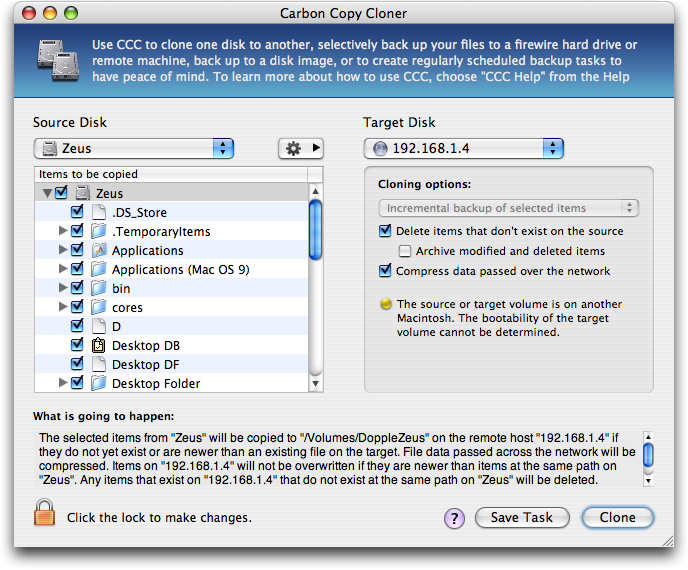
  For those who haven't used Carbon Copy Cloner, it's a full-featured
  cloning, synchronization, and backup program with scheduling and
  archiving features. I've started experimenting with Carbon Copy
  Cloner to create bootable duplicates of my primary work machines
  over the network to disks installed inside my Power Mac G4 file
  server. (This is in addition to Time Machine backups of my Leopard
  Macs, and Retrospect home folder backups of Macs running Tiger or
  Panther, all to the same Power Mac G4.) The capability to create a
  bootable duplicate over a network is uncommon, shared only with
  EMC's Retrospect (the excellent SuperDuper can create a backup to a
  remote disk image over a network, but that's not bootable). Carbon
  Copy Cloner's network duplicates work much more quickly than those
  in the current version of Retrospect.

<http://www.tidbits.com/resources/2008-03/Carbon-Copy-Cloner.png>

  Carbon Copy Cloner 3.1 requires Mac OS X 10.4.8 or higher and works
  well with Mac OS X 10.5.2. The program is uncrippled shareware,
  meaning that all features are available whether or not you've paid,
  and no registration is ever required, but Bombich Software
  appreciates donations once Carbon Copy Cloner has proven its worth
  to you. It's a 2.1 MB download.


Apple Becomes First Victim in Hacking Contest
---------------------------------------------
  by Rich Mogull <[EMAIL PROTECTED]>
  article link: <http://db.tidbits.com/article/9529>

  On Thursday, March 27th, a MacBook Air became the first victim in
  the second annual Pwn2Own hacking contest at the CanSecWest
  conference. It took  security researcher Charlie Miller only 2
  minutes to win the $10,000 cash prize (and the MacBook Air) by
  discovering and exploiting a previously unknown vulnerability in the
  Safari Web browser. Miller immediately signed a non-disclosure
  agreement with contest sponsor TippingPoint, who promptly reported
  the flaw to Apple. No details will be released until Apple patches
  the vulnerability.

<http://cansecwest.com/post/2008-03-20.21:33:00.CanSecWest_PWN2OWN_2008>
<http://cansecwest.com/>

  Last year, the Pwn2Own contest was limited to two Macs, but contest
  organizers opened the field this year by pitting Mac OS X 10.5
  Leopard against both Microsoft Windows Vista and Ubuntu Linux. The
  rules are simple; if a researcher can "pwn" a fully patched laptop
  ("pwn" is hacker lingo for completely exploiting and taking over a
  system), they take home the laptop and a cash prize. The amount of
  cash decreases every day as the rules make it easier for an attacker
  to control the system. No one claimed the $20,000 prize on the first
  day for remotely exploiting any of the systems through a network
  attack. On the second day, when the MacBook Air went down, attackers
  were allowed to email or direct the Web browser on the system to a
  hostile site (known as a client-side attack). On the last day of the
  contest the conference organizers installed a variety of common
  third-party applications for the attackers, but the prize dropped to
  $5,000. By the end of the contest, only the Linux system had not
  been compromised.

  Although we need to take contests like these with a grain of salt,
  we can't dismiss the results. Since it took Charlie Miller only 2
  minutes to compromise the MacBook Air, it's clear that he walked in
  the door with a complete exploit ready to go. That's far different
  from creating one on the spot. Still, it's concerning that Mac OS X
  was the first victim to succumb to attack since the contest rules
  don't favor any particular platform.

  The Windows Vista laptop held out until the last day, finally
  succumbing to a vulnerability in the Adobe Flash player. This is
  likely an indication that the new anti-exploitation security
  features of Vista are effective at making it more secure than
  Windows XP, and more secure than it would have been without these
  changes. Although Apple added similar features to Mac OS X in
  Leopard, such as library randomization, discussions with security
  researchers indicate that these defenses are not yet fully
  implemented, and thus provide little additional security.

<http://dvlabs.tippingpoint.com/blog/2008/03/28/pwn-to-own-final-day-and-wrap-up>

  As a Mac enthusiast and security professional, I spend a lot of time
  talking and working with the research community. Most feel that Mac
  users are relatively safer than Microsoft Windows users, but that
  Mac OS X has lost its lead as a secure consumer operating system.
  This was, in many ways, by necessity. Windows is under such constant
  onslaught that Microsoft had little choice but to increase the
  operating system's security significantly or face the risk of losing
  customers, especially among their corporate clients. (But I can also
  say from experience that Windows Vista suffers from severe usability
  issues, most of which are completely unrelated to the new security
  features.) Since Macs are much less frequently attacked, Apple isn't
  under nearly the same pressure. The researchers I work with, most of
  them Mac users themselves, frequently identify Safari and QuickTime
  as particularly problematic programs to secure, and none were
  surprised by the contest results.

  What does this mean to the average Mac user? Not much... yet. We're
  no more or less secure today than we were the day before the
  contest, and we shouldn't make major decisions based on stunts like
  these. Although I'm not ready to reverse my advice and send you all
  running to the nearest store for additional security software (see
  "Should Mac Users Run Antivirus Software?," 2008-03-18), we, as a
  community, still can't afford to be complacent. If security is a
  priority for us, it will be a priority for Apple. With Leopard, all
  the hooks are there for a very secure operating system. We just need
  to continue to pressure Apple to finish implementation and make it
  far more difficult for our platform of choice to lose next year's
  contest.

<http://db.tidbits.com/article/9511>


Outspring Mail Promises Intelligent Filing
------------------------------------------
  by Adam C. Engst <[EMAIL PROTECTED]>
  article link: <http://db.tidbits.com/article/9540>

  While many long-time Eudora users continue to bemoan Eudora's fate,
  the developers of QuickMail, another email client that once boasted
  a significant user base, have released an entirely new email
  program, called Outspring Mail.

<http://www.outspring.com/index.php?option=content&task=view&id=64>

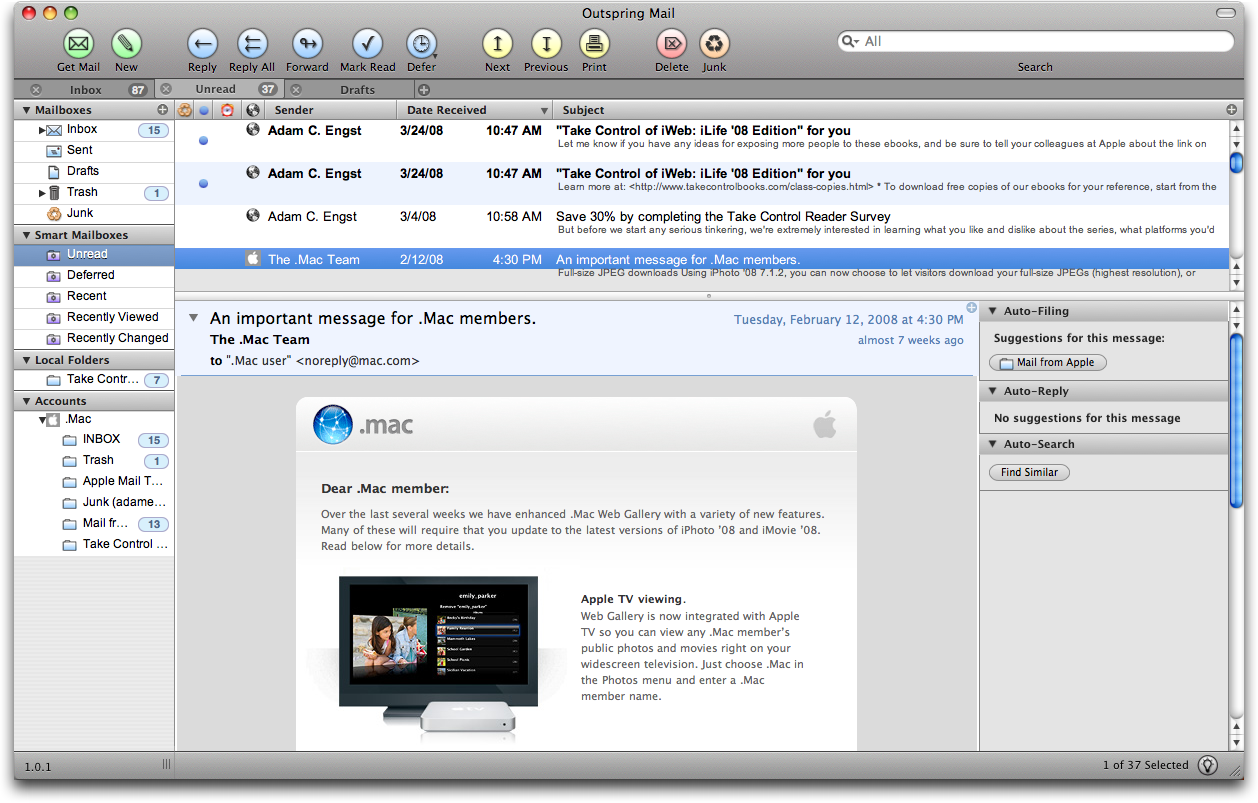
  Visually, Outspring Mail uses a three-pane interface, and the
  program offers all the basics, including support for POP, IMAP,
  SMTP, and SSL. From there, though, Outspring Mail provides the first
  notable rethinking of what an email client should do since the
  appearance of Google's Gmail. Outspring Mail observes the user's
  actions and learns from them, suggesting likely destination
  mailboxes for messages and even offering to use a previous reply to
  answer a frequently asked question. Outspring CEO Jeff Baudin said,
  "If I frequently reply to an email message that says, 'How do I get
  to your office?' or words to that effect; shouldn't my email program
  be smart enough to know I've replied to this same type of message
  before? And shouldn't it then offer to use one of these replies for
  the current message?"

<http://www.tidbits.com/resources/2008-03/Outspring-Mail.png>

  Outspring Mail also debuts a "message deferment" feature that
  enables the user to defer dealing with a message for a specified
  amount of time. Outspring Mail then places the message in a special
  folder, and once the time elapses, moves it back to the Inbox with
  an indicator that the deferred message has been returned. This
  feature could help a user keep the Inbox clean, though it's entirely
  likely that all those messages that build up in the Inbox normally
  would just end up being deferred repeatedly and indefinitely.

  For people who do most of their scheduling via email, Outspring
  Mail's data detectors may prove useful. They search for absolute
  dates (like 4/15/08) and relative dates (like "next Wednesday") and
  convert the text to links that take the user to the associated date
  in iCal.

  Other useful or unique features include a tabbed interface, the
  capability to find similar messages, a Reply with Template command
  (similar to Eudora's stationery feature), message preview with an
  intelligent summary, the capability to resize and rotate images,
  smart mailboxes, built-in spam filtering, display of HTML messages,
  Spotlight-based searching, integration with Address Book, Growl
  notification for new mail received, colorization of quoted text, and
  more.

  In my initial usage, Outspring Mail felt a little rough around the
  edges, with one crash and an error dialog that looked as though not
  all debugging code had been removed. The program did perform basic
  actions acceptably, and if the performance wasn't amazing (on a
  first generation MacBook), the preferences do warn that the
  auto-filing analysis can slow the program down.

  Outspring advertises the program as "Intel Native" and "Leopard
  Compatible," but does not provide specific system requirements. It
  can import mail from Apple Mail and QuickMail, but not other common
  Macintosh programs. Outspring Mail costs $95, with $59 upgrades from
  QuickMail. A 10-day demo version is available as a 7.1 MB download.


Aperture 2.1 Adds Plug-in Capability to Edit Photos
---------------------------------------------------
  by Jeff Carlson <[EMAIL PROTECTED]>
  article link: <http://db.tidbits.com/article/9536>

  Apple made a significant push into Adobe's turf last week with the
  release of Aperture 2.1, a free upgrade for owners of version 2.0 of
  the company's photo management program. In addition to bug fixes,
  Aperture 2.1 introduces a plug-in architecture developers can use to
  create utilities that can edit images. One plug-in is included with
  the update: Dodge & Burn, which enables you to lighten or darken
  areas of an image selectively, rather than apply the adjustment to
  the entire image.

<http://www.apple.com/pr/library/2008/03/28aperture.html>

  That level of editing control is one reason photographers use Adobe
  Photoshop to fine-tune their images. Making it possible to apply
  selective adjustments might convince some people to wean themselves
  from the Adobe juggernaut. More likely, however, this change will be
  more effective in preventing those not currently invested in
  Photoshop to stay within Aperture for their touch-up needs.

  Plug-ins appear under the Edit With submenu of the Images menu.
  Accessing a plug-in loads a selected image in a new window, where
  you can choose brush sizes and effect styles; in addition to dodging
  and burning, the included plug-in can saturate, desaturate, sharpen,
  blur, apply contrast, or fade areas of the image. Pressing O reveals
  the edit as an overlay, which is helpful for seeing where the effect
  is applied. Saving the changes creates a new version of that image.

<http://www.tidbits.com/resources/2008-03/aperture2_plugin.jpg>

  To tempt Aperture owners, Apple mentioned in its press release a
  number of developers working on Aperture plug-ins - companies whose
  products are used by photographers, such as Noise Ninja, Viveza,
  Power Stroke, Dfx, dpMatte, and plug-ins from Image Trends. (Charles
  Maurer wrote about Noise Ninja in "Editing Photographs for the
  Perfectionist, 2007-09-07.)

<http://www.picturecode.com/>
<http://www.niksoftware.com/viveza/usa/entry.php>
<http://www.digitalfilmtools.com/powerstroke/>
<http://www.tiffen.com/products.html?tablename=dfx>
<http://www.dvgarage.com/prod/prod_dpmatte.php>
<http://www.imagetrendsinc.com/>
<http://db.tidbits.com/article/7832>

  Aperture 2.1 is available via Software Update or as a 48.1 MB
  download.

<http://www.apple.com/support/downloads/aperture21update.html>


Photoshop Express Offers Free Photo Editing on the Web
------------------------------------------------------
  by Jeff Carlson <[EMAIL PROTECTED]>
  article link: <http://db.tidbits.com/article/9526>

  Adobe has announced Photoshop Express, a new online photo service
  that makes it easy to upload, share, and - more importantly - edit
  digital photos without running a dedicated program such as iPhoto or
  Adobe's own Photoshop Elements. The service is free, currently
  includes 2 GB of online storage, and is a public beta. It also
  requires Flash 9 to operate. You can tour the service's
  functionality by clicking the Test Drive button on the home page.

<http://www.photoshop.com/express/>

  It's easy to see the appeal of Photoshop Express as being "Photoshop
  on the Web," a way to tap into the long heritage of image editing
  established by Adobe Photoshop. But when I saw a preview of the
  service last week, my first thought was, "This is more like a really
  good online version of iPhoto."  It features an easy-to-use
  interface and basic capabilities for uploading and organizing images
  into photo albums, as well as sharing photos with others (I've made
  a couple of galleries available).

<http://jeffcarlson.photoshop.com/>

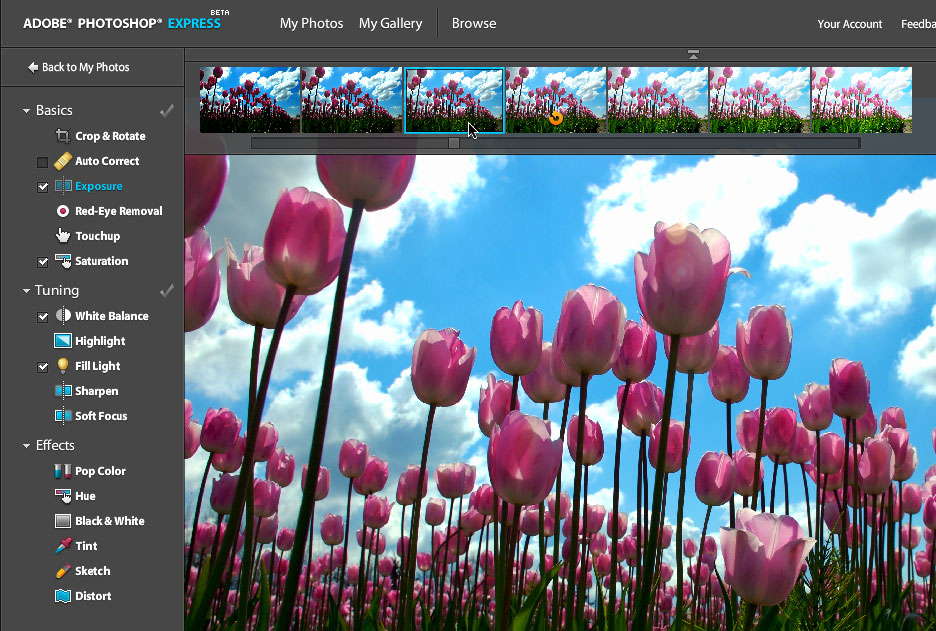
  As you might expect from technology based on Photoshop, the service
  shines when it comes to making adjustments to your photos. You won't
  find levels or curves adjustments in this consumer-oriented
  approach. Making an adjustment such as exposure gives you a strip of
  thumbnails with various degrees of the settings applied; click the
  one that looks best to you. (A few adjustments, such as White
  Balance, also offer sliders for a bit more control over how the
  effect is applied.) Making edits is also non-destructive, with a
  clear method of reverting to previous edits and toggling the
  application of adjustments you've applied.

<http://www.tidbits.com/resources/2008-03/psexpress_adjustments.jpg>

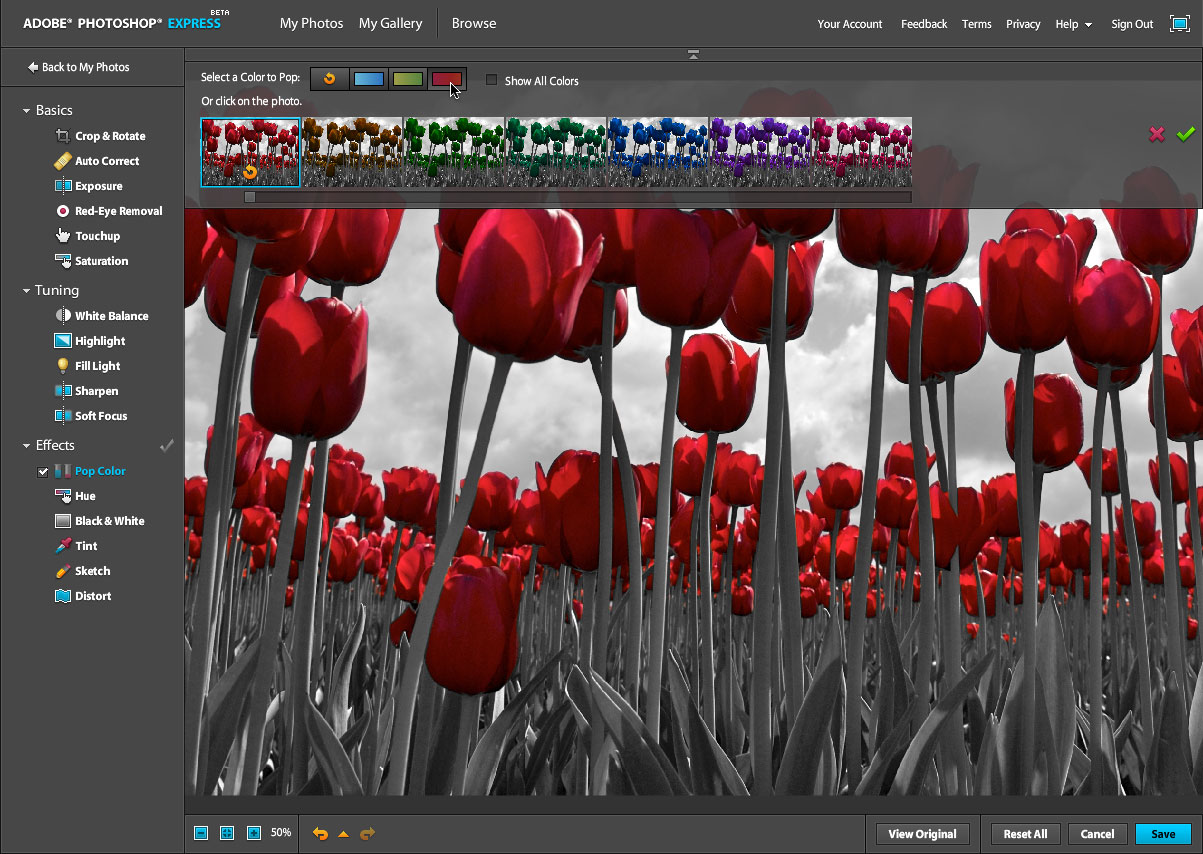
  A few corrections are quite nifty, such as the capability to "pop" a
  color and make the rest of the image grayscale. And I'm impressed by
  the implementation of the Retouch feature, which gives you more
  control over fixing blemishes than just applying spot patches to
  them.

<http://www.tidbits.com/resources/2008-03/psexpress_pop_color.jpg>

  Photoshop Express isn't a serious competitor against an established
  photo-sharing service such as Flickr, which functions as much as a
  social networking site as a way to post photos. Photoshop Express
  also lacks the capability to assign tags to images (which makes
  finding them easier later) or even a way to rename them, though you
  can add and edit captions. However, Adobe clearly understands this,
  because you can import and export pictures between other services.
  The service currently supports Facebook, Photobucket, and Picasa; an
  Adobe representative said that they've signed an agreement with
  Yahoo to add Flickr access soon.

<http://www.flickr.com/>
<http://www.facebook.com/>
<http://www.photobucket.com/>
<http://www.picasa.com/>

  Photoshop Express also isn't the first online photo editor, but does
  have the advantage of being Photoshop-derived. Picnik, which Adam
  wrote about last year (see "Picnik Duplicates iPhoto on the Web,"
  2007-09-07) offers similar features and works with many online
  services. In Flickr, for example, clicking the Edit Photo button
  that appears above one of your images opens the photo in Picnik.

<http://db.tidbits.com/article/8887>

  The service does have a few drawbacks. Photoshop Express is
  currently limited to users in the United States. It's also quite
  network-intensive, since the majority of the processing is being
  done on Adobe's servers. While working in Photoshop Express on one
  computer, I've seen the Internet performance on other computers on
  my network slow down. The service is also built entirely in Flash;
  I've never been a fan of the technology, which has always struck me
  as overly resource-intensive and, frankly, annoying. That said,
  Photoshop Express reminds me that Flash doesn't have to be equated
  with annoying banner ads or goofy online greeting cards.

  Adobe said that this iteration is specifically focused on consumers.
  Future revisions are likely to bring improvements such as more
  storage (for a fee, I would assume), a way to order prints directly,
  built-in support for the service in Adobe's applications, and
  probably more robust tagging and sharing options.

  At its launch, Photoshop Express also stepped into a legal quandary:
  The terms of service (the ones you agree to, usually without
  reading) indicate that for any photos uploaded and made available
  for publicly sharing, "you grant Adobe a worldwide, royalty-free,
  nonexclusive, perpetual, irrevocable, and fully sublicensable
  license to use, distribute, derive revenue or other remuneration
  from, reproduce, modify, adapt, publish, translate, publicly perform
  and publicly display such Content (in whole or in part) and to
  incorporate such Content into other Materials or works in any format
  or medium now known or later developed." In other words, Adobe can
  do whatever it wants with your images.

<https://www.photoshop.com/express/terms.html>

  Later in the day, Adobe responded with a promise to change the
  language, writing, "We've heard your concerns about the terms of
  service for Photoshop Express beta. We reviewed the terms in context
  of your comments - and we agree that it currently implies things we
  would never do with the content. Therefore, our legal team is making
  it a priority to post revised terms that are more appropriate for
  Photoshop Express users. We will alert you once we have posted new
  terms."

<http://www.adobe.com/cfusion/webforums/forum/messageview.cfm?forumid=74&catid=684&threadid=1349048&enterthread=y>

  Photoshop Express won't replace iPhoto or Photoshop Elements, but it
  does offer a high degree of near-immediate gratification. If you
  want to upload something quicl and make a few corrections (from any
  computer, since it's entirely Web based), the hassle factor is
  incredibly low. It's also an easy way for non-technical friends and
  relatives to make their photos available.

  (Disclaimer: I'm currently writing "The Photoshop Express Pocket
  Guide" for Peachpit Press. The first chapter is now available as a
  free download; subsequent chapters will be posted online as part of
  Peachpit's Rough Cuts program for subscribers of Safari Books
  Online.)

<http://www.peachpit.com/promotions/promotion.aspx?promo=136289>
<http://safari.peachpit.com/roughcuts/>


First Kindly Impressions about My Kindle
----------------------------------------
  by Tonya Engst <[EMAIL PROTECTED]>
  article link: <http://db.tidbits.com/article/9528>

  I ordered a Kindle about a month ago, and it finally arrived
  yesterday. The Kindle, Amazon.com's new ebook reader, probably won't
  set the literary world on fire. However, I ordered one anyway
  because as a publisher of electronic books I'm especially curious
  about it, because I think it may help beat back the stacks of books
  that sometimes overwhelm our living space, and because I'm hoping it
  will work well for reading on trips.

<http://www.amazon.com/dp/B000FI73MA/?tag=tidbitselectro00>

  My first impressions have been positive. It was easy to figure out
  how to start using it, and easy to understand my options. I don't
  always understand the highly compressed controls in consumer
  electronics quickly; clock radios in particular often baffle me. And
  the iPod's controls had me in tears when I first tried to use one.
  So, if I can get the Kindle working easily without help, that's
  saying something.

  However, the Kindle is not without its quirks:

* When the Kindle sleeps, it puts up a literary looking picture and a
  little message telling me to press Alt-A to wake. (It's not actually
  the A key; it's an A-looking key at the lower right.) It is
  ridiculous to press Alt-anything on a modern device aimed at normal
  users, but I have forgiven the Kindle this user-interface gaffe
  because it told me so clearly what to do. I didn't have to consult
  the online manual, ask for help, or search in Google.

* The Kindle has a scroll wheel that you roll to move a cursor up and
  down on a scroll bar-like panel that's parallel to the main screen;
  you press the scroll wheel to select the menu item or link in the
  same line as the cursor. It's weird to operate controls that are
  separated from the visual interface elements, but it's simple to
  learn and lets you open and operate menus fluidly. The reason for
  this oddly decoupled controller is that the screen doesn't redraw
  like a normal computer screen, so it's impossible to have a mouse
  pointer moving on the screen. This page-by-page redraw is a
  byproduct of the Kindle's use of E Ink technology that results in a
  readable onscreen display and long battery life.

<http://en.wikipedia.org/wiki/E-Ink>

* TidBITS contributing editor Glenn Fleishman used a Kindle briefly
  but didn't like the "disconcerting flash" as the screen redrew to
  show a new page. Glenn wrote a nice overview of the Kindle's specs,
  pros, and cons in "Comparing Amazon's Kindle to the iPhone and Sony
  Reader," 2007-11-19 and in a blog post at the Seattle Times. The
  flash isn't bothering me, perhaps in part because I was expecting
  it, but I'm withholding final judgement until I try reading
  immersive fiction on it.

<http://db.tidbits.com/article/9327>
<http://blog.seattletimes.nwsource.com/techtracks/archives/2007/11/the_kindle_a_reviewers_first_impressions_1.html>

  On the one hand, the Kindle has a strange mix of features and
  interface elements, but on the other hand, I find it charming that
  it's so easy to figure out how to use it. At the moment, I feel
  toward it much as I feel toward my Roomba robotic vacuum cleaner
  (see "Roomba: a Robot Underfoot," 2005-07-11). Even though the
  Roomba takes time to clean and periodically requires that I call
  customer service for a replacement part or ROM upgrade, I still
  adore what it does well and put up with the downsides in order to
  enjoy the benefits.

<http://db.tidbits.com/article/8169>

  At first, the Kindle couldn't find the Sprint EVDO network that it
  uses for its Whispernet delivery service in my house. However, once
  it was out in the yard, where it could pick up the signal, it seemed
  to have locked on, and now it sees the network even inside. My next
  step is to try buying new material from the Kindle Store at Amazon.
  The Kindle did come with a preloaded user manual, a dictionary, and
  a nice note from Jeff Bezos, but I'm ready for more variety.


Switch Your Network to Gigabit Ethernet
---------------------------------------
  by Adam C. Engst <[EMAIL PROTECTED]>
  article link: <http://db.tidbits.com/article/9518>

  I hate waiting for network tasks to complete, whether it's copying
  large files, saving a big Word document, or watching a backup take
  forever. The real problem is that being forced to watch a progress
  bar often causes me to jump off to another task, which in turn makes
  me lose track of where I am. I wouldn't go back to the System 6 days
  before MultiFinder for anything, but there are times when I think
  that Mac OS X's multitasking makes me less productive.

  One way to reduce the number of times I hop between tasks is to cut
  down on the number of unnecessary waits. Last week, I focused on
  speeding up my Ethernet network's performance, an effort that proved
  both easy and inexpensive, and one that I'd encourage anyone who is
  frustrated by network speeds to try.

  (One quick clarification - although we all talk about network
  "speed," that's a misleading term. Increasing the performance of a
  network is more like increasing the diameter of a water hose. If
  you're trying to fill a swimming pool, a fire hose will finish the
  job much more quickly than a thinner garden hose at the same
  distance from the water source. That's what we're doing when we move
  from a "slower" network to a "faster" network - we're making the
  network pipes bigger, so they can carry more data in the same amount
  of time. Ideally, we would always talk about increasing network
  "bandwidth" or "throughput" but those terms don't always resonate as
  well with normal users.)


**Going to Gigabit** -- Apple has periodically increased the
  throughput of their networking support in Macs, starting with
  LocalTalk's 230.4 kilobits per second (Kbps). After that came 10
  megabits per second (Mbps) Ethernet, followed by 100 Mbps Ethernet
  (sometimes called "fast Ethernet") and now 1000 Mbps Ethernet, which
  is commonly called "gigabit Ethernet." 10 Gbps Ethernet is used in
  some enterprise networks, and development is underway on 40 Gbps and
  100 Gbps Ethernet; these faster flavors are used mostly to tie
  together gigabit Ethernet networks without hampering overall
  performance.

  (Terminology abounds in this field. 10, 100, and 1000 Mbps Ethernet
  are also sometimes called 10Base-T, 100Base-T, and 1000Base-T, which
  refers to underlying cabling standards; the T stands for twisted
  pair, referring to the use of simple copper wiring, twisted at
  regular intervals to reduce signal interference. There are other
  forms of cabling, so 10Base-2 refers to 10 Mbps Ethernet running
  over coaxial cable and there are a number of 1000Base-X standards
  that carry gigabit Ethernet over fiber optic cables.)

  Whenever Apple adopts the latest flavor of Ethernet, there's usually
  a lag time before most users follow along. Although Apple can source
  the Ethernet controllers sufficiently cheaply to include them in
  Macs, it takes a while before other equipment manufacturers can get
  the chips cheaply enough to build them into switches, routers, and
  other networking devices at prices that most people can afford. And
  of course, once someone has a perfectly functional 100 Mbps network,
  it takes a few years of buying new Macs and other networking
  hardware before enough of the devices on that network are capable of
  gigabit Ethernet. (To be painfully clear, you need at least two
  computers on a network capable of gigabit Ethernet before it's worth
  upgrading your switches!)

  Back when we lived in Seattle, we used a 10Base-2 Ethernet network,
  with four locations connected by long runs of coaxial cable. This
  made sense at the time because 10Base-2 can be daisy-chained, with
  each computer connecting to the next; see "Creating a Simple
  Ethernet Network," 1998-09-14. In places where we needed to support
  10Base-T as well, we added a hub to convert between the two wiring
  standards.

<http://db.tidbits.com/article/5085>

  When we moved to Ithaca, I wired our new house with twisted pair
  wiring and used 100 Mbps Ethernet switches from Linksys to connect
  the three different parts of the network (our server/laundry room,
  my office, and Tonya's office). That setup worked fine for a number
  of years, but of late I had been experiencing network problems that
  were most easily resolved by power cycling one or more of the three
  Ethernet switches. Plus, I realized that three of our four primary
  Macs supported gigabit Ethernet internally. It was time to go
  gigabit.

  (Another brief aside. Hubs retransmit all incoming data to all
  ports, which is less efficient than switches, which create a
  dedicated path between any two ports, keeping unnecessary data off
  the rest of the network. When I first started creating Ethernet
  networks, switches cost much more than hubs; processor advances
  eliminated any cost advantage quite a few years ago. It's unclear if
  hubs even exist for modern flavors of Ethernet; if you run across
  one, keep running.)


**Making the Switch** -- The first step was to purchase new gigabit
  Ethernet switches to replace the increasingly flaky 100 Mbps Linksys
  switches. I took the shortcut of shopping on Amazon.com, where I
  compared the user ratings and reviews of similarly priced switches
  from D-Link, Netgear, and other manufacturers. It's important to
  read such reviews carefully, paying close attention to those that
  make points that seem relevant to your intended use. In the end, I
  bought three identical 5-port gigabit Ethernet switches from D-Link,
  the DGS-2205. At the time they cost only $34.99, and came with $10
  rebates.

<http://www.amazon.com/dp/B000FIVDIA/?tag=tidbitselectro00>

  (How large a switch should you get? It depends on the number of
  devices you plan to attach in any particular location. Five ports is
  probably enough for most home and small office networks, because you
  likely will have only a few machines close together. To connect
  multiple locations, you run a single Ethernet cable to the next
  switch. It's generally better to run only one cable between
  inexpensive switches in multiple locations than to run multiple
  cables across long distances to a single switch. For areas with many
  devices, you can buy switches with 8, 12, and 24 ports.)

  As a slight bonus, given that they're powered on all the time, these
  particular D-Link switches advertised themselves as using less power
  by powering down inactive ports, budgeting power for different
  Ethernet cable lengths, and using more efficient power adapters. In
  my testing, each switch uses about 2.1 watts constantly, which costs
  me about 24 cents per month; that's about two-thirds of the power
  used by the older Linksys switches. Some older inexpensive gigabit
  switches ran very hot and even required cooling fans.

  Installing the gigabit Ethernet switches was trivially easy, just a
  matter of swapping the Ethernet cables from the old Linksys switches
  and plugging in the power adapters. On two of the D-Link switches,
  the status lights glowed green to indicate that communications
  between my Power Mac G5 and MacBook, and with Tonya's MacBook Pro,
  were now taking place at gigabit speeds.

  However, the lights on one of the D-Link switches weren't green, but
  amber, indicating that communications on those ports were running at
  only 100 Mbps. Two of those three didn't surprise me, since the
  Power Mac G4 acting as our internal server had an Intel Pro/100
  Ethernet card that supported only 100Base-T (see "Adding Ethernet to
  a Power Mac," 2004-07-12), and our 802.11g-capable AirPort Extreme
  Base Station is also limited to 100Base-T.

<http://db.tidbits.com/article/7737>

  But the third amber light was concerning, since it was associated
  with the cable that connected to one of the other switches, and it
  should have been green to indicate a 1000Base-T connection.
  Initially, I was worried that the problem lay in the outdoor-rated
  Ethernet cable I'd laboriously researched and installed to extend my
  network from one side of the house to the other, but some quick
  cable swapping revealed the problem to be a single cheap patch cable
  that lacked sufficient wires to carry 1000Base-T. Exchanging it for
  a better cable turned that third light green.

  (Time for another interruption. As you've just read, not all twisted
  pair Ethernet cables are created equal. Very old ones from the early
  1990s may be Category 3, commonly known as Cat3, which is suitable
  only for 10Base-T. It was replaced by Cat5 cable, good for up to
  100Base-T and possibly functional with gigabit Ethernet. However,
  for gigabit Ethernet, you really want to use either Cat5e, which
  replaced Cat5, or Cat6 cable, and networking people have told me
  that Cat6 is best for full performance over long cable runs.
  Hopefully, any cables you have lying around will be labeled on the
  cable itself; if you suspect problems, just get new Cat6 cables. All
  cable runs must be less than 100 meters, and preferably shorter. If
  you're remodeling your house or office, the best approach is to
  install conduit and string with which you can pull whatever future
  cable you want, along with another string. TidBITS editor Rich
  Mogull took that route - and then discovered later that some
  subcontractor had pulled the string out of half the runs! Chuck
  Goolsbee of Web hosting company digital.forest recommends fish tape
  for this exigency.)

<http://en.wikipedia.org/wiki/Fish_tape>

  The next part of the project took some more research. I needed a
  PCI-based gigabit Ethernet card for the Power Mac G4 that would work
  with drivers already built into Mac OS X 10.5 Leopard (whenever
  possible, try to avoid Ethernet cards that require their own
  drivers, which may not be updated in sync with Mac OS X). When I
  last had to buy an Ethernet card for the Power Mac G4 several years
  ago, the Accelerate Your Mac site offered a useful page with reader
  reports about PCI Ethernet cards. The page is still there, more
  useful than ever, and it turned me on to the TRENDnet TEG-PCITXR
  card, which works with Apple's built-in Ethernet drivers. Rather
  astonishingly, it was widely available for under $20; I bought it
  for $15.99 from Newegg.

<http://xlr8yourmac.com/OSX/os_x_network_cards.html>
<http://trendnet.com/products/proddetail.asp?prod=140_TEG-PCITXR&cat=14>

  Once I installed the card in my Power Mac G4 and configured the
  Network preference pane to use it, the D-Link switch's associated
  light turned green to indicate that my server was now communicating
  at gigabit speeds.

  That left only the AirPort Extreme Base Station, but all it does is
  distribute wireless connectivity in the house and connect to my
  cable modem for my main Internet connection, which maxes out at
  about 4 Mbps down and 750 Kbps up. So upgrading to a new 802.11n
  AirPort Extreme Base that also supports gigabit Ethernet, or a
  similarly capable Time Capsule, simply wouldn't make much, if any,
  difference.

  (One last aside. There is a performance problem that can occur with
  gigabit Ethernet networks any time your base station uses NAT to
  connect traffic between the local area network (LAN) and wide area
  network (WAN). This situation doesn't arise in normal circumstances,
  because most people connect a relatively slow broadband Internet
  connection to the WAN port. But if the Internet connection is fast -
  say, 30 Mbps fiber, which is available in some locations - or if
  your base station isn't directly connected to your broadband cable
  or DSL modem, performance can suffer. That's because most base
  stations have relatively weak processors that can't keep up with
  NAT's need to examine and rewrite every packet that crosses between
  the LAN and the WAN. TidBITS editor Glenn Fleishman has found that a
  number of Wi-Fi base stations (including Apple's) with NAT enabled
  unintentionally throttle LAN/WAN traffic to as low as 30 to 70 Mbps,
  even on networks that can send traffic at 980 Mbps between LAN
  gigabit ports. The solution is to have only one device performing
  the role of a NAT gateway, preferably connected directly to the
  broadband modem. If you need better performance, you might need to
  use a computer with two Ethernet adapters and IPNetRouterX from
  Sustainable Softworks.)

<http://www.sustworks.com/site/prod_ipnrx_overview.html>


**The Final Bits** -- To give you a sense of how much of a difference
  moving from 100 Mbps Ethernet to 1000 Mbps Ethernet makes, I did a
  few simple tests copying a 1.07 GB file back and forth across my
  different machines before and after the upgrade. I used basic file
  sharing in Mac OS X - Apple Filing Protocol (AFP) and hand-timed the
  copies with an iPod touch's stopwatch.

  Across 100 Mbps Ethernet, it took between 106 seconds and 113
  seconds to copy the 1.07 GB file, or about 81 to 87 Mbps. That's a
  pretty decent usage of the pipe, since there's always some network
  overhead that prevents you from getting the full bandwidth of the
  connection.

  When I ran the same test over gigabit Ethernet, the copies took
  between 43 and 48 seconds, or 199 to 213 Mbps. That's a significant
  improvement in performance, but far from the 1000 Mbps that is
  theoretically available. Curious, I did a bit more testing.

  The Link Rate test in Sustainable Softworks' IPNetMonitorX produced
  an estimate of over 800 Mbps, which is much closer to the
  theoretical limit, but achieved in a calculated fashion, rather than
  by actually transferring large quantities of data. Testing with FTP
  at the command line produced, at best, results similar to the AFP
  copies, showing the AFP wasn't being notably slower than Apple's
  built-in FTP server and client. Most interesting, though, was that
  simply duplicating the same file in the Finder took almost exactly
  the same time as transferring over the network on my Power Mac G5
  (and about twice as long on the MacBook, which I can't explain),
  indicating that I may in fact have been bumping up against hard disk
  and filesystem performance limits as well.

<http://www.sustworks.com/site/prod_ipmx_overview.html>

  To sum up then, for less than $125, I was able to increase the
  effective speed of my network for copying large files by almost 2.5
  times. It would have been nice if I'd seen a 10-fold improvement,
  but it seems that such performance gains will require faster hard
  disks and network protocols as well.

  Keep in mind that this network upgrade will almost certainly not
  affect my perception of Internet throughput at all, since that's
  constrained by my Internet connection and by the remote servers I'm
  connecting to. Increasing the local bandwidth simply won't make much
  difference, if any, to Internet performance.

  But hey, I'm happy with halving the time it takes to shove large
  quantities of data around my network, since backups should move more
  quickly, copying big video files won't be so painful, screen sharing
  should be snappier, and working on hefty Word files on the server
  will be less sluggish. That's all good, and well worth the minimal
  expense.


TidBITS Watchlist: Notable Software Updates for 31-Mar-08
---------------------------------------------------------
  by TidBITS Staff <[EMAIL PROTECTED]>
  article link: <http://db.tidbits.com/article/9527>

* Apple TV 2.0.1 was released last week and... well, Apple doesn't say
  what it does. The only way to know it exists is to go to Settings >
  General > Update Software on an Apple TV. A new Genres submenu now
  appears under My Movies, and we'll assume that bug fixes have been
  applied. (Free.)

* Mac Pro EFI Firmware Update 1.3 "fixes several issues to improve the
  stability of the Mac Pro (Early 2008)." TidBITS reader Jack Hayes
  tells us that the update appears to fix an annoying problem that
  would cause a Mac Pro to restart when awakened from sleep. (Free,
  1.76 MB)

<http://www.apple.com/support/downloads/macproefifirmwareupdate13.html>

* Firmware Restoration CD 1.5 enables users of the Mac Pro (Early
  2008) to restore the firmware of the machine after an interrupted or
  unsuccessful update. Previous versions of this CD work with other
  Mac models. You will have to download this disk image and burn it to
  CD to be able to use it. (Free, 2.5 MB)

<http://www.apple.com/support/downloads/firmwarerestorationcd15.html>

* Moneydance 2008 from Reilly Technologies is a major update to the
  company's personal finance program, often listed as a primary
  competitor to Intuit's Quicken. Notable changes include improved
  matching for downloaded transactions, a zoom-able home page graph
  for quickly exploring income and expenses, over/under budget
  highlighting, a pop-up calendar for choosing dates, and a new
  capital gains report, along with numerous bug fixes and minor
  enhancements. Moneydance may be the only Macintosh application other
  than Quicken that does transaction download and online bill payment
  using the standard online banking protocol OFX. ($39.99 new, $19.99
  upgrade, 5.2 MB)

<http://moneydance.com/>

* Freeway 5 from Softpress Systems adds numerous significant features
  to the company's Web design software, including the capability to
  create CSS-based menus, personalized templates for Blogger, a suite
  of Google Actions to add Google content to sites, a set of
  Scriptaculous Actions for dynamic effects, accessibility options,
  sliced background images, background effects, nested HTML lists,
  iPhoto import, color labeling, and more. Pro and Express versions
  are both available; Softpress provides a comparison document. ($249
  Pro/$149 Express new, $99 Pro/$49 Express upgrade)

<http://www.softpress.com/products/>
<http://www.softpress.com/products/differencesbetwe.php>

* AirPort Extreme Update 2008-001 for Tiger improves the reliability
  of AirPort connections on Intel-based Macs running Mac OS X 10.4
  Tiger. (Free, 1.3 MB)

<http://www.apple.com/support/downloads/airportextremeupdate2008001fortiger.html>

* Security Update 2008-002 v1.1 replaces Security Update 2008-002 v1.0
  and will be installed by Software Update for Mac OS X 10.5.2 users
  who have not yet installed v1.0 and for Mac OS X 10.5.2 users who
  have Aperture 2.0 and who already installed Security Update 2008-002
  v1.0. The new release fixes problems with the Printer Settings
  button in Aperture 2.0 under Mac OS X 10.5.2. No other applications
  or versions of Mac OS X are affected. (Free, 50 MB)

<http://www.apple.com/support/downloads/securityupdate2008002v11leopard.html>

* Plugin Manager 1.7.3 from Apple fixes unspecified reliability
  problems in all of Apple's professional applications, including
  Final Cut Studio, Final Cut Express, Aperture, and Logic Express.
  (Free, 864K)

<http://www.apple.com/support/downloads/pluginmanager173.html>

* iPod Reset Utility 1.0.3 for Mac from Apple restores the first and
  second generation iPod shuffle models to factory settings when
  iTunes is unable to do so. (Free, 3.6 MB)

<http://www.apple.com/support/downloads/ipodresetutility103formac.html>

* MailTags 2.2 from Indev Software adds Leopard support to this
  popular Mail add-on, which enables users to tag messages with
  Spotlight-searchable keywords, categories, due dates, and more. The
  new version supports all the data types in Mail version 3, including
  RSS articles, notes, and to-do items. It also features a new modular
  architecture that will allow for future features to be added by way
  of drop-in Extras; an Extras SDK for third parties is in the works.
  ($29.95 new, free upgrade, 4 MB)

<http://www.indev.ca/MailTags.html>

* SOHO Organizer 7.0 from Chronos is a major upgrade to the company's
  long standing calendaring and contact management application for
  individuals and workgroups. New in 7.0 are recurring tasks, display
  of tasks in calendar views, date and alphabet bars for quickly
  filtering events and contacts, the capability to print calendars
  from all calendar views, automatic age calculations for birthdays
  and anniversaries, and support for creating and printing CD/DVD
  labels. ($99.99 new, $49.99 upgrade, 67 MB)

<http://www.chronosnet.com/Products/sohoorganizer.html>

* SOHO Notes 7.0 from Chronos adds a number of features to the note
  manager for individuals and networked workgroups. Most interesting
  among the new features is the capability to attach an unlimited
  number of tasks to notes and to embed tasks within notes. Other
  improvements include a details sidebar for editing note attributes,
  importing of data into forms, the addition of a comments field for
  each note, and improved printing. ($39.99 new, $25 upgrade, 32 MB)

<http://www.chronosnet.com/Products/sohonotes.html>


Hot Topics in TidBITS Talk/31-Mar-08
------------------------------------
  by Jeff Carlson <[EMAIL PROTECTED]>
  article link: <http://db.tidbits.com/article/9537>

**Vista Woes Redux** -- Apple's latest online ad campaign makes a
  splash by using two ad spots in conjunction: the Mac and PC
  characters react to the banner ad at the top of the page. (6
  messages)

<http://emperor.tidbits.com/TidBITS/Talk/1918>


**Browser standards** -- Readers discuss Microsoft's attempt to make
  Internet Explorer 8 use nonstandard tags (and convince Web
  developers to design for them) in an attempt to lock in users. (2
  messages)

<http://emperor.tidbits.com/TidBITS/Talk/1919>


**Have naughty posters invaded TidBITS?** An online filter blocks a
  TidBITS Talk issue, but what was the objectionable word? (8
  messages)

<http://emperor.tidbits.com/TidBITS/Talk/1920>


**devices not syncing calendar (etc) data reliably, any ideas?** Is
  data syncing generally unreliable, or is something specific causing
  problems? (4 messages)

<http://emperor.tidbits.com/TidBITS/Talk/1921>


**Un-junking TidBITS digests** -- Thunderbird is erroneously marking
  TidBITS Talk digests as junk mail, so how does one mark the messages
  as legitimate? (6 messages)

<http://emperor.tidbits.com/TidBITS/Talk/1922>


**Software for Slideshow Presentations** -- A reader is looking for
  something simple that will play a presentation without user
  interaction. (4 messages)

<http://emperor.tidbits.com/TidBITS/Talk/1923>


**Does Carbon Copy Cloner do a Smart Update when cloning?** The latest
  update to CCC clarifies what happens during an update, specifically
  when making incremental backups. (4 messages)

<http://emperor.tidbits.com/TidBITS/Talk/1924>


**Fusion 1.1 & Time Machine** -- To avoid overwhelming a backup drive,
  Fusion 1.1 automatically excludes its virtual machine disk images
  from Time Machine backups. (2 messages)

<http://emperor.tidbits.com/TidBITS/Talk/1925>


**Updated Paste Plain Text AppleScript for Word 2008** -- A reader has
  questions about Joe Kissell's script for pasting unformatted text in
  Microsoft Word 2008. (1 message)

<http://emperor.tidbits.com/TidBITS/Talk/1926>


**AirPort Update Extends Time Capsule, Adds AirDisk Support** -- The
  surprise inclusion of making Time Machine backups to a drive
  attached to an AirPort Extreme base station doesn't seem to work for
  one reader. (2 messages)

<http://emperor.tidbits.com/TidBITS/Talk/1927>


$$

This is TidBITS, a free weekly technology newsletter providing timely
news, insightful analysis, and in-depth reviews to the Macintosh and
Internet communities. Feel free to forward to friends; better still,
please ask them to subscribe!

Non-profit, non-commercial publications and Web sites may reprint or
link to articles if full credit is given. Others please contact us. We
do not guarantee accuracy of articles. Caveat lector. Publication,
product, and company names may be registered trademarks of their
companies. TidBITS ISSN 1090-7017.

Copyright 2008 TidBITS: Reuse governed by Creative Commons license.

Contact us at:    <[EMAIL PROTECTED]>
TidBITS Web site: <http://www.tidbits.com/>
License terms:    <http://www.tidbits.com/terms/>
Full text search: <http://www.tidbits.com/search/>
Subscriptions:    <http://www.tidbits.com/about/list.html>
Account help:     <http://www.tidbits.com/about/account-help.html>


--
If you want to unsubscribe or change your address, use this link
http://emperor.tidbits.com/webx?unsub@@.3c557dc4!u=306a67f9