TidBITS#929/19-May-08
=====================
  Issue link: <http://db.tidbits.com/issue/929>
  Practicality rules in this TidBITS issue, as Adam explains how an
  architectural problem in Mac OS X can result in certain applications
  accidentally filling up your hard disk. He also looks at the
  Kensington SaddleBag Ultra laptop bag, and reviews MercuryMover, a
  slick utility for moving and resizing windows using the keyboard
  (complete with a live demonstration of just what it can do in his
  first ScreenFlow-created screencast). Security editor Rich Mogull
  then shares his top tips for keeping your iPhone secure, and we pass
  on news of the Microsoft Office 2008 SP1 Update, which fixes over
  150 bugs in the application suite. In the TidBITS Watchlist this
  week, we look at PageSender 4.3, CrowzNest 2.0, Captain FTP 5.3, AOL
  Desktop 1.0, Cyberduck 3.0.1, Cocktail 4.1 (Leopard Edition), Dejal
  Simon 2.4, and the Office 2004 for Mac 11.4.2 Update.

Articles
    Microsoft Fixes Office 2008 Bugs, Announces VBA Return
    Take Control News: Two New Books about Apple Mail in Leopard
    Move/Resize Windows from the Keyboard with MercuryMover
    Kensington SaddleBag Ultra: The Same Old Bag, in a Good Way
    Dealing with Doppelganger Folders in /Volumes
    iPhone Security Tips
    TidBITS Watchlist: Notable Software Updates for 19-May-08
    Hot Topics in TidBITS Talk/19-May-08


------------ This issue of TidBITS sponsored in part by: --------------

* READERS LIKE YOU! Support TidBITS with a contribution today!
  <http://www.tidbits.com/about/support/contributors.html>
  Special thanks this week to Curtis Ewing, John K. Lilley,
  Chris Williams, and Yasuhiro Miyake for their generous support!

* Fetch Softworks: With Fetch 5.3, FTP and SFTP are simpler
  than ever. Use it on Mac OS X to upload, download, mirror,
  and manage your Web site, eBay images, and data sets.
  Download your free trial version! <http://fetchsoftworks.com/>

* WebCrossing Neighbors Creates Private Social Networks
  Create a complete social network with your company or group's
  own look. Scalable, extensible and extremely customizable.
  Take a guided tour today <http://www.webcrossing.com/tour>

* MARK/SPACE, INC: The Missing Sync provides the very best in
  synchronization for Mac users with BlackBerry, Palm OS, or
  Windows Mobile devices. Integrates with Address Book, iCal,
  Entourage, iPhoto, and iTunes. <http://www.markspace.com/bits>

* VMware Fusion. The most seamless way to run Windows on your Mac.
  Backed by nearly a decade of proven virtualization technology.
  Try VMware Fusion today for free, or order online for only $79.
  Visit: <http://www.tidbits.com/about/support/vmware-fusion.html>

* Make friends and influence people by sponsoring TidBITS!
  Put your company and products in front of tens of thousands of
  savvy, committed Macintosh users who actually buy stuff.
  More information: <http://db.tidbits.com/advertising.html>

---------- Help support TidBITS by supporting our sponsors ------------


Microsoft Fixes Office 2008 Bugs, Announces VBA Return
------------------------------------------------------
  by Adam C. Engst <[EMAIL PROTECTED]>
  article link: <http://db.tidbits.com/article/9622>

  Microsoft's Macintosh Business Unit last week released Microsoft
  Office 2008 Service Pack 1, fixing numerous bugs and improving
  security and performance in the process of bringing the Office
  applications to version 12.1.0. Microsoft also announced that Visual
  Basic for Applications (VBA) would be returning to the next major
  release of Office for Mac.

  Microsoft's extensive release notes document over 150 bugs and
  improvements in Office 2008 SP1, making the update an important one
  for all Office 2008 users. In addition, Microsoft has fixed a
  security vulnerability in Word that could have enabled remote code
  execution if the user opened a specially crafted Word file. (Note
  that if you're still using Microsoft Office 2004, the Office 2004
  for Mac 11.4.2 Update addresses this vulnerability.) The Office 2008
  SP1 Update also includes all the changes that were part of the
  previous Office 2008 for Mac 12.0.1 Update (see "Important Updates
  Released for Office 2008 and 2004," 2008-03-11).

<http://support.microsoft.com/kb/952331/>
<http://www.microsoft.com/technet/security/bulletin/ms08-026.mspx>
<http://support.microsoft.com/kb/952332/>
<http://db.tidbits.com/article/9496>

  The Office 2008 SP1 Update is available through Microsoft's
  AutoUpdate utility (most easily accessed by choosing Check for
  Updates in the Help menu of any Office 2008 application) or as a
  standalone 180 MB download. The update requires Mac OS X 10.4.9 or
  later. Before updating, make sure that the Microsoft Office 2008
  folder is located in the Applications folder on the startup volume,
  that you have not renamed or modified any of the files in the
  Microsoft Office 2008 folder, and that you are installing while
  using an administrator account. In addition, users who previously
  installed a beta of Office 2008 need to remove and re-enter the
  Office 2008 product key, and anyone who had trouble deploying Office
  2008 SP1 via Apple Remote Desktop or the command line last week
  should download the update disk image again to get a version that
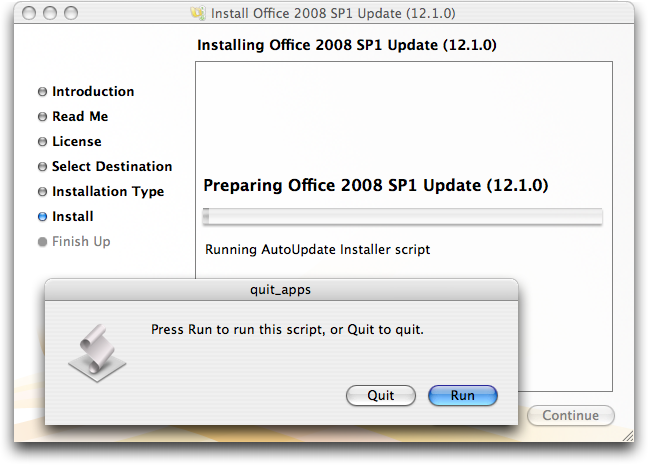
  has an installation script error fixed. Aside from all that, on both
  of my Macs, the updater just sat there until I clicked Run in an odd
  "quit_apps" script dialog that appeared _behind_ the main installer
  window (it took me a while to realize what was preventing the
  installer from continuing).

<http://www.microsoft.com/mac/help.mspx?target=dcae186d-57fa-4718-a06d-81cde168e5131033&clr=99-4-0>
<http://www.microsoft.com/mac/itpros/default.mspx?CTT=PageView&app=ag&target=9043bbf9-501e-4bdd-a641-f9543698e9091033>
<http://www.tidbits.com/resources/2008-05/Office-2008-Updater-dialog.png>

  In the announcement, Microsoft's Craig Eisler also said, "We are
  very clear that Visual Basic for Applications (VBA) is an important
  feature to certain customers, and we will be bringing support back
  for VBA in the next version of Office for Mac - along with
  continuing our support for AppleScript."

  Office users who relied heavily on VBA for workflow and automation,
  particularly in ways that would work for both the Mac and Windows
  versions of Office, have been troubled by the lack of VBA support in
  Office 2008. That's undoubtedly a small part of the overall Office
  user base, but a particularly involved and vocal segment that is
  faced either with sticking with Office 2004 (which lacks optimal
  performance on Intel-based Macs) or relying entirely on Windows
  versions of Office.

  So although it's certainly positive to see Microsoft announcing that
  VBA will resurface, "the next version" of Office could mean a 2 to 4
  year wait, which is an awfully long time for those who need VBA.
  Microsoft told Macworld that the problem with supporting VBA was
  related to the PowerPC architecture of the VBA support in Office
  2004, and supporting VBA in Office 2008 would have required cutting
  features or delaying the product even longer than the
  three-and-a-half years between the releases of Office 2004 and
  Office 2008.

<http://www.macworld.com/article/133393/2008/05/vba.html>


Take Control News: Two New Books about Apple Mail in Leopard
------------------------------------------------------------
  by Adam C. Engst <[EMAIL PROTECTED]>
  article link: <http://db.tidbits.com/article/9617>

  Looking to get more out of the latest version of Apple Mail, the one
  that ships with Leopard? Help is now at hand in the form of Joe
  Kissell's 95-page book, "Take Control of Apple Mail in Leopard."
  This title is chock full of handy tips, carefully considered
  procedures, and troubleshooting assistance. Along with coverage of
  14 new features in Leopard's version of Mail, Joe delves into the
  nitty-gritty of account setup; helps you get organized so you can
  read your most important messages first; and thoroughly covers the
  ins and outs of addressing, composing, and sending email. Plus, he
  examines making Time Machine backups of your email, Address Book
  integration, RSS feeds, Notes and To-Do items, archiving messages,
  and how to proceed if you run into a problem with not being able to
  send or receive email, or some other annoying bug-a-boo.

<http://www.takecontrolbooks.com/leopard-apple-mail.html?14@@!pt=TB929>

  Joe has also updated "Take Control of Spam with Apple Mail" for
  Leopard, and it goes far beyond the three pages of basic
  spam-zapping advice offered in "Take Control of Apple Mail in
  Leopard." Weighing in at 71 pages, "Take Control of Spam with Apple
  Mail" gives you background information so you understand more of
  what's going on with spam, detailed advice for configuring Mail to
  maximize its effectiveness at eliminating spam, and carefully
  researched coverage of utilities that can improve Mail's
  spam-slaying capabilities. "Take Control of Spam with Apple Mail"
  comes with a coupon for $5 off SpamSieve (normally $30), Joe's top
  pick for a third-party spam-fighting utility.

<http://www.takecontrolbooks.com/spam-apple-mail.html?14@@!pt=TB929>

  Each title costs $10 singly, but you can save $5 by purchasing them
  together in a bundle. Look for a bundle option at the left side of
  either book's Web page.

  Owners of "Take Control of Apple Mail in Tiger" who purchased before
  01-Oct-07 can click the Check for Updates button on the first page
  of the ebook's PDF to access a special upgrade discount. Everyone
  who purchased on or after that date should already have received a
  download link for a free update. Contact us at
  [EMAIL PROTECTED] if our email didn't arrive. Owners of "Take
  Control of Email in Apple Mail" (the Panther edition) can click the
  Check for Updates button on the first page of the ebook's PDF to
  access a special upgrade discount.

  If you already own "Take Control of Spam with Apple Mail", you can
  upgrade for free. Open your existing PDF and on page 1, click Check
  for Updates, and download the new version from the Web page that
  loads.


Move/Resize Windows from the Keyboard with MercuryMover
-------------------------------------------------------
  by Adam C. Engst <[EMAIL PROTECTED]>
  article link: <http://db.tidbits.com/article/9619>

  Most technical authors aren't wild about taking screenshots because
  setting up a good screenshot can take longer than writing about it.
  You have to make sure fields are appropriately filled in, the
  pointer is showing appropriately, and the window is the correct
  size. This last bit is often tricky, since moving and resizing
  windows with the mouse is inherently a loose operation -
  pixel-perfect alignment is difficult.

  However, there's now a utility that can help both authors and anyone
  who prefers to use the keyboard as much as possible: Helium Foot
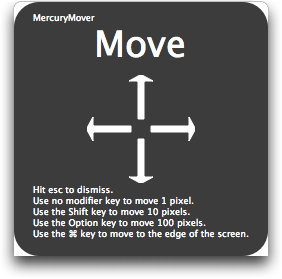
  Software's MercuryMover. It's a small preference pane that brings to
  the keyboard two basic functions that are generally restricted to
  the mouse: moving and resizing windows. Press a user-configurable
  keyboard shortcut (the default is Command-Control-Up arrow), and a
  translucent heads-up display appears with instructions telling you
  how to move the frontmost window using the arrow keys. Two other
  keyboard shortcuts help you resize windows up/left and down/right.
  (Requiring the user to think about which way a window should be
  resized seems unnecessarily baroque, but it's unavoidable, due to
  needing all four arrow keys to expand and contract in both
  situations.) You can also switch among the three different
  move/resize modes while the heads-up display is showing. See my
  screencast for a live tour through MercuryMover's preferences and
  usage.

<http://www.heliumfoot.com/mercurymover/>
<http://www.tidbits.com/resources/2008-05/MercuryMover-HUD-move.png>
<http://www.tidbits.com/resources/2008-05/MercuryMover-screencast.mov>

  Once the heads-up display is showing, a single unmodified arrow key
  press moves or resizes the frontmost window one pixel, but by
  holding down a modifier key as you press an arrow key, you can move
  or resize the window 10 or 100 pixels at a time, or take it all the
  way to the edge of the screen. Pressing = centers the window, and
  pressing + expands the window to the full size of the screen. Once
  you have the window looking the way you want, press Escape or click
  the mouse to dismiss MercuryMover. If you've made a mistake,
  Command-Z and Command-Shift-Z work as expected to undo and redo your
  actions, while the heads-up display is still showing. Using
  MercuryMover is easy, and I suspect that if you use it regularly,
  its keyboard shortcuts and controls will become second nature.

  Much as it's a slick little utility, MercuryMover isn't perfect.
  Although it could resize Eudora's windows, Eudora didn't always
  redraw the window contents to match. I suspect there may be other
  older applications that suffer similarly.

  While using the current version of MercuryMover, I found myself
  wishing it would let me set exact window dimensions and locations by
  typing in numbers and recall those settings later in order to keep
  screenshots consistent, something that's devilishly difficult now.
  Happily, before I even suggested the feature to Keith Alperin,
  MercuryMover's creator, he told me that the next version will
  "display the size of the current window and will also have a
  facility to 'bookmark' specific sizes and/or positions. I call these
  my screenshot features." I hope that next version is available
  before I need to update my iPhoto Visual QuickStart Guide again; for
  this last update, I found myself using screenshots from the previous
  edition as templates for getting the iPhoto window sized properly
  for particular screenshots.

  MercuryMover costs $24 and can be tested for 30 days. It requires
  Mac OS X 10.4.10 or later, and is a 782K download.


Kensington SaddleBag Ultra: The Same Old Bag, in a Good Way
-----------------------------------------------------------
  by Adam C. Engst <[EMAIL PROTECTED]>
  article link: <http://db.tidbits.com/article/9618>

  I've been using a Kensington SaddleBag to haul my laptop and
  associated crud around on trips for more years than I can remember.
  It's a messenger-style bag with a padded pocket for a laptop,
  another large pocket for gear, and a zippered pocket with lots of
  small internal pockets for cables, pens, business cards, and coins.
  There are also two external pockets, one on the big flap that closes
  the bag, and another on the back that's good for magazines. But what
  has always set the SaddleBag apart for me is a clever pocket on the
  outside flap that's sized perfectly for airline boarding passes
  (which I'm always nervous about dropping otherwise) and the hidden
  backpack straps in the back pocket. Although I usually rely on a
  nicely padded shoulder strap, there have been numerous times over
  the years where converting it to a backpack made for more
  comfortable carrying.

<http://us.kensington.com/html/4730.html>

  My beloved SaddleBag has been fraying a bit around the edges, but
  I'm not sufficiently vain that I'd ditch such a highly functional
  bag based on looks alone. But on our last trip, the unthinkable
  happened, and a major seam on the side gave way, threatening to
  spread various electronic gadgets over the floor of the plane. It
  was time for a new bag for my MacBook and gear (which likely weighs
  more than the MacBook itself).

  My first step was to re-read Jeff Carlson's excellent overview of
  how to choose a laptop case (check out "Buying a Laptop Bag,"
  2004-04-05). But as much as I appreciated having all the possible
  features and pitfalls brought to my attention, it was also a bit
  frustrating, since I couldn't lay my hands on bags from highly
  regarded manufacturers like Tom Bihn, Brenthaven, Crumpler, and
  Matias. If only it had been Macworld Expo time, since many of the
  bag manufacturers have booths at Macworld where you can poke and
  prod most of their models, as Karen Anderson did this year (see
  "Macworld Expo Laptop Bag Roundup and Slideshow," 2008-01-23).

<http://db.tidbits.com/article/7627>
<http://www.tombihn.com/>
<http://www.brenthaven.com/>
<http://www.crumplerbags.com/>
<http://matias.ca/laptoparmor/>
<http://db.tidbits.com/article/9420>

  Amusingly, the replacement bag topic came up on a mailing list I'm
  on just as I was starting my search, and a surprising number of
  people strongly recommended the Brenthaven Pro 15/17 Backpack, which
  is designed specifically for Apple's 15-inch and 17-inch laptops.
  (Many bags, including my SaddleBag, can't handle the 17-inch
  models).

<http://www.brenthaven.com/catalog-apple-pro-15-17.html>

  This was about the time I started to freeze up on the decision. I'm
  one of those people who is congenitally incapable of purchasing
  something without knowing all the alternatives, options, and price
  points. It's a curse, especially when it comes to something like a
  laptop bag, where there are hundreds of models, each differing in
  subtle ways that I could probably discern only in person, and
  ranging in price from $20 to $200. If I was ever forced to buy an
  iPod case, my brain would probably short-circuit.

  That was when I had a flash of insight. I actively liked my
  Kensington SaddleBag, and the only reason I was in the market for a
  new bag was because of a seam ripping out. (And yes, it ripped in
  such a way that I wouldn't have trusted myself to repair it with any
  guarantee of long-term success.) So I popped over to Kensington's
  Web site, where I discovered that they still sell the SaddleBag,
  along with the SaddleBag Pro, which features a bottom-mounted drawer
  for cables and other junk. Some random searching around the Web also
  revealed the existence of a SaddleBag Ultra, which still exists on
  Kensington's Web site, but oddly isn't linked from the main
  navigation. The SaddleBag Ultra seems almost identical to the
  original SaddleBag, but with the addition of a webbed pocket on one
  side for a water bottle, which would be great, since I always
  disliked putting water bottles inside my SaddleBag with my
  electronics.

<http://us.kensington.com/html/2226.html>
<http://us.kensington.com/html/6404.html>
<http://images.acco.com/KENSINGTON/K62362/K62362-11759.jpg>

  So why not just buy basically the same bag again? Sure, I wasn't
  expanding my horizons, but we're talking a laptop bag here, not some
  new hobby for my non-existent free time. All my familiar spots for
  storing different bits of gear would still be there, and years of
  muscle memory for opening and closing the bag and pulling things out
  wouldn't be wasted. But what clinched my decision to buy the
  SaddleBag Ultra was the discovery, via Amazon.com, that it was
  readily available for between $30 and $40. Compared to what you can
  pay for a laptop bag, that's practically free.

<http://www.amazon.com/dp/B0007MYC2I/?tag=tidbitselectro00>

  It arrived a few days ago, and although I haven't had a trip since,
  I fully enjoyed transferring everything I regularly carry from the
  old bag to the equivalent spot in the new one. The handle lacks the
  foam pad from the previous model, but it's similarly soft, and I
  don't anticipate it being a problem. The backpack straps on the new
  one are much more padded, though, which will be highly welcome. I
  can't compare the shoulder straps, since I have an extra-padded one
  that I bought separately and enjoy every time I use it. Some of the
  smaller zippered pockets have a slightly different configuration,
  with some being better and others worse, but all in all, it's
  basically the same old bag. I can't say if it's the perfect bag for
  you, but it's inexpensive and meets my needs well.

  And that's what I now know I really wanted: the same old bag,
  slightly updated and improved. This may be a sign that I'm getting
  older, but luckily, since I am getting older, I don't care.


Dealing with Doppelganger Folders in /Volumes
---------------------------------------------
  by Adam C. Engst <[EMAIL PROTECTED]>
  article link: <http://db.tidbits.com/article/9620>

  I've been working with CrashPlan Pro recently, seeding backups from
  my Macs to a 750 GB hard disk that will eventually live at a
  friend's house and serve as our offsite backup. It all went well for
  a while, but all of a sudden, CrashPlan Pro on each of the Macs
  started complaining that the destination Mac was out of disk space.
  That made no sense, given that my 750 GB disk had over 580 GB of
  free space, and everything was still set correctly in the CrashPlan
  interface. Late in the day, I sent email to the CrashPlan folks
  asking what might be going on.

  Before I heard back the next morning, however, Mac OS X warned me
  that my startup disk was almost out of space, so I fired up
  GrandPerspective to see where my disk space had gone. Mac OS X's
  virtual memory can hog disk space, but there should have been at
  least 5 or 6 GB of free space. A few minutes with GrandPerspective,
  and I found my culprit, a folder in /Volumes.


**Background and Explanation** -- The Volumes directory, which is
  normally hidden in Mac OS X, is the mount point for external disks.
  That means that when you attach a hard disk to a Mac, that hard disk
  appears as a disk alias in /Volumes, and the Finder shows it to you
  on the Desktop and/or in the sidebar, depending on your preferences.

  My external 750 GB hard disk is called "Adam's CrashPad" and when I
  looked in /Volumes, there was a normal _folder_ with that name, to
  which CrashPlan had been happily backing up gigabytes of data.
  Although the disk appeared as "Adam's CrashPad" in the Finder, in
  /Volumes it was called "Adam's CrashPad 1".

  As I dug into the situation more, things became muddier. It turns
  out that the main way this kind of replacement can happen is if a
  disk is unmounted in such a way that applications using it aren't
  made aware that it is no longer present, usually by powering it
  down, or removing a FireWire or USB cable without ejecting properly
  first. Certain applications then continue to write to the path where
  the disk had been, and the end result is a folder (and its embedded
  file structure) that matches what would have been on the disk, had
  it been present. (I never ejected my external disk improperly, so I
  still don't know exactly what happened.)

  Needless to say, applications should notice the disappearance of a
  disk, and Matthew Dornquast of Code42 Software said that they had
  spent nearly 100 hours trying to prevent CrashPlan from writing to a
  folder in /Volumes if the disk disappeared. However, I received
  reports of a wide variety of applications suffering from this
  problem, including the BitTorrent client Azureus, the Perforce
  version control system, Apple's Xcode development environment, and
  Mac OS X itself. (This is speculation, but Unix applications and
  Java-based applications may suffer more than Cocoa-based
  applications because cross-platform developers are more likely to
  use generic code that happily creates subdirectories if the parent
  directory in /Volumes doesn't exist; that way, the same code can
  work across different operating systems.)

  Mac OS X can fall prey to this problem if you set your user's home
  folder to live on an external disk (which might be your laptop in
  FireWire Target Disk Mode, a technique that lets you use the same
  data on a desktop Mac at work and on the laptop at home, for
  instance). If that external drive is unmounted improperly, which is
  easy to do if you're leaving work in a hurry and grab your laptop
  without unmounting it from the desktop Mac, Mac OS X on the desktop
  Mac blithely recreates your home folder in /Volumes.

  You might wonder why /Volumes is writable to user-level applications
  at all, and the answer seems to be that such permissions are
  necessary to allow anyone, even a restricted account, to insert
  removable media, which of course needs to be mounted in /Volumes. If
  /Volumes weren't world-writable, user-level applications wouldn't be
  able to create new folders there.


**Delete and Reboot, For Now** -- Solving my particular problem was
  easy. I simply viewed /Volumes in the Finder by choosing Go to
  Folder from the Finder's Go menu (Command-Shift-G), and then typing
  "/Volumes" in the dialog that appeared. Once I could see /Volumes, I
  trashed the "Adam's CrashPad" folder, emptied the Trash to reclaim
  the necessary space, and rebooted quickly, before CrashPlan could
  recreate the folder in /Volumes. A similar process should work in
  other situations.

  More generally, this is an architectural problem in Mac OS X that
  Apple needs to fix. Although applications bear some responsibility
  for creating folders in /Volumes when they shouldn't, the operating
  system should protect itself from such an obvious misuse.
  Unfortunately, a vast amount of code, both from Apple and other
  developers, assumes that /Volumes is writable, which means that
  fixing the problem would require lots of other changes, and Apple
  hasn't had the fortitude to force such an unpalatable solution on
  developers.

  Until such time as Apple re-architects this aspect of Mac OS X, it
  will remain up to developers to work around the problem by avoiding
  coding techniques that happily create entire hierarchies of files
  and folders even if the parent volume is no longer present.


iPhone Security Tips
--------------------
  by Rich Mogull <[EMAIL PROTECTED]>
  article link: <http://db.tidbits.com/article/9614>

  I was one of those people who never intended to purchase an iPhone
  before Apple released its putative second version. Yet, I somehow
  found myself sitting on an airplane home from San Francisco with a
  new iPhone in my pocket. It may have been the last day of Macworld
  Expo; to be honest, things are a little fuzzy. The iPhone has
  quickly become both an indispensable tool and my favorite toy. And
  like any security geek, I've spent a fair bit of time digging
  through all the options and making sure the iPhone is as safe as it
  is a pleasure to use.

  We don't spend a lot of time thinking about the security of the
  phones in our pockets, mostly because the odds of losing or breaking
  them are far higher than someone hacking them. One thing I realized
  quickly when using my iPhone is that I need to think of it more as a
  cross between a computer and a phone. We iPhone users check email
  and browse the Web on our iPhones as much as on our Macs, but
  there's one key difference: the iPhone is always in a pocket and
  always on the network. While there isn't a lot you need to do from a
  security standpoint, I do have a few recommendations that stem from
  how we use iPhones differently than other devices.


**Set a Passcode** -- The first thing that I recommend you do is set
  an access passcode in case you lose your phone. Your iPhone becomes
  inaccessible when it's locked down (at an interval you set) until
  you enter the passcode. Corporations often require passcode
  protection for smartphones that they require employees to carry, but
  it's not something we think about for our consumer phones. Since the
  iPhone contains all your email accounts, all your contacts, and
  possibly access to private Web sites that control access via
  cookies, you have more to lose than with a standard phone. If you
  find that entering the passcode over and over again is too much
  trouble, think carefully about the data that you've stored on your
  iPhone, so you can minimize damage in the event that your iPhone is
  lost or stolen. For example, be prepared to change all your
  passwords for email accounts you read on the iPhone immediately.

  You can set the passcode from Settings > General > Passcode Lock.
  Don't forget the code you set, or you'll have to reset your phone in
  iTunes to regain access. I keep my iPhone set to lock itself
  automatically every 15 minutes since I'm paranoid (as a security
  writer, I'm a bit more of a target than most people), but most
  people will be fine with a 1-hour lock.


**Don't Remember Open, Unencrypted Wi-Fi Networks** -- One nice
  feature of the iPhone is that it can remember the settings for every
  Wi-Fi network you connect to, and automatically reconnect to these
  networks in the future. Have it memorize your home and office
  network names (the SSIDs) and passwords, and you're automatically
  connected when you move between home and work, using AT&Ts (slow)
  EDGE network when you're out and about.

  The problem is that a lot of networks use the same network name,
  like "linksys" (for Linksys-branded wireless access points),
  "tsunami" (for Cisco), or "default". Your phone can't tell the
  difference between different open, unencrypted networks that use the
  same name, even though Wi-Fi access points also broadcast a unique
  embedded number.

  All a bad guy has to do is set up an open access point with a common
  name and start collecting the network traffic of anyone passing by.
  If you live in a rural or suburban area, this probably isn't much of
  a concern, but if you spend time in urban areas, airports, or
  conference centers it's a small, but real, risk. If any of that
  traffic is unencrypted and sensitive, say an email password, the bad
  guy (or, more likely, curious teenager) can capture it.

  I wrote more about these risks on my blog, and the solution is
  simple. On your iPhone, go into Settings > Wi-Fi and set the slider
  for "Ask to Join Networks" on. For those times you need to connect
  on an open network, just make sure you "forget" it from the iPhone
  interface (again, in Settings > Wi-Fi) when you're done.

<http://securosis.com/2008/04/28/iphone-security-tip-never-memorize-wireless-networks/>

  For networks that you control, like your home network, just make
  sure to at least enable wireless encryption (preferably WPA). A
  unique name is also a good idea: with WPA and WPA2, the network name
  is used as part of the encryption process, and changing the name
  from its default setting improves your security there, too. (Apple
  names its base stations with part of the unique network address by
  default, like "AirPort Network 00b33f", you'll likely want to change
  that anyway!)

  Your phone won't connect to a network with the same name (should you
  run across one) unless both the network ID and password match. And
  if you use Apple's AirPort base stations (Extreme or Express),
  AirPort Utility makes every effort to keep you from setting up an
  unencrypted network, and even marks an open network as a
  configuration error.


**Use a VPN** -- With an ever-increasing number of hotspots offering
  free Wi-Fi, such as all Starbucks stores as AT&T takes over their
  hotspot network, it's likely that we iPhone owners will find
  ourselves connecting to more open Wi-Fi networks in the future to
  take advantage of free, high speed bandwidth. Any open Wi-Fi network
  is a risk, free or not, but I for one have always been turned off by
  overpriced wireless and use free options much more frequently. As we
  expand our use of free networks, it's also more likely we'll
  eventually wander into an open network with a name we've remembered
  (probably near a college) where someone decides to sniff the
  traffic.

  The good news, yet again, is that Apple includes a virtual private
  network (VPN) client on the iPhone. Virtual private networks are
  encrypted tunnels between you and a gateway, but by default, they
  only encrypt traffic destined for that network. If you connect to a
  VPN to check your email, only that email traffic is encrypted unless
  you tell your iPhone to "Send all traffic" to the remote network.
  This is also, conveniently, an option in the VPN settings on your
  iPhone.

  Setting up a VPN is beyond the scope of this article (see Glenn
  Fleishman's "Secure Your iPhone Connections at Macworld Expo - and
  Beyond," 2008-01-09, for more details), but if you use the PPTP
  option, be sure you set the encryption level to "Maximum" to prevent
  bad guys from sniffing your VPN password.

<http://db.tidbits.com/article/9391>

  The biggest problem with the iPhone's VPN is that it doesn't engage
  automatically. If you wander in and out of a Wi-Fi network's
  coverage, and the iPhone switches to EDGE and back, you'll lose your
  Internet connection (if the VPN connection tries to remain active)
  or your VPN protection (if it does not). Here's hoping Apple fixes
  that in the iPhone 2.0 software.


**Relax and Enjoy** -- That's about all you need to do to secure your
  iPhone, and as I said, keeping an iPhone safe is more about not
  leaving it in a cab or knocking it onto a hard floor than encrypting
  every bit of data in and out. Most of you will never have to worry
  about network sniffing or advanced attacks, but a few extra, simple
  precautions never hurt. Especially those of you wandering around
  college campuses or technology conferences.


TidBITS Watchlist: Notable Software Updates for 19-May-08
---------------------------------------------------------
  by TidBITS Staff <[EMAIL PROTECTED]>
  article link: <http://db.tidbits.com/article/9615>

* Office 2004 for Mac 11.4.2 Update from Microsoft is a security
  update for Microsoft Office 2004, fixing a vulnerability in
  Microsoft Word that could allow remote code execution if the user
  were to open a specially crafted Word file. (Free upgrade, 9 MB)

<http://support.microsoft.com/kb/952332/>

* Simon 2.4 from Dejal Systems enhances the server and Internet
  services monitoring tool with support for Twitter, enabling users to
  monitor numerous aspects of the Twitter services (such as when
  someone follows or stops following you), and adding a notifier that
  can to inform you of server changes via Twitter. Also new is a
  Calendar notifier that can add events or tasks to iCal, or events to
  Google Calendar. Other new features include integration of
  previously separate services and notifiers, an iPhone report
  template, improvements in the Smart Change detection, and simplified
  status icons. ($29.95 to $195 new, free upgrade for 2.x users, 11
  MB)

<http://www.dejal.com/simon/>

* Cocktail 4.1 (Leopard Edition) from Maintain is a general purpose
  maintenance and system-configuration utility that provides a
  graphical interface to many of the options that would otherwise
  require a trip to the command line. Cocktail organizes its functions
  into five basic categories: disks, system, files, network, and
  interface, and the Pilot feature lets users automate various
  maintenance actions. The 4.1 update adds support for clearing caches
  for the Flock browser and the dynamic link editor. It also fixes
  some compatibility problems with Safari 3.1, provides improved
  Automator actions, fixes problems that could cause the weekly
  maintenance script to fail, and more. Cocktail 4.1 requires Mac OS X
  10.5 Leopard; Cocktail 4.0.2 (Tiger Edition) and 3.7 (Panther
  Edition) remain available. ($14.95 new, 2.6 MB)

<http://www.maintain.se/cocktail/>

* Cyberduck 3.0.1 from David Kocher adds support for WebDAV and Amazon
  S3 to the open-source file transfer client. Other new features
  include support for Quick Look in Leopard, mapping of FTP URLs to
  Web URLs, and an activity window that shows all pending tasks.
  (Free, 10.3 MB)

<http://cyberduck.ch/>

* PageSender 4.3 from SmileOnMyMac offers minor updates to the fax
  application, including options to clear the Recent Faxes and Recent
  Emails list. ($39.95 new, free upgrade for 4.x users, 7 MB)

<http://www.smileonmymac.com/pagesender/>

* CrowzNest 2.0 and Captain FTP 5.3 from Xnet Communications are new
  versions of two intertwined file upload and remote file management
  programs. CrowzNest links local files to remote destinations using
  FTP, SSL, SFTP, or WebDAV ($11 new, no upgrades, 2 MB). This release
  provides a little more flexibility, enabling files to be sent to
  multiple remote hosts, archiving files after upload, and
  notification after upload. Version 2.0 requires Captain FTP 5.3, a
  full-featured file transfer client, which fixed a couple of bugs in
  this release as well. ($29 new, free upgrade for 5.x users, 10 MB)

<http://captainftp.xdsnet.de/crowznest/>
<http://captainftp.xdsnet.de/cftp/features.html>

* AOL Desktop 1.0 replaces the horrible, horrible America Online
  client that's been in use for many years. The new AOL Desktop
  software, which works with AOL's free "bring your own broadband"
  offering and their paid services, uses Apple's WebKit underneath
  their tabbed browser, and can import email and favorites from the
  older client. Did I mention how horrible that older client was?
  (Free, 12 MB)

<http://daol.aol.com/software/desktop-for-mac/>


Hot Topics in TidBITS Talk/19-May-08
------------------------------------
  by Jeff Carlson <[EMAIL PROTECTED]>
  article link: <http://db.tidbits.com/article/9621>

**CMYK Conversion with ColorSync** -- The capability to output PDF
  files for modest design needs runs into a snag due to improper
  handling of how blacks are generated. (1 message)

<http://emperor.tidbits.com/TidBITS/Talk/1985>


**[ANN] Office 2008 SP1 Update (12.1.0) released** -- This week's
  public service announcement: Update Office 2008 from the Help menu
  in one of the Office applications, not by trying to launch the
  Microsoft AutoUpdate program manually. (9 messages)

<http://emperor.tidbits.com/TidBITS/Talk/1986>


**[Office 2008 SP1] install causes setup assistant to loop** -- An
  issue with invalid product keys could stymie the Office 2008 SP1
  update. Microsoft outlines the fix. (1 message)

<http://emperor.tidbits.com/TidBITS/Talk/1987>


**Best way to make network** -- Will an AirPort Extreme cover a
  reader's entire house with its signal, or is a bridge such as an
  AirPort Express required? (5 messages)

<http://emperor.tidbits.com/TidBITS/Talk/1988>


**Monitor recommendation?** Readers provide plenty of suggestions for
  replacement LCD displays. (30 messages)

<http://emperor.tidbits.com/TidBITS/Talk/1989>


**Digital Rights Misery: When Technology Is Designed to Fail** -- Jeff
  Porten's article inspires debate about whether the content companies
  are conspiring against consumers, or if the end result of
  anti-piracy measures only appears to be a conspiracy. (3 messages)

<http://emperor.tidbits.com/TidBITS/Talk/1990>


**MozyHome** -- Readers discuss the costs of online backups and
  whether the services that exist are likely to remain in business. (4
  messages)

<http://emperor.tidbits.com/TidBITS/Talk/1991>


**SSH failing to launch** -- Unix experts come to the aid of a reader
  who seems to be missing a key file. (3 messages)

<http://emperor.tidbits.com/TidBITS/Talk/1992>


**Good time or dumb time to buy an iPod Touch** -- With the next
  generation of iPhone and iPod touch on the horizon, is now a good
  time to wait or buy? (8 messages)

<http://emperor.tidbits.com/TidBITS/Talk/1993>


**color profiles and browsers** -- A reader has a question about
  embedded color profiles and how Web browsers handle them. Can you
  help? (2 messages)

<http://emperor.tidbits.com/TidBITS/Talk/1994>


**Cable TV to Mac** -- So you want to watch television on your
  computer. What's the best approach? (5 messages)

<http://emperor.tidbits.com/TidBITS/Talk/1995>


$$

This is TidBITS, a free weekly technology newsletter providing timely
news, insightful analysis, and in-depth reviews to the Macintosh and
Internet communities. Feel free to forward to friends; better still,
please ask them to subscribe!

Non-profit, non-commercial publications and Web sites may reprint or
link to articles if full credit is given. Others please contact us. We
do not guarantee accuracy of articles. Caveat lector. Publication,
product, and company names may be registered trademarks of their
companies. TidBITS ISSN 1090-7017.

Copyright 2008 TidBITS: Reuse governed by Creative Commons license.

Contact us at:    <[EMAIL PROTECTED]>
TidBITS Web site: <http://www.tidbits.com/>
License terms:    <http://www.tidbits.com/terms/>
Full text search: <http://www.tidbits.com/search/>
Subscriptions:    <http://www.tidbits.com/about/list.html>
Account help:     <http://www.tidbits.com/about/account-help.html>


--
If you want to unsubscribe or change your address, use this link
http://emperor.tidbits.com/webx?unsub@@.3c557dc4!u=306a67f9