TidBITS#930/26-May-08
=====================
  Issue link: <http://db.tidbits.com/issue/930>
  Laptops have become smaller and more powerful, but still the
  alternative beckons: Can you travel without one? Rich Mogull,
  self-described technology addict, ventures out on vacation armed
  only with his iPhone and lives to tell the tale. Rich also looks at
  the release of information on iCal security vulnerabilities which,
  although they pose little risk for Mac users, have yet to be patched
  by Apple. Also in this issue, Glenn Fleishman ponders options for
  recovering a stolen Mac following the recent report of a woman using
  Back to My Mac to apprehend thieves, and Adam notes what's new in
  Nisus Writer Pro 1.1 and wonders if replicating Word's feature set
  is enough to be competitive. If you're a GarageBand user, check out
  our two new ebooks about GarageBand '08. Finally, in the TidBITS
  Watchlist, we pass along information on SpamSieve 2.7, TextExpander
  2.2, KeyCue 4.2, Airfoil 3.2, and Logic Pro 8.0.2.

Articles
    Nisus Writer Pro 1.1 Adds Comments, Mail Merge, and More
    Unpatched iCal Security Flaws Present Low Risk
    Take Control News: Two New Books about GarageBand '08
    Help! I'm Being Held Captive, and All I Have Is a Wi-Fi Network!
    iPhone Survivor: Traveling Without a Laptop
    TidBITS Watchlist: Notable Software Updates for 26-May-08
    Hot Topics in TidBITS Talk/26-May-08


------------ This issue of TidBITS sponsored in part by: --------------

* READERS LIKE YOU! Support TidBITS with a contribution today!
  <http://www.tidbits.com/about/support/contributors.html>
  Special thanks this week to Takahito Kameoka, Jan van Prooijen,
  George B. Smith, and Russell H. Ginns for their generous support!

* Fetch Softworks: Fetch 5.3 makes FTP and SFTP easy!
  Upload, download, mirror, and manage your Web site. Dozens of
  new features to make file transfers easier and more reliable.
  Get your free trial version at <http://fetchsoftworks.com/>!

* WebCrossing Neighbors Creates Private Social Networks
  Create a complete social network with your company or group's
  own look. Scalable, extensible and extremely customizable.
  Take a guided tour today <http://www.webcrossing.com/tour>

* Bare Bones Software's BBEdit 8.7 -- Latest version offers a
  major interface overhaul, new prefs, text clippings, improved
  JavaScript, new Ruby/SQL/YAML/Markdown support, code folding.
  Over 160 new features in all! <http://www.barebones.com/>.

* MARK/SPACE, INC: If you have a smartphone, we can sync it!
  Sync your address book, calendar, notes, music, pictures, and
  more from your BlackBerry, Windows Mobile or Palm OS mobile
  phone to your Mac. <http://www.markspace.com/bits>

* VMware Fusion. The most seamless way to run Windows on your Mac.
  Backed by nearly a decade of proven virtualization technology.
  Try VMware Fusion today for free, or order online for only $79.
  Visit: <http://www.tidbits.com/about/support/vmware-fusion.html>

* Make friends and influence people by sponsoring TidBITS!
  Put your company and products in front of tens of thousands of
  savvy, committed Macintosh users who actually buy stuff.
  More information: <http://db.tidbits.com/advertising.html>

---------- Help support TidBITS by supporting our sponsors ------------


Nisus Writer Pro 1.1 Adds Comments, Mail Merge, and More
--------------------------------------------------------
  by Adam C. Engst <[EMAIL PROTECTED]>
  article link: <http://db.tidbits.com/article/9629>

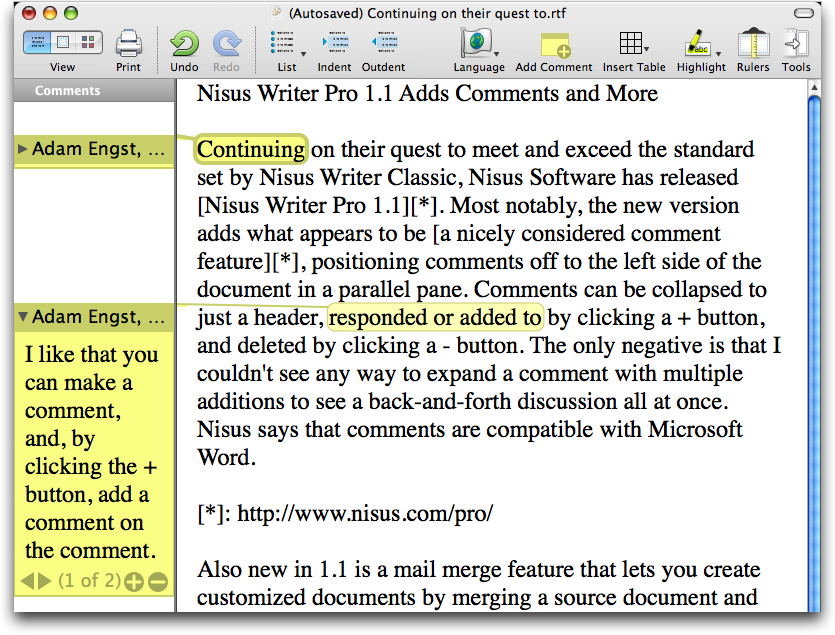
  Continuing on their quest to meet and exceed the standard set by
  Nisus Writer Classic, Nisus Software has released Nisus Writer Pro
  1.1. Most notably, the new version adds what appears to be a nicely
  considered comment feature, positioning comments off to the left
  side of the document in a parallel pane. Comments can be collapsed
  to just a header, responded or added to by clicking a + button, and
  deleted by clicking a - button. The only negative is that I couldn't
  see any way to expand a comment with multiple additions to see a
  back-and-forth discussion all at once. Nisus says that comments are
  compatible with Microsoft Word.

<http://www.nisus.com/pro/>
<http://www.tidbits.com/resources/2008-05/Nisus-Writer-Pro-comments.png>

  Also new in 1.1 is a mail merge feature that lets you create
  customized documents by merging a source document and either data
  from Address Book or a comma-separated value text file. You can also
  add bits of Perl code to customize documents further.

  Less significant features include additional macro commands, page
  numbers in the status bar, a "Go to Page" feature that simplifies
  navigation in longer documents, the capability to redefine a style
  based on the current selection, a Page Borders palette that works on
  selected sections, a preference to control the thickness of the
  insertion point, preservation of fonts in a document that aren't
  available on the Mac on which the document is being opened, and an
  option in the Open dialog to ignore rich text commands so HTML
  documents can be opened as plain text (rather than interpreted).
  Nisus Writer Pro 1.1 also incorporates numerous bug fixes and
  performance enhancements that should speed up typing and display
  rendering, especially in Mac OS X 10.5 Leopard.

<http://www.nisus.com/pro/releasenotes.php>

  With these changes Nisus Writer Pro also comes closer to being able
  to compete with Microsoft Word for serious word processing. However,
  until Nisus Writer can do change tracking, it won't be able to take
  over from Word in collaborative workgroups that share documents
  around for editing as well as commenting. Even if a future version
  of Nisus Writer Pro were to add change tracking, I'm concerned that
  Nisus isn't putting enough effort into rethinking what a modern word
  processor should be able to do - merely recreating Word's feature
  set isn't enough. Arguably, most writing today has the Web as the
  ultimate destination, and smooth collaboration (both sequentially
  and in real-time) is becoming ever more important. If a small
  company like Nisus can't meet those needs in the relatively near
  future, the field will undoubtedly be ceded to the online word
  processors like Google Docs, Zoho Writer, Buzzword, or a promising
  newcomer like TextFlow.

<http://docs.google.com/>
<http://writer.zoho.com/>
<https://buzzword.acrobat.com/>
<http://www.textflow.com/>

  Nisus Writer Pro 1.1 is a universal binary and requires Mac OS X
  10.4 or later. The upgrade for existing owners of Nisus Writer Pro
  is free. New copies cost $79, and a 3-user "family pack" for
  individuals, families, and small office users is available for $99.
  Upgrades from Nisus Writer Express cost $45. A 15-day demo is
  available.

<http://www.nisus.com/free/pro.php>


Unpatched iCal Security Flaws Present Low Risk
----------------------------------------------
  by Rich Mogull <[EMAIL PROTECTED]>
  article link: <http://db.tidbits.com/article/9624>

  On 22-May-08, the research unit of Core Security Technologies
  released the details of three new security vulnerabilities in iCal.
  Two of the vulnerabilities can crash a vulnerable system, while the
  third can potentially allow an attacker to take over your computer.
  Based on the communication notes in the official advisory from Core,
  it appears that Apple originally intended to release a patch before
  the vulnerability details were released, but the patch was delayed.
  In all three cases the vulnerabilities take advantage of the user
  opening specially crafted .ics calendar files.

<http://www.coresecurity.com/index.php5?module=ContentMod&action=item&id=2219>

  The first two vulnerabilities are a class of bug known as a
  null-pointer dereference. Until very recently this type of flaw
  wasn't considered exploitable by an attacker, because it might crash
  your system or the running program but it couldn't allow someone to
  take over your computer. This changed in March 2008 when security
  researcher Mark Dowd used a null-pointer dereferencing bug in the
  Adobe Flash player to exploit a fully patched Windows Vista laptop
  during the CanSecWest conference Pwn2Own contest (the same contest
  where Charlie Miller compromised a MacBook Air; see "Apple Becomes
  First Victim in Hacking Contest," 2008-03-28).

<http://blogs.zdnet.com/security/?p=988>
<http://cansecwest.com/post/2008-03-20.21:33:00.CanSecWest_PWN2OWN_2008>
<http://db.tidbits.com/article/9529>

  Dowd's technique is extremely complex, and _there is absolutely no
  indication it can be used with these iCal vulnerabilities_. Core's
  own advisory states that they do not believe these vulnerabilities
  will do anything other than crash iCal if you open a malicious .ics
  file.

<http://www.matasano.com/log/1032/this-new-vulnerability-dowds-inhuman-flash-exploit/>

  The third vulnerability is remotely exploitable by an attacker, but
  is a low risk due to the sequence of steps needed for it to run. You
  must first import the malicious calendar entry, then double-click it
  in iCal, then click Edit, then click the field to change the alarm.
  The exploit code will execute only if you click on the alarm field
  in Edit mode.

  In all three cases, if the attacker inserts the malicious calendar
  entry into a calendar you subscribe to, it will automatically import
  into your system and could crash iCal (you still have to click the
  alarm in a malicious entry for the attacker to take over your
  system). These attacks haven't yet been seen in the wild, but Core's
  security advisory contains working proof-of-concept code from which
  a bad guy could easily build an attack.

  This brings up a complex ethical issue about disclosure of security
  vulnerabilities. By releasing detailed information before Apple
  patched the flaws, Core places all Mac users at risk. On the other
  hand, as you can read in the Report Timeline of the advisory, Core
  worked with Apple to coordinate the release with the patch until
  communications seemed to break down at the last minute.

  My personal opinion is that researchers should only release
  vulnerability details either after a patch is released, or if there
  is clear evidence the bad guys already know about the vulnerability
  and are exploiting it in the wild. However, some researchers
  disagree with my opinion and feel they should also release details
  if a vendor is unresponsive or doesn't patch within a reasonable
  time period. I used to share this opinion, but over time I've come
  to believe that the stakes have changed in the last 5 to 10 years,
  with exploits appearing within hours of vulnerability advisories.
  Releasing details before a patch helps the bad guys far more than
  users. All too often these situations become ego battles between the
  vendor and the researcher, with innocent users caught in the
  crossfire.

  The good news is that in this particular case the overall risk to
  users is low. The two easiest vulnerabilities to exploit will only
  crash iCal, and only if you import a malicious .ics file or are
  subscribed to a compromised calendar. The third vulnerability is
  more serious, but unless you click on the alarm field in the
  malicious entry it can't run.

  As usual, we advise you to follow safe computing practices. Be
  careful what you import into iCal, and make sure you keep your eyes
  open and update when Apple releases an update, which we expect soon.
  Your risk is low, and despite being unpatched, this vulnerability
  isn't keeping me up at night.

  (Full disclosure: Core Security Technologies is currently a
  consulting client of mine.)


Take Control News: Two New Books about GarageBand '08
-----------------------------------------------------
  by Adam C. Engst <[EMAIL PROTECTED]>
  article link: <http://db.tidbits.com/article/9626>

  We're pleased to announce the release of a pair of ebooks about
  GarageBand '08. These books are based on previous editions but have
  been completely updated to cover all the latest GarageBand features
  - Visual EQ, Magic GarageBand, tempo automation, the arrange track,
  and more. Each costs $10 or you can purchase them together for only
  $17.50. Whether you're just getting started with GarageBand or are
  an old pro looking to get the most out of the program, these titles
  have the help you need.

<https://secure.esellerate.net/secure/prefill.aspx?s=STR5625274989&cmd=BUY&_cartitem0.skurefnum=SKU43643959258&_cartitem1.skurefnum=SKU96334121026&_Shopper.CouponName=CPN006480522BUN&_eSellerate.Options=prevalidatecoupon&pt=TB930>

  In "Take Control of Making Music with GarageBand '08," Seattle
  musician Jeff Tolbert's step-by-step instructions guide beginning
  and intermediate users through using GarageBand's built-in loops to
  create three songs, explaining not only how to use GarageBand's
  editing and mixing features but also how to be playful and creative
  while composing tunes that please the ear. In this 110-page title,
  you'll learn how to plan a song, get the most out of Magic
  GarageBand, edit loops using both graphical and notation view,
  create exciting mixes, and export your masterpieces as songs or
  iPhone ringtones. The book also covers how to change track volume,
  tempo, and panning dynamically, and how to work with GarageBand's
  effects. Linked-in audio lets you listen to examples while you read
  about them. Bonus! The book includes seven suggestions for solving
  performance problems and a five-page glossary of music-related
  terms.

<http://www.takecontrolbooks.com/garageband-music.html?14@@!pt=TB930>

  Want to record your own music? In "Take Control of Recording with
  GarageBand '08," Jeff shares his GarageBand know-how and years of
  recording experience to help you get the most out of your existing
  gear or purchase new equipment that fits your budget and style.
  You'll find real-world recording studio techniques, learn tips for
  using a microphone, and discover how to apply effects like a pro.
  Clear steps and practical advice help you plan a recording session,
  record multiple tracks at once, and fix mistakes easily. Two example
  songs demonstrate many of the techniques discussed, and you can
  follow along with audio examples as you read.

<http://www.takecontrolbooks.com/garageband-recording.html?14@@!pt=TB930>

  Owners of a previous edition of either GarageBand title who
  purchased before 01-Aug-07, can click the Check for Updates button
  on the first page of the ebook's PDF to access a special 50
  percent-off upgrade discount. Everyone who purchased on or after
  that date should already have received a download link for a free
  update; contact us at [EMAIL PROTECTED] if our email didn't
  arrive.


Help! I'm Being Held Captive, and All I Have Is a Wi-Fi Network!
----------------------------------------------------------------
  by Glenn Fleishman <[EMAIL PROTECTED]>
  article link: <http://db.tidbits.com/article/9627>

  Two weeks ago, a remarkable Mac owner - a teenaged Apple Store
  employee - led police to her stolen Mac laptop through the clever
  use of a Leopard feature; see "Back to My Mac Leads to Recovery of
  Stolen Mac," 2008-05-10. The recovery was so clever it was used as a
  question in the rapid-fire round at the end of NPR/Chicago Public
  Radio's "Wait Wait... Don't Tell Me!" show on 17-May-08.

<http://db.tidbits.com/article/9608>
<http://www.npr.org/templates/rundowns/rundown.php?prgId=35&prgDate=05-17-2008>

  This incident led several readers to ask via email how they could
  accomplish a similar feat; one person's Mac had already been
  pilfered. Back to My Mac can be tricky to work without controlling
  all network circumstances, but it's not a bad place to start. I
  found two other methods and offer some rumination on other ideas.


**Get My Mac Back, Back to My Mac!** If you'd like to be as smart as
  19-year-old Kait Duplaga, you can enable Back to My Mac even if you
  have just a single Macintosh. The feature, built into Mac OS X 10.5
  Leopard, requires a .Mac subscription - either a regular
  subscription or one that's part of the five-user family pack. An
  email-only subscription available as a less-expensive extra won't
  work.

  In Leopard's .Mac system preference pane, use the Account tab to log
  into .Mac, and then click the Back to My Mac tab to start up that
  service. Back to My Mac requires your .Mac user name and password to
  be accessible from another computer running Leopard. It
  automatically updates the .Mac servers with your computer's
  information whenever network information changes.

  If your computer is stolen, you could set up your .Mac account and
  Back to My Mac on another computer - Duplaga was tipped off because
  a friend saw her identity appear on iChat - and then access the
  remote machine. Your stolen computer will appear in the Shared list
  in a Finder window's sidebar. Select it, click Share Screen or
  Connect As, and you'll have access to the remote screen and remote
  files. Duplaga launched Photo Booth from the Applications folder,
  snapped some shots, and quickly copied those to her computer along
  with some other photos on the machine.

  The thieves, if they'd been savvy enough, could have kept the
  computer off a network, logged out of .Mac, or even used Back to My
  Mac to share Duplaga's screen.

  Because Back to My Mac requires a networked router that uses one of
  two automated port mapping protocols to be enabled - Apple's NAT-PMP
  or the more broadly used UPnP - it's likely that a stolen computer
  won't wind up accessible via Back to My Mac, even though it may
  appear in the Shared list in the sidebar.

  Conceivably, you could pull the IP address that Back to My Mac
  registers with the .Mac service, and then give that to the police,
  who, if they had a cybercrime division, could use it to track down
  the appropriate ISP, and then ask or subpoena that ISP for details
  on the IP's location (if static or assigned). I've tested different
  means of retrieving an IP address for Back to My Mac machines, but
  Apple wraps Back to My Mac inside IPv6 (next-generation Internet
  addressing) tunnels, and I've unable to figure out if the IPv4 (the
  current addressing scheme) address is also made available.


**Going Deep Undercover** -- Orbicule's Undercover software and
  service is a nifty little package designed to keep track of your
  computer with minimal resource usage. The $49 application, a
  universal binary updated for Leopard, must first be installed to
  generate a unique ID that you retain and keep private. Once
  installed, Undercover contacts the company's servers every 6 minutes
  with a very lightweight request - 500 bytes - to check whether the
  computer is in Orbicule's database of stolen machines. The company
  says no ID information is passed during this request.

<http://www.orbicule.com/undercover/works.html>

  If your computer is stolen, you use an online form to notify
  Orbicule using your private ID code. This updates their database,
  and the next time your computer comes online, the Undercover process
  - which runs at boot regardless of whether a user is logged in -
  discovers its host machine is stolen, and goes into a reporting
  mode.

  Undercover then starts to take screenshots of the desktop and, if
  there's a built-in or external iSight, snapshots through the camera.
  The software continually transmits this information to Orbicule. The
  company will contact the ISP through which the laptop thief has
  connected, as well as work with local law enforcement to deliver the
  information.

  After a period of time you define, Undercover will pull a trick from
  the old handbook of Macintosh practical jokes and pranks: it starts
  gradually dimming the screen in an attempt to trick the thief into
  trying to get it repaired or sell it. (You might ask, Which book? I
  can't recall if it's "Stupid Mac Tricks" by Bob LeVitus, or "The
  Macintosh Joker" by Owen Linzmayer. Both came with floppies, and
  could perform such pranks as progressively shrinking the effective
  screen size by one pixel on each side after each restart.)

<http://www.amazon.com/dp/0201570467/?tag=tidbitselectro00>
<http://www.amazon.com/dp/1568300794/?tag=tidbitselectro00>

  Orbicule has assembled a database of Apple Store and repair shop IP
  addresses: should the computer be powered up on one of those
  networks, your computer displays a full-screen message that, if
  dismissed, reappears with the fact that the computer has been
  stolen, offering a finder's fee (paid by the company), and any
  custom text you provide.

  Here's perhaps the best part: Orbicule clearly has a sense of humor.
  Your computer will also use its text-to-speech capability to yell
  the same information, setting the volume level to its highest
  setting.

  The only fault I can find in Orbicule's software, which I have not
  yet installed nor tested, is that if your computer isn't connected
  to the Internet for 60 days, this second phase ("Plan B") is
  automatically invoked. So if you go on vacation for three months,
  leaving your computer behind - heaven forfend! - when you return, it
  will start yelling at you about being stolen. You have to contact
  the company with your private ID code to disable Plan B; the company
  is looking into ways to allow the interval to be changed.

  Orbicule has a variety of prices for its software, which requires no
  annual fee. A single-user commercial license is $49, a household
  license (up to 5 Macs) is $59, and a site license for up to 25 Macs
  is $249. Full-time students pay $10 less for a single-user license
  and $5 less for a household license. Educational institutions pay $8
  per Mac for 100 copies or more.


**Get Back to Where You Once Belonged** -- BAK2u makes theft-tracking
  software for a variety of platforms and devices; its Mac offering,
  Verey I for Mac, is somewhat simpler and comes with no recovery
  service. The software costs $39.90, is a universal binary, works
  with Leopard, and has no recurring fees.

<http://www.bak2u.com/verey.php>

  Verey I requires that you enter a password whenever it connects to a
  network. If the password is entered incorrectly, Verey I starts
  recording audio and video with a built-in iSight, if available, and
  sends you alerts that include network information and a scan of
  nearby Wi-Fi networks through a variety of services (via instant
  messaging, email, Twitter, and on a Web page).

  Verey I doesn't use or require any corporate intervention in
  recovery, instead letting you handle everything. That may or may not
  be a plus, depending on your situation and preferences.

  There's also the cleverly name-checked Computrace LoJack for
  Laptops, which has nothing to do with the car theft-prevention and
  recovery service except a name licensed by its maker Absolute
  Software. As far as I can tell from the minimal information on the
  company's Web site, the software regularly contacts the company's
  servers, and when you alert Absolute Software that your computer is
  stolen, they work with you and law enforcement to track it down via
  network access. It's a subscription package, and costs either $49
  per year or $99 for 3 years.

<http://lojackforlaptops.com/>


**Distributed, Decentralized Identification** -- I learned about a
  very low-tech solution used by many police departments around the
  United States and Canada from Cornell University's Oliver Habicht
  (pictured here with a super-cool laptop etching), a friend of the
  Engsts. Called Operation ID, the program lets individuals, academic
  institutions, and companies engrave or etch a unique identifier in
  some indelible fashion onto objects that need to be protected. (This
  Operation ID is not to be confused with programs of the same name in
  North America used to educate retailers about under-age alcohol and
  cigarette sales.)

<http://communications.library.cornell.edu/com/news/spotlight/Smiley-Faces.cfm>

  The ID is a left-to-right, geographically largest-to-smallest
  human-readable code. It starts with the state or province
  abbreviation or a corresponding number (like MN or NY), followed by
  numbers that identify the county and then police department. The
  final digits are a unique number assigned by the police department
  that can be assigned to an individual or to an organization. In some
  places, police prefer that the ID is the simpler formula of the
  state or province's two-letter postal abbreviation followed by a
  driver's license number.

  Oliver researched the program before committing laptops purchased by
  Cornell to be labeled with Operation ID numbers, but neither of us
  could find any centralized authority, Web site, or canonical
  information about it. I've come to the conclusion that Operation ID
  is a meme - a kind of mind virus - rather than an actual program.

  Visiting dozens of local Web sites that describe the program,
  there's no reference to any official centralized source or even
  references to how the program started. On one site, it's described
  as being 30 years old. I expect that it's a combination of useful
  bureaucracy, in which police departments are used to being assigned
  numbers within state hierarchies, and someone's bright idea in the
  1970s that was simply passed along, almost as a form of oral history
  crossed with procedure - police myth!

  The relatively standardized form in which the ID is used means that
  it's perpetuated itself, and means that many officers and precincts
  should be familiar with it. If you pair a Google search of
  "Operation ID" with your town or college, you can typically find out
  if your local law enforcement system offers the loan of an engraving
  pen or help with engraving, and whether they register your ID.
  Minnesota State University has a good explanation of their rendition
  of the program. Some departments will hand out Operation ID stickers
  that you put in your window, ostensibly to deter thieves.

<http://www.mnsu.edu/security/safety/operation.html>

  Oliver noted that Cornell's Operation ID policy says property can be
  traced "by computer back to the university." He contrasts this with
  the fact that the number assigned to him was written on a piece of
  paper and placed in a filing cabinet.

<http://www.policy.cornell.edu/vol2_1.cfm>


**In Recovery** -- Clearly, there's room to provide more association
  of stolen gear with those who own it. Given that Macs, like most
  electronics of any kind, have unique serial numbers, and, unlike
  most electronics, can read those serial numbers within the operating
  system means that there should be a way to connect a uniquely
  numbered Mac, its owner, and the computer's location.

<http://docs.info.apple.com/article.html?artnum=106486>

  I would think that there's room for a Mac developer to work on a
  theft-recovery service with Skyhook Wireless, which can compute a
  set of location coordinates using a scan of nearby Wi-Fi networks
  and their signal strengths. Skyhook already has an API that allows
  external access to their systems via a Web page, and partners with
  companies like Apple on the iPhone (alongside a Google
  cell-triangulation system) to provide GPS-like results. Skyhook
  already has a deal in place with The CyberAngel for Windows-based
  theft-recovery services with Wi-Fi positioning.

<http://www.thecyberangel.com/usingthecyberangel.aspx>

  It seems like a short step for a stolen Mac to phone home and say,
  "Help! I've been stolen, and I'm being held in a warehouse in Santa
  Rosacrucia!" Then it's just a matter of convincing the police that
  no psychics were involved in determining the system's whereabouts.


iPhone Survivor: Traveling Without a Laptop
-------------------------------------------
  by Rich Mogull <[EMAIL PROTECTED]>
  article link: <http://db.tidbits.com/article/9625>

  Something about human nature compels us to challenge ourselves. It's
  as if evolution itself coalesces into corporeal form to drive us
  forward; clinging to our backs as it whispers sweet rewards to tempt
  us into actions to prove we are worthy of our place on this planet.
  For some, these temptations burst free with creative impulse
  resulting in works of art, literature, or entrepreneurship. For
  others, especially young males, these temptations lead to dangerous
  physical follies involving beer. And those individuals with
  exceptional skills, experiences, and capabilities demand even more
  extreme challenges. Challenges that risk their very survival.

  I've been trained to survive some of the harshest, most dangerous
  conditions in our world short of combat. As a former paramedic and
  firefighter with over a decade's experience in mountain rescue, I'm
  confident in my ability to handle everything from natural disasters
  to run-of-the-mill survival situations in the ocean, in the desert,
  and in the mountains. But nothing could prepare me for my latest
  challenge... surviving five days on vacation in California with only
  my iPhone; leaving my trusty MacBook Pro at home.

  Scoff if you must, but I am completely unapologetic about my
  addiction to technology. As a frequent business traveler I've lugged
  my laptop to the corners of the earth and rely upon it as an
  essential travel tool. My first MacBook Pro even accompanied us to
  our wedding on a beach in Mexico (saving us from relying on a local
  band). But when my wife and I decided to spend a long anniversary
  weekend in San Francisco, I felt compelled to challenge myself and
  see if I could survive under such harsh conditions. Plus, bringing
  my laptop on an anniversary trip might have ensured my demise by
  other, more direct, means.


**Day 1: Phoenix, Arizona** -- As I pull my iPhone from its cradle and
  shut the lid of my laptop I feel a shudder of fear. Am I up for this
  challenge? Is it worth the risk to my mental health? I attempt to
  brush aside my fears as I slip the iPhone into my pocket and stride
  from the door with nothing more than the clothes on my back. And my
  boarding pass. And my roller bag with 5 days of clothes and
  toiletries. And a couple of books and magazines. But
  technologically, I am otherwise empty-handed and defenseless.


**Day 1 continued: San Francisco, California** -- The iPhone served me
  well at the airport; keeping me entertained in the mind-numbing
  security line with the latest news and Twitter updates. I spent the
  flight comfortably crammed into what my airline claims is a First
  Class seat, thanks to an upgrade, and catching up on some television
  I legally transferred over from my TiVo. It's still early in my
  journey, but so far I've managed to satisfy my email, news, Twitter,
  and television addictions.

  Upon landing we head to the rental car area even though we
  originally planned to pick up our car the next day. I check my
  confirmation number using TripIt, an online travel tool, as we race
  to the counter to find a long line being served by only two
  attendants. I pull out my iPhone, browse to the Web site for the
  rental company, and with a few clicks call the service desk. No cars
  are available, so we scurry to another rental company as I check
  rates online. We're headed to our car before our original line
  clears.

<http://tripit.com/>

  We're now navigating our way to dinner using Maps, after about 4
  hours of wandering the city. I laughed in the face of the hotel
  receptionist as she offered me a map, opting to face my fears and
  place my trust in the iPhone. So far we haven't stopped moving long
  enough for me to miss the laptop, and using the iPhone I'm
  completely up to date on my email. Being self employed, it's
  difficult to go completely offline during working days; one reason
  traveling without a laptop is such a great fear.


**Day 2: Alcatraz Island, California** -- We managed to find shelter
  for the night and survived the winds and frigid San Francisco Bay
  conditions, but the lack of a coffee maker in our room drove us into
  the wild soon after dawn. A quick search in Maps on the iPhone
  located the nearest breakfast restaurant, and the live mapping
  guided us over the death-defying hills of Lombard Street and down
  the other side to our ferry to Alcatraz Island.

  I now find myself somewhat disturbed as I respond to emails while
  standing outside the prison cell that once held Al Capone. Did the
  mythical crime lord once sit in his cell, browsing YouTube over his
  EDGE data connection? Perhaps not, so I snap a picture with my phone
  and move on to the dining area, scanning the other inhabitants for
  hidden shanks.


**Day 3: Sonoma, California** -- I'm sitting in a lean-to structure in
  the middle of a field surrounded by edible plants, but to touch them
  is to place my very existence at risk. The locals, called
  "winemakers," consider the plants sacred, only to be touched in a
  ceremony known as a "harvest." One of these winemakers is our host,
  and after five hours of participating in the ritual known as a
  "tasting," I am completely disoriented yet completely happy. This
  Colin Lee Vineyards and Winery produces a powerful beverage with a
  compelling flavor I can't seem to resist.

  Using the notepad on my phone I write down the address and phone
  number, since they don't use email, and I begin to research my
  foraging options for our evening meal. My screen appears blurry -
  perhaps it's affected by the local climate? If so, the climate is
  also affecting everything around me, since nothing seems to be in
  focus.


**Day 4: Sonoma, California** -- My laptop separation anxiety now
  seems completely unfounded. Four days into this challenge and I'm
  completely confident that I will not only survive, but thrive. I've
  been able to stay completely current with work email messages,
  including those with attachments. I haven't been able to edit
  documents, but I'm still able to at least read standard Microsoft
  Word, Excel, and Adobe PDF documents. Not ideal, but serviceable
  considering the circumstances. Someday, maybe, we'll be able to edit
  these files directly, and having even read-only PowerPoint support
  would be extremely helpful for following along with presentations
  while on conference calls. While a laptop will always be preferable
  for any serious document work, basic editing capabilities will
  satisfy those unexpected needs when a full computer isn't available.

  One of the primary reasons I usually travel with a laptop is to have
  access to a Web browser. I use it for everything from itinerary
  lookups, flight changes, and local maps to movie times, news
  updates, restaurant recommendations, and general research. While the
  iPhone Web browser and email client aren't as robust as the Mac OS X
  equivalents, they exceed my survival requirements and meet most
  needs. They are my two essential travel applications.

  The one missing piece that makes me break out in a cold sweat when I
  even suspect I need it is copy-and-paste. The lack of copy-and-paste
  between applications, or even within the same application, is a
  devastating loss equivalent to having to start a fire with a bow and
  drill instead of match or lighter. You can still survive, but at a
  high cost with much anxiety.

  It's our last night in Sonoma, and I set my iPhone on the table
  between us with some Jimmy Buffett emanating from the speakers as we
  enjoy some fine wine and cheese. Chalk up my ability to survive
  these hard conditions to my extensive fortitude combined with the
  iPhone exceeding my expectations.


**Day 5: Approaching Phoenix, Arizona** -- As we prepare for landing,
  I check my iPhone to ensure it's in airplane mode so I don't bring
  us crashing to the ground in a ball of wireless-induced flames.
  Looking back on my journey, I reminisce about the challenges I
  faced. From finding shelter and foraging for food, to entertaining
  ourselves and keeping informed, I realize the iPhone is in many ways
  more useful than the laptop it replaced.

  With maps, a nearly feature-complete Web browser and email client,
  photos, video, calendar, and... what's that called... a phone, it
  offers much of the core functionality I use for non-business travel.
  With only a few more features, such as copy-and-paste, PowerPoint
  viewing, and perhaps basic Office document editing it might even be
  suitable for lightweight work trips. The large screen and functional
  Web browser offer advantages over my old Blackberry; attached
  documents look much better, and unlike the Blackberry, the Web
  experience is more than sufficient for most browsing. I do have a
  slight advantage since I'm very quick on the iPhone keyboard and
  able to write full email messages with two-thumb typing faster than
  some people on a standard desktop keyboard.

  While I couldn't survive a full business trip with just the iPhone,
  I not only didn't miss my MacBook Pro during this challenge, but
  accomplished feats the laptop could never match. While my laptop
  technically supports location-based mapping (with an external GPS),
  photos (via the iSight), and phone calls (Skype), I would need to
  buy some seriously larger trousers to fit it, and the required spare
  batteries, in my pocket.

  And as my journey of survival ends I realize that I am not a brave
  man. If I truly wanted to challenge myself I'd keep the laptop and
  try to survive without the iPhone. But that's a feat I'll leave for
  braver souls. Besides, this being our anniversary trip, the presence
  of the MacBook Pro justifiably wouldn't have been good for my
  continued health.


TidBITS Watchlist: Notable Software Updates for 26-May-08
---------------------------------------------------------
  by Adam C. Engst <[EMAIL PROTECTED]>
  article link: <http://db.tidbits.com/article/9623>

* Logic Pro 8.0.2 from Apple fixes unspecified bugs and compatibility
  problems in Logic Pro 8.0 and the bundled Waveburner 1.5 and Impulse
  Response Utility 1.0. ($499 new, free upgrade, 139 MB)

<http://www.apple.com/support/downloads/logicpro802.html>

* Airfoil 3.2 from Rogue Amoeba improves support for the new Draft N
  (802.11n) AirPort Express, including better synchronization and what
  Rogue Amoeba describes as "full password support." This update also
  handles remote control for QuickTime Player and iTunes via an Apple
  Remote with an Apple TV or Keyspan Express Remote with an AirPort
  Express. Airfoil streams music across a network from any application
  to AirPort Express base stations, other computers, and Apple TV.
  ($25, free upgrade for 3.x owners, $10 upgrade for 2.x owners, 10
  MB)

<http://www.rogueamoeba.com/airfoil/mac/>

* SpamSieve 2.7 from C-Command Software updates the powerful
  spam-filtering software with a variety of accuracy improvements
  aimed at dealing with obfuscations, image attachments, URLs, and
  HTML. Other changes include increased performance and lower memory
  use, cosmetic changes to the rule and corpus windows, and more.
  ($39, free upgrade, 5.1 MB)

<http://c-command.com/spamsieve/>

* TextExpander 2.2 from SmileOnMyMac adds to the typing shortcut tool
  a pre-defined snippet group with common CSS code to help people who
  design Web sites using Cascading Style Sheets. Other changes in
  version 2.2 include compatibility with MacSpeech Dictate, limiting
  of the "Adapt to Case" option to lowercase snippets and
  abbreviations with two or more characters, and disabling of
  expansion when Shift-Space is typed. ($29.95, free upgrade, 3.9 MB)

<http://www.smileonmymac.com/textexpander/>

* KeyCue 4.2 from Ergonis Software helps users learn and remember
  keyboard shortcuts by displaying a concise table of all available
  shortcuts for the current application when the Command key is held
  down. Version 4.2 adds support for Stairways Software's Keyboard
  Maestro 3.0, showing Keyboard Maestro hot keys along with those that
  are native to the current application. Other changes include the
  capability to avoid overlapping with the heads-up display of
  clipboards in Script Software's CopyPaste Pro and a bug fix that
  could prevent the Mac from restarting or shutting down. (19.95
  euros, free upgrade if purchased within the last 2 years or 9.99
  euros for 2-year license renewal, 907K)

<http://www.ergonis.com/products/keycue/>
<http://www.keyboardmaestro.com/>
<http://www.scriptsoftware.com/copypaste/>


Hot Topics in TidBITS Talk/26-May-08
------------------------------------
  by Jeff Carlson <[EMAIL PROTECTED]>
  article link: <http://db.tidbits.com/article/9630>

**Folder Encryption** -- A reader needs to ensure that work files
  remain securely encrypted. Will FileVault provide the solution, or
  are third-party encryption products the answer? (10 messages)

<http://emperor.tidbits.com/TidBITS/Talk/1996>


**Spam on iPhone** -- The iPhone's limited memory and storage make it
  difficult to provide good on-device filtering of unsolicited email.
  Instead, weed out the junk before it gets to the phone. (2 messages)

<http://emperor.tidbits.com/TidBITS/Talk/1997>


**Griping about Mail** -- A former Eudora user runs into limitations
  in Mail, which spurs a discussion about preserving original messages
  for litigation. (6 messages)

<http://emperor.tidbits.com/TidBITS/Talk/1998>


**Using Skype Video** -- Can you take advantage of Skype's High
  Quality Video setting without purchasing special Logitech hardware?
  (2 messages)

<http://emperor.tidbits.com/TidBITS/Talk/1999>


**DirecTV DVR to Mac** -- The non-TiVo DVR offered by DirecTV does not
  seem capable of transferring video to a Mac, so what's the
  alternative? (3 messages)

<http://emperor.tidbits.com/TidBITS/Talk/2001>


**Monitor Recommendations** -- After soliciting advice on buying a
  replacement display, Kirk McElhearn shares advice on acquiring and
  setting it up. (1 message)

<http://emperor.tidbits.com/TidBITS/Talk/2002>


**Power supply and fan replacements** -- Can replacing an old power
  supply and fan in a Power Mac G4 improve performance and reduce
  noise? (2 messages)

<http://emperor.tidbits.com/TidBITS/Talk/2003>


**iPhone Survivor: Traveling Without a Laptop** -- Readers respond to
  Rich Mogull's article on leaving his laptop at home for a trip to
  San Francisco. (4 messages)

<http://emperor.tidbits.com/TidBITS/Talk/2004>


$$

This is TidBITS, a free weekly technology newsletter providing timely
news, insightful analysis, and in-depth reviews to the Macintosh and
Internet communities. Feel free to forward to friends; better still,
please ask them to subscribe!

Non-profit, non-commercial publications and Web sites may reprint or
link to articles if full credit is given. Others please contact us. We
do not guarantee accuracy of articles. Caveat lector. Publication,
product, and company names may be registered trademarks of their
companies. TidBITS ISSN 1090-7017.

Copyright 2008 TidBITS: Reuse governed by Creative Commons license.

Contact us at:    <[EMAIL PROTECTED]>
TidBITS Web site: <http://www.tidbits.com/>
License terms:    <http://www.tidbits.com/terms/>
Full text search: <http://www.tidbits.com/search/>
Subscriptions:    <http://www.tidbits.com/about/list.html>
Account help:     <http://www.tidbits.com/about/account-help.html>


--
If you want to unsubscribe or change your address, use this link
http://emperor.tidbits.com/webx?unsub@@.3c557dc4!u=306a67f9