TidBITS#933/16-Jun-08
=====================
  Issue link: <http://db.tidbits.com/issue/933>
  The iPhone has captured much attention in our world, but it's not
  the only smartphone on the market. Mark Anbinder looks at the $99
  Palm Centro and discovers there's still some life in Palm. Also in
  this issue, Sharon Zardetto looks at the state of font
  auto-activation under Leopard, and Adam cleans up his system with
  Service Scrubber. Getting back to the iPhone, Glenn Fleishman
  provides more details about the upcoming iPhone 3G, and Mark pines
  for SlingPlayer Mobile for the iPhone, while Adam crunches the
  numbers and discovers that the iPhone 3G will cost U.S. buyers more
  than the original, despite its advertised lower prices. We also note
  the releases of QuickTime 7.5, iMovie 7.1.2, iDVD 7.0.2, Iris 1.0,
  AirPort Utility 5.3.2, PopChar X 4, Mellel 2.5, Opera 9.5,
  BlogAssist 2.2, InterMapper 5.5, and updates to The Missing Sync for
  Palm, Symbian, and Windows Mobile.

Articles
    QuickTime 7.5 Addresses Security Concerns, iMovie and iDVD Updated
    Take Control News: Ebooks about Screen Sharing and Back to My Mac
    Service Scrubber Cleans Services Menu
    Font Auto-Activation Still Broken in 10.5.3
    iPhone 3G GPS Details, Power Adapter, and Industrial Design
    SlingPlayer Mobile Would Drive Slingbox Owners to iPhone
    iPhone 3G Actually $160 More Expensive
    Palm Centro: Another Look at the Original Smartphone
    TidBITS Watchlist: Notable Software Updates for 16-Jun-08
    Hot Topics in TidBITS Talk/16-June-08


------------ This issue of TidBITS sponsored in part by: --------------

* READERS LIKE YOU! Support TidBITS with a contribution today!
  <http://www.tidbits.com/about/support/contributors.html>
  Special thanks this week to Donald Schaefer, Thomas Ransom,
  James Tait Elder, and T. P. Hazard for their generous support!

* Fetch Softworks: Fetch 5.3 has WebView, the easy way
  to view files in a browser and copy Web addresses from Fetch.
  Also a new look for Leopard, droplet shortcuts, and more.
  Download your free trial version! <http://fetchsoftworks.com/>

* WebCrossing Neighbors Creates Private Social Networks
  Create a complete social network with your company or group's
  own look. Scalable, extensible and extremely customizable.
  Take a guided tour today <http://www.webcrossing.com/tour>

* MARK/SPACE, INC: Take it with you! The Missing Sync makes
  it easy to synchronize contacts, calendars, notes, photos
  and more from your Mac to your BlackBerry, Palm OS, or
  Windows Mobile phone. <http://www.markspace.com/bits>

* VMware Fusion. The most seamless way to run Windows on your Mac.
  Backed by nearly a decade of proven virtualization technology.
  Try VMware Fusion today for free, or order online for only $79.
  Visit: <http://www.tidbits.com/about/support/vmware-fusion.html>

* Make friends and influence people by sponsoring TidBITS!
  Put your company and products in front of tens of thousands of
  savvy, committed Macintosh users who actually buy stuff.
  More information: <http://db.tidbits.com/advertising.html>

---------- Help support TidBITS by supporting our sponsors ------------


QuickTime 7.5 Addresses Security Concerns, iMovie and iDVD Updated
------------------------------------------------------------------
  by Jeff Carlson <[EMAIL PROTECTED]>
  article link: <http://db.tidbits.com/article/9654>

  While the iPhone 3G and Snow Leopard grabbed everyone's attention at
  the Worldwide Developers Conference last week, Apple also released
  security and bug-fix updates to QuickTime, iMovie '08, and iDVD '08.

  QuickTime 7.5 tackles several security issues dealing with
  maliciously crafted media: PICT images, AAC-encoded media, and Indeo
  video. It also changes the behavior of handling URLs by revealing
  files in the Finder or Windows Explorer instead of launching them.
  (For more information on recent QuickTime security issues and how
  Apple is addressing them, see "QuickTime Security Enhanced with
  Anti-Exploitation Technologies," 2007-09-07.)

<http://support.apple.com/kb/HT1991>
<http://db.tidbits.com/article/9579>

  QuickTime 7.5 is available via Software Update or as stand-alone
  downloads for the following operating systems: Mac OS X 10.5 Leopard
  (56 MB), Mac OS X 10.4 Tiger (52.8 MB), Mac OS X 10.3 Panther (51.39
  MB), and Windows XP and Vista (22.67 MB).

<http://www.apple.com/support/downloads/quicktime75forleopard.html>
<http://www.apple.com/support/downloads/quicktime75fortiger.html>
<http://www.apple.com/support/downloads/quicktime75forpanther.html>
<http://www.apple.com/support/downloads/quicktime75forwindows.html>

  Apple's updates for iMovie and iDVD only state that each addresses
  "general compatibility issues, improves overall stability, and
  addresses a number of other minor issues." They're also available
  via Software Update (once QuickTime 7.5, which is required, is
  installed), or as stand-alone downloads: iMovie 7.1.2 (17.9 MB) and
  iDVD 7.0.2 (20.27 MB). They also require Mac OS X 10.4.11 or later.

<http://www.apple.com/support/downloads/imovie712.html>
<http://www.apple.com/support/downloads/idvd702.html>


Take Control News: Ebooks about Screen Sharing and Back to My Mac
-----------------------------------------------------------------
  by Adam C. Engst <[EMAIL PROTECTED]>
  article link: <http://db.tidbits.com/article/9656>

  Leopard brought us oodles of new features, including built-in screen
  sharing and a theoretically seamless way to connect back to your own
  Macs for both screen sharing and file sharing. With screen sharing,
  you control the mouse and keyboard of one computer while you sit at
  another computer across the room or on the other side of the world.
  It's great for providing remote tech support for family and friends,
  for configuring and managing remote servers, and for collaborating
  with colleagues in real time. To help you better work with screen
  sharing and Back to My Mac, we are pleased to announce the release
  of two ebooks, both by TidBITS contributing editor Glenn Fleishman.
  Each title is $10 by itself or you can buy them together for $15:

* In "Take Control of Screen Sharing in Leopard," Glenn documents the
  new screen-sharing capabilities in Leopard. Screen-sharing
  applications have been available for the Mac for many years, but
  Leopard makes screen sharing accessible to normal Mac users. Apple
  has piled on the options, enabling screen sharing via iChat,
  Bonjour, directly by entering an IP address or hostname, and Back to
  My Mac. All these choices bring complexity, and this book helps you
  figure out which type of screen sharing to use when, how to share
  screens with people who are not running Leopard and even with
  Windows users, and how to get the most out of Leopard's hidden
  Screen Sharing application. The 88-page book also includes
  troubleshooting information and assistance with configuring routers
  for screen sharing.

<http://www.takecontrolbooks.com/leopard-screen-sharing.html?14@@!pt=TB933>

* In "Take Control of Back to My Mac," Glenn changes gears to focus on
  the Back to My Mac service also introduced in Leopard. With Back to
  My Mac, you can connect from one of your Macs to another for file
  and screen sharing, making it possible, for instance, to snag a
  forgotten document or to control your Power Mac G5 from your MacBook
  while on a trip. Or at least that's the theory, since in practice,
  people have had huge trouble in getting Back to My Mac working. In
  this book, you'll find essential details on configuring common
  routers to work with Back to My Mac, learn about the security
  implications of using Back to My Mac, and discover handy features in
  the hidden Screen Sharing application. The 100-page book even covers
  the latest significant improvements to Back to My Mac in Mac OS X
  10.5.3.

<http://www.takecontrolbooks.com/back-to-my-mac.html?14@@!pt=TB933>

  In case you're wondering, we've confirmed with Apple that the
  functionality of the Back to My Mac service will not be changing as
  Apple transitions .Mac to MobileMe (Back to My Mac currently
  requires that you have a .Mac account). However, some aspects of
  using Back to My Mac will obviously be changing; for instance,
  you'll likely be turning on the service in a MobileMe system
  preference pane in Mac OS X 10.5.4, not in a .Mac preference pane.
  Meanwhile, we know there are folks who want help with screen sharing
  and especially Back to My Mac right now, so we're excited to be able
  to make these books available.

  (If you own the second edition of "Take Control of .Mac," you can
  purchase "Take Control of Back to My Mac" for $5 off; to access the
  discount, open the PDF of the second edition and then on the cover,
  click Check for Updates. Scroll down a little on the resulting Check
  for Updates Web page.)


Service Scrubber Cleans Services Menu
-------------------------------------
  by Adam C. Engst <[EMAIL PROTECTED]>
  article link: <http://db.tidbits.com/article/9643>

  Not long ago, I downloaded a copy of MacGourmet, an excellent recipe
  database and menu management program that I wanted to test for a
  review. After playing with it briefly, I returned to Eudora to get
  some work done. But the first time I selected some text in a message
  and pressed Command-Shift-R to reply quoting the selection,
  MacGourmet immediately tried to import the selected text as a
  recipe. Needless to say, it wasn't a recipe, so the "import" failed,
  and I had to hold down the Shift key and choose Reply Quoting
  Selection from Eudora's Message menu to finish the message I wanted
  to respond to.

  Irritated, I whipped off a snippy message to Michael Dupuis of
  Advenio, admonishing him for setting a default keyboard shortcut for
  MacGourmet's Import Recipe service that was so likely to conflict
  with another program's keyboard shortcut (sorry about that,
  Michael!), and then went to find the latest version of Service
  Scrubber.


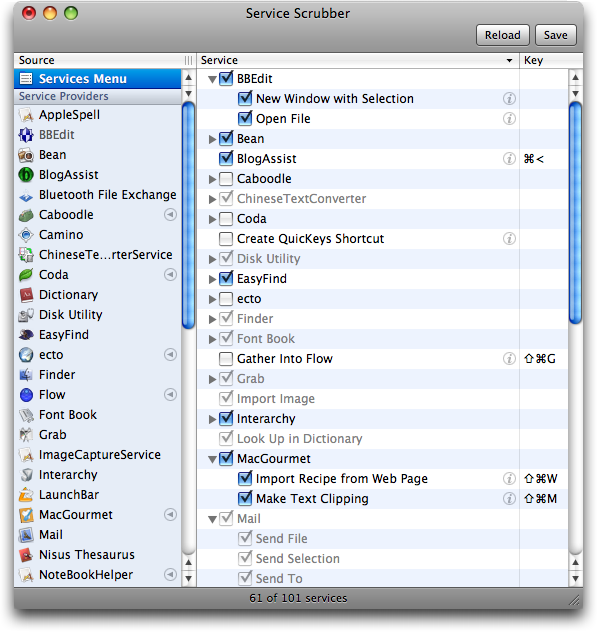
**At Your Service** -- First, a little background. Since the early
  days of Mac OS X, there has been a hierarchical Services menu that
  appears in the application menu of all applications (that's the menu
  with the name of the application). The Services menu contains
  further hierarchical menus that either provide quick access to a
  feature of some other program or provide a way to transfer
  information from one program to another. For instance, if you wanted
  to put a bunch of text from Safari into a BBEdit window for editing,
  you could select it in Safari, copy it, switch to BBEdit, open a new
  window, and paste the text (five steps). Or, you could simply select
  the text in Safari, and then choose Safari > Services > BBEdit > New
  Window with Selection (two steps). Neat, eh? Here are a few other
  tasks simplified by the Services menu:

* Put the selected text in the body of a new message in Mail, or
  create a new message addressed to the person whose name is selected.

* Start or stop speaking the selected text, even if the application
  containing the text doesn't have a normal Speech menu.

* Start a Google search in Safari for the selected text.

  Lots of applications register services with the Services menu - I
  have over 30 items in the Services menu on my MacBook, and nearly 60
  on my Power Mac G5, which has many more applications installed. This
  leads to two problems. First is simple overload - the Services menu
  becomes much harder to navigate when it contains items you'll never
  use (Chinese Text Converter? ISA Reference?). Second, applications
  often assign keyboard shortcuts to their services, in part because
  the Services menu is so long and cumbersome. But those keyboard
  shortcuts sometimes take over for keyboard shortcuts in other
  applications, which is maddening - that's what happened to me with
  MacGourmet's service stealing Eudora's keyboard shortcut.


**Clean the Services Menu** -- The solution to this mess is Service
  Scrubber, a donation-ware application from Many Tricks (418K
  download). Service Scrubber displays both the contents of the
  Services menu and all service providers (applications that put
  submenus in the Services menu). With Service Scrubber, you can
  disable a service provider entirely, if you seldom use the program
  and don't want it cluttering your Services menu, or you can turn off
  individual services within service providers, if you have no
  intention of using those functions. A little triangle button next to
  a service provider indicates that you've made changes to it; click
  the triangle button to re-enable disabled services inside. Service
  Scrubber's help implies that the triangle button will also bring
  back original keyboard shortcuts, but that doesn't seem to be the
  case for me. No loss. Another minor restriction is that Service
  Scrubber cannot currently edit signed applications, which Apple
  introduced in Mac OS X 10.5 Leopard.

<http://www.manytricks.com/servicescrubber/>
<http://www.tidbits.com/resources/2008-06/Service-Scrubber-window.png>
<http://www.manytricks.com/blog/?id=30>

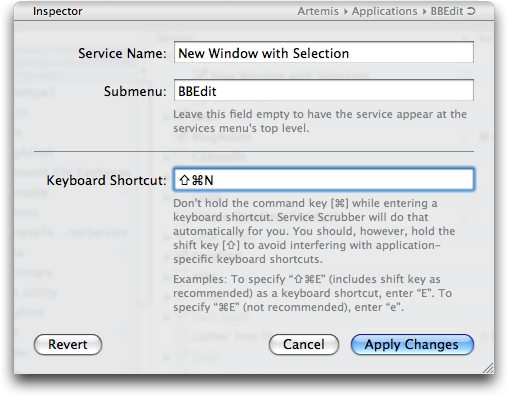
  More important is the capability to change the keyboard shortcuts
  for individual services by clicking them in the Key column. If you
  anticipate using the service a lot, you can assign it a keyboard
  shortcut that makes sense to you and doesn't conflict with other
  application shortcuts. The only limitation is that you cannot use
  the Control key in shortcuts. Annoyingly, although you can use the
  Option key, Service Scrubber displays the character associated with
  Option-N, for instance, instead of showing you
  Command-Shift-Option-N (for this screenshot, I stuck with the more
  obvious Command-Shift-N). For less commonly used services, it may be
  easier to delete the keyboard shortcut entirely.

<http://www.tidbits.com/resources/2008-06/Service-Scrubber-inspector.png>

  Once you're done making changes, click the Save button at the top of
  Service Scrubber's window, enter your administrator password, and
  you're done. For a quick visual demonstration of how to use Service
  Scrubber, see my short screencast.

<http://www.tidbits.com/resources/2008-06/Service-Scrubber-screencast.mov>

  I'm a bit ashamed to admit that I never use the Services menu, and
  this article is a bit of repentance, since I think services have the
  potential to make me more productive. In my defense, I think Apple's
  basic implementation of services is still clumsy, hard to find and
  use, and occasionally irritating when keyboard shortcuts conflict.
  And that's after six revisions of Mac OS X! Here's hoping Apple puts
  more thought into making services more discoverable in the next big
  cat, and until then, I strongly recommend that you use Service
  Scrubber to make the Services menu work the way you want.


Font Auto-Activation Still Broken in 10.5.3
-------------------------------------------
  by Sharon Zardetto <[EMAIL PROTECTED]>
  article link: <http://db.tidbits.com/article/9655>

  Perusing the Apple Discussions board several weeks ago, I was
  surprised (and, okay, pleased) to find my name, and one of my books,
  mentioned in passing. But the thread was talking about how the font
  auto-activation feature wasn't working for TextEdit in Mac OS X
  10.5.2, and the mention was "interestingly, the book by Sharon
  Zardetto, 'Take Control of Fonts in Leopard,' has a section on auto
  activation, and there is no suggestion that it doesn't work." And
  that's true: except for stipulated problems with Microsoft Word
  2004, I didn't say, or even intimate, that auto activation might not
   work - because it worked when I wrote the book. Since the Mac OS X
  10.5.2 update, however, its performance is patchy.

<http://www.takecontrolbooks.com/leopard-fonts.html>

  Fair warning: this article only describes the font auto-activation
  problem; there's no solution available. When I started writing this
  article, I hoped that Mac OS X 10.5.3 would provide a solution, but
  that has not turned out to be the case.


**Not-so-auto Activation** -- The auto-activation feature in Leopard's
  Font Book (turned on and off in its preferences) checks a document
  as you open it; if the document uses a font that's not currently
  active, you get a dialog asking if you'd like it activated. The
  extra-special aspect of this feature is that you don't need the font
  in Font Book at all - if the font is anywhere on an attached drive,
  Font Book finds it and offers to activate it for you; the font stays
  available inside the application until you quit it. This is
  invaluable for people who use different fonts for different projects
  but don't want them all on, or even installed in Font Book waiting
  for manual activation; it used to be a feature only in third-party
  font management software.

  In Mac OS X 10.5.2 and 10.5.3, however, this feature just doesn't
  work. Look for the auto-activation notice for a Pages or Keynote
  document, and you get the insipid "Some warnings occurred. Would you
  like to review them now?" dialog, and the "review" unhelpfully
  states that a font is missing. In TextEdit, you don't get even that
  dialog: the document just opens with the default font substituted.
  As if to make up for its lackadaisical behavior when opening a
  document with a missing font, TextEdit occasionally overcompensates.
  Leave its Font panel open, disable a font in Font Book, move back
  into TextEdit, and you might get an auto-activation dialog asking
  permission to activate the font. And you're not allowed to refuse:
  click the Don't Allow button, and you get the dialog again. And
  again. It doesn't give up until you give in and click Allow.

  Word 2004 never played well with Font Book's auto-activation
  feature, but now the feature doesn't want to come out and play at
  all. Word 2008's relationship with auto-activation is squirrelly at
  best, and schizophrenic at worst, with auto-activation dialogs
  sometimes popping up while the program is starting up, or well after
  you've opened a document that doesn't even contain the font you're
  being queried about. InDesign CS3 does what it did under earlier
  versions of Leopard: it ignores Font Book's auto-activation and
  reports missing fonts in its own way.

  That said, we can't complain about the third-party products that
  don't work with auto-activation, since there's obviously something
  broken on the Font Book end of things.

  But is it a Font Book problem, or a Mac OS X problem? Since there's
  no way to control font auto-activation except through Font Book, I
  can't experimentally confirm or deny which is the culprit.
  (Third-party font managers have offered auto-activation in versions
  of Mac OS X before Leopard, so it's unlikely they're hooking into
  any system component of Leopard to perform the trick.) So, I don't
  know which is the problem, but I don't think the distinction makes a
  lick of difference to users. The special auto-activation feature
  that made Leopard's native font handling a boon to fontophiles who
  don't otherwise need a more full-featured font management utility
  has gone missing through two Leopard updates now, and might push
  some of us back to a non-Apple solution if it doesn't return soon.
  We're not waiting for Snow Leopard, Apple.


iPhone 3G GPS Details, Power Adapter, and Industrial Design
-----------------------------------------------------------
  by Glenn Fleishman <[EMAIL PROTECTED]>
  article link: <http://db.tidbits.com/article/9652>

  The initial outpouring of information from Apple about the iPhone
  3G, iPhone 2.0 software, and .Mac's metamorphosis into MobileMe left
  us dazed. Here are a few additional details that we glossed over at
  first.


**Touch Me, 3G** -- In an Apple briefing, I was able to play with an
  iPhone 3G briefly, and I can report that it does, in fact, feel
  better than the original iPhone, which I have owned since the night
  they were first released. The plastic back feels good, and is
  clearly going to be more scratch- and damage-resistant. (My aluminum
  back is dented from a bad fall, and looks a bit shabby.)

  The difference between the original iPhone and the iPhone 3G is
  nowhere near as large as that between the nice-but-boxy
  first-generation iPod and its smaller, rounder successors that
  switched from a mechanical to touch-based scroll wheel. It's much
  more like the difference between, say, a third-generation iPod and a
  fifth-generation. It's all about refinement.

  The iPhone 3G definitely feels faster overall - it's unclear whether
  this is due to iPhone 2.0 software optimizing the phone, or a faster
  processor. Apple declined to talk about processor speed.


**More Power, Scotty!** During the briefing, Greg "Joz" Jozwiak , the
  marketing head for the iPhone and iPod, slid a small plastic and
  metal object over to me without comment. I put the thing in my hand
  and thought, "Huh. Metal prongs on one end - clearly power. A slot
  on the other side. Looks like a USB port. Plug, port. Plug, port."
  My brain took a moment and then told me, "It's a power adapter,
  dummy, just one smaller than you've ever seen before."

  And so it is. Exceedingly tiny, the adapter seems like it can barely
  contain the metal necessary to provide conductivity. It's another
  aspect of Apple's overall design philosophy. Even if another maker
  could design the iPhone's industrial look and feel, they would still
  send you an ugly black brick to go with it.

<http://tidbits.com/resources/2008-06/specs_charger20080609.jpg>


**Tag, You're It** -- Jozwiak said that while the camera is
  essentially the same in the new iPhone, the image handling and
  processing is improved, and the availability of the GPS chip will
  allow photos to be geotagged: marked with the GPS's idea of the
  current latitude and longitude.

  Using industry-standard photo metadata, uploading a geotagged image
  lets services that support location-based marking put your photo on
  a map. Flickr wasn't the first, but was the first big service to add
  geotagging support.

<http://www.flickr.com/help/map/>

  I also extracted some detail about how the GPS will work in relation
  to both battery life and permission. A GPS can be a dangerous thing:
  What if you don't want your location to be known? It can also be a
  battery drain. Jozwiak said that the GPS function is active only
  when you're using it; this is part of the whole philosophy of no
  unnecessary background activities to preserve battery life and
  functionality.

  When you use the Maps application, you'll be able to choose whether
  or not to use the GPS location and tracking features. Likewise, if a
  program wants to use the Core Location capabilities available to
  developers, the iPhone (any model) will ask your permission first.
  Core Location uses GPS, Wi-Fi, and cell-tower location. (Separately,
  I'm not sure if GPS routes can be transferred from the iPhone, or if
  you can only view your routes within Maps itself, as Steve Jobs
  showed.)


SlingPlayer Mobile Would Drive Slingbox Owners to iPhone
--------------------------------------------------------
  by Mark H. Anbinder <[EMAIL PROTECTED]>
  article link: <http://db.tidbits.com/article/9659>

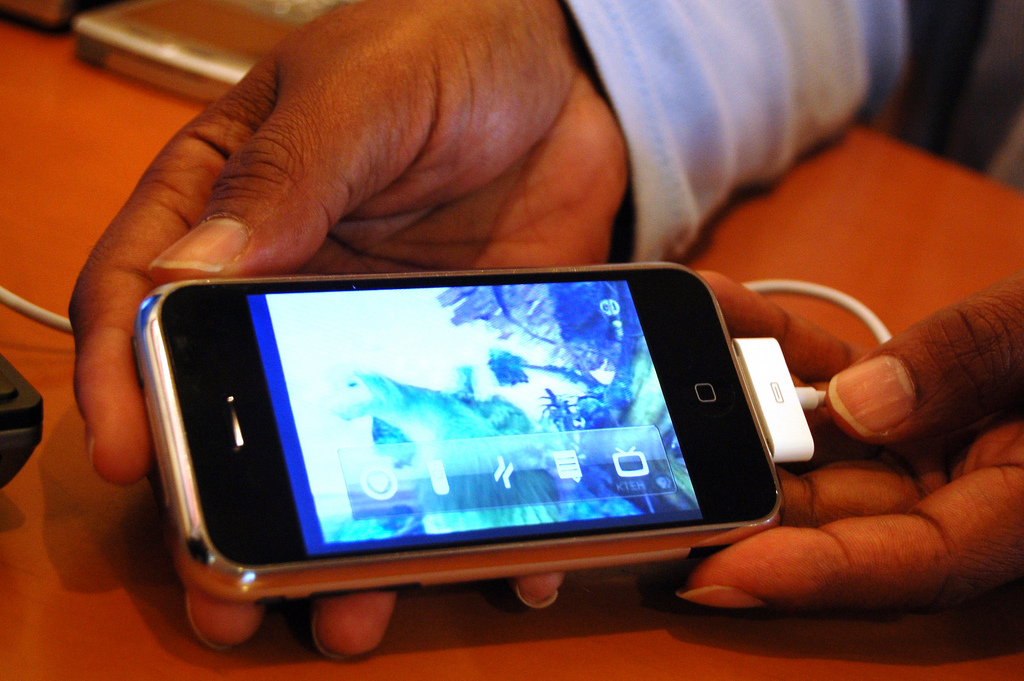
  At a coffee shop near Moscone West, where Apple's Worldwide
  Developers Conference took place last week, representatives of Sling
  Media showed me a proof-of-concept version of their SlingPlayer
  Mobile video placeshifting software on an iPhone and an iPod touch.
  The software, already available for Palm OS, Windows Mobile, and
  Symbian handhelds, enables users to watch video from their Slingbox
  devices while away from their televisions.

<http://www.slingmedia.com/go/spm>

  The iPhone and iPod touch are great devices for watching television
  remotely, especially when on a fast Wi-Fi connection. Sling Media's
  proof-of-concept application was a joy to watch, with crisp video
  and only brief delays in using the software's remote control
  features - not noticeably worse than similar delays in the
  SlingPlayer desktop software when it's running on a fast Internet
  connection. Overall, the iPhone app was noticeably polished, and
  Sling's developers are cleverly taking advantage of WebKit to use
  HTML and CSS to overlay viewing controls, channel favorite icons,
  and other features in front of the live video.

<http://www.tidbits.com/resources/2008-06/SlingPlayer-Mobile.jpg>

  Oddly, while Sling Media says they've gotten enthusiastic reactions
  from their Apple contacts, the company is not one of the 4,000
  developers Apple announced it has accepted into the iPhone developer
  program. As a result, Sling can't say when, or if, SlingPlayer
  Mobile will be available to iPhone users. For now, the
  proof-of-concept software runs only on a hacked iPhone or iPod
  touch, and isn't being distributed outside the company.

  There have been many more applicants for the iPhone developer
  program - about 25,000 - than Apple has accepted, so Sling Media is
  by no means alone in this boat. The most likely reason for Sling not
  being accepted is Apple simply limiting the accepted developers to a
  manageable number (for more on this, see Paul Kafasis's comments
  about Rogue Amoeba also not being accepted). I certainly hope that's
  it, since I'd hate to see Apple making a conscious decision to leave
  Sling out in the cold to avoid competition with iTunes video sales
  and rentals. AT&T could also be concerned about the bandwidth usage
  if lots of iPhone users started watching their Slingbox video
  streams over the cellular network instead of using Wi-Fi. But that
  ship has already sailed; customers of AT&T and other carriers are
  currently watching TV wirelessly thanks to other versions of
  SlingPlayer Mobile.

<http://blogs.oreilly.com/iphone/2008/06/a-broken-system.html>

  Here's hoping Apple approves Sling Media's developer application
  soon; these folks have done an outstanding job producing software
  that looks wonderful on the iPhone and iPod touch, and that makes
  these handhelds an even better choice for road warriors.


iPhone 3G Actually $160 More Expensive
--------------------------------------
  by Adam C. Engst <[EMAIL PROTECTED]>
  article link: <http://db.tidbits.com/article/9653>

  The Reality Distortion Field is starting to wear off, and I'm
  getting a bad feeling about the iPhone 3G. Don't get me wrong - my
  complaint isn't about the iPhone 3G itself or how much it costs, but
  about how much _more_ it will end up costing U.S. customers than the
  original iPhone thanks to higher monthly fees, and how Apple and
  AT&T are hiding that price increase from potential customers. (It
  appears that things are different in other countries, where plans
  for the iPhone 3G are little changed.)

  Apple's tag line for the iPhone 3G is "Twice as fast. Half the
  price." And indeed, the price of a new 8 GB iPhone 3G is now $199,
  down from $399. However, the 16 GB iPhone 3G drops from $499 to
  $299, also a $200 drop, but not half the original price. I'm willing
  to grant a certain poetic license for marketing slogans - if one of
  the two models is half the price, that's good enough to warrant the
  tag line.

  Things start to smell worse when you realize that the 3G cellular
  networking that gives the iPhone 3G its name both reduces battery
  life and costs more. As I reported in "Apple Announces iPhone 3G to
  Ship on 11-Jul-08" (2008-06-09), an unlimited personal data plan
  will cost $30 per month, up $10 from the original iPhone plan, when
  coupled with a voice plan that starts at $39.99 per month.
  (ZDNet.com has a list of rates for individual and family voice
  plans; note that you must add $10 per line to the family plans.
  Business data plans will cost $45 per month, and must also be
  coupled with a voice plan.)

<http://db.tidbits.com/article/9647>
<http://blogs.zdnet.com/gadgetreviews/?p=240>

  So buying an iPhone 3G may cost $200 _less_ than before, but paying
  the monthly bill will set you back $240 _more_ over your 2-year
  contract with AT&T, for a total of $1,680 in subscription fees
  instead of $1,440 (previously, the lowest monthly voice+data plan
  cost $59.99 per month). How exactly is that cheaper?

  Wait, it gets worse! Om Malik, in an interview with Ralph de la
  Vega, president and chief executive officer of AT&T Mobility,
  learned that SMS messages are no longer included in the data plan
  either, so you'll have to pay extra for them. Previously, the data
  plan included 200 SMS messages per month. AT&T's Messaging 200 plan,
  which includes 200 SMS messages, costs $5 per month, so it would
  seem likely that the iPhone 3G's SMS plan would be similar.

<http://gigaom.com/2008/06/09/att-mobility-ceo-new-3g-iphone-game-changer/>

  (The iPhone 3G's SMS rate details aren't yet disclosed, and AT&T's
  live chat customer assistance person was either unwilling or unable
  to reveal how much they'd be. An AT&T spokesperson told us that the
  company would discuss the specifics of SMS pricing closer to the
  iPhone 3G release date.)

  So now the minimum monthly cost of an iPhone 3G is up to $75,
  raising the cost across 2 years by another $120, to a total of
  $1,800, and bringing the total cost of ownership and service of an 8
  GB iPhone 3G to an even $2,000. That's $160 more than the total cost
  of ownership and service for an original 8 GB iPhone (after the
  first price cut), which totals out to $1,840.

  What about AT&T's prepaid GoPhone plan, something that Apple
  reportedly required as an option for the original iPhone?
  Unfortunately, PhoneNews.com is reporting that AT&T has tentatively
  confirmed that GoPhone plans will not be available for the iPhone
  3G.

<http://www.phonenews.com/new-iphone-says-no-to-prepaid-3584/>

  It looks like you're stuck with a 2-year contract, although it won't
  be added onto existing contracts for current iPhone owners (the 2
  year contract will simply restart). It's unclear what will happen to
  the iPhone hacking community, which has proven capable of unlocking
  each successive version of the iPhone software so you could use it
  with other, possibly less-expensive, carriers. Apple's international
  push will remove much of the desire for unlocking in other
  countries, and in the United States, there will apparently be some
  sort of penalty for people who don't activate their iPhones within
  30 days of purchase.

  In the past, you could purchase an iPhone and activate it online
  through iTunes, which made it easy to avoid activation and instead
  unlock. However, in a major shift, the iPhone 3G can be purchased
  and activated only in person at Apple and AT&T stores, which not
  only takes 10 to 12 minutes, but will make it nearly impossible to
  avoid activation. The lines are going to be awful the first few
  days, with each transaction taking far longer than at the iPhone's
  launch in 2007, when purchasers could head home and activate online.
  (Perhaps this will be an easier process for an existing AT&T
  customer transferring her current phone number, or for a current
  iPhone owner - could the phone's SIM card simply be swapped in and
  the plan updated?)

  The reason for this change is the way AT&T's contract with Apple has
  been renegotiated. Gone is the revenue sharing deal that gave Apple
  a portion of your monthly fees (as much as $18 per month by some
  estimates). In place of that, AT&T will pay Apple more for each
  iPhone, thus subsidizing the lower initial cost to customers. AT&T's
  press release says that this revised agreement "is consistent with
  traditional equipment manufacturer-carrier arrangements," and "both
  iPhone 3G models will be offered at attractive prices to broaden the
  market potential and accelerate subscriber volumes." So AT&T
  believes that lowering the initial price of the phone and raising
  the monthly fees will - by 2010 - generate more income than the
  previous revenue sharing approach. AT&T backs this up by noting that
  "average monthly revenues per iPhone subscriber are nearly double
  the average of the company's overall subscriber base."

<http://www.att.com/gen/press-room?pid=4800&cdvn=news&newsarticleid=25791>

  I don't have a problem with Apple and AT&T making moves to increase
  market size or profitability. And I don't even really have a problem
  with the overall cost of the iPhone 3G, which seems roughly
  comparable with similar smartphones and their associated service
  plans (as Gizmodo's chart shows).

<http://gizmodo.com/5015540/iphone-3gs-true-price-compared>

  What does bother me about all this is how both Apple and AT&T are
  making a big deal about the iPhone 3G being cheaper, Apple with the
  "Half the price" tag line and AT&T with its "$199 Starting Price
  Significantly Expands Mass Market Appeal" line in the press release,
  along with the bare-faced statement that lowering the initial price
  will "accelerate subscriber volumes." That initial purchase will
  indeed be cheaper, but anyone who doesn't take the higher monthly
  fees into account is either being deceived or is just plain stupid.
  I know it's standard marketing practice to take advantage of the
  math-challenged with tricks like this, but it still feels
  underhanded.

  And yes, I realize that Apple is just the manufacturer now,
  especially given that the revenue sharing plan has been dropped, but
  we're talking about a cell phone that's essentially useless without
  a voice and data plan, for which there is only one source - AT&T. So
  any discussions of cost must include the monthly service fees in
  addition to the initial purchase price.


Palm Centro: Another Look at the Original Smartphone
----------------------------------------------------
  by Mark H. Anbinder <[EMAIL PROTECTED]>
  article link: <http://db.tidbits.com/article/9644>

  It's pointless to talk about cell phones or smartphones without
  bringing up the 800-pound gorilla in the room, so I'll get that out
  of the way right now and say that the $99 Palm Centro is no iPhone.
  But at a fraction of the price of Apple's just-announced iPhone 3G,
  Palm's latest smartphone is a slim and capable update of their PDA
  line with one key advantage over the iPhone for some users - an
  actual keyboard.

<http://www.palm.com/us/products/smartphones/centro/>

  Available already on the AT&T and Sprint wireless networks, and
  newly available for Verizon Wireless, the Centro joins the Palm Treo
  family of cell phones as a slimmer, sleeker entry, one we can more
  reasonably imagine carrying around for daily use. It's been a long
  time since the Motorola MicroTAC Elite seemed svelte, and many
  smartphones are clearly eating too much and not getting enough
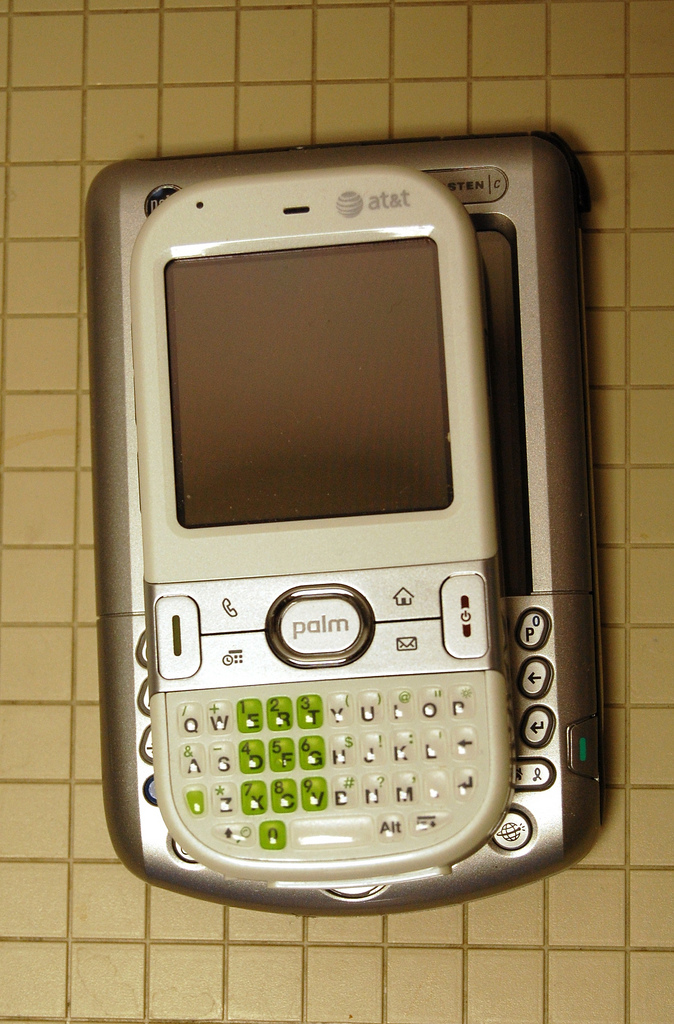
  exercise. By contrast, the Centro is narrow and easy to grip,
  similar in width to Motorola's more recent offerings, such as the
  RAZR and ROKR.

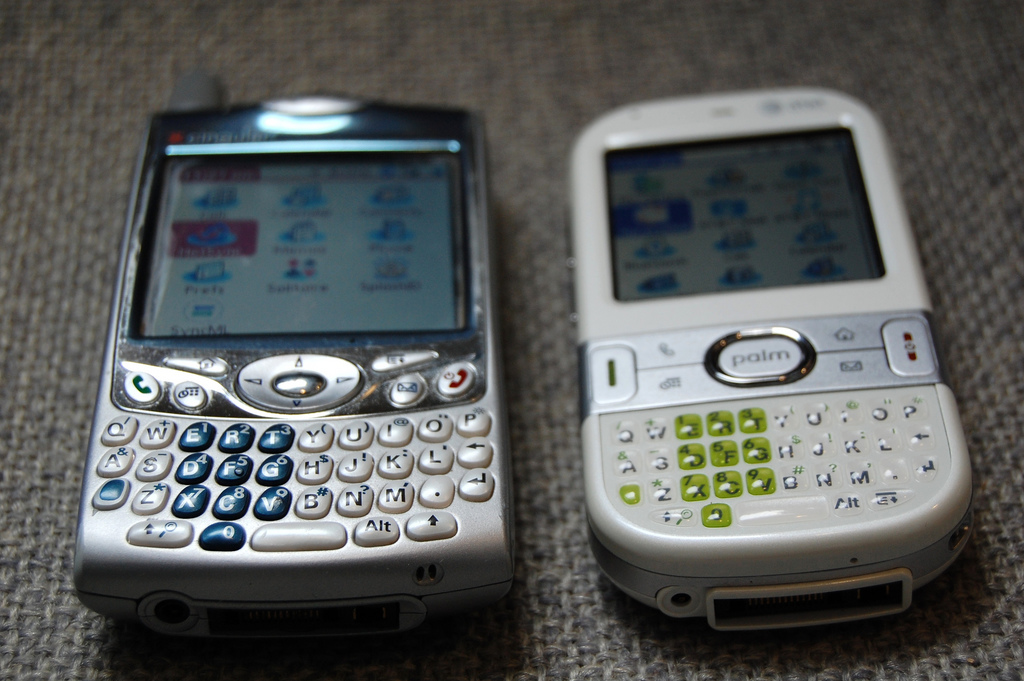
<http://www.tidbits.com/resources/2008-06/centro_tungsten_layered.jpg>


**The Keyboard Is Where It's At** -- The only drawback to the Centro's
  narrower design is that it sports the smallest keyboard Palm has yet
  offered on its handhelds. Having used a Palm Tungsten C for a while,
  I was used to the idea of teensy keys placed close together, but at
  a full inch wider than the Centro, the Tungsten has room for bigger,
  much more widely spaced keys. The difference is clear with sustained
  typing; only those with relatively small hands will be comfortable
  with much typing on the Centro. Even the extra fifth of an inch
  (about half a centimeter) of width on the Treo seems to make a
  difference in typing ease.

<http://www.tidbits.com/resources/2008-06/centro_tungsten_side.jpg>

  But, if you have relatively small hands or you're dexterous with
  your big fingers, having a keyboard makes all the difference when
  composing email and text messages. I found that, after a few
  minutes, I was pretty adept at punching out a few sentences at a
  time - also true with the iPhone, but even with the iPhone's
  adaptive typing recognition, which guesses what you meant to type
  even if you miss every third letter, lots of users have said they
  prefer a real keyboard.


**Purely Palm** -- Another key advantage for the Centro is its
  familiarity for those who've used Palm handhelds, often for many
  years or across several models. Detractors say the gradually updated
  and incrementally refined user interface has fallen way behind, but
  I have to say that the Centro's Palm OS offers a clean simplicity
  that shouldn't be underestimated.

  Anyone who used the original Palm user interface will immediately
  recognize what it's evolved into; there are more icons on the
  Applications screen, but a few iterations ago, Palm made them
  sleeker and colorized them, as well as grouping them into (optional)
  categories for easy navigation.

  As with other recent Palm handhelds, the Centro has an idiosyncratic
  relationship with Mac OS X. The Palm Desktop software hasn't been
  updated in years, but if you want to use it to manage syncing of
  your contacts, calendar, and other info between handheld and Mac,
  you can. Or, Palm's HotSync software can now collaborate with iSync
  to allow users to stick with Apple's Address Book and iCal. We
  suspect most Mac users will take this approach, especially if they
  don't have a long-standing Palm habit.

  (A more modern and feature-rich sync approach comes from
  Mark/Space's $39.95 The Missing Sync for Palm OS, though I've
  personally found that the included Palm HotSync software has met my
  needs. See Jeff Carlson's "Missing Sync for Palm OS 5.0 Modernizes
  Palm Interaction" (2005-11-07) for more details on what the software
  can do, even though that article covers an older version.)

<http://www.markspace.com/missingsync_palmos.php>
<http://db.tidbits.com/article/8317>

  The Centro includes a Web browser and email client; neither is a
  spectacular example of its genre, but both are capable as handheld
  applications go. The Web browser can display graphics but not much
  in the way of page layout; Palm Web browsing hasn't changed much in
  the several years it's been around, though the Blazer browser is
  surprisingly adept at displaying a variety of pages.


**No Surprises** -- There's not much else to say, if you're familiar
  with using cell phones and you're familiar with using Palm
  handhelds. (I suspect relatively few users are jumping on the Palm
  bandwagon for the first time by picking up a smartphone, though
  certainly some are.) The audio quality is fine, the reception
  strength is reasonable even in fringe areas (easy to test in my
  basement, where the iPhone and my Verizon Wireless phone also have
  trouble), and the battery lasts one to three days of off-and-on use.
  (You'll probably want to charge daily.)

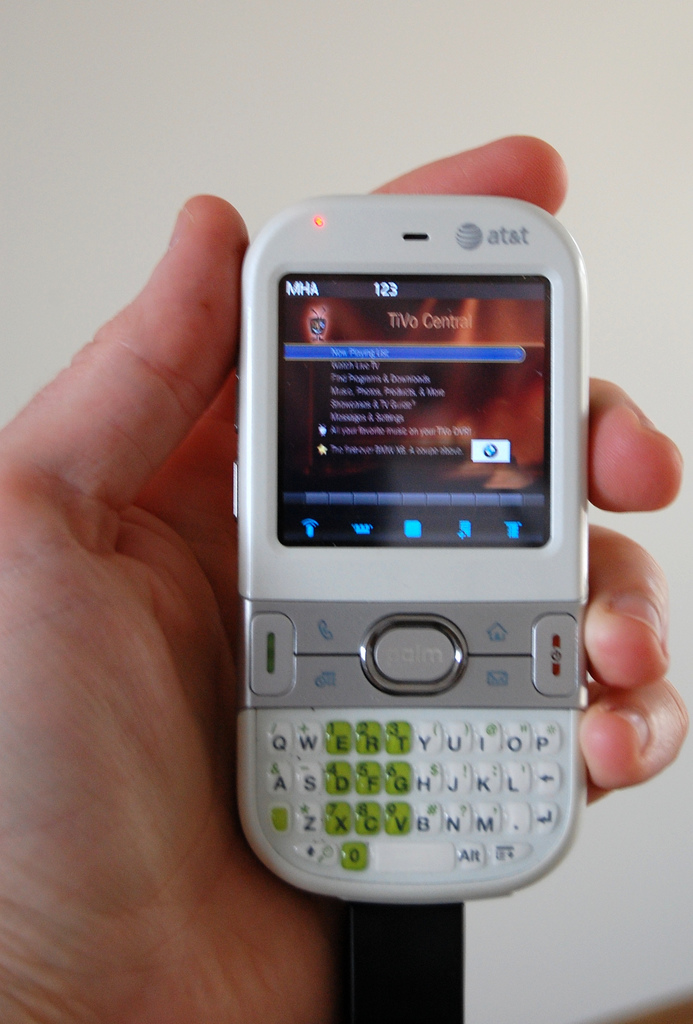
  What's the best feature of the Palm Centro? I think it's the
  capability to use the Palm OS version of SlingPlayer Mobile, the
  handheld version of Sling Media's placeshifting video viewing
  software. With my Slingbox hooked to my TiVo, I was pleasantly
  surprised at how watchable both live TV and pre-recorded programs
  were. The delay in sending remote-control signals from the Centro to
  the TiVo via cellular connection wasn't even significantly worse
  than using Sling's desktop software via broadband.

<http://www.slingmedia.com/go/spm>
<http://www.tidbits.com/resources/2008-06/centro_sling.jpg>


**Do You Want One?** There's no question that the Centro is a capable
  phone, and a worthy successor to a decade of Palm handhelds. In a
  world with no iPhone, Palm's Centro and Treo smartphones would be
  the clear alternative to the quirky Windows Mobile and the walled
  garden of RIM's BlackBerry. But with Apple's category-killer in the
  game, the Centro will be most attractive to those with an attachment
  to the Palm way of life and those who just need a small dose of
  smartphone, i.e., those for whom the iPhone is overpriced overkill.

  The Centro is most attractive of all right now, with a $50 rebate
  making the phone $49 instead of $99 through 06-Jul-08. Voice (450
  minutes) and data plans start at about $75 per month, though there
  are slight differences between the three carriers.

<http://www.gizmolovers.com/2008/06/06/palm-centro-for-4999-and-other-palm-specials/>


TidBITS Watchlist: Notable Software Updates for 16-Jun-08
---------------------------------------------------------
  by Adam C. Engst <[EMAIL PROTECTED]>
  article link: <http://db.tidbits.com/article/9658>

* Iris 1.0 from Nolobe is a new image editing application for Mac OS X
  10.5 Leopard. Iris uses a single-window interface to provide tools
  for painting and drawing, plus compositing of text, images, and
  effects on multiple layers. Iris also offers powerful color
  correction tools and supports a wide range of import and export
  formats. ($79 new, 3.5 MB)

<http://nolobe.com/iris/>

* AirPort Utility 5.3.2 from Apple probably has some changes from the
  previous version, but they're a closely kept secret and Apple's not
  telling. (Actually, what Apple says, in the What's New in this
  Version section, is: "Wireless networking that works with most Wi-Fi
  enabled devices, including Mac, PC, iPhone, iPod touch, and more."
  I'm so glad to hear that "wireless networking that works" is new.)
  Versions of AirPort Utility for setting up and configuring the
  AirPort Express Base Station, AirPort Extreme Base Station, and Time
  Capsule are available for Leopard ((8.8 MB), Tiger (9.3 MB), and
  even Windows (10.3 MB), or you can just let Software Update give you
  a new version.

<http://www.apple.com/support/downloads/airportutility532forleopard.html>
<http://www.apple.com/support/downloads/airportutility532tiger.html>
<http://www.apple.com/support/downloads/airportutilitysetup532forwindows.html>

* PopChar X 4 from Ergonis Software is a major upgrade to the
  long-standing tool for finding and inserting special characters.
  Most important among the new features is a new "All" view that lets
  you search for special characters across all installed fonts,
  eliminating the need to search each font individually. Other
  enhancements include a new command for copying the selected
  character's Unicode name, support for Unicode 5.1, an improved
  appearance under Mac OS X 10.5 Leopard, the capability to list
  undefined Unicode characters that may be present, improved
  compatibility with Butler and CopyPaste Pro, and more. (29.99 euros
  new, upgrades are free for 2 years after purchase and then 14.99
  euros, 1.8 MB)

<http://www.ergonis.com/products/popcharx/>

* Mellel 2.5 from RedleX brings an elegant cross-referencing
  capability to the increasingly powerful word processor. Mellel's new
  cross-reference feature lets users create complex reference formats
  that can include page numbers, page ranges, and even position in the
  text (above, next page, etc), and it updates all cross-references
  live, so there's seldom a need to regenerate references. When a
  deletion causes a reference to point at a non-existent target,
  Mellel provides a tool to track those broken references, and it can
  even allow references to targets that haven't yet been created
  (upcoming chapters or screenshots, for instance). And even better,
  these references become internal links if the document is printed to
  PDF. Mellel also now supports bookmarks, includes the Spotlight
  plug-in in the application bundle, and fixes a variety of bugs. ($49
  new, free upgrades for purchases since May 2006 or $19 otherwise,
  30.2 MB)

<http://www.mellel.com/>
<http://www.mellel.com/releasenotes.html>

* Opera 9.5 from Opera Software brings to the multi-platform Web
  browser a variety of new and interesting features, including Opera
  Link, which synchronizes bookmarks and notes between Opera and Opera
  Mini (a free mobile phone browser). Other notable features include
  the capability to search for any text in visited pages, a modernized
  look-and-feel (with multiple skins), fraud protection technology,
  and performance improvements across the email client, RSS feeds, and
  the browser itself. (Free, 15.6 MB)

<http://www.opera.com/>

* BlogAssist 2.2 from Dejal Systems is a neat tool that makes it
  easier to create blog posts and comments in HTML by providing a
  variety of formatting options for selected or copied text. It can
  make links, create a list of links, insert an image, format text
  with all the standard HTML styles, create lists, and insert
  variables like the date and time. But what's really impressive is
  that you can add your own operations, making BlogAssist highly
  customizable for individual situations. BlogAssist can be invoked
  via hotkey, from a system-wide menu item, from the Services menu, or
  from a floating window.  ($9.95 new, free update, 2.1 MB)

<http://www.dejal.com/blogassist/>

* The Missing Sync from Mark/Space sees a number of updates to the
  independent synchronization software for a wide variety of mobile
  device operating systems, including a public preview version of The
  Missing Sync for Symbian (specifically for the Nokia Series 60
  devices), version 4.0.3 of The Missing Sync for Windows Mobile, and
  version 6.0.4 of The Missing Sync for Palm OS. Updates to the
  Windows Mobile version include improved Bluetooth connectivity and
  synchronization, improved performance of devices mounted on the
  desktop under Leopard, improvements to the SMS and Call Log
  applications, and better compatibility with Apple's firewall in
  Leopard when connecting via Wi-Fi. ($39.95 new, free update for
  owners of 4.0, 39.8 MB) The updated Palm OS version of The Missing
  Sync adds support for the Palm Centro and fixes synchronization
  problems with Yojimbo from Bare Bones. ($39.95 new, free update for
  owners of 6.0, 40.1 MB)

<http://www.markspace.com/missingsync_symbian.php>
<http://www.markspace.com/missingsync_windowsmobile.php>
<http://www.markspace.com/missingsync_palmos.php>


* InterMapper 5.0 from Dartware enhances the network monitoring and
  mapping utility, which can create live maps of large networks;
  monitor devices, servers, and applications on those networks; and
  alert you to problems. InterMapper 5.0 adds support for testing
  devices with IPv6 addresses and for IPv6 client connections. It also
  features enhanced Nagios plug-in support, support for folders in the
  Map list, and a technology preview of the InterMapper Database,
  which can collect data from networked devices in an SQL database for
  querying and reporting. (Pricing is based on the number of devices
  monitored.)

<http://dartware.com/network_monitoring_products/intermapper/>
<http://dartware.com/network_monitoring_products/whatsnew.html>


Hot Topics in TidBITS Talk/16-June-08
-------------------------------------
  by Jeff Carlson <[EMAIL PROTECTED]>
  article link: <http://db.tidbits.com/article/9657>

**Service Scrubber Cleans Services Menu** -- A reader points out that
  the Keyboard & Mouse preference pane can also remap keyboard
  shortcuts. (1 message)

<http://emperor.tidbits.com/TidBITS/Talk/2022>


**Are Time Capsule backups encrypted during transmission?** Calling on
  the TidBITS Talk community for help, wondering about encrypted
  backups to a Time Capsule as well as backing up one machine to
  multiple drives using Time Machine. (1 messages)

<http://emperor.tidbits.com/TidBITS/Talk/2023>


**Dealing with Doppelganger Folders in /Volumes** -- Adam's article on
  file weirdness sparks a question where a reader's system seems to be
  hiding more than 50 GB of files (or otherwise using that space on
  disk). Poking around using Terminal may reveal the cause. (6
  messages)

<http://emperor.tidbits.com/TidBITS/Talk/2024>


**MobileMe Oh My (or, Apple Breaks Record in Making My Book
  Obsolete)** -- Readers speculate on what the switch from .Mac to
  MobileMe will bring in terms of synchronization and Apple's new
  push-data model. (6 messages)

<http://emperor.tidbits.com/TidBITS/Talk/2025>


**Apple Announces iPhone 3G to Ship on 11-Jul-08** -- Readers react to
  the iPhone 3G announcement, bringing up questions of whether to
  upgrade to the new device and how Apple is marketing it around the
  world. (24 messages)

<http://emperor.tidbits.com/TidBITS/Talk/2028>


**GPS misconceptions** -- Does the GPS circuitry in the iPhone 3G
  drain power as much as automobile GPS units, or will the drain be
  negligible? Readers also discuss whether the GPS feature will be
  able to help route around traffic problems. (13 messages)

<http://emperor.tidbits.com/TidBITS/Talk/2029>


**iPhone 3G Actually $160 More Expensive** -- The pricing of iPhone 3G
  cellular plans is more expensive than existing iPhone plans in the
  United States, but is that the case in other markets? (19 messages)

<http://emperor.tidbits.com/TidBITS/Talk/2030>


**GyazMail** -- Readers discuss this email software, specifically
  comparing it to Apple's Mail. (3 messages)

<http://emperor.tidbits.com/TidBITS/Talk/2031>


**Computer cleanliness** -- Is your older Mac acting up? The problem
  could be dust accumulated on the fans and internal components (made
  worse by cat hair!). (11 messages)

<http://emperor.tidbits.com/TidBITS/Talk/2033>


**iPhone 3G - can it be used as a modem?** Unfortunately, the iPhone
  3G can't be used as a tethered modem. (4 messages)

<http://emperor.tidbits.com/TidBITS/Talk/2034>


**Back to Back to my Mac** -- A new option in the Back to My Mac panel
  in System Preferences can help diagnose problems under Mac OS X
  10.5.3. Readers also suggest other ways to get the feature working.
  (3 messages)

<http://emperor.tidbits.com/TidBITS/Talk/2035>


**Quicken equivalents...** -- Quicken isn't the only money manager on
  the block, but alternatives often don't get much attention. Readers
  share their experiences with others. (3 messages)

<http://emperor.tidbits.com/TidBITS/Talk/2037>


$$

This is TidBITS, a free weekly technology newsletter providing timely
news, insightful analysis, and in-depth reviews to the Macintosh and
Internet communities. Feel free to forward to friends; better still,
please ask them to subscribe!

Non-profit, non-commercial publications and Web sites may reprint or
link to articles if full credit is given. Others please contact us. We
do not guarantee accuracy of articles. Caveat lector. Publication,
product, and company names may be registered trademarks of their
companies. TidBITS ISSN 1090-7017.

Copyright 2008 TidBITS: Reuse governed by Creative Commons license.

Contact us at:    <[EMAIL PROTECTED]>
TidBITS Web site: <http://www.tidbits.com/>
License terms:    <http://www.tidbits.com/terms/>
Full text search: <http://www.tidbits.com/search/>
Subscriptions:    <http://www.tidbits.com/about/list.html>
Account help:     <http://www.tidbits.com/about/account-help.html>


--
If you want to unsubscribe or change your address, use this link
http://emperor.tidbits.com/webx?unsub@@.3c557dc4!u=306a67f9