Apologies if this is a duplicate; server problems hampered delivery. -Adam

TidBITS#934/23-Jun-08
=====================
  Issue link: <http://db.tidbits.com/issue/934>
  As the heat of the summer kicks in, Adam turns his attention to the
  just-released Firefox 3 and finds it full-featured and surprisingly
  capable after the previous version, which could barely be considered
  a Macintosh application. Meanwhile, it's Glenn Fleishman's fate to
  explain complex Internet technologies, such as why there are public
  and private IP addresses, how to tell which your network has, and
  what that means for using Apple's Back to My Mac service. Jeff
  Carlson changes gears entirely, and talks about how AppleCare once
  again proves its worth by providing a replacement battery for his
  MacBook Pro. In the TidBITS Watchlist this week, we look briefly at
  the releases of CrossOver Mac 7.0, the Xserve EFI Firmware Update
  1.1, ConceptDraw Office, and Growl 1.1.4.

Articles
    Making AppleCare Worthwhile: MacBook Pro Battery Replacement
    Firefox 3 Bounds Forward
    Does Your Network Have a Public IP Address?
    TidBITS Watchlist: Notable Software Updates for 23-Jun-08
    Hot Topics in TidBITS Talk/23-June-08


------------ This issue of TidBITS sponsored in part by: --------------

* READERS LIKE YOU! Support TidBITS with a contribution today!
  <http://www.tidbits.com/about/support/contributors.html>
  Special thanks this week to Vincent A. Simanca, Frank Demmler,
  Michael Holliday, and Jean-Louis Payant for their generous support!

* Fetch Softworks: With Fetch 5.3, FTP and SFTP are simpler
  than ever. Use it on Mac OS X to upload, download, mirror,
  and manage your Web site, eBay images, and data sets.
  Download your free trial version! <http://fetchsoftworks.com/>

* WebCrossing Neighbors Creates Private Social Networks
  Create a complete social network with your company or group's
  own look. Scalable, extensible and extremely customizable.
  Take a guided tour today <http://www.webcrossing.com/tour>

* Bare Bones Software's BBEdit 8.7 -- Latest version offers a
  major interface overhaul, new prefs, text clippings, improved
  JavaScript, new Ruby/SQL/YAML/Markdown support, code folding.
  Over 160 new features in all! <http://www.barebones.com/>.

* MARK/SPACE, INC: If you have a smartphone, we can sync it!
  Sync your address book, calendar, notes, music, pictures, and
  more from your BlackBerry, Windows Mobile or Palm OS mobile
  phone to your Mac. <http://www.markspace.com/bits>

* VMware Fusion. The most seamless way to run Windows on your Mac.
  Backed by nearly a decade of proven virtualization technology.
  Try VMware Fusion today for free, or order online for only $79.
  Visit: <http://www.tidbits.com/about/support/vmware-fusion.html>

* Make friends and influence people by sponsoring TidBITS!
  Put your company and products in front of tens of thousands of
  savvy, committed Macintosh users who actually buy stuff.
  More information: <http://db.tidbits.com/advertising.html>

---------- Help support TidBITS by supporting our sponsors ------------


Making AppleCare Worthwhile: MacBook Pro Battery Replacement
------------------------------------------------------------
  by Jeff Carlson <[EMAIL PROTECTED]>
  article link: <http://db.tidbits.com/article/9663>

  Every time I buy a new Mac laptop, I question whether I should
  purchase AppleCare to extend the warranty from one year to three
  years. My MacBook Pro cost $2,800 (with tax and shipping) in
  November 2006, so laying out another $300 for AppleCare - well,
  frankly, it hurt. (For more on the purchase, and how it stacked up
  to previous PowerBooks I've owned, see "More Bang, Less Bucks for my
  MacBook Pro" 2006-11-20.) However, I've found that almost every
  laptop I've owned has needed some sort of after-warranty work done,
  so I've ordered AppleCare for every one.

<http://www.apple.com/support/products/>
<http://db.tidbits.com/article/8761>

  True to my history, AppleCare has come through on this laptop, too.
  Recently I'd noticed that the battery (the original one that came
  with the computer) was delivering only about an hour of performance
  per charge. That seemed low even under constant use, and after
  reading a post on MacUser about a similar issue I resolved to call
  Apple.

<http://www.macuser.com/huh/sending_out_for_a_new_battery.php>

  First, of course, I prepared for the call. I jotted down the
  battery's serial number (so I wouldn't have to extricate the battery
  from the computer while I was on the call). I had previously reset
  the laptop's System Management Controller (SMC) while
  troubleshooting the low charge, and run the latest version of
  coconutBattery, a freeware (donations encouraged) application that
  pulls status information from your battery; it informed me that the
  battery's current capacity was less than half of the original
  capacity. I also do my best to discharge the battery at least once a
  month to keep it conditioned. (See an older article I wrote about
  the topic for Macworld: "Laptop Battery Smarts, 2004-10-04.)

<http://www.coconut-flavour.com/coconutbattery/>
<http://support.apple.com/kb/HT1411>
<http://www.macworld.com/article/39716/2004/10/novmobilemac.html>

  With that information in hand, I contacted Apple. Right away, the
  support representative directed me to Apple's support page for the
  15-inch MacBook Pro Battery Exchange Program to check if the
  battery's serial number fell in the affected range (it didn't). I
  told him about the diminished capacity figure from coconutBattery,
  and he also directed me to System Profiler, which provides the same
  information under the Power subheading. Lastly, he asked for the
  battery's cycle count, the measure of how many times it had been
  discharged and recharged.

<http://www.apple.com/support/exchange_repair/macbookpro.html>

  He quickly noted that the battery did seem to be defective, and
  because the laptop was under AppleCare the company would send me a
  new one, free of charge. He needed authorization from a manager, and
  at one point asked me to "restart the computer with four keys held
  down..."

  "Zap the PRAM?" I asked (Command-Option-P-R). "I've tried that,
  too."

  Satisfied, he confirmed my shipping address and took my credit card
  number. The price of a new battery is charged while the replacement
  is in transit.

  When I received the battery two days later, I packed the defective
  one into the same box, called DHL to arrange a pick up, and started
  using my new battery.

  It's worth noting that I could have also taken the laptop and
  battery to a retail Apple Store and probably received the same
  service at the Genius Bar, but in my case it was more convenient to
  just call.

  I haven't made up for the $300 cost of AppleCare with a new $130
  battery, but the computer is also protected until November 2009. At
  some point when it's more convenient to part with the laptop for a
  while, I need to have a spot on the screen checked out, and who
  knows what else will happen? So far, that's still $300 well spent.


Firefox 3 Bounds Forward
------------------------
  by Adam C. Engst <[EMAIL PROTECTED]>
  article link: <http://db.tidbits.com/article/9662>

  After a seven-month public beta, the Mozilla Foundation has released
  Firefox 3, a major update to the open-source Web browser that is the
  Internet's second most popular browser, with between 16 and 18
  percent of the overall usage share, depending on whose numbers you
  believe. (The second position holds within the Macintosh world as
  well; on our site, for instance, 46 percent of visitors use Safari
  on the Mac, with the Mac version of Firefox second at 17 percent.
  Windows users visiting our site use Internet Explorer and Firefox
  nearly equally, representing 14 and 13 percent of visits,
  respectively.)

<http://www.mozilla.com/en-US/firefox/>
<http://en.wikipedia.org/wiki/Usage_share_of_web_browsers>

  Whereas Firefox 2 was arguably a good browser, it could barely be
  considered a Macintosh application, but it looks as though Firefox 3

  may significantly improve the user experience for Mac users. Most
  notably, a new theme provides a more Mac-like look and feel for
  Firefox 3, so it doesn't feel nearly so much like a port from
  another operating system. Firefox 3 also supports Growl
  notifications for completed downloads and available updates, and the
  up and down arrow keys now act like they should in a Mac application
  and move to the beginning and end of text fields.

  On the downside, Firefox lacks any of expanding text areas like
  OmniWeb and Safari, still doesn't support the Mac OS X Keychain,
  and, although I've seen claims that it supports Mac OS X's built-in
  dictionary, I haven't been able to verify that in practice. There's
  also an unusual (but fixable) incompatibility with Web sites built
  in iWeb 2.

<http://diamondsw.dyndns.org/Home/Et_Cetera/Entries/2008/6/18_Firefox_3_and_iWeb.html>

  Other changes fall into several categories - improved ease-of-use
  and personalization, performance, and security. Hang on, since this
  is a bit of a ride.

<http://www.mozilla.com/en-US/firefox/3.0/releasenotes/>


**Ease-of-use and Personalization** -- If you've always hated being
  asked to save a password for a secure site _before_ you've logged in
  (making it easy to save an incorrect password), you'll like
  Firefox's new information bar, which drops down to provide controls
  for saving passwords. Since it's non-modal, you can wait until
  you've logged in successfully to save the password.

<http://www.tidbits.com/resources/2008-06/Firefox-info-bar.png>

  A new download manager lists the dates on which files were
  downloaded, provides a search field for finding downloads based on
  name or site, and lets you open, reveal, or link to downloads
  easily. If a download fails, you can resume it (though I wouldn't
  bet on this working universally).

  Numerous interface controls have been improved. A single slider
  makes it easy to resize the location bar and search bar
  simultaneously. The Find toolbar at the bottom of the screen now
  opens with selected text already entered - you can still set an
  option to do a quick-find just by typing when not in a text-entry
  field.

  Speaking of text, you can now select discontiguous chunks of text by
  holding down the Command key while selecting; Firefox 3 also
  supports double-click and drag to select by word, and
  triple-clicking now selects by paragraph. A new zoom feature
  accessible from the View menu or via the keyboard zooms either all
  items on the page or just the text.

  Although I'm not familiar enough with Firefox 2 to see the changes,
  Mozilla claims that in Firefox 3 tabs are easier to locate in the
  tab "quickmenu" (a pop-down menu on the right side of the tab bar)
  and that Firefox 3 prompts you to save tabs on exit (I always enable
  the option to re-open windows and tabs automatically). The Open All
  in Tabs feature now appends to the current tab set, rather than
  overwriting it, and new smart folders collect recently bookmarked
  sites, recent tags, and your most visited pages. I obviously haven't
  used Firefox 3 for long, but I'm quite intrigued to see how useful
  the new Most Visited smart folder will prove.

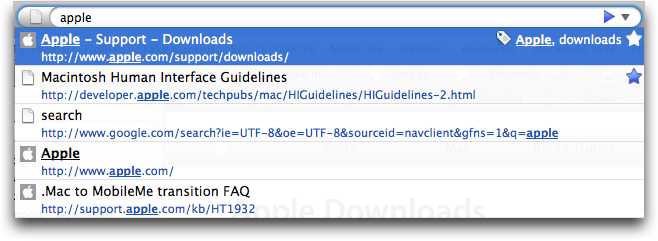
  Tags on bookmarks are a new feature; since it's often difficult to
  find bookmarks after the fact, you can now add tags of your own
  devising. Once added, you can use tags to find sites in Firefox's
  new smart location bar feature, which matches what you type with
  URLs from the history, page titles from the history, bookmark
  titles, and bookmark tags. Unfortunately, despite all this,
  Firefox's location bar still cannot expand text such as
  "apple/support/downloads" to
  "http://www.apple.com/support/downloads/"; like Safari and OmniWeb
  can; Firefox still falls back on Google in such situations.
  (Although falling back on Google is probably a good idea for most
  people, it's worth noting that the Mozilla Foundation also receives
  revenue from ads shown in Google search results.) Another
  improvement in the location bar is a star icon that you can click
  once to add the current URL to your bookmarks, storing it
  automatically in an Unsorted Bookmarks category. Click the star
  again, and you can remove the bookmark, name it, file it, or add
  tags.

<http://support.mozilla.com/en-US/kb/Bookmark+Tags>
<http://support.mozilla.com/en-US/kb/Smart+Location+Bar>
<http://www.tidbits.com/resources/2008-06/Firefox-smart-location-bar.png>

  Although I've never been a big fan of tags, or even of bookmarks, in
  the past, I'm contemplating using them as a way of eliminating tab
  buildup. I end up with tons of open tabs in OmniWeb (which is very
  good about not losing track of them), so much so that some of them
  have been open for months. That's patently ridiculous, so I'm
  considering using Firefox's new bookmarking and tagging features to
  save bookmarks to such pages with tags indicating why I thought the
  pages were worth saving. Perhaps one is an interesting article, or
  another provides background for a story I want to write, or a third
  is a piece of software I should test. Perhaps tagging will let me
  put them out of sight in such a way that I can get them back if
  necessary.

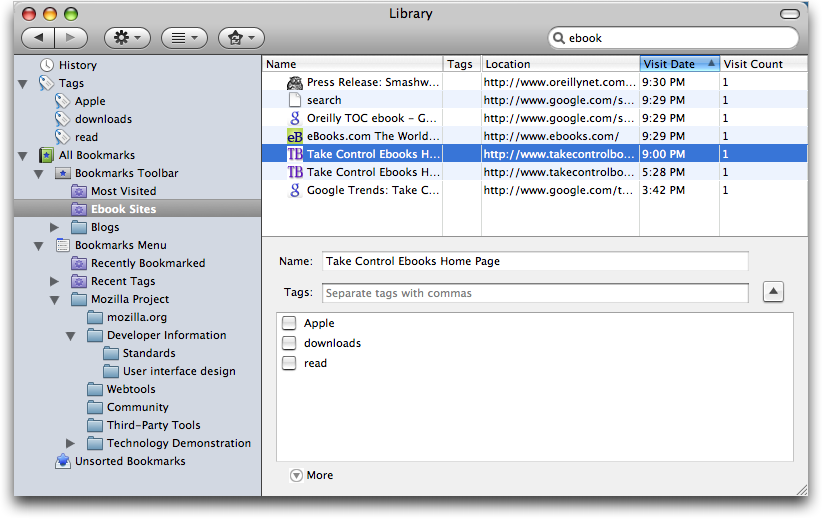
  A new Library window provides an interface for managing all these
  bookmarks, tags, and history items. If you end up with too many
  items (particularly in the history) to browse through reasonably,
  you can search through any collection in the Library. Even more
  interesting is the fact that you can save those searches as smart
  folders. So, for instance, I've done a search on "ebook" in my
  history and saved that as a smart folder; in theory, it should
  collect all the sites I visit that talk about ebooks. It doesn't
  appear as though you can mix bookmarks and history items in a smart
  folder, but perhaps that makes sense, since the history items will
  eventually disappear, unlike bookmarks.

<http://www.tidbits.com/resources/2008-06/Firefox-library-window.png>

  Lastly, the new Add-ons Manager available from the Tools menu lets
  you find new add-ons and manage them. ("Add-ons" include extensions
  that modify Firefox's behavior, themes that change the look and feel
  of the program, and plug-ins that add new under-the-hood
  functionality.) I've appreciated certain Firefox add-ons in the
  past, but their constant updates can be annoying as well, so I'm
  hoping that this new interface makes it easier to try out new
  extensions and uninstall them quickly if they're a pain.


**Performance** -- Although I firmly believe that the browser's
  interface is what makes the difference, which is why I've stuck with
  OmniWeb even during the ascendance of Safari, for many people, raw
  browsing and rendering speed is equally important. Honestly, that's
  one area I've found OmniWeb lacking, especially when it's dealing
  with lots of open tabs, which consume hundreds of megabytes of
  virtual memory. Safari 3 feels a bit faster than OmniWeb, but not so
  much that I've switched to it as my primary browser. Still, it's
  always open, and I use it regularly for certain tasks.

  In my initial use, Firefox feels noticeably faster than both OmniWeb
  and Safari 3, and Mozilla claims that the program has significantly
  improved performance due to improved memory usage. Also improved is
  JavaScript performance, which should help in Web apps like Google
  Docs.

  Firefox's new Gecko 1.9 rendering engine also provides better
  performance, along with support for new Web APIs (like offline
  support for Web apps that use it), and improved standards
  compliance. According to the Wikipedia entry on Firefox, version 3
  is the first official release of a Mozilla browser to pass the Acid2
  standards-compliance test, and it does better on the Acid3 test than
  Firefox 2.

<http://en.wikipedia.org/wiki/Firefox#Backend_changes>

  A new but hidden feature is the capability to display images using
  their color profiles (data written to the image file that helps
  applications display the color correctly). Safari does this by
  default, and it can help photos display more accurately than in
  Firefox 2, although with a 10 to 15 percent performance hit in
  displaying images. To enable color management, type "about:config"
  in the Address bar, and after a warning - making configuration
  changes could lead to instability - type "gfx.color" in the Filter
  field to locate the gfx.color_management setting. Double click it to
  toggle the Value field from false to true, then close the window.

<http://www.dria.org/wordpress/archives/2008/04/29/633/>

  And although this won't directly speed up everyday browsing, Firefox
  3 now stores all bookmarks, history, cookies, and preferences in a
  transactionally secure database format that should prevent data loss
  even in the event of a crash. Crashes may not take much time if they
  don't destroy data, but a crash that requires you to restore an old
  set of bookmarks from backup can waste a lot of time.


**Security** -- Mozilla has also directed a lot of effort into making
  Firefox more secure. You can click the favicon (the tiny little icon
  in the location bar, next to the site's URL) to see more information
  about a site, although this feature seems to provide identity
  information about the site's owner only for https URLs (even
  Mozilla's own site lacks identity information). Sites that use
  Extended Validation SSL certificates (like PayPal) have a green
  favicon and display the site name.

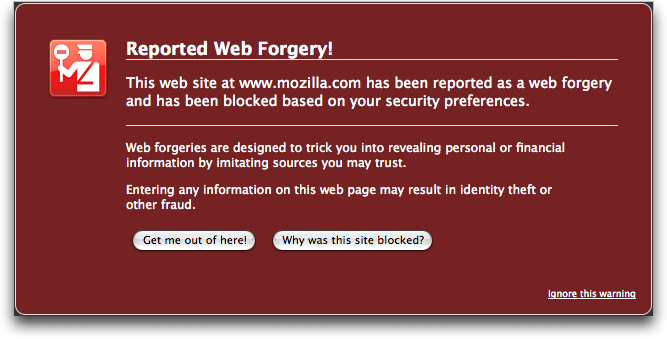
  Even better, Firefox 3 displays a warning whenever a user tries to
  visit a site that has been reported as trying to infect your
  computer or as a forgery (phishing) site. This feature uses the
  Google Safe Browsing protocol.

<http://www.tidbits.com/resources/2008-06/Firefox-phishing-dialog.png>
<http://code.google.com/p/google-safe-browsing/wiki/Protocolv2Spec>

  Finally, Firefox 3 automatically checks add-on and plug-in versions,
  and disables older, insecure versions; add-ons that provide updates
  in an insecure manner will also be disabled automatically.


**Try It Out** -- It's always difficult to get a feel for a new Web
  browser without actually living in it for a while, so I'm planning
  on doing just that. One day may be enough to tease out most of the
  new features, but a Web browser is one of the tools upon which I
  rely constantly; like a carpenter's hammer or a doctor's scalpel, it
  has to come to hand perfectly and perform exactly as expected or
  I'll find another browser that fits my needs better.

  And so, if you're at all curious about how Web browsing could be
  different with Firefox 3, I suggest you give it a try too. Set it as
  your default browser and see how it works for at least a few days,
  paying special attention to the new features that might set it apart
  from Safari or OmniWeb or Camino or Opera or iCab or whatever other
  browser has become your tool of choice.

  Firefox 3 requires Mac OS X 10.4 or later, and is a universal
  binary. It's a 17.2 MB download.


Does Your Network Have a Public IP Address?
-------------------------------------------
  by Glenn Fleishman <[EMAIL PROTECTED]>
  article link: <http://db.tidbits.com/article/9661>

  I pose the question in the headline based on the early feedback from
  readers of my new book, "Take Control of Back to My Mac," which
  covers using Mac OS X 10.5 Leopard plus the .Mac service (soon to be
  called MobileMe) for remotely accessing files on and remotely
  controlling the screens of Macs you manage or own.

<http://www.takecontrolbooks.com/back-to-my-mac.html?14@@!pt=TB934>

  The trouble with Back to My Mac, in comparison with Skype and
  LogMeIn, is that Back to My Mac requires a publicly routable IP
  address on either a computer that's to be reachable or a router to
  which one or more computers with Back to My Mac are connected.

  The question I've heard from multiple readers is, "I'm not a network
  engineer. How do I figure out if I have such an IP address?"

  There's a short non-answer and a long answer. The short non-answer
  is that I can't give you a good short answer because the Internet is
  broken. The current system of public and private networks, designed
  in part to get around a shortage in the current IP addressing
  system, doesn't allow easy end-to-end connections. For the long
  answer, read on. (I expand on the short non-answer in the last
  section, too.)


**Public IP versus Private IP** -- Let me back up to explain what a
  public IP address really is. The Internet is Balkanized through
  something called Network Address Translation (NAT), which allows a
  single public IP address that's reachable, or _routable_, from any
  other computer on the Internet to act as a kind of proxy for 1,
  1,000, or 1,000,000 private IP addresses. A gateway mediates traffic
  between the public address and the private one. (You can read more
  about NAT in "Punch Through NAT with Port Map's Port Forwarding,"
  2008-04-16.)

<http://db.tidbits.com/article/9568>

  If a computer on which you want to enable Back to My Mac has a
  public IP address - as do some computers in my office network - then
  Back to My Mac works without a hitch. It allows any other computers
  that you log into with your .Mac account name and password, and on
  which you enable Back to My Mac in the .Mac system preference pane,
  to access that publicly addressed computer. (If you have a public IP
  that's assigned to individual computers, you probably already know
  that you do, because you're likely paying your ISP more for that
  privilege.)

  Where a computer is on a private network, using a range of addresses
  that can be reached only through a router, Back to My Mac has to
  perform a NAT end-run using one of two widely available protocols
  that let a privately addressed computer punch through the NAT
  gateway with the router's assistance. Those protocols are NAT-PMP
  (NAT Port Mapping Protocol), an open standard used exclusively by
  Apple, and UPnP (Universal Plug and Play), another standard used
  widely by other routers and supported by Apple and Microsoft for
  various services.

  By subverting NAT, these two protocols enable a router that has a
  public IP address to make services on private computers available
  publicly. It's a secondary problem to let other computers know
  precisely which ports - a kind of numbered cubbyhole on an IP
  address, in this case the address of the router - are used by
  whatever game, remote access service, IP phone, or other software
  that has engaged NAT-PMP or UPnP.

  Apple plays nice with networks by using these two protocols.
  LogMeIn, Skype, and other remote connection and voice-over-IP
  programs use their own techniques to link computers that can't be
  reached via public IP addresses. Skype, for instance, uses
  "supernodes," which are computers with a logged-in Skype user, a
  high bandwidth connection, and a reachable address. Supernodes are
  chosen dynamically by the Skype system, and they engender varying
  degrees of concern and irritation from network administrators.
  (Skype 3 for Windows has a checkbox to disable becoming a supernode;
  the current Mac release, 2.7, does not.)

<https://secure.logmein.com/>
<http://www.skype.com/>


**Your Network's Layout** -- The next piece in figuring out whether
  you have a publicly reachable IP is looking at how your broadband
  network is set up. Most of us at home have a cable, DSL, or fiber
  modem that connects to some incoming wire, and has one or more local
  Ethernet jacks, and optionally Wi-Fi.

  Some broadband modems act as full-fledged routers: they assign
  private addresses to networked computers and let you configure
  firewall and other network settings. Others act like bridges: they
  enable the ISP to assign you an address (which can be public or
  private, and either dynamic or static) and relay traffic from the
  ISP's network to yours.

  With a modem that acts as a router, you may be unable to use Back to
  My Mac because that modem controls access to the network. If the
  modem doesn't support or allow you to enable UPnP, you're stuck
  using manual port mapping (if supported), which lets you set up only
  one computer to be reachable via Back to My Mac. (I cover the ugly
  details of port mapping in my book. It gets rather involved.)

  I have this kind of modem in my home, for Qwest DSL service, and I'm
  stuck because it's made by 2Wire. Although Qwest gives me a public
  IP address, 2Wire does not offer UPnP support in any of its modems;
  its customers are ISPs, typically DSL providers who don't wish to
  allow users to make public services from networked computers
  available, largely due to security and control reasons.

  A theoretical malicious program could use UPnP or NAT-PMP to open a
  tunnel to itself from other agents in the outside world, and become,
  for instance, a mail server delivering spam or any of a number of
  other activities. So there's some justification for disabling UPnP,
  but it should be left up to the user, since viruses can work without
  enabling direct port mapping.

  With the second kind of modem, the one that bridges a network, you
  can connect your AirPort Extreme Base Station or other gateway to
  the broadband modem, obtain what's typically a publicly reachable IP
  address, enable the automatic port mapping option (NAT-PMP or UPnP),
  and then Bob's your uncle: Back to My Mac typically works. Many
  broadband networks are set up this way, and it's one of the best
  cases in which to use Back to My Mac.

  Now, how can you tell which type of modem you have, and how can you
  tell whether you have a public IP address? Let's get into that next.


**Reach Out and IP Someone** -- We start with the broadband modem. Can
  you view your modem's configuration by connecting to it over your
  local network via a Web browser? If not, then you find yourself in
  one of two situations:

* The modem is a bridge, and you still need to determine whether or
  not devices you plug into it obtain or can be assigned a public IP
  address.

* Your modem has a configuration locked down by your ISP, and you can
  neither enable UPnP if available nor use manual port mapping if UPnP
  is unavailable. In this second case, you're out of luck with Back to
  My Mac.

  If you can connect to your broadband modem via a Web browser, do so
  (this may require a password, which may require a call to your ISP),
  and see what the summary screen or status screen tells you about the
  modem's Wide Area Network (WAN) connection - the modem's connection
  back to the ISP's network.

  That screen should provide you the address the modem is using. In
  some cases, you'll see just one number; with my Qwest modem, I see
  both a private address in Qwest's network and a separate public
  address to which Qwest connects my modem, both of them clearly
  labeled.

  You can tell whether this WAN address is public or private by
  looking at its first few numbers. Current IP addresses - using the
  ancient IPv4 numbering system - have four numbers separated by dots,
  like 10.0.0.1. If the WAN port's IP address starts with 192.168 or
  10., or begins with 172. followed by the numbers 16 to 31, it's a
  private address. (Examples: 192.168.0.1, 10.0.0.1, 172.16.5.1.)
  You'll need to contact your ISP to see if you can get a public
  address.

  If the number doesn't fit any of those patterns, it should be a
  public address, and should be generally reachable.

  Now, if you can't connect to your broadband modem from the local
  network or if you want to ensure the address you're looking at for
  the WAN port is truly public, you can use a Web site that tries to
  tell you your current IP address; WhatIsMyIPAddress.com is one of
  many examples. These sites tell you what they believe the address is
  of the router or computer that sent the request. However, if your
  network is nested in one or more layers of NAT, the page shows the
  IP address of an ISP's router.

<http://whatismyipaddress.com/>

  Visit that link. Does it match the configuration screen (if any) of
  the broadband modem? If so, you're almost certainly set to go.

  If not, or if that doesn't apply, you can try at least one technique
  to see if the router is reachable: the command-line tool ping. Make
  a note of the address from the Web page and leave your home or
  office. Using Mac OS X from another network, launch Terminal (in
  Applications/Utilities); under Windows, launch the Command Prompt
  program in the Applications folder. At the prompt type:

    ping -c 10 address

  replacing _address_ with the IP address that you copied. Do you see
  a few lines in response in the Terminal like this one?

    64 bytes from 34.33.111.253: icmp_seq=0 ttl=127 time=10.564 ms

  That means the modem is responding to an "are you alive" request
  over the Internet, and is likely reachable.

  Let's put this all together.


**Back into Back to My Mac** -- If, in any of the cases above, you
  believe or know that you have a public IP address connected to a
  modem or router that can use NAT-PMP or UPnP, or that you have used
  manual port mapping to enable access to one computer via Back to My
  Mac, turn on Back to My Mac and see if you can reach the computer
  from outside your local network. (You can't properly test Back to My
  Mac with two computers on the same local network, since Leopard
  doesn't offer any visual indication to show whether a computer in
  the Shared list in the Finder sidebar is available via Bonjour over
  the local network or via Back to My Mac over the Internet.)

  If that doesn't work, or you determine you don't have a public IP
  address, there's nothing more you can do on your own; it's time to
  call your ISP if you want any hope of making Back to My Mac work.

  To recap, Back to My Mac should work on a network in which one of
  these conditions is met:

* Your ISP has assigned your modem a public IP address _and_ it
  supports either UPnP or manual port mapping.

* Your ISP bridges their network across the modem, providing a public
  IP address for your router, which supports NAT-PMP, UPnP, or manual
  port mapping.

  Back to My Mac won't work on a network in which either of these
  conditions are true:

* Your ISP doesn't provide a public IP address to your modem or your
  router.

* You can't configure UPnP, NAT-PMP, or manual port mapping on your
  modem or router.

  If your network should allow proper Back to My Mac functioning, and
  you still get a yellow dot (in Mac OS X 10.5.3) in the .Mac
  preference pane's Back to My Mac view (see "Back to My Mac
  Communicates Faults in 10.5.3," 2008-05-29) then you either need to
  read my book, or try an alternative like LogMeIn Free for Mac or
  Timbuktu plus Skype. I have advised many TidBITS readers to try
  these alternatives because their networks simply won't work with
  Back to My Mac.

<http://db.tidbits.com/article/9636>
<http://www.netopia.com/software/products/tb2/tb2_skype.html>


**The Future with IPv6** -- As I said at the outset, the Internet is
  broken. IPv4 addresses are in short supply and running out. But take
  heart: IPv6 is IPv4's replacement, has vastly more potential
  addresses (4 billion to the fourth power, versus 4 billion), and is
  designed and implemented in a way that will restore much of the
  end-to-end principle of the Internet. This introduces more security
  concerns, but also makes it much more likely that network services
  will just work.

  IPv6 isn't a simple migration; every single device on the Internet
  must support the new protocol and deal with the long, perhaps
  eternal, transition from IPv4. Mac OS X and Windows have supported
  IPv6 for years, but DSL and cable modems have lagged even as other
  components of broadband networks have been upgraded. Comcast, for
  instance, uses IPv6 for its vast internal routing network, because
  they simply couldn't obtain enough IPv4 numbers for their needs.
  (You can read more about this in a recent article I wrote for the
  Economist, "Your Number's Up.")

<http://www.economist.com/science/tq/displaystory.cfm?story_id=11482493>

  I bring up IPv6 not to complicate your understanding, but because
  Apple has enabled IPv6 in two key places that have to do with your
  network and Back to My Mac. IPv6 can be tunneled over existing IPv4
  networks, which means that data addresses using the new scheme can
  be wrapped within packages addressed with the old.

  In fact, Back to My Mac takes advantage of this. Connections made
  with Back to My Mac use tunnels of IPv6 to transport data packets,
  which are wrapped in strong encryption. Back to My Mac essentially
  creates two IPv6 end points, one on each computer connected via Back
  to My Mac. Ultimately, this should enable better connectivity using
  more services - perhaps allowing third-party Mac developers to wire
  in their own services.

  The other key point is that Apple has enabled IPv6 in their Draft N
  routers: any Wi-Fi-enabled base station released in 2007 or 2008,
  including the revised AirPort Express Base Station. Apple isn't
  supporting just IPv6 addressing - which would be like letting postal
  carriers know that a house has an old house number and a new house
  number - but is also allowing tunneling IPv6 from the local network
  out to IPv6 gateways on the Internet.

  These gateways, run at no cost to the user, let you connect native
  IPv6 networks, such as those run by Apple's recent AirPort base
  stations, to each other using the current Internet without any need
  for changes by your ISP. Over time, experts and network operators
  have told me, IPv6 connections will expand further into the backbone
  of the Internet, and eventually IPv4 will primarily be tunneled
  inside of IPv6, instead of the reverse.

  With IPv6, the idea of a public or private IP address more or less
  goes away, and the necessity of building and using a service like
  Back to My Mac drops a bit, too. You'd still want the security of
  Back to My Mac's authentication (proving your identity) and
  encryption (securing the connection), but you'll no longer need to
  muck about with the question of public and private IP addresses.


TidBITS Watchlist: Notable Software Updates for 23-Jun-08
---------------------------------------------------------
  by Adam C. Engst <[EMAIL PROTECTED]>
  article link: <http://db.tidbits.com/article/9660>

* Growl 1.1.4 from the Growl Team is a minor update to the system-wide
  notification utility that provides highly customizable notifications
  of events from a wide variety of applications. Growl 1.1.4 fixes a
  few problems related to updating from the 1.1.3 version and failed
  installations in Leopard. Version 1.1.3 provided more interesting
  changes, including support for Safari 3.0 in the GrowlSafari
  plug-in, better compatibility with Leopard (particularly via the
  GrowlMail plug-in), the capability to show notifications in every
  Space, and some fixes to stop major memory leaks. (Free, 4.4 MB)

<http://growl.info/>
<http://growl.info/applications.php>

* ConceptDraw Office  from CS Odessa uses the company's new InGyre
  technology to provide a seamless workflow between ConceptDraw
  Mindmap, ConceptDraw Project, and ConceptDraw Pro. The idea is to
  integrate brainstorming, project management, and CS Odessa's
  flagship business graphics and diagramming software. ConceptDraw
  Office costs $499, but that's nearly $150 less than buying all three
  programs separately. ($499 new)

<http://www.conceptdraw.com/en/products/cdoffice/main.php>

* Xserve EFI Firmware Update 1.1 from Apple claims to fix "several
  issues to improve the stability of Xserve computers." I suppose we
  have to take Apple's word for it, though a bit more detail would
  have been nice, such as the fact that this update applies only to
  Intel-based Xserves. Because this is a firmware update, you can't
  just install it willy-nilly, especially since Xserves are often run
  without monitors or in co-location facilities. After you download
  the update, locate the Xserve EFI Firmware Update application in
  /Applications/Utilities and launch it, then follow the directions
  (Apple provides more generic directions as well). If your Xserve
  lacks a monitor, Apple provides separate directions for headless
  updating, but note that if you cannot access your Xserve physically
  (to push the power button), you'll have to wait to install this
  update until someone can lay hands upon the machine. (Free, 1.6 MB)

<http://www.apple.com/support/downloads/xserveefifirmwareupdate11.html>
<http://support.apple.com/kb/HT1557>
<http://support.apple.com/kb/HT1877>

* CrossOver Mac 7.0 from CodeWeavers enhances the WINE-based utility
  for running select pieces of Windows software under Mac OS X.
  CrossOver Mac 7.0 includes many of the elements of the just-released
  WINE 1.0, including significantly enhanced support for ActiveX
  controls in Internet Explorer. Other improvements in CrossOver Mac
  7.0 include support for Microsoft Office 2007, newer versions of
  Quicken, and Adobe CS and CS2 (particularly Photoshop). Standard and
  Pro versions of CrossOver Mac 7.0 differ in that the Pro version has
  a longer support period and includes a copy of CrossOver Games with
  a variety of Windows games. (New copies: $39.95 Standard/$69.95 Pro)

<http://www.codeweavers.com/products/cxmac/>
<http://en.wikipedia.org/wiki/Wine_%28software%29>


Hot Topics in TidBITS Talk/23-June-08
-------------------------------------
  by Jeff Carlson <[EMAIL PROTECTED]>
  article link: <http://db.tidbits.com/article/9664>

**Interesting Australian twist to iPhone 3G** -- Cellular providers in
  Australia offer networks in several bands, but the 900 MHz networks
  being built in rural areas can't take advantage of the iPhone 3G's
  top data speeds. (5 messages)

<http://emperor.tidbits.com/TidBITS/Talk/2039>


**Quicken 2007 and Internet banking - Help!** The capability to
  download transactions directly from within Quicken 2007 is broken
  for some readers, but a workaround is possible. (4 messages)

<http://emperor.tidbits.com/TidBITS/Talk/2040>


**Name: "Snow Leopard"** -- If Apple keeps the name Snow Leopard for
  its next major operating system release, will buyers be confused?
  (19 messages)

<http://emperor.tidbits.com/TidBITS/Talk/2041>


**What to do with G3 233 MHz Blue & White PowerPC** -- Is it futile to
  install Mac OS X on a 9-year-old Mac? At what point is an old
  machine actually unusable? (19 messages)

<http://emperor.tidbits.com/TidBITS/Talk/2042>


**iPhone 3G GPS Details, Power Adapter, and Industrial Design** -- The
  iPhone 3G's power adapter is miniscule, but are its fixed prongs a
  mistake? It might just be small enough that the prongs don't clutter
  one's bag. (2 messages)

<http://emperor.tidbits.com/TidBITS/Talk/2043>


**Palm Centro is an ex-Parrot** -- Mark H. Anbinder's look at the Palm
  Centro makes some readers wonder if Palm is just delaying its end.
  (3 messages)

<http://emperor.tidbits.com/TidBITS/Talk/2044>


**Entourage - whither tending?** -- How will Apple's new push
  synchronization technology in MobileMe affect Microsoft Entourage
  (if at all)? (1 message)

<http://emperor.tidbits.com/TidBITS/Talk/2045>


**Domain of frivolity** -- Apple's purchase of the me.com domain for
  the MobileMe service leads a reader to snatch up clever @me.com
  email addresses. (8 messages)

<http://emperor.tidbits.com/TidBITS/Talk/2046>


**Recent Items scrubber?** Following our coverage of Service Scrubber,
  a reader wonders if it's possible to clean up the Recent Items menu
  in Mac OS X. (2 messages)

<http://emperor.tidbits.com/TidBITS/Talk/2049>


**Snow Leopard** -- Talk of the next version of Mac OS X and it
  multi-processor focus brings up questions of how many processor
  cores we're likely to see in the near future (and whether you'll
  need a plumber to install the water cooling system). (3 messages)

<http://emperor.tidbits.com/TidBITS/Talk/2050>


**Whither My Dream App?** The My Dream App contest pitted developers
  to come up with a great program, but what's happened since? Will the
  Cookbook application remain vaporware? (1 message)

<http://emperor.tidbits.com/TidBITS/Talk/2051>


**Choosing a system and software for an old G4** -- Macs have
  incredibly long useful lives, but you can't assume the latest
  version of the Mac OS will run on them. Readers discuss upgrading
  old machines, including reasons for keeping a Mac running Mac OS 9
  around. (7 messages)

<http://emperor.tidbits.com/TidBITS/Talk/2054>


$$

This is TidBITS, a free weekly technology newsletter providing timely
news, insightful analysis, and in-depth reviews to the Macintosh and
Internet communities. Feel free to forward to friends; better still,
please ask them to subscribe!

Non-profit, non-commercial publications and Web sites may reprint or
link to articles if full credit is given. Others please contact us. We
do not guarantee accuracy of articles. Caveat lector. Publication,
product, and company names may be registered trademarks of their
companies. TidBITS ISSN 1090-7017.

Copyright 2008 TidBITS: Reuse governed by Creative Commons license.

Contact us at:    <[EMAIL PROTECTED]>
TidBITS Web site: <http://www.tidbits.com/>
License terms:    <http://www.tidbits.com/terms/>
Full text search: <http://www.tidbits.com/search/>
Subscriptions:    <http://www.tidbits.com/about/list.html>
Account help:     <http://www.tidbits.com/about/account-help.html>


--
If you want to unsubscribe or change your address, use this link
http://emperor.tidbits.com/webx?unsub@@.3c557dc4!u=306a67f9