TidBITS#944/08-Sep-08
=====================
  Issue link: <http://db.tidbits.com/issue/944>
  Wouldn't it be cool if you could synchronize files between your Mac
  and your iPhone... without actually having to copy them to the
  iPhone? Joe Kissell reviews SugarSync, which lets you perform all
  sorts of useful tricks with synced files, whether or not you have an
  iPhone. Joe also examines a number of iPhone 3G cases, with an eye
  toward finding the perfect iPhone protection that fits in his
  pocket. Andy Affleck joins us with a look at Ambrosia Software's new
  WireTap Anywhere audio utility, which is apropos, given the release
  of the second edition of his "Take Control of Podcasting on the
  Mac." Adam ponders whether Apple's special event on Tuesday will
  bring a glitch-free launch, and Glenn notes that Amazon Video on
  Demand now works on the Mac. In the TidBITS Watchlist this week, we
  note the releases of Dialectic 1.2, Sandvox 1.5, Simon 2.4.2, PCalc
  3.3, Sound Studio 3.5.7 and Tinderbox 4.5.

Articles
    Tune In Tomorrow For Apple Event Coverage
    Amazon Launches Mac-Compatible Video on Demand
    Take Control News: Learn to Podcast on the Mac
    WireTap Anywhere Records from Multiple Sources
    SugarSync Sweetens Online Syncing
    Searching for the iPhone 3G Case of My Dreams
    TidBITS Watchlist: Notable Software Updates for 08-Sep-08
    Hot Topics in TidBITS Talk/08-Sep-08


------------ This issue of TidBITS sponsored in part by: --------------

* READERS LIKE YOU! Support TidBITS with a contribution today!
  <http://www.tidbits.com/about/support/contributors.html>
  Special thanks this week to Bob Latter, Hedrich Michaelsen,
  Marco De Zordo, and Donald Johnson for their generous support!

* Fetch Softworks: With Fetch 5.3, FTP and SFTP are simpler
  than ever. Use it on Mac OS X to upload, download, mirror,
  and manage your Web site, eBay images, and data sets.
  Download your free trial version! <http://fetchsoftworks.com/>

* WebCrossing Neighbors Creates Private Social Networks
  Create a complete social network with your company or group's
  own look. Scalable, extensible and extremely customizable.
  Take a guided tour today <http://www.webcrossing.com/tour>

* Bare Bones Software's BBEdit 9.0 -- A burly upgrade introducing new
  capabilities like Projects, non-modal Find and Multi-File Search,
  editing in browsers, text completion, Scratchpad, new Ruby module,
  better JavaScript, ObjC, Obj-C++ & YAML <http://www.barebones.com/>

* MARK/SPACE, INC: If you have a smartphone, we can sync it!
  Sync your address book, calendar, notes, music, pictures, and
  more from your BlackBerry, Windows Mobile or Palm OS mobile
  phone to your Mac. <http://www.markspace.com/bits>

* VMware Fusion. The most seamless way to run Windows on your Mac.
  Backed by nearly a decade of proven virtualization technology.
  Try VMware Fusion today for free, or order online for only $79.
  Visit: <http://www.tidbits.com/about/support/vmware-fusion.html>

* Microsoft's MacBU: Supporting Mac users with Office 2008.
  Straighten up your Office with the latest updates to Word,
  Excel, PowerPoint, and Entourage. Update today at Mactopia!
  <http://www.microsoft.com/mac/downloads.mspx>

* ConceptDraw Office adds real business power to Microsoft Office
  and Apple's iWork. Whether you need project management, business
  graphics, or mind mapping, it's all easily created on your Mac!
  Buy today for only $499! <http://www.conceptdraw.com/tb>

---------- Help support TidBITS by supporting our sponsors ------------


Tune In Tomorrow For Apple Event Coverage
-----------------------------------------
  by Adam C. Engst <[EMAIL PROTECTED]>
  article link: <http://db.tidbits.com/article/9760>

  I admit to some trepidation regarding Apple's "Let's Rock" special
  event tomorrow. It's likely that - given the title, Apple's past
  history of music-related announcements in September, and the
  constant beat of the rumor drums - we'll see updates to the iPod
  line and perhaps a revision to iTunes. Also likely is an update to
  the iPhone software, given the message one of our readers received
  from Steve Jobs promising an iPhone bug fix this month (see "Jobs
  Personally Acknowledges iPhone Bug and Upcoming Fix," 2008-08-19).

<http://db.tidbits.com/article/9743>

  But I'm not really thinking much about what new music-related
  products Apple may release, since all my old iPods still work fine,
  and I'd be shocked if Apple actually updates iTunes in a way that
  makes it useful for families with multiple Macs. I'm more interested
  to see if Apple can pull off a successful launch of new products
  without the kind of bugs, mistakes, and followup flailing that have
  marked recent launches, ranging from MobileMe to iTunes 7.7 to the
  iPhone 3G.

  If this launch really is focused on iPods, Apple should be able to
  pull it off without significant difficulty, since the company has
  done many such releases without notable problems and the iPod line
  doesn't require significant integration with other products and
  services. However, if a major update to iTunes is involved, or
  anything that revolves around MobileMe, the integration issues
  across Apple's many product lines become much trickier, and the
  chance for problems all the greater.

  It's ironic - Apple is in many ways finding itself in Microsoft's
  shoes. The more products you have, and the tighter the integration
  between them, the harder it is to push something out the door
  quickly and cleanly. Whereas Microsoft has Windows, Office, Internet
  Explorer, Outlook, and MSN, Apple now has Mac OS X, the iPhone
  software, iTunes, and iLife on the software side; the Mac,
  iPhone/iPod touch, and iPod on the hardware side; and of course the
  iTunes Store and MobileMe. That's a lot of software, hardware, and
  Internet services to keep in sync.


Amazon Launches Mac-Compatible Video on Demand
----------------------------------------------
  by Glenn Fleishman <[EMAIL PROTECTED]>
  article link: <http://db.tidbits.com/article/9761>

  Amazon Video on Demand brings video rental and purchases to Mac OS X
  as a streaming service, years after the company launched a movie and
  television download service for Windows and TiVo Series 2 and 3
  players. The new service requires a live Internet connection of 450
  Kbps or faster to watch rented or purchased items.

<http://www.amazon.com/gp/video/ontv/start>

  Amazon sets how portable the playback of your video is based on
  whether you rent or purchase. Video on Demand rentals may be watched
  only through the method you choose when you pay for the rental:
  either online via the Flash viewer, or downloadable for offline
  viewing (via a limited set of portable devices, a Windows-only media
  player, or an appropriate TiVo model). New movies have the typical
  24-hour rental period as the only option. (The standalone Vudu
  player that has its own video store added 24-hour extensions a few
  months ago, charging $0.99 for standard-definition films, and $1.99
  for high-def movies.)

<http://www.amazon.com/gp/help/customer/display.html?nodeId=3748&#diff>
<http://supports.vudu.com/questions/207/Less+than+two+hours+remain+in+my+movie+rental+period.+Can+I+still+watch+the+movie%3F>

  If you purchase a video, the content is stored in your account, and
  can be streamed or downloaded later to devices you control.

  The Amazon Video on Demand service combines the convenience of
  Netflix's streaming service with the range of titles sported by the
  Vudu box. Conversely, it also suffers from the worst limits attached
  to streaming and computer-based viewing that Netflix now avoids if
  you purchase a Netflix Player by Roku for use with any of their
  unlimited rental plans.

<http://www.netflix.com/HowItWorks>
<http://www.vudu.com/>
<http://www.roku.com/netflixplayer/>

  I have a Netflix Player, and find it fairly free of frustration.
  Netflix recently added a few thousand more titles for rental, which
  include more movies and TV shows that interest me (such as a
  documentary on Andy Goldsworthy I wanted to re-watch, and season two
  of Heroes). The quality is quite high on my 3 Mbps home DSL line for
  Netflix's newer titles, which were digitized well. (Some older TV
  shows look as though they were captured from old VHS tapes retrieved
  from a sales bin at a video rental store.)

  The range of what's available via Amazon Video on Demand is vastly
  greater than what Apple has in the iTunes Store. Amazon currently
  counts 14,500 movies for purchase or rental and 1,200 TV seasons
  (not episodes), including episodes that are just hours or days old.
  It's possible that Apple is once again receiving the short end of
  the stick due to the movie and TV industry's worry that the iTunes
  Store would repeat its music success with video, and thus become too
  powerful (see "Apple Punished for iTunes Success," 2008-02-06, for
  the story of how the music industry is withholding DRM-free music
  from the iTunes Store as a way of propping up competitors).

<http://db.tidbits.com/article/9449>

  Amazon supports Mac OS X via a Flash browser plug-in in Safari 2.0
  or later and Firefox 1.5 or later, and thus doesn't list a minimum
  system release, but rather hardware requirements. The company says a
  Mac with a PowerPC G5 running at least 1.8 GHz or an Intel Core Duo
  rated at 1.33 GHz or faster is needed. (Windows users need a 2.33
  GHz Intel Pentium 4 or faster, and can also use Internet Explorer
  6.0 or later.)

<http://www.amazon.com/gp/help/customer/display.html?nodeId=200238930&#browser>

  If Amazon can meet the quality bar set by Netflix and Roku, then I
  could see renting and purchasing movies via Amazon as yet another
  option. It's unclear whether streaming will work well when
  traveling, as it's often hard to get 450 Kbps to yourself on any
  kind of hotel, airport, or hotspot connection; that's where iTunes
  downloads (downloaded before you leave) have a distinct advantage.


Take Control News: Learn to Podcast on the Mac
----------------------------------------------
  by Adam C. Engst <[EMAIL PROTECTED]>
  article link: <http://db.tidbits.com/article/9757>

  Beginning a podcast is easier than starting a radio station, but
  it's still hard to assemble your hardware and software, and to learn
  the necessary tricks of the trade. You can easily meet that
  challenge with the second edition of "Take Control of Podcasting on
  the Mac," a 118-page book that provides start-to-finish guidance
  from long-time podcaster Andy Affleck.

<http://www.takecontrolbooks.com/podcasting-mac.html?14@@!pt=TB944>

  The book leads off by discussing how to plan a podcast's topic,
  format, and polish. Then Andy focuses on the practical details of
  choosing the right microphone and audio software, followed by
  step-by-step instructions for recording using Audio Hijack Pro,
  GarageBand, Sound Studio, WireTap Studio, and Ubercaster, with
  advice about conducting interviews by phone, iChat, and Skype.

  Once your audio is in the can, Andy explains how to use audio
  plug-ins to make a recording sound better, complete with
  downloadable sound files to supplement his text. He also explains
  how to edit out any awkward bits, plug in additional audio, and mix
  tracks.

  Finally, Andy covers how to encode a podcast, add useful tags and
  chapters, find a publishing tool, and publish your podcast for the
  world to hear.

  "Take Control of Podcasting on the Mac" includes a coupon worth $3
  off either Audio Hijack Pro or Fission. Or save $14 off both.


WireTap Anywhere Records from Multiple Sources
----------------------------------------------
  by Andy Affleck <[EMAIL PROTECTED]>
  article link: <http://db.tidbits.com/article/9758>

  Ambrosia Software has released WireTap Anywhere, an advanced audio
  tool billed as a virtual patch box. WireTap Anywhere gives you full
  control over exactly what audio can be recorded in your preferred
  audio recording software (GarageBand, QuickTime Pro, Sound Studio,
  etc.).

<http://www.ambrosiasw.com/utilities/wta/>

  Typically, audio recording software requires you to choose your
  audio input device - generally a microphone, either built-in or
  attached to your computer. WireTap Anywhere lets you define your own
  virtual input devices, which are made up of any and all sources you
  care to add to them. For example, you could specify iTunes, Skype,
  and your microphone together as a single device, enabling you to
  record the live combination of your voice, the voice of a remote
  person over Skype, and background music in GarageBand.

  You can do this already using Ambrosia's own WireTap Studio or Rogue
  Amoeba's Audio Hijack Pro. What's new and different here is that you
  aren't limited to grabbing audio from specific sources for recording
  purposes. You can also route audio to any program that can accept
  it. So, for example, you could have a conversation in iChat where
  you're speaking into a microphone and playing something you created
  in GarageBand. Better yet, do you have friends or family members who
  use different audio chat software? You can use WireTap Anywhere to
  link iChat and Skype together and initiate a conference call between
  yourself and people using Skype and iChat at the same time.

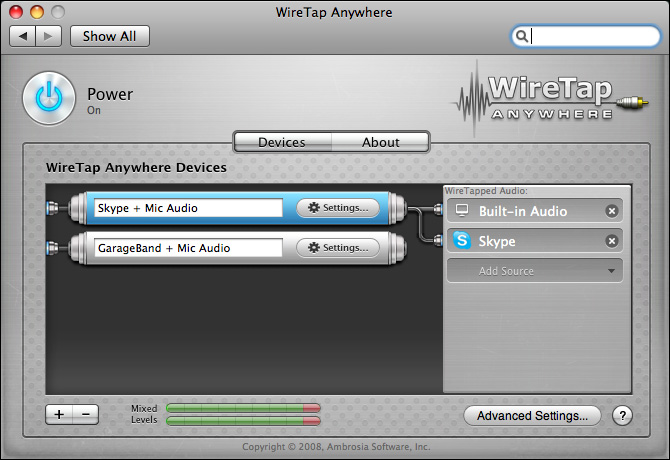
  Creating these virtual input devices is deceptively simple. WireTap
  Anywhere appears as a System Preferences pane that lists any and all
  devices you have created. When you create a new WireTap Anywhere
  device, select an audio source, which can be any physical device
  built-in or attached to your computer, or any application currently
  running. These are added to the virtual device and mixed together.

<http://www.tidbits.com/resources/2008-09/01_WTA_Window.jpg>

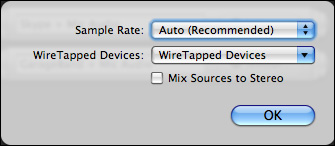
  When recording an interview in Skype or iChat, your voice, recorded
  locally through your microphone, needs different post-processing
  from your remote subject's voice, which comes in at a lower quality.
  Thankfully, WireTap Anywhere allows you to send each individual
  audio source to a separate channel, instead of the default behavior
  of mixing all sources to stereo.

<http://www.tidbits.com/resources/2008-09/02_WTA_Settings.jpg>

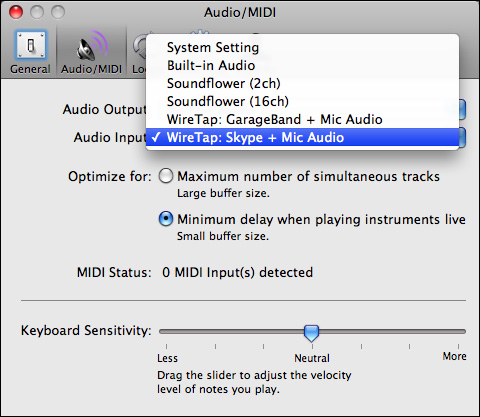
  Record your interview in a program that supports multi-channel
  recording (such as GarageBand) and have each voice (yours and
  theirs) land in separate tracks. Then you can apply one set of audio
  effects to your voice and a different set to your subject's until
  both are at the right volume levels and sound quality.

<http://www.tidbits.com/resources/2008-09/03_GB_Select_Input.jpg>
<http://www.tidbits.com/resources/2008-09/05_GB_Tracks.jpg>

  This method of recording requires four channels, two for you (left
  and right) and two for your remote party (left and right).
  Unfortunately for me, I do my interviews on an aging 1.25 GHz
  PowerBook G4, which is not quite up to the task of recording four
  channels simultaneously - my audio was choppy and not acceptable.
  Until I get a faster Mac, I'm sticking with Audio Hijack Pro, which
  only records two channels (local on the left and remote party on the
  right), for my multi-channel Skype interview recording needs.

  A number of advanced features will appeal to users of Logic or other
  high-end audio software, such as having WireTap Anywhere operate as
  an Audio Unit Generator. In this mode, you bring your tapped audio
  in not as an input device but through an Audio Unit Generator. Audio
  Units are Apple's standard for audio processing filters. They can
  either modify existing sound (the most common usage) or generate
  sounds. In the latter mode they act as instruments or noise
  generators. While many audio programs support Audio Unit effects for
  modifying sound, only high-end tools such as Logic support sound
  generators. The main advantage of acting as a generator is that the
  user interface is accessible and changeable from within your audio
  program.

  I wish GarageBand would support this feature, since I found that
  after I changed the settings of my virtual input device for the
  third or fourth time, GarageBand would crash and require a reboot of
  my computer before it would even see the virtual devices. Being able
  to alter my settings inside of GarageBand would have made this much
  easier. That said, once the devices are set up the way you want
  them, there is little need to change them.

  While other applications (WireTap Studio, Audio Hijack Pro, and
  Soundflower come to mind) provide some of these features, WireTap
  Anywhere provides all of them and more in a clean, intuitive
  interface that makes the creation of new input devices quick and
  deceptively easy. WireTap Anywhere costs $129 and there's a 30-day,
  fully functional demo available as a 13.1 MB download.

  I discuss the functionality of WireTap Anywhere and some of my
  experiences using it in episode 8 of Take Control of Podcasting on
  the Mac: The Podcast.

<http://tcopodcasting.podbus.com/files/ep008.html>

  [Andy Affleck is the author of the just-updated "Take Control of
  Podcasting on the Mac" and has been tinkering with audio tools since
  the days of Farallon's MacRecorder on his Mac Plus.]

<http://www.takecontrolbooks.com/podcasting-mac.html?14@@!pt=TB944>


SugarSync Sweetens Online Syncing
---------------------------------
  by Joe Kissell <[EMAIL PROTECTED]>
  article link: <http://db.tidbits.com/article/9751>

  In my ongoing efforts to keep up with the latest Mac backup tools,
  I've come across a number of services that promise to automatically
  synchronize some set of files from your Mac or PC with a server
  somewhere on the Internet, such that you can access those files from
  nearly any device that can run a Web browser. Among the many
  services in this category are SpiderOak, Dropbox, and of course
  MobileMe's iDisk feature.

<https://spideroak.com/>
<http://www.getdropbox.com/>
<http://www.apple.com/mobileme/>

  On the whole I've found these services interesting but not exciting
  - there's always at least one "gotcha," such as a missing key
  feature, significant bugs, an unreliable infrastructure, or so-so
  Mac software. (MobileMe, alas, has thus far been an offender in all
  the above categories.) However, one such service I've had my eye on
  for a while, SugarSync from Sharpcast, suddenly got much more
  interesting with the release of an iPhone client and a new online
  feature.

<http://www.sugarsync.com/>


**Introducing SugarSync** -- First, the basics. You pay for the
  SugarSync service based on the amount of online storage space you
  want - rates start at $24.99 per year for 10 GB and go up to $249.99
  per year for a healthy 250 GB. Once you've signed up (a free trial
  is available), you download the free client software, which is
  available for Mac OS X and Windows; they also offer mobile versions
  for Blackberry, Windows Mobile, and now iPhone.

<http://phobos.apple.com/WebObjects/MZStore.woa/wa/viewSoftware?id=288491637&mt=8>

  The client software runs in the background and automatically
  synchronizes any folders you specify (such as your Desktop folder or
  Documents folder, space permitting) with the SugarSync servers.
  Assuming an active Internet connection, synchronization happens
  immediately when files in the designated folders change on any
  device - that makes it a genuine "push" application. You can see and
  download your synchronized files by logging in to the SugarSync Web
  site, and if you set up the software on more than one computer, you
  can use it to sync files between them. All files are encrypted and
  transferred using SSL connections.

  So far, that may sound like a more-flexible, higher-security,
  cross-platform version of iDisk. But wait, there's more!


**Doing iDisk One Better** -- If you've paid close attention to the
  MobileMe news, you may know that the service is missing a feature
  that was demonstrated publicly and was even shown in Apple's
  introductory video about MobileMe (though the video was later
  changed to remove any mention of this feature). What we were
  supposed to have seen was a button on the iDisk page of the MobileMe
  Web site that let you email someone a link to any file. So, instead
  of emailing a large attachment, you'd just put a file on your iDisk,
  click a button, and send someone a special, private URL at which
  they could download the file. That sounded great to me, but for
  whatever reason, that feature isn't part of MobileMe - at least not
  yet.

  Well, with SugarSync you can do exactly this. For example, the other
  day I needed to send out copies of a number of my Take Control
  ebooks to a user group at which I'm going to be giving a
  presentation next week. The combined size would have exceeded what
  my mail server permits, and the files could easily have been
  rejected on the receiving end too. So I stuck them in one of my
  SugarSync folders, selected them in the SugarSync Manager window,
  clicked the Send Files button, typed in an email address, and that
  was that.


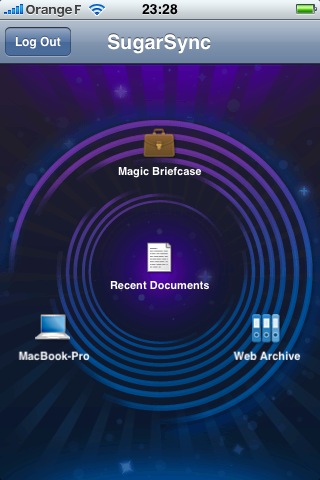
**SugarSync on iPhone** -- All that is useful, but it gets even better
  with the iPhone app. With a couple of taps, you can see a list of
  the files in the designated sync folders on your Mac or PC, and if
  they're in a format the iPhone understands (such as Microsoft
  Office, PDF, plain text, or most graphics formats) you can view the
  file on your iPhone. Not only that, but you can email someone a link
  to any of these files right from your phone - and here's the cool
  part - even if the file isn't actually on your phone.

<http://www.tidbits.com/resources/2008-08/SugarSync.jpg>

  So picture this. You've set up your Downloads folder to sync with
  SugarSync. On your way out the door to work, you click on a link to
  download a 300 MB file, knowing that it will take some time to show
  up on your computer. Then, while riding the train or walking down
  the street, you pull out your iPhone, tap a few buttons, and email a
  link to that file to a friend, who can download it immediately,
  without the file ever having to sync to your phone at all - no
  worries about bandwidth limits, slow uploads, or anything else. (Oh,
  and by the way, when you get to work, the file will also be waiting
  for you on your PC!)

  The technology behind this is all very straightforward, but
  SugarSync's excellent implementation is what makes it feel magical.
  I'm so used to syncing meaning literally copying entire things from
  one place to another (and it usually is exactly that), but the
  SugarSync iPhone app lets you do a sort of lightweight, virtual
  syncing that turns out to be much more practical in many situations.

  Here's another example. You have, say, 10 GB of files on your Mac
  synced with SugarSync, but far less than 10 GB of free space on your
  iPhone. And if you did have the space, you wouldn't want to wait for
  all that stuff to transfer - even with a USB connection, it would
  take a very long time. Yet, curiously, when you look at your sync
  folder on your iPhone, all the files appear to be there, with
  changes appearing almost instantly even over a cellular connection.
  And, sure enough, if you try to view one of the files on your
  iPhone, there it is!

  Well, I fib slightly. What I described can happen, and often does,
  with smaller files and a Wi-Fi connection. But in fact what
  SugarSync offers iPhone users is essentially on-demand sync. It
  shows you all your files, and as soon as you ask for one, it fetches
  it from the server, which in some cases can be so fast it appears
  that the file was already on your phone. SugarSync also deletes the
  file when it's no longer needed, so you can get approximately the
  effect of having many gigabytes of files available on your iPhone at
  any time without (most of) them actually being there.

  I'd like to mention two other interesting features of the SugarSync
  iPhone app. One, a seemingly small but very handy thing, is
  renaming: you can rename a synchronized file on your computer (and
  the SugarSync server) from your iPhone. I'll give you an example of
  how I put this feature to use. The iPhone can display text files,
  but only if it knows they're text files, which it determines by
  looking at the extension. I had some documents on my Desktop that I
  created in BBEdit and didn't bother giving an extension, and I
  wanted to read them on my iPhone. No problem: I just added a ".txt"
  extension, and a View File button instantly appeared in SugarSync,
  letting me see their contents.

  The other interesting feature, which doesn't appear in the desktop
  or Web versions of SugarSync, is a list of Recent Documents - which
  is to say, shortcuts to the most recently edited files in any of
  your designated sync folders. Unfortunately, files don't disappear
  from this list when they're deleted, and I had dozens of copies of
  some "recent" (but long since deleted) files on my iPhone. I
  eventually figured out how to clear them from the list, but it was
  an odd, awkward procedure: I had to log in to the SugarSync Web
  site, locate the previously trashed files in my Deleted Files
  folder, select them all, and click Permanently Delete. They did
  immediately disappear from my iPhone, but I think the Recent
  Documents feature should exclude deleted files.


**Versioning, Almost** -- Although I'm most excited about the
  SugarSync iPhone app, I also want to mention an important new
  feature that applies across the SugarSync line: versioning.
  Previously, SugarSync kept copies of synchronized files that you'd
  deleted, but now, in addition, it keeps up to five older versions of
  every file. This is very good, because it officially promotes
  SugarSync from "just a sync program" to "an honest-to-goodness
  backup program" in my book - it now creates what I refer to as
  additive incremental archives.

  However, my enthusiasm for this new feature is tempered by the fact
  that it stores _only_ the last five versions; because SugarSync
  syncs so efficiently, those five versions of an important file
  you're working on could easily turn out to be all from the last 10
  minutes! If you could store more versions, or if you could restrict
  SugarSync to keeping a maximum of one older version per hour (or
  even per day), I think that would provide more realistic and
  practical protection. As it is, it can't do the one thing I want to
  be able to do with backups of files I'm actively working on, which
  is to restore an arbitrary version from hours or days ago, even if
  the file has been saved dozens or hundreds of times in between. So,
  it's no Time Machine, but at least it's a step in the right
  direction.


**Final Thoughts** -- I recently read a rumor to the effect that Apple
  is planning an iDisk feature for the iPhone and iPod touch in the
  next month or two. Obviously, I have no idea if the rumor is true,
  or what such a feature would look like if it did exist. But I will
  say that if Apple wants to outdo SugarSync in cleverness and
  convenience, they've got their work cut out for them.

<http://www.macrumors.com/2008/08/20/september-apple-event-rumor-itunes-unlimited-iphone-idisk-access/>

  Meanwhile, even if you don't have an iPhone or iPod touch, SugarSync
  is well worth trying out. Sharpcast offers a 45-day free trial of
  the service with a 10 GB limit, which should be more than adequate
  to get a feel for what it can do. SugarSync 1.1.10 for Mac is a 19.9
  MB download.

<https://www.sugarsync.com/downloads/>


Searching for the iPhone 3G Case of My Dreams
---------------------------------------------
  by Joe Kissell <[EMAIL PROTECTED]>
  article link: <http://db.tidbits.com/article/9750>

  For nearly as long as I've owned cell phones, I've carried them in
  my pocket, sans case, and I figured that when I got my spiffy new
  iPhone 3G, I'd probably do the same thing. The new phone would be
  slimmer than my old one, making it more pocketable, and I'd never
  had any particular problems with scratches or other damage (as long
  as I remembered not to put coins, keys, or other hard objects in the
  same pocket as the phone).

  However, as soon as I began using my new iPhone, I realized that the
  glossy plastic case provides very little grip. If my hands are at
  all sweaty, the device feels worryingly slick. I found myself
  feeling anxious about pulling the phone out of my pocket on a
  crowded subway platform or sidewalk, because it would be so easy to
  drop. And, of course, even if the phone kept working thereafter, its
  beautiful shiny surface would be marred.

  In the first couple of weeks after the iPhone 3G's launch, only a
  few case options were available (and of those, still fewer were
  available here in France), and though I fully expect that number to
  climb into the triple digits before long, I had to work with what I
  could find. My major desire was for something to provide traction,
  and secondarily, to cushion the phone slightly in the event that it
  did fall. I won't wear a cell phone clipped to my belt or otherwise
  visible on my person, and I don't like having to perform an
  additional procedure of opening a case or removing a phone before I
  can use it. So holsters, sleeves, wallets, and other such designs
  were out - I was looking for a simple, slim case with a decent
  texture.


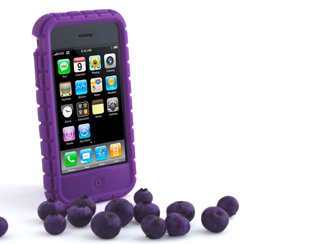
**PixelSkin** -- The first case I tried was the PixelSkin from Speck
  Products. This is a rubbery one-piece case that slips onto the phone
  easily and allows ready access to the controls, ports, and camera
  lens. (The case feels like it's made of silicone, but the
  manufacturer doesn't say what the material is.) Because of the
  case's texture and chunky surface, my anxiety about dropping the
  phone magically went away - an immediate plus. I also appreciated
  that it came in purple, my favorite color (as well as five other
  colors), and putting the case on the phone was as easy as could be.

<http://www.speckproducts.com/products/pixelskin/iphone-3g/143>
<http://www.tidbits.com/resources/2008-08/PixelSkin.jpg>

  After using the PixelSkin for about a week, though, I realized that
  my criteria for choosing a case had left out a few important facts.
  For one thing, I hadn't considered the ease of getting the phone
  into and out of my pocket. As fantastic as the PixelSkin was at
  being "grippy," that also meant that I couldn't get it out of my
  pocket in a hurry without turning the pocket inside-out. So for me,
  a texture that didn't adhere quite so well to its surroundings would
  have been a better choice.

  Also, although the PixelSkin was plenty thick and cushiony (a good
  thing safety-wise), that made my slim new phone about as thick as my
  old one had been, a minus in my book. In addition, the case's raised
  lip around the screen, which might have protected it if the phone
  fell, sometimes interfered with tapping or dragging right near the
  screen's edge. And finally, I prefer to use a dock when syncing and
  charging my iPhone, and the PixelSkin's case had to be removed every
  time I docked the phone.


**Elan Form** -- So my revised selection criteria included thinness, a
  less-tacky surface, better access to screen edges, and dockability.
  That turns out to be a rather tall order for an iPhone case, but I
  found one particularly promising candidate: the Griffin Elan Form.
  It's a thin, two-piece polycarbonate shell covered with leather. (It
  comes in pink with brown trim, and in black.) The large, top piece
  slides on the phone and stays there; a smaller bottom piece pops off
  to enable the phone to dock. Griffin also includes a screen shield
  made of heavy transparent plastic.

<http://www.griffintechnology.com/products/elanform3g>
<http://www.tidbits.com/resources/2008-08/Elan-Form.jpg>

  It took a bit of oomph to get the case on the phone, as the fit is
  quite snug. The first few times I removed the bottom piece to dock
  the phone took a bit of finessing too; but now it stays on nicely
  when I want it to be on, yet comes off without a struggle.

  The textured leather provides a nice solid grip on the phone without
  the stickiness or bulk of the PixelSkin; it also slips into and out
  of my pocket easily. Because the lip around the screen is much
  smaller, access to the edges of the screen is no problem. And, of
  course, I can now dock the phone without removing the entire case,
  though I do have to slip off the bottom piece, which could then
  potentially be lost. I'm not sure it's a huge improvement to remove
  only part of the case rather than the whole thing to dock the phone,
  but it seems somewhat easier to me. One small complaint: after a few
  weeks of use, the leather began pulling away from the plastic shell
  in one corner. I'm sure I could glue it back into place, but I
  shouldn't have to be making repairs, however minor, on something I
  just bought.

  Using the Elan Form made me realize there was yet another deficiency
  in my selection criteria: I hadn't taken the screen into account.

  I wasn't especially worried about scratching the glass screen, but
  all the same, I figured it couldn't hurt to pop in the Elan Form's
  screen shield. Unfortunately, this piece of plastic is a real
  blemish on the case's overall design. Thankfully, the shield doesn't
  adversely affect the screen's touch sensitivity. But it's a thick
  piece of plastic that's not perfectly rigid and as such, it doesn't
  make complete contact with the entire screen. Even if you
  scrupulously avoid moisture or grease on the screen or the cover,
  the parts of the shield that come in contact with the screen will
  have a blotchy, amoeba-like appearance, which is both unsightly and
  distracting.


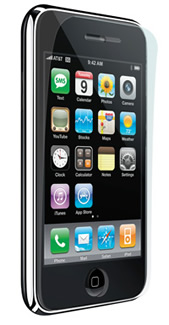
**Crystal Film** -- A number of companies make flexible, stick-on
  screen protectors for the iPhone, and having read a review of the
  Elan Form that mentioned the screen-shield problem, I preemptively
  purchased a pack of Power Support's Crystal Film for the iPhone 3G.
  Each package contains two removable screen protectors that (in
  theory, at least) adhere perfectly to the glass's surface. (The
  company also makes a version called Anti-Glare Film, which is
  supposed to reduce the appearance of fingerprints due to its matte
  finish, though some users have complained that the finish also gives
  the display a grainy appearance. I haven't seen or tried that
  version.)

<http://www.powersupportusa.com/products/iphone3G_crystalfilm.php>
<http://www.tidbits.com/resources/2008-08/Crystal-Film.jpg>
<http://www.powersupportusa.com/products/iphone3G_antiglare.php>

  Years ago when I had a Palm, I bought screen protectors, and I
  remembered how tricky it was to apply them without getting any air
  bubbles or dust particles between the protector and the screen. So I
  took extraordinary precautions to work in as dust-free an
  environment as I could and to clean the phone thoroughly. Then I
  applied and removed the adhesive sheet Power Support includes for
  last-second dust removal and applied the screen protector as
  carefully as I could.

  On the plus side: I was able to apply the film with no dust or
  bubbles. Unfortunately, I didn't realize until it was too late that
  it was very slightly crooked; the alignment turned out to be much
  more of a challenge than anything else. More irritating, though, was
  the fact that even though this Crystal Skin model was expressly
  designed for the iPhone 3G, it doesn't quite cover the screen -
  there's a gap of about 1 mm all the way around. And because the Elan
  Form comes just to the edge of the screen in the front (a good
  thing), it leaves the edges of the Crystal Film exposed, so I'm
  constantly reminded that it's there (and that I didn't get it on
  perfectly straight).

  Apart from that, the Crystal Film works as promised. It feels and
  acts just like the original glass, and collects grease and
  fingerprints with equal ease. That's all fine with me, though,
  because the main thing is that I don't worry about minor scratches
  or dings on the screen and the display isn't impaired in any way.


**Inching Toward Perfection** -- Now that I've gone through two cases
  and a screen protector, I've finally come to understand what I
  actually want in an iPhone case, though finding the model that suits
  me perfectly will undoubtedly require more trial and error. I want
  something that will interfere as little as possible with my normal
  use of the phone - pocketing it, docking it, and interacting with it
  - while providing a good grip and protection against scratches and
  other minor damage, preferably for the whole phone.

  With that in mind, there are two other products I'm interested in
  trying:

* ZAGG invisibleSHIELD: It's like a stick-on screen protector, but the
  two pieces wrap around the entire phone. It claims to improve the
  grip, though I wonder how well it will stay on, and whether I'd be
  nervous that it provides essentially no impact protection.

<http://www.zagg.com/invisibleshield/apple-iphone-cases-screen-protectors-covers-skins-shields.php>

* Speck Products' SeeThru: These cases are similar in design to the
  Elan Form, including the slip-off bottom piece for docking, but are
  transparent (in your choice of colors - again, happily, purple is an
  option). Unlike other hard plastic cases with docking support (such
  as the Incase Slider Case and the Contour Flick), these have
  non-slip strips on the side. And, as a bonus, the removable bottom
  section doubles as a stand that holds your iPhone in landscape
  orientation.

<http://www.speckproducts.com/products/seethru/iphone-3g/142>
<http://www.goincase.com/products/detail/slider-case-cl59031>
<http://www.contourcase.com/flick/flickiphone3G/>

  I'm sure there are other suitable options too, or will be in the
  near future. Of course, I'd prefer not to spend as much money on
  cases as on my calling plan, so the case of my dreams better come
  along soon!


TidBITS Watchlist: Notable Software Updates for 08-Sep-08
---------------------------------------------------------
  by Adam C. Engst <[EMAIL PROTECTED]>
  article link: <http://db.tidbits.com/article/9756>

* Dialectic 1.2 from JNSoftware adds to the phone dialing utility
  support for dialing the iPhone via Bluetooth, a color setting for
  the alert window, improved phone number formatting in the Address
  Book menu, better reliability of dialing via the Phlink Dial Method,
  and additional scripts for dialing VoIP services. ($25, free update,
  6.1 MB)

<http://www.jonn8.com/dialectic/>

* Sandvox 1.5 from Karelia Software is a major update to the company's
  Web site creation software. Improvements include changes that make
  it easier to publish media-intensive Web sites, updates pagelets
  that provide additional functionality on pages, seven new page
  designs, new blogging features, the capability to edit multiple
  pages simultaneously, improved compatibility with MobileMe, and
  more. ($49 Regular/$79 Pro, free update, 26 MB)

<http://www.karelia.com/>

* Simon 2.4.2 from Dejal Systems updates the Internet monitoring tool
  to work around an Apple bug that could cause remote volumes to not
  unmount properly, updates Twitter support with the latest version of
  the Twitter engine, fixes problems with the iPhone and RSS report
  templates, and more. ($29.95 to $195, free update, 10.8 MB)

<http://www.dejal.com/simon/>

* PCalc 3.3 from TLA Systems is the first major revision of the fully
  featured scientific calculator in almost two years. It includes the
  improvements made in TLA's recent PCalc for iPhone, adds a new
  default appearance, makes RPN mode behave more like HP calculators,
  adds fuel efficiency conversions, adds keyboard shortcuts to the
  Dashboard widget, provides smarter Undo/Redo support, and fixes a
  few bugs. ($19, free upgrade, 2.5 MB)

<http://www.pcalc.com/english/about.html>
<http://www.pcalc.com/iphone/>

* Sound Studio 3.5.7 from Freeverse fixes a bug in the popular sound
  editor that prevented Automator actions and Sound Studio's Monbots
  automation tools from opening files. It also corrects an AppleScript
  error in the Bookend Audio Monbot when running under Mac OS X 10.5
  Leopard. ($79.95 new, free update, 34.7 MB)

<http://www.freeverse.com/soundstudio>

* Tinderbox 4.5.1 from Eastgate Systems enhances the "personal content
  assistant" with numerous cosmetic improvements, including new shapes
  for maps, customizable drop shadows, and improved typography.
  Outline titles can now extend to multiple lines; outlines can be
  edited in place; agents update more quickly; and agents and
  containers can have pull-down summary tables, sparkline plots, and
  bar graphics. Tinderbox 4.5 also features better address book and
  vCard integration, with automatic linking. ($229 new, free updates
  for purchases within the last year or $90 otherwise, 16.8 MB)

<http://www.eastgate.com/Tinderbox/>


Hot Topics in TidBITS Talk/08-Sep-08
------------------------------------
  by Jeff Carlson <[EMAIL PROTECTED]>
  article link: <http://db.tidbits.com/article/9759>

**Car Alarm for Stolen Laptops** -- Readers suggest a number of
  laptop-tracking solutions that are available. (3 messages)

<http://emperor.tidbits.com/TidBITS/Talk/2192>


**Google Chrome** -- Google is creating its own Web browser, which was
  announced first as a comic. Readers look at the Windows-only beta
  and discuss the underlying rendering engine and other aspects of
  building around Web standards. (42 messages)

<http://emperor.tidbits.com/TidBITS/Talk/2193>


**10.3.9 to 10.5.1 - use Migration Assistant?** If you're leapfrogging
  a major operating system version, is it safe to trust Apple's
  Migration Assistant? (14 messages)

<http://emperor.tidbits.com/TidBITS/Talk/2195>


**Creating/Burning DVD Disk Images** -- What software should a reader
  use to make a backup of an instructional DVD that's heavily used by
  his two-year-old daughter? (4 messages)

<http://emperor.tidbits.com/TidBITS/Talk/2197>


**Transnational iPhones** -- The inability to unlock an iPhone 3G
  presents a problem for someone who needs his iPhone in Australia for
  eight months but will be returning to the United States following
  the trip. (4 messages)

<http://emperor.tidbits.com/TidBITS/Talk/2198>


$$

This is TidBITS, a free weekly technology newsletter providing timely
news, insightful analysis, and in-depth reviews to the Macintosh and
Internet communities. Feel free to forward to friends; better still,
please ask them to subscribe!

Non-profit, non-commercial publications and Web sites may reprint or
link to articles if full credit is given. Others please contact us. We
do not guarantee accuracy of articles. Caveat lector. Publication,
product, and company names may be registered trademarks of their
companies. TidBITS ISSN 1090-7017.

Copyright 2008 TidBITS: Reuse governed by Creative Commons license.

Contact us at:    <[EMAIL PROTECTED]>
TidBITS Web site: <http://www.tidbits.com/>
License terms:    <http://www.tidbits.com/terms/>
Full text search: <http://www.tidbits.com/search/>
Subscriptions:    <http://www.tidbits.com/about/list.html>
Account help:     <http://www.tidbits.com/about/account-help.html>


--
If you want to unsubscribe or change your address, use this link
http://emperor.tidbits.com/webx?unsub@@.3c557dc4!u=306a67f9