TidBITS#943/01-Sep-08
=====================
  Issue link: <http://db.tidbits.com/issue/943>
  As longtime word-processing wonks, we've watched as Google Docs and
  others take writing and editing online. But what if you want to work
  on something where you don't have Internet access, such as on a
  plane? Adam looks at how Google Gears and its new implementation for
  Safari give Google Docs offline capabilities. Sticking with the text
  editing theme, Adam then digs into Bare Bones Software's latest
  release, BBEdit 9.0. Also this week, Glenn Fleishman looks at the
  reports of Google's forthcoming Web browser, called Chrome, and the
  comics that explain it. In the TidBITS Watchlist, we note the
  releases of Final Cut Express 4.0.1, VMware Fusion 2.0 RC1, Apple
  ProRes QuickTime Decoder 1.0, Coda 1.5, and RapidWeaver 4.1.1.
  Lastly, TidBITS is hiring at our global headquarters in Ithaca, NY.

Articles
    TidBITS Is Hiring... in Ithaca
    Google Explains Its Forthcoming Web Browser with Comics
    BBEdit 9.0 Adds Something for Everyone
    How to Use Google Docs Offline in Safari
    TidBITS Watchlist: Notable Software Updates for 01-Sep-08
    Hot Topics in TidBITS Talk/01-Sep-08


------------ This issue of TidBITS sponsored in part by: --------------

* READERS LIKE YOU! Support TidBITS with a contribution today!
  <http://www.tidbits.com/about/support/contributors.html>
  Special thanks this week to David W. Everett, Frederick Mills,
  Glenn Mehrbach, and Charles Reeves Jr. for their generous support!

* Fetch Softworks: Fetch 5.3 has WebView, the easy way
  to view files in a browser and copy Web addresses from Fetch.
  Also a new look for Leopard, droplet shortcuts, and more.
  Download your free trial version! <http://fetchsoftworks.com/>

* WebCrossing Neighbors Creates Private Social Networks
  Create a complete social network with your company or group's
  own look. Scalable, extensible and extremely customizable.
  Take a guided tour today <http://www.webcrossing.com/tour>

* MARK/SPACE, INC: Take it with you! The Missing Sync makes
  it easy to synchronize contacts, calendars, notes, photos
  and more from your Mac to your BlackBerry, Palm OS, or
  Windows Mobile phone. <http://www.markspace.com/bits>

* VMware Fusion. The most seamless way to run Windows on your Mac.
  Backed by nearly a decade of proven virtualization technology.
  Try VMware Fusion today for free, or order online for only $79.
  Visit: <http://www.tidbits.com/about/support/vmware-fusion.html>

* Microsoft's MacBU: Supporting Mac users with Office 2008.
  Is your Office up-to-date? Make sure you're running the latest
  versions of Word, Excel, PowerPoint, and Entourage by choosing
  Check for Updates from the Help menu of any Office application!

* ConceptDraw Office adds real business power to Microsoft Office
  and Apple's iWork. Whether you need project management, business
  graphics, or mind mapping, it's all easily created on your Mac!
  Buy today for only $499! <http://www.conceptdraw.com/tb>

---------- Help support TidBITS by supporting our sponsors ------------


TidBITS Is Hiring... in Ithaca
------------------------------
  by Adam C. Engst <[EMAIL PROTECTED]>
  article link: <http://db.tidbits.com/article/9734>

  After a summer of feeling utterly overwhelmed despite our best
  attempts to work more efficiently and use the Getting Things Done
  techniques, we've decided that the most effective way to get things
  done is to hire other people to do them. Plus, it's cheaper and
  safer than messing about with the time-space continuum.

  We're currently hiring for two contract positions: a technology
  writer to help with TidBITS and Take Control research,
  fact-checking, and writing; and a personal assistant to handle
  necessary tasks that aren't a good use of time for Tonya or me.
  These positions will involve regular collaboration and meetings in
  person, so applicants must be located in Ithaca, NY.

  For more information about the positions, see our Jobs page.

<http://db.tidbits.com/jobs.html>


Google Explains Its Forthcoming Web Browser with Comics
-------------------------------------------------------
  by Glenn Fleishman <[EMAIL PROTECTED]>
  article link: <http://db.tidbits.com/article/9754>

  Understanding technical concepts, even for those who spend their
  days with their "heads inside the computer," as I conceive of it,
  can often be a reach. People learn in different ways, and hearing an
  explanation, seeing a visual representation, and reading about
  something all reach different individuals.

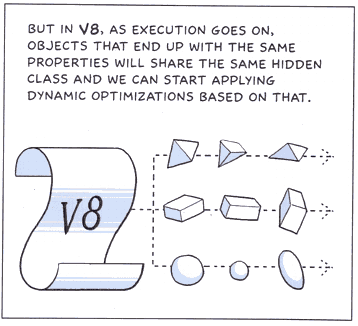
  Google decided to hire the talented Scott McCloud to explain in
  graphics and words how their new Chrome Web browser differs from all
  those currently available. It's a neat idea: in explaining their
  JavaScript optimization, for instance, you don't need to understand
  what a classless programming language is if you look at the
  graphical representation, which is simplified, but entirely
  accurate.

<http://blogoscoped.com/google-chrome/>
<http://www.tidbits.com/resources/2008-09/google_comics_pane.png>

  The comic was released under a Creative Commons license, and sent
  through postal mail to an unknown number of people. Philipp Lenssen
  of Google Blogoscoped explains that he received, scanned, and posted
  the comic. The site referenced in the comic, www.google.com/chrome,
  isn't live at this writing.

<http://blogoscoped.com/archive/2008-09-01-n47.html>
<http://www.google.com/chrome>

  Chrome's key difference from previous browsers is that each tab in
  the browser will run as a separate, sandboxed process to isolate
  JavaScript slowdowns and browser crashes to a tab, in much the same
  way that multi-tasking operating systems typically prevent one
  crashing program from bringing down the entire system.

  Google says in this comic that they have vastly improved the speed
  of JavaScript by commissioning an advanced JavaScript virtual
  machine. In June 2008, the WebKit project announced its own
  JavaScript virtual machine optimization project dubbed SquirrelFish.

<http://webkit.org/blog/189/announcing-squirrelfish/>

  For pages that feature pop-up windows, whether useful or advertising
  come-ons, each tab will capture the pop-ups and enable you to
  convert them into freestanding windows.

  Security is enhanced, Google says, by disallowing each tab from
  writing files or examining data on the hard drive. This is a typical
  behavior, and something that Apple and Microsoft have implemented in
  some form in Safari 3 and Internet Explorer 8. Google has also
  implemented a three-tier hierarchy of trust that it believes will
  prevent unintentional privileges being granted to programs or
  scripts on Web pages that shouldn't have them.

  The browser will also let you shroud a given tab in secrecy - an
  "incognito" window - so you can exclude its pages, passwords, and
  other details from the browser's cached or saved elements. People
  typically use this mode to avoid leaving traces on a shared computer
  - often for personal research, viewing unclothed individuals, or
  keeping a gift or party secret.

  Chrome will be based on WebKit, the same open-source project used as
  the fundamental basis of Apple's desktop and mobile Safari and
  Nokia's S60 browser, which Nokia will ultimately use to replace all
  its current browsers and which is part of the future direction of
  the Symbian platform.

<http://webkit.org/>

  Scott McCloud is best known for his "Understanding Comics" and
  "Reinventing Comics," in which he uses the medium to explain its
  past, present, and potential future, a future in which McCloud has
  been deeply involved.

<http://www.amazon.com/dp/006097625X/?tag=tidbitselectro00>
<http://www.amazon.com/dp/0060953500/?tag=tidbitselectro00>

  Timing on Chrome appearing in a workable form isn't yet known. This
  is the best kind of browser war: unlike the monopoly-driven efforts
  by a certain firm to kill Netscape Navigator in the 1990s, we're in
  a time of browser plenty. Microsoft recently released a second beta
  of Internet Explorer 8 for Windows; Firefox 3 for all platforms
  appeared not long ago from the Mozilla Foundation, the spiritual
  heirs of Navigator; and Apple keeps pushing WebKit and Safari to
  have greater speed and more security for Windows, Mac OS X, and the
  iPhone and iPod touch. And that's not even considering other
  entrants such as OmniWeb, Opera, iCab, Camino, and Flock.

  The nice part for users is that with Google's entry, we'll have four
  browsers, all of which are intended to be fast, easy, and secure,
  and which use three separate rendering platforms (Chrome and Safari
  sharing WebKit). This ensures the kind of diversity of evolution
  that promotes better software and a lower chance of a single flaw
  being exploited in all extant browsers. It also means job security
  for Web developers used to tweaking designs to look good in multiple
  browsers.


BBEdit 9.0 Adds Something for Everyone
--------------------------------------
  by Adam C. Engst <[EMAIL PROTECTED]>
  article link: <http://db.tidbits.com/article/9749>

  Bare Bones Software's BBEdit, one of the longest-standing
  applications in the Macintosh world, has received a major update to
  version 9.0, adding a number of features that will likely enhance
  the productivity of anyone who uses the text editor or currently
  relies on a less-capable program. Whether you need a Web authoring
  tool, a programmer's editor, a utility for manipulating massive text
  files, a writing tool that focuses purely on text, or all of the
  above at different times, BBEdit 9.0 has new features that will make
  your life easier. Oh, and yes, if you look hard enough, it has
  ponies too.

<http://www.barebones.com/products/bbedit/>
<http://www.barebones.com/support/bbedit/arch_bbedit9.html>


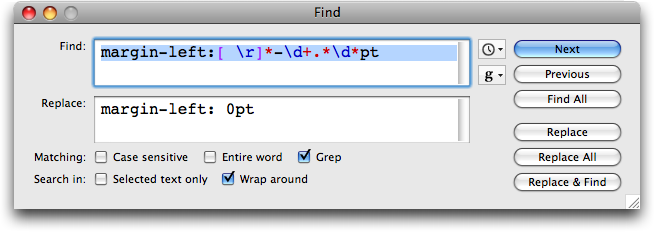
**Find Modelessly** -- Perhaps the most significant changes to BBEdit
  9.0 apply to its much-admired searching capabilities. In this
  version, Bare Bones has separated the act of searching for text
  within a single file from searching for results across multiple
  files. A modeless, resizable Find window provides all the
  grep-capable searching power that BBEdit users have long
  appreciated. However, if you want to run a search across multiple
  files, you'll instead rely on a new Multi-File Search window that's
  also modeless and resizable. Multi-File Search can search through
  open documents, as well as the contents of disk browsers, recent
  folders, BBEdit projects, recent Xcode projects, and even saved
  Spotlight searches. There's also an option to colorize grep searches
  in the Find window, which should make complex grep patterns easier
  to parse.

<http://www.tidbits.com/resources/2008-08/BBEdit-Find-window.png>

  After all these years, it's great to see Bare Bones setting the old
  modal Find & Replace dialog aside ("Thank goodness!" exclaimed Tonya
  when I shared this news). But never fear, if you're addicted to the
  old interface, or if you frequently want to switch from searching
  for text in a single file to searching for the same text in multiple
  files, an option brings back the old Find & Replace dialog.

  Another related feature that has changed significantly, and for the
  better, is BBEdit's Find Differences. In BBEdit 8.5, Bare Bones
  added the capability to display which characters within a line were
  different between two similar files. That was huge for us, since it
  enabled us to use BBEdit in conjunction with the Subversion version
  control system to work with TidBITS articles. Though code may have
  relatively short lines, a line of prose is a paragraph, and without
  knowing what within a paragraph has changed, knowing only that two
  paragraphs are not the same isn't particularly helpful. In BBEdit
  9.0, Bare Bones has enhanced the Find Differences feature such that
  it not only shows the changed lines, and the changed characters
  within each line, it also lets you see and replace individual spans
  of differing characters within each changed line.


**Browse and Edit** -- BBEdit has long had File Group documents that
  enabled you to bring together files and folders from disparate parts
  of your hard disk, but file groups were really just an alternative
  view of files that already existed in the Finder; you could open,
  rename, and delete them, but not much more. Similarly, the program
  has long featured Disk Browser windows that showed a view of files
  and folders on the hard disk; within a disk browser you could see,
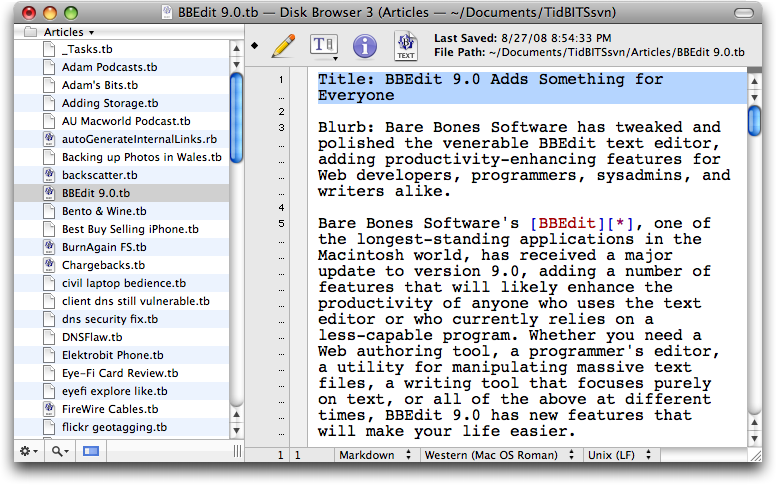
  but not modify, the actual content of files. In BBEdit 9.0 both file
  groups, renamed Projects, and disk browsers now work the way they
  should in providing not just opening and previewing capabilities,
  but full editing. Whenever you click a file in the left sidebar of a
  project or disk browser window, the file opens in the main window,
  fully editable. Double-click a file and it opens in its own window,
  just as in previous versions.

<http://www.tidbits.com/resources/2008-08/BBEdit-Disk-Browser.png>

  For programmers dealing with hundreds or thousands of files,
  BBEdit's file groups and disk browser windows were useful before,
  and they're far more useful now. For those for whom the previous
  features weren't helpful previously, they very well may be now - I
  plan to give them a try, whereas I'd never seen the benefit before.

  Alas, BBEdit's FTP/SFTP Browser does not yet share this editable
  pane feature, which would be huge for Web developers. It would also
  be great to see additional version control interface within disk
  browsers, identifying files that had been changed in the repository
  but not yet updated, or that had local changes not yet committed
  back to the repository.

  Because it's possible to have a file open in a project window, in a
  disk browser, and in an independent window, BBEdit 9.0 also lets you
  change a file in any window and have the changes reflected
  immediately in all the others. I can't quite imagine why you'd want
  to open multiple views to a particular file intentionally, but the
  alternative - keeping track of which window contained which changes
  to the same file - would undoubtedly cause fits of uncontrolled
  gibbering.


**More Features** -- Though editable panes in Project and Disk Browser
  windows and the modeless Find interface are the marquee features of
  BBEdit 9.0, there are plenty of other additions. A Scratchpad window
  provides a constantly saved place to dump bits of text for editing
  or copying into other documents. If you use BBEdit on multiple Macs,
  the program can now sync the contents of the ~/Library/Application
  Support/BBEdit folder to other Macs via MobileMe - handy for
  maintaining the same clippings, text factories, and other settings
  between computers. One clever technique - if you have to use BBEdit
  9.0 on someone else's Mac temporarily, you can simply copy the
  version of the BBEdit folder on your iDisk down to the Mac to
  recreate your personal environment.

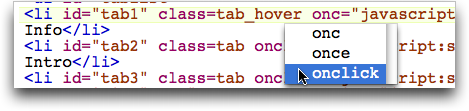
  Also new is text completion, which enables you to type a character
  or two, press a key, and select the desired expansion from a pop-up
  (text completion can also kick in automatically after a delay in
  typing, but I found that a bit overwhelming in normal use). This is
  probably mostly helpful for programmers, since BBEdit provides
  language-specific expansions pulled from the current document,
  nearby documents, clippings, and other sources. BBEdit's built-in
  language support is also reportedly improved, particularly for Ruby,
  JavaScript, HTML, and Python.

<http://www.tidbits.com/resources/2008-08/BBEdit-text-completion.png>

  For sysadmins, BBEdit can now read and write bzip-compressed files
  (.bz2) such as Leopard's log files, much as it could already work
  with gzip-compressed files. And last, but by no means least for
  those of us who write for a living, BBEdit windows can now feature a
  constantly updated character, word, and line count; clicking it
  toggles between counting for the document and for the selected text.


**Upgrade Details** -- Upgrades for registered customers of any
  previous commercial version of BBEdit cost $30. New copies of BBEdit
  9.0 remain priced at $125, and the educational price remains at $49.
  The program is available immediately; there's a fully functional
  30-day trial version that's a 15.4 MB download. It requires Mac OS X
  10.4 or later, and is a universal binary.


How to Use Google Docs Offline in Safari
----------------------------------------
  by Adam C. Engst <[EMAIL PROTECTED]>
  article link: <http://db.tidbits.com/article/9752>

  It's ironic that with all the writing I do, I've never settled on a
  single word processor, instead picking and choosing among lots of
  different ones depending on the task at hand. Although it's a
  mediocre word processor, we've started using Google Docs for certain
  sorts of collaborative writing, such as when Tonya and I are working
  on marketing materials for Take Control, or when I'm writing an
  article for Macworld. Its brilliant collaborative capabilities more
  than make up for its minimal feature set, and I have found it better
  for my needs than similar products like Zoho Writer and Buzzword,
  which don't seem as focused on enabling quick collaboration.

<http://docs.google.com/>

  Like all online word processors, Google Docs has one significant
  architectural limitation: if you don't have Internet access, your
  documents are completely unavailable to you. Google has been working
  on eliminating this limitation with a technology called Google Gears
  (Zoho Writer and a few other Web apps also use Gears - it's an open
  source technology that any developer can implement). Gears addresses
  the disconnected problem with a database engine based on SQLite, and
  Gears-enabled pages can send and receive data from this local
  database cache when offline. When connectivity is reestablished,
  Gears synchronizes the changes back up to Google's storage cloud.

  Gears has been available for the Mac via the Firefox Web browser for
  some time, but Google just released a "beta" version of Gears for
  Safari. (Nearly everything Google does is labeled as beta, even
  after years of development and millions of users, which makes it
  difficult to determine the actual state of the code.) I had tried
  Gears with Firefox briefly before our trip to Wales, but I found it
  a bit confusing and hadn't come back to it until this Safari
  release, which I suspect will be attractive to more Mac users
  anyway. The Safari release was quiet, and Google's Gears home page
  doesn't yet acknowledge that it's compatible with Safari.

<http://groups.google.com/group/gears-users/browse_thread/thread/36537d4f47c5495c>
<http://gears.google.com/>

  Gears for Firefox is a Firefox add-on, but for Safari, Gears has two
  parts, an input manager (installed in /Library/InputManagers) and an
  Internet plug-in (installed in /Library/Internet Plugins). Some
  people don't like input managers; if so, stick with the Firefox
  version.


**Installation and Setup** -- Until Google officially releases Gears
  for Safari, you can't follow the normal installation method, which
  is to visit the Gears home page and click the Install Gears button
  (do that if you want to install in Firefox now). Instead, download
  this disk image and run the installer inside. You'll have to restart
  Safari to finish the installation. Gears automatically updates
  itself, so when Google releases new versions, you should just get
  the updates. You can also verify that the installation has worked by
  looking for a Google Gears Settings menu item in the Safari
  application menu. But don't choose that just yet. Instead, go to
  Google Docs, and at the upper right of the page, click the Offline
  link next to your email address to continue the installation process
  in a series of dialog boxes.

<http://dl.google.com/gears/current/gears-osx-opt.dmg>
<http://docs.google.com/>
<http://www.tidbits.com/resources/2008-08/Google-Docs-Settings-line.png>

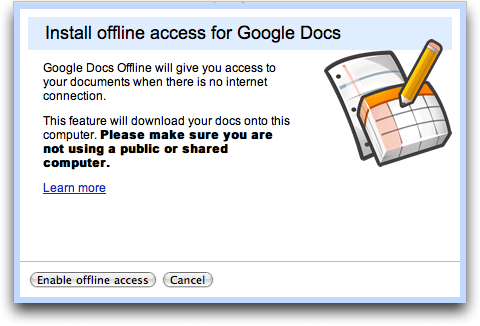
  First, Google Gears asks you to enable offline access; click the
  Enable Offline Access button. Next, Gears asks if it's acceptable to
  store data on your computer (necessary, of course, but nice to be
  asked). Select the "I trust this site. Allow it to use Gears"
  checkbox and click Allow.

<http://www.tidbits.com/resources/2008-08/Gears-enable-access-dialog.png>
<http://www.tidbits.com/resources/2008-08/Gears-store-data-dialog.png>

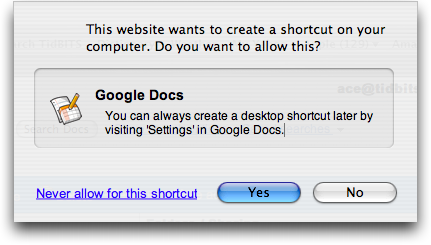
  Gears then asks if you want to make a desktop shortcut, which isn't
  necessary, and can be done later if you want. The desktop shortcut
  is actually a small application that's created on your Desktop, but
  it doesn't have to stay there. Double-clicking it opens Google Docs
  in the Web browser that was your default as of when you created it;
  it isn't smart enough to switch if you change your default, but you
  can recreate it if necessary. Merely dragging the Google Docs URL
  from Safari's address bar to the Desktop to create a .webloc file
  provides exactly the same functionality as the Google Docs
  application that Gears creates.

<http://www.tidbits.com/resources/2008-08/Gears-desktop-shortcut-dialog.png>

  Once all that is done, Gears synchronizes your data, which shouldn't
  take long unless you have a vast number of documents stored in
  Google Docs. Subsequent synchronization takes place regularly, and
  you'll likely never notice it.

<http://www.tidbits.com/resources/2008-08/Gears-synchronizing.png>


**Basic Usage** -- If Safari is open, you can just navigate to
  http://docs.google.com/ manually, via .webloc file, or via the
  Google Docs application that Gears creates. Once there, click any
  document to open it, make changes as you would normally, and when
  you're done, click the Save & Close button. Keep in mind that you
  can edit only word processing documents; spreadsheets and
  presentations can be viewed offline but not edited yet.

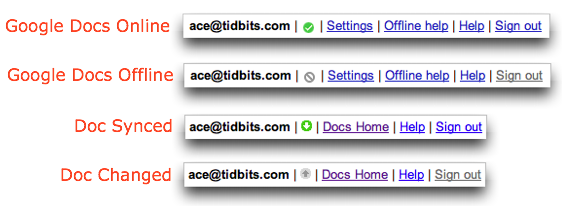
  Google uses only a tiny icon that switches between a green checkmark
  and a gray slashed circle to indicate whether you're online or
  offline in the main Google Docs file list. Unfortunately, that icon
  doesn't update quickly, so even after I disconnected my Mac from all
  networks, it claimed I was online for a few minutes before realizing
  otherwise. Similarly, when you're in a particular document, a green,
  downward-pointing arrow indicates that the document is in sync; a
  gray, upward-pointing arrow tells you that there are changes that
  need to be saved next time you connect. Maybe it's just because I'm
  feeling my way around what it's like to work offline in an online
  word processor, but I would have appreciated more obvious status
  markers.

<http://www.tidbits.com/resources/2008-08/Google-Docs-status-icons.png>

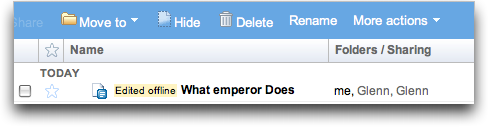
  Edited documents do get a little "Edited offline" tag next to them
  in the Google Docs file list, and shortly after you reconnect to a
  network, Gears notices and synchronizes your documents back to the
  cloud, erasing the "Edited offline" tag at the same time.

<http://www.tidbits.com/resources/2008-08/Google-Docs-edited-offline-tag.png>

  Note that if you choose to install Gears for both Firefox and
  Safari, the two don't share the same data store. In other words, if
  you make a change in a document in Safari while offline, you won't
  see that change in Firefox until the Safari version is synchronized
  back to Google Docs. That's not unreasonable, but for those of us
  who use multiple Web browsers regularly, it could cause some
  confusion.


**Protecting Against Beta** -- My only concern about the pre-release
  nature of Gears is that I'd hate to lose a plane ride's worth of
  work should something go wrong. I haven't used it much, and although
  I haven't had any problems, I do worry a bit, since Gears is saving
  to a database, not a normal file that you could extract easily if
  necessary.

  Of course, you can always copy the text and work on it in TextEdit
  or some other simple word processor, but what I'm considering
  instead is using a utility like Keyboard Maestro or CopyPaste Pro
  that maintains a clipboard history. Then, every so often, as a
  backup, I'd just select all and copy.

<http://www.keyboardmaestro.com/>
<http://www.scriptsoftware.com/copypaste/>

  Needless to say, Gears is free, as is Google Docs, and it requires
  Safari 3.1.1 or later on Mac OS X 10.4.11 or 10.5.3 or later. Even
  if you don't plan to use Google Docs offline much, I'd encourage you
  to give it a spin, since it might let you get some work done at a
  time when you'd otherwise be dead in the Internet water.


TidBITS Watchlist: Notable Software Updates for 01-Sep-08
---------------------------------------------------------
  by Adam C. Engst <[EMAIL PROTECTED]>
  article link: <http://db.tidbits.com/article/9748>

* Final Cut Express 4.0.1 from Apple resolves a permissions issue
  where projects would not open if they contained media not properly
  owned by the user. The update also adds easy setups for ingesting
  AVCHD footage as well as 720p25 HDV. A pair of Apple Intermediate
  Codec sequence presets have also been renamed to more accurately
  reflect the resolution of the footage. The update is available only
  via Software Update at publication time. (Free)

<http://www.apple.com/support/releasenotes/en/Final_Cut_Express_4.0_rn/>

* VMware Fusion 2 Release Candidate 1 from VMware includes a 12-month
  subscription to McAfee VirusScan Plus to protect Windows against
  viruses, supports seven languages, improves the user interface
  surrounding snapshots, and fixes a number of bugs. One subtle new
  feature of interest to Web developers using Fusion to test Web sites
  in Windows: Windows XP normally exposes only the default Web browser
  as a valid HTTP application, preventing other installed Web browsers
  from appearing. Fusion 2.0 RC1 now works around this, enabling
  Internet Explorer, Firefox, Safari, and Opera in Windows to be
  advertised as HTTP applications, which in turn lets BBEdit find
  these applications in its HTML Preview preferences and use them for
  previewing HTML documents. (Free until final release, 247 MB)

<http://communities.vmware.com/community/beta/fusion>
<http://communities.vmware.com/docs/DOC-7452>


* Apple ProRes QuickTime Decoder 1.0 enables users to play Apple
  ProRes files through QuickTime. Apple describes ProRes as "a
  visually lossless format that provides uncompressed HD quality at SD
  data rates. It is an excellent choice for mastering and can easily
  be transcoded to distribution formats like H.264. With new support
  for playback on both Mac and Windows computers, Apple ProRes can
  also be used for review and approval of Final Cut Studio sequences."
  (Free, 396K)

<http://www.apple.com/support/downloads/appleproresquicktimedecoder10formac.html>

* Coda 1.5 from Panic is a highly significant update to the
  single-window Web authoring tool. The most notable new features
  include support for the Subversion version control system, the
  capability to search for text across multiple files, custom Web
  books for your favorite online reference pages, and improvements to
  the text clipping feature. Support for AppleScript has been
  expanded, a "Reverse Publish" feature downloads remote items, and
  tabs now indicate whether files are local or remote. There are
  numerous other changes and bug fixes in the program; be sure to read
  the release notes. ($99 new, free update, 19.9 MB)

<http://www.panic.com/coda/>
<http://www.panic.com/coda/releasenotes-new.html>

* RapidWeaver 4.1.1 from Realmac Software beefs up the WYSIWYG HTML
  authoring tool with support for Leopard's Quick Look feature, an
  automatic resizing option for dragged-in images, and easier
  publishing of Web sites to MobileMe. There are a number of other bug
  fixes and minor improvements. RapidWeaver 4.x requires Mac OS X 10.5
  Leopard. ($79 new, free update for 3.6 and 4.0 users, 33 MB)

<http://www.realmacsoftware.com/>
<http://www.realmacsoftware.com/downloads/version-history/>


Hot Topics in TidBITS Talk/01-Sep-08
------------------------------------
  by Jeff Carlson <[EMAIL PROTECTED]>
  article link: <http://db.tidbits.com/article/9753>

**App store mail list** -- Where does one go to find the latest
  releases in Apple's App Store? RSS and Twitter feeds are available.
  (4 messages)

<http://emperor.tidbits.com/TidBITS/Talk/2178>


**MacBook Pro power on airlines** -- Attempting to charge a MacBook
  Pro on a flight didn't work, possibly due to the power required to
  charge versus the power needed to run the laptop without charging.
  (5 messages)

<http://emperor.tidbits.com/TidBITS/Talk/2180>


**Screensaver/Expose issues** -- A reader's screen saver starts and
  stops without any indication of the underlying reason. (2 messages)

<http://emperor.tidbits.com/TidBITS/Talk/2184>


**Sleep Problems with Eudora** -- A bug in Eudora is keeping a Mac
  from sleeping. (7 messages)

<http://emperor.tidbits.com/TidBITS/Talk/2185>


**VNC on Tiger** -- Readers share their experiences using Chicken of
  the VNC under Mac OS X 10.4 Tiger. (2 messages)

<http://emperor.tidbits.com/TidBITS/Talk/2188>


**Security Concern of an un-commanded start-up** -- An iMac
  mysteriously starts itself in the middle of the night. Gremlins? Or
  a bug? (6 messages)

<http://emperor.tidbits.com/TidBITS/Talk/2189>


$$

This is TidBITS, a free weekly technology newsletter providing timely
news, insightful analysis, and in-depth reviews to the Macintosh and
Internet communities. Feel free to forward to friends; better still,
please ask them to subscribe!

Non-profit, non-commercial publications and Web sites may reprint or
link to articles if full credit is given. Others please contact us. We
do not guarantee accuracy of articles. Caveat lector. Publication,
product, and company names may be registered trademarks of their
companies. TidBITS ISSN 1090-7017.

Copyright 2008 TidBITS: Reuse governed by Creative Commons license.

Contact us at:    <[EMAIL PROTECTED]>
TidBITS Web site: <http://www.tidbits.com/>
License terms:    <http://www.tidbits.com/terms/>
Full text search: <http://www.tidbits.com/search/>
Subscriptions:    <http://www.tidbits.com/about/list.html>
Account help:     <http://www.tidbits.com/about/account-help.html>


--
If you want to unsubscribe or change your address, use this link
http://emperor.tidbits.com/webx?unsub@@.3c557dc4!u=306a67f9