TidBITS#946/22-Sep-08
=====================
  Issue link: <http://db.tidbits.com/issue/946>
  It's becoming a common story: After determining that he didn't
  really need one, Joe Kissell finally took the plunge and bought an
  iPhone 3G when it became available in France. Joe discusses how the
  iPhone has changed his work and some of the limitations that he's
  run into. Speaking of the iPhone 3G, Apple is recalling its
  diminutive USB power adapter due to the risk of electric shock. Adam
  looks at the new StuffIt Deluxe 2009 as the venerable utility turns
  20, Joe highlights the improvements in VMware Fusion 2.0, Tonya
  finds an immediate use for the just-released MercuryMover 2.0
  window-moving utility, and we note the release of the latest edition
  of Adam's "Take Control of Buying a Mac." In the TidBITS Watchlist,
  we spotlight the availability of Gears for Safari, BBEdit 9.0.1,
  Coda 1.5.1, Apple's Digital Camera Raw Compatibility Update 2.2,
  Apple Remote Desktop 3.2.2, and Server Admin Tools 10.5.5.

Articles
    Apple Recalls Supercool iPhone 3G USB Power Adapter
    MercuryMover 2.0 Puts Windows Where You Want Them
    StuffIt Deluxe 2009 Keeps Evolving After 20 Years
    Take Control News: Buy the Right Mac at the Right Time
    VMware Fusion 2.0 Released
    Confessions of an iPhone Convert
    TidBITS Watchlist: Notable Software Updates for 22-Sep-08
    Hot Topics in TidBITS Talk/22-Sep-08


------------ This issue of TidBITS sponsored in part by: --------------

* READERS LIKE YOU! Support TidBITS with a contribution today!
  <http://www.tidbits.com/about/support/contributors.html>
  Special thanks this week to Peter Adams, Scott Darlington,
  Holly McReynolds, and Chris Engst for their generous support!

* GET FETCH 5 FOR FREE! Fetch Softworks makes Fetch, the original
  Macintosh FTP client, free for educational and charitable use.
  Fetch 5.3 includes a new look and Leopard technology support.
  Apply today at <http://fetchsoftworks.com/edapply>!

* WebCrossing Neighbors Creates Private Social Networks
  Create a complete social network with your company or group's
  own look. Scalable, extensible and extremely customizable.
  Take a guided tour today <http://www.webcrossing.com/tour>

* Bare Bones Software's BBEdit 9.0 -- A burly upgrade introducing new
  capabilities like Projects, non-modal Find and Multi-File Search,
  editing in browsers, text completion, Scratchpad, new Ruby module,
  better JavaScript, ObjC, Obj-C++, YAML <http://www.barebones.com/>

* MARK/SPACE, INC: If you have a smartphone, we can sync it!
  Sync your address book, calendar, notes, music, pictures, and
  more from your BlackBerry, Windows Mobile or Palm OS mobile
  phone to your Mac. <http://www.markspace.com/bits>

* VMware Fusion. The most seamless way to run Windows on your Mac.
  Backed by nearly a decade of proven virtualization technology.
  Try VMware Fusion today for free, or order online for only $79.
  Visit: <http://www.tidbits.com/about/support/vmware-fusion.html>

* Microsoft's MacBU: Supporting Mac users with Office 2008.
  Straighten up your Office with the latest updates to Word,
  Excel, PowerPoint, and Entourage. Update today at Mactopia!
  <http://www.microsoft.com/mac/downloads.mspx>

* ConceptDraw Office adds real business power to Microsoft Office
  and Apple's iWork. Whether you need project management, business
  graphics, or mind mapping, it's all easily created on your Mac!
  Buy today for only $499! <http://www.conceptdraw.com/tb>

* Parallels Desktop 3.0 for Mac + $25 iTunes card for only $79.99!
  Run Windows on your Mac seamlessly without rebooting, and listen
  to $25 worth of music from iTunes on us while you're doing it!
  Limited time offer: act now! <http://www.parallels.com/i-tunes25>


---------- Help support TidBITS by supporting our sponsors ------------


Apple Recalls Supercool iPhone 3G USB Power Adapter
---------------------------------------------------
  by Glenn Fleishman <[EMAIL PROTECTED]>
  article link: <http://db.tidbits.com/article/9777>

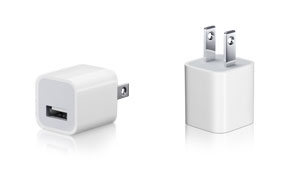
  In shocking news - pun intended - Apple has recalled the tiny USB
  power adapter it released with great glee along with the iPhone 3G.
  The ultracompact adapter, hardly more than two prongs and a USB
  jack, apparently has a flaw that has led to one or both of the
  prongs breaking off and remaining in an outlet. The company's recall
  page says that "no injuries have been reported," and that it
  involves a "very small percentage of the adapters sold."
  Nonetheless, there's a risk of electric shock, and no electric shock
  is good at any household amperage.

<http://tidbits.com/resources/2008-09/adapter-views2.jpg>
<http://www.apple.com/support/usbadapter/exchangeprogram/>

  The company has asked its users to stop using the adapters
  immediately, but won't have replacements ready to ship until
  10-Oct-08. Affected adapters were sold with iPhones in the United
  States, Japan, Canada, Mexico, Colombia, Ecuador, El Salvador,
  Guatemala, Honduras, and Peru.

  The included iPhone USB cable, docks sold separately, and adapters
  sold in other countries pose no risk. Apple strongly advises
  charging the iPhone 3G by plugging the USB cable into a computer,
  the larger fold-up Apple adapter, or a third-party adapter.

  Revised ultracompact adapters will sport a green dot on the bottom
  to differentiate them from the less-safe initial version. Apple is
  accepting Web orders for the exchange, which requires your iPhone
  serial number. You can also go to an Apple Store starting 10-Oct-08
  to exchange an adapter in person, but you must bring your iPhone 3G
  as well as the adapter.

  There is no charge associated with the exchange.

  I expect most iPhone 3G owners will continue to use the existing
  ultracompact adapter until the replacements become available and
  just take additional care, because the alternatives involve always
  having a computer nearby or purchasing a different charger for which
  Apple will not reimburse you.


MercuryMover 2.0 Puts Windows Where You Want Them
-------------------------------------------------
  by Tonya Engst <[EMAIL PROTECTED]>
  article link: <http://db.tidbits.com/article/9779>

  On Sunday afternoon, just after telling a pair of boys not to throw
  pillows indoors, I sat down to pay some bills and immediately lost a
  window in my MYOB bookkeeping software. This problem happens
  occasionally when I switch my MacBook Pro from running while
  attached to an external monitor to running on its own, and I
  retrieve lost windows by zooming them from MYOB's Window menu. It's
  annoying, but not a big deal.

  However, this time, all the commands in MYOB's Window menu were
  dimmed and the window was seemingly irretrievable without spending
  time rebooting, reattaching, or reinstalling on what wasn't supposed
  to be a computer-intensive weekend afternoon.

  I even knew what was causing the problem. I've recently been testing
  the Matrox DualHead2Go - a USB device that enables me to attach a
  pair of external monitors to my MacBook Pro. There's a long story
  about the DualHead2Go that I'll tell at another time, but suffice to
  say that MYOB put the window in a spot that the DualHead2Go had made
  available, but since I'd disconnected the DualHead2Go and was using
  a single external monitor, that location wasn't visible.

  What to do? Sometimes being a member of the press has its perks:
  coincidentally, and accompanied by some tasty homemade brownies that
  made the package impossible to ignore, a CD had arrived in my house
  on Friday, containing the brand new MercuryMover 2.0, a $20 utility
  from Helium Foot Software. While enjoying a brownie on Saturday, I
  asked Adam to remind me what MercuryMover does - it enables you to
  use keyboard shortcuts to move windows around on your Mac's screen,
  and to resize them. I duly noted that MercuryMover sounded useful,
  and that I hoped a TidBITS staffer who was less enmeshed in editing
  books would write about it. Anyway, as the boys went outside - no
  doubt to look for sticks suitable for a sword fight - I realized
  that MercuryMover might solve my MYOB missing window problem.

<http://www.heliumfoot.com/mercurymover/>

  Indeed, MercuryMover allowed me to retrieve my missing window with
  ease. After I enabled it in System Preferences and invoked it with
  Control-Command-Up arrow, it walked me through how to use it,
  showing which keys I could press to move my missing window and
  showing the current coordinates of the window. I also took a moment
  to configure the main cool new feature in version 2.0, which creates
  keyboard shortcuts that correspond with particular window sizes and
  locations. Because my windows often jumble as I connect and
  disconnect my MacBook Pro from an external monitor, I think this
  feature will help eliminate window chaos. Better still, it all
  worked smoothly and intuitively, leaving me plenty of time to sneak
  another brownie and make sure nobody's eye got poked out.


StuffIt Deluxe 2009 Keeps Evolving After 20 Years
-------------------------------------------------
  by Adam C. Engst <[EMAIL PROTECTED]>
  article link: <http://db.tidbits.com/article/9775>

  The world has changed over the last 20 years, but one constant for
  Mac users has been the premier compression and archiving software
  StuffIt Deluxe. Starting out life as shareware from teenage
  programmer Raymond Lau and riding along through multiple versions as
  its parent company Aladdin Systems became Allume and was then
  acquired by Smith Micro, StuffIt Deluxe has continued to add
  features and improve its lossless compression capabilities. Though
  the need for compression isn't nearly as great in this age of large
  hard disks and fast Internet connections (not to mention Apple's
  support for Zip archiving within Mac OS X), StuffIt Deluxe remains
  useful for large numbers of Mac users. (For those who can't quite
  understand this, the mere fact that it remains the flagship product
  of Smith Micro's Consumer Group should be sufficient evidence that
  many Mac users do rely on it.)

  Most notable among the changes in this version, StuffIt Deluxe 2009
  adds support for new technologies in Mac OS X 10.5 Leopard. Thanks
  to Quick Look support, Leopard users can now look inside archives
  without having to expand them first, a major boon. This works within
  the Finder, Mail, or any other Quick Look-capable application.
  Similarly, you can preview archives while browsing in Time Machine.
  And, though unrelated to Leopard, new support for Google's MacFUSE
  filesystem utility lets users mount any browsable archive type in
  the Finder as though it were a disk.

<http://my.smithmicro.com/mac/StuffIt/>

  It's unclear if StuffIt Deluxe 2009 has particularly different
  compression capabilities, but the program does offer optimized
  compressors for common file types, including MP3, PDF, iWork files,
  Microsoft Office files, and more. It can losslessly compress even
  JPEG images up to 30 percent. One new capability is "duplicate
  folding" - a way of saving space within an archive by storing only a
  single copy of duplicate files that's likely to be most helpful to
  those who rely on StuffIt Deluxe's scheduled archiving capabilities
  as part of a backup routine. Duplicate folding is yet another
  instance of how StuffIt Deluxe views compression as happening to a
  collection of files, rather than merely to each individual file in
  an archive. Also new is support for expanding 7-Zip and segmented
  Zip archives; in total, StuffIt Deluxe 2009 can now expand over 30
  compression formats.

  DropStuff, one of the major utilities that makes up the StuffIt
  Deluxe 2009 package and itself the bulk of what Smith Micro sells as
  the StuffIt Standard 2009 product, has been enhanced with additional
  customization options. Sets of compression formats and other options
  can be saved as Desktop droplets, enabling users to create different
  types of archives quickly via drag-and-drop.

  Another utility, SEA Maker, lets users create Mac OS X
  mini-installers - it's not new, but what is new is its Remote
  Payload feature that lets SEA Maker retrieve the parts of an
  installer from an FTP site or iDisk. DropStuff, with help from the
  StuffIt Scheduler utility, can also automatically transfer archives
  to your MobileMe iDisk, making it potentially useful as part of a
  backup strategy.

  StuffIt Deluxe 2009 costs $79.99, StuffIt Standard 2009 (which
  comprises DropStuff and the otherwise free StuffIt Expander) costs
  $49.99, and StuffIt Expander 2009 remains free. Upgrades to StuffIt
  Deluxe 2009 from any previous version of StuffIt Deluxe or StuffIt
  Standard run $29.99, and upgrades to StuffIt Standard 2009 from
  previous versions cost $14.99. Mac OS X 10.4 or later is required.

<http://my.smithmicro.com/mac/StuffIt/expander.html>
<http://my.smithmicro.com/mac/StuffIt/updates.html>


Take Control News: Buy the Right Mac at the Right Time
------------------------------------------------------
  by TidBITS Staff <[EMAIL PROTECTED]>
  article link: <http://db.tidbits.com/article/9776>

  Deciding that you want to buy a new Mac is easy, but embarking on
  the project immediately raises questions like, "What Mac will best
  meet my needs?", "Should I buy now or wait a month?", "How do I move
  my files from my old Mac to my new one?", and "What should I do with
  my old Mac?" Mac guru Adam Engst has answered these questions
  countless times, and he has distilled the answers into the 98-page
  "Take Control of Buying a Mac."

<http://www.takecontrolbooks.com/buying-mac.html?14@@!pt=TB946>

  Worksheets in the book help you match your needs and budget to the
  right Mac model, and a chart of Apple's model launches over the last
  5 years helps predict when new Macs will appear. Adam also explains
  when you can purchase to get the most bang for your buck, compares
  different venues for where to shop, gives advice and step-by-step
  instructions for transferring files from an old Mac to the shiny new
  one, and offers thoughts about how to get the most out of the Mac
  that's being replaced.

  It's only $10 and will easily pay for itself in helping you buy a
  Mac with the desired extras for less.

  If you've purchased a previous edition of this book prior to 2008,
  click the Check for Updates button in your copy to access a 75
  percent upgrade discount. (We wanted to make it as easy as possible
  for people to update to this new edition while still earning a
  little money to pay for the time that went into writing, Caroline
  Rose's editing, and Tonya's production efforts.) Those who purchased
  in 2008 should have received email from us with a link to a free
  update.


VMware Fusion 2.0 Released
--------------------------
  by Joe Kissell <[EMAIL PROTECTED]>
  article link: <http://db.tidbits.com/article/9773>

  Not so long ago, it seemed like every time I looked at my computer
  screen, either Parallels or VMware had released yet another version
  of their respective virtualization programs for running Windows on
  an Intel-based Mac. Over the last several months, though, those
  rapid-fire releases have slowed way down. Parallels has focused its
  recent attention mainly on Parallels Server (see "Parallels Server
  Brings Virtualization to Leopard Server," 2008-01-10) and minor
  updates to Parallels Desktop, while VMware has spent the last four
  months beta testing VMware Fusion 2.0 (see "VMware Fusion 2 Beta 2
  Adds Significant Features" by Adam Engst, 2008-07-31). Version 2.0
  is now shipping, and it's a doozy.

<http://www.parallels.com/en/products/server/mac/>
<http://db.tidbits.com/article/9392>
<http://www.vmware.com/products/fusion/>
<http://db.tidbits.com/article/9719>

  If you've followed our periodic updates on Fusion 2.0's public beta
  testing, most of the new features will come as no surprise. But to
  review, VMware Fusion has changed tremendously; the most significant
  differences from version 1.1 (from among its "over 100 new features
  and enhancements") include the following:

* Unity View improvements. Unity View is a mode in which the Fusion
  window itself, and along with it the Windows desktop, disappear so
  that windows from Windows applications appear right alongside - or
  even interleaved with - windows from Mac applications. Unity now
  plays better with Spaces, Expose, and the Dock; in addition, if you
  close a virtual machine while it's in Unity View, it remembers that
  state when you reopen it. (By the way, Fusion now uses the term
  "Unity" to cover not only Unity View, but a whole list of features
  that simplify and enhance the interaction between Windows
  applications and Mac OS X, including the next four items on the
  list.)

* Mirrored folders. With a few clicks, you can now set up Fusion to
  map your Mac's Desktop, Documents, Music, and Pictures folders to
  their Windows counterparts so that both operating systems share one
  common set of user data.

* Application sharing. Fusion 2.0 lets you map particular Mac file
  extensions so they open automatically in Windows applications, and
  vice versa.

* Multiple display support. Now your Windows virtual machine can use
  all the displays (up to 10) connected to your Mac.

* Driverless printing. Instead of having to install a Windows driver
  for each printer you use, you can now access all your existing Mac
  printers from within Windows.

* Multiple snapshots. Previously, Fusion could save your entire
  Windows configuration in a single "known good" state so that you
  could return to it later if you encountered problems. Now you can
  save more than one of these snapshots, optionally using an
  Autoprotect feature to save them on a recurring schedule.

* Anti-virus software. Fusion 2.0 includes a free 12-month
  subscription to McAfee VirusScan Plus.

* Enhanced graphics support. You can now play 1080p movies in Windows
  with hardware acceleration, and run software (games in particular)
  that requires DirectX 9.0c or Shader Model 2.

* Easier importing. If you already have Windows installed on your Mac
  using Parallels Desktop, Virtual PC, or Boot Camp, Fusion now
  includes a built-in import capability. (In addition, it can still
  run Windows directly from your Boot Camp installation.)

* Mac OS X Server support. You can now run Leopard Server (but not the
  standard version of Leopard) as a guest operating system. This is
  hugely significant, because previously, the only way to do this was
  to buy Parallels Server (for $1,248.75) - Parallels Desktop doesn't
  support Leopard Server. Moreover, Fusion lets you run Leopard Server
  on any Intel-based Mac, not just an "Intel-powered Mac server or
  desktop computer," as Parallels Server requires.

* Greater Mac OS X integration. Fusion now supports Cover Flow, Quick
  Look, and Apple Help, among other things.

  This list is just the tip of the iceberg; for the full list of new
  features, see the extensive Fusion 2.0 release notes.

<http://www.vmware.com/support/fusion2/doc/releasenotes_fusion.html>

  You may have noticed that more than a few of the new features
  strongly resemble features already available in Parallels Desktop.
  That was, of course, intentional. Although the two programs have
  always been close competitors, my overall advice in the past had
  been that if you wanted the best user experience and tight
  integration with Mac OS X, Parallels had the edge; whereas if you
  wanted the best performance in CPU-intensive tasks or the lowest
  impact on your Mac's resources, Fusion was, for the most part, the
  better choice. Assuming roughly comparable performance between the
  old version and the new, that equation has now changed; in terms of
  integration, Fusion is now just as good as - and in some cases
  better than - Parallels Desktop. Indeed, Fusion 2.0 now raises the
  bar with features like driverless printing and support for Leopard
  Server in a sub-$100 product, making it a compelling choice for the
  time being.

  VMware Fusion 2.0 is a 248 MB download. It's a free upgrade for
  owners of version 1.x; the retail price for new customers remains
  unchanged at $79.99. A free trial is also available.

<http://www.vmware.com/products/fusion/>
<https://www.vmware.com/tryvmware/login.php?eval=fusion>


Confessions of an iPhone Convert
--------------------------------
  by Joe Kissell <[EMAIL PROTECTED]>
  article link: <http://db.tidbits.com/article/9774>

  As I write this, it's my two-month anniversary of being an iPhone
  owner. (We're celebrating by taking a vacation to Italy together; my
  wife, who has sometimes referred to herself as an "iPhone widow," is
  coming too.) What's surprising from my current vantage point is that
  I spent a number of months fully convinced that I was outside the
  target audience for this device, and that, cool as it unarguably
  was, I simply would never own an iPhone (or its slimmer sibling, the
  iPod touch). When I first got my iPhone 3G, I posted some thoughts
  on what had persuaded me to change my mind (see "Totally an iPhone
  3G Owner," 2008-07-17). Now that I've lived with it for a while,
  I've learned that I was right about some things and wrong about
  others - and some aspects of the iPhone experience (both good and
  bad) have surprised me.

<http://db.tidbits.com/article/9698>

  If you're thinking about joining the millions of (usually) happy
  iPhone or iPod touch owners but are still on the fence - or if you,
  like early-2008 Joe, think it just isn't worth it - perhaps you'll
  find my observations helpful in deciding one way or the other.


**Price** -- Let's get the whole money thing out of the way first.
  iPhones, though cheaper now than before thanks to the carrier
  subsidies, are still not cheap, and monthly voice-and-data plans are
  also rather pricey. Sure, they're in the ballpark of what you'd pay
  for other comparable devices and perhaps (depending on your calling
  habits) not hugely more expensive than a standard cell phone plan.
  Even so, monthly service is a nontrivial financial commitment for
  most of us. Obviously, an iPod touch requires just the single
  up-front payment (and, of course, the occasional $10 software update
  fee), but it lacks the phone, camera, and GPS. Depending on your
  needs, that trade-off may make perfect sense, or it may kill the
  entire appeal.

  The reduction in initial cost overcame a big barrier for me, and
  though I dislike having to pay so much money per month, I do believe
  I'm getting more than I pay for. That is, the increase in
  productivity and the decrease in lost time much more than make up
  for the extra monthly expense. If I can do more paying work during
  the day simply by reclaiming time that would otherwise be wasted,
  that's a big deal to me.

  There is one niggling issue, though, and that is international
  roaming. The costs of making calls and transferring data when away
  from your home country have been much discussed, and though I don't
  want to belabor them here, they can certainly become a concern for
  anyone who travels abroad. Given the nature of the plan I have with
  Orange here in France, roaming within Europe isn't too bad, but
  roaming to, say, North America is another story. Before I head to
  San Francisco for Macworld Expo in January, I'll probably pay Orange
  100 euros to unlock my phone (it'd be free if I could wait another
  couple of weeks until my six-month anniversary), and then buy a
  prepaid SIM card with a data plan for use in the United States. I
  suspect the combined cost will be less than what I'd pay for voice
  and data roaming during my trip.


**Productivity vs. Entertainment** -- Needless to say, if you see an
  iPhone or iPod touch primarily as an entertainment device rather
  than a productivity device, you have to determine how much that
  entertainment is worth to you. For me, the music, videos, and games
  are merely the icing on the cake, not the reason for owning the
  device.

  One of the reasons I thought I wouldn't benefit from an iPhone is
  that I work at home and, like a good Parisian, shun exercise for its
  own sake - so I don't really need a portable gadget for listening to
  music or watching videos. My failure to think of my iPhone as an
  iPod is so complete that I have never, even once, thought to take my
  earphones with me when leaving the house. I'll see someone listening
  to an iPod and think, "Oh yeah, I guess I could be listening to
  music now too." But that's not what's interesting to me about the
  iPhone.

<http://www.o-chateau.com/blog/not-exercising/>

  My iPhone has enabled me to be more productive by, for example,
  answering email and catching up on my RSS feeds while on the Metro
  to run an errand across town, a frequent occurrence. As I'll
  describe in a moment, it's saved me all kinds of grief by enabling
  me to produce just about any piece of information I may need while
  I'm out and about. I've used it as a remote control while watching
  movies from my Mac mini; I'll also use it as a remote control when
  giving Keynote presentations in person. And I've even - I'll regret
  admitting this, I'm sure - sent email from the bathtub to my wife in
  the next room.

  In short, it's become an extremely handy tool, both around the house
  and around town. I use it primarily as a reference book and a
  communication device - usually for email, occasionally for voice,
  hardly ever for SMS, and only on rare occasions for music or video.


**Head-slappers** -- Owning an iPhone has also been a headache, in
  that I keep slapping myself on the forehead after forgetting I have
  a gadget in my pocket that could have alleviated some hassle I just
  went through. I'm not yet used to having access to the Web, my
  email, my photos, and most of my files at all times. For example:

* I was chatting with a friend about a trip to Spain earlier this
  year, and how lovely one of the little towns was that we'd visited.
  While struggling to describe it, I remembered that I probably had
  all my photos from that trip on my iPhone, because I'd selected the
  option to sync every photo taken within the last year. Seconds later
  I was in show-and-tell mode.

* I purchased tickets for a Suzanne Vega concert online (n.b., she's a
  fellow Mac user), and opted to pick them up at a local Virgin outlet
  rather than having them mailed. So I went to the store with my
  credit card, having forgotten that I also needed the confirmation
  number I got by email. When the clerk rebuffed me, I promised to go
  home and fetch the number - but as soon as I walked out the door I
  remembered that I had access to all the email in my IMAP account on
  my iPhone, so I just looked up that email message, went back in,
  showed it to the clerk, and walked out with my tickets.

<http://www.suzannevega.com/>

* My wife and I were at a restaurant discussing travel plans, puzzling
  over where certain spots in Rome were and how to get between them.
  Then I realized: I do happen to have a map of Italy in my pocket. A
  few taps later, I'd zoomed in on a satellite image of the Colosseum.

* While at Apple Expo I received an email asking for a certain phone
  number. I remembered picking up a piece of paper the other day that
  listed this number, and thought I'd have to call home and ask my
  wife to rummage through some folders to find it. But wait! I
  routinely scan every piece of paper that comes across my desk, and I
  recently started using SugarSync to synchronize (among other things)
  the folder that contains all my scanned PDFs with their online
  service (see "SugarSync Sweetens Online Syncing," 2008-08-30). So,
  even though I'd never synced that particular document to my iPhone,
  I was able to download it and view its contents from the floor of a
  convention center.

<http://www.sugarsync.com/>
<http://db.tidbits.com/article/9751>


**Traveling Light** -- The vacation on which I'm about to embark will
  be computer-free - a real stretch for me. I'm trying to avoid doing
  or even thinking about work, but I take tremendous comfort in
  knowing that I'll have access to my email and the Web wherever I go.
  Not only that, but I can (should the need arise) connect to my
  Xserve remotely to reboot it, upgrade my blogging software, or run
  disk repair utilities. If an editor emails me a Word or PDF file
  that urgently needs commenting or review, I can handle it from my
  phone. If a colleague needs a file that's on my MacBook Pro at home,
  I can most likely fetch it and email it to them - even though my
  home computer will be turned off. And so on. I have also, of course,
  loaded an Italian phrase book!


**Clutter Reduction** -- It's great to have a single small object that
  substitutes for the phone, camera, map, French dictionary, and
  notebook I'd otherwise have to carry. And yet, one way the iPhone
  has failed to live up to my expectations is, ironically, in ease of
  use.

  Let's say I'm standing on a Paris street corner trying to figure out
  which Metro line to take across town. The old way of determining
  this would be to pull out a map book, flip open the front cover, and
  go, "Aha." The new way is to take out my iPhone, press the Home
  button to turn it on, drag the slider to unlock it, enter my
  passcode (a necessity for me since my iPhone contains lots of
  personal data), press the Home button again to display my apps,
  slide over to the screen with my Metro map, tap the icon, wait for
  it to load, and then find my location. It takes a lot longer to do
  all those things, so most of the time if my wife is with me she'll
  pull her map out of her purse and figure out where we need to go
  before I've gotten past the first screen.

  This is just one example of many. As with any good multitasker (such
  as the proverbial Swiss Army Knife - and yes, I carry around one of
  those too), you trade usability for flexibility. You wouldn't carve
  a steak or build a house with the tools in your Swiss Army Knife,
  but when you'd otherwise be stuck, something is better than nothing.
  The iPhone doesn't have the greatest email client or text editor or
  map program or camera, but it has ones that are good enough for
  quickly performing minor tasks on the go.

  The question is, does the reduction of objects make up for the loss
  of quality and efficiency? Well, sometimes yes and sometimes no.
  Although the iPhone does many things quite well, when I start
  seriously considering carrying, say, a map or a notebook around with
  me again, that means my multitasking marvel didn't meet even my
  basic needs in that category.

  Speaking of notebooks... The iPhone is - let me be frank - a truly
  terrible device for doing any sort of writing (regardless of which
  spiffy text editor you've installed). Notwithstanding my relatively
  small fingers and the built-in text correction feature, I end up
  with tons of errors in even short, simple chunks of text, and the
  whole process is far more tedious than I imagined. The lack of copy
  and paste is certainly a huge irritant too, as that could save me a
  great deal of typing.

  But the very lamest thing of all about the current iPhone, in my
  opinion, is that it cannot synchronize notes or to-do items. On Mac
  OS X, Mail and iCal can share to-do items, and you can sync notes
  from Mail with your other Macs via MobileMe. But you can't sync the
  iPhone's Notes with Mail's notes (or any other application), and the
  iPhone can't even display to-do items, much less sync them, without
  third-party software. I've tried a number of iPhone apps that can
  synchronize their own private notes and/or to-do items with a
  Web-based service or, in some cases, with a proprietary desktop
  application - but as far as I know, there is currently no way at all
  to synchronize those two basic and essential kinds of data between
  the software included with the iPhone and Mac OS X.

  (An aside here: I'm not asking for recommendations; I'm merely
  venting. I know lots of developers are trying very hard to crack
  this nut, and though I haven't been entirely satisfied with any of
  the solutions I've found so far, I'm sure one of them will get there
  eventually. It's just the principle of the thing - I can't believe
  Apple has made it this hard.)

  Along the same lines, another hope I had for the iPhone was that it
  would make a handy voice recorder. My French skills being what they
  are, I frequently have conversations in which I absorb only about
  half of what the other person is saying. I always wish I could
  record it and play it back later to figure out what I missed. Well,
  again, if it takes me 20 seconds of tapping, sliding, and waiting to
  get to the point where audio is being recorded, it's too late. With
  a conventional digital recorder in my pocket, I'd press one button
  (or maybe two) and be recording in under a second.


**Failing the Impromptu Demo Test** -- The built-in GPS has been a
  godsend on several occasions. But because the iPhone relies on a
  data connection to download and display maps, its operation isn't
  always what it should be. One evening my wife and I were walking
  along the Seine, and some tourists came up to us to ask where the
  nearest Metro stop was. I didn't know offhand, so I pulled out my
  iPhone, turned it on, and tapped the Maps icon, thinking I'd
  instantly get a map showing our current location and, of course, all
  the Metro stops in the vicinity. I'd done that many times before
  without any trouble. On this occasion, though, the map didn't load.
  I tried toggling 3G, but that didn't help. Not knowing what else to
  do, I turned off the phone and waited for it to restart. By this
  time, the tourists had gotten completely fed up with me and asked if
  I couldn't just point them in the general direction of a likely
  stop. So I did, and about 30 seconds later, the map finally showed
  up on the screen.

  I don't know what they murmured to themselves as they walked away,
  but I imagine it was some combination of "what an idiot" and "what a
  stupid phone." I thought I was going to show off this impressive
  capability of a powerful device, and I only got egg on my face.

  Then there was the time I was at a government office and had to look
  up a phone number on my iPhone. I went to Contacts and tapped in the
  right place, but the screen froze. After some time, I managed to get
  to the contact I wanted, but when I accidentally tapped the screen
  while trying to scroll, the phone began dialing the contact (a
  process that, as a side effect, hid the number from view). By the
  time I got back to the screen I wanted, three public servants were
  laughing and trading jokes about my iPhone. Well, I knew this was a
  powerful device, but I had no idea it had the power to make a French
  bureaucrat crack a smile. That's amazing! I must use this feature
  more often.


**Wishing for More** -- For every wonderful capability the iPhone has,
  I find myself wishing it were just a touch more fantastic. For
  example, I've been using Evernote to snap photos of signs, menus,
  and the like. When I do this, the phone uploads the photos to
  Evernote's servers, which use OCR software to find the text in the
  images and index their contents in a few minutes. So I can search
  (on my phone or on my Mac) for the name of a dish on a menu at a
  restaurant where I ate last month and find it instantly. That's very
  cool, but what I really want is for my iPhone to give me a rapid
  English translation of that text. All it would require is sending
  the text through any of the many machine translation services out
  there, but as things stand now, I can't get that all in one package.

<http://www.evernote.com/>

  Similarly, I sometimes use Jott to record short memos to myself that
  are converted into editable, searchable text by a combination of
  speech recognition software and human transcriptionists. Even better
  would be a service that lets me record someone speaking French and
  give me an English translation of the text (or vice versa). Sure, it
  would be rough, but in some situations, anything is better than
  nothing.

<http://www.jott.com/>


**Final Thoughts** -- The thing that made me realize the iPhone was
  worth the money was simply realizing that it would serve me best as
  a tool rather than as a toy. As tools go, it achieves some things
  far better than I'd ever imagined, and fails at some things I
  assumed it would get right. On the whole, though, I am happy with my
  choice. Unlike most tools, this one stands a good chance of becoming
  even better in the future, thanks to software updates. It does make
  my wife a bit jealous, but I think I can make it up to her by having
  my iPhone order her some great Italian food.


TidBITS Watchlist: Notable Software Updates for 22-Sep-08
---------------------------------------------------------
  by TidBITS Staff <[EMAIL PROTECTED]>
  article link: <http://db.tidbits.com/article/9772>

* iPhone Configuration Utility 1.0.1 for Mac OS X from Apple updates
  the utility used by system administrators to manage iPhone and iPod
  touch configurations. Apple doesn't specify what's changed in this
  revision, so we're assuming it applies bug fixes. (Free, 9.3 MB)

<http://www.apple.com/support/downloads/finalcutserverupdate111.html>

* Final Cut Server Update 1.1.1 from Apple addresses performance,
  stability, and installation issues in Final Cut Server 1.1. A Final
  Cut Server serial number is required to download the standalone
  update. (Free, 55.3 MB)

<http://www.apple.com/support/downloads/finalcutserverupdate111.html>

* Pro Applications Update 2008-03 from Apple improves performance and
  stability in Compressor and Apple Qmaster, and is recommended for
  owners of Final Cut Studio 2, Final Cut Server, and Logic Studio.
  The update is available via Software Update or as a standalone
  download; the latter requires a valid Final Cut Studio 2 serial
  number. (Free, 64.4 MB)

<http://www.apple.com/support/downloads/proapplicationsupdate200803.html>

* Gears for Safari 0.4.22.0 from Google is the official release of the
  software that enables offline use of otherwise online Web apps like
  Google Docs (for more information, see "How to Use Google Docs
  Offline in Safari," 2008-09-01). Google offers a bit more technical
  information in the introductory blog post. (Free)

<http://gears.google.com/>
<http://db.tidbits.com/article/9752>
<http://googlemac.blogspot.com/2008/09/gears-for-safari.html>

* BBEdit 9.0.1 from Bare Bones Software fixes a wide variety of minor
  bugs in the recently released BBEdit text editor. Areas of focus
  include text completion, dealing with documents that appear in
  multiple windows, and the new modeless Find dialog. It's worth
  browsing through the release notes to see if any of the changes fix
  any annoyance you've had, but this really is tweaky stuff. ($125
  new, free update for 9.0 users or $30 from previous versions, 15.4
  MB)

<http://www.barebones.com/products/bbedit/>
<http://www.barebones.com/support/bbedit/arch_bbedit901.html>

* Coda 1.5.1 from Panic offers bug fixes for the just-updated Coda Web
  development tool. A number of crashing bugs have been squashed, the
  Terminal window can now prompt before allowing itself to be closed,
  drag-and-drop duplication now works for folders, and deleting a
  remote file while it's being edited closes its editor. Coda's
  release notes detail a number of other interesting changes - they're
  worth a read. ($99 new, free update, 19 MB)

<http://www.panic.com/coda/>
<http://www.panic.com/coda/releasenotes.html>

* Digital Camera Raw Compatibility Update 2.2 from Apple adds raw
  image file compatibility to Aperture 2 and iPhoto '08 for the
  following cameras: Canon EOS Digital Rebel XS/Kiss Digital F/1000D,
  Kodak DCS Pro SLR/n, Nikon D700, Olympus EVOLT E-420, Olympus EVOLT
  E-520, Olympus SP-570, Samsung GX-10, Samsung GX-20, Sony DSLR-A300,
  and Sony DSC-R1. Apple installs camera compatibility at the system
  level, so installing the update requires a restart. (Free, 3.5 MB)

<http://www.apple.com/support/downloads/digitalcamerarawcompatibilityupdate22.html>

* Apple Remote Desktop 3.2.2 Client and Apple Remote Desktop 3.2.2
  Admin from Apple improve the reliability of the Copy Items command,
  use unicast packets for improved performance while upgrading client
  software across a network, and apply fixes to the Force Quit All
  Applications and Copy items to Computer Automator actions. The
  updates require Apple Remote Desktop 3.0 or later. (Free update,
  2.82 MB for the Client or 30 MB  for the Admin)

<http://www.apple.com/support/downloads/appleremotedesktop322client.html>
<http://www.apple.com/support/downloads/appleremotedesktop322admin.html>

* Server Admin Tools 10.5.5 from Apple updates the collection of
  server tools by correctly enabling and showing the status of RADIUS
  or Kerberos authentication for PPTP VPN, reliably displays the
  primary IP address for 802.11n-enabled AirPort Base Stations, and
  fixes a number of other issues. (Free, 64 MB)

<http://www.apple.com/support/downloads/serveradmintools1055.html>


Hot Topics in TidBITS Talk/22-Sep-08
------------------------------------
  by Jeff Carlson <[EMAIL PROTECTED]>
  article link: <http://db.tidbits.com/article/9778>

**Chrome Port for the Mac is Out** -- Code Weavers has posted a quick
  port of the Google Chrome Web browser, and readers give it a spin
  while arguing about what constitutes a "native" application. (25
  messages)

<http://emperor.tidbits.com/TidBITS/Talk/2216>


**VMware Fusion 2.0 Released** -- A reader runs into trouble after
  installing Fusion 2.0 on top of Mac OS X 10.5.5, but others aren't
  seeing the problem. (2 messages)

<http://emperor.tidbits.com/TidBITS/Talk/2219>


**Confessions of an iPhone Convert** -- Joe Kissell's account of how
  the iPhone is proving useful elicits comments. (2 messages)

<http://emperor.tidbits.com/TidBITS/Talk/2222>


**iTunes 8 Adds Genius; iTunes Store Adds HD TV and NBC** -- A reader
  notes that the new Genius feature in iTunes 8 performs poorly with
  classical music (which has never been the software's strong suit). 2
  messages)

<http://emperor.tidbits.com/TidBITS/Talk/2224>


$$

This is TidBITS, a free weekly technology newsletter providing timely
news, insightful analysis, and in-depth reviews to the Macintosh and
Internet communities. Feel free to forward to friends; better still,
please ask them to subscribe!

Non-profit, non-commercial publications and Web sites may reprint or
link to articles if full credit is given. Others please contact us. We
do not guarantee accuracy of articles. Caveat lector. Publication,
product, and company names may be registered trademarks of their
companies. TidBITS ISSN 1090-7017.

Copyright 2008 TidBITS: Reuse governed by Creative Commons license.

Contact us at:    <[EMAIL PROTECTED]>
TidBITS Web site: <http://www.tidbits.com/>
License terms:    <http://www.tidbits.com/terms/>
Full text search: <http://www.tidbits.com/search/>
Subscriptions:    <http://www.tidbits.com/about/list.html>
Account help:     <http://www.tidbits.com/about/account-help.html>


--
If you want to unsubscribe or change your address, use this link
http://emperor.tidbits.com/webx?unsub@@.3c557dc4!u=306a67f9