TidBITS#947/29-Sep-08
=====================
  Issue link: <http://db.tidbits.com/issue/947>
  Two big announcements anchor this issue: Adobe's announcement of the
  stunningly huge Creative Suite 4 and T-Mobile's G1 phone, the first
  that runs Google's Android smartphone platform. Also this week, we
  point to a particularly interesting Mac software bundle, Glenn
  Fleishman weighs in on the ever-increasing anger toward Apple in
  relation to the company's arbitrary policies surrounding what apps
  are acceptable for the iPhone App Store, and Jeff Carlson passes on
  a link to a fun song composed entirely of Mac sounds. Turning
  practical, Glenn examines the recent drop in functionality for
  Leopard's screen sharing capability and our new staff writer Doug
  McLean dips his feet into the TidBITS water with an article about
  how to solve a particular error when updating iPhone and iPod touch
  apps. In the Watchlist, we sort through a ton of software releases,
  including Firefox 3.0.3, iPDA 4.2, Java for Mac OS X 10.5 Update 2
  and Java for Mac OS X 10.4 Release 7, ShareTool 1.2.3, WireTap
  Anywhere 1.0.2, Notebook 3.0, Art Text 2, PageSpinner 5.1, and
  PDFpen 4.0.

Articles
    Sound Different with Apple Soundtrack
    Leopard Screen Sharing Loses Hidden Features
    Yet Another Massive Mac Software Bundle
    Adobe Announces Vast Creative Suite 4
    T-Mobile Introduces Branded Google Phone
    Fix 5002 Error When Updating iPhone Apps
    Developers Could Turn Away from iPhone App Store
    TidBITS Watchlist: Notable Software Updates for 29-Sep-08
    Hot Topics in TidBITS Talk/29-Sep-08


------------ This issue of TidBITS sponsored in part by: --------------

* READERS LIKE YOU! Support TidBITS with a contribution today!
  <http://www.tidbits.com/about/support/contributors.html>
  Special thanks this week to Gerlach Baas/Ceramics, Joe Walters,
  Robert Bowser, and Outlaw Productions for their generous support!

* Fetch Softworks: Fetch 5.3 has a new look for Leopard,
  and new support for Leopard technologies. And you can
  upload with the oldest technology of all, Copy and Paste!
  Download your free trial version! <http://fetchsoftworks.com/>

* WebCrossing Neighbors Creates Private Social Networks
  Create a complete social network with your company or group's
  own look. Scalable, extensible and extremely customizable.
  Take a guided tour today <http://www.webcrossing.com/tour>

* MARK/SPACE, INC: Take it with you! The Missing Sync makes
  it easy to synchronize contacts, calendars, notes, photos
  and more from your Mac to your BlackBerry, Palm OS, or
  Windows Mobile phone. <http://www.markspace.com/bits>

* VMware Fusion. The most seamless way to run Windows on your Mac.
  Backed by nearly a decade of proven virtualization technology.
  Try VMware Fusion today for free, or order online for only $79.
  Visit: <http://www.tidbits.com/about/support/vmware-fusion.html>

* Microsoft's MacBU: Supporting Mac users with Office 2008.
  Is your Office up-to-date? Make sure you're running the latest
  versions of Word, Excel, PowerPoint, and Entourage by choosing
  Check for Updates from the Help menu of any Office application!

* ConceptDraw Office adds real business power to Microsoft Office
  and Apple's iWork. Whether you need project management, business
  graphics, or mind mapping, it's all easily created on your Mac!
  Buy today for only $499! <http://www.conceptdraw.com/tb>

---------- Help support TidBITS by supporting our sponsors ------------


Sound Different with Apple Soundtrack
-------------------------------------
  by Jeff Carlson <[EMAIL PROTECTED]>
  article link: <http://db.tidbits.com/article/9786>

  The sounds a Mac makes are iconic and easily identified. For
  example, when I saw Pixar's "Wall-E" on opening night, I knew
  immediately what percentage of the audience used Macs from the
  giggles I heard after the titular robot finishes recharging, which
  ends with the Mac's startup chime. You may also know the story of
  Sosumi (a made-up word that, when said aloud, is "so sue me").

<http://www.imdb.com/title/tt0910970/>
<http://www.boingboing.net/2005/03/24/early-apple-sound-de.html>

  What happens when you put the Mac's sounds together? Hear it
  yourself: Designer and musician Mike Soloman created a catchy tune
  made up entirely of Mac sounds in GarageBand. I especially like that
  he included a screencast of GarageBand playing the song (and that he
  threw in the Wilhelm scream at the end). Soloman has made his
  GarageBand file available for download, as well as an audio file of
  the song.

<http://www.thecleverest.com/videos/343>
<http://en.wikipedia.org/wiki/Wilhelm_scream>


Leopard Screen Sharing Loses Hidden Features
--------------------------------------------
  by Glenn Fleishman <[EMAIL PROTECTED]>
  article link: <http://db.tidbits.com/article/9787>

  For reasons known only to Apple, the mid-September release of Mac OS
  X 10.5.5 disabled extra toolbar items in the Screen Sharing program
  - for remote computer access and control - that required
  configuration via the command line in Terminal. Rob Griffiths of
  Macworld was the first to document the extra switches on 12-Dec-07,
  and was also the first to note their removal. Even if you've already
  enabled the toolbar options, they're gone.

<http://www.macworld.com/article/131094/2007/12/screensharepower.html>
<http://www.macworld.com/article/135557/2008/09/1055update.html>

  In this modified screen capture that appears in my book, "Take
  Control of Screen Sharing in Leopard," you can see which features
  have been eliminated: the quality/color depth setting, screen
  capture, control/observe toggle, full screen mode, and
  keyboard/mouse control toggle.

<http://tidbits.com/resources/2008-09/ss_control_features.jpg>
<http://www.takecontrolbooks.com/leopard-screen-sharing.html>

  Rob has a couple of pieces of advice on restoring the functions,
  although I'm not sure I favor either: installing the 10.5.4 version
  of Screen Sharing, or using Xcode to modify the version in 10.5.5.

<http://www.macworld.com/article/135649/2008/09/screen_sharing_buttons.html>

  But your only other option to get the missing features back, Rob
  notes, is to purchase the $300 5-user license of Apple Remote
  Desktop, which is overkill for a few buttons.


Yet Another Massive Mac Software Bundle
---------------------------------------
  by Adam C. Engst <[EMAIL PROTECTED]>
  article link: <http://db.tidbits.com/article/9781>

  I have no idea what qualifies the Parallels Green Computing Bundle
  as "green," other than the color of the banner at the top of the
  page. That said, it looks like a highly attractive collection of
  software, worth $299.81, that you can pick up for a mere $49.99
  through 30-Sep-08. The bundle includes the programs listed below -
  I've included links so you can read more about them, but you must
  order from the bundle page.

<http://www.parallels.com/green_bundle1>

* Parallels Desktop 3.0 for Mac: At this point, I assume that everyone
  knows that Parallels Desktop is one of two popular virtualization
  programs that let you run Windows software on an Intel-based Mac.

<http://www.parallels.com/products/desktop/>

* Default Folder X: St. Clair Software's utility for making it easier
  to work with recently accessed files and folders in Open and Save
  dialogs has been a favorite among members of the TidBITS staff for
  years.

<http://www.stclairsoft.com/DefaultFolderX/>

* PageSender: Fax may not be cool, but in some parts of the world and
  in some industries (like construction) it remains absolutely
  essential. With SmileOnMyMac's PageSender, you can easily fax
  anything you can print.

<http://www.smileonmymac.com/PageSender/>

* PasswordWallet: Selznick Scientific Software's PasswordWallet was
  one of the first utilities for storing all your passwords and other
  private information in a single secure place, and it works on the
  Mac, the iPhone/iPod touch, and Palm OS-based devices.

<http://www.selznick.com/products/passwordwallet/>

* docXConverter 3.1 Premium: If you find yourself dealing with Word
  2007's .docx or Excel 2007 .xlsx files (without having Microsoft
  Office 2008 for the Mac), or if you need to work with old AppleWorks
  5 or 6 .cwk word processing files, Panergy's docXConverter can turn
  them into RTF (for word processing documents) or CSV (for
  spreadsheets) files.

<http://www.panergy-software.com/products/docxconverter/>

* MacScan: If you're on the paranoid end of the privacy spectrum,
  SecureMac's MacScan helps reduce your paranoia level by promising to
  detect and remove spyware, along with blacklisted tracking cookies.

<http://macscan.securemac.com/>

* Macintosh Explorer: If you wish Finder windows had tabs like Safari,
  check out Rage Software's Macintosh Explorer. It provides a
  Macintosh file browser with tabs, thumbnails of image files,
  filtered file lists, spring-loaded folders, and more. Those
  switching from Windows might especially like Macintosh Explorer's
  approach.

<http://www.ragesw.com/products/explorer.html>

* Drive-In: Flip4Mac's Drive-In lets you store personal DVDs on your
  Mac, but in image format, so there's no quality loss, and you can
  use the DVD interface and extras just as though the original disc
  were present. The tradeoff? Lots of disk space.

<http://www.flip4mac.com/drivein.htm>

* Macaroni: Atomic Bird's Macaroni is a system maintenance utility
  that automates regular Mac and Unix maintenance tasks, lets you run
  your own maintenance tasks, and removes language-specific files from
  applications (this can save a lot of disk space, but can also
  confuse updater applications).

<http://www.atomicbird.com/macaroni>


Adobe Announces Vast Creative Suite 4
-------------------------------------
  by Jeff Carlson <[EMAIL PROTECTED]>
  article link: <http://db.tidbits.com/article/9782>

  When Adobe announced Creative Suite 3 in April 2007, the biggest new
  feature for Mac users was support for Apple's Intel-based Macs; CS3
  was among the last major Mac applications to move to Intel
  compatibility. After all, the people who shell out a lot of money
  for the premiere design tools on the market expected performance,
  and the migration to Intel-native code demanded patience.

  The announcement of Adobe Creative Suite 4 brings new features to
  the forefront, as well as performance improvements that will make
  pro users happy. The software is scheduled to ship in October 2008,
  though Adobe hasn't given a more specific date.

  The entire Creative Suite has gone massive - it's no longer a
  convenient bundle of three or four applications - so I'm going to
  hit on just a smattering of new features gleaned from recent
  briefings with Adobe. The Creative Suite 4 Web site offers a bunch
  of information for more investigation.

<http://www.adobe.com/products/creativesuite/>


**Photoshop CS4 and Photoshop CS4 Extended** -- It's good to be king,
  Photoshop knows, and this CS4 release turns the king into an emperor
  of speed by tapping the fast processing capabilities of a computer's
  GPU (graphics processing unit). GPUs have tons of appropriate and
  unused processing juice, and Photoshop now hands off some of its
  most intensive tasks. This happens when working on very large files,
  for example, or to redraw the display when invoking a new feature to
  rotate the canvas - helpful for designers and artists who use
  pressure-sensitive tablets.

<http://www.adobe.com/products/photoshop/photoshop/>

  (The Windows version of Photoshop CS4 adds 64-bit processing, a
  feature originally slated for the Mac version until Apple abruptly
  cancelled 64-bit support in its Carbon programming libraries; see
  "64-bit Controversy Accompanies Lightroom 2 Beta," 2008-04-07. Adobe
  had committed to Carbon, and its Cocoa migration plans are much
  longer term.)

<http://db.tidbits.com/article/9550>

  In terms of snazzy features, Photoshop CS4 adds content-aware
  scaling, a technology that enables images to be stretched or
  compressed without obvious distortion. It's not something most
  people are likely to use, true, but it can be extremely useful in
  advertising and more casual work than in serious photography. A new
  Adjustments panel collects common image adjustments that can be
  applied non-destructively to an image. The Camera Raw dialog also
  gains the capability to apply edits to selective areas instead of an
  entire image.

<http://www.adobe.com/products/photoshop/photoshop/features/>

  Photoshop CS4 Extended now has improved 3D capabilities; for
  example, artists can import 3D objects created in other applications
  and paint directly onto them and then export the objects.

<http://www.adobe.com/products/photoshop/photoshopextended/>

  Adobe's developers also put a lot of work into fine-tuning the user
  experience. Holding Option and Control and dragging with the brush
  tool selected changes the brush size; adding the Command key to that
  mix changes the brush's hardness. When moving around a file using
  the Hand tool, a flick of the mouse "tosses" the canvas in the same
  way that flicking one's finger tosses a screen on the iPhone. Oh,
  and Command-~ (Command-tilde) finally switches between open windows
  like most Mac applications. John Nack, principal product manager for
  Photoshop, lists dozens of such improvements on his blog.

<http://blogs.adobe.com/jnack/2008/09/cs4_sweating_the_details.html>


**InDesign CS4** -- Adobe's page-layout application InDesign CS4 now
  works harder at making the publishing process easier with several
  new features. While InDesign has had preflighting for years,
  checking for problems before you send a file off to be printed or
  produced, the live preflight feature in CS4 highlights potential
  problems as documents are in progress.

<http://www.adobe.com/products/indesign/>
<http://www.adobe.com/products/indesign/features/?view=topnew>

  Cross-references can be set up that update dynamically even when
  page flow changes. Conditional text enables customization of
  documents from a single source; in Adobe's example, a catalog can
  contain prices for items in U.S. or UK currencies instead of
  creating two separate catalogs.

  As with Photoshop, some of the small details are the best. If you've
  ever created a 1-pica box to use as a spacer measurement, you'll be
  happy to use the new smart guides. Smart guides can note how you've
  positioned previous objects and suggest the same amount of spacing
  for new objects. The spread rotation feature makes it easy to edit
  text or other elements that are positioned vertically by rotating
  the entire pasteboard - no more craning your neck at a right angle
  to make sure you've typed something correctly.


**Multiple Suites** -- As you can discover online, there's much, much
  more to Creative Suite 4. You'll also find a bewildering array of
  purchase and upgrade options.

<http://www.adobe.com/products/creativesuite/compare/>

  The entire suite is available in six configurations:

* The Design Premium includes InDesign CS4, Photoshop CS4 Extended,
  Illustrator CS4, Flash CS4 Professional, Dreamweaver CS4, Fireworks
  CS4, and Acrobat 9 Pro for $1,799 new. (Upgrade pricing varies.)

<http://www.adobe.com/products/creativesuite/design/upgrade/?promoid=DRHWP>

* The Design Standard includes InDesign CS4, Photoshop CS4,
  Illustrator CS4, and Acrobat 9 Pro for $1,399 new. (Upgrade pricing
  varies.)

<http://www.adobe.com/products/creativesuite/designstandard/upgrade/?promoid=DRHWM>

* The Web Premium includes Dreamweaver CS4, Flash CS4 Professional,
  Photoshop CS4 Extended, Illustrator CS4, Fireworks CS4, Acrobat 9
  Pro, Soundbooth CS4, and Contribute CS4 for $1,699 new. (Upgrade
  pricing varies.)

<http://www.adobe.com/products/creativesuite/web/upgrade/>

* The Web Standard includes Dreamweaver CS4, Flash CS4 Professional,
  Fireworks CS4, and Contribute CS4 for $999 new. (Upgrade pricing
  varies.)

<http://www.adobe.com/products/creativesuite/webstandard/upgrade/>

* The Production Premium includes Photoshop CS4 Extended, Illustrator
  CS4, Flash CS4 Professional, After Effects CS4, Premiere Pro CS4,
  Soundbooth CS4, OnLocation CS4, and Encore CS4 for $1,699 new.
  (Upgrade pricing varies.)

<http://www.adobe.com/products/creativesuite/production/upgrade/>

* The Master Collection includes everything (except Photoshop CS4,
  since Photoshop CS4 Extended is part of the lineup) for $2,499 new.
  (Upgrade pricing varies.)

<http://www.adobe.com/products/creativesuite/mastercollection/upgrade/>

  Each suite also includes Bridge CS4, Device Central CS4, and Version
  Cue CS4; the Production Premium and Master Collection also include
  Dynamic Link.

  Additionally, each major application is available for purchase
  without buying a suite.


T-Mobile Introduces Branded Google Phone
----------------------------------------
  by Glenn Fleishman <[EMAIL PROTECTED]>
  article link: <http://db.tidbits.com/article/9783>

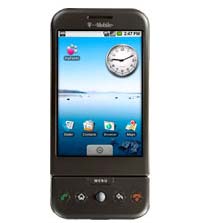
  Google has announced its first cell phone. Excuse me, did I say
  Google? I meant T-Mobile USA. It's an easy mistake to make. The
  T-Mobile G1 synchronizes only with Google's online Web services, has
  the Google logo on the back, and, duh, has a "G" as part of its
  name.

<http://www.t-mobileg1.com/>

  Last year, Google assured consumers and the cell phone industry that
  their Android platform wouldn't result in a GPhone. Rather, nearly
  three dozen companies in the Open Handset Alliance - including
  software developers, cell phone carriers, and handset makers, among
  others - would collaborate in bringing a range of hardware,
  software, and services to the market.

  This is still true, but the first phone is, in essence, the
  much-predicted GPhone. (See the now somewhat inaccurately titled,
  "Google's View of Our Cell Phone Future Is an Android, Not a
  GPhone," 2007-11-12.)

<http://www.tidbits.com/resources/2008-09/android_g1.jpg>
<http://db.tidbits.com/article/9291>

  While the phone was made by HTC, Google runs the show and T-Mobile
  operates the lights and moves the scenery. The G1 has a touch
  screen, and includes 3G, Wi-Fi, Bluetooth, and GPS radios. In its
  closed position, the touchscreen interface rules the roost, but the
  screen can slide aside to reveal a physical keyboard for typing.

  The phone includes a 1 GB RAM card in a card slot and can accept up
  to 8 GB in that slot. The G1 also has a removable battery. (The
  iPhone comes in 8 GB and 16 GB models, with a 32 GB model rumored to
  be on the way; the iPhone's battery isn't user-swappable.)

  Despite including 3G service for the phone, T-Mobile has only a
  handful of cities equipped for those higher data speeds, although
  that list includes New York City, the San Francisco Bay Area, and
  Los Angeles. In the large majority of the United States, T-Mobile
  offers only 2.5G EDGE service. The company says it should cover 27
  metropolitan areas by the end of 2008, as opposed to AT&T, which
  expects to be in 350 markets by then; Verizon and Sprint have long
  covered an even larger number of areas with 3G service.

<http://www.t-mobile.com/templates/faq.aspx?PAsset=Cov_Pop_FAQ>

  So far, synchronization and push email - where email is continually
  sent to a phone when received at a server - is limited to Google's
  Web applications; there's no Microsoft Exchange support. The G1 can
  handle non-Google email accounts for normal pull or polling
  retrieval.

  On the music front, the G1 has gotten good early reviews through an
  integrated Amazon MP3 store, which features the retailer's catalog
  of 6 million unprotected songs. The store's interface is apparently
  well designed and easy to use.

  Part of the potential for Android is that its technology is
  relatively open - some parts are open source already - and committed
  carriers have to agree to allow any services or software to work on
  the handsets they sell, and to allow any legitimate handset.

  That means anything missing in an initial release could be
  supplemented by application developers and service hosts - unlike
  with Apple, which highly restricts which programs can run on the
  iPhone. Apple could choose to offer the iTunes Store's unprotected
  music through an Android application, so far as I can tell, as
  unlikely as that is.

  Android's online application store is called Market. At launch, all
  applications offered must be free, although that will change, and
  there's no approval process for inclusion. Carriers will work out
  revenue splits with developers when a for-fee version of Market
  starts up, according to MocoNews.

<http://www.washingtonpost.com/wp-dyn/content/article/2008/09/23/AR2008092301539.html>

  Walt Mossberg of The Wall Street Journal got an advance look, and
  generally praises the G1 as a serious competitor to the iPhone, even
  though it's less sleek (both heavier and larger) and less polished.

<http://mossblog.allthingsd.com/20080923/googles-g1-first-impressions/>

  The G1 can copy and paste. Perhaps that gives it a leg up. More
  seriously, the developers built in nifty integration, so the G1 can
  determine your compass point from its GPS and orient maps in the
  included Google Maps software to the direction you're facing. That's
  neat, and there's no reason that the iPhone 3G couldn't have done
  that (nor do that in the future). The map program also shows
  photographic street-level views.

  Oddly, as Mossberg notes, there's no built-in video player, although
  one can be downloaded, and the phone uses a non-standard audio jack
  - HTC's ExtUSB format, which requires a not-included adapter that
  plugs into the USB port, and is rather awkward. It also lacks
  support for the rather straightforward stereo audio Bluetooth
  profile; the iPhone has the same bizarre lacuna. The G1 has a 3
  megapixel camera, but can't record video out of the box.

<http://www.netimes.com/HTC_ExtUSB/>

  The T-Mobile G1 will go on sale in the United States on 22-Oct-08
  for $180 with a two-year voice contract, requiring at least a
  minimum voice plan (they start at $40 per month), and a data plan
  that includes unlimited data at either $25 for 400 text messages or
  $35 with unlimited text messages. T-Mobile will next offer it in
  Britain starting in November 2008.


Fix 5002 Error When Updating iPhone Apps
----------------------------------------
  by Doug McLean <[EMAIL PROTECTED]>
  article link: <http://db.tidbits.com/article/9785>

  For the last week or so, some percentage of iPhone/iPod touch users
  have been experiencing an annoying App Store error when updating
  their apps in iTunes 8. The error message reads:

  "We could not complete your iTunes Store request. An unknown error
  occurred. (5002)"

  Whether the problem lies with iTunes 8, with the iPhone Software
  2.1, or the App Store itself remains unclear, but users on Apple's
  discussion boards have discovered several fixes for the problem.
  They include:

<http://discussions.apple.com/thread.jspa?threadID=1703373>

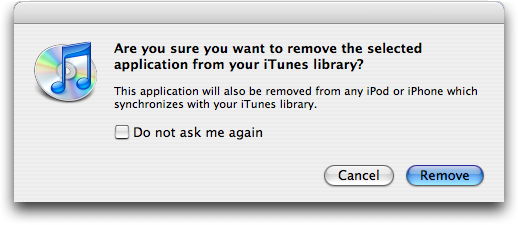
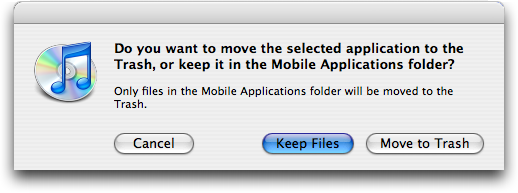
  1. The most popular fix is to look through your collection of apps
  in iTunes 8 for generic black-and-white icons and delete them.
  (iTunes prompts to make sure you want to remove the app from your
  library, and then to see if you want to delete the actual files -
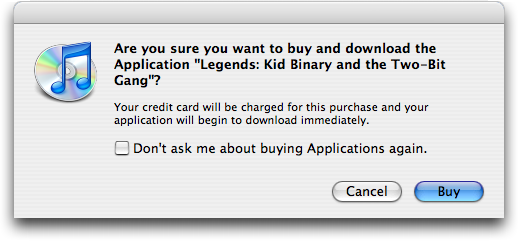
  click Move to Trash to do that.) Next, "repurchase" the apps from
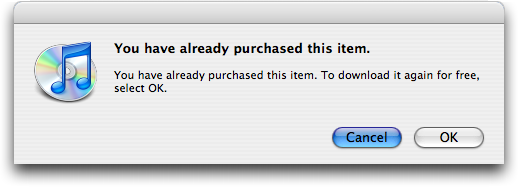
  the App Store to download them again - Apple won't charge you. (You
  will see a dialog asking if you want to buy the app, but a
  subsequent one confirms that you can download for free.) After
  clearing and redownloading apps with generic icons, updating should
  work properly.

<http://www.tidbits.com/resources/2008-09/iTunes-Delete-dialog.png>
<http://www.tidbits.com/resources/2008-09/iTunes-Trash-dialog.png>
<http://www.tidbits.com/resources/2008-09/iTunes-Store-Buy-dialog.png>
<http://www.tidbits.com/resources/2008-09/iTunes-Store-Download-dialog.png>

  2. If the idea of deleting and redownloading sounds like a pain,
  there is another option. Again, look for apps with generic icons,
  select them, and choose File > Get Info (Command-I). iTunes will
  complain that the app can't be found, and will ask you if you want
  to find it. Click Yes, then direct it to the copy sitting in your
  ~Music/iTunes/Mobile Applications folder. This appears to fix some
  kind of broken alias and allows you to update successfully.

  3. In rare circumstances the offending app will not have a generic
  icon. In this case you need to find the app for which iTunes gives
  you the same 'can't find it' message when you view the Get Info
  window for that app. Once you find the troublemaker, the steps are
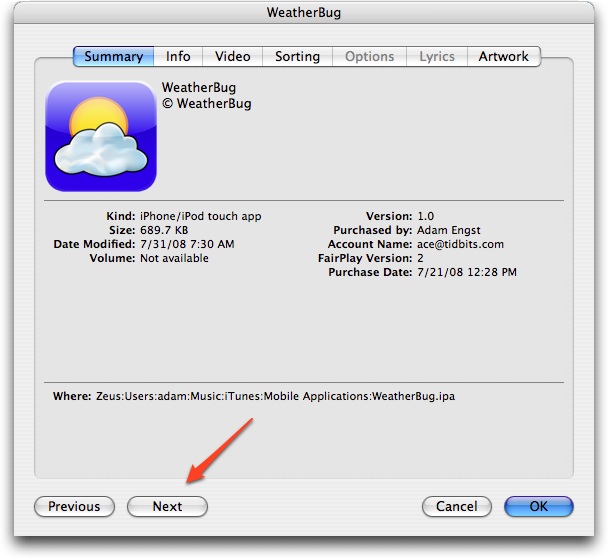
  the same as described above. For a fast way to scan through your
  apps, select the first one, choose File > Get Info, and then click
  the Next button in the lower left of the Get Info window.

<http://www.tidbits.com/resources/2008-09/iTunes-Get-Info-window.png>

  4. Finally, you can also try starting the update process on the
  iPhone or iPod touch itself, rather than via iTunes 8 on the Mac. If
  that succeeds, the subsequent sync with iTunes 8 may clear up the
  problem. A smaller number of users have succeeded with this
  solution.

  Hopefully, we'll soon see an update - most likely to iTunes 8 or to
  iPhone Software 2.1 - that will solve this problem going forward.


Developers Could Turn Away from iPhone App Store
------------------------------------------------
  by Glenn Fleishman <[EMAIL PROTECTED]>
  article link: <http://db.tidbits.com/article/9784>

  Developers need certainty when they invest time and money into
  applications. The early history of the Macintosh shows that when you
  combine intense company support, a clear process, and great
  excitement - that is, Guy Kawasaki and his amazing evangelical
  efforts - you can build an ecosystem that sustains a platform.

  Jason Snell, Macworld's editorial director, writes that Apple's lack
  of transparency, consistency, and clarity in how they approve or
  reject applications for the App Store for iPhone and iPod touch may
  lead to developers reaching a point where they walk away.

<http://www.macworld.com/article/135729/2008/09/app_store_policies.html>

  The most recent absurd decision, in which Apple denied distribution
  to an on-the-fly podcasting management program because it duplicated
  "the functionality of the Podcast section of iTunes" has had a
  clearly chilling effect when you follow developers on Twitter, and
  read developers' blogs.

  True, many of these firms that are candid about their plans are on a
  relatively small scale, but they also make some of the best and most
  popular software outside design and business suites. Smaller
  developers have a disproportionate impact on Mac OS X as a desirable
  platform compared to, say, the same scale of programmer or firm on
  Windows; due to Windows' large market share and base, enormous firms
  making games and business applications seem to hold the greatest
  sway. (This is a generalization, but it's based on years of
  interaction with regular Mac users, these various companies' volume
  of products sold, and the kind of purposes to which Macs are more
  frequently put than their Windows counterparts.)

  I'm currently in the middle of my own small iPhone application
  development project. I'm investing some thousands of dollars in
  having a programmer build the application and hiring a designer to
  create an application icon, and I have put over 100 hours of my time
  into revising the back-end of the hosting side of the equation. (The
  app will be a portable way to check on book prices through my book
  shopping site isbn.nu. Many of the changes made to the Web site and
  its database-driven system will also benefit its Web-only
  component.)

<http://isbn.nu/>

  I admit that as a very small scale "developer" - I even have to put
  that word in quotation marks - I had to put on an extra sweater. As
  my family's breadwinner, investing hours and dollars is a scary
  thing when Apple might suddenly decide that, say, shopping
  applications aren't allowed, even though there's nothing either
  competitive or against the guidelines issued.

  On a much larger scale, why would a gaming firm that doesn't have a
  direct relationship with Apple put $50,000 into creating a game for
  the iPhone if Apple could snap their fingers and prevent the game
  from being sold? Or why should a one-person shop put a single penny
  in? A larger firm might absorb the loss and move on; it could
  destroy the small companies that make the Mac so rich to use.

  Jason notes that the Google-backed Android platform apparently has
  no restrictions on what can be added to its Market application
  store, although at launch, all programs must be free to download
  (see "T-Mobile Introduces Branded Google Phone," 2008-09-23). That
  may not be tenable, but it's part of the open access principles
  Google has been putting their weight behind for more than a year:
  networks should accept any handset running any software accessing
  any service.

<http://db.tidbits.com/article/9783>

  Let's not get into a tussle about whether Android will actually
  thrive as a platform; Nokia also has an active, expanding, and far
  more open process for applications to be distributed for its Symbian
  and S60 platforms (see "Symbian Smartphone Platform Goes Free,
  Partly Open Source," 2008-06-24). If there's a comparable platform
  that's more open for development and has a large audience (Symbian
  has the majority of smartphone sales worldwide), then developers
  whose future is in mobile applications may migrate to it, however
  irritating it is.

<http://db.tidbits.com/article/9666>

  Apple needs to get its act together to avoid uncertainty by being
  specific about what is and isn't acceptable. Remember FUD? Fear,
  uncertainty, doubt. It was what once made Microsoft great and
  terrible: they sowed FUD to keep their competitors from gaining a
  toehold.

  But Apple's FUD is against themselves. They need to unFUD
  themselves, and fast.


TidBITS Watchlist: Notable Software Updates for 29-Sep-08
---------------------------------------------------------
  by TidBITS Staff <[EMAIL PROTECTED]>
  article link: <http://db.tidbits.com/article/9780>

* Firefox 3.0.3 from Mozilla updates the popular Web browser to fix a
  number of bugs, including some "Mac-specific issues" that aren't
  further described. A number of fixes focus on improved security and
  stability. 3.0.3 follows hard on the heels of 3.0.2, fixing a
  problem that prevented users from saving or retrieving passwords.
  (Free, 17.2 MB)

<http://en-us.www.mozilla.com/en-US/firefox/>
<http://en-us.www.mozilla.com/en-US/firefox/3.0.2/releasenotes/>
<http://www.mozilla.org/security/known-vulnerabilities/firefox30.html#firefox3.0.2>

* iPDA 4.2 from ZappTek is an update to the company's software for
  syncing documents, email, RSS feeds, and a variety of other data to
  normal iPods. New to this version is support for the 4G iPod nano's
  contact grouping, improved Entourage contact processing, and
  improved RSS feed processing. Needless to say, iPDA does not support
  the iPhone or iPod touch, both of which can already do what iPDA
  brings to other iPod models. ($19.95 new, free updates for 4.0
  owners or $10 to upgrade from an earlier version, 1.1 MB)

<http://www.zapptek.com/ipda/>

* Java for Mac OS X 10.5 Update 2 from Apple improves the security,
  performance, and compatibility for Java SE 6, J2SE 5.0, and J2SE
  1.4.2 on Mac OS X 10.5 Leopard. This update requires Mac OS X 10.5.4
  or later. Released simultaneously, Java for Mac OS X 10.4, Release 7
  improves reliability and compatibility for Java 2 Platform Standard
  Edition 5.0 and Java 1.4 on Mac OS X 10.4.11 and later. (Free,
  136.4/79.7 MB)

<http://www.apple.com/support/downloads/javaformacosx105update2.html>
<http://www.apple.com/support/downloads/javaformacosx104release7.html>

* ShareTool 1.2.3 from Yazsoft enables two computers to connect
  remotely and securely for Bonjour networking. With ShareTool, you
  can access resources that typically only work over a local network
  connection, like iTunes sharing, over the Internet. To prevent
  snooping, the software utilizes SSH encryption. Version 1.2.3
  overhauls the interface, exposes more information about the
  connection, logs connection attempts, and fixes a variety of minor
  problems. ($20 single user, free upgrade, 9 MB)

<http://www.yazsoft.com/st/>
<http://www.yazsoft.com/st/sitepages/history.html#v123>

* WireTap Anywhere 1.0.2 from Ambrosia Software updates the recently
  released audio software with a variety of bug fixes and
  enhancements. Additional down-mixing capabilities, performance
  optimizations, and software source muting features are among the
  changes. ($129 new, free update, 9.7 MB)

<http://www.ambrosiasw.com/utilities/wta/>

* NoteBook 3.0 from Circus Ponies is a major upgrade of the
  information management software. Notable additions include
  diagramming and sketching capabilities, PDF annotation tools,
  handwriting recognition features, the capability to open multiple
  pages at once, and a redesigned interface. ($49.95 new, $19.95
  upgrade, 14.77 MB)

<http://www.circusponies.com/>
<http://www.circusponies.com/aboutnotebook30.html>

* Art Text 2 from BeLight Software is a major upgrade of the graphics
  and text editing program. High on the list of changes is the
  addition of a template gallery with over 200 new templates, more
  than 120 new vector icons, and a collection of nearly 200 texture
  samples. Additionally, the interface has been redesigned, there is
  support for multiple layers, two gradient fill options have been
  added, and you can now control stroke properties for every outline.
  ($39.95 new, free upgrade for purchase since 01-Jul-08 or $19.95
  otherwise, 36.3 MB)

<http://www.belightsoft.com/products/arttext/>
<http://www.belightsoft.com/products/arttext/version2.php>

* PageSpinner 5.1 from Optima System is a relatively minor update to
  the Web development package. Changes include cosmetic improvements
  to match Mac OS X 10.5 Leopard, an option to auto-check HTML and PHP
  syntax on save, and a variety of other interface enhancements and
  bug fixes. ($29.95 new, free update, 4.9 MB)

<http://www.optima-system.com/pagespinner/>
<http://www.optima-system.com/pagespinner/release_notes.html>

* PDFpen 4.0 and PDFpenPro 4.0 from SmileOnMyMac get a major update
  with the addition of OCR (optical character recognition) when
  running on an Intel-based Mac with a 1.8 GHz or faster CPU. The new
  versions of these PDF editing tools also come with an improved user
  interface featuring a document sidebar, improved file compatibility,
  Microsoft Word document import, additional document markup
  capabilities (including underline and strikethrough), save as TIFF,
  and the capability to print notes and comments. PDFpenPro can also
  create and edit document tables of contents. ($49.95/$99.95 new, $25
  update, 10.8/11.0 MB)

<http://www.smileonmymac.com/PDFpen/>


Hot Topics in TidBITS Talk/29-Sep-08
------------------------------------
  by Jeff Carlson <[EMAIL PROTECTED]>
  article link: <http://db.tidbits.com/article/9788>

**Moving Time Capsule backups offsite** -- What's the best way to make
  a backup of your Time Capsule backup and store it offsite? (1
  message)

<http://emperor.tidbits.com/TidBITS/Talk/2225>


**Problems with a StuffIt Archive File** -- StuffIt says that the
  password for a protected archive is wrong, even though the owner
  knows it's correct. Could the issue be with the StuffIt version? (4
  messages)

<http://emperor.tidbits.com/TidBITS/Talk/2227>


**BCC self with Gmail** -- A reader wants Gmail to send a blind copy
  to his account automatically, without adding a BCC recipient each
  time. (9 messages)

<http://emperor.tidbits.com/TidBITS/Talk/2228>


**Storage for laptops with intermittent connectivity** -- Suggestions
  are offered for setting up a file server that is accessible at any
  time, in any location, and which appears as just another volume. 4
  messages)

<http://emperor.tidbits.com/TidBITS/Talk/2229>


**StuffIt Deluxe 2009 Keeps Evolving After 20 Years** -- A reader
  chimes in on his experiences with StuffIt over its two decades of
  existence. 1 message)

<http://emperor.tidbits.com/TidBITS/Talk/2230>


**MercuryMover 2.0 Puts Windows Where You Want Them** -- If you're
  looking to bring Finder windows to one screen on a multiple-display
  setup, a reader suggests an AppleScript script as an alternative to
  MercuryMover. 1 message)

<http://emperor.tidbits.com/TidBITS/Talk/2231>


**iTunes "Genius Sidebar"** -- Closing the iTunes 8 Genius sidebar can
  occasionally be problematic, but readers suggest ways to disable the
  feature. 5 messages)

<http://emperor.tidbits.com/TidBITS/Talk/2233>


**Apple and the Economy** -- A reader notes that his local Apple Store
  isn't as crowded as it used to be. Anomaly, or is the state of the
  economy starting to affect Apple's traffic? 1 message)

<http://emperor.tidbits.com/TidBITS/Talk/2236>


**iPod touch as a Palm replacement** -- After switching to an iPod
  touch, a reader shares his experiences with using it as a Palm
  replacement. 7 messages)

<http://emperor.tidbits.com/TidBITS/Talk/2237>


**Running iPhone apps on a Mac** -- Is it possible to run iPhone
  applications on a Mac? Not currently, but it's possible in
  principle. 2 messages)

<http://emperor.tidbits.com/TidBITS/Talk/2238>


**CDDB and Gracenote** -- Did Gracenote unfairly profit from the work
  of thousands of people who contributed to the CDDB, an online
  database of CD track information? 15 messages)

<http://emperor.tidbits.com/TidBITS/Talk/2239>


**Developers Could Turn Away from iPhone App Store** -- Readers
  discuss Apple's actions regarding approving applications for the App
  Store, including a discredited article that justifies Apple's
  behavior. 2 messages)

<http://emperor.tidbits.com/TidBITS/Talk/2240>


$$

This is TidBITS, a free weekly technology newsletter providing timely
news, insightful analysis, and in-depth reviews to the Macintosh and
Internet communities. Feel free to forward to friends; better still,
please ask them to subscribe!

Non-profit, non-commercial publications and Web sites may reprint or
link to articles if full credit is given. Others please contact us. We
do not guarantee accuracy of articles. Caveat lector. Publication,
product, and company names may be registered trademarks of their
companies. TidBITS ISSN 1090-7017.

Copyright 2008 TidBITS: Reuse governed by Creative Commons license.

Contact us at:    <[EMAIL PROTECTED]>
TidBITS Web site: <http://www.tidbits.com/>
License terms:    <http://www.tidbits.com/terms/>
Full text search: <http://www.tidbits.com/search/>
Subscriptions:    <http://www.tidbits.com/about/list.html>
Account help:     <http://www.tidbits.com/about/account-help.html>


--
If you want to unsubscribe or change your address, use this link
http://emperor.tidbits.com/webx?unsub@@.3c557dc4!u=306a67f9