TidBITS#949/13-Oct-08
=====================
  Issue link: <http://db.tidbits.com/issue/949>
  Apple is announcing new laptops tomorrow - that's straight from
  Apple, not a rumor - but before we cover the event (check our Web
  site on Tuesday!), we have a lot of news and information in this
  issue. Speaking of laptops, Apple has instituted a repair program
  for MacBook Pro models containing certain Nvidia chips. The company
  also changed its App Store customer review policy to reduce
  ill-informed posts. Changing gears, Rich Mogull takes us on a
  fascinating tour of how mobile phones - including the iPhone -
  accomplish some of their magic. Plus, Doug McLean looks at news of
  upcoming Mac compatibility for Netflix's streaming video service and
  how that field is starting to get crowded, Adam writes about
  submitting bug reports and getting impressive turnaround from a
  developer, and Glenn Fleishman reports on a recent outage of our Web
  server despite having multiple backups and contingency plans. We
  also note the releases of MozyPro, Apple Security Update 2008-007,
  1Password 2.9, Opera 9.6, and Radioshift 1.1. Finally, don't miss
  the opportunity to win a copy of PDFpen 4 in this week's DealBITS
  drawing!

Articles
    Apple Openly Pre-Announces Laptop Announcement
    Take Control News: 50% Off Sale Ending Tuesday!
    DealBITS Drawing: Win a Copy of PDFpen 4
    MacBook Pro Repair Program Addresses Nvidia Flaws
    EMC Releases MozyPro Backup for Business
    Netflix Mac Support News and More
    Apple Changes App Store Customer Review Policy
    Tales of Customer Service in the PDF World
    TidBITS Outage Causes Editors Outrage
    Peering Inside a Mobile Phone Network
    TidBITS Watchlist: Notable Software Updates for 13-Oct-08


------------ This issue of TidBITS sponsored in part by: --------------

* READERS LIKE YOU! Support TidBITS with a contribution today!
  <http://www.tidbits.com/about/support/contributors.html>
  Special thanks this week to William Bruce Harris, Larry Karp,
  Richard A. Mageau, and Allan Deering for their generous support!

* Fetch Softworks: With Fetch 5.3, FTP and SFTP are simpler
  than ever. Use it on Mac OS X to upload, download, mirror,
  and manage your Web site, eBay images, and data sets.
  Download your free trial version! <http://fetchsoftworks.com/>

* WebCrossing Neighbors Creates Private Social Networks
  Create a complete social network with your company or group's
  own look. Scalable, extensible and extremely customizable.
  Take a guided tour today <http://www.webcrossing.com/tour>

* MARK/SPACE, INC: Take it with you! The Missing Sync makes
  it easy to synchronize contacts, calendars, notes, photos
  and more from your Mac to your BlackBerry, Palm OS, or
  Windows Mobile phone. <http://www.markspace.com/bits>

* VMware Fusion. The most seamless way to run Windows on your Mac.
  Backed by nearly a decade of proven virtualization technology.
  Try VMware Fusion today for free, or order online for only $79.
  Visit: <http://www.tidbits.com/about/support/vmware-fusion.html>

* Microsoft's MacBU: Supporting Mac users with Office 2008.
  Is your Office up-to-date? Make sure you're running the latest
  versions of Word, Excel, PowerPoint, and Entourage by choosing
  Check for Updates from the Help menu of any Office application!

* ConceptDraw Office adds real business power to Microsoft Office
  and Apple's iWork. Whether you need project management, business
  graphics, or mind mapping, it's all easily created on your Mac!
  Buy today for only $499! <http://www.conceptdraw.com/tb>

* Circus Ponies NoteBook: The easy way to get organized
  on the Mac. Control your notes. Track your tasks. Manage
  your projects. Organize your life. Try NoteBook right now,
  free for 30 days! <http://www.circusponies.com/tidbits>

---------- Help support TidBITS by supporting our sponsors ------------


Apple Openly Pre-Announces Laptop Announcement
----------------------------------------------
  by Glenn Fleishman <[EMAIL PROTECTED]>
  article link: <http://db.tidbits.com/article/9805>

  We're used to obscure portents or even no advance notice at all
  about Apple products, but this one takes the cake for clarity. Apple
  has invited media and analysts to an event at the company's
  headquarters in Cupertino on 14-Oct-08. The invitation features a
  beam focused across an open laptop with an Apple logo, and a
  headline reading, "The spotlight turns to notebooks." Be sure to
  check our Web site on Tuesday to catch our coverage of the event and
  analysis of the new machines.

<http://www.tidbits.com/>

  Certainly, those who pay attention to the patterns of Apple product
  releases (like Adam, because of his "Take Control of Buying a Mac"
  ebook - see the Release Date Chart on the book's Web page) have been
  expecting a major announcement related to laptops in the last few
  months of the year, and the rumor mills have been awash with
  speculation (some of it truly silly) about what features might
  appear with updated laptops. The moral of the story is, don't buy a
  laptop from Apple until October 14th, after which you can decide if
  the new machines are what you want, or if you want to look around
  for a deal on the previous generation.

<http://www.takecontrolbooks.com/buying-mac.html?14@@!pt=TB949>


Take Control News: 50% Off Sale Ending Tuesday!
-----------------------------------------------
  by Adam C. Engst <[EMAIL PROTECTED]>
  article link: <http://db.tidbits.com/article/9807>

  We often hear from people who have fallen slightly behind on reading
  TidBITS each week, so we wanted to remind anyone who missed last
  week's issue that our 50-percent-off sale to celebrate the 5th
  anniversary of Take Control runs through Tuesday, 14-Oct-08. For
  more information, see "Take Control News: 50%-Off Sale to Celebrate
  5th Anniversary" (2008-10-06).

<http://www.takecontrolbooks.com/catalog.html?14@@!pt=TB949-TC5&cp=CPN81006TC5>
<http://db.tidbits.com/article/9797>


DealBITS Drawing: Win a Copy of PDFpen 4
----------------------------------------
  by Adam C. Engst <[EMAIL PROTECTED]>
  article link: <http://db.tidbits.com/article/9806>

  Adobe Acrobat Pro is a pricey piece of software, and while it's
  essential for certain high-end PDF tasks, most people don't need to
  spend $449 when they could instead spend a tenth of that on a copy
  of SmileOnMyMac's PDFpen. If you need to move pages around in a PDF,
  delete pages, fill out PDF forms, or add signatures to a PDF, PDFpen
  is likely all you need. The just-released PDFpen 4 adds basic
  optical character recognition to scanned originals so you can edit
  the text, can import Microsoft Word documents, and offers additional
  markup options.

<http://www.smileonmymac.com/PDFpen/>

  In this week's DealBITS drawing, you can enter to win one of three
  copies of PDFpen 4, each worth $49.95. Entrants who aren't among our
  lucky winners will receive a discount on PDFpen, so be sure to enter
  at the DealBITS page. All information gathered is covered by our
  comprehensive privacy policy. Remember too, that if someone you
  refer to this drawing wins, you'll receive the same prize as a
  reward for spreading the word.

<http://www.tidbits.com/dealbits/pdfpen2/>
<http://www.tidbits.com/about/privacy.html>


MacBook Pro Repair Program Addresses Nvidia Flaws
-------------------------------------------------
  by Jeff Carlson <[EMAIL PROTECTED]>
  article link: <http://db.tidbits.com/article/9808>

  Is the video on your recent-model MacBook Pro causing you grief?
  It's not your eyes playing tricks on you. Apple has announced a
  repair program to fix Mac laptops that contain Nvidia's troubled
  GeForce 8600M GT graphics processor. Symptoms include distorted or
  scrambled video on the laptop's screen, or no video on the laptop or
  on an external display when the computer is on.

<http://support.apple.com/kb/TS2377>

  The GeForce 8600M GT graphics processor was included on the 15-inch
  and 17-inch models of the MacBook Pro (Late 2007, 2.4/2.2 GHz) and
  MacBook Pro (Early 2008), manufactured between May 2007 and
  September 2008. To determine the processor your MacBook Pro uses,
  choose About This Mac from the Apple menu, click the More Info
  button to launch System Profiler, and click Graphics/Displays in the
  left column. The graphics processor is displayed in the right
  column.

<http://support.apple.com/kb/SP13>
<http://support.apple.com/kb/SP4>

  The program does not appear to be a recall. Instead, according to
  Apple, "if the Nvidia graphics processor in your MacBook Pro has
  failed, or fails within two years of the original date of purchase,
  a repair will be done free of charge, even if your MacBook Pro is
  out of warranty." If you've had to pay for this repair previously,
  contact Apple to get a refund.


EMC Releases MozyPro Backup for Business
----------------------------------------
  by Joe Kissell <[EMAIL PROTECTED]>
  article link: <http://db.tidbits.com/article/9804>

  Over the past couple of years, online backup services have become
  more and more attractive, as pricing has dropped to levels ordinary
  people can afford, and as broadband Internet connections have become
  both faster and more common. One of the early entrants into the
  affordable online backup category was Mozy, which offered secure
  online storage of unlimited data from a single computer (Mac or
  Windows) for $4.95 per month. Mozy was later acquired by EMC, and
  its personal backup service was renamed MozyHome. Now, the company's
  MozyPro service, aimed at businesses and previously available only
  for Windows, has been released for Mac OS X. The service is referred
  to as a "beta," but that designation seems to be used in roughly the
  way Google often uses it; MozyPro is clearly finished enough to go
  on sale with full support.

<http://mozy.com/mac-pro>

  Like MozyHome, MozyPro offers encrypted online backups and
  restoration, complete with archives of every version of files backed
  up within the last 30 days. This business-oriented version, however,
  offers several additional features:

* It can back up files on mounted network volumes (whereas MozyHome
  can back up files only on local volumes).

* It can run on Mac OS X Server, backing up server applications
  including iCal Server, Mail Services, and Directory.

* It includes an Admin Console, a Web page where an administrator can
  manage the backup and restoration of files on all the business's
  computers (both Mac and Windows).

* Phone support is available 24 hours a day.

  Licenses for MozyPro are $3.95 per computer or $6.95 per server. In
  addition, data storage costs $0.50 per gigabyte per month - unlike
  MozyHome, no flat-fee, unlimited data storage option is available.


Netflix Mac Support News and More
---------------------------------
  by Doug McLean <[EMAIL PROTECTED]>
  article link: <http://db.tidbits.com/article/9803>

  Back in January 2007, Netflix announced it would be offering "Watch
  Instantly" content, videos that could be streamed and viewed from
  the Web at no extra charge with any unlimited plan. Since that date,
  the Mac community has grumbled at the fact that the service is
  available only to Windows users, although it does work with
  virtualization software like VMware Fusion and Parallels Desktop.
  Over the last year or so, Netflix has issued several statements
  indicating their proximity to a Mac access solution without showing
  any real developments. With that in mind we take the latest notice,
  posted on the Netflix blog, with a grain of salt. In the blog post,
  Netflix spokesman Brent writes:

    "And, for all of you Mac users (of which I am one) we've been busy working
getting a solution that will allow you to watch instantly on your Mac. So hang
in there - we'll have something for you by the end of the year."

<http://blog.netflix.com/2008/10/new-content-to-watch-instantly.html>

  This promising morsel of information actually came as the endnote to
  another major notice: Starz Play, the broadband entertainment
  service from the premium movie service provider Starz, has signed an
  agreement with Netflix that adds over 1,500 titles to the Watch
  Instantly catalog. Also noted in the post is the addition of new
  CBS, Disney, and NBC TV episodes.

  Another bit of Netflix-related news came from Roku, the maker of the
  popular Netflix Player that allows users to stream content from
  their computer to their television (this is one of the few ways to
  circumvent the Windows-only limitation of the Watch Instantly
  feature). According to Wired.com, Roku is expanding from its
  exclusive relationship with Netflix to open its platform to any
  interested content providers. This means the Roku player will soon
  be able to host a wide variety of video-on-demand services, though
  it's unclear yet who will develop them, how many there will be, and
  if the services will be compatible with each other.

<http://www.roku.com/netflixplayer/>
<http://blog.wired.com/business/2008/09/roku-box-will-b.html>

  Finally, the Roku Netflix Player will have some competition soon,
  from LG's $399.95 Network Blu-ray Disc Player, which can play
  Blu-ray discs in full HD and stream video from Netflix's Watch
  Instantly feature. Judging from responses on Twitter when I asked if
  there were any competitors to Roku's Netflix Player, a number of
  video geeks are eagerly anticipating the LG player's combination of
  Blu-ray and Netflix support.

<http://us.lge.com/products/model/detail/tv|audio|video_digital%20video__BD300.jhtml>


Apple Changes App Store Customer Review Policy
----------------------------------------------
  by Doug McLean <[EMAIL PROTECTED]>
  article link: <http://db.tidbits.com/article/9800>

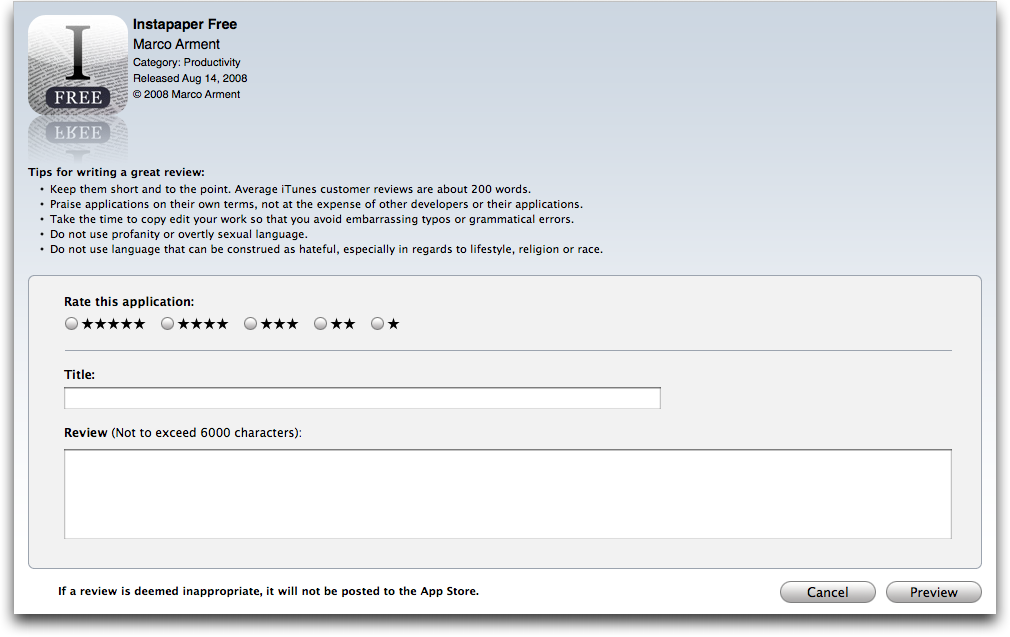
  Apple recently announced that in order to submit a product review of
  any app in the iPhone App Store, the reviewer must own the app in
  question, whether through free download or purchase. When you
  attempt to write a review for a particular product, iTunes searches
  your Mobile Applications folder for the app in question. If found,
  iTunes opens the review form for that product, and you can enter
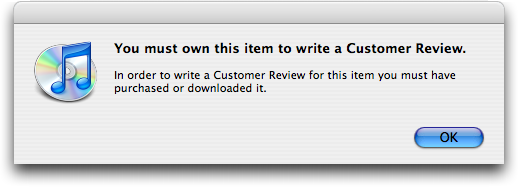
  your review. If iTunes can't find the app, a dialog informs you,
  "You must own this item to write a Customer Review" and refuses to
  let you review the app.

<http://www.tidbits.com/resources/2008-10/App-Store-review-form.png>
<http://www.tidbits.com/resources/2008-10/rejection-dialog.png>

  Prior to this change, many developers felt their products were being
  unfairly rated and reviewed by people who hadn't even tried them.
  Numerous reviews (often highly negative ones) were based on price,
  screenshots, or product descriptions alone. Since the App Store is
  the only place to acquire apps for the iPhone/iPod touch, it seems
  more than reasonable that you would be allowed to review only those
  apps you actually own.

<http://www.tidbits.com/resources/2008-10/poor-review.png>

  While the new policy may not actually improve the depth or quality
  of reviews - people who have downloaded apps may still glibly trash
  them - it will at least assure readers that the opinions are in fact
  based on firsthand user experience.

  Unfortunately, the new limitation may eliminate a small portion of
  credible opinions. For example, if I try out an app on a friend's
  iPhone, I can't share my thoughts on it through the App Store -
  despite my opinion being based on firsthand experience. Yet such
  cases are certainly in the minority, and owning the product would
  definitely give you a better sense of it than briefly tinkering with
  it on someone else's phone. The tradeoff seems entirely worthy.

  How does Apple's new policy situate the App Store reviews in
  comparison to customer reviews on other sites, like Amazon.com?
  (Amazon is the gold standard for customer reviews - even people who
  don't end up buying at Amazon use their customer reviews when
  evaluating possible purchases).

  Apple's ownership requirement would seem to raise the bar of review
  quality, since sites like Amazon and VersionTracker have no way of
  determining whether or not a reviewer owns the product in question.
  However, in practice, the App Store is likely just attaining equal
  footing. While few sites restrict reviewing to people who have
  purchased or downloaded through the site, the assumption is that
  anyone reviewing the products has some experience with them. For
  instance, books, DVDs, home goods, and other items sold through
  Amazon are also widely available through many other retailers, so
  reviews can reflect firsthand experiences no matter where the
  product was purchased.

  Requiring commentators to own the apps being reviewed is just one
  more thing the App Store does to improve the quality of reviews.
  Most importantly, potential buyers can say whether or not a
  particular review is helpful, and sort reviews by those that
  received the most helpful votes. Unfortunately, Dan Frakes of
  Macworld notes that the App Store's Most Helpful sort order keys off
  the number of helpful votes, not the ratio of helpful to
  not-helpful. As a result, an older review that has a 20 (helpful) of
  40 (total) ratio will sort well above a newer review that has 9 of
  10 helpful votes. Obviously, it would need some threshold, since 1
  of 1 helpful votes has a great ratio but not necessarily much
  relevance. It's also possible to sort by the reviews with the
  highest ratings, and to see which other products a reviewer has
  evaluated (since someone who writes one good review is likely to
  write others).

  Perhaps the main thing that's missing is the way Amazon shows the
  most helpful reviews with low ratings; that feature makes it easy to
  find well-received - and likely legitimate - criticism for a
  generally liked product, something that's tricky on the App Store
  now. Amazon's bar chart showing the distribution of different
  ratings is also especially welcome.

<http://www.tidbits.com/resources/2008-10/Amazon-review.png>

  All in all, Apple's new ownership requirement is a wise move, and
  one that marks a subtle but important difference in the way the App
  Store does business.


Tales of Customer Service in the PDF World
------------------------------------------
  by Adam C. Engst <[EMAIL PROTECTED]>
  article link: <http://db.tidbits.com/article/9799>

  Not long ago, the good people at our print-on-demand service QOOP
  alerted me that the PDF of "Take Control of Mac OS X Backups" I had
  given to them was corrupted. Confused, I traced back through the
  various versions of the file that were created during my workflow,
  and discovered that the problem occurred with specific graphics when
  I ran the files through Apago's PDF Enhancer Professional Edition.

<http://qoop.com/>
<http://www.takecontrolbooks.com/backup-macosx.html>
<http://www.apagoinc.com/prod_home.php?prod_id=2>

  Now, PDF Enhancer is a powerful high-end PDF manipulation tool on
  which I rely heavily for Take Control, and particularly for our
  print-on-demand versions. For normal Take Control PDFs, I use PDF
  Enhancer largely to reduce file size by eliminating unnecessary PDF
  features, deleting duplicate graphics, and downsampling large
  images. For the print-on-demand PDFs, though, I use some of PDF
  Enhancer's more-advanced features, namely those that resize pages to
  7 by 9 inches and convert colors to grayscale for the
  black-and-white option (converting the PDF results in slightly
  better quality over doing the conversion in the printer). And of
  course, because I have to do the same conversions for each book, PDF
  Enhancer's drag-and-drop interface is a boon.

  I was distressed to find that PDF Enhancer was itself the problem,
  so I filed a bug report with Dwight Kelly of Apago, including the
  original file and the corrupt version so he could see what was going
  on. After a few messages back and forth to establish things I'd
  forgotten to include in my bug report, Dwight announced that he'd
  figured out the problem - PDF Enhancer was trying to remove
  identical duplicate ICC profiles but linking them incorrectly - and
  he sent me a version of my file for me to verify. A day or two
  later, he sent me a new version of PDF Enhancer that did indeed
  solve the problem entirely.

  What struck me most was how long it has been since I've experienced
  this situation personally with a program on which I rely. I talk
  with lots of developers and report a fair number of bugs, but it's
  uncommon for a developer to convert my feedback into a new version
  within a week. In at least the haze of my memory, I remember such
  things happening more frequently 10 or 15 years ago. That's not to
  say developers today aren't responsive, but it's now more likely
  that a developer will confirm my bug report and months later mention
  that it was fixed in the most recent release.

  Contrast this situation with a bug I discovered in another high-end
  PDF manipulation tool, Aerialist Professional from ARTS PDF. One
  problem we run into is that we want all our links to inherit the
  current magnification level when clicked - that is, if you're
  reading in Adobe Reader (Preview ignores zoom levels) and you've
  zoomed in to make the type easier to read, clicking a link shouldn't
  change your magnification level. Acrobat Pro's linking tools are
  awful, so if we make links in the PDF manually, it's entirely
  possible they'll end up with the wrong magnification level. Among
  other features (I bought it for its automatic index linking
  capability), Aerialist Professional includes a feature to set
  options like magnification level for all the links in a document.
  Sounds great, but if you use it, and your recipient is viewing pages
  in continuous mode (versus page-by-page) in Adobe Reader or Preview,
  all links jump to the page _after_ the one they're supposed to hit.
  Oops.

<http://www.artspdf.com/arts_pdf_aerialist_pro.asp>

  ARTS PDF's support was reasonable and responsive, and tried to help
  me work around the problem. But instead of fixing the bug and
  sending me a new version of the program, I got this message: "I've
  managed to replicate the issue as you described so this will be
  lodged as a bug with development and scheduled with the next
  release." That was the middle of December 2007, and for a plug-in
  that even then worked only with Acrobat Pro 7 on the Mac, not the
  then-current Acrobat Pro 8, and I've heard nothing about support for
  the now-current Acrobat Pro 9. I've simply had to avoid the link
  features of Aerialist Professional for the last 10 months, and I
  don't hold out significant hope for a new release any time soon.

  I fear that there is no moral to this story, just an appreciation
  that Apago was able to provide exemplary customer service and a
  sadness that I can't use highly desirable features in ARTS PDF's
  Aerialist Professional. Perhaps the PDF Enhancer bug was easily
  fixed; perhaps the fact that it corrupted files made it a priority;
  perhaps the developer had some free time at the point I reported it;
  or perhaps I received special treatment as a member of the press.
  Whatever the reason, it certainly wasn't true of the Aerialist
  Professional bug. Kudos to Apago, and while I certainly understand
  that near-instant turnaround on bug fixes can never be a guarantee
  for anyone, any developer who does put in that level of effort
  deserves major credit.


TidBITS Outage Causes Editors Outrage
-------------------------------------
  by Glenn Fleishman <[EMAIL PROTECTED]>
  article link: <http://db.tidbits.com/article/9802>

  At some point on Tuesday, 07-Oct-08, our main Web server lost its
  mind. The scripts that drive our site went out of control, and the
  server became somewhat unresponsive. We had been Slashdotted as a
  result of Rich Mogull's excellent "Peering Inside a Mobile Phone
  Network" article, but the load simply wasn't that high, and the
  server has handled previous Slashdottings before with aplomb.

<http://db.tidbits.com/article/9796>

  We were slightly out of date with the most recent updates and
  thought perhaps updating from Mac OS X Server 10.5.4 to 10.5.5 might
  solve the problem. Instead, it rendered our Intel-based Xserve
  inoperable. The updates failed with an odd message about the root -
  or / directory - being unwritable, and forced us to restart.
  Unfortunately, the installer had left the machine in an even more
  dysfunctional state, and the machine didn't come back up. Our
  co-location host, digital.forest, rebooted it by hand, and it would
  boot only so far as the Apple logo before restarting automatically.
  The same problem happened when trying to boot into single-user mode.
  Not good. The techs at digital.forest then booted from a DVD and ran
  Disk Utility, which apparently found and fixed some errors, but
  nothing that solved the boot problem.

  No worries, we thought. Adam had set up two separate backup systems:
  Time Machine to a second drive in the Xserve, and CrashPlan (see
  "CrashPlan: Backups Revisited," 2007-02-26) to a separate server in
  Adam's home.

<http://db.tidbits.com/article/8882>


**Starting the Recovery Process** -- You know that saying about
  confidence going before a fall? Well, after booting from the Leopard
  Server DVD, digital.forest did what seemed like a sensible thing and
  restored our most recent Time Machine backup, which dated from 11:50
  AM of that day. The machine came back up, and we were able to get
  back in via Apple Remote Desktop. It took a little fussing to get
  the Web server turned on again, and then, worryingly, our site
  wasn't showing any articles later than 30-Sep-08. Indeed, when we
  looked at the databases, they were from that date, despite Time
  Machine's claim that the most recent backup was from that day.

  We were starting to get nervous, but we had another ace in the hole.
  Adam restored from his local CrashPlan backup, uploaded the files we
  needed, and I took at look at what he uploaded for me. Again, no
  love, but for a different reason. CrashPlan had more recent copies
  of many necessary files, but also had tons of restore failure
  messages - noted in the file names - scattered throughout the
  retrieved directories. It was a mess, but after some panicked
  scanning of the CrashPlan backups, I realized that the main database
  files we needed were present and intact. I replaced the Time Machine
  versions of the database with the later CrashPlan versions, checked
  their consistency with MySQL's command-line tools, and brought the
  system back up.

  And with a great sigh of relief, we both started to breathe again,
  because the CrashPlan backups were from the morning of that day, so
  we'd lost almost nothing in our main TidBITS article database. We
  weren't able to recover later versions of some other databases, but
  those were far less important and losing a week's work of stats and
  changes wasn't a problem.

  With a bit more elbow grease and effort, all made more difficult by
  me being on vacation on Mt. Desert Island in Maine (but with a
  high-speed DSL line in our lovely rental house), Adam and I managed
  to get back to status quo ante, having to repost only a few stories
  manually.


**Debriefing and Navel Gazing** -- Despite having a previously
  reliable system, a reliable release of Leopard Server (10.5.4), and
  multiple backup systems, all supported by a capable support staff at
  a co-location facility - we were dead in the water for hours. That's
  a bad thing, and generally depressing.

  I think something went wrong starting on 30-Sep-08, and whatever
  that was, the problem grew gradually worse until the day of the
  failure. This putative problem affected the system and the
  capability of both backup packages to create archives _and_ to
  notify us that the backups weren't being properly made.

  Adam doesn't buy my theory about there being some sort of creeping
  corruption starting on 30-Sep-08, and he points out that when he
  browsed backward in Time Machine, looking at the directory that
  holds the main databases, Time Machine had only four widely
  separated backups: 30-Sep-08, 09-Sep-08, 08-Sep-08, and 27-Jul-08.
  Some other files (in ~/Library/Preferences) that change every day
  were backed up regularly. The implication is that Time Machine
  backed up these critical files 4 times out of about 70 days.
  Assuming hourly backups, there were about 840 chances to back them
  up. They may not have changed every hour, but even if they changed
  only once per day, that's still abysmally poor performance on Time
  Machine's part. Most disappointing is that it in no way informed us
  of its criminally negligent behavior.

  If you're using Time Machine as your primary backup method,
  especially on a Leopard Server machine, stop reading this article
  right now, find a frequently modified important file in the Finder,
  go into Time Machine, and flip back through the changes, making sure
  that you have regular backups and not the sporadic nonsense that we
  had.

  Although it ultimately saved the day, CrashPlan also let us down in
  a big way. It had been backing up files from our server successfully
  for several months with no problems. However, as soon as I tried to
  restore files, it threw thousands of integrity check errors, so many
  that it was impossible to sort through them in the logs. Again, if
  there are problems, alert on backup so the user knows about them
  before trying to restore.

  We have plans for adding more redundancy, and we'll carry out those
  tasks in the near future. Cloning the main drive to its second
  internal hard disk as well as backing it up in two separate fashions
  might have allowed an immediate resumption of service. (That's how
  our other server is set up, and that approach saved our bacon on one
  occasion.)

  Some folks would recommend striped and mirrored multiple disk arrays
  (RAID) where we would have increased speed, less chance of failure,
  and greater restore capabilities (but that's in addition to backups,
  not a replacement for backups). In the past, a RAID hasn't been
  necessary because TidBITS feeds out mostly static information. As we
  move to a more dynamic site design that involves significant
  communication with and among our readers, that has to change, too.

  This is the kind of thing that drives grown men and women to drink.
  In the middle of all this, while we waited for something to happen,
  I sat down with my wife, two children, and six in-laws for some
  delicious soup made by my wife. And a beer. And around 9 PM, Adam
  ultimately had dinner and very possibly something stronger to drink.
  Like the captain being the last one off a sinking ship, the
  publisher eats only after the server is back up and running.


Peering Inside a Mobile Phone Network
-------------------------------------
  by Rich Mogull <[EMAIL PROTECTED]>
  article link: <http://db.tidbits.com/article/9796>

  Have you ever wondered why your mobile phone can alert you to new
  voicemail without having ever rung? Or why a text message can get
  through when a call can't? Maybe you've traveled across continents
  and been amazed at how calls still manage to follow you? Or perhaps
  you've noticed that sometimes your battery seems to last only a
  fraction of its normal life? And why can the iPhone 3G figure out
  your location in 3 seconds when it takes your car GPS 3 minutes?

  Although we normally take the ubiquitous mobile phone for granted,
  assuming it should work anywhere at any time, there's quite a bit of
  complex technology involved in sending a call to a device in your
  pocket. While we've all screamed in frustration over dropped calls
  and other annoyances, the truth is these are impressive devices,
  packed with amazing technology. And after you learn a little more
  about the inside of the system, maybe, just maybe, you'll be a
  little less irritated the next time you battle to make a simple
  call.


**How Your Calls Follow You** -- One of the most fascinating aspects
  of mobile phones is how calls manage to find us in the first place.
  If you think about it, you are basically wandering the planet with a
  tiny radio in your pocket, but by calling a single number anyone can
  track you down in seconds. Although there are a few different types
  of mobile phone networks, they all follow the same basic, yet
  elegant, architecture. For this article I'll be using terms for the
  GSM (Global System for Mobile communications) network - the one used
  by AT&T and other international iPhone providers. I've also
  simplified things a bit, and Wikipedia is a great source if you'd
  like to dig in deeper.

<http://en.wikipedia.org/wiki/GSM>

  It all starts with the phone in your pocket. Every phone in the
  world has a unique identifier called an IMSI - your International
  Mobile Subscriber Identity. In most phones, this is encoded on a
  small smart card (yes, the same technology used by some banks and ID
  cards) called a SIM - Subscriber Identity Module. When you turn your
  phone on it tries to find the nearest base station, which is a
  collection of switching equipment tied to that (likely ugly)
  cellular antenna on the side of the highway. Your phone connects to
  the nearest base station, based on signal strength, and that's where
  the interesting stuff starts to happen.

  The IMSI truly is a unique number tied to you and your mobile phone
  provider, and is the key to the entire system. The base station is a
  relatively dumb system that just passes on your information to the
  main brains of the system - the Mobile Switching Center (MSC). The
  MSC can be located pretty much anywhere, which is why, in the very
  early days of cell phones, 911 calls might have been routed to a
  confused emergency dispatcher in a different city or state (don't
  worry, that's all fixed now). While each system is a little
  different, a large cell phone provider will generally have a bunch
  of MSCs to support different phone numbers for different local
  areas.

  At its simplest, the MSC is just two big databases and a connection
  to the regular phone system. One database, called your Home Location
  Registry (HLR) is the master database for your account, with your
  IMSI, phone number, and current location. The second database is
  called the Visitor Location Registry (VLR) and it keeps track of
  people that have wandered into that area (a VLR serves only a single
  base station). Here's how it works. Your phone registers your unique
  IMSI with the nearest base station, and that base station tells its
  VLR that you are connected. The VLR then contacts your HLR and,
  using your IMSI, registers your location.

  When someone calls you, the call is routed from the regular phone
  system through your MSC all the way out to the highway you're
  driving on, since the system always knows where you are. If you
  happen to be on a GSM system like AT&T (and unlike Verizon), your
  call can even follow you to any other GSM system in the world, as
  long as it has some sort of agreement with your primary phone
  provider. I used to have to rent a local phone when I traveled
  someplace like Australia (since U.S. phone companies don't play nice
  with others), but in recent years my biggest worry is someone from
  home accidentally waking me up at 3 AM local time.


**How Calls Work in Cars and Planes** -- This may seem pretty
  straightforward, but it becomes more complex since we mobile phone
  users have a bad habit of moving around - sometimes at high speed -
  while we're on the phone. To handle this, the base stations and MSC
  work together to hand off your call as you move from tower to tower.
  This is a bit easier today since we've switched off the old analog
  system (where your phone needed a dedicated channel to talk) to the
  new digital systems (where many phones share a channel, just like a
  computer network). All your conversations are digitally encoded and
  the phone system routes them around as needed.

  Not that it's perfect - especially if you drive the main highway
  between my home in Phoenix and my wife's office. Some of these
  hand-offs don't always work as planned, notably if there are dead
  zones between towers. But it does explain those times when your call
  becomes garbled or you lose half the conversation, then everything
  magically returns to normal (by magically, I mean rarely). As we
  move around with our phones, they're constantly negotiating with
  base stations, which are constantly negotiating with each other and
  one or more MSCs.

  Now imagine you're 30,000 feet in the air traveling at 500 miles per
  hour. Although our mobile phones don't have a lot of power, from up
  in the sky it's not unlikely a single phone could hit dozens of
  towers with nearly equal power signals. That's the main reason
  you're not supposed to use your phones in the air; Wikipedia
  explains in more detail. Newer planes are extremely well shielded
  from interference and shouldn't experience problems (although some
  studies still consider phones a risk), but all the base station
  switching and phone tracking confuses the heck out of the mobile
  phone network. The systems some airlines outside the United States
  are putting into planes set up a tiny cell network on the plane
  itself so your phone locks in to the plane's system using low power,
  and then it handles talking to the ground.

<http://en.wikipedia.org/wiki/Mobile_phones_on_aircraft>

  As a side note, the main reason airlines make you turn all your
  electronics off during takeoff and landing is so you aren't
  distracted and can hear and follow directions if something goes
  wrong.


**Why Text Messages Work When Your Phone Won't Ring** -- All of that
  crazy call setup happens in the background without your ever
  noticing because, as anyone who watches spy movies will tell you,
  your phone is always talking to the network. It does this using
  channels dedicated to signaling and messaging that are separate from
  the channels we use to talk. That's how your phone is initially
  registered, and how calls are handed off (or dropped) as you move
  from one base station to another.

  Early on when they invented GSM, someone decided it would be useful
  to dedicate a small part of this signaling to sending messages to
  your phone. They added a feature to send 160-character messages over
  the signaling channel. The initial idea was to use it to alert you
  to new voicemail messages, but then someone thought it might be nice
  to also send some short text messages, and thus the Short Messaging
  Service (SMS) was born.

  That's why you sometimes get voicemail notifications without hearing
  your phone ring. If the local voice channels are all filled, the
  call can't get through and callers are forced to leave a message,
  but since the notification uses that signaling channel, it still
  reaches you right away. A nice side benefit is that SMS messages
  will often go through even when regular calls won't. When I'm
  wearing my part-time hat as a disaster worker, I often find myself
  using SMS when I can't make regular calls. If you are at that big
  concert, game, or Steve Jobs keynote you might try SMS instead of
  battling your neighbors for scarce voice channels.

  The Multimedia Messaging Service (MMS) that Apple mysteriously won't
  support on the iPhone also uses SMS. In this case, the short message
  contains a special link that tells your phone where to find a photo
  or video someone shared with you.

  The downside of SMS is that there's no guarantee your message will
  go through, and the system can't alert either you or the recipient
  if it was dropped somewhere along the line. (Some mobile phone
  networks allow you to confirm message delivery, but AT&T does not
  offer that option).


**Why Your Battery Sometimes Dies Faster** -- As you now realize,
  there's a ton of signaling and messaging going on in the background
  as you walk down the street with that amazing battery-powered radio
  in your pocket. Modern mobile phones are incredibly power-efficient
  and use this signaling to "tune" themselves to their local
  environment. When they have a good signal, they use less power, but
  the farther you move away from the base station the more power they
  need to maintain these signaling channels. If you are in a really
  busy area your phone might also be battling for space on the
  network, which increases how many signals are sent and thus how much
  power it uses.

  So you might notice two effects - in some places your battery may
  seem to last forever, whereas in other places it drains quickly, no
  matter how little you use it. If you are deep inside in a big
  building your phone might need to use a lot more power to
  communicate with the nearest base station, taxing your battery.
  Another area might require less power under normal circumstances,
  but if it's saturated with a lot of phones you'll be signaling more,
  or talking to a base station that's farther away, and your phone
  will die sooner. That's why my iPhone battery doesn't last nearly as
  long at Macworld Expo as it does during other conferences in Moscone
  Center - the density of iPhone (and thus AT&T) users is
  significantly higher.


**Why the iPhone GPS is Faster than Your Car GPS** -- By this point,
  you probably already know the answer to that question. While phones
  are constantly tracking their location so calls can reach you, when
  you turn a GPS on it needs to figure out where you are nearly from
  scratch. Your GPS looks for special signals from satellites, and
  then compares the timing of those signals to determine your
  position. When you pull a GPS out of the box for the first time, it
  has no idea where you are on the face of the planet, and has to
  spend a few minutes looking around for those signals and downloading
  data to narrow your location. When you turn it on in roughly the
  same location after that, unless it's been a long time since your
  last usage, it will be faster to acquire the satellites, but it
  still has to lock on to the necessary satellite signals before it
  can determine your location.

  Your iPhone cheats. In order to support 911 emergency services, all
  mobile phone systems now try to track your physical location down to
  about a minimum of 150 meters (it's a bit different outside the
  United States). Thus your phone, thanks to the network, has a good
  rough idea where you are before the GPS even starts. If you are near
  a Wi-Fi network, the Skyhook Wireless-enabled location feature of
  the iPhone may then narrow your location down even more. This means
  your iPhone GPS _already_ has a good idea of where to look for those
  satellites, while the unit in your car needs to start scanning from
  scratch (or based on remembering where you were when you last turned
  it off).


**The Future Is Now** -- We take them for granted, but mobile phones,
  and the networks that back them, are fascinating pieces of
  technology that provide capabilities that seemed like science
  fiction only a few short decades ago (consider Dick Tracy's
  wristwatch radio, Maxwell Smart's shoe phone, and James Bond's car
  phone in the 1963 movie "From Russia with Love"). Now maybe the next
  time you're ready to slam that frustrating marvel against the floor
  because you can't make a call, you'll hesitate briefly and send your
  mother a text message instead.

<http://en.wikipedia.org/wiki/Dick_Tracy#Evolution_of_the_strip>
<http://en.wikipedia.org/wiki/Get_Smart#Gadgets>
<http://en.wikipedia.org/wiki/List_of_James_Bond_gadgets#From_Russia_With_Love>


TidBITS Watchlist: Notable Software Updates for 13-Oct-08
---------------------------------------------------------
  by Doug McLean <[EMAIL PROTECTED]>
  article link: <http://db.tidbits.com/article/9801>

* Security Update 2008-007 from Apple brings with it a variety of bug
  fixes and patches, largely to components of Mac OS X's Unix
  underpinnings. A full list of fixes can be found on Apple's Web
  site. The update is available via Software Update (the easiest way
  to get it) or as standalone downloads. You can download Security
  Update 2008-007 for Mac OS X 10.5.5 Client (31 MB) and Server (125
  MB); for Mac OS X 10.4.11 Client, Intel (161 MB) and PowerPC (70
  MB); and for Mac OS X 10.4.11 Server, Universal (199 MB) and PowerPC
  (123 MB).

<http://www.apple.com/support/downloads/>
<http://support.apple.com/kb/HT3216>
<http://www.apple.com/support/downloads/securityupdate2008007clientleopard.html>
<http://www.apple.com/support/downloads/securityupdate2008007serverleopard.html>
<http://www.apple.com/support/downloads/securityupdate2008007clientintel.html>
<http://www.apple.com/support/downloads/securityupdate2008007clientppc.html>
<http://www.apple.com/support/downloads/securityupdate2008007serveruniversal.html>
<http://www.apple.com/support/downloads/securityupdate2008007serverppc.html>

* 1Password 2.9 from Agile Web Solutions updates the password syncing
  utility with the capability to sync passwords between Macs using a
  variety of approaches, all without requiring a MobileMe account.
  This capability requires a switch to 1Password's new (but optional)
  Agile Keychain format, which offers some advantages (with the
  promise of more reliable syncing being the big one) over Mac OS X's
  built-in keychain support, but which can't be managed with Mac OS
  X's Keychain Access utility. Other new features include saving
  passwords in Firefox after the information has been submitted,
  faster Safari startup time, support for Safari 4.0 Developer Preview
  #2, AppleScript support for showing preference panels, and several
  tweaks to the Palm version. ($29.95 new, free update, 24 MB)

<http://agilewebsolutions.com/products/1Password>
<http://www.switchersblog.com/2008/10/1password-29-br.html>

* Opera 9.6 from Opera Software is an updated version of the company's
  independent Internet browser. The update improves the built-in email
  client's performance and flexibility by adding the capability to
  follow or ignore email threads, as well as including a new
  "low-bandwidth mode" for use when you're on dial-up or need to get
  in and out quickly. Opera Link, the browser synchronization service,
  has also been updated and now enables synchronized custom search
  engines and typed history. Also new is the optional Opera Scroll
  Marker, which indicates where you left off reading on one screen
  when you scroll to the next. (Free, 7.9 MB Intel-only/13.5 MB
  universal binary)

<http://www.opera.com/>

* Radioshift 1.1 is an updated version of the Internet radio recording
  tool from Rogue Amoeba. Changes include a new recording status
  indicator, refinements to the user interface, and a smattering of
  major and minor bug fixes. ($32 new, free update, 10.8 MB)

<http://www.rogueamoeba.com/radioshift/>


$$

This is TidBITS, a free weekly technology newsletter providing timely
news, insightful analysis, and in-depth reviews to the Macintosh and
Internet communities. Feel free to forward to friends; better still,
please ask them to subscribe!

Non-profit, non-commercial publications and Web sites may reprint or
link to articles if full credit is given. Others please contact us. We
do not guarantee accuracy of articles. Caveat lector. Publication,
product, and company names may be registered trademarks of their
companies. TidBITS ISSN 1090-7017.

Copyright 2008 TidBITS: Reuse governed by Creative Commons license.

Contact us at:    <[EMAIL PROTECTED]>
TidBITS Web site: <http://www.tidbits.com/>
License terms:    <http://www.tidbits.com/terms/>
Full text search: <http://www.tidbits.com/search/>
Subscriptions:    <http://www.tidbits.com/about/list.html>
Account help:     <http://www.tidbits.com/about/account-help.html>


--
If you want to unsubscribe or change your address, use this link
http://emperor.tidbits.com/webx?unsub@@.3c557dc4!u=306a67f9