TidBITS#951/27-Oct-08
=====================
  Issue link: <http://db.tidbits.com/issue/951>
  Apple racked up impressive numbers for its fourth financial quarter
  of 2008 - $7.9 billion in revenue and $1.14 billion in profit - but
  that's only half of the story - literally. Those numbers nearly
  double when you account for iPhone revenue received, which we
  explain this week. Also in this issue, Joe Kissell celebrates the
  release of Mail Act-On 2, Jeff Carlson suggests a way to import
  video from a FireWire-equipped camcorder to the new MacBook that no
  longer includes FireWire, Glenn Fleishman notes the release of
  Google's Android code as open source, and Adam weighs in on rumors
  of a tablet-sized device from Apple and looks at the new Google
  Earth for iPhone. In Take Control news, we announce the release of
  Joe's new ebook, "Take Control of MobileMe." And in this week's
  TidBITS Watchlist we note the releases of iPhoto 7.1.5, BBEdit
  9.0.2, Lightroom 2.1, Adobe Camera Raw 5.1, DiscLabel 5.3, Cocktail
  4.2, AirPort Extreme Update 2008-004, Aperture 2.1.2, InDesign CS3
  5.0.4 Update, InCopy 5.0.4 Update, and Suitcase Fusion 2.0.

Articles
    First Look at Google Earth for iPhone
    Tablet iPod Rumored on Weak Evidence
    Importing Video from a FireWire Camcorder to an Aluminum MacBook
    Adam Running the New York City Marathon
    iPhones, Macs Give Apple a Strong Q4 2008
    Android Code Released as Open Source
    Mail Act-On 2 Supercharges Mail Rules
    Take Control News: Make the Most of MobileMe
    TidBITS Watchlist: Notable Software Updates for 27-Oct-08
    Hot Topics in TidBITS Talk/27-Oct-08


------------ This issue of TidBITS sponsored in part by: --------------

* READERS LIKE YOU! Support TidBITS with a contribution today!
  <http://www.tidbits.com/about/support/contributors.html>
  Special thanks this week to Stephan S. Miller, William Dodson,
  Miguel Cordoba, and Pendleton Rogers for their generous support!

* GET FETCH 5 FOR FREE! Fetch Softworks makes Fetch, the original
  Macintosh FTP client, free for educational and charitable use.
  Fetch 5.3 includes a new look and Leopard technology support.
  Apply today at <http://fetchsoftworks.com/edapply>!

* WebCrossing Neighbors Creates Private Social Networks
  Create a complete social network with your company or group's
  own look. Scalable, extensible and extremely customizable.
  Take a guided tour today <http://www.webcrossing.com/tour>

* MARK/SPACE, INC: Take it with you! The Missing Sync makes
  it easy to synchronize contacts, calendars, notes, photos
  and more from your Mac to your BlackBerry, Palm OS, or
  Windows Mobile phone. <http://markspace.com/bits>

* VMware Fusion. The most seamless way to run Windows on your Mac.
  Backed by nearly a decade of proven virtualization technology.
  Try VMware Fusion today for free, or order online for only $79.
  Visit: <http://www.tidbits.com/about/support/vmware-fusion.html>

* Microsoft's MacBU: Supporting Mac users with Office 2008.
  Is your Office up-to-date? Make sure you're running the latest
  versions of Word, Excel, PowerPoint, and Entourage by choosing
  Check for Updates from the Help menu of any Office application!

* ConceptDraw Office adds real business power to Microsoft Office
  and Apple's iWork. Whether you need project management, business
  graphics, or mind mapping, it's all easily created on your Mac!
  Buy today for only $499! <http://www.conceptdraw.com/tb>

* Circus Ponies NoteBook: The easy way to get organized
  on the Mac. Control your notes. Track your tasks. Manage
  your projects. Organize your life. Try NoteBook right now,
  free for 30 days! <http://www.circusponies.com/tidbits>

---------- Help support TidBITS by supporting our sponsors ------------


First Look at Google Earth for iPhone
-------------------------------------
  by Adam C. Engst <[EMAIL PROTECTED]>
  article link: <http://db.tidbits.com/article/9831>

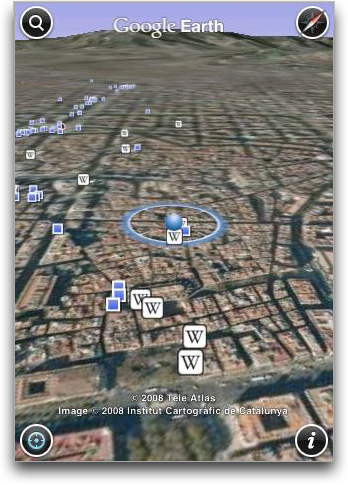
  The iPhone is already pushing hard into the realm of what would have
  been science fiction 20 years ago, but with the release of the
  Google Earth iPhone app, it gets even closer. Could you have
  imagined using a handheld device to view an aerial photo of the
  Woolworth Building in Manhattan, and then tapping a tiny icon to
  read an encyclopedia article about it? That, and more, is now
  possible.

<http://www.tidbits.com/resources/2008-10/Google-Earth-for-iPhone.png>

  For those who may have not seen it, Google Earth is a cross-platform
  Mac and Windows application that lets you view any location on the
  planet, zooming in to see satellite and aerial imagery. On top of
  the primary view you can layer other map-related information, such
  as roads, weather, geo-located photos, and even cloud cover. You can
  also find businesses and get directions, just like in Google Maps on
  the Web.

  The free Google Earth iPhone app (which works on the iPod touch as
  well), offers the basic functionality of the full Google Earth
  application, though it can't display all of the different layers
  available in the full application. It can show borders and labels,
  and terrain, along with geo-located photos from Panoramio and links
  to geographically related Wikipedia articles. But the app can't
  display roads, 3D buildings, street view photos, weather, or any of
  the other layers that can be applied in the full application.

<http://www.panoramio.com/>

  Google Earth for iPhone takes advantage of the iPhone's gestures, so
  you can pinch to zoom in and out (double-tap also zooms in), drag
  with a single finger to pan the view, and drag in a circular motion,
  or drag left or right, with two fingers to rotate the view. Tilting
  the iPhone or iPod touch changes the angle at which you view the
  map, or you can drag up or down with two fingers. Four buttons
  around the corners of the screen let you search for addresses,
  reorient the view to put north at the top of the screen, find your
  current location, and set options and get help. Searching, though
  slow to invoke, is smart enough to match against the contents of
  Address Book and make it easy to select a match without having to
  type the full address. There's even an option to search for results
  near your current location.

  Performance isn't stunning, but it's amazing that Google was able to
  shoehorn as much of the full 110 MB Google Earth application into an
  8.9 MB iPhone app. I imagine that much of that becomes possible by
  offloading more of the application to Google's servers, so it's
  possible that the iPhone app will perform better when connected via
  Wi-Fi than via 3G or EDGE.


Tablet iPod Rumored on Weak Evidence
------------------------------------
  by Adam C. Engst <[EMAIL PROTECTED]>
  article link: <http://db.tidbits.com/article/9826>

  John Markoff of the New York Times is reporting that a source from a
  search engine has shared log information showing hits from "an
  unannounced Apple product with a display somewhere between an iPhone
  and a MacBook."

<http://bits.blogs.nytimes.com/2008/10/21/read-my-lips/>

  By itself, that might not have attracted much attention. But during
  a rare appearance on Apple's earnings call this week, Steve Jobs
  commented that Apple didn't "know how to build a sub-$500 computer
  that is not a piece of junk" and - far more positively - that Apple
  is watching the nascent market for netbooks (small, inexpensive,
  portable computers used primarily for Web and email access).

  Combine Jobs's comments with the search engine logs, and it's easy
  to imagine an iPhone- or iPod touch-like device with a larger
  screen. Just because Apple can't build a sub-$500 computer that's
  not junk doesn't mean they can't build a sub-$500 device based on
  the iPhone software. Sounds an awful like the device I suggested in
  "Open Letter to Steve Jobs: In Support of an iPod reader"
  (2008-03-05), doesn't it?

<http://db.tidbits.com/article/9487>

  However, much as I'd love to see an iPod reader and believe that it
  would be good business for Apple, I'm suspicious of the evidence as
  given.

  A quick scan through my Google Analytics shows a wide range of
  screen resolutions: 393 in the last month, including a few hits from
  devices that report pixel counts from 0 by 0 (clearly an audio-only
  Web browser) all the way up to 65536 by 65536 (must be a custom
  screen used on the sly by Bill Gates's Mac-using housekeeper). There
  are tons of hits from devices reporting resolutions between an
  iPhone and a MacBook. Our traffic is infinitesimal in comparison
  with that of a search engine, but I can't see how more data would do
  anything but further muddy the issue.

  There are two other things this anonymous search engine could do to
  glean more information about a particular screen resolution, which I
  can't do easily. First, they could limit the search to IP number
  ranges known to belong to Apple, and second, they could examine the
  user-agent strings for suspicious resolutions. Although it's
  conceivable that Apple would allow prototype devices out on the
  Internet from within an Apple-controlled IP range, I can't imagine
  seeing a user-agent string along the lines of "Unannounced Apple
  Product."

  So, I have to say that I'm not buying the rumor, much as I would buy
  the device if it actually existed.


Importing Video from a FireWire Camcorder to an Aluminum MacBook
----------------------------------------------------------------
  by Jeff Carlson <[EMAIL PROTECTED]>
  article link: <http://db.tidbits.com/article/9827>

  Apple's newest consumer laptop is a package full of shiny power, but
  it also lacks a FireWire port. That means no FireWire Target Disk
  Mode, no support for external hard drives with FireWire interfaces,
  and no support for digital camcorders that have FireWire (or i.Link)
  ports.

  In an email response to a customer who asked about camcorder
  support, CEO Steve Jobs replied, "Actually, all of the new HD
  camcorders of the past few years use USB 2." And looking at Amazon's
  current best-selling camcorders, most of them connect via USB.

<http://www.edibleapple.com/steve-jobs-email-response-re-lack-of-firewire-on-macbooks/>
<http://www.amazon.com/gp/bestsellers/electronics/172421/ref=pd_ts_e_nav>

  However, if you already own a perfectly good MiniDV or HDV camcorder
  that connects via FireWire, you may not be completely out of luck.
  Although I don't have one on hand to test this, in theory you can
  use an analog-to-digital video converter to bring your footage into
  the new MacBook. (If you own one of these devices, please let me
  know if I'm off the mark.)

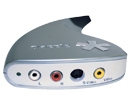
  For example, take a look at the Pinnacle Video Capture for Mac
  ($100). Most camcorders include a composite AV cable that enables
  you to connect the camcorder directly to a television for playback.
  Insert the left and right audio plugs, and either composite video or
  S-video cable, into the Video Capture for Mac hub, which in turn
  connects to the MacBook via USB.

<http://www.tidbits.com/resources/2008-10/VCM_HW_Small_US.jpg>
<http://www.pinnaclesys.com/PublicSite/us/Products/Consumer+Products/Home+Video/Studio+Family/Video+Capture+for+Mac.htm>

  Poking around online, I also found the ADS Tech VideoExpress ($50)
  and the Plextor ConvertX for Mac (PX-TV402U) ($229), neither of
  which I've used.

<http://www.adstech.com/products/USBAV-191-EF/intro/USBAV_191_intro.asp?pid=USBAV-192-EF>
<http://www.plextor.com/english/products/TV402UMac.htm>

  Obviously, this approach isn't ideal. You're starting with digital
  footage and converting it to analog, then re-digitizing it in the
  computer, so I wouldn't be surprised if there's some image quality
  loss (though I'm guessing it would be hardly noticeable). You also
  lose device control, the capability to control the camcorder
  directly from iMovie as you're reviewing footage and importing.

  I should also point out that you can also still purchase a new white
  MacBook with FireWire for $999 or move up to a MacBook Pro, which
  includes FireWire.

  I agree with many others that removing FireWire from the new MacBook
  is disappointing, but it's also consistent with Apple's outlook for
  digital video. iMovie '08 is a completely new application that
  shares little with iMovie HD 6, and it's clearly designed as an
  editor for video snippets and shorter movies destined for YouTube.
  In Apple's view, the people who are shooting these types of movies -
  using Flip cameras or the movie-recording functions of digital still
  cameras - are the market for the new MacBook. I don't expect Apple
  to bring FireWire back to its consumer laptop.


Adam Running the New York City Marathon
---------------------------------------
  by Adam C. Engst <[EMAIL PROTECTED]>
  article link: <http://db.tidbits.com/article/9829>

  Sometimes you have to attempt feats you don't know you're capable of
  achieving.

  I turned 40 in November 2007, and one of my goals for the year was
  to race every standard timed distance during the year, including a
  triathlon and a marathon, neither of which I'd ever done. I've run
  competitively since my sophomore year of high school, so it's not
  like I was going from couch potato to marathoner, but I've always
  focused on the short to middle distances, everything between 1,500
  meters and 10 kilometers, and I would seldom run more than 25 miles
  per week. The prospect of racing a marathon - more than my weekly
  mileage in a single shot - wasn't unimaginable, but it was daunting,
  to say the least.

  I'm almost done with the year, and I'll be capping it off by running
  the New York City Marathon on Sunday, November 2nd. Honestly, I'm
  nervous as all hell. I've trained well and managed to avoid serious
  injury, but it has been harder and more time-consuming than I
  anticipated, both for me and for Tonya and Tristan, who had to put
  up with how my long runs and subsequent fatigue tweaked our family
  schedule.

  Long runs? Before this year, I had run 20 miles once in 1984, and
  two 13-mile races around 1990. More recently, I qualified for the
  New York City Marathon with a 1:20:45 at the local Skunk Cabbage
  Half Marathon in April 2008, and since then I've successively raised
  the bar on how far I could run, with a 16-mile trail race, an
  18.5-mile trail race, an 11.5-mile trail race combined with a
  12-mile road run back to my car, and a full 26.2-mile training run
  on the roads in 3:30:24. Each of those runs caused me significant
  anxiety beforehand, and it was a huge relief each time I finished,
  knowing that I could handle each successive distance. (Tonya has
  been matching my efforts on her old bike, starting from scratch in
  late May 2008 when we bought a tandem to eliminate car miles driving
  Tristan to school, and working her way up to riding the full
  marathon distance just yesterday for her longest bike ride since
  1989.)

  So, if you'd like to follow me during the New York City Marathon
  this coming Sunday, there are a number of ways to do it. You can
  sign up for email alerts that track my progress, or you can watch
  the race on TV or via the Internet (I suspect the chances of my
  appearing in the video are relatively low, but it might be fun to
  watch anyway). There's also an interactive Athlete Tracker that will
  work during the race, but I can't tell how that will operate ahead
  of time. And if you live in New York City and would like to watch
  the race and help cheer me on, I gather it's easy to find a spot on
  the course to do that.

<http://fanalert.ingnycmarathon.org/Alerts.aspx>
<http://www.ingnycmarathon.org/about/coverage.php>
<http://athletetracker.ingnycmarathon.org/>
<http://www.ingnycmarathon.org/about/spectator.php>

  To track my progress either live or over the Internet, note that
  I'll be starting in the first wave, at 9:40 AM Eastern (remember
  that the clocks fall back 1 hour on Sunday for Daylight Saving
  Time), and I hope to be running between 6:30 and 7:00 minutes per
  mile, so you can calculate when I'm likely to hit specific points.
  Although I imagine it will be difficult to pick any given runner out
  of the crowd, I'll be wearing my traditional race uniform of red
  shorts and a blue jersey with the High Noon Athletic Club sun logo
  on the front and back.

<http://www.tidbits.com/resources/2008-10/Adam-running.jpg>

  My base goal is to finish, of course, with a more serious goal being
  to finish in under 3 hours. And if I can get down into the low
  2:50s, that's just icing on the cake.

  I'll report on the race next week, but thanks in advance for any
  support you'd like to provide, and I hope my efforts can serve as an
  example of how it's never too late to try to accomplish something
  that you had no idea was possible before.


iPhones, Macs Give Apple a Strong Q4 2008
-----------------------------------------
  by Jeff Carlson <[EMAIL PROTECTED]>
  article link: <http://db.tidbits.com/article/9825>

  Last year at this time, I commented that the Mac had made a comeback
  as a major contributor to Apple's bottom line after several quarters
  where the iPod dominated the balance sheets. With last week's
  release of the company's Q4 2008 financial results, the Mac is
  joined decisively by the iPhone, which, including sales to date, has
  now surpassed Apple's goal of selling 10 million units during 2008.

<http://www.apple.com/pr/library/2008/10/21results.html>

  For the quarter ending 27-Sep-08, Apple earned $7.9 billion in
  revenue with a net quarterly profit of $1.14 billion ($1.26 per
  diluted share). That compares to $6.22 billion in revenue and a $904
  million profit from the fourth fiscal quarter of 2007 (see "Apple
  Sells Record Number of Macs for Q4 2007," 2007-10-22). Sales of
  2,611,000 Macs (a 21 percent increase from last year) and 11,052,000
  iPods (an 8 percent increase) contributed heavily.

<http://db.tidbits.com/article/9256>

  However, that's not the full story.


**Mind the GAAP** -- The big question for this quarter was iPhone
  performance. In the third quarter of this year, Apple sold 717,000
  first-generation iPhones - the iPhone 3G had not yet been released.
  For this quarter, Apple marked an impressive 6,892,000 iPhone sales
  (that compares to 1,119,000 in the year-ago quarter). The company
  didn't break the number down any further, but during the earnings
  call that followed Apple's announcement Apple COO Tim Cook pointed
  out that the iPhone's market expanded from 6 countries to 51 during
  the quarter, and therefore a significant percentage is attributable
  to international sales. (International sales accounted for 41
  percent of the overall quarterly revenue.)

  Apple also crowed that the 6.9 million number beats RIM (Research in
  Motion), which sold 6.1 million BlackBerry devices in the same
  period - not bad for the upstart entrant in the market. It's also a
  larger amount than sales of the original iPhone - 6.1 million - over
  the previous five quarters combined.

  Another aspect of the iPhone to watch is the revenue it produced,
  which isn't straightforward. Due to GAAP (Generally Accepted
  Accounting Principles), Apple doesn't treat the sale of an iPhone
  (or Apple TV) as a regular sale, but rather counts the expected
  income over the life of the product (currently set at 24 months for
  accounting purposes) due to the fact that Apple provides free
  updates after the sale; one example is the iPhone 2.0 software
  update that was made available to all iPhone owners.

<http://en.wikipedia.org/wiki/GAAP>

  (Speaking of the Apple TV, Apple CEO Steve Jobs reiterated that he
  thinks it - and the category of the "digital living room market" -
  will continue to be a "hobby" in 2009.)

  If you count income without the GAAP consideration, Apple reported
  revenue of $11.68 billion - an increase of _48 percent_ over its
  reported $7.9 billion - and net income of $2.44 billion.


**Looking Ahead** -- Despite all the strong financial news, the
  declining economy figured prominently in the company's conference
  call and guidance for the future. Apple CFO Peter Oppenheimer said,
  "Looking ahead, visibility is low and forecasting is challenging,
  and as a result we are going to be prudent in predicting the
  December quarter." Apple expects a revenue target of between $9 and
  $10 billion and earnings per diluted share between $1.06 and $1.35.

  A few indicators fueled this approach. Education sales were down 7
  percent from last year as K-12 school districts tightened their
  budgets, according to Tim Cook; that accounts for approximately
  75,000 lost Mac sales. Slowing Mac purchases in the last month as
  customers waited for last week's MacBook and MacBook Pro refresh
  also hurt earnings, though sales since the announcement have surged.

  However, Apple doesn't have much to worry about looking ahead. It
  has $25 billion in the bank and zero debt, which Jobs said would
  help the company innovate its way through a rough economy. In fact,
  Jobs even pointed out that Apple customers' loyalty means they're
  likely to delay purchases instead of buying a less expensive brand.

  When asked about whether Apple would offer its products at lower
  prices (citing the iPhone and MacBook as examples), Jobs delivered a
  quintessential answer that reflects the company's overall attitude.
  "There are some customers which we choose not to serve. We don't
  know how to make a $500 computer that's not a piece of junk," he
  said. "And our DNA will not let us to ship that. But we can continue
  to deliver greater and greater value to those customers that we
  choose to serve - and there's a lot of them."


Android Code Released as Open Source
------------------------------------
  by Glenn Fleishman <[EMAIL PROTECTED]>
  article link: <http://db.tidbits.com/article/9823>

  The Open Handset Alliance, the group that manages the
  Google-developed and -driven Android operating system, said that the
  entire platform has been released as source code and licensed for
  liberal use. Open-source licensing typically requires that anyone
  who distributes versions of a project - whether identical or
  modified - also make the full code base available. Most developers
  also contribute any changes they make back into a central
  repository. The first smartphone using Android shipped 22-Oct-08
  from T-Mobile in the United States (see "T-Mobile's Google Phone
  Promising but Unpolished," 2008-10-20).

<http://source.android.com/posts/opensource>
<http://db.tidbits.com/article/9822>

  The Android Open Source Project chose the Apache 2.0 license, which
  allows development along both commercial and open tracks, and either
  track may involve free or for-fee elements. Because Android uses a
  Linux kernel as its base, however, that part of the project remains
  under the GPLv2 license, which has broad requirements that prevent
  closed paths from forming.

  The primary difference I can see between the two licenses is that
  with the Apache 2.0 license, a developer can add to the work and set
  their own terms regarding distribution and copyright. All the source
  from the project up to that point still must be noted with licenses.

  Open-source licenses vary widely, with many allowing commercial
  resale of derived software, and some requiring the release of any
  code that a developer or firm has modified and then incorporated in
  a distributed release. These licenses typically affirm intellectual
  property rights, and assign a chain of rights as the work develops.
  Apple, for instance, uses FreeBSD for much of the core of Mac OS X;
  the associated license requires notices of copyright to be attached,
  but has no mandate to keep development open or contributed back to
  the root.

  The use of an Apache 2.0 license is critical for Android because
  handset makers and others may want to develop custom versions of
  Android that their competitors can't simply copy from the code base
  and use. On the other hand, in order to keep the operating system in
  sync, most proprietary changes will likely be overlays and modules;
  otherwise, it would become an unmanageable task to fold in
  improvements while maintaining copyright separation.

  Reports indicate that Android will likely be used for a variety of
  handhelds, tablets, and mobile gadgets, as well as a replacement for
  existing "embedded" operating systems used for devices that aren't
  computers, like cable set-top boxes. The richness and newness of the
  platform apparently makes it more compelling than many embedded
  offerings currently on the market.


Mail Act-On 2 Supercharges Mail Rules
-------------------------------------
  by Joe Kissell <[EMAIL PROTECTED]>
  article link: <http://db.tidbits.com/article/9819>

  For years I've been a big fan of Indev's Mail Act-On, a plug-in for
  Apple Mail that lets you assign keystrokes to individual rules for
  things like filing messages and changing their background color.
  That may not sound very exciting, but in practice, it has
  revolutionized the way I work with Mail. And it's one of those
  things that gets into your motor memory and becomes so automatic
  that you almost can't figure out how to function without it.
  (Enthusiasts of LaunchBar, Quicksilver, or Butler, you know what I
  mean.) But now, my fingers are 32 percent happier, because Mail
  Act-On 2.0.1 has been released. Whereas the first version knocked my
  socks off, this new version also launders my socks, folds them,
  tucks them neatly into my sock drawer, and gives me a pedicure.

<http://www.indev.ca/MailActOn.html>

  I have no idea what that last sentence means either, but I'm trying
  to make the point that I'm extremely happy with this new piece of
  software!


**The Keys to Efficiency** -- Let me begin with some Mail Act-On
  basics - things the program has been able to do for some time. Its
  fundamental capability is ad hoc application of individual rules.
  Normally, whatever rules you set up in Mail apply automatically to
  all incoming messages - and only then. You can select a message
  later on and manually apply _all_ your existing rules, but Mail
  doesn't let you apply just _one_ rule to a message. Mail Act-On
  does, and it lets you apply rules with keystrokes (a big bonus in my
  book).

  Say you have dozens or hundreds of mailboxes, nested several levels
  deep. You've just read a message in your Inbox and you want to file
  it in one of these mailboxes. Mail lets you do this by drag and
  drop, but if you have to navigate a complicated hierarchy of
  mailboxes, that's both awkward and error-prone. You can also dig
  through a set of hierarchical menus to do the same thing - it's a
  bit less tweaky but still time-consuming. With Mail Act-On
  installed, you can set up a rule that says "Move messages into
  mailbox X," and with as few as two keystrokes, apply that action
  instantly to any message(s) you select.

  Now, that by itself isn't terribly interesting, because there are
  lots of other ways to assign keystrokes to menu commands. But Mail
  Act-On lets you go way beyond that, because all its actions are
  based on rules. That means you can do a whole bunch of things with a
  single keystroke (for example, mark a message as read, change its
  color, send an automatic reply, and file it into a mailbox). In
  addition, you can specify conditions and not just results. So, a
  rule can say, "Move messages into mailbox X _only_ if the sender is
  so-and so."

  Not only that, but if you assign the same keystroke to multiple Mail
  Act-On rules, you can apply all of them at once. For instance, I
  have a rule that files messages from my wife in the "Morgen"
  mailbox, another that files messages from my mother in the "Mom"
  mailbox, and similar rules for a bunch of other people with whom I
  correspond frequently. I assigned the keystroke "D" to all these
  rules (my mnemonic is "D" for "Do the right thing," in case you were
  wondering), and now whenever I want to file messages from any or all
  of those people, I can do it with just one keyboard shortcut.


**New and Improved** -- All right, that's all old news. It's been
  nearly a year since I installed the initial (and only) public beta
  of a Leopard-compatible version of Mail Act-On. That version got the
  job done, but I experienced some performance difficulties, and had
  long wished for some interface improvements. When Mail Act-On 2.0
  finally appeared last week, I wasn't expecting much more than a
  polished, bug-reduced version of what I had been using. Instead,
  what I got was a totally new Mail Act-On, rewritten from scratch
  with better performance, a dramatically improved interface, and
  features I hadn't even dared to hope for.

  In my opinion, the most interesting new feature is one that many
  Mail users have wanted for years: outbox rules. Now, for the first
  time ever, you can have special rules apply automatically to all
  your outgoing messages. This lets you do things like move sent
  messages into subject- or correspondent-specific mailboxes, grouping
  conversations together in one place instead of having one ginormous
  Sent mailbox (mine has, at the moment, a completely unreasonable
  25,000 messages) that's detached from all your carefully filed
  incoming mail. Lots of other email programs have offered this
  capability for years, and I'm delighted to finally be able to add it
  to Mail.

  The interface for creating Mail Act-On rules has progressed from
  weird and somewhat aggravating to clean and obvious. Previously, to
  assign keystrokes to rules, you had to give them special, odd names,
  and put them in a certain position in your list. Now, when you go to
  Mail's Rules preference pane, you see three views: Inbox Rules
  (Mail's existing rules), Outbox Rules, and Keystroke Rules. When you
  create a rule in the Keystroke Rules view (Mail Act-On migrates
  rules from the old version automatically), you simply create a rule
  as you normally would, but with one tiny addition: a single
  character that serves as the keystroke. (Yes, just one character -
  I'm getting to that.)

  Earlier versions of Mail Act-On had an odd way of using keystrokes,
  which took some getting used to. The normal method was to press a
  user-assignable shortcut key (` by default) followed by - not at the
  same time as - a single character. Alternatively, you could press
  Control and your shortcut key at the same time, so my "Do the right
  thing" shortcut was either ` followed by D, or Control-D, the latter
  of which I found more convenient and less error-prone. The new
  interface for performing keystrokes is still unusual, but more
  intuitive and much more powerful.

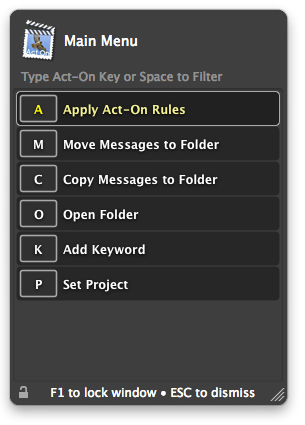
  You still have the option to press either a shortcut key followed by
  a keystroke or Control at the same time as a keystroke. The default
  shortcut key (which is still user-adjustable) has changed to F2;
  when you press it, a menu appears, showing all your defined
  keystrokes. If you then hit one of those keys, it does what you
  expect. However, you can instead press F1 and get an all-purpose
  menu. In this menu, you can press A to run one of your existing
  keystroke-based rules, M to move a message, or C to copy a message
  (among other options). After pressing M or C, you can then navigate
  to any mailbox in Mail, even if you never defined a rule for it. For
  example, I might press F1 (to display the menu), then M to say I
  want to move a message, then spacebar to say I want to search for a
  mailbox, and finally a few characters of the mailbox's name. When I
  find a match (using the arrow keys if necessary), I just press
  Return.

<http://www.tidbits.com/resources/2008-10/ActOnScreenshot1.png>

  That may sound like a lot of key presses, but they all happen in
  about 2 seconds, and once you've done them a few times to get the
  hang of them, the process becomes automatic. It's very cool: with
  about half a dozen keystrokes, I can move or copy a message to any
  of dozens or hundreds of mailboxes without knowing where it is,
  without any advance preparation, and - crucially for me - without
  taking my hands off the keyboard. And, once I've moved a message
  into a mailbox, Mail Act-On remembers that as a recent destination
  and in the future, lets me get to it with fewer keystrokes (in a
  manner somewhat reminiscent of LaunchBar).

  Besides the F1 and F2 shortcuts, there's also F3, which displays a
  similar menu - this one just for moving messages (thus saving you
  one keystroke from the F1 method). You can also lock any of these
  menus open on screen; this enables you to perform a series of Mail
  Act-On actions in one swoop, rather than continually dismissing and
  redisplaying the menus.


**Other Features** -- The new version of Mail Act-On can also undo
  keystroke rules. I've wished for this capability many times, after
  accidentally hitting the wrong key (but not knowing which one I
  hit), sending messages into an unknown folder somewhere.

  If you also have Indev's popular MailTags plug-in, which adds
  searchable keywords, due dates, and other metadata to Mail messages,
  Mail Act-On inherits some additional capabilities. You can have a
  rule assign keywords, for example (and that includes outbox rules);
  you can also press K after displaying the F1 menu to add keywords
  manually, or press P to assign the message to a project (essentially
  a category). Indev says MailTags integration comes by way of a new
  extensible architecture that could enable other developers to add
  their own features, though I have not yet seen any further details
  on how this works.

<http://www.indev.ca/MailTags.html>

  Last but not least, Mail Act-On 2 has added a new feature that many
  long-time users are sure to be less than excited about: a price!
  Previously the program was freeware, but now it's shareware (a
  21-day free trial is available). The introductory price is $19.95
  (expected to increase to $24.95 at some point in the future). Given
  how much more productive Mail Act-On has made me - and the fact that
  I've had free use of it for several years - I think that price is
  more than fair.

  Mail Act-On 2.0.1 runs only on Mac OS X 10.5 Leopard, and is a 2.3
  MB download. Version 1.3.2, which runs only on Mac OS X 10.3 and
  10.4 (and has none of the groovy new features) remains available as
  a free 911K download.


Take Control News: Make the Most of MobileMe
--------------------------------------------
  by Adam C. Engst <[EMAIL PROTECTED]>
  article link: <http://db.tidbits.com/article/9828>

  MobileMe has become a virtual Swiss Army knife of online services,
  offering not only a whizzy new "push" data syncing service for
  tracking calendar, contact, and bookmark info on a variety of
  devices, but also email services, online storage and file sharing,
  Web hosting, and much more. To help you make the most of your
  $99-per-year MobileMe subscription, we've just released the 112-page
  "Take Control of MobileMe," by Joe Kissell.

<http://www.takecontrolbooks.com/mobileme.html?14@@!pt=TB951>

  Joe starts out by helping you understand MobileMe's features and get
  set up, and then he dives into the details of real-life projects. In
  particular, he focuses on syncing - what to expect, what kinds of
  data besides calendar and contact information can sync, handling
  problems, and more. The ebook also examines:

* Various ways to use an iDisk for storing and sharing files

* Accessing and updating calendar and contact data on the MobileMe
  site

* Using the Gallery feature (alone or via iLife '08) to publish photos
  and movies

* Publishing a Web site to MobileMe's servers

* Enabling Back to My Mac in order to access one of your Macs from
  another

* Using MobileMe email, via its Web interface, Apple Mail, and an
  iPhone or iPod touch

  You'll also learn what Backup, Apple's free backup software that
  comes with MobileMe, can and can't do, and get advice on whether
  it's a good choice for you, especially when compared with Leopard's
  Time Machine.

  This ebook is effectively the third edition of "Take Control of
  .Mac," and if you own that ebook you should already have received an
  email message with a free download link or a discount, depending on
  when you purchased it. If our mail didn't arrive, open the PDF of
  the latest version of that ebook and click the Check for Updates
  link on the cover to learn more.

  Also, we've just updated Glenn Fleishman's "Take Control of Back to
  My Mac" to version 1.1. It's a free update for anyone who already
  owns it; click your Check for Updates link in that book. If you
  don't own it, you can buy it together with "Take Control of
  MobileMe" at a discount.


TidBITS Watchlist: Notable Software Updates for 27-Oct-08
---------------------------------------------------------
  by Doug McLean <[EMAIL PROTECTED]>
  article link: <http://db.tidbits.com/article/9824>

* iPhoto 7.1.5 from Apple is a minor update that "improves the
  printing quality of books, cards and calendars ordered via the
  iPhoto printing service." It's available via Software Update or as a
  standalone download. (Free update, 9 MB)

<http://www.apple.com/support/downloads/iphoto715.html>

* BBEdit 9.0.2 from Bare Bones Software is a maintenance update to the
  recently released text editor, adding a slew of minor bug fixes as
  well as a few small feature enhancements. The full, and lengthy,
  list of repairs is worth looking through to see if any issues you've
  encountered have been resolved, though the fixes are extremely
  specific. The two primary additions are a language selector in the
  Scratchpad to enable proper syntax coloring and refined capabilities
  for the Use Selection for Find command. ($125 new, free update, 15.4
  MB)

<http://www.barebones.com/products/bbedit/>
<http://www.barebones.com/support/bbedit/current_notes.html>

* Lightroom 2.1 from Adobe is the latest update to the popular photo
  management software, adding improved Photoshop integration, enhanced
  performance under Leopard, keyword migration capabilities,
  compatibility with several raw file formats (see the update for
  Adobe Camera Raw 5.1, below), and several bug fixes. ($299 new, free
  update, 33.9 MB)

<http://www.adobe.com/downloads/updates/>
<http://www.adobe.com/special/photoshop/Lightroom_21_ReadMe.pdf>

* Adobe Camera Raw 5.1 updates the Photoshop plug-in with raw file
  support for 15 new digital cameras including the Nikon D90, Nikon
  D700, Canon EOS 50D and the Canon EOS 1000D. Adobe has also released
  a new set of Digital Negative (DNG) camera profiles, available on
  Adobe Labs, that offer improved raw processing and color-rendering
  emulation. Additionally, Adobe recently released Camera Raw 4.6 with
  the same raw file support for Photoshop CS3 users. (Free update, 8.4
  MB for ACR 5.1; 14.9 MB for ACR 4.6)

<http://www.adobe.com/downloads/updates/>
<http://www.adobe.com/support/downloads/detail.jsp?ftpID=4059>
<http://labs.adobe.com/wiki/index.php/DNG_Profiles>
<http://www.adobe.com/support/downloads/detail.jsp?ftpID=4033>

* DiscLabel 5.3 from SmileOnMyMac is the latest version of the CD and
  DVD label design software. Changes include added support for
  Aperture imports, Blu-ray disc packaging design elements, the
  capability to select from multiple iPhoto libraries when importing,
  and various unspecified bug fixes. ($35.95 new, free update, 12.7
  MB)

<http://www.smileonmymac.com/DiscLabel/>

* Cocktail 4.2 (Leopard Edition) from Maintain is a significant update
  to the general purpose maintenance utility. New to this version is
  the capability to search and delete corrupted preference files, a
  searchable database of Mac OS system error codes, a list of commonly
  used network ports, an enhanced procedure for clearing log files, a
  handful of interface updates, and fixes for various unspecified
  bugs. ($14.95, 1.8 MB)

<http://cocktail.maintain.se/>

* AirPort Extreme Update 2008-004 from Apple "resolves some issues
  with AirPort connections when roaming in large Wi-Fi networks." It's
  only for Intel-based Macs, and currently appears only via Software
  Update. Apple released AirPort Extreme Update 2008-003 early last
  week but pulled it soon after, so this version presumably corrects a
  problem introduced in that phantom update. An Apple support article
  also describes it as the solution to a problem with being unable to
  turn AirPort on after turning it off and restarting. (Free, 2.2 MB)

<http://support.apple.com/kb/TS2416>

* Aperture 2.1.2 from Apple is a minor update to the photo management
  software that enhances the print quality of books ordered through
  the Aperture printing service. The update is available via Software
  Update or as a standalone download and cannot be used for Aperture
  trial software; you must own the full version of Aperture 2 to
  update. ($199 new, free update, 48 MB)

<http://www.apple.com/support/downloads/aperture212.html>

* InDesign CS3 5.0.4 Update from Adobe addresses compatibility issues
  in the page layout program with the recently released Creative Suite
  4. According to Adobe's Web site, the InDesign CS3 5.0.4 Update
  contains fixes regarding "CS4 to CS3 Export to INX (Save Back)
  workflows... File Size, Hyphenation, Performance, Anchored Objects,
  Character Alignment, Step and Repeat, Indexing and Table of
  Contents, Text and Fonts, Dictionaries, Color, Scripting,
  Import/Export Graphics, InDesign Interchange files (INX), XML,
  Library files, Printing, and others." The installer also includes
  the fixes from all previous InDesign CS3 5.0.x updates - which are
  no longer separately available. A list of issues that have been
  resolved with the update can be downloaded from Adobe's site as a
  PDF. (Free, 71.7 MB)

<http://www.adobe.com/support/downloads/detail.jsp?ftpID=4029>
<http://www.adobe.com/support/documentation/en/indesign_incopy/releasenotes.html>

* InCopy 5.0.4 Update includes fixes for Adobe's little-known word
  processor regarding "Notes, Tagging, Character Alignment, Undo and
  Redo, Text and Fonts, Dictionaries, Import/Export Graphics, and
  others," to quote again from Adobe's Web site. Like the InDesign
  update, the installer also includes the fixes from all previous
  InCopy CS3 5.0.x updates. You can download a list of issues that
  have been resolved with this update from Adobe's Web site as a PDF.
  (Free, 69.9 MB)

<http://www.adobe.com/support/downloads/detail.jsp?ftpID=4031>
<http://www.adobe.com/support/documentation/en/indesign_incopy/releasenotes.html>

* Suitcase Fusion 2.0 from Extensis is a major update to the popular
  font management utility. With a redesigned user interface and new
  back end based on Universal Type Server architecture, Suitcase
  Fusion 2.0 offers improved performance and stability. Changes
  include Leopard-compatible auto-activation plug-ins for Illustrator
  CS4, InDesign CS4, and QuarkXPress 8; a character palette with Glyph
  Preview capabilities; plug-in-based font matching features; multiple
  font preview capabilities for comparing type faces; a new core
  application that runs in the background to offer uninterrupted font
  management when Suitcase is not active; font organization tools such
  as auto-classification and Smart Sets; a font search engine, and
  more. Suitcase Fusion 2.0 requires Mac OS X 10.5 Leopard. ($99.95
  new, $49.98 upgrade, 31.3 MB)

<http://www.extensis.com/en/products/suitcasefusion2/>
<http://www.extensis.com/en/products/suitcasefusion2/features.jsp>


Hot Topics in TidBITS Talk/27-Oct-08
------------------------------------
  by Jeff Carlson <[EMAIL PROTECTED]>
  article link: <http://db.tidbits.com/article/9830>

**Mail Act-On 2 Supercharges Mail Rules** -- It's becoming clear that
  some of the best innovation in Mail is coming from developers
  outside Apple. (2 messages)

<http://emperor.tidbits.com/TidBITS/Talk/2264>


**Autocorrect in Word 2008: where?** The location of Word's
  autocorrect dictionary is discovered. 4 messages)

<http://emperor.tidbits.com/TidBITS/Talk/2265>


**Bizarre Mail icons behavior** -- The toolbar icons in Mail disappear
  for an unexplained reason and then return. Which button is
  triggering that action? 6 messages)

<http://emperor.tidbits.com/TidBITS/Talk/2266>


**Tablet iPod Rumored on Weak Evidence** -- Given the prices of the
  iPhone, iPod touch, and MacBook, are we likely to see an affordable
  Apple tablet device that fits a size between handheld and laptop? 1
  message)

<http://emperor.tidbits.com/TidBITS/Talk/2267>


**Importing Video from a FireWire Camcorder to an Aluminum MacBook**
  -- A reader explains why using an analog-to-digital converter may
  not be a good solution. 3 messages)

<http://emperor.tidbits.com/TidBITS/Talk/2268>


$$

This is TidBITS, a free weekly technology newsletter providing timely
news, insightful analysis, and in-depth reviews to the Macintosh and
Internet communities. Feel free to forward to friends; better still,
please ask them to subscribe!

Non-profit, non-commercial publications and Web sites may reprint or
link to articles if full credit is given. Others please contact us. We
do not guarantee accuracy of articles. Caveat lector. Publication,
product, and company names may be registered trademarks of their
companies. TidBITS ISSN 1090-7017.

Copyright 2008 TidBITS: Reuse governed by Creative Commons license.

Contact us at:    <[EMAIL PROTECTED]>
TidBITS Web site: <http://www.tidbits.com/>
License terms:    <http://www.tidbits.com/terms/>
Full text search: <http://www.tidbits.com/search/>
Subscriptions:    <http://www.tidbits.com/about/list.html>
Account help:     <http://www.tidbits.com/about/account-help.html>


--
If you want to unsubscribe or change your address, use this link
http://emperor.tidbits.com/webx?unsub@@.3c557dc4!u=306a67f9