TidBITS#961/19-Jan-09
=====================
  Issue link: <http://db.tidbits.com/issue/961>
  Macworld may be over, but Jeff Carlson still has photography news to
  share from the show, and Glenn Fleishman offers our take on the saga
  surrounding Steve Jobs's medical leave from Apple. Rich Mogull looks
  at the new Safari RSS security vulnerability, Adam discusses his
  major transition from Now Up-to-Date to iCal and BusySync, and Jeff
  Greenberg joins us with a review of the Power Slider for iPhone 3G
  battery case. We also pass along news of a program that keeps Macs
  awake when playing video, the arrival of the Talking Moose on
  Twitter, and a request from Adam for Tristan's 10th birthday. This
  week the TidBITS Watchlist covers the releases of Script Debugger
  4.5.2 and Cyberduck 3.1.

Articles
    Steve Jobs Takes Medical Leave Until June
    Protect Yourself From the Safari RSS Vulnerability
    A Request for Tristan's 10th Birthday
    Talking Moose Joins Twitter
    Caffeine Helps Video-Playing Macs Stay Awake
    Macworld Expo 2009 for Photographers
    Converting from Now Up-to-Date to iCal and BusySync
    Easy Now Up-to-Date to iCal Imports
    Incase Power Slider for iPhone 3G Reviewed
    TidBITS Watchlist: Notable Software Updates for 19-Jan-09
    ExtraBITS for 19-Jan-09
    Hot Topics in TidBITS Talk for 19-Jan-09


------------ This issue of TidBITS sponsored in part by: --------------

* READERS LIKE YOU! Support TidBITS with a contribution today!
  <http://www.tidbits.com/about/support/contributors.html>
  Special thanks this week to Jack Albright, Frank Malinowski,
  Francesca Fairbrother, and Michael Voss for their generous support!

* Fetch Softworks: Fetch 5.3 makes FTP and SFTP easy!
  Upload, download, mirror, and manage your Web site. Dozens of
  new features to make file transfers easier and more reliable.
  Get your free trial version at <http://fetchsoftworks.com/>!

* WebCrossing Neighbors Creates Private Social Networks
  Create a complete social network with your company or group's
  own look. Scalable, extensible and extremely customizable.
  Take a guided tour today <http://www.webcrossing.com/tour>

* Bare Bones Software's BBEdit 9.1 -- A burly upgrade introducing new
  capabilities like Projects, non-modal Find and Multi-File Search,
  editing in browsers, text completion, Scratchpad, new Ruby module,
  better JavaScript, ObjC, Obj-C++, YAML <http://www.barebones.com/>

* MARK/SPACE, INC: If you have a smartphone, we can sync it!
  Sync your address book, calendar, notes, music, pictures, and
  more from your BlackBerry, Windows Mobile or Palm OS mobile
  phone to your Mac. <http://www.markspace.com/bits>

* Microsoft's MacBU: Supporting Mac users with Office 2008.
  Straighten up your Office with the latest updates to Word,
  Excel, PowerPoint, and Entourage. Update today at Mactopia!
  <http://www.microsoft.com/mac/downloads.mspx>

* ConceptDraw Office adds real business power to Microsoft Office
  and Apple's iWork. Whether you need project management, business
  graphics, or mind mapping, it's all easily created on your Mac!
  Buy today for only $499! <http://www.conceptdraw.com/tb>

* MacSpeech Dictate -- unleash the power of your voice with
  award-winning speech recognition solutions for the Mac.
  It's so easy to use - just talk! Now with spelling and
  phrase training. <http://tidbits.com/about/support/macspeech.html>

---------- Help support TidBITS by supporting our sponsors ------------


Steve Jobs Takes Medical Leave Until June
-----------------------------------------
  by Glenn Fleishman <[email protected]>
  article link: <http://db.tidbits.com/article/10004>

  Steve Jobs is taking a medical leave of absence from Apple until
  June 2009, while staying involved in "major strategic decisions,"
  according to a letter sent to company employees, posted on Apple's
  Web site, and distributed as a media advisory. "During the past
  week," Jobs writes, "I have learned that my health-related issues
  are more complex than I originally thought." Chief Operating Officer
  Tim Cook, often cited as a likely successor to Jobs, will handle
  day-to-day company operations.

<http://www.apple.com/pr/library/2009/01/14advisory.html>
<http://www.apple.com/pr/bios/cook.html>

  How did Jobs go from recovering from a cold a few months ago to
  "complex" medical problems necessitating months off? It has been
  gradual.

  First, despite his significant weight loss, Apple said that Jobs was
  "hit with a 'common bug.'" I, like many others, dismissed
  speculation, because - myself a former cancer sufferer - I thought
  the issue personal unless it affected his performance in the role.
  If it were to affect his performance and he wasn't being factual, he
  and the company's board of directors would face questions and
  possibly lawsuits about the disclosure of his health-related issues.

<http://blogs.wsj.com/biztech/2008/06/10/steve-jobss-appearance-grabs-notice-not-just-the-iphone/>

  Then, just before Macworld Expo 2009, Jobs released a public
  statement saying that he was suffering from an unknown malady,
  diagnosed as a hormone imbalance. (See "Jobs Clears the Air on
  Health Issue," 2009-01-05.) No one knew precisely what was wrong, as
  his description was specific but lacked a condition name, but the
  board offered their support for his leadership.

<http://www.apple.com/pr/library/2009/01/05sjletter.html>
<http://db.tidbits.com/article/9979>

  Now, the problem is "more complex," still undisclosed, and
  apparently likely to require months of recovery. Bloggers and
  mainstream media columnists alike have been speculating that Jobs
  has had a recurrence of the pancreatic cancer for which he was
  operated on in 2004, or that a new and serious health condition
  would force him to step down.

  However, many of us who follow Apple have been responding to this
  rampant speculation with "Shut up." Neither I nor most of the Mac
  journalists I know see Jobs as the avatar of all that is right and
  good at Apple, but instead as an effective leader who has made
  largely terrific decisions that thousands upon thousands of Apple
  employees have executed well. Jason Snell excellently countered the
  broad media trend of turning Jobs into Apple's godhead in an
  interview with Advertising Age.

<http://adage.com/mediaworks/article?article_id=133711>

  Listen: We at TidBITS will all be sad if Jobs has a chronically
  debilitating or fatal illness. We'll find it a dark day when he
  takes off the mantle for good as Apple's chief. But the company
  doesn't rise and fall by him.

  Jobs has recruited and forged a large team of executives, engineers,
  and marketers who understand how to make products people want.
  Decisions from Apple don't all originate at the top, despite the way
  the company is commonly viewed. We hear from past and present Apple
  employees that many of Apple's best decisions were made lower down
  and then approved at the top.

  The culture that makes Apple work has been distributed throughout
  the firm. That's probably Jobs's most effective legacy.

  We wish Steve Jobs a swift and complete recovery. And we expect
  Apple to tick along just as usual.


Protect Yourself From the Safari RSS Vulnerability
--------------------------------------------------
  by Rich Mogull <[email protected]>
  article link: <http://db.tidbits.com/article/10003>

  Programmer Brian Mastenbrook revealed on 11-Jan-09 that he has
  discovered a security vulnerability that could allow a malicious Web
  site you visit using Safari to read any file on your system. The
  flaw affects the latest versions of Safari when used in Mac OS X
  10.5 Leopard or Windows, though not in earlier versions of Mac OS X.
  Mastenbrook wrote that he has reported the details to Apple.

<http://brian.mastenbrook.net/display/27>

  The vulnerability apparently could reveal the contents of any file,
  which includes email messages, passwords stored in browser cookies,
  or other documents. We have strong indications that the problem is
  real and you should immediately protect yourself in case malicious
  attackers figure out the vulnerability's full details before Apple
  issues a patch.

  The vulnerability lies in the Safari RSS reader, and according to
  Mastenbrook, you may be affected even if you don't use the reader,
  as long as Safari is set to be your default RSS reader, which it is
  unless you've changed the setting. This likely indicates that the
  problem relates to how Safari handles RSS subscription links or
  feeds, since browsing to those triggers Safari's RSS reader.

  The good news is that it's relatively easy to protect yourself. If
  you are on Windows, just stop using Safari until a fix is released.
  If you are using Mac OS X 10.5 Leopard, follow the updated
  instructions on Mastenbrook's Web site, linked above. Simply
  changing the default RSS reader application in Safari does not
  provide full protection, unfortunately.

  It's always a relief when there is a reasonable workaround to a
  potentially serious security vulnerability, and we won't be
  surprised if Apple patches this vulnerability fairly quickly.


A Request for Tristan's 10th Birthday
-------------------------------------
  by Adam C. Engst <[email protected]>
  article link: <http://db.tidbits.com/article/10011>

  "I feel like I know you." That's among the most common things I hear
  from TidBITS readers I meet in person. Tonya and I have long kept
  TidBITS slightly personal, sharing the major events in our lives so
  readers have a better sense of the people behind all the words. That
  was highly unusual for a technical publication back in the day,
  though much less so now in the age of microblogging via Twitter (see
  "Confessions of a Twitter Convert", 2007-10-09).

<http://db.tidbits.com/article/9228>

  Back when our son Tristan was born in 1999, I asked TidBITS readers
  to send him email describing the world he was born into, focusing on
  topics he wouldn't be able to pick up by reading a history of the
  time. The response was stunning, with hundreds of thoughtful,
  interesting messages from around the globe (see "Please Welcome
  Tristan Mackay Engst", 1999-01-18).

<http://db.tidbits.com/article/5244>

  Through some temporal sleight of hand, Tristan has just turned 10.
  During those years he's metamorphosed into a fully formed kid with
  an abundance of opinions and interests. But although he's aware of
  what's going on in our lives and in the world at large, everything
  he knows is filtered through the lens of being 10. Also, although
  he's pretty well-read on Napoleonic-era naval battles, the history
  of Welsh castles, and the high points of Greek and Roman times, he
  has difficulty identifying the world-changing events of the past
  decade from the constant barrage of news. Particularly with the U.S.
  administration changing this week, it feels as though we could be on
  the cusp of another significant shift in the world.

<http://www.tidbits.com/resources/2009-01/Tristan-2009.jpg>

  So I would once again like to ask a favor of you. The combined
  knowledge and life experience of the TidBITS readership is a vast
  resource, and I'd appreciate it if you would share some of it with
  Tristan by sending him email at [email protected]. (I'm archiving
  everything for when he shows interest in email, and while I may read
  these messages, I won't delete anything other than spam.) Feel free
  to tell him anything you'd like, but if you need some focus,
  consider giving your thoughts about one of the following:

<mailto:[email protected]>

* What sort of world do you live in today? How do you view other
  people, communities, and world events? What is your life like? What
  do you think of our collective future? While many of the basics may
  have stayed the same, there's no question that our lives have
  changed radically over the last 10 years.

* What do you think of Tonya and me - what sort of people are we? Has
  our work made the world a better place in some small way? Tristan's
  view of us will always be colored by our role as parents, and
  hearing what others think of us may help him understand us better
  once he's an adult.

  Thanks for any thoughts you can contribute, and although Tristan
  isn't yet at an age where he can fully appreciate everything that
  he's told, I'm certain that at some point he will be intensely
  grateful to everyone for giving him such an unusual gift. I know I'm
  already grateful for the attention you've given us over the years.


Talking Moose Joins Twitter
---------------------------
  by Adam C. Engst <[email protected]>
  article link: <http://db.tidbits.com/article/10005>

  I make a practice of scanning the names of people who follow me on
  Twitter, just to get a sense of who reads what I write. So I was
  amused to see among them a blast from the past: the Talking Moose.

<http://twitter.com/TalkingMoose>

  For those whose Macintosh experience doesn't extend back to the
  mid-1980s, the Talking Moose was a bit of background software that
  would periodically pop up, in the form of an animated moose
  reminiscent of Bullwinkle, and offer witticisms via the MacinTalk
  speech synthesis software. Created by Steven Halls in 1986, the
  Talking Moose became popular for a few years, thanks in part to
  being distributed with Bob "Dr. Mac" LeVitus's "Stupid Mac Tricks"
  book in 1989 before fading into obscurity. It was resurrected in
  1992 by Uli Kusterer and later brought forward to Mac OS X.

<http://en.wikipedia.org/wiki/Talking_Moose>
<http://www.zathras.de/angelweb/moose.htm>

  If the concept of a wisecracking moose constantly interrupting you
  seems, well, hokey, keep in mind that this was before most computer
  users had access to anything resembling today's Internet and were
  thus in dire need of constant distraction from the existential angst
  of everyday life. The question is, will the Talking Moose's oddball
  sayings stand out from what normally flows through Twitter?


Caffeine Helps Video-Playing Macs Stay Awake
--------------------------------------------
  by Adam C. Engst <[email protected]>
  article link: <http://db.tidbits.com/article/9923>

  Tonya and I were watching The Simpsons (not a habit, but see "The
  Simpsons Takes Aim at Apple", 2008-12-02) on my MacBook via Hulu the
  other night, only to be interrupted by the screensaver kicking in
  every 5 minutes. I could have disabled the screensaver, of course,
  but I didn't want to stop the program, so I just kept touching the
  trackpad every few minutes. How stupid is that?

<http://db.tidbits.com/article/9898>

  That's why I was happy to learn about a free application that solves
  this problem elegantly. Lighthead Software's Caffeine puts a tiny
  coffee cup in your menu bar. Click it and your Mac won't go to
  sleep, dim its screen, or start the screensaver, no matter how you
  have configured the Energy Saver and Desktop & Screen Saver
  preference panes. (Another click turns Caffeine off again.)
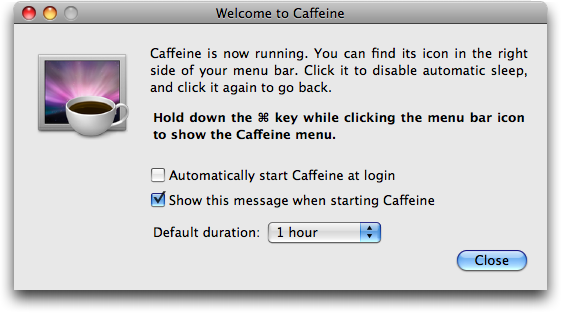
  Command-click the coffee cup to display a menu that lets you access
  preferences and set a duration for Caffeine to work its magic (if
  only that was available for real coffee!). The simple preference
  window lets you add Caffeine to your login items, display the
  preferences on startup, and set a default duration. The duration
  setting is particularly appreciated, since you don't want to drain
  your battery unnecessarily just because you forgot to disable
  Caffeine.

<http://lightheadsw.com/caffeine/>
<http://www.tidbits.com/resources/2008-12/Caffeine.png>

  My suspicion is that most Macintosh-based video-playing applications
  already do exactly what Caffeine does, whereas Web-based media
  players can't access system-level settings like sleep and screen
  dimming. Caffeine will be welcome for anyone using services like
  Hulu, Joost, and Netflix's Watch Instantly feature for Intel-based
  Macs (see "Netflix Starts Deploying Mac-Compatible Media Player",
  2008-11-03). (Note that those services are available only for people
  accessing the Internet from within the United States; a small amount
  of payback comes from the BBC, whose iPlayer will play video only
  within the UK.)

<http://www.hulu.com/>
<http://www.joost.com/>
<http://www.netflix.com/>
<http://db.tidbits.com/article/9832>
<http://www.bbc.co.uk/iplayer/>


Macworld Expo 2009 for Photographers
------------------------------------
  by Jeff Carlson <[email protected]>
  article link: <http://db.tidbits.com/article/10010>

  It could be that I'm now more interested in photography than I have
  been in previous years, but Macworld Expo 2009 seemed to include
  more products and services aimed at photographers than usual. I'm
  not surprised - I see a lot of people carrying DSLR (digital
  single-lens reflex) cameras these days, as prices have come down in
  recent years on gear aimed at enthusiastic amateurs like myself.

  This isn't a comprehensive look at everything photo-related at the
  expo, by any means, but these items caught my eye while walking the
  show floor.


**HDR Imaging** -- Depending on how a scene is lit, it's not uncommon
  to take a photo where you see plenty of detail in one area (such as
  the sky or background) and very little in another (the foreground,
  for example, which can appear underexposed). High dynamic range
  (HDR) image processing combines multiple exposures of the scene to
  produce an image that reveals details from both areas. (For more
  information, see "Photomatix: A Virtual Magic Wand, 2006-10-16.)

<http://db.tidbits.com/article/8711>

  I haven't done much HDR imaging, but a friend recommended I take a
  look at Topaz Adjust ($39.99), a Photoshop plug-in that achieves HDR
  looks from single images as well as multiple photos. He was ready to
  put down money for it until he realized that it works only on
  Intel-based Macs, not his Power Mac G5.

<http://topazlabs.com/topazlabs/03products/topaz_adjust/>

  At the other end of the show, Creaceed was demonstrating Hydra 2
  ($79.95), an HDR program that operates in a standalone version or as
  an Aperture plug-in. In addition to bringing out details in photos,
  it can align images shot handheld (typically you get better results
  when the exposures are taken on a tripod).

<http://www.creaceed.com/hydra/>


**Tiffen Filters** -- Pro photographers use glass filters in front of
  their lenses to affect how their photos will turn out, such as
  compensating for color casts or adding warmth to a cool environment.
  Working with digital, however, it's possible to make those types of
  adjustments during post-processing.

  Tiffen was showing off its Dfx v2 software (from $99.95, depending
  on specific package), which mimics the looks offered by the
  company's massive range of physical filters, film lab processes,
  gels, and special effects.

<http://tiffen.com/dfx_v2_home.html>


**Lowel Lighting** -- Photography is more about light than about the
  camera, a fact that becomes clear once you start to venture into
  lighting your own scenes. Lowel had a bright booth that mostly
  showed off the Lowel Ego ($125), a tabletop light designed to bathe
  objects in soft, manageable light, as opposed to the harsh
  highlights and shadows produced by most on-camera flashes.
  (Depending on your needs, you may also get good results using an
  inexpensive do-it-yourself lightbox.)

<http://www.lowel.com/ego/>
<http://strobist.blogspot.com/2006/07/how-to-diy-10-macro-photo-studio.html>


**Fluid Mask 3** -- This item appeals as much to image editing pros as
  it does to photographers, who are finding that they need to have at
  least some familiarity with Photoshop or other ways of manipulating
  pixels. Vertus was showing off the capabilities of its Fluid Mask 3
  ($149), software for selecting and isolating difficult-to-mask areas
  such as hair, by masking images of _smoke_. It made for an
  impressive demo.

<http://www.vertustech.com/>


**Joby Gorillapod** -- Joby wrapped several of their flexible camera
  tripods around all areas of their booth, demonstrating just how
  versatile the alien-looking Gorillapod can be. Compact and bendable,
  the tripods are easier to lug around than traditional tripods and
  can be secured to almost any surface to help steady a shot. I
  already own the SLR-Zoom model, which supports cameras up to 6.6
  pounds (3 kg), so I was eyeing the Go-Go ($34.95), which is the
  original Gorillapod model outfitted with a suction cup clip that
  could affix to the back of an iPhone or other compact device for
  watching movies on long plane or train trips.

<http://joby.com/products/gorillapod/2>
<http://joby.com/products/gorillapod/gogo/>

  And for when you have to call your art director while out on a
  shoot, Joby was also showing off the Zivio Boom Bluetooth headset,
  which features a retractable boom microphone and a high degree of
  adjustability (a pivoting ear bud and several sizes of earpieces)
  for comfort.

<http://myzivio.com/>


Converting from Now Up-to-Date to iCal and BusySync
---------------------------------------------------
  by Adam C. Engst <[email protected]>
  article link: <http://db.tidbits.com/article/9936>

  One of the liabilities of having worked in the Mac world for nearly
  20 years is the constant need to move both data and basic
  capabilities forward to keep pace with the state of the industry.
  Sometimes, as with Nisus Writer Classic, the move is forced by a
  technological change (the loss of the Classic environment), but in
  other situations, it's harder to find the excuse to make the move.

  That's what happened for us with calendaring. We've used Now
  Software's Now Up-to-Date since the mid-1990s, and it has served us
  well. Although iCal has improved since its release a number of years
  ago, it has always suffered from a basic limitation: you can't share
  calendars in a read-write fashion. That is, if Tonya puts an event
  on her iCal calendar, although I can subscribe to her calendar and
  see that event, I can't reschedule or otherwise change that event.
  (The other limitation, of course, is that you need either a MobileMe
  account or a private server on which to post the shared calendar; we
  have both, but not everyone does.)

  iCal's read-only approach makes no sense for us beyond the most
  basic usage patterns, since many of our events revolve around shared
  topics, such as Tristan, TidBITS, or specific Take Control book
  projects. If Tonya were to put an event on her calendar for
  Tristan's fencing lesson, for instance, and the time changed, I'd
  have to ask her to change the time or go do it myself on her Mac.
  This is yet another case of Apple's sharing myopia - for Apple,
  sharing is too often a look-but-don't-touch affair (think of iPhoto
  and iTunes if you don't believe me). That's not how we teach
  children to share, and I think it's unnecessarily limiting in the
  computer world as well.


**Choosing an Alternative** -- Although Now Up-to-Date kept working
  through some lean years during the Mac OS X transition, and although
  Now Software revitalized the product with version 5.0, the code base
  was old, so the company has been working on a complete rewrite
  codenamed Nighthawk. Nighthawk may ship soon, but the wait has been
  awfully long. We considered other calendaring programs but settled
  on iCal to take advantage of some of the other integration between
  iCal and the iPhone/iPod touch, and with applications like the to-do
  program Things. It's another case where it eventually proved too
  hard to avoid Apple's solution, despite its remaining warts.

<http://www.nowsoftware.com/products/nudc5/learn.asp>
<http://www.nowsoftware.com/nighthawkSubsite/>
<http://culturedcode.com/things/>

  Our other need was to be able to share calendars not just with each
  other, but also with the many people with whom we work on TidBITS
  and Take Control. The program that makes the kind of sharing we want
  possible is BusySync, from BusyMac. BusySync is a clever utility
  that synchronizes iCal calendars with other Macs on a local network,
  with Macs out on the Internet (if you have a static IP address), and
  with Google Calendar. With BusySync, Tonya and I don't have to have
  read-only views of each other's calendars; instead, we can actually
  share specific calendars. Any event Tonya creates, I can edit if
  necessary, and vice versa.

<http://www.busymac.com/>

  Where BusySync gets even more interesting is with its capability to
  publish and subscribe to Google Calendar. With it, I can publish our
  Home calendar up to Google Calendar and share it with our assistant.
  Her copy of BusySync is set to subscribe to our Home calendar, so
  she can see when we have free time for an appointment, make the
  appointment for us, and put the event on the Home calendar in her
  copy of iCal. As soon as she does that, her copy of BusySync syncs
  her changes up to Google Calendar, and then a copy of BusySync here
  syncs them down to our copies of iCal. It's really very slick, and
  provides exactly the read-write sharing that iCal's normal
  publishing to MobileMe doesn't.

<http://www.google.com/calendar/>

  Of course, in between when we started this transition and when I
  wrote this article, Google officially released its CalDAV support,
  which enables read-write sharing of calendars between iCal and
  Google Calendar. Doug McLean looked at Google's Calaboration program
  and wrote about it in "Google Calendar Gains Official CalDAV
  Support" (2008-12-03). I haven't tried Calaboration myself, since it
  lacks a number of features we have now with BusySync, most notably
  read-write synchronization of calendars on our iPhone and iPod
  touch. (For a more detailed comparison, see BusyMac's comparison
  chart.)

<http://db.tidbits.com/article/9900>
<http://blog.busymac.com/blog/2008/12/google-caldav-versus-busysync.html>

  I did run into a few minor and unreproducible quirks when setting up
  BusySync initially, but John Chaffee of BusyMac was highly
  responsive, thanks in part to a clever capability built into
  BusySync that bundles up relevant logs and attaches them to an email
  message to their support address.


**Sync Carefully** -- With power comes responsibility. Since BusySync
  lets anyone both publish and subscribe, you need to be careful that
  you set a single Mac as the primary publisher, and have everyone
  else subscribe to the correct published calendar. Although BusySync
  has checks in place to prevent duplication (so you can't subscribe
  to the same calendar locally and via Google Calendar, for instance),
  I have a feeling that wanton publishing and subscribing from
  multiple Macs is a recipe for confusion.

  Similarly, you have to be careful with adding attendees to events,
  since iCal happily notifies them via email of the event, including
  the event as an attachment in the email. And by default, Mail and
  iCal collaborate such that Mail automatically puts received events
  into iCal (see "Configure Mail to Prevent iCal Spam" by Jeff
  Carlson, 2008-04-10). So, if I create an event that Tonya needs to
  know about and add her as an attendee, she must avoid adding that
  event from Mail to iCal, or otherwise it becomes a duplicate that
  her copy of BusySync immediately shares back with me. The solution
  here seems to be to turn off the Automatically Retrieve Invitations
  from Mail setting in iCal's Advanced preferences.

<http://db.tidbits.com/article/9561>

  A corollary is that you want to think carefully about which Mac
  should be the primary publisher. Consider for instance, our Home
  calendar. I publish it from our always-on Power Mac G5 server over
  the local network for all of our other Macs to subscribe to locally,
  and that G5 also publishes it to Google Calendar for our assistant.
  If I instead used my MacBook as the primary publisher and conduit,
  Tonya and our assistant wouldn't be able to sync events in that
  calendar while I was travelling. Those changes would sync as soon as
  I came home and completed the synchronization circuit, but that's
  not ideal. If you travel a lot, it might make the most sense to have
  Google Calendar be the primary publisher, since that way you can
  sync whenever you have an Internet connection. Be careful with
  Google Calendar and time zones, since we've run into as-yet-unsolved
  problems with some events changing times when synced with people in
  other time zones.

  Besides, changing which Mac is the primary publisher (which we did
  recently after the Power Mac G5 changed from being my personal
  desktop Mac to being our internal file server), is tricky. I believe
  it's best done by backing up iCal on the publishing Mac, breaking
  down all the rest of the sharing, setting up iCal on the new Mac
  with the backup, and setting everything up again from scratch. It's
  also good to stop publishing to Google Calendar, delete the
  calendars already published to Google Calendar before the
  transition, publish the calendars from the new Mac to Google
  Calendar again, and then share those again within Google Calendar.
  Those subscribed to your Google Calendar via BusySync will need to
  subscribe again to the newly published calendars. In short, save
  yourself some effort and set up BusySync as the publisher on the
  correct Mac to start.

  Luckily, all this is made safer by the fact that BusySync
  automatically backs up iCal every day and retains 10 days of backups
  in ~/Library/Application Support/BusySync/Backups.


**Doing the Export/Import Dance** -- Some people are happy to break
  from the past and move to a new system without bothering to migrate
  old data forward. That's not our style, so I put some effort into
  figuring out how to import our years of calendar information from
  Now Up-to-Date into iCal. The process was not straightforward at the
  time. There's now a utility that will do all this for you (see "Easy
  Now Up-to-Date to iCal Imports", 2009-01-04), but I'm leaving this
  information here in case it's of use in similar situations.

<http://db.tidbits.com/article/9975>

  Now Up-to-Date knows how to export events to tab-delimited text
  files, which would seem to be an entirely reasonable approach.
  However, iCal, for reasons known only to Apple, can import only from
  another iCal file, from Microsoft Entourage, or from a vCal file.
  According to Wikipedia, vCal is an open-source calendar format for
  the Vision personal information management program, and not to be
  confused with vCalendar, a more well-known standard for calendar
  data exchange that has since morphed into the iCalendar format.
  Putting this all together, I suspect that what iCal considers a
  "vCal" file is actually a vCalendar file, or in the modern world, an
  iCalendar file (which is in turn sometimes known as an "iCal file" -
  augh!).

<http://en.wikipedia.org/wiki/vCal>
<http://en.wikipedia.org/wiki/vCalendar#vCalendar_1.0>
<http://en.wikipedia.org/wiki/iCalendar>

  Regardless of all the possible meanings of "vCal," the best way I
  was able to find to convert Now Up-to-Date's exported text file into
  vCal format was by importing it into Palm Desktop 4.2.1, which I
  happened to have on my Mac from years ago when I last used a Palm
  device. The program is hard to find on Palm's servers, but this link
  will download it if you need it.

<http://www.palm.com/us/software/desktop/mac.html>
<http://palmone.r3h.net/downloads.palmone.com/PalmDesktopMac421Revd.dmg>

  Once all the data was in Palm Desktop, it was easy to export it in
  vCal format, and import into iCal. However, it took me a number of
  tries to get it right, for reasons I didn't anticipate initially.

* Now Up-to-Date has an export format for Palm Desktop, so I figured
  I'd choose that. It worked, but didn't include things like the
  description field. After some fiddling, I realized that Palm Desktop
  had an option to import a text file exported from Now Up-to-Date
  that did include more fields. So the trick was to avoid the Palm
  Desktop-specific _export_ option in Now Up-to-Date and use the Now
  Up-to-Date-specific _import_ option in Palm Desktop.

* Now Up-to-Date's concept of categories matches iCal's concept of
  calendars, so it made sense to export certain categories from Now
  Up-to-Date separately, so they could be imported into different iCal
  calendars. I separated out birthdays and anniversaries and TidBITS
  events, and then lumped all the rest of the events into an iCal
  calendar called Historical.

* Repeating events, such as birthdays and reminders to take out the
  recycling, were a problem, since Now Up-to-Date simply exported a
  normal event for each repetition, there being no way to indicate
  that an event was to repeat. I resolved this by opening the exports
  (which were text files, remember) in BBEdit and using its Process
  Lines Containing feature to find and delete unnecessary events.
  After importing into iCal, I had to turn all the birthdays back into
  yearly repeating events manually.

* For reasons I still don't understand, iCal made some mistakes on
  importing, automatically making some random events repeat, causing
  some events to become multi-day events, and so on. I had to fix all
  these spurious events manually. It's possible that my mistake was in
  importing into the Tiger version of iCal on the Power Mac G5, rather
  than the Leopard version on my MacBook - I simply didn't think of
  that until it was too late.

  In the end, I created a number of different calendars in iCal:

* Home: For personal events, to be shared with our assistant and my
  father, since we often coordinate working together on firewood,
  garden stuff, and the like.

* Holidays: This is actually a group of calendars, one for the
  birthdays of friends, several for the birthdays of the different
  sides of our extended family (for use with iPhoto when making
  calendars for specific people), and an edited calendar of U.S.
  holidays that I also use for the iPhoto calendars.

* TidBITS: TidBITS-specific events and tasks, to be shared with
  TidBITS staff and translators who might want to see our rough
  editorial schedule.

* Take Control: This too is a group of calendars, one for each ebook
  that has activity. The goal here is to share each book's calendar
  with the author and editor, so they can see our publishing schedule.

* Historical: This calendar holds all the miscellaneous events from
  Now Up-to-Date that we might want to refer to in the future. Its
  events run from the early 1990s through October 2008, and it can be
  turned off entirely to speed up searches.


**iCal Annoyances** -- Although BusySync eliminates the primary
  problem with iCal, I'm still not particularly impressed with iCal,
  even in comparison to the ancient Now Up-to-Date. Plus, since I used
  both the Tiger and Leopard versions simultaneously for a while, I'm
  a bit irritated that I prefer aspects of the Tiger version.

  The main thing I don't like about iCal is that although you can set
  the color for each calendar (which uses it for the text color for
  each event in the calendar), iCal desaturates those colors, making
  them almost pastel. It does this so it can indicate selected events
  by making their colors more vivid. The end result is that it's more
  difficult to read most of the text than is necessary, and the whole
  thing looks a bit like an Easter egg display. On my MacBook screen,
  this is particularly troubling at certain screen angles. I've looked
  on the Internet for solutions to this, and found none, although I've
  seen complaints from people who are color-blind and can barely see
  the pastels at all.

  Similarly, although iCal has a keyboard shortcut to select the
  current day (Command-T), it indicates the selected day in Month view
  (my preference) with such a light color that I can barely see it.
  Again, this is somewhat dependent on the particular monitor and
  screen angle, but there's no way to change the color within iCal.

  Creating events in iCal's month view is easy; just double-click the
  day to make a new event in the selected calendar (in day and week
  views, just drag from the start to the end times). In the Tiger
  version, you have to tab through the month/day/year for the From and
  To lines, before you can get to the time. The Leopard version jumps
  over the dates automatically, assuming they're correct, and if you
  do want to enter dates in the Leopard version, you can use the / to
  move from field to field. That's better, although I still find it
  clumsier than in Now Up-to-Date.

  However, the Tiger version displays event details in a drawer,
  whereas the Leopard version instead shows a pop-up balloon. The
  problem comes when you want to edit an event, since in the Tiger
  version, you can just select it and change the details in the
  drawer. In the Leopard version, you must double-click the event to
  display the pop-up balloon with the event details, then you must
  click the pop-up's Edit button, and only then can you make your
  changes. A tip: if you want to change only the event's title,
  Option-double-click it to edit directly. You can select an event and
  press Command-E to edit it directly (thanks to Chris Pepper for
  pointing this out!), but weirdly, you press Escape to accept your
  changes; Escape normally cancels changes in a dialog. From a
  usability standpoint, editing events in Leopard's iCal is a distinct
  step backwards. We can only hope that Apple improves the iCal user
  experience in Snow Leopard.


**Moving On** -- Despite the non-trivial amount of effort that went
  into moving many years of events from Now Up-to-Date to iCal and
  setting up BusySync to make up for iCal's shortcomings, the end
  result is worth it. Tonya and I can share calendar information with
  each other and with the people with whom we work, and we can sync
  events seamlessly back and forth with our iPhone and iPod touch. And
  equally important, now that we're using Apple's recommended
  solution, we'll be able to take advantage of the numerous add-ons
  and utilities for working with iCal data.


Easy Now Up-to-Date to iCal Imports
-----------------------------------
  by Adam C. Engst <[email protected]>
  article link: <http://db.tidbits.com/article/9975>

  John Chaffee of BusyMac, makers of the BusySync utility for
  synchronizing iCal events among multiple Macs, has solved the
  problem of importing events from Now Up-to-Date to iCal, something
  that took me quite some effort when I made the switch to iCal
  recently.

  As I wrote in "Converting from Now Up-to-Date to iCal and BusySync"
  (2008-12-12), the conversion process previously required exporting
  to text, editing the text file in BBEdit, importing into Palm
  Desktop, exporting again in vCal format, and then importing into
  iCal. My approach worked, but was time-consuming and finicky.

<http://db.tidbits.com/article/9936>

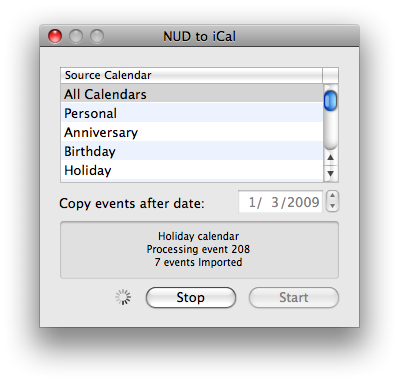
  John solved the problem with a small utility that uses AppleScript
  to transfer events from Now Up-to-Date to iCal. In my testing, his
  free NUD to iCal program did a fine job of moving events between the
  programs, converting Now Up-to-Date categories into iCal calendars.
  NUD to iCal also remaps Now Up-to-Date event types to the
  appropriate iCal calendars.

<http://blog.busymac.com/blog/2009/01/transferring-calendar-events-from-now-uptodate-to-ical.html>

  When I tested John's first beta of NUD to iCal, the import process
  took far too long due to repeating events in Now Up-to-Date. Since
  they can't be transferred to repeating events in iCal, that first
  beta tried to transfer each one as a separate event, and with 20 to
  50 repetitions of each birthday and holiday in my calendar, the
  number of events to transfer was insanely high. John worked around
  that problem in the second beta by transferring only the first
  instance of each repeating event, radically improving performance.

<http://www.tidbits.com/resources/2009-01/NUD-to-iCal.png>

  I suggested to John that he could tag every repeating event with
  [REPEATING] in the title, after which it would be easy to find those
  events in iCal and edit them to repeat properly again. He
  implemented that in the final version, and it works swimmingly. I
  find that it's good to go through repeating events and make sure
  they're worth moving over anyway, so the extra effort of making them
  repeat isn't problematic.

  NUD to iCal is free, and it's a tiny 80K download. If you're
  considering a move from Now Up-to-Date to iCal, it's essential.


Incase Power Slider for iPhone 3G Reviewed
------------------------------------------
  by Jeff I. Greenberg <[email protected]>
  article link: <http://db.tidbits.com/article/9963>

  If you're disappointed in your iPhone 3G's battery life, there's a
  new solution in town - the Incase Power Slider 3G. Let me get this
  out of the way right up front: the Incase Power Slider for iPhone 3G
  provides the battery life the iPhone 3G ought to have had from the
  start.  Sure, it bulks up both the size and weight of the iPhone,
  but all your battery frustrations disappear.

<http://www.goincase.com/products/detail/power-slider-ec20003>

  I'm no more able to resist the Reality Distortion Field than anyone
  else. In fact, I've owned a lot of Apple technology, including a
  Newton, and yes, even an eMate. I like my MacBook Pro, I enjoy my
  iPod, but I love my iPhone. There has been only one time since my
  purchase that I was more than six feet away from it. The
  first-generation iPhone did a decent job with its battery, and when
  the iPhone 3G came out, I upgraded.

  Overall, the iPhone 3G is even better than the first-generation
  iPhone, and I especially appreciate the 3G speed boost over EDGE. In
  fact, I like almost everything about the iPhone 3G more than the
  original iPhone.

  Everything, that is, except for the battery. I think everybody who
  owns an iPhone 3G will agree - the battery life is fair at best.
  Face it, you know you're constantly checking your battery life
  throughout the day, worried that you'll be stuck without enough
  power in the middle of an important call or when you most need to
  check directions via the Maps app.

  If you want your phone to last all day (say 12 or more hours of
  sporadic use), you have to learn how to maximize your battery life.
  I've gotten pretty good at the necessary dance. At home, I use Wi-Fi
  and keep 3G off. When I drive to work, I turn off Wi-Fi and turn on
  3G. I don't bother with Bluetooth, since it drains battery life even
  more. Despite these precautions, if I am going out at night, I have
  to remember to charge the iPhone midday.

  I've been watching the market for external battery packs for the
  iPhone 3G. There's the Backup Battery for iPhone from Richard Solo,
  the 3G Juice, the mophie Juice Pack 3G, FastMac's TruePower iV, and
  now the Incase Power Slider for iPhone 3G. The first two are
  standalone batteries; the other three double as cases.

<http://www.mophie.com/products/juice-pack-iphone-3g>
<http://richardsolo.com/index.asp?PageAction=VIEWPROD&ProdID=264>
<http://www.3gjuice.com/>
<http://fastmac.com/iv.php>

  The Incase Power Slider came out on 28-Nov-08. It was available only
  from Incase's Web site, or from an Apple Store, where I ended up
  purchasing it for $99.95.


**Basics** -- The Power Slider box's design is similar to that of the
  iPhone. Inside is an attractive pouch, a manual, and a USB cable
  that features a standard wide (A-type) USB connector on one end, and
  the smaller (Mini-B) USB connector on the other. This is the same
  sort of cable that comes with most digital cameras, and is what
  you'll use for syncing and charging instead of the iPhone's normal
  dock connector cable.

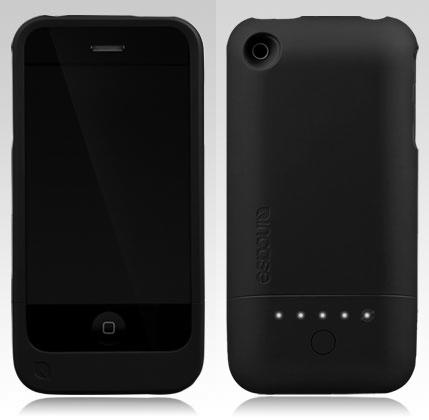
  The case itself comes in two pieces, a top half that fits around the
  phone, and a bottom sliding half that contains the battery
  compartment. At the top of the case there's a cutout for the sleep
  and volume switches and the headset jack. On the back there's a
  cutout for the camera, and holes at the bottom provide access for
  the iPhone's built-in microphone and the case's USB jack.

  The Power Slider fits pretty well around the iPhone, but my fingers
  keep getting drawn to the seam between the two halves. I'm not sure
  if the fit is a little off, or I'm just being picky. A fellow iPhone
  geek agreed that it's likely just a manufacturing glitch.

  The obvious drawback to the Power Slider is that it changes the
  size, weight, and form of my iPhone. By itself, it's 5.1 inches x
  2.6 inches by 0.86 inches (129 mm x 66 mm x 22 mm). It doubles the
  thickness of the phone, making it about the thickness of a Treo. It
  also adds about an inch (25 mm) to the length of the phone and 2.5
  ounces (70 g) to the weight. I'm much more aware of it in my pocket,
  which isn't entirely a bad thing, since before this I've had a
  couple of panic attacks because the iPhone is so light, I forgot it
  was there.

<http://www.tidbits.com/resources/2008-12/Power-Slider-3G.png>

  On the back of the case is a small button. Press it, and up to five
  lights come on to let you know the battery status. If you hold the
  button down for 3 seconds, it preps the phone for syncing when you
  plug in the USB cable. This failed sporadically, such that iTunes
  didn't realize that my iPhone was plugged in. The instructions state
  that you may need to restart iTunes in such situations. I run the
  Growl notification manager, so I was able to see when my Macintosh
  detected that my iPhone was plugged in. Aside from these occasional
  setup problems, syncing via the Power Slider's USB cable worked
  fine.

  Like any battery-driven product, the Power Slider needs to charge
  fully before its first use; a full charge takes about three hours.


**Performance** -- What I didn't anticipate about the Power Slider is
  that it doesn't extend the iPhone's battery life so much as enable
  you to put off using the iPhone's own battery. That's because the
  Power Slider makes the iPhone drain the external battery first, and
  only then fall back on the iPhone's internal battery. Although this
  works fine, it prevents the iPhone from providing any feedback about
  remaining battery life. Nonetheless, this puppy really works.

  I started using the Power Slider at 8 PM. After 24 hours of light to
  moderate iPhone use - about 60 minutes of phone calls, a dozen text
  messages, about an hour of app use, brightness set to medium, email
  on push - the Power Slider's external battery finally ran out. But I
  wasn't dead in the water, since my iPhone was still running happily
  on its internal battery.

  Am I happy with the Power Slider case? Yes, I'm pretty pleased. I've
  now had the Power Slider for two weeks, and it's been great. I'm
  still doing the dance between 3G and Wi-Fi through force of habit,
  but only because I'm still gun-shy about ending up with a powerless
  iPhone. However, I have rediscovered my Jawbone Bluetooth headset,
  which I'd previously abandoned due to poor battery life. I've also
  had some crazy travel days, where I needed to use the iPhone for 18
  or more hours, and the extra battery life kept me sane. I've even
  done what I never would have felt comfortable doing before due to
  battery life concerns - I've ridden in cabs with the GPS running to
  make sure I was heading to the right place.

  Should you buy a Power Slider for your iPhone 3G? If you're
  struggling to make it through the day even with smart power
  management, then absolutely, positively yes. That's especially true
  if you travel a lot and rely heavily on your iPhone to work at all
  times. However, the changes to the iPhone's form factor are
  impossible to ignore, so if you're uncomfortable with a thicker,
  heavier phone, I'd say to look instead at the 3G Juice or Richard
  Solo Backup Battery, both of which can be carried separately from
  the iPhone and attached only if you need the extra power.


  [Jeff I. Greenberg is the Principal Instructor of Future Media
  Concepts, where he teaches film and video solutions from Adobe,
  Apple and Avid. You can find out more about him at his Web site. And
  if you really like, you can follow him on Twitter.]

<http://www.fmctraining.com/>
<http://www.jeffigreenberg.com/>
<http://twitter.com/filmgeek>


TidBITS Watchlist: Notable Software Updates for 19-Jan-09
---------------------------------------------------------
  by Doug McLean <[email protected]>
  article link: <http://db.tidbits.com/article/10008>

  Script Debugger 4.5.2 from Late Night Software is a maintenance
  update to the AppleScript authoring environment. Issues addressed
  include the Scripting Additions window failing when displaying the
  Leopard version of Standard Additions.osax, a series of stability
  bugs with the Dictionary Explorer, a Text Substitution indenting
  problem, and more. For more information on Script Debugger 4.5,
  check out Matt Neuburg's "Script Debugger 4.5 Offers Power Editing
  to AppleScripters" (2008-11-26). ($199 new, free update, 10.7 MB)

<http://www.latenightsw.com/sd4/>
<http://www.latenightsw.com/sd4/releaseNotes.html>
<http://db.tidbits.com/article/9887>


  Cyberduck 3.1 is a significant update to the popular open-source FTP
  client. The new version's biggest addition is native support for
  uploading to Amazon CloudFront (in conjunction with Amazon S3) and
  Cloud Files from Rackspace - two major content distribution
  services. Other updates include pre-configured protocol settings for
  MobileMe iDisk, the capability to send commands over SSH using the
  Send Command function, archive and unarchive capabilities, clickable
  URL fields, and enhanced WebDAV interoperability. A full list of
  changes and enhancements is available on Cyberduck's Web site.
  (Free, 11.1 MB)

<http://cyberduck.ch/>
<http://cyberduck.ch/changelog/>


ExtraBITS for 19-Jan-09
-----------------------
  by TidBITS Staff <[email protected]>
  article link: <http://db.tidbits.com/article/10014>

**Seagate Hard Drive Firmware Bug Makes Disks Unusable** -- Hard drive
  manufacturer Seagate is working on a solution to a firmware problem
  that is rendering many of its high-capacity drives unusable. If
  you've purchased a Seagate Barracuda 7200.11, DiamondMax 22, or
  Barracuda ES.2 SATA model, check to see if your drive is affected
  and learn more about possible fixes. Seagate says data remains
  intact but inaccessible, and is providing recovery services for
  drives that have been bit by the bug. (Posted 2009-01-19)

<http://seagate.custkb.com/seagate/crm/selfservice/search.jsp?DocId=207931>


**Adam Talks about Steve Jobs's Medical Leave on Tech Night Owl Live**
  -- Donning his pundit hat, Adam weighs in on the fuss surrounding
  Steve Jobs's medical leave, taking the stance that it shouldn't
  affect Apple's operations and that the public at large has no right
  to know anything about Jobs's health. (Posted 2009-01-19)

<http://www.techbroadcasting.com/podcasts/nightowl_090115.mp3>


**Watch Adam & Jim Dalrymple Argue on MacVoicesTV** -- If you haven't
  already listened to Adam and Macworld's Jim Dalrymple talk about the
  Macworld Expo keynote in the MacNotables podcast, you can now
  _watch_ them go at it on this MacVoicesTV episode, since Chuck
  Joiner had the whole thing videotaped as well. These aren't your
  average talking heads! (Posted 2009-01-16)

<http://macvoices.tv/macvoicestv-906-macworld-expo-adam-engst-and-jim-dalrymple-unleash-on-keynote-announcements-in-the-podloft/>


**Apple Continues to Develop Eye-to-Eye Video Conferencing** -- About
  a year ago, Joe Kissell wrote "Looking Video Chat Problems in the
  Eye" (2008-01-31) about the problem of making eye contact when
  videoconferencing. A recent patent application from Apple indicates
  they're still searching for a way to enable users to look their
  video chat partners in the eye. (Posted 2009-01-15)

<http://arstechnica.com/journals/apple.ars/2009/01/13/apple-patent-application-shows-isight-behind-notebook-screen>
<http://db.tidbits.com/article/9433>


**Adam Quoted on Jobs Health Issue in Washington Post** -- The money
  quote from my conversation with Mike Musgrove of the Washington Post
  about Steve Jobs's six month medical leave: "I hope and believe
  Apple is a sufficiently grown-up company that a key executive can
  step out from day-to-day operations without impacting it in a big
  way." (Posted 2009-01-15)

<http://www.washingtonpost.com/wp-dyn/content/article/2009/01/14/AR2009011402790.html>


Hot Topics in TidBITS Talk for 19-Jan-09
----------------------------------------
  by Jeff Carlson <[email protected]>
  article link: <http://db.tidbits.com/article/10012>

**Kindle? What Kindle?** Readers hoping for an Apple ebook reader like
  the Amazon Kindle to appear at Macworld Expo were disappointed, but
  with the iPod touch and iPhone, does Apple even need to make one? (2
  messages)

<http://emperor.tidbits.com/TidBITS/Talk/2396>


**January 22nd, 2009 - the 25th Anniversary of the Macintosh** -- Will
  Apple do anything to commemorate the 25th anniversary of introducing
  the Mac? Should we take matters into our own hands? (10 messages)

<http://emperor.tidbits.com/TidBITS/Talk/2398>


**Apple does solicit feedback!** People complain that feedback to
  Apple is like tossing a rock into a deep well, but the company does
  occasionally contact people directly. (7 messages)

<http://emperor.tidbits.com/TidBITS/Talk/2401>


**The Future of Macworld** -- With Apple having exited Macworld Expo,
  what will the show be like? And is there any truth to the rumors
  that Apple might make an appearance at CES, the Consumer Electronics
  Show? (15 messages)

<http://emperor.tidbits.com/TidBITS/Talk/2402>


**Re-Unplugging QuickTime from Safari?** After a recent update to
  Safari, a reader realized that the browser is handling playback of
  QuickTime movies, rather than handing them off to QuickTime Player
  where he prefers to view them. Is there a setting to change this
  behavior? (2 messages)

<http://emperor.tidbits.com/TidBITS/Talk/2405>


**Protect Yourself From the Safari RSS Vulnerability** -- Simply
  switching the default RSS reader setting in Safari is apparently not
  enough to bypass a recent vulnerability. (3 messages)

<http://emperor.tidbits.com/TidBITS/Talk/2406>


$$

This is TidBITS, a free weekly technology newsletter providing timely
news, insightful analysis, and in-depth reviews to the Macintosh and
Internet communities. Feel free to forward to friends; better still,
please ask them to subscribe!

Non-profit, non-commercial publications and Web sites may reprint or
link to articles if full credit is given. Others please contact us. We
do not guarantee accuracy of articles. Caveat lector. Publication,
product, and company names may be registered trademarks of their
companies. TidBITS ISSN 1090-7017.

Copyright 2009 TidBITS: Reuse governed by Creative Commons license.

Contact us at:    <[email protected]>
TidBITS Web site: <http://www.tidbits.com/>
License terms:    <http://www.tidbits.com/terms/>
Full text search: <http://www.tidbits.com/search/>
Subscriptions:    <http://www.tidbits.com/about/list.html>
Account help:     <http://www.tidbits.com/about/account-help.html>


--
If you want to unsubscribe or change your address, use this link
http://emperor.tidbits.com/webx?unsub@@.3c557dc4!u=306a67f9