TidBITS#962/26-Jan-09
=====================
  Issue link: <http://db.tidbits.com/issue/962>
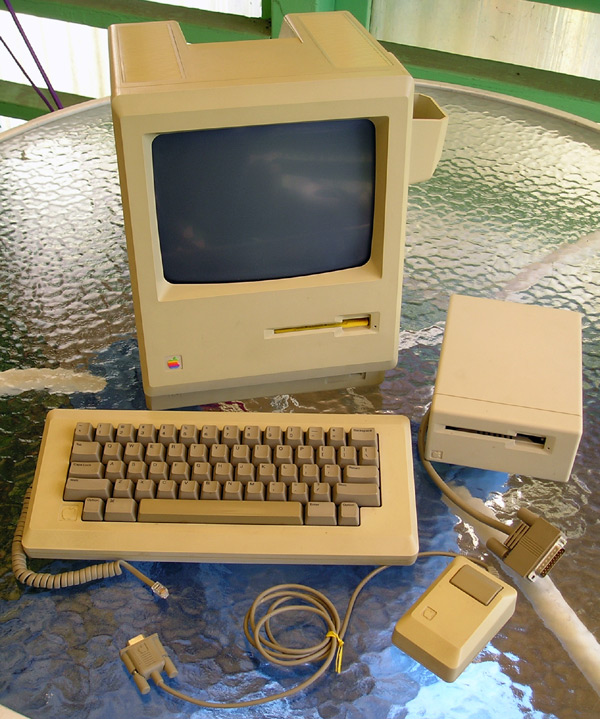
  What was the first Macintosh you owned? The computer for the rest of
  us turned 25, and although Apple isn't marking the occasion, the
  TidBITS staff reminisces (for some, not very far) back to our first
  Macs, and Adam explains his potentially controversial choice for the
  best Mac ever. This week also brings some significant business news,
  starting with Apple's best financial quarter thanks to $10.2 billion
  in revenue. Microsoft, however, announced layoffs - but as Glenn
  Fleishman points out, the numbers may not be as bad as reported.
  Glenn also notes that the SEC may be investigating Apple and Steve
  Jobs over how Jobs's health issues have been disclosed to
  shareholders. In other news, Apple quietly updates the low-end white
  MacBook, Doug McLean roars about Growl, and Adam comments on why
  people affected by malicious Trojans in illegally downloaded copies
  of iWork '09 and Photoshop CS4 really shouldn't be surprised. In the
  TidBITS Watchlist, we note the releases of Default Folder X 4.1.1,
  QuickTime 7.6, Mellel 2.6, and Sandvox 1.5.4.

Articles
    SEC Reportedly Investigates Apple over CEO Health
    Apple Quietly Improves Low-End MacBook
    Apple Posts $10.2 Billion Revenue for Q1 2009
    Microsoft Plans Shift in Business, Thousands of Layoffs
    Yet Another Reason Not to Pirate Software
    Growl Offers System-Wide Notifications
    The Mac Turns 25: Best Mac Ever?
    The Mac Turns 25: Our First Macs
    TidBITS Watchlist: Notable Software Updates for 26-Jan-09
    ExtraBITS for 26-Jan-09
    Hot Topics in TidBITS Talk for 26-Jan-09


------------ This issue of TidBITS sponsored in part by: --------------

* READERS LIKE YOU! Support TidBITS with a contribution today!
  <http://www.tidbits.com/about/support/contributors.html>
  Special thanks this week to Jim Gower, Sara Flemming,
  Paul R. Simmons, and Mike Millard for their generous support!

* GET FETCH 5 FOR FREE! Fetch Softworks makes Fetch, the original
  Macintosh FTP client, free for educational and charitable use.
  Fetch 5.3 includes a new look and Leopard technology support.
  Apply today at <http://fetchsoftworks.com/edapply>!

* WebCrossing Neighbors Creates Private Social Networks
  Create a complete social network with your company or group's
  own look. Scalable, extensible and extremely customizable.
  Take a guided tour today <http://www.webcrossing.com/tour>

* MARK/SPACE, INC: Take it with you! The Missing Sync makes
  it easy to synchronize contacts, calendars, notes, photos
  and more from your Mac to your BlackBerry, Palm OS, or
  Windows Mobile phone. <http://markspace.com/bits>

* VMware Fusion. The most seamless way to run Windows on your Mac.
  Backed by nearly a decade of proven virtualization technology.
  Try VMware Fusion today for free, or order online for only $79.
  Visit: <http://www.tidbits.com/about/support/vmware-fusion.html>

* Microsoft's MacBU: Supporting Mac users with Office 2008.
  Is your Office up-to-date? Make sure you're running the latest
  versions of Word, Excel, PowerPoint, and Entourage by choosing
  Check for Updates from the Help menu of any Office application!

* ConceptDraw Office adds real business power to Microsoft Office
  and Apple's iWork. Whether you need project management, business
  graphics, or mind mapping, it's all easily created on your Mac!
  Buy today for only $499! <http://www.conceptdraw.com/tb>

* It's time to speak up with MacSpeech Dictate! Get the all-new
  MacSpeech Dictate with spelling and phrase training. Speech
  Recognition so good, the only thing it can't do is speak for you.
  Learn more at <http://tidbits.com/about/support/macspeech.html>

---------- Help support TidBITS by supporting our sponsors ------------


SEC Reportedly Investigates Apple over CEO Health
-------------------------------------------------
  by Glenn Fleishman <[email protected]>
  article link: <http://db.tidbits.com/article/10019>

  Before the close of trading on 21-Jan-09, the Wall Street Journal
  reported (using an anonymous source) that the SEC had opened an
  investigation into how Apple had disclosed information related to
  Steve Jobs's health. Jobs, currently on leave from the company
  except for major strategic decisions until June 2009, has made a
  number of brief statements about his health over the last several
  months. (See "Steve Jobs Takes Medical Leave Until June,"
  01-14-2009.)

<http://www.emailthis.clickability.com/et/emailThis?clickMap=viewThis&etMailToID=1775550511&pt=Y>
<http://db.tidbits.com/article/10004>

  Publicly traded companies are required to disclose matters that have
  a material effect on a company's performance, which could include a
  CEO who was unable to perform as expected. The SEC typically only
  discloses their investigations when a settlement is made, fines
  imposed, or prosecution intended.


Apple Quietly Improves Low-End MacBook
--------------------------------------
  by Mark H. Anbinder <[email protected]>
  article link: <http://db.tidbits.com/article/10021>

  The low-end MacBook, the white 13-inch polycarbonate model that
  remained in Apple's laptop lineup at $999 when the company
  introduced a new unibody aluminum model in October 2008 (see
  "Updated MacBook Design Gets Metal and Glass", 2008-10-14), is now
  an even better deal. Without any fanfare, the company has quietly
  begun shipping a revised MacBook that features more memory,
  more-advanced Nvidia graphics, and a faster frontside bus, without
  giving up the low price or the FireWire 400 port that keeps many
  users interested in the model.

<http://db.tidbits.com/article/9813>
<http://www.apple.com/macbook/white/>

  Likely of most interest to prospective buyers will be the
  performance boost the low-end MacBook now gets from the combination
  of the Nvidia GeForce 9400M graphics processor (replacing the Intel
  GMA X3100 GPU of earlier 13-inch MacBooks) that also appears in the
  newer aluminum MacBooks, and a boost in the logic board's frontside
  bus speed from 866 MHz to 1066 MHz. Oddly, the upgraded model also
  loses a little processor speed, dropping from a 2.1 GHz Intel Core 2
  Duo processor to a 2.0 GHz Core 2 Duo. We suspect the net result
  will still be a faster machine.

  At the same time, Apple has increased the $999 model's base memory
  to 2 GB (upgradable to 4 GB), and now offers not only the previously
  available 120 GB, 160 GB, and 250 GB hard drives, but also a 320 GB
  hard drive for $225 more than the base model. The white MacBook
  retains its Mini-DVI port, which supports adapters to DVI or VGA,
  but can't drive Apple's 30-inch Cinema Display, which requires
  dual-link DVI. By comparison, the aluminum MacBook model features
  the newer Mini DisplayPort, supporting DVI, VGA, and dual-link DVI
  with appropriate adapters.

  The FireWire 400 port remains the biggest technical difference
  between the white MacBook (which has one) and the unibody aluminum
  MacBook model (which has none). The absence of a FireWire port from
  the aluminum MacBook model (though the MacBook Pro features a
  backward-compatible FireWire 800 port) was the subject of much
  consternation among users who felt they'd miss FireWire Target Disk
  Mode and compatibility with FireWire-based digital video camcorders,
  FireWire external hard drives, and other devices (see "On the Way
  Out: FireWire and Matte Screens?", 2008-10-18).

<http://db.tidbits.com/article/9818>


Apple Posts $10.2 Billion Revenue for Q1 2009
---------------------------------------------
  by Glenn Fleishman <[email protected]>, Jeff Carlson <[email protected]>
  article link: <http://db.tidbits.com/article/10020>

  Despite the poor state of the economy, Apple has good news for its
  latest quarter of results. The computer company hit $10.2 billion in
  revenue and $1.6 billion in profit, and sold oodles of products: 4.4
  million iPhones, 22.7 million iPods, and 2.5 million Macs in the
  quarter ending 27-Dec-08 (the second highest number in Apple's
  history for Mac sales). Revenue was up slightly over the same
  quarter in 2008, which saw $9.6 billion in revenue (see "Apple Beats
  Earnings Records with Q1 2008 Results," 2008-01-22); sales of Macs
  were up 9 percent in the same period, iPods up 3 percent, and
  iPhones up 88 percent.

<http://www.apple.com/pr/library/2009/01/21results.html>
<http://db.tidbits.com/article/9417>

  The company ended the quarter with about $28 billion in cash, cash
  equivalents, and marketable securities as part of $35 billion in a
  variety of current assets. On the downside of the ledger, Apple owes
  or has to count as a liability about $15 billion in bills to pay,
  expenses they've incurred, or revenue they deferred.

  The numbers above are the official figures using GAAP (Generally
  Accepted Accounting Principles). Apple now also releases a separate
  set of "adjusted sales" and "adjusted net income" reports that deal
  with how they account for revenue from iPhones on a subscription
  basis over two years. The adjusted sales figure was $11.8 billion
  for the quarter, while adjusted net income was $2.3 billion. This is
  a closer representation of actual dollars taken in and net dollars
  retained. This accounting was designed to cushion the flow of
  revenue from the devices and allow zero-cost software upgrades, in
  contrast with the iPod touch, which has its revenue realized when
  sold (which is why major system software updates for the iPod touch
  require a fee).

  With the normal slowing in sales following the holiday quarter,
  Apple is still projecting fairly robust sales of $7.6 to $8 billion
  in the current fiscal quarter.

  Apple said it sold a cumulative total of 13.7 million iPhones in
  2008, and has sold a total of 17 million, which is far ahead of the
  10 million units figure that Apple projected back in 2007. Passing
  10 million units sold seemed unlikely until mid-2008 when Apple
  introduced the iPhone 3G. Apple now sells iPhones in over 70
  countries.

  Despite the high level of sales, which puts Apple up against
  Research in Motion BlackBerry phones in the United States, acting
  company head Tim Cook said during a conference call with analysts,
  "Our objective is not to be the unit-share leader in the industry.
  Our objective is to build the world's best phone."

  Cook also emphasized that there's a bit of buy-in by developers
  writing software for the iPhone. "We approached this as a software
  business," he said, which differentiates the iPhone for third-party
  developers from products like the Android platform used by the
  T-Mobile G1 or the Palm Pre (not yet released).

  Cook also fired a shot across the bow, noting that competition was
  good, but only, "as long as they don't rip off our IP," referring to
  "intellectual property" such as patented ideas. "We will not stand
  for having our IP ripped off and we'll use any weapons we have at
  our disposal," Cook said. While he wouldn't single out any
  particular company, it's possible this was meant as a warning to
  Palm. (The Palm Pre project is run by former Apple hardware
  engineering chief Jon Rubenstein.)

  Apple Stores continue to drive traffic in huge numbers, with 46.7
  million visitors in the last quarter alone, or 14,400 visitors per
  week in each store on average. The company expects to open about 25
  new stores this year adding to 251 stores open in 10 countries
  today.

  Cook was clear on Apple's future in the netbook category, one that's
  been on fire as tiny laptops with decent capabilities have captured
  what Cook said was 3 percent of the PC market. Cook reiterated a
  point made by Steve Jobs in the previous quarter's earnings call
  with some additional detail: netbooks are underpowered and lack the
  quality that Apple wants to put in its devices. "We think the
  products are inferior," Cook said, though he noted that Apple is
  still watching the category.

  Cook offered no new information about Mac OS X 10.6 Snow Leopard,
  which Apple said last year would be available somewhere in the
  middle of 2009.

  Unsurprisingly, the first question of the conference call was about
  Steve Jobs's health: "How is Steve?" Without actually answering the
  question, Cook responded at length, with a fluency that indicated he
  was certainly prepared for the question: "There is an extraordinary
  breadth and depth and tenure among Apple's executive team. And these
  executives lead over 35,000 employees that I would all call wicked
  smart. And that's in all areas of the company: in engineering,
  marketing, operations, sales, and all the rest. And the values of
  the company are extremely well-entrenched. We believe we're on the
  face of the Earth to make great products, and that's not changing."


Microsoft Plans Shift in Business, Thousands of Layoffs
-------------------------------------------------------
  by Glenn Fleishman <[email protected]>
  article link: <http://db.tidbits.com/article/10023>

  As expected, Microsoft announced layoffs last week, a rare event in
  the company's history. The actual scale - 5,000 Microsoft employees
  and as many as 5,000 contractors - seems to have shocked analysts
  and reporters so much that they ignored a few salient facts.

<http://www.nytimes.com/2009/01/23/technology/companies/23soft.html>
<http://blog.seattlepi.nwsource.com/microsoft/archives/160115.asp>

  Microsoft shed 1,500 employees at the time of the announcement and
  plans to lay off 3,500 more over the next 18 months. But, during the
  same period, CEO Steve Ballmer said in a staff memo the company will
  add 2,000 to 3,000 new positions for its new initiatives, many of
  which are focused on cloud computing, applications that run in a
  distributed fashion over the Internet instead of being housed on
  individual personal computers or servers.

<http://blog.seattlepi.nwsource.com/microsoft/archives/160106.asp>

  Even more specifically, insiders are claiming that the majority of
  the first cuts are in the Xbox, Zune, and Windows Mobile divisions
  of the company, according to veteran Microsoft reporter Mary-Jo
  Foley.

<http://blogs.zdnet.com/microsoft/?p=1836>

  We have no word yet at TidBITS as to whether any Macintosh Business
  Unit staff have been let go. The MacBU develops core business and
  communications software for Mac OS X, such as the Office suite.

  It's well known in the Seattle area that Microsoft has a penchant
  for hiring and no talent for firing. Very few people are
  involuntarily separated from the company headquartered in Redmond,
  WA, even after they've committed egregious blunders or exhibited
  total and complete incompetence. (Theft is another matter.)

  As a result, Microsoft employs a lot of people that don't contribute
  directly to the company's bottom line. The areas that Ballmer said
  would be cut were largely support staff: IT, human resources,
  marketing, and so forth, rather than the muscle and sinew of the
  company, its core programming efforts.

  It's never a good day to lose one's job, and one hopes that the most
  competent and able folks will be able to shift within the company to
  the new positions opening up.

  And, by the way, Microsoft made $4.2 billion dollars on $16.6
  billion in revenue in the last quarter, and has $20 billion in the
  bank. These moves are expected to save them $1.5 billion a year in
  expense and $700 million in capital spending.


Yet Another Reason Not to Pirate Software
-----------------------------------------
  by Adam C. Engst <[email protected]>
  article link: <http://db.tidbits.com/article/10033>

  I've been laid up in bed following a hernia repair operation last
  Wednesday (feeling better, thanks!), and while that's undoubtedly
  making me crankier than normal, I'm having trouble mustering any
  sympathy for the people who downloaded pirated copies of iWork '09
  and Photoshop CS4 and had their Macs turned into zombies
  participating in distributed denial of service attacks. Yeah, it
  sucks that those people are going to have to go to some effort to
  wrest back control of their Macs (for safety's sake, I recommend
  absolution of a clean install of Mac OS X and applications, moving
  only documents and settings over) but let's face it, anyone
  downloading this software was trying to get something for nothing.
  Oh, I know, it seems that copying software illegally is a victimless
  crime, but it's now painfully clear that doing so also attaches a
  big "Practices Unsafe Hex!" sign to your back. Perhaps software
  piracy isn't so victimless after all.

<http://www.macworld.com/article/138380/2009/01/iworktrojan.html>
<http://www.macworld.com/article/138432/2009/01/piratedphotoshop.html>

  We've been saying for a long time that responsible computing
  practices include avoiding untrustworthy sites and, especially, not
  downloading software from such sites. For the most part, we were
  thinking about the usual gambling, porn, and get-rich-quick sites
  that attempt to prey on our baser instincts. But with (unverified)
  claims that as many as 20,000 people downloaded the pirated version
  of iWork '09, perhaps we've been remiss in not stating the obvious.
  The kind of people who post pirated software aren't necessarily the
  sort of people you want installing software on your Mac. And that's
  just what you do when you download pirated software - you invite
  someone who's intent on ripping off Apple or Adobe to do what they
  want with your machine.

  So let's not pretend that this Trojan Horse situation is in any way
  a normal security exploit or that people who suffered from it didn't
  know that they were doing something wrong. They may not have known
  that their Macs would be dragooned into a denial of service attack,
  but they certainly knew they were doing something wrong. Not to get
  all preachy, but in this sort of situation, virtue offers not just
  its own reward, but also the reward of keeping your Mac safe from
  unsavory elements.


Growl Offers System-Wide Notifications
--------------------------------------
  by Doug McLean <[email protected]>
  article link: <http://db.tidbits.com/article/10027>

  Multitaskers, which nowadays includes almost everyone, are
  frequently presented with an annoying problem under Mac OS X:
  application notification dialogs popping up and stealing your time
  and mental focus. Granted, sometimes we're interested in the
  information these notifications contain, such as when there's an
  unusual error or a software update becomes available, but often the
  moments and means these notifications choose are not ideal. While
  the time and attention it takes to close a dialog or make an icon
  stop bouncing on the Dock is slight, momentary distractions add up
  (see "Minimize Desktop Distractions," 2008-12-04). What's needed is
  a piece of software that can mediate non-critical alerts from
  applications, giving us better control over how and when we see
  them. Thankfully, the free and open-source Growl does just that.

<http://db.tidbits.com/article/9908>
<http://growl.info/>

  While Growl has been around since 2004, many people aren't aware of
  it - I just found out about it this fall when Adam introduced it to
  me as a must-have. Growl is system-wide notification software that
  presents application alerts according to your custom specifications.
  It comes with 17 standard notification styles, 14 of which are
  visual styles ranging from screen-length transparent bars to chat
  bubbles. The remaining three standard options are audio, email, and
  SMS notifications. Additional styles, including SpongeBob
  SquarePants and a Vanna White lookalike alert, are available for
  download from the Growl Web site.

<http://growl.info/styles.php>

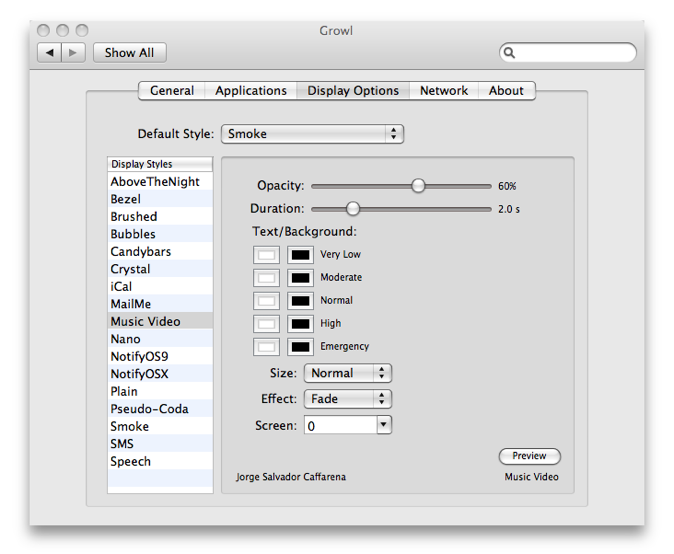
  Growl enables users to determine where alerts appear on screen, how
  long they remain visible, and other visual style preferences such as
  text size, bubble transparency, and text/background colors. Users
  can also designate priority levels, and enable "sticky"
  notifications that remain on-screen until clicked. Also,
  notification styles and settings can be adjusted for each program
  taking advantage of Growl. For example, Firefox could be set to
  sticky Music Video style alerts that appear at the top of the
  screen, while Safari could be set to display Smoke style alerts at
  the bottom of the screen that disappear after 5 seconds.

<http://www.tidbits.com/resources/2008-12/Growl-Options.png>

  Unfortunately, Growl can't take over the notification tasks of just
  any program because it doesn't actively seek and collect
  information; it waits for other programs to post notifications to
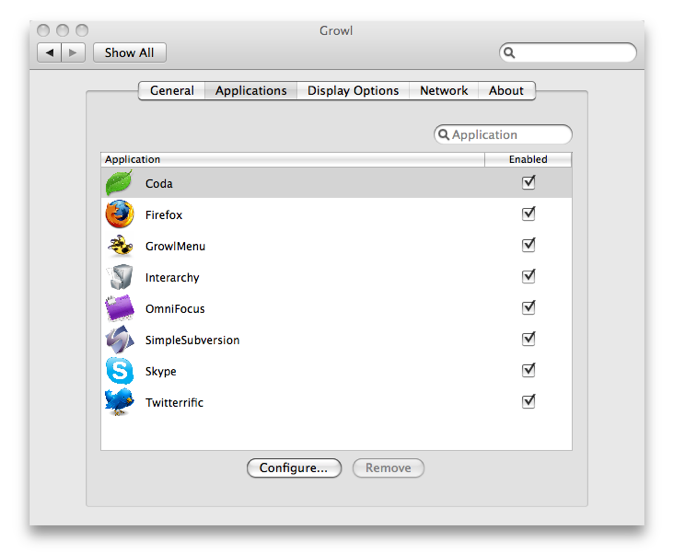
  Growl. If you do have a program that supports Growl, it
  automatically appears under the Applications list in Growl's
  preferences. Otherwise, there's nothing you can do to add it.

<http://www.tidbits.com/resources/2008-12/Growl-Apps.png>

  Users can also configure exactly which notifications from each
  program are enabled and how they appear. For instance, Skype can
  notify you of every new chat message you receive, but that's
  ridiculous if you're actually maintaining a chat, since you see each
  message in the chat window and then again via Growl. While there
  could be a use for that sort of duplication if you were merely
  monitoring a chat while using another application, in most cases it
  makes more sense to turn off Skype's notification of new chat
  messages. Even worse is the Contact Is Typing notification - it's
  hard to imagine a reason why you'd want to be notified every time
  your chat partners were typing.

  Growl also possesses network capabilities that enable notifications
  to be sent from one computer to another. So, if you were sitting on
  the couch with your laptop waiting for a download to finish on a Mac
  in the other room, Growl could alert you when it's done without your
  having to get up and check.

  The list of programs that are compatible with Growl is fairly
  substantial; those that do not directly support Growl might work
  with third party utilities that can. For example, iTunes does not
  directly support Growl, but can be convinced to work with Growl via
  GrowlTunes, Quicksilver, and Synergy Classic, which in turn
  communicate with Growl. Similarly, GrowlMail enables Mail to work
  with Growl, and GrowlSafari mediates between Safari and Growl.
  GrowlTunes, GrowlMail, and GrowlSafari are all included with Growl
  under the Extras folder. Growl can also notify users of hardware
  changes via HardwareGrowler, also included in the download package.
  HardwareGrowler notifies users of physical environment changes to
  their computer, such as when devices are connected or disconnected.

<http://growl.info/applications.php>
<http://growl.info/documentation/hardwaregrowler.php>

  OmniGrowl ($10) from Wooden Brain Concepts works with a host of
  previously unsupported programs and services such as iCal and
  Address Book events, traffic reports, RSS headlines, and more. A
  handy plug-in for Gmail users is Waffle Software's Google + Growl,
  which establishes communication between Growl and Google Notifier, a
  program that enables users to check Gmail and Google Calendar
  without opening a Web browser.

<http://www.woodenbrain.com/products/omnigrowl/omnigrowl.html>
<http://wafflesoftware.net/googlegrowl/>
<http://toolbar.google.com/gmail-helper/notifier_mac.html>

  Growl appears to be steadily gathering support from application
  developers. As Growl's list of compatible applications and third
  party plug-ins expands, this handy tool inches closer to truly
  becoming a system-wide notification system, though I'd be shocked if
  Apple ever actually integrated it into Mac OS X. I highly recommend
  checking out Growl, and if you like it, encouraging companies whose
  programs you use to add Growl support.


The Mac Turns 25: Best Mac Ever?
---------------------------------
  by Adam C. Engst <[email protected]>
  article link: <http://db.tidbits.com/article/10028>

  When my friends at Macworld called and asked me to contribute to
  their 25th anniversary issue, I jumped at the chance. Steve Jobs is
  so uninterested in the past that he had Apple's famous icon garden
  not only ripped out, but junked. I, on the other hand, find it
  instructive to pay attention to the past because it both informs
  where we are today and, hopefully, enables us to avoid repeating our
  mistakes.

  So when asked the question of what the best Mac of all time is, I
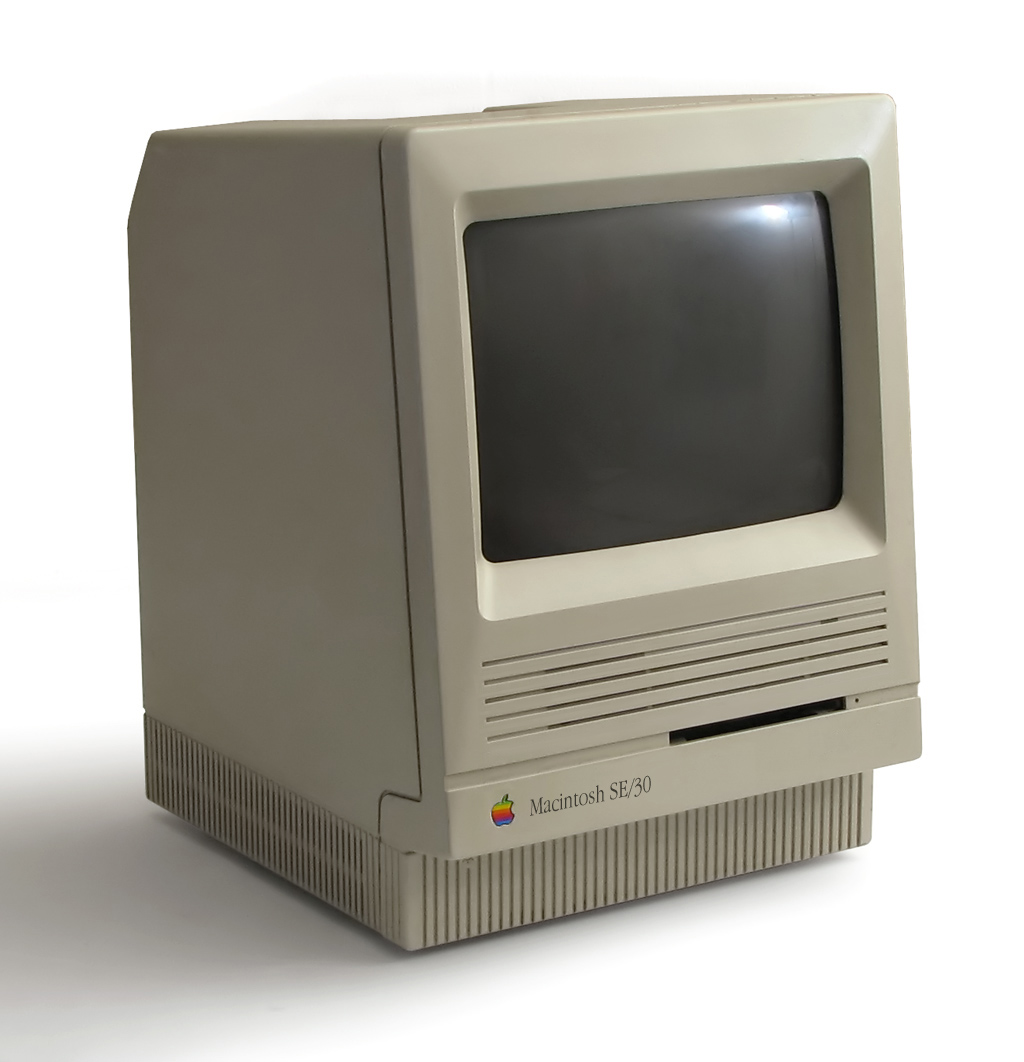
  didn't have to think too hard - it's the Macintosh SE/30. Despite
  Andy Ihnatko's sage comment that one's favorite Mac is one's first
  Mac, the SE/30 was only my first Mac on the outside - it started
  life as an SE that Tonya and I later upgraded to an SE/30 with a
  motherboard swap in 1990.

<http://www.macworld.com/article/138328/2009/01/macat25_bestmac.html>
<http://en.wikipedia.org/wiki/Macintosh_SE/30>

  My choice, shared by stalwarts John Gruber and John Siracusa, was
  not based on the fact that the SE/30 can in any way compete with a
  modern Mac, which Charlie Sorrel seemed to think was relevant on
  Wired's Gadget Lab blog. It's painfully obvious that the SE/30 has
  nothing on any modern Mac. If the best Mac ever was simply the most
  powerful, it would merely be a competition between Apple's current
  models, and it would change as soon as a new Mac came out. Boring.

<http://blog.wired.com/gadgets/2009/01/the-best-mac-ev.html>

  No, the SE/30 gets my nod as the best Mac ever for more subtle
  reasons.

* It offered, for the time, an amazing combination of power, small
  size, and expandability, thanks to its 68030 processor and PDS
  expansion slot. It wasn't the first to be that fast or the most
  expandable - both of those awards went to the Macintosh IIx - but it
  opened our eyes to the possibility that we could have a small Mac
  that made no compromises. The next Mac to do that for me was the
  PowerBook 100, which might be my runner-up for best Mac ever, thanks
  to what it showed was possible in a portable form factor.

* That expansion slot was key, because it made multiple monitors an
  obvious and financially realistic option for many people. An SE/30
  with a video card and an external monitor was a lot cheaper than a
  Macintosh IIx with two video cards and two monitors. Attaching a
  second monitor is one of the easiest ways to increase productivity
  to this day, something that New York Times writers noted back in
  2006 and again just a few weeks ago. Since that SE/30, every one of
  my main Macs has had multiple monitors attached.

<http://www.nytimes.com/2006/04/20/technology/20basics.html>
<http://www.nytimes.com/2009/01/15/technology/personaltech/15basics.html>

* Even after I stopped using the SE/30 as my main Mac, the expansion
  slot kept it useful, since I was able to install an Ethernet card
  and use the SE/30 for various Web and mailing list server duties
  until 2001. Sure, a new Mac could have performed the SE/30's tasks
  without difficulty, but I didn't have to buy one for that purpose,
  because the SE/30 remained useful for over a decade, running
  continuously updated software the entire time. No other Mac I've
  owned has had such a lifespan, and with Apple ever more focused on
  getting us to upgrade frequently, I doubt any Mac will enjoy such
  longevity again.

  In short then, the SE/30 was a great package that offered a glimpse
  of what the Macintosh could be in the future and then stuck around
  to watch that future come to life around it. And that's why I keep
  my SE/30 around to this day in a bookshelf, where it can see the new
  Macs that trundle in and out of our offices and remind us of where
  we started.


The Mac Turns 25: Our First Macs
--------------------------------
  by TidBITS Staff <[email protected]>
  article link: <http://db.tidbits.com/article/10029>

  The Macintosh turned 25 this week, and in honor of the event, we're
  all taking a moment to dig back into the depths of time and share a
  few thoughts about our first Macs.


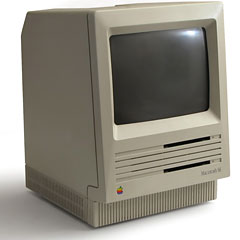
**Adam & Tonya: Macintosh SE** -- Tonya and I bought our first Mac in
  the summer of 1988, which required a little finagling, since
  although we were students at Cornell University at the time, we
  weren't enrolled in summer classes, thus making us ineligible for
  the student discount until the semester started. Undaunted, we
  convinced a friend to put her name on the paperwork, plunked down
  our money, and brought home a double-floppy Macintosh SE. We weren't
  new to the Mac at that time, since both of us had worked in
  Cornell's public computer rooms, but having a Mac in our apartment
  made it easier for Tonya to write papers and for me to work on my
  senior honors thesis in a wildly pre-release version of the
  Storyspace hypertext editor (still being sold by Eastgate Systems).
  Apart from site-licensed programs like WriteNow, I remember buying
  QuicKeys and Suitcase right away to outfit our new Mac.

<http://lowendmac.com/compact/art/mac-se-240.jpg>
<http://en.wikipedia.org/wiki/Macintosh_SE>
<http://www.eastgate.com/storyspace/>

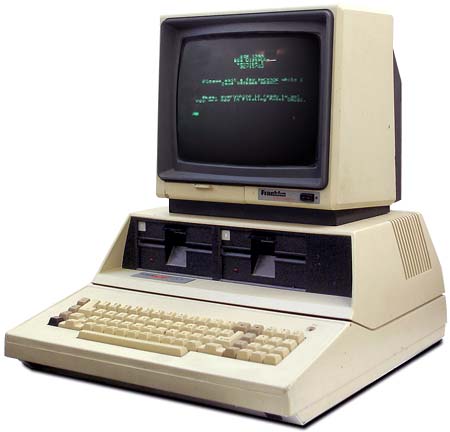
  I had, somewhat earlier, built a hard drive for my Atari 1040ST
  (which had replaced my first computer, a Franklin ACE 1000, which
  was an Apple ][ clone) from a Seagate 30 MB mechanism, a SCSI
  controller board, and a massive case that could support up to five
  full-height drives. All I had to do to move that hard drive over to
  the SE was build a new cable to plug into the Mac's SCSI port, but
  unfortunately I had no electronics gear to test my wiring. Once
  again undaunted, I ran wires from the cable through a
  battery-powered squirt gun to test continuity. My tests worked, the
  drive worked, and we were up and running.

<http://en.wikipedia.org/wiki/Atari_ST#STF_and_STFM_models>
<http://www.myoldcomputers.com/museum/comp/museumpics/1040sta.jpg>
<http://www.vintage-computer.com/franklin.shtml>
<http://oldcomputers.net/pics/ace1200-right.jpg>

  We used the SE for a year or so, but after graduation, when the
  SE/30 upgrade came out, we jumped at the chance to move up, adding a
  video card and an Apple 13-inch RGB monitor to the mix and turning
  the humble SE into a veritable tower of power for its era. We still
  have that SE/30 in a bookshelf, reminding us of what the world of
  the Macintosh was like back in the early 1990s (see "The Mac Turns
  25: Best Mac Ever?", 2009-01-26).

<http://en.wikipedia.org/wiki/Macintosh_SE/30>
<http://db.tidbits.com/article/10028>


**Joe: Macintosh SE** -- During graduate school at the University of
  Texas at Arlington, I had a conversion experience of sorts: I got
  enough of a taste of Macs in the school's computer lab that I
  realized I could never again own a PC. Although I'd found much to
  like about Macs, the deciding factor was, without a doubt, Nisus. I
  tried a demo version of this unusual multilingual word processor on
  a Mac Plus at school and with every cascading submenu I just drooled
  more. Nothing in the PC world could touch it, and since I was
  studying linguistics, the program's superb support for non-Roman
  languages made the decision that much easier.

  There was just one problem: As a starving student, I couldn't afford
  the cheapest new Mac available at the time, which was early 1991. In
  fact, even a used SE/30 - a model discontinued the previous year -
  cost a couple thousand dollars more than I had. But knowing that I'd
  find some way to get a Mac as soon as possible, I went ahead and
  ordered a copy of Nisus before I graduated so that I could use my
  student discount - even though I had nothing to run it on.

<http://upload.wikimedia.org/wikipedia/commons/d/db/Se30.jpg>

  If I'd been able to afford it, I would have bought a Mac Portable,
  which at the time seemed to me the sexiest computer imaginable.
  Instead, that summer I spent (as I recall) about $500 on a used Mac
  SE with a 20 MB hard drive, and another $100 or so to max out the
  RAM to 4 MB. That fall, I added a new StyleWriter printer for output
  and a Global Village ADB modem for connectivity.

<http://en.wikipedia.org/wiki/Macintosh_Portable>

  During the time I owned the SE, I spent more than I'd originally
  paid for it replacing a busted logic board and a faulty hard drive.
  But it was still my beloved first Mac. I gave it to a family member
  a couple of years later when I made a major leap forward to my next
  Mac, a Centris 610.

<http://en.wikipedia.org/wiki/Macintosh_Centris_610>


**Jeff: Macintosh Classic** -- I'm going to start a little further
  back in time, fully cognizant that I can't seriously compete with
  some of my colleagues in the "first-computer used" category. The
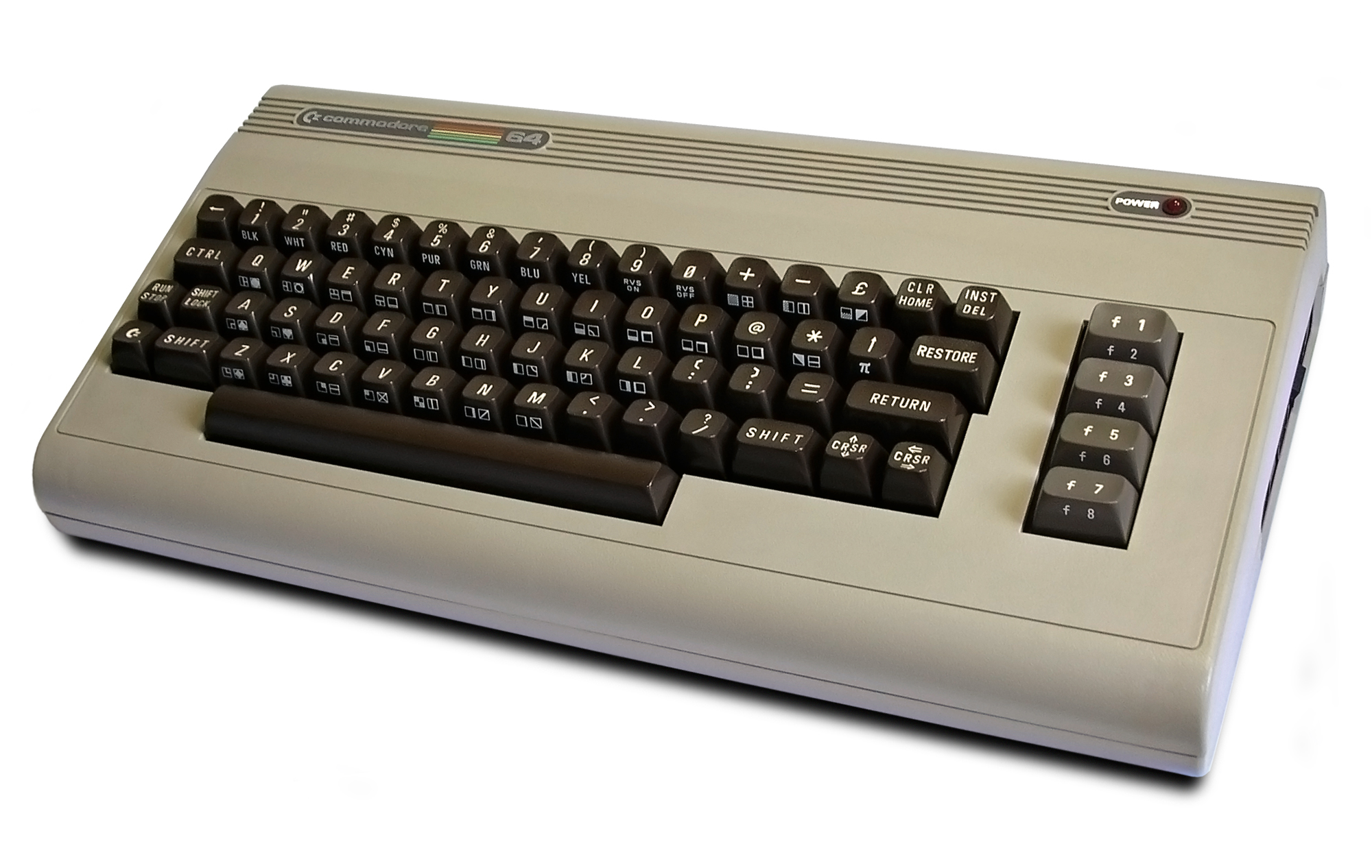
  first computer I owned was a Commodore VIC-20, which was fairly soon
  replaced by the unbridled power of a Commodore 64. In high school I
  lobbied the newspaper's journalism adviser to jump into the digital
  age with a set of C64s, but she'd (smartly) already decided on
  getting a Mac Plus, with a few Mac SEs arriving the following year.

<http://en.wikipedia.org/wiki/Commodore_VIC-20>
<http://tiof.files.wordpress.com/2007/02/vic201.jpg>
<http://en.wikipedia.org/wiki/Commodore_64>

  Although I took that Commodore 64 to college, it was by then just a
  word processor from which I could print papers; the Mac had become
  the be-all, end-all computer for me. Working on the high school
  paper taught me how to do layout (and swap floppies) in PageMaker
  1.0, write in Microsoft Word, and play a mean game of Solitaire. As
  a college freshman, I was the only staffer who knew how to use the
  newspaper's new Macs. But I had no money to buy my own; on deadline,
  I'd often beg a friend in the freshman girl's dorm to let me write
  my articles on her Mac SE.

<http://upload.wikimedia.org/wikipedia/commons/9/9d/Commodore64.jpg>

  Finally, as a sophomore, I took advantage of the student discount to
  buy a Macintosh Classic, along with a case to carry it in (of
  course!), which I'd frequently sling over my shoulder and then bike
  to the newspaper office for weekly late-night production deadlines.
  I would have loved to own one of the new PowerBooks (eventually I
  bought a used PowerBook 100, one of my favorite machines), but the
  price was prohibitive.

<http://en.wikipedia.org/wiki/Macintosh_Classic>
<http://www.daniellight.co.uk/uploaded_images/Macintosh_classic-705825.jpg>
<http://en.wikipedia.org/wiki/PowerBook_100>


**Matt: Macintosh LC** -- As a programmer, I'd been working with
  computers since 1968, but as a Classics professor in the early
  1980s, my immediate problem was typing Ancient Greek, or, more
  precisely, typing both English and Greek in the same document. I had
  an IBM Selectric typewriter with interchangeable typeballs, and
  later an Olivetti electronic typewriter that used interchangeable
  typewheels and had a tiny "memory" so that it was almost a miniature
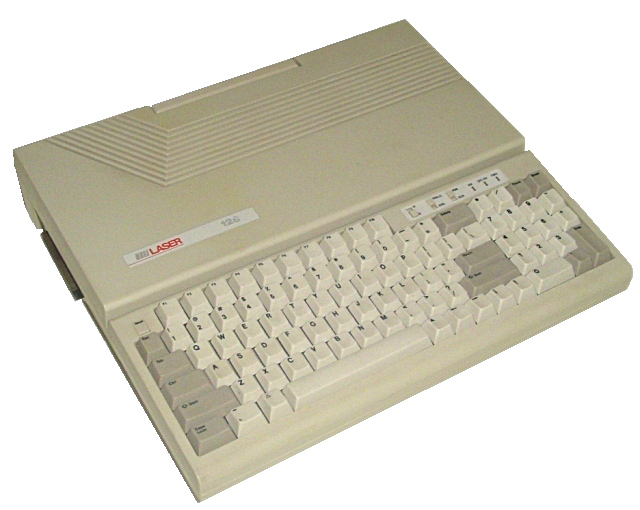
  word processor. But the real solution was a personal computer: I got
  an Apple ][c clone called a Laser 128. This, together with an
  ImageWriter and a wonderful (now defunct) program called Gutenberg,
  gave me a full-featured word processor with the ability to alternate
  English and Greek letters at will.

<http://en.wikipedia.org/wiki/IBM_Selectric>
<http://www.earlyofficemuseum.com/IBM_Selectric_Type_Balls.jpg>
<http://en.wikipedia.org/wiki/Laser_128>
<http://upload.wikimedia.org/wikipedia/commons/7/7d/Laser128_1.jpg>
<http://en.wikipedia.org/wiki/Imagewriter>
<http://www.atarimagazines.com/creative/v9n6/64_Gutenberg.php>

  While teaching at Cornell University in the late 1980s, I met Adam,
  who taught me to use the Macs in the computer labs; I remember us
  performing some clever tricks with Microsoft Word and QuicKeys (and
  swapping a lot of floppy disks). But the Mac still felt like a toy
  to me, and I didn't actually want one.

  Then, in 1990, I arrived at Swarthmore College and found that, like
  every professor, I was given an office Mac. It was one of those
  early squat all-in-one machines with a tiny monochrome screen -
  probably either a Plus or an SE. Naturally, since it was right there
  on my desk and hooked into something called the "Internet," I
  started playing with it constantly. (Oh, the INITs! Oh, the bombs!)

  But what turned me into a Mac person wasn't the machine so much as
  the killer apps I got for it. Nisus, a fantastic word processor with
  amazing search-and-replace and macro features, along with
  LaserGreek, a gorgeous Ancient Greek font, allowed me to do all my
  multilingual scholarly writing. And HyperCard 2 made the Mac
  interface itself programmable, letting me create an Ancient Greek
  language lab for my students. By the end of that school year, I was
  a Mac convert, the proud owner of a brand new pizza-box Macintosh LC
  which, together with a StyleWriter printer, remained my workhorse
  machine for many years.

<http://db.tidbits.com/article/3154>
<http://www.linguistsoftware.com/lgk.htm>
<http://db.tidbits.com/article/4075>
<http://en.wikipedia.org/wiki/Macintosh_LC>
<http://www.allaboutapple.com/museo/pictures/donazioni/mac_lc.jpg>


**Glenn: Macintosh Plus** -- The first computer I programmed on was a
  Commodore PET, and the first PC I owned was an Ohio Scientific
  Challenger 1P. I taught myself machine-code programming on the C1P,
  and copyrighted a tape-based software loading program I wrote. My
  folks bought me the $333 computer, and then saw little of me outside
  my room for months.

<http://www.old-computers.com/museum/photos/commodore_pet4032_1.jpg>
<http://www.old-computers.com/museum/computer.asp?c=191>
<http://www.old-computers.com/MUSEUM/photos/OhioScient_Challenger1P_System_1.jpg>
<http://cocatalog.loc.gov/cgi-bin/Pwebrecon.cgi?v1=168&ti=151,168&Search_Arg=fleishman&Search_Code=NALL&CNT=25&PID=m44Tr1xsRWJig3Dy5TMeSdUs5Za&SEQ=20090124225123&SID=1>

  The 1P stood for one port, which was an unpopulated RS-232C port
  into which you could stick some components, solder them to an
  optional connector, and run a 110-baud modem. An easter egg in the
  boot firmware let you enter the character "L" and be told that the
  built-in 8K BASIC was written by Micro Soft and Bill Gates. (Who the
  hell was Bill Gates?)

<http://glennf.com/vanity/computers.html#Anchor-OSI-57453>

  Like the Apple ][, the PET and C1P all used the famous 6502
  microprocessor. By the time I went to college, I'd upgraded to a
  Commodore 64, which used a similar processor.

  I started using a 512K Mac during my last year in high school, where
  I was the school newspaper's typesetter. We had some aging
  phototypesetting gear that allowed me to set one justified line at a
  time onto a thin photosensitive paper that could be developed and
  waxed to be cut and put down on boards for layout.

  My marvelous journalism teacher let me take the newspaper's first
  Mac home over winter holidays in 1985 so that I could learn
  PageMaker 1.0, and come back ready to typeset and teach others. I
  was completely blown away. This experience likely led to my decision
  to major in art with a concentration in graphic design when I
  started college the following fall.

  I took my Commodore 64 to school to write papers, like Jeff. But I
  was yearning for a Mac once the Macintosh Plus had been out for
  months with a whopping 1 MB of RAM. My grandparents on my father's
  side offered to buy me a Mac sophomore year, which I believe cost
  about $1,200 with the student discount.

<http://en.wikipedia.org/wiki/Macintosh_Plus>

  My roommate, Ethan Robey, and I agreed to split the cost of a fancy
  dot-matrix printer. But we somehow managed to order the wrong item.
  After weeks of waiting, an ImageWriter II in the wide-carriage,
  pin-fed paper version arrived! We couldn't return it, and we'd spent
  much more than we needed to. Ah, well. The upside is that it could
  handle normal and pin-fed continuous paper, of which a large supply
  was available for the, uh..."borrowing." It wasn't being used much
  by that point.

<http://www.parsons.edu/faculty_and_staff/faculty_details.aspx?pType=2&dID=79&sdID=104&id=4253>
<http://en.wikipedia.org/wiki/ImageWriter_II>
<http://us.st12.yimg.com/us.st.yimg.com/I/data-labels_2035_4787346>

  Now, this Macintosh Plus wasn't a passing fancy: I spent many a year
  swapping sets of 800K floppies with that puppy. Sometime during my
  senior year (1989-1990), I got a case-cracking kit so I could
  upgrade RAM myself. The campus computer store wanted some truly
  insane amount of money to upgrade from 1 to 4 MB - $750, perhaps?

  The kit was a very long hex wrench, to remove two tiny and
  hard-to-get-at screws at the top of the case; a spring-loaded clip
  that you would insert into the seam of the Mac and gradually ease
  open; and a grounding strap to avoid zapping internal components.

  That spring, I was able to barely afford a 60 MB Ehman external hard
  drive, the only affordable drive at that time, and my
  floppy-swapping days were over.

  Like Jeff, I used to haul this Mac around in a special case. It
  would fit only in the middle seat of an airplane. I grew up in
  Oregon and went to college in Connecticut. I sat in a lot of middle
  seats.

  I wound up getting about 4 years of use out of that Mac, finally
  selling it to a friend. He moved to Brooklyn where, when he was out
  of the house he shared with a number of other people, a pipe burst
  in the basement, pouring water all over the Mac. Roommates unplugged
  the computer (which was off), dried it out, and it kept working for
  a while after that.

  My next machine was enormously more advanced: a Macintosh IIcx. And,
  in 1991, I took a job at the Kodak Center for Creative Imaging,
  where I was responsible for 100 Macintosh IIfxs - curse you,
  Jean-Louis Gassee! - and had a Macintosh Portable of my very own.

<http://en.wikipedia.org/wiki/Macintosh_IIcx>


**Rich: Mac mini** -- Since I'm truly frightened Adam will physically
  eject me from the TidBITS staff once I reveal my first Mac, I'm
  going to distract you by talking about the first Apple products I
  used, as opposed to owned.

  Similar to Glenn, I started programming in elementary school on a
  Commodore PET, where I'd show off by switching it to binary mode to
  demonstrate binary addition (both the beginning and end of my
  education in binary). Fairly early on my best friend's parents
  bought an Apple ][ for his family, and the two of us quickly
  monopolized it for a mix of games and programming. I can't count the
  hours we spent playing Wizardry and designing education software we
  planned on selling back to our school, thereby allowing us to retire
  before the eighth grade. During these same years we also toyed with
  programming BASIC on an Atari 2600 using a small hand controller
  (no, you couldn't even save your programs).

  The first computer I owned was a Commodore 64, and my friend and I
  would shift between his home and mine depending on whether we were
  in the mood for Apple or Commodore. In 1984 our school obtained two
  original Macs, and I remember reveling in correcting people who
  referred to the plastic-encased floppy disks as "hard drives"
  (ensuring I would later never get a date in my home town).

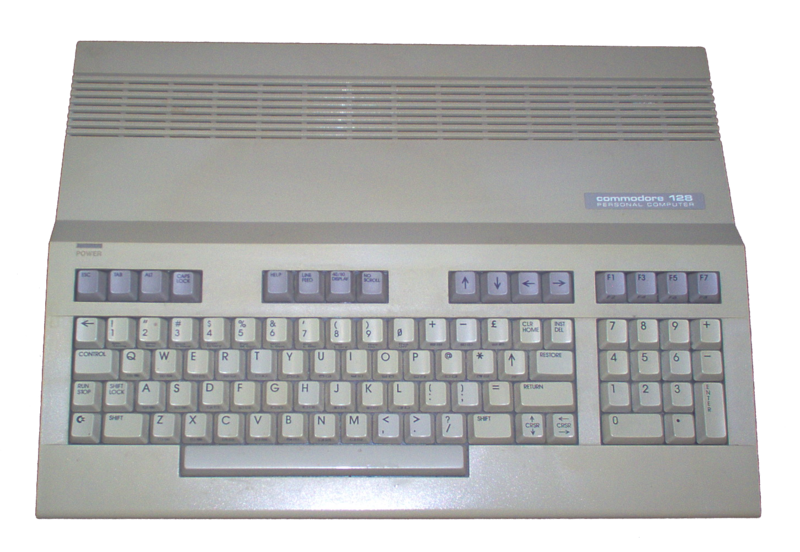
  I shipped off to the University of Colorado with the Commodore 128
  that I'd promised my parents would get me through all four years
  (which would eventually became eight years, and require a few
  additional computers along the way). While in school I used a
  variety of Macs for layout and publishing, but used mostly PCs for
  class work. Much of this wasn't by choice - I'd spend hours drooling
  over the various Macs and eventually NeXT systems at our local
  student bookstore. By the time I could finally afford one, I had
  started my career in IT, with a side business of building PCs, and
  Macs faded to my past.

<http://upload.wikimedia.org/wikipedia/commons/thumb/9/93/Commodore_128.png/800px-Commodore_128.png>
<http://en.wikipedia.org/wiki/Next_Computer>

  But then a strange thing happened. Steve Jobs returned to Apple and
  the company produced a string of beautiful machines with a new,
  Unix-based operating system. I was intrigued, and finally invested
  in a first generation Mac mini for research purposes. Despite being
  woefully underpowered compared to my home and work PCs, it quickly
  became my primary system when I wasn't traveling.

<http://en.wikipedia.org/wiki/Mac_mini>
<http://images.apple.com/hk/en/macmini/gallery/images/gallery1img20060228.jpg>

  Then the Intel transition was announced, and I pre-ordered one of
  the first MacBook Pros off the assembly line. I virtualized my work
  computer, totally against policy, and have been all Mac ever since.
  In the process I've racked up two MacBook Pros, a MacBook for my
  wife (after banning PCs from the house), five iPods, two iPhones,
  multiple AirPort Express and Extreme units, and a one very loud
  Xserve sitting in my closet. I've also converted my entire side of
  the family, and am working on my in-laws.

<http://en.wikipedia.org/wiki/Macbook_Pro>

  Hopefully my exuberance makes up for my tardiness.


**Mark: Macintosh 512K** -- I'm a little surprised to discover mine
  was the earliest Mac purchase of this august group, but after
  several years of light programming experimentation on a Prime
  minicomputer at my mom's office, Commodore PETs, TRS-80s, and Apple
  ][s at school, and an Atari 400 at home, I bought Apple's second
  Macintosh model - the Macintosh 512K - soon after I got to Cornell
  to use in my Computer Science programming classes. (It was even
  Friday the 13th, which turned out to be pretty lucky for me.)

<http://upload.wikimedia.org/wikipedia/commons/3/36/Mac512K_wb.jpg>
<http://en.wikipedia.org/wiki/Macintosh_512K>

  That first Mac, with its 9-inch black-and-white screen, saw me
  through about three years of college, enjoying upgrades first to a
  Macintosh 512Ke (enjoying new ROMs and support for 800K floppy
  drives instead of the original 400K) and then finally to a Macintosh
  Plus, with an entire megabyte of RAM! I wasn't a Computer Science
  major for long, but my Mac was great for writing papers and
  developing software for a professor who hired me to write the Mac
  version of his DOS application.

<http://en.wikipedia.org/wiki/Macintosh_512Ke>
<http://en.wikipedia.org/wiki/Macintosh_Plus>

  Along with my Mac, I had an ImageWriter printer and one of the
  coolest peripherals imaginable, a Thunderscan scanner attachment
  from Thunderware that replaced the ImageWriter's ribbon cartridge
  and used the printer's roller and ribbon mechanisms to move photos
  or other documents through the printer to scan them.

<http://www.folklore.org/StoryView.py?project=Macintosh&story=Thunderscan.txt>

  It wasn't until my next job forced me to set up and support lots of
  shiny new Macintosh II computers with 13-inch color monitors that my
  1 MB of memory and monochrome 9-inch screen started to seem
  inadequate. I eventually bought my own Mac II with color display and
  twin floppy drives. The next year, I even added a 30 MB SuperMac
  Dataframe hard drive!

<http://en.wikipedia.org/wiki/Macintosh_II>

  That Mac II lasted me several years, thanks to RAM and PMMU
  upgrades. It was joined by a PowerBook 100, and eventually gave way
  to a SuperMac C600 clone desktop. Along the way, I've also had a
  Quadra 950, Power Mac G4, and a parade of PowerBook and MacBook
  laptops.


**Doug: 20-inch Intel-based iMac** -- Given that I'm roughly the same
  age as the Mac itself at 25, my trip down memory lane will be
  considerably shorter than the preceding expeditions down memory's
  Mariana Trench.

  Having been raised on Apple through 12 years of public school,
  distant memories of their computers waft through my brain: Playing
  Number Munchers and Oregon Trail on what must have been some
  descendant of the Apple ][ in elementary school; making HyperCard
  animations with a Macintosh Classic II in middle school; and surfing
  the Web on an iMac G3 in high school. While Apple was a constant
  presence in my school life, we had a PC at home - the writing on its
  console read only, "Standard Computer," a name I still find
  hilarious for its cartoonishly generic character. It wasn't until
  college that I began to have a conscious affinity for Macs.

<http://en.wikipedia.org/wiki/Macintosh_Classic_II>
<http://en.wikipedia.org/wiki/IMac_G3>

  Studying art at Cornell University, I found myself working as a lab
  monitor at the art building's Mac lab. The space was decked out with
  about 20 Power Mac G5s paired with 22-inch Cinema Displays, and I
  just loved being in there. Whether I was on shift, hanging out
  between classes, or editing videos for my senior thesis, countless
  hours of my collegiate career were spent in that lab with those
  machines. So, in many ways, I consider that setup to be my first
  Mac.

  Eventually though, I did get my hands on one I could truly call my
  own. Upon graduating from college and moving to New York City, I
  trotted out to the newly opened 5th Avenue Apple Store to tinker
  around with the new machines and fell in love with the 20-inch Intel
  Core Duo iMac. Days later, I ordered one from Apple's Web site. Only
  three years old, it still serves me well every day of the week.

<http://images.apple.com/hk/en/imac/images/index_hero20080429.png>

  [Images linked from many sources, including All About Apple, Low End
  Mac, Early Office Museum, Greater Pittsburgh Vintage Computer
  Museum, Old Computers, and Wikimedia Commons.]

<http://www.allaboutapple.com/index2.htm>
<http://lowendmac.com/>
<http://www.earlyofficemuseum.com/>
<http://myoldcomputers.com/>
<http://oldcomputers.net/>
<http://commons.wikimedia.org/>


TidBITS Watchlist: Notable Software Updates for 26-Jan-09
---------------------------------------------------------
  by Doug McLean <[email protected]>
  article link: <http://db.tidbits.com/article/10022>

  Default Folder X 4.1.1 from St. Clair Software is a maintenance and
  stability update to the Open and Save dialog-enhancement utility.
  Bugs addressed include a crash when you log out or restart your Mac,
  an AppleScript bug preventing other applications from retrieving the
  current URL in Firefox when Default Folder X is open, and a bug
  causing repeated error messages to appear in the Console regarding
  failed Finder queries. Also, support for Hazel has been improved by
  mitigating a file labeling conflict issue. ($34.95 new, free update,
  10.2 MB)

<http://www.stclairsoft.com/DefaultFolderX/>

  QuickTime 7.6 from Apple brings several updates to the multimedia
  software. Changes include enhanced single-pass H.264 encoding
  quality, more reliable Motion JPEG media playback, heightened AAC
  encoding fidelity, improved export consistency for audio tracks from
  MPEG video files, and increased compatibility with iChat and Photo
  Booth. Apple has also released a separate security document
  detailing the accompanying bug fixes. Issues addressed mainly
  include maliciously crafted URLs and movie files that lead to
  application crashes. The update is currently available via Software
  Update and from Apple's Web site. (Free update, 72 MB)

<http://support.apple.com/kb/HT3292>
<http://support.apple.com/kb/HT3403>
<http://support.apple.com/downloads/QuickTime_7_6_for_Leopard>

  Mellel 2.6 from RedleX brings a host of new features to the
  increasingly powerful word processor. Freshly added is a
  sophisticated Quick Look plug-in that enables users to access
  document previews that appear identical to printed versions. Also
  new is the Spread View feature, which displays a document's pages as
  they would appear in a book or magazine spread. The new version also
  now sports an improved statistics palette, support for automatic
  updates, the capability to save directly to PDFs, and smart style
  matching for switching between style sets. A full list of changes,
  improvements, and bug fixes is available on RedleX's Web site. ($49
  new, free upgrades for purchases since December 2006 or $19
  otherwise, 33.3 MB)

<http://www.mellel.com/>
<http://www.mellel.com/releasenotes.html>

  Sandvox 1.5.4 from Karelia Software is a minor maintenance update to
  the template-based Web site creation tool. The biggest change is
  added support for the JS-Kit commenting service Comments. The JS-Kit
  Comments service enables site administrators to foster social
  networks, encourage user-generated content, communicate directly
  with users, and provide a fully functioning commenting engine.
  According to Karelia's Web site, the new version apparently comes
  with other undisclosed changes as well, presumably minor performance
  enhancements or bug fixes. ($49 Regular/$79 Pro, free update, 26 MB)

<http://www.karelia.com/sandvox/>
<http://js-kit.com/>


ExtraBITS for 26-Jan-09
-----------------------
  by TidBITS Staff <[email protected]>
  article link: <http://db.tidbits.com/article/10034>

**Fix for Buggy Seagate Firmware on Intel-based Macs** -- Although
  Seagate has yet to respond to our inquiries about how Mac users can
  update buggy firmware in a wide selection of buggy Seagate drives,
  Steve Maller reports that Seagate tech support walked him through
  building a CD that booted his Mac Pro into FreeDOS, after which he
  could run the firmware updater. PowerPC-based Macs and drives in
  external cases are still out in the cold. (Posted 2009-01-26)

<http://stevemaller.com/blog/2009/01/22/my-seagate-hard-drives-are-safe-now/>


**iLife '09 Shipping on 27-Jan-09** -- Apple has announced it will
  begin shipping iLife '09 on 27-Jan-09. The latest version features
  major upgrades to iPhoto, iMovie, and GarageBand; comes free with
  new Macs; and costs $79 for all other users. (Posted 2009-01-26)

<http://www.apple.com/pr/library/2009/01/26ilife.html>


**Adam Prognosticates on Mac Software Future** -- For Macworld's 25th
  anniversary issue, Adam contributed an article looking at the
  near-term future of software on the Mac, focusing on three things:
  what's coming in Mac OS X, the possibility of a Mac App Store, and
  how Apple is embracing cloud computing. The nut? Don't expect big
  changes in the next year or two. (Posted 2009-01-26)

<http://www.macworld.com/article/138387/2009/01/macat25_software.html>


**Macworld's Six Worst Mac Products Ever** -- As part of Macworld's
  25th anniversary issue, Adam wrote an article about what he feels
  are Apple's six worst Mac-related products of all time. It's pure
  opinion, so check out the reader comments about what was - and
  should have been - included. (Posted 2009-01-26)

<http://www.macworld.com/article/138404/2009/01/macat25_worstproducts.html>


**Watch Tonya and Andy Ihnatko Strategize at Macworld Expo** -- In
  MacVoicesTV episode 917, recorded at Macworld Expo, Tonya plays
  along as Andy Ihnatko plans to take over NASA and then they both
  talk about Macworld Expos past, present, and future. Bob LeVitus and
  Bryan Chaffin join them midway. (Posted 2009-01-22)

<http://macvoices.tv/macvoicestv-917-the-macnotables-fill-the-macworld-podloft-with-opinions-observations-and-show-picks/>


**Adam's Predictions for 2009 at Macworld** -- We forgot to post this
  earlier, during the bustle of Macworld Expo, but here are Adam's
  Apple-related predictions for 2009, as solicited by our friends at
  Macworld before the show. Note that part of the second prediction
  has already come true. Score! (Posted 2009-01-20)

<http://www.macworld.com/article/137891/2009/01/2009predictions.html>


**Seagate Hard Drive Firmware Bug Makes Disks Unusable** -- Hard drive
  manufacturer Seagate is working on a solution to a firmware problem
  that is rendering many of its high-capacity drives unusable. If
  you've purchased a Seagate Barracuda 7200.11, DiamondMax 22, or
  Barracuda ES.2 SATA model, check to see if your drive is affected
  and learn more about possible fixes. Seagate says data remains
  intact but inaccessible, and is providing recovery services for
  drives that have been bit by the bug. (Posted 2009-01-19)

<http://seagate.custkb.com/seagate/crm/selfservice/search.jsp?DocId=207931>


Hot Topics in TidBITS Talk for 26-Jan-09
----------------------------------------
  by Jeff Carlson <[email protected]>
  article link: <http://db.tidbits.com/article/10032>

**SugarSync Problems** -- Readers report data loss and little
  developmental work on the beta software for synchronizing files over
  the Internet. (3 messages)

<http://emperor.tidbits.com/TidBITS/Talk/2408>


**Leopard Use Percentage** -- It's difficult to determine how many
  people are using Mac OS X 10.5 Leopard, but statistics from the Omni
  Group help provide one data point. (9 messages)

<http://emperor.tidbits.com/TidBITS/Talk/2409>


**Caffeine** -- Readers discuss the pros and cons of software that
  prevents your computer's screen from dimming after a set amount of
  time. (13 messages)

<http://emperor.tidbits.com/TidBITS/Talk/2410>


**Folder View Question** -- Is it possible to specify that all new
  Finder windows open in column view? (3 messages)

<http://emperor.tidbits.com/TidBITS/Talk/2414>


**MacBook shutdown with (just) power button?** Following an abrupt
  freeze and shutdown of a MacBook, a reader gets conflicting
  information on how to solve the problem from Apple's customer
  support line and an Apple Genius at an Apple Store. (4 messages)

<http://emperor.tidbits.com/TidBITS/Talk/2417>


$$

This is TidBITS, a free weekly technology newsletter providing timely
news, insightful analysis, and in-depth reviews to the Macintosh and
Internet communities. Feel free to forward to friends; better still,
please ask them to subscribe!

Non-profit, non-commercial publications and Web sites may reprint or
link to articles if full credit is given. Others please contact us. We
do not guarantee accuracy of articles. Caveat lector. Publication,
product, and company names may be registered trademarks of their
companies. TidBITS ISSN 1090-7017.

Copyright 2009 TidBITS: Reuse governed by Creative Commons license.

Contact us at:    <[email protected]>
TidBITS Web site: <http://www.tidbits.com/>
License terms:    <http://www.tidbits.com/terms/>
Full text search: <http://www.tidbits.com/search/>
Subscriptions:    <http://www.tidbits.com/about/list.html>
Account help:     <http://www.tidbits.com/about/account-help.html>


--
If you want to unsubscribe or change your address, use this link
http://emperor.tidbits.com/webx?unsub@@.3c557dc4!u=306a67f9