TidBITS#967/02-Mar-09
=====================
  Issue link: <http://db.tidbits.com/issue/967>
  The big news this week revolves around Web browsers, as Apple
  releases a public beta of Safari 4, showcasing a new tab interface,
  the graphical Top Sites view, and Cover Flow for bookmarks and
  history. Doug McLean looks at what's new in Safari 4, and also
  passes on the news that the Omni Group has made its OmniWeb Web
  browser (and three other programs) free. Matt Neuburg reviews his
  favorite new keyboard, the utterly retro Customizer 104 from
  Unicomp, designed to feel like IBM's legendary Model M keyboard.
  Elsewhere in the issue, Adam shares a look at a wonderful site that
  obsessively documents iPhoto's book themes, and Glenn Fleishman
  offers a hands-on review of Amazon's new Kindle 2 ebook reader. In
  the TidBITS Watchlist this week, we look at 1Password 2.9.9,
  Photoshop 11.0.1, MacSpeech Dictate 1.3, Corel Painter 11, and
  Cocktail 4.3.1.

Articles
    Liz Castro's iPhoto Book Themes Site
    OmniWeb and OmniSiblings Run Free
    Apple Releases Beta of Safari 4
    Kindle 2 Improves Design, Not Features
    The Greatest Computer Keyboard of All Time?
    TidBITS Watchlist: Notable Software Updates for 02-Mar-09
    ExtraBITS for 02-Mar-09
    Hot Topics in TidBITS Talk for 02-Mar-09


------------ This issue of TidBITS sponsored in part by: --------------

* READERS LIKE YOU! Support TidBITS with a contribution today!
  <http://www.tidbits.com/about/support/contributors.html>
  Special thanks this week to Idell Neumann, Marco De Zordo,
  Robert Fusco, and Raymond F. Mensing III for their generous support!

* GET FETCH 5 FOR FREE! Fetch Softworks makes Fetch, the original
  Macintosh FTP client, free for educational and charitable use.
  Fetch 5.3 includes a new look and Leopard technology support.
  Apply today at <http://fetchsoftworks.com/edapply>!

* WebCrossing Neighbors Creates Private Social Networks
  Create a complete social network with your company or group's
  own look. Scalable, extensible and extremely customizable.
  Take a guided tour today <http://www.webcrossing.com/tour>

* Bare Bones Software's BBEdit 9.1 -- A burly upgrade introducing new
  capabilities like Projects, non-modal Find and Multi-File Search,
  editing in browsers, text completion, Scratchpad, new Ruby module,
  better JavaScript, ObjC, Obj-C++, YAML <http://barebones.com/>

* MARK/SPACE, INC: If you have a smartphone, we can sync it!
  Sync your address book, calendar, notes, music, pictures, and
  more from your BlackBerry, Windows Mobile or Palm OS mobile
  phone to your Mac. <http://www.markspace.com/bits>

* 25% off VMware Fusion 2, the preferred way to run Windows on
  your Mac. Now only $59.99 when you enter "FusionSpring09"
  at checkout. Offer valid through 11:59PM PT on March 31, 2009.
  Visit: <http://www.tidbits.com/about/support/vmware-fusion.html>

* Microsoft's MacBU: Supporting Mac users with Office 2008.
  Straighten up your Office with the latest updates to Word,
  Excel, PowerPoint, and Entourage. Update today at Mactopia!
  <http://www.microsoft.com/mac/downloads.mspx>

* ConceptDraw Office adds real business power to Microsoft Office
  and Apple's iWork. Whether you need project management, business
  graphics, or mind mapping, it's all easily created on your Mac!
  Buy today for only $499! <http://www.conceptdraw.com/tb>

* MacSpeech Dictate -- unleash the power of your voice with
  award-winning speech recognition solutions for the Mac.
  It's so easy to use - just talk! Now with spelling and
  phrase training. <http://tidbits.com/about/support/macspeech.html>

---------- Help support TidBITS by supporting our sponsors ------------


Liz Castro's iPhoto Book Themes Site
------------------------------------
  by Adam C. Engst <[email protected]>
  article link: <http://db.tidbits.com/article/10093>

  I'll admit that I prefer iPhoto's calendars to its hardcover books,
  simply because if I spend the time creating a calendar, I'm certain
  it will be displayed (on our wall, or by whomever I give it to) for
  an entire year. In contrast, lovely as iPhoto's hardcover books are,
  my experience is that they're looked at a few times and then put
  away on a shelf. That's not a bad thing - a book may be perfect for
  documenting a special trip or event and not require constant
  attention.

  But honestly, the other problem I have with books is that they're
  quite a bit of work to create, at least if you're as obsessive as I
  am about getting things just right. Even after selecting all the
  photos and figuring out what, if anything, I want to say about them,
  iPhoto offers oodles of themes and layout options within each theme.
  Sometimes I become overwhelmed just picking my desired layout and
  have to go read email or something easy.

  If you're thinking about making a book in iPhoto, my fellow Peachpit
  author Liz Castro has created a wonderfully useful Web site where
  she obsessively documents each and every iPhoto book theme. For each
  theme, she uses screenshots from iPhoto to summarize the outside
  layouts, the inside layouts, and possible backgrounds.

<http://www.lizcastro.com/iphotobookthemes/>

  Then she moves on to provide examples for each layout option, for
  the cover, for the introduction page, and for pages containing each
  of the possible number of photos for that theme. Each page is
  exhaustive, but it's far easier to scan them than to work your way
  through all the options in iPhoto itself.

  Liz first started this site to document the themes in earlier
  versions of iPhoto, and while the pages for iPhoto '08 are still
  available, she has updated them all for iPhoto '09. For the most
  part, the book-related changes in iPhoto '09 revolve around the
  Travel theme, but it's worth noting that you can add either an
  introduction page (really just a text page, since it can go anywhere
  in a book) or a map page to any of the themes, although the Travel
  theme offers the most customization options. Liz also provides some
  useful tips on using the new map pages.

<http://www.lizcastro.com/iphotobookthemes/pmwiki.php?n=Main.Maps>

  So if you're a bit overwhelmed by all the options in iPhoto, or are
  just looking to figure out what has changed with books in iPhoto
  '09, drop by Liz's site.


OmniWeb and OmniSiblings Run Free
---------------------------------
  by Doug McLean <[email protected]>
  article link: <http://db.tidbits.com/article/10094>

  The Omni Group recently announced on its blog that four of its
  previously commercial programs are now available for free download
  without restrictions. The products include the popular Web browser
  OmniWeb, the screen effects and presentation tool OmniDazzle, the
  disk cleanup tool OmniDiskSweeper, and the memory optimization tool
  OmniObjectMeter.

<http://www.omnigroup.com/>
<http://blog.omnigroup.com/2009/02/25/omniweb-omnidazzle-omnidisksweeper-and-omniobjectmeter-now-freeware/>
<http://www.omnigroup.com/applications/omniweb/>
<http://www.omnigroup.com/applications/omnidazzle/>
<http://www.omnigroup.com/applications/omnidisksweeper/>
<http://www.omnigroup.com/developer/omniobjectmeter/>

  OmniWeb, the most widely used of these applications, previously cost
  $14.95. Like Safari, OmniWeb relies on Apple's WebKit rendering
  engine, and thus provides page display capabilities similar to
  Safari 3. When reached for comment, Omni Group head Ken Case
  confirmed that the company plans to update the embedded version of
  WebKit regularly and would be including a newer version in a future
  5.9.x update.

  Although OmniWeb's innovative features, such as site-specific
  preferences, graphical tabs, persistent workspaces, and expandable
  text area fields, caused the browser to attract a devoted following,
  OmniWeb had difficulty competing against the Mac's major browsers,
  Safari and Mozilla's Firefox. Both Apple and Mozilla can bring far
  more development resources to bear, and the free status of Safari
  and Firefox overshadowed any technical superiority OmniWeb may have
  enjoyed in specific areas.

  Now that OmniWeb is free, it may see significantly increased usage,
  since it's certainly a very good browser, just not one that could
  compete against free alternatives. We would strongly encourage
  everyone who cares about Web browsers to give OmniWeb a try. If
  nothing else, it's often useful to have multiple browsers around for
  checking recalcitrant Web sites.

  As a smaller company with limited staff and resources, the Omni
  Group decided they were unable to devote the necessary development
  and marketing efforts to these products. But rather than let them
  languish, they decided to make them free. However, the company has
  clearly stated that the programs have not been discontinued or
  abandoned. While they are no longer considered to be under active
  development, the Omni Group hopes to update them as possible, with
  Linda Sharps of the Omni Group stating, "We have lots of ideas for
  what we'd like to add to these products, and it's possible that at
  some point we'll have more resources to allocate to them."

  Some users are concerned that, despite these words, the move to
  freeware will slow the development of these programs to a halt,
  perhaps putting them in the dreaded "maintenance mode." Some
  commenters on the Omni Group blog have suggested the company
  consider making the programs open source, thus enabling a wider
  community to continue their evolution. When asked about
  open-sourcing the programs, Case said, "We considered making any or
  all of these apps open source in addition to being freeware. But a
  good open source project still requires good project management,
  good filtering of submissions, etc., which isn't exactly a recipe
  for focusing our attention on our other products! But we haven't
  ruled out the idea either."

  Despite the jury being out on open source versions, loyal OmniWeb
  fans may be comforted to know that a new version is in the works.
  Case said, "We didn't want to keep charging people for OmniWeb 5.x
  just because we hadn't shipped 6.0 yet. We're still continuing to
  work on [OmniWeb] 5.9.x updates, as well as a more major 6.0 upgrade
  - they'll just all be free."

  Sharps also noted that this move in no way indicates any serious
  trouble on the business end of things. In fact, according to Sharps,
  2008 was the company's "best year ever," and it is continuing to
  grow steadily, to the point of conducting a hiring search for new
  developers. These newly free programs may even contribute to the
  bottom line by acting as positive PR for the company, drawing in new
  users who may then discover the Getting Things Done-inspired
  OmniFocus, the OmniGraffle diagramming program, the popular
  OmniOutliner, and the project management program OmniPlan.

<http://www.omnigroup.com/applications/omnifocus/>
<http://www.omnigroup.com/applications/omnigraffle/>
<http://www.omnigroup.com/applications/omnioutliner/>
<http://www.omnigroup.com/applications/omniplan/>


Apple Releases Beta of Safari 4
-------------------------------
  by Doug McLean <[email protected]>
  article link: <http://db.tidbits.com/article/10091>

  After more than a year without a major update to their Safari Web
  browser, Apple has released a public beta of Safari 4, bringing a
  host of new features, interface enhancements, and performance
  boosts.

  The major changes include a new Top Sites feature that enables users
  to view and connect to their most-visited sites; Cover Flow
  integration for bookmarks and history; the relocation of tabs to the
  top of the window; an updated WebKit renderer featuring the new
  Nitro Engine that handles JavaScript with improved speed; and a full
  set of developer tools.

  A brief post-release survey of Twitter traffic about Safari 4
  indicated a mixed reception: glowing reviews and gripes about
  missing features or buggy behavior were equally present. But despite
  it being too early to tell whether the update will be a hit or not,
  Safari 4 provides lots to talk about.


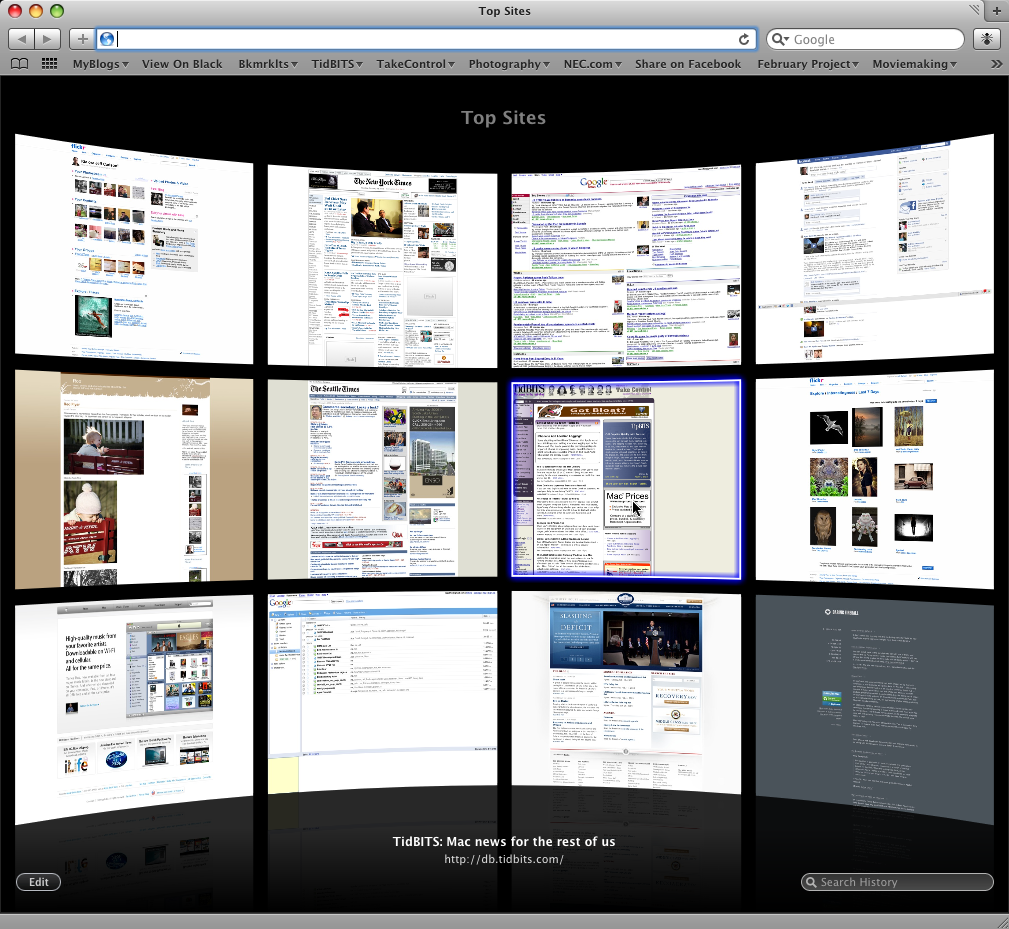
**Top Sites** -- Arguably Safari 4's most dramatic new feature, Top
  Sites provides an at-a-glance springboard to your most heavily
  visited sites. The view appears when you open a new browser window,
  or you can click a new Top Sites icon (a grid of squares) in the
  Bookmarks bar. When opened, Top Sites displays an in-browser window
  containing a grid of screenshot thumbnails of your most visited
  sites (utilizing the most recent appearance of the sites).

<http://www.tidbits.com/resources/2009-02/safari4_topsites.png>

  The grid has an edit mode which enables you to move the thumbnails
  within the grid, pin them to a certain location, and select from
  three grid sizes (6, 12, and 24 viewable thumbnails). The Top Sites
  view also shows when changes have been made to a site, signified by
  a blue star appearing in the right hand corner of the thumbnail.
  Clicking any of these miniature windows in Top Sites brings that
  window forward in the browser tab and displays the site.

  While I think the Top Sites feature looks fantastic, and enjoy
  opening sites from its interface, I question its underlying
  philosophy. Essentially, I want more control over determining what
  my Top Sites are, rather than having Safari tell me. Clicking an
  Edit button lets me remove sites in the view or pin sites to a
  specific location (for example, if I always want Google News to
  appear in the upper-left corner). But removing a site brings up a
  replacement chosen by Safari; why can't I simply type the URL of a
  site I want to appear?

  The issue here lies in the word "top." I want a feature that will
  show me my _favorite_ sites; Apple is giving me a feature that shows
  me my _most visited_ sites and assumes it's the same thing. This is
  undoubtedly true for some users. My mother, for example, visits the
  same handful of Web sites regularly, and rarely strays from them.
  But what about people who frequently get caught up in Web surfing,
  or do heavy Internet research? If I spent a day researching a new
  piece of software, it's possible that several of the pages I
  trafficked in that search could supplant my truly favorite sites,
  those sites I want easily accessible. This is especially true were I
  to do any regular cleaning out of my browser history.

  Perhaps over time my Top Sites would be the sites I check often, but
  what if I want a site easily accessible from this page even if I
  don't go there often? For example, I might be interested in a site
  that updates infrequently, and would want it accessible from this
  page as a way of seeing when new information has been posted. In
  short: let me tell Safari what my Top Sites are, not the other way
  around.

  It turns out there is a non-obvious method of doing this. Open a
  browser window and load the site you want to appear in your Top
  Sites. In a separate window, bring up the Top Sites screen and click
  the Edit button. Lastly, drag the URL from the first window and drop
  it onto one of the Top Sites thumbnails, and then click the pin
  button to hold it in place.

  Hopefully, the final release version of Safari 4 will provide a
  better way to manage what appears on Top Sites, such as a menu item
  for Make Top Site. Still, as a visual way of catching up on
  often-visited sites, the feature has boatloads of potential.


**Cover Flow** -- Another major addition to Safari is the integration
  of Cover Flow browsing to your bookmarks and history. Just like in
  the Finder or iTunes, Cover Flow here enables you to sift through
  snapshots of browser pages in your History or Bookmarks lists.
  Safari still has its classic drop-down menus from the top menu bar,
  where you can find a text listing of your recent History or
  Bookmarks. However, if you open these to a full view or click the
  Bookmarks icon on the Bookmarks bar, you will see the new Cover Flow
  view.

  I'm skeptical about the utility of Cover Flow as applied to
  bookmarks, though I think applying it to history makes more sense.
  In either case I'm interested in determining whether Cover Flow will
  speed up my search, much as it undoubtedly looks cooler than your
  typical text-based list.

  Typically, when I'm searching through my history I'm looking for
  sites I don't visit often - things I found while surfing or
  searching whose names I don't recall (otherwise I'd probably just
  Google them). So for searching my history, I imagine looking at
  image files might be a faster way to search, at least for me, given
  that I'm a highly visual person. There have been countless times
  when I opened a site from the History list that sounded correct,
  only to discover it was different from what I thought. The
  image-based Cover Flow could solve this sort of problem.

  However, applying Cover Flow as a search method for bookmarks seems
  slower because a fundamental difference exists between the two
  situations: in my bookmarks I usually know the name of the site for
  which I'm searching. In this case, the application of
  image-privileged searching seems like a detriment. Searching through
  iTunes with Cover Flow is helpful because album covers look
  drastically different and often incorporate a recognizable name.
  However, most Web sites don't look that different from each other,
  especially at a distance. When I speed through my bookmarks with
  Cover Flow, many of the pages look quite similar, especially when it
  comes to blogs. In this case, it's more helpful to have a list of
  words to scan through, because the site names stand out more
  drastically than their appearance.


**Tabs** -- The new tab placement at the top of the window in what's
  normally known as the title bar is aimed at opening up more screen
  real estate. To that end, the tabs work well and provide a clean and
  streamlined appearance. (Google's Chrome first introduced this
  placement of tabs.) As a big fan of tabbed browsing, my concern
  isn't so much with the elimination of a dedicated tab bar, or the
  location of the tabs at the top, but with the shifting sizes of the
  tabs themselves.

  In Safari 4 the size of each individual tab is dependent on the
  number of tabs currently open in the browser. Thus, if two tabs are
  open, each takes up half of the top bar; if four tabs are open, each
  takes up one quarter of the top bar, and so on. This is quite
  different from Safari 3, or even from Firefox, wherein tabs are
  equally sized, with each new tab being added to the right hand side
  of the tab bar until the tab bar is filled. When the tab bar is
  filled, the tabs shrink in width, and after a certain point, a tab
  with three dots (a graphical ellipsis) appears that, when clicked,
  enables you to scroll amongst the open tabs. The consistent size of
  the tabs makes it easy to locate them quickly, and close them.
  Safari 4's new shifting tab sizes means that the location of your
  tab changes slightly as new ones are opened, as does the close tab
  button. Though the difference is slight, it does slow you down
  enough to be annoying.

  Also troubling is that the loss of the title bar means that there's
  no single name for the current window in a consistent location, as
  is true for nearly every Macintosh application. Plus, clicking on
  the title bar can result in unexpected clickthrough, since clicking
  on a tab not only switches to Safari, but displays that tab.


**Nitro Engine** -- Apple claims its new Nitro Engine handles
  JavaScript 30 times faster than Internet Explorer 7, more than 3
  times faster than Firefox 3, and 4.2 times faster than Safari 3
  according to benchmark tests using iBench and SunSpider. Apple also
  reports that Safari 4 bests those other browsers in HTML
  performance, loading pages 3 times faster than either Internet
  Explorer or Firefox.

  From my own testing, and reading anecdotal evidence on Twitter, I
  must say Safari 4 is noticeably faster than Safari 3 and Firefox 3.
  This is especially true on JavaScript-heavy pages. The updated
  WebKit also now supports HTML 5 and CSS 3, and Apple boasts, "Safari
  4 is the first browser to pass the Web Standards Project's Acid3
  test, which examines how well a browser adheres to CSS, JavaScript,
  XML and SVG Web standards that are specifically designed for dynamic
  Web applications."

<http://www.webstandards.org/action/acid3>


**Developer Tools** -- Safari 4 enhances its set of developer tools,
  enabling developers and Web designers to examine page structures,
  debug JavaScript, inspect offline databases, and test code. Despite
  the welcome inclusion of these tools, the Save as Web Application
  option that was widely reported to be available in the developer
  seed version of Safari 4 is now missing.


**Other Changes** -- Additional updates include the replacement of the
  somewhat irrelevant SnapBack button in the Address Bar with the
  Refresh button (when a page is loading the Refresh button switches
  to a spinning gear, and if hovered over, switches again to the Stop
  button), thus further streamlining the new interface; the welcome
  addition of full-page zoom instead of just text zoom (accessible via
  Command +/-); updated versions of the Smart Address Field and Smart
  Search Field that offer more sophisticated search suggestions; and
  finally, enhanced phishing and malware protection that better
  protect you against these risks.


**Download and Install Information** -- Keep in mind that Safari 4 is
  a public beta, so you're likely to run into rough edges.
  Additionally, Safari 4 saves bookmarks as a plist file as opposed to
  an HTML file as was done in Safari 3. Thus, it is likely that
  outdated bookmark syncing tools may not work with this version,
  although the recently released Foxmarks bookmark synchronization
  tool does largely support Safari 4. Be sure to back up your
  bookmarks before installing. Also, just to note: the update requires
  a full restart upon installation.

<http://blog.foxmarks.com/?p=705>

  Safari 4 is a 31.7 MB download. The update requires Mac OS X Leopard
  10.5.6 or Mac OS X Tiger 10.4.11. If you're running Leopard,
  Security Update 2009-001 must be installed first.

<http://www.apple.com/safari/download/>


Kindle 2 Improves Design, Not Features
--------------------------------------
  by Glenn Fleishman <[email protected]>
  article link: <http://db.tidbits.com/article/10097>

  Amazon's Kindle 2 should have been its Kindle 1. That might be a
  left-handed compliment from this southpaw, but I found the original
  Kindle electronic book reader to be awkward in design, navigation,
  and handling.

<http://www.amazon.com/dp/B00154JDAI/?tag=tidbitselectro00>

  Fundamentally, the Kindle 2 retains the same software, type display,
  restrictions on content, and technology as the previous release.
  Nonetheless, the new version makes a better case for itself.


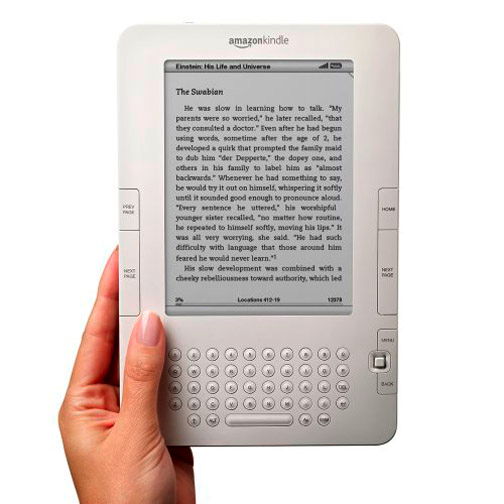
**Function Follows Reform** -- The Kindle 2 ($359) eschews the first
  model's overly designed form in favor of a flatter, thinner, more
  conventional, rounded-corner rectangle. Instead of a strange
  iridescent vertical selection bar, designed to avoid a refresh delay
  issue in the display, there's a tiny square joystick nubbin for
  navigation and selection. It's a huge improvement.

<http://www.tidbits.com/resources/2009-02/Kindle2.jpg>

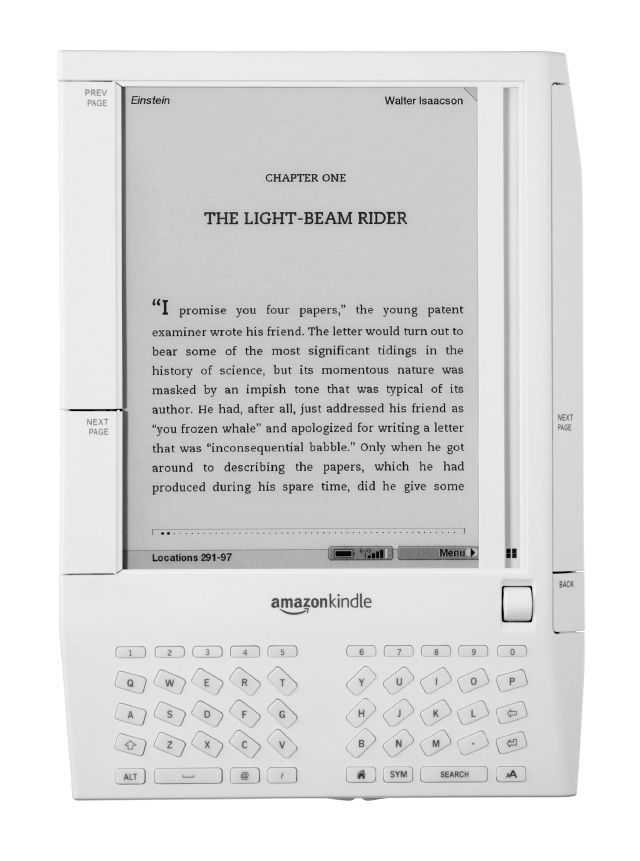
  Amazon also rearranged the tiny keyboard into a more sensible,
  simpler layout: a regular matrix of circular buttons with a spacebar
  lozenge at the bottom, instead of the simulacrum of an ergonomic
  split keyboard found in the original Kindle.

<http://www.tidbits.com/resources/2009-02/original_kindle.jpg>

  These changes aren't cosmetic. They take the device from feeling
  like a version 0.5 prototype to having the polish and fit of
  something that deserves to be released.

  Redesigned buttons for navigating to the next page, previous page,
  or home, moving back to the previous action, and bringing up a
  contextual menu are all enormously improved, even though they're all
  smaller. On the original Kindle, it was sometimes hard to press the
  correct button, and easy to trigger the wrong action by accident.

  The Kindle 2 sports 2 GB of storage built-in (though no option to
  add more), with most of that initially unused. Amazon estimates
  1,500 books could be stored in the available space. The built-in
  battery can't be replaced by a user, but Amazon says the battery
  life was improved.

  The Kindle 2 can be charged via a USB cable, and Amazon includes a
  nifty iPhone-like sleek adapter that's distinct from Apple's, but is
  similarly compact.

  When T-Mobile released its Android-based G1 phone, I complained that
  the maker, HTC, had given little thought to power adapters,
  providing a cheap and generic brick. Amazon is clearly on Apple's
  page about small touches paying big dividends.


**Toning Up** -- The E-Ink-based screen continues to be the star of
  the Kindle, improved on by what Amazon claims is a 20-percent-faster
  refresh. I know that the flash of the pixels being rewritten is less
  disturbing to my eye than the original Kindle. It's also clear that
  Amazon and E-Ink have made it simpler for small areas of the screen
  to be rewritten more quickly to show selections, a spinning progress
  icon, and highlighting.

  The screen now shows 16 levels of gray instead of 4, and it's
  remarkable how so few distinct tones actually dramatically improve
  an image's display. Dithering can barely work with 4 tones, but with
  4 times as many, it works much better.

  E-Ink and other firms are working like mad to produce better
  versions of their paper-like displays, and it's easy to imagine that
  with a slightly denser screen with a faster refresh and - dare I
  dream - 256 colors or grays, a much more general-purpose device
  would be possible.

<http://e-ink.com/>


**Mehr Licht, Said Goethe** -- The biggest remaining lacuna is the
  lack of illumination. The E-Ink screen is designed to draw no power
  when changes aren't being written to it. It's the closest thing to
  paper that you can read on today. But the contrast isn't high enough
  for me to read comfortably without direct illumination.

  I've been reading on the device in a variety of places since
  receiving a review copy, and most of them don't work well with my
  otherwise perfect (with correction) vision. On a tabletop at lunch,
  I can read a newspaper or book just fine with bright overhead
  indirect fluorescents, but the Kindle needs to be propped at 45
  degrees to get the right illumination. The matte screen avoids
  reflections at a large range of reading angles.

  At home, on a couch on which I routinely read paperbacks with small
  print, I could barely read the Kindle. As someone who finds direct
  lighting unpalatable (to mix senses), the Kindle doesn't meet my
  needs.


**Whisper Me a Book** -- The Kindle 2 is equipped with the same Sprint
  cellular data connection for downloading files. The original model
  had a hardware switch for disabling the wireless connection to
  increase battery life or when using a Kindle on an aircraft. The
  Kindle 2 puts the wireless switch into software, available at the
  top of every menu no matter the context.

  As before, the cell data connection is the Kindle's secret weapon.
  You want a book? Navigate through what's available for the device in
  the Kindle Store, which is linked to your Amazon account, and thus
  presents you with recommendations based on your past buying habits.
  Select a book, click buy, and it's on the Kindle in under a minute.

  There's no monthly charge for the Sprint network; the price of its
  use for downloads is apparently built into what Amazon charges for
  books, blogs, magazines, and newspapers.

  Amazon calls the delivery system WhisperNet, and it's rather nice
  when you've subscribed to, say, The Washington Post, to have it
  simply available each morning, stored on the device.

  If you drill down, there's an experimental Web browser, seemingly
  unchanged from the original Kindle's version, which needs an extra
  advanced setting turned on to support CSS. The browser is fine in a
  pinch, but it's not something you'd use on a regular basis.

  I'm still surprised Amazon didn't go for the gusto and put in an
  802.11g Wi-Fi chip. With an antenna and certain radio components
  already in place, adding Wi-Fi might have cost Amazon just a few
  dollars, and made the Kindle more usable in a greater variety of
  places. The Kindle 2, like its predecessor, can't be used outside
  the United States with its radio on, and Amazon won't sell a Kindle
  2 to anyone without a U.S. delivery address and a U.S.-based credit
  card.

  The other kind of whispering built into the Kindle is text-to-speech
  synthesis. The Kindle can read whatever text is on screen in a
  perfectly pleasant voice through its built-in speakers or while
  wearing headphones. I found the default voice just fine; it might
  become boring on a long flight or drive due to the lack of human
  inflection, however.

  After some opening salvos by the Authors Guild about this feature,
  Amazon agreed to make changes that would allow publishers to turn
  the read-aloud option on or off for individual titles. The issue at
  stake is whether Amazon is purchasing just the right to sell
  onscreen reading or also the right to sell audio versions. Amazon
  says there's no problem but is trying to assuage publisher and
  author concerns.

  (I'm a member of the Authors Guild, and the group has done a great
  job in preserving the eroding rights of authors for the last several
  decades. This may appear to be about readers being denied access,
  but it's actually about authors wanting to be paid for their words
  by those who resell them. I wrote a thorough explanation to accompy
  this article: "Why the Kindle 2 Should Speak When Permitted To." You
  can also read Guild president Roy Blount, Jr.'s amusing editorial on
  this matter from before Amazon changed its policy last week. And you
  can listen to Harlan Ellison rant in this NSFW-language YouTube
  clip, "Pay the writer.")

<http://db.tidbits.com/article/10107>
<http://www.nytimes.com/2009/02/25/opinion/25blount.html>
<http://www.youtube.com/watch?v=mj5IV23g-fE>


**Rights Remain Silent** -- So far, so good. But behind this new
  hardware sits the soul of the old machine. For the Kindle, Amazon
  sells only books that are in its proprietary, digital rights-managed
  format. You're not buying a book; you're licensing a specific use on
  any Kindle you own.

  Amazon may extend that to smartphones. The company has made noises
  about something like Kindle reader software that could access the
  same library of 230,000 titles. If Amazon follows the policy it uses
  for video purchases and rental, the media you buy would be stored at
  Amazon and available on any supported device.

  Adam wrote more about this in his preview of the Kindle 2, "Amazon
  Announces Kindle 2 Ebook Reader," 2009-02-09. In short, Amazon has
  locked formats available, and books you buy in Kindle format can't
  yet be viewed anywhere else.

<http://db.tidbits.com/article/10056>


**Lighting the Fire** -- The Kindle 2 is a superbly updated ebook
  reader, and worth considering for any frequent traveler who is also
  a voracious reader. Instead of carrying pounds of books or facing
  the horrors of boredom on a plane or in a distant hotel room, the
  Kindle 2 neatly lightens the load and fills the gap.

  For me, the price of the device and its minor flaws keep it off my
  wishlist: I travel little, have a short commute by bike or car, and
  read widely enough that the current Kindle library likely wouldn't
  satisfy my needs.


The Greatest Computer Keyboard of All Time?
-------------------------------------------
  by Matt Neuburg <[email protected]>
  article link: <http://db.tidbits.com/article/10101>

  Back in 2004, Adam reported the tale of his relentless search for a
  keyboard that would meet his all-text, all-typing, all-the-time
  needs as perfectly as did the nostalgically recalled Apple Extended
  Keyboard, and how he settled on the Matias Tactile Pro (see "The
  Majestic Alps and the King of Keyboards," 2004-03-29). Leap with me
  now, though, still further backwards in time, to a keyboard greater
  still: arguably the clickiest, springiest, most responsive keyboard
  ever, a massive hunk of sturdy plastic, whose tall, concave, solid,
  gently textured, large, separated, clacking keys once resounded
  through offices and computer labs all across the land. This was
  IBM's legendary Model M, whose feel was intended to suggest that of
  Selectric typewriters, punch-card machines, and business equipment
  of all kinds.

<http://db.tidbits.com/article/7607>
<http://en.wikipedia.org/wiki/Model_M_Keyboard>

  The Model M's keys operated on the principle of a "buckling spring",
  which IBM patented in 1978. Supporting the keycap is a coiled
  spring, shaped like a piece of a tiny Slinky, running vertically
  from the underside of the keycap down to a knob sticking up from the
  pivot point of a rocking actuator switch. But the spring does not
  run _quite_ vertically. The angles of the spring's top and bottom
  attachments are such that it actually bulges or bows forward a
  little. As the user starts to press the key, the spring is
  compressed and (this is the important part) the bulge is increased.
  The force of the compression combined with the angle of the
  increased bulging is sufficient to rock the actuator switch forward
  into the "on" position with a sudden, highly audible snap. The key
  character has now been typed. There is a good deal of travel left in
  the key, however, so it continues on downwards, with the spring
  resistance increasing all the while, until it is stopped by its
  housing.

<http://www.google.com/patents?vid=USPAT4118611>

  There is something about the precise combination of all the forces,
  sounds, and nerve and muscle responses here that feels immensely
  solid, firm, predictable, and clean. As you rest your fingers on the
  keys, there is no chance whatever of depressing one of them
  accidentally; the resistance of the spring is too much for that. And
  even if some random twitching of your fingers does depress the key a
  little, the point where the rocker switch actuates is not reached.
  Yet as soon as you start to depress a key deliberately, it snaps the
  rocker switch very early, and the remainder of the downward key
  travel echoes this responsive feedback with the rising spring
  resistance until, if you are heavy-handed, your finger is stopped
  hard, with a second click, by the key housing. At the same time, the
  keys themselves, as I mentioned earlier, are tall, the keycap tops
  being slightly concave and quite widely separated, almost cradling
  and guiding your fingers into place.

  The result is that your chance of slipping onto the wrong key, or of
  not knowing with certainty when a key has been struck, or of getting
  the timing wrong so that keys are struck in the wrong order, or of
  key "bounce" emitting two instances of a character where one was
  intended, is reduced essentially to zero. If what you're accustomed
  to is a typical modern rubber dome switch, then after about two
  minutes to get used to the keyboard, you suddenly find yourself
  typing more cleanly, steadily, and accurately, with more relaxed,
  precise gestures, than ever before in your life.

  Manufacture of the Model M keyboard was divested from IBM to Lexmark
  in 1991, and in 1996 the design was licensed by a small Lexington,
  Kentucky firm called Unicomp. At the end of January 2009, NPR did a
  story on Unicomp. According to reporter Martin Kaste, Unicomp's
  founder is Neil Muyskens, who left IBM specifically to continue
  manufacture of this keyboard, using not just the original technology
  but the original plastic molds. Manufacture is both labor-intensive
  (the buckling springs are inserted by hand and individually tested)
  and high-tech (the key response times are rechecked by a robotic
  typist). The resulting price isn't all that high - just a little
  higher than an ordinary keyboard, really. But, according to the
  story, it's high enough to make sales a problem; retail chains (any
  left in business) won't stock it, and what Kaste calls "aging nerds"
  don't buy fast enough to keep the company going, especially because
  these keyboards are so reliable and long-lived that you probably
  won't buy more than one of them, once.

<http://www.npr.org/templates/story/story.php?storyId=100076874>

  You can guess the rest. Once I heard that story, I had had enough.
  Enough frustration with decent but ultimately mushy, short-lived
  keyboards. Enough guilt about not putting my money where my heart
  and fingers are. I bought a Unicomp keyboard. I love it. I'm typing
  on it right now. And if you're a real typist with plenty of desktop
  space, I can't recommend it highly enough. It isn't just that I type
  more accurately, more smoothly, and (therefore) faster; it's that I
  _feel_ better. I'm more comfortable, less frustrated, less tense;
  and I approach a day of typing at the computer with eagerness
  instead of a vague, nagging dread. This could really make me a
  happier, more productive writer!

  If you want one, the place to start is the PCKeyboard.com Web site
  (and don't start puzzling over whether there's an "s" at the end of
  the name; it's all too confusing). What I got is listed as a
  "Customizer 104/105". It comes in one color, black (with lovely grey
  keys), and two wiring configurations, PS/2 (boo, hiss) and USB
  (yay!). So what I ordered was a Windows (US) USB model with US
  English layout.

<http://pckeyboards.stores.yahoo.net/>

  Now, don't get all bent out of the shape over the use of the word
  "Windows" in that title. Nothing about this keyboard is going to
  remind you of Bill Gates except for the presence of a picture of
  something that looks like a flying window where the Option key
  should be, and the presence of the word Alt where the Command key
  should be, next to the Spacebar. I suppose you could paste something
  over those symbols if they really bother you (I think Unicomp will
  actually sell you alternative keycaps, but I didn't look into that).
  You do, however, need to reverse the meaning of the Option and
  Command keys. Here's how you do it.

  Plug the keyboard into your computer. A dialog will appear stating
  that the keyboard isn't known, and asking you to type the key to the
  right of the left Shift key ("Z" on my keyboard) and to the left of
  the right Shift key (forward slash), and then asking you to confirm
  that this appears to be a U.S. keyboard. Then, choose Apple > System
  Preferences, open the Keyboard & Mouse preferences, and click
  Modifier Keys on the Keyboard pane. In that dialog, set the Command
  key to mean Option and the Option key to mean Command. You're good
  to go! Remember, though, that this reversal is made in software, for
  your individual user; during startup, when your user hasn't loaded
  yet, to hold down the Option key (to display a choice of available
  systems) you'll still need to use Alt.

  (Okay, I lied. There is one further indication that this is a
  Windows keyboard: the presence of the Application key next to the
  right Control key. I believe this is supposed to do the same thing
  as right-clicking the mouse - what a Mac user would call
  Control-clicking. On my machine, it doesn't do anything, and that's
  just fine with me.)

  The Customizer 104/105 keyboard costs $69; shipping is extra (and
  earplugs for anyone who shares your office space must be purchased
  elsewhere). See the Web site for other models and configurations.

<http://pckeyboards.stores.yahoo.net/customizer.html>


TidBITS Watchlist: Notable Software Updates for 02-Mar-09
---------------------------------------------------------
  by Doug McLean <[email protected]>
  article link: <http://db.tidbits.com/article/10092>

  1Password 2.9.9 from Agile Web Solutions updates the password
  syncing utility with support for Safari 4 Beta, as well as support
  for the iCab Web browser. The update also brings improved load time
  for Agile Keychain, expanded built-in documentation, enhanced
  imports from Safari and Firefox, and a variety of bug fixes
  including ones that address import performance, memory leaks, and
  crashing in Mac OS X 10.4. A full list of changes is available on
  the Agile Web Solutions Web site. ($39.95 new, free update, 11.4 MB)

<http://1password.com/>
<http://www.icab.de/>
<http://agilewebsolutions.com/products/1Password/versions#v7365>

  Photoshop CS4 11.0.1 is a maintenance update to Adobe's flagship
  photo editing program. In the latest version the Pen barrel rotation
  now works correctly with Wacom tablets, 3D textures edited by
  plug-ins are properly recognized, and the results for the Auto-Blend
  Layers command have been improved. Also, two crashing bugs have been
  fixed - one that occurs when pasting formatted text, and another
  that occurs when working with corrupt fonts. ($699 new, free update,
  33.1 MB)

<http://www.adobe.com/downloads/updates/>

  MacSpeech Dictate 1.3 from MacSpeech is a maintenance update for the
  speech recognition utility, fixing reported issues and adding
  several features. Changes include new Cache Document and Cache
  Selection commands that enable users to navigate and edit existing
  documents by voice, microphone status indicators that have been
  added to the menu bar, new Press the Key commands that input the
  keyboard keys specified, and an added Cancel Training command that
  closes the Recognition window. Other changes include recognition
  window output now being handled without auto-formatting, and the
  removal of the Force Quit this Application command. Several bugs
  have also been fixed, including one that causes the command Go to
  End to fail, and two that caused MacSpeech Dictate to crash. Lastly,
  the latest version includes a new online help book written by
  TidBITS Contributing Editor Matt Neuburg. ($199 new, free update)

<http://www.macspeech.com/>

  Corel Painter 11 from Corel is the latest version of the
  professional painting and illustration software. Changes include new
  Hard Media and RealBristle Dry Media controls that offer greater
  media options, enhanced selection tools including a new polygon mode
  for the lasso tool, increased support for Wacom pens and tablets,
  new color profiles for individual documents, a new resizable color
  palette, improved Adobe Photoshop support, and a feature that
  enables users to switch between Transform modes from one centralized
  location. ($399 new, $199 upgrade, 103 MB)

<www.corel.com/painter>

  Cocktail 4.3.1 from Maintain is a security and stability update to
  the general purpose maintenance utility. This version addresses an
  issue wherein Cocktail stopped responding during a scheduled system
  cache clearing, adds the capability remove the Trojan Lamzev.A and
  the worm Inqtana, and improves the utility's capability to clear
  potentially harmful files. ($14.95, 1.8 MB)

<http://www.maintain.se/cocktail/>


ExtraBITS for 02-Mar-09
-----------------------
  by TidBITS Staff <[email protected]>
  article link: <http://db.tidbits.com/article/10103>

**Exporting 720p from iMovie '09** -- Macworld's Chris Breen spent the
  weekend crunching pixels to come up with a way to export
  deinterlaced 720p video from iMovie '09, a process that seems
  strangely difficult (and made more difficult by an unresolved bug in
  the way iMovie handles interlaced video). (Posted 2009-03-02)

<http://www.macworld.com/article/139124/2009/03/export720pimovie09.html>


**Dan Frakes Examines Safari 4's Tabs** -- The beta of Safari 4 offers
  some notable changes to how tabs work, and while some of those
  changes are useful, others have provoked criticism. Macworld's Dan
  Frakes runs down the good, the bad, and the ugly. (Posted
  2009-03-02)

<http://www.macworld.com/article/139026/2009/02/safari4tabs.html>


**MacOS iPhone Project Puts System 7 on an iPhone** -- We thought
  running the classic Atari game Adventure on an iPhone was the
  epitome of retro geekiness, but a fully functional version of System
  7 on an iPhone? Wow! It's not available yet, but it's worth checking
  out for the screenshots alone. (Posted 2009-03-02)

<http://www.macosiphone.co.cc/>


**MobileMe Receives Various Improvements** -- None of this stuff is
  earth-shattering, but Apple has improved MobileMe's performance in
  various areas, fixed some user interface annoyances, and made other
  small improvements. (Posted 2009-02-27)

<http://support.apple.com/kb/HT3409>


**iPhone Becomes Credit Card Terminal** -- People who sell at farmers'
  markets or street festivals can now use an iPhone to process credit
  card transactions via ProcessAway. Now if only there could be direct
  iPhone-to-iPhone transactions, or the capability to use an iPhone to
  make payments more generally, as is increasingly common with mobile
  phones in Japan. (Posted 2009-02-27)

<http://www.processaway.net/>


**Hidden Preferences in Safari 4 Beta** -- Liking the beta of Safari
  4's speed, but ambivalent or truly annoyed by changes such as the
  top-mounted tabs and new toolbar? The Random Genius blog found
  hidden preferences to control these and other settings. (Posted
  2009-02-26)

<http://swedishcampground.com/safari-4-hidden-preferences>


**The Photographic Dictionary** -- Thanks to Photojojo for turning us
  on to The Photographic Dictionary, a Web site that defines words
  both textually and with a carefully chosen photograph. Particularly
  interesting are conceptual words, such as "unknown." (Posted
  2009-02-26)

<http://www.thephotographicdictionary.org/>


Hot Topics in TidBITS Talk for 02-Mar-09
----------------------------------------
  by Jeff Carlson <[email protected]>
  article link: <http://db.tidbits.com/article/10102>

**Backups Need Power, Too** -- Readers share tips about determining
  what size of a UPS to buy, and how best to deal with a power outage.
  (2 messages)

<http://emperor.tidbits.com/TidBITS/Talk/2482>


**EtherPad Brings Simultaneous Writing to the Web** -- Dropbox's
  versioning feature invites using it in tandem with SubEthaEdit, but
  for now the idea is just a wish list item. (2 messages)

<http://emperor.tidbits.com/TidBITS/Talk/2483>


**Time Machine ignoring folders** -- Readers share ongoing,
  unexplained quirks with Time Machine. (2 messages)

<http://emperor.tidbits.com/TidBITS/Talk/2486>


**iPhone to Add Location Logging?** Is Google somehow getting around
  Apple's limitation that non-Apple applications can't operate in the
  background on the iPhone? (2 messages)

<http://emperor.tidbits.com/TidBITS/Talk/2487>


**Safari 4** -- The Safari 4 beta dispenses with the SnapBack button
  that would take you back to an earlier page, leading readers to
  comment on whether they ever used the feature. (10 messages)

<http://emperor.tidbits.com/TidBITS/Talk/2490>


$$

This is TidBITS, a free weekly technology newsletter providing timely
news, insightful analysis, and in-depth reviews to the Macintosh and
Internet communities. Feel free to forward to friends; better still,
please ask them to subscribe!

Non-profit, non-commercial publications and Web sites may reprint or
link to articles if full credit is given. Others please contact us. We
do not guarantee accuracy of articles. Caveat lector. Publication,
product, and company names may be registered trademarks of their
companies. TidBITS ISSN 1090-7017.

Copyright 2009 TidBITS: Reuse governed by Creative Commons license.

Contact us at:    <[email protected]>
TidBITS Web site: <http://www.tidbits.com/>
License terms:    <http://www.tidbits.com/terms/>
Full text search: <http://www.tidbits.com/search/>
Subscriptions:    <http://www.tidbits.com/about/list.html>
Account help:     <http://www.tidbits.com/about/account-help.html>


--
If you want to unsubscribe or change your address, use this link
http://emperor.tidbits.com/webx?unsub@@.3c557dc4!u=306a67f9