TidBITS#966/23-Feb-09
=====================
  Issue link: <http://db.tidbits.com/issue/966>
  There's an undercurrent of keeping your Mac safe throughout this
  week's TidBITS issue. First, Adam passes on news of a critical
  vulnerability in Adobe Reader and Acrobat, along with suggestions on
  how to avoid being bitten by the current exploits. Jeff Carlson
  points out that a part of anyone's backup strategy should be keeping
  the power on, via a UPS. And Doug McLean shares details about the
  liquid submersion indicators now built into all iPods, iPhones, and
  MacBooks. But we're not going all paranoid on you - Adam also dives
  deep into iPhoto '09 and returns with news that Apple seems to be
  working on an iPhone application that tracks your location. Jeff
  also explains how you can get a free Mac.com account for use with
  iChat, since trial MobileMe accounts expire. And finally, Doug
  contributes a roundup of his favorite screensavers that go beyond
  bouncing a picture around your screen. We've also just published
  "Take Control of Running Windows on a Mac, Third Edition," and our
  Dutch and Japanese translations could use some more help. Notable
  software releases this week include ScreenFlow 1.5, MercuryMover
  2.0.3, TextExpander 2.5.2, MacBook SMC Update 1.3, WireTap Studio
  1.0.8, Things 1.0.4, and the ConceptDraw WebWave plug-in for
  ConceptDraw Pro.

Articles
    Critical Vulnerability in Adobe Reader and Acrobat
    iPhone to Add Location Logging?
    Get a Free, Non-Expiring Mac.com Address for iChat
    The Latest Details about Running Windows on a Mac
    More Dutch and Japanese Translators Wanted!
    Backups Need Power, Too
    Liquid Submersion Indicators Reveal Accidental Dips
    Top 10 Screensavers for the 21st Century
    TidBITS Watchlist: Notable Software Updates for 23-Feb-09
    ExtraBITS for 23-Feb-09
    Hot Topics in TidBITS Talk for 23-Feb-09


------------ This issue of TidBITS sponsored in part by: --------------

* READERS LIKE YOU! Support TidBITS with a contribution today!
  <http://www.tidbits.com/about/support/contributors.html>
  Special thanks this week to Charles S. Brown, Gary Mueller,
  Miska Knapek, and William Hern for their generous support!

* Fetch Softworks: Fetch 5.3 makes FTP and SFTP easy!
  Upload, download, mirror, and manage your Web site. Dozens of
  new features to make file transfers easier and more reliable.
  Get your free trial version at <http://fetchsoftworks.com/>!

* WebCrossing Neighbors Creates Private Social Networks
  Create a complete social network with your company or group's
  own look. Scalable, extensible and extremely customizable.
  Take a guided tour today <http://www.webcrossing.com/tour>

* MARK/SPACE, INC: Take it with you! The Missing Sync makes
  it easy to synchronize contacts, calendars, notes, photos
  and more from your Mac to your BlackBerry, Palm OS, or
  Windows Mobile phone. <http://markspace.com/bits>

* 25% off VMware Fusion 2, the preferred way to run Windows on
  your Mac. Now only $59.99 when you enter "FusionSpring09"
  at checkout. Offer valid through 11:59PM PT on March 31, 2009.
  Visit: <http://www.tidbits.com/about/support/vmware-fusion.html>

* Microsoft's MacBU: Supporting Mac users with Office 2008.
  Is your Office up-to-date? Make sure you're running the latest
  versions of Word, Excel, PowerPoint, and Entourage by choosing
  Check for Updates from the Help menu of any Office application!

* ConceptDraw Office adds real business power to Microsoft Office
  and Apple's iWork. Whether you need project management, business
  graphics, or mind mapping, it's all easily created on your Mac!
  Buy today for only $499! <http://www.conceptdraw.com/tb>

* Speak up with MacSpeech Dictate! Get the all-new MacSpeech
  Dictate with spelling and phrase training. Speech recognition
  so good, about the only thing it can't do is speak for you.
  Learn more: <http://www.tidbits.com/about/support/macspeech.html>

---------- Help support TidBITS by supporting our sponsors ------------


Critical Vulnerability in Adobe Reader and Acrobat
--------------------------------------------------
  by Adam C. Engst <[email protected]>
  article link: <http://db.tidbits.com/article/10087>

  Adobe has issued a security advisory warning about a "critical
  vulnerability" in all fully patched versions of Adobe Reader 9 and
  earlier, and in Adobe Acrobat 9 and earlier. Although the security
  advisory makes no specific mention of the Mac, previous
  vulnerabilities have been cross-platform, so there's no reason to
  believe this one will be any different. Adobe expects to issue an
  update for the latest versions of Adobe Reader and Acrobat by
  11-Mar-09.

<http://www.adobe.com/support/security/advisories/apsa09-01.html>

  Details of the vulnerability? A malicious PDF could cause the
  affected application to crash and could potentially allow an
  attacker to take control of the computer. I know that's what we
  always say, but in this case, there are reports of this
  vulnerability being exploited in the wild, at least in the Windows
  world.

  Luckily, the security group Shadowserver has verified the exploit
  with Adobe Reader 8 and 9 on Windows. Their posting explains that
  the vulnerability relies in part on JavaScript, such that turning
  off JavaScript is an easy way to mitigate the problem. In their
  testing, a malicious PDF could still crash Adobe Reader if
  JavaScript was turned off, but it couldn't take over the machine.

<http://www.shadowserver.org/wiki/pmwiki.php?n=Calendar.20090219>

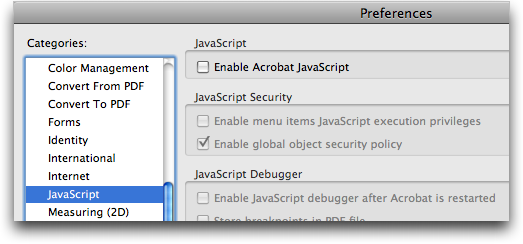
  To disable JavaScript, deselect the Enable Acrobat JavaScript
  checkbox in the JavaScript pane of Adobe Reader's and Acrobat's
  preferences.

<http://www.tidbits.com/resources/2009-02/JavaScript-setting.png>

  Since Apple's Preview and most, if not all, other Mac OS X PDF
  readers cannot interpret JavaScript in a PDF, I suspect that they
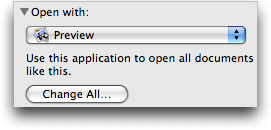
  would be unaffected by a malicious PDF. To change the default so all
  PDFs open with Preview, choose File > Get Info (Command-I) for any
  PDF, choose Preview from the Open With pop-up menu, and click the
  Change All button.

<http://www.tidbits.com/resources/2009-02/Reset-PDF-Open-With-setting.png>

  It's distressing that Adobe's security advisory provides no
  practical information that would help users protect themselves until
  an update appears. Aside from the lack of platform-specific detail,
  would it have killed Adobe to suggest that users turn off JavaScript
  and avoid PDF files from dodgy sites?


iPhone to Add Location Logging?
-------------------------------
  by Adam C. Engst <[email protected]>
  article link: <http://db.tidbits.com/article/10083>

  Could the iPhone soon be able to track your location in the
  background as you walk around? A hint that such a capability is in
  the works at Apple comes from a programmer friend who spent some
  time spelunking around inside iPhoto '09, which shows traces of
  being able to associate such GPS log data with photos.

  That could provide geotagging information for photos taken with
  another camera, or it might let you view a map of your travels, with
  pins dropped where you'd taken photos with the iPhone.

  My source points to an unused nib file within iPhoto as evidence of
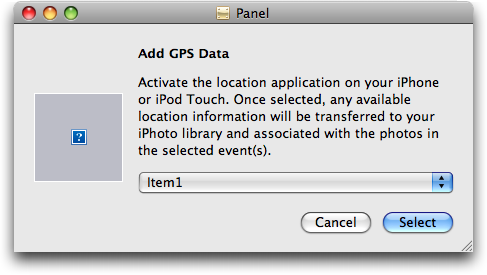
  this feature. As you can see from the screenshot and the text below,
  it's assuming that there's a Location app on the iPhone, and that
  app must be running to transfer location data to iPhoto.

<http://www.tidbits.com/resources/2009-02/PhoneLocationBrowser-nib.png>

    Activate the location application on your iPhone or iPod Touch. Once
selected, any available location information will be transferred to your iPhoto
library and associated with the photos in the selected event(s).

  Elsewhere, in the iPhoto binary, there's also this string, which
  appears to provide the iPhoto side of the directions:

    Select an iPhone or iPod Touch from your list of named devices. Once
selected, the appropriate information will be transferred to your iPhoto
library and associated with the photos in the selected event(s).

  The user experience seems rather convoluted, since the implication
  from these strings is that you would have to select one or more
  events in iPhoto, then launch the app on the iPhone to transfer
  location information via Wi-Fi. Quibbling with the interface is
  pointless, though, given that this feature is non-functional in
  iPhoto '09, and there's no known Location app in the iPhone with
  which to connect.

  Setting the speculation phasers on stun, therefore, ponder the
  following:

* One of the issues with the iPhone is that independent apps can't
  stay active in the background, so GPS-based apps must be onscreen at
  all times to capture location data. Apple isn't subject to that
  limitation, so a Location app from Apple could track location no
  matter what you're doing. Apple should open that capability up to
  developers as well.

* The text mentions the iPod touch, which is a bit odd. Although the
  iPod touch can figure out its location from nearby Wi-Fi networks,
  the feature is worthless if you're anywhere but a heavily built-up
  urban area. And of course, the iPod touch currently has no GPS or
  camera. Could that be changing in a future model?

* One problem with using the iPhone's GPS constantly is that it drains
  the battery in just a couple of hours. I can't really see this
  feature being useful unless the iPhone were to get better battery
  life while using GPS. Or, I suppose, the Location app could rely
  largely on cell phone tower triangulation (which I suspect works
  better inside buildings anyway), using GPS occasionally to improve
  accuracy when available.

* The text talks about the location data being associated with "the
  photos in the selected event(s)." That could be interpreted to mean
  that the Location app's data could be used to geotag photos from
  non-GPS-capable cameras, much as you can do now with a GPS data
  logger device and a program like HoudahGeo or Ovolab's Geophoto.
  Since so few cameras offer GPS support right now, those programs
  remain extremely useful for automatic addition of location
  information.

<http://www.houdah.com/houdahGeo/>
<http://www.ovolab.com/geophoto/>

* iPhoto '09 can already show you a map containing your geotagged
  photos from the iPhone, and it can show a path between photos within
  a map in a book, but it's just drawing lines between photo locations
  - it doesn't actually know the path you took between the points
  where you took the photos. This feature could enhance such maps with
  your actual path.

  In the end, there's no guarantee that Apple has done more than toyed
  with the idea of garnering additional location-based data for
  iPhoto's geotagging feature. Such a feature would need to be
  designed and introduced extremely carefully, to ensure that users
  had sufficient control over it to avoid privacy concerns, and to
  ensure that the messaging around the app didn't give the wrong
  impression. Given that many of the marketing blurbs for the GPS data
  logging devices gleefully suggest privacy-infringing uses like
  spying on a teenager, spouse, or employee, caution on Apple's part
  seems entirely warranted.


Get a Free, Non-Expiring Mac.com Address for iChat
--------------------------------------------------
  by Jeff Carlson <[email protected]>
  article link: <http://db.tidbits.com/article/10084>

  A TidBITS reader writes:

    It seems that as part of the conversion from .Mac to MobileMe, Apple no
longer allows expired MobileMe accounts to be used for iChat. My mother-in-law
got a 60-day free MobileMe account solely for iChat purposes. As soon as she
cancelled it (shortly before the free 60 days expired), she was no longer able
to use iChat.

  It's true that a me.com address expires if you don't subscribe to
  MobileMe within the free period. Apple is doing all it can to
  encourage people to use the paid service. If you were a subscriber
  to .Mac, the precursor to MobileMe, then you already have a mac.com
  address that will work in the future, even if you opted to not renew
  your .Mac/MobileMe account.

  However, you can also create a free mac.com address for use with
  iChat that won't expire. It can be used only for iChat, and doesn't
  include email or any of the other MobileMe features, including
  encrypted iChat messaging.

  Here's how:

  1. In iChat, choose Preferences from the iChat menu.

  2. Click the Accounts icon at the top of the window.

  3. Click the + (plus) button in the lower-left corner to create a
  new account.

  4. Click the Get an iChat Account button, which takes you to Apple's
  site in your Web browser.

  5. Fill out the fields in the Create Your iChat ID form and click
  Continue. If your chosen screen name is already taken, you'll need
  to come up with a new one.

  6. Go back to iChat's preferences and choose Mac.com Account from
  the Account Type pop-up menu.

<http://www.tidbits.com/resources/2009-02/ichat_dotmac_account.png>

  7. Enter your just-created user name and password in the fields
  provided, then click Done.

  This technique is also helpful for creating extra iChat addresses;
  for example, it can be handy for people who want to separate work
  and personal chats. When the account is enabled, you'll see two AIM
  Buddy Lists, which you can populate separately and run
  simultaneously.


The Latest Details about Running Windows on a Mac
-------------------------------------------------
  by Adam C. Engst <[email protected]>
  article link: <http://db.tidbits.com/article/10085>

  Now that running Windows on a Mac has become commonplace, you might
  think that it's also become easy. Alas, the gods of technology have
  yet to make it so, and making Windows run smoothly can still make
  you want to rip your hair out. Of course, this fact also keeps Mac
  writers like Joe Kissell busy, and, taking advantage of Joe's
  unstoppable curiosity, we've just released his latest ebook, "Take
  Control of Running Windows on a Mac, Third Edition," with coverage
  of the latest versions of VMware Fusion, Parallels Desktop,
  VirtualBox, and Boot Camp.

<http://www.takecontrolbooks.com/windows-on-mac?pt=TB966>

  The 167-page ebook helps you figure out which virtualization
  software makes sense for you, round up the necessary hardware and
  software, make any obligatory preparations (like partitioning with
  the right format - FAT32, anybody?), and get it all working right
  with hardware drivers installed, printers printing, anti-virus
  software patrolling the perimeter, and so forth. Joe also gets into
  the details of sharing files between Mac and Windows installations,
  making the most of the snazzy new features in the latest versions of
  Parallels Desktop and VMware Fusion, creating functional backups of
  your Windows installation, and generally getting on with your life
  while using Windows. To make the $10 ebook even more valuable, it
  comes with coupons for $8 off VMware Fusion and $5 off Parallels
  Desktop.

  Since this book covers all the options for running Windows on a Mac,
  those of you who are using or plan to use VMware Fusion will
  probably be happier with Joe's "Take Control of VMware Fusion 2,"
  which is also available for $10 and which also comes with a coupon
  worth $8 off the purchase price of Fusion.

<http://www.takecontrolbooks.com/vmware-fusion-2?pt=TB966>

  If you already own a previous edition of "Take Control of Running
  Windows on a Mac," be sure to check your email for a discount update
  offer, or find the update offer by opening the ebook and clicking
  the Check for Updates button on the first page.


More Dutch and Japanese Translators Wanted!
-------------------------------------------
  by Adam C. Engst <[email protected]>
  article link: <http://db.tidbits.com/article/10090>

  We're hard at work on bringing translations into our homegrown
  TidBITS Publishing System as a way of making TidBITS even more
  accessible to people who prefer to read in languages other than
  English. But while we're enhancing our content management system,
  our volunteer translators continue to put out issues of TidBITS each
  week in other languages.

  So, if you're bilingual in English and either Dutch or Japanese (all
  three is not required!), we can use your help. Both our Dutch and
  Japanese translation teams are running slightly short-handed and
  could use a few more volunteers to spread out the effort. In
  essence, you'd work with the other members of the teams to help
  translate TidBITS from English into either Dutch or Japanese for the
  thousands of people who read TidBITS in those languages.

  You can read more about what's involved with both the Dutch
  translation and the Japanese translation at their respective pages.
  Thanks for any help you can provide, and do note that as a small
  token of our appreciation, translators receive all Take Control
  ebooks for free.

<http://www.tidbits.com/tb-issues/lang/nl/tidbits-nl/over-vertalen.html>
<http://www.tidbits.com/tb-issues/lang/jp/join_us.html>


Backups Need Power, Too
-----------------------
  by Jeff Carlson <[email protected]>
  article link: <http://db.tidbits.com/article/10086>

  After learning our lessons the hard way, we at TidBITS are adamant
  about backing up our data and evangelizing the importance of having
  good backups. (For examples, see Adam's article "International
  Verify Your Backups Day," 2009-02-13, Joe's ebooks "Take Control of
  Mac OS X Backups" and "Take Control of Easy Backups in Leopard," and
  my own travails and successes recovering the contents of a failed
  hard disk, "DriveSavers to the Rescue," 1999-08-30.)

<http://db.tidbits.com/article/10071>
<http://www.takecontrolbooks.com/backup-macosx?pt=966>
<http://www.takecontrolbooks.com/leopard-easy-backup?pt=966>
<http://db.tidbits.com/article/5530>

  But making copies of bits isn't the only consideration for keeping
  your data intact. You need electricity to feed your computer and
  hard drives - and that electricity needs to keep running, especially
  in the event that the power goes out unexpectedly. An abrupt
  shutdown can cause disk directory corruption, and power surges risk
  overloading and damaging power supplies.

  I was reminded of these facts recently when I was interrupted by a
  shrill and sudden beeping from beneath my desk. A dreaded red light
  appeared on the UPS (uninterruptible power supply) into which my
  computer and accessories are plugged, indicating that its battery
  was dead.

  If you're not familiar with the device, a UPS is essentially a
  multi-plug power strip with a built in battery that can keep
  electricity flowing for several minutes in the event of a power
  outage. It also provides protection from power surges and filters
  the incoming power to reduce fluctuations. In my case, I was using
  an old APC Smart-UPS 1000 I inherited from Glenn Fleishman when he
  stopped running Web servers out of our shared office.

<http://www.apc.com/resource/include/techspec_index.cfm?base_sku=SU1000NET>

  The good thing about a UPS is that you can replace the battery
  without replacing the whole unit. So I went to APC's Web site and
  discovered that it would cost about $150 for a new battery.

  While browsing APC's other offerings I came across the company's
  Trade-UPS program. APC will give you credit toward buying a new UPS,
  and also recycle your old one and pay for the shipping. The last
  item is significant, since UPSes are quite heavy (the Smart-UPS 1000
  weighs 46 pounds).

<http://buy.apc.com/commerce/storefronts/tradeups/tradein.aspx>

  I entered my UPS and its serial number in the Trade-UPS page, which
  gave me a point value of 1000; I would need to match that number in
  new products to qualify for the discount and free return. The
  Smart-UPS 1000 was built for a rougher load than what I was using it
  for, so I figured I could get by with a UPS that didn't offer as
  much capacity. But how to tell just how much I needed?

  Once again, TidBITS search to the rescue! Adam wrote about buying a
  UPS in 1999 (see "Don't Interrupt! A UPS Saves the Day, 1999-09-20),
  in which he explained how to calculate the electrical load your
  computer system will place on the UPS when the power fails:

<http://db.tidbits.com/article/5566>

    [L]ook on the back or bottom of each of your devices for power draw ratings
in either amps or watts. If power draw is listed in amps, multiply it by your
line voltage (120 volts for North America, 230 volts for Europe, etc.) to find
the volt-amp (VA) load. If the power draw is instead listed in watts, multiply
by 1.4 to find volt-amps. The problem with this manual calculation is that
manufacturers tend to be conservative and publish the maximum power draw
possible, which would in turn cause you to buy a larger UPS than necessary.

  Adding up the devices in my home office, I came up with a total of
  1102 volt-amps. Not all of those were plugged into the Smart-UPS
  1000 (which has a VA rating of 1000), but the number gave me a
  reference for what to look for.

  Going back to the list of recommended new products, I decided to buy
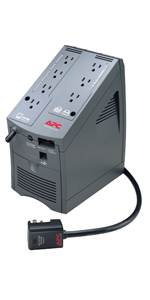
  two smaller-capacity UPSes. I chose the Back-UPS LS, which has a
  model that is rated between 500-700 VA. With the trade-in discount,
  I was able to buy each for $128 (instead of the $140 list price).

<http://www.apc.com/products/family/index.cfm?id=22>
<http://www.tidbits.com/resources/2009-02/back-ups_ls700.jpg>

  Although I ended up paying almost $300 (with tax and shipping),
  instead of $150 to replace a battery, I now have two UPSes that
  allow me to plug in equipment that previously was just in a power
  strip and add more components if needed. And the Smart-UPS 1000
  (along with an older, smaller UPS I retired ages ago) will soon be
  headed back for responsible recycling, without my having to pay
  shipping.

  So when you're evaluating your backup system, don't forget to take
  power into consideration. A backup hard disk can't help you if it
  gets zapped by a blown circuit breaker or a lightning storm.


Liquid Submersion Indicators Reveal Accidental Dips
---------------------------------------------------
  by Doug McLean <[email protected]>
  article link: <http://db.tidbits.com/article/10080>

  While it's no news that water and electronic devices don't mix,
  Apple has of late rolled out an interesting and little-known design
  feature: the liquid submersion indicator (LSI). Now integrated into
  the design of all Apple laptops, iPods, and iPhones, the LSI reveals
  whether or not its host device has been subjected to liquid damage.

  As Apple clearly states on its support pages, "Liquid damage repair
  is not covered by the Apple one year limited warranty or the
  AppleCare Protection Plan." Thus, if your MacBook Air or iPhone
  receives an accidental dunking, you're not going to be able to
  convince Apple to repair it for free. Not as long as you have an
  iPhone or an iPod manufactured after 2006, or any laptop produced
  since 2008 - all these models include an LSI.

  For the iPod and iPhone, the liquid submersion indicator is usually
  found in the headphone jack. Examining the inside of the jack with a
  magnifying glass reveals a white dot at the end of the passage. This
  dot turns half red or pink if the device has been submerged in
  liquid. For the iPhone 3G the indicator is located on the bottom of
  the connector housing, right under the 30-pin dock connector.

<http://support.apple.com/kb/HT3302>

  While iPod and iPhone owners can view the LSI without disassembly,
  the same is not true for the MacBook line. Apple doesn't say where
  the LSIs in the laptops are exactly, but AppleInsider published a
  diagram claiming to show their locations. The four LSIs in the
  MacBook, MacBook Pro, and MacBook Air are spread out in various
  points below the keyboard where they'd work well for detecting
  spilled liquid. Again, normally white, the indicators turn red when
  exposed to moisture, but even getting to them to determine if there
  was liquid damage can reportedly take a technician up to 2 hours.

<http://support.apple.com/kb/HT3425>
<http://www.appleinsider.com/articles/08/10/15/inside_the_new_macbooks_lsi_battery_hd_and_ram.html>

  We can only assume that Apple's repair technicians had sufficient
  evidence of people returning liquid-damaged devices under phony
  pretenses to warrant the creation and implementation of these
  indicators. It's also likely that the cost to incorporate the LSIs
  in the new laptop models was small enough to make it worthwhile for
  cutting down on repair fraud.

  On the user end, the most obvious concern is that these LSIs will
  somehow indicate liquid damage when the device hasn't been dunked.
  In particular, people living in extremely humid climates have voiced
  concern that the indicators could misinterpret environmental
  conditions and prevent them from receiving deserved support. How
  much of a concern this should be is hard to say, given that the
  information available on the nature or composition of these
  indicators is slim. We did find a note from an Apple repair
  technician passing on the claim from Apple that the indicators are
  "very accurate" and "will not be affected by humidity or
  environmental factors."

<http://uhbookstorecomputers.blogspot.com/2009/02/liquid-submersion-indicators.html>

  More troublesome might be actual exposure to liquid that activates
  the LSI but does not, at that point in time, cause the device to
  fail. Should the device need repair in the future for a seemingly
  unrelated reason, that repair may be denied because of the LSI.
  Water, for instance, doesn't itself necessarily damage electronics,
  but can cause electrical short circuits that will. So if power is
  removed instantly, and the device is allowed to dry, it may be fine.
  Unfortunately, other liquids like coffee and soda may contain
  corrosive substances or leave behind conductive residues even after
  the liquid has evaporated. In such cases, the device may seem to
  work properly for some time after the spill, but gradually become
  flakier.

  The moral of the story? You already know to try to keep liquids away
  from your devices, but if the worst does come to pass, you'll just
  have to own up to the mistake and pay for repair or replacement
  unless you have computer insurance coverage from a company like
  Safeware.

<http://www.safeware.com/>


Top 10 Screensavers for the 21st Century
----------------------------------------
  by Doug McLean <[email protected]>
  article link: <http://db.tidbits.com/article/9845>

  Now that screen burn is pretty much a thing of the past, we don't
  really need screensavers anymore. And many people - quite reasonably
  - prefer to have their computers go into energy-saver mode when
  they're away for any significant amount of time. After all, what's
  the point of displaying power-wasting patterns when you aren't
  around to enjoy them? Fair enough, but there is still something to
  be said for enjoying some interesting displays during those times
  when you've just stepped back from the Mac for a short while. Today,
  screensavers can do more than just display repetitive animations
  (remember Flying Toasters from the After Dark screensaver?) and it's
  worth investigating what's out there.

  When I went in search of new and interesting screensavers, I was
  looking for three things: screensavers that could change and develop
  over time, screensavers that made use of input devices or updating
  information, and screensavers that put a fun twist on age-old tricks
  like clocks or photo slideshows. Here's a look at ten of the most
  interesting and enjoyable screensavers I found kicking around the
  Web. Unless otherwise noted, all these screensavers are free.


  1) Electric Sheep

<http://www.tidbits.com/resources/2008-10/Electric-Sheep.png>

  Often cited as one of the best screensavers available, Electric
  Sheep is both visually stunning and conceptually engaging. Named in
  homage to the science fiction author Philip K. Dick's short story,
  "Do Androids Dream of Electric Sheep?" this open-source screensaver
  connects 60,000 sleeping computers to generate morphing abstract
  animations. The process is mediated by a genetic algorithm - the
  animations (or "sheep") with high user ratings go on to reproduce
  with other popular sheep and produce offspring with shared
  characteristics. Unpopular sheep eventually die off and enter an
  archive. Users can also edit and upload their own sheep into the
  gene pool. The end result is a spectacular collaboration and
  competition between human design and computer algorithms. Scott
  Draves, creator of the software, discusses Electric Sheep in an
  online video (at 2:40 in). From a user perspective - and it's not
  often my art degree proves useful in writing technical articles -
  this screensaver really has the most impressive visual abstractions
  of any I've seen. But what really makes it stand out is the user's
  ability to collect new animations, and to affect the production of
  future ones through voting (via the Up and Down arrow keys). The
  endless number of new and different visualizations provides a major
  reason to keep turning it on.

<http://www.electricsheep.org/>
<http://blip.tv/file/1233576>


  2) Surveillance Saver

<http://www.tidbits.com/resources/2008-10/Surveillance.png>

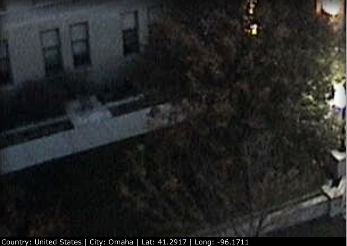
  For the security guard in each of us, Surveillance Saver pulls live
  feeds from over 1,000 different surveillance cameras all over the
  world. The screensaver shows live images of city streets, parking
  lots, Internet cafes, university libraries, highways, and more -
  from all over the planet. Each live feed remains on your screen for
  2 minutes before changing to a new one - unfortunately at this time
  there's no option to adjust cycle times. My favorite detail of this
  screensaver is the information bar located at the bottom of each
  feed informing you of the feed's location, local time, and
  geographical coordinates. Despite the camera's typically mundane
  shots, the prospect of viewing an unfiltered slice of life from
  places like the Czech Republic or Iceland is enticing. The current
  alpha version is a little buggy at times - sometimes I would see
  only a black screen, or the live feed would freeze up into a still
  image. But this is a screensaver with enormous potential - and
  hopefully it will continue to develop in future versions with the
  addition of some controls. Nonetheless the current version is still
  worth checking out; it will certainly satisfy your inner spy. Though
  it's worth asking: What do I do if I actually witness a crime?

<http://i.document.m05.de/?page_id=438>


  3) BreveCreatures

<http://www.tidbits.com/resources/2008-10/brevecreatures.png>

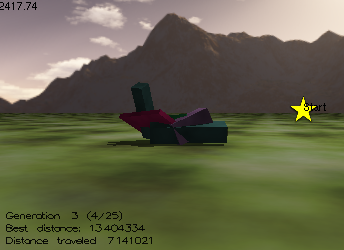
  BreveCreatures is a screensaver that simulates the evolution of
  virtual creatures. Beginning with randomly generated
  block-creatures, the screensaver uses a genetic algorithm to help
  the organisms develop locomotive capabilities. Each creature is
  plopped down in a simulated 3D world and has a set amount of time to
  move as far as possible from the start point - denoted by a yellow
  star. Some creatures never budge an inch, and others speedily
  scramble off - it's fun to watch one plop down and wonder, based on
  its shape and parts, whether it will have any success. The
  screensaver progresses through successive generations, each
  generation utilizing the qualities of the most successful creatures
  from the previous group. The result is a slow evolution towards
  mobility. Because the process can take hours or even days for
  significant developments to occur, each time BreveCreatures is
  activated it picks up where it left off. This is all surprisingly
  enthralling to watch. I found myself unable to turn it off - saying,
  "just one more" - wanting to see if the new creature would be the
  new record setter. It was also amazing to leave the room for an hour
  and come back to see the progress that had been made. An interesting
  addition for future versions of this program would be a video
  highlight gallery that details the game-changing creatures that
  significantly pushed forward the evolution of your system.

<http://www.spiderland.org/breve/breveCreatures.html>


  4) Chemical Burn

<http://www.tidbits.com/resources/2008-10/Chemical-Burn.png>

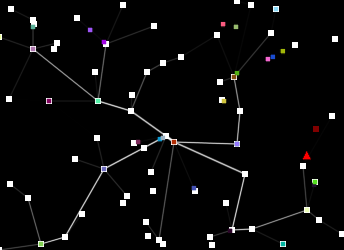
  Chemical Burn is a screensaver that displays a transportation
  network simulation. Packets of data are randomly generated with an
  assigned destination (or node); these packets then attempt to find
  the fastest way to get to their node. Frequently used routes become
  faster; in turn, becoming even more popular and also more visible.
  You can also select to have nodes collapse at random, and be sent
  "Packets of Death," which destroy the receiving node and the
  transportation routes connected to it. However, the destruction of
  nodes and routes results in newly formed ones, continuing the
  system's process. Another option is the capability to determine the
  initial number of nodes (more nodes result in a more complex, but
  slower, system), as well as traffic and distance weighting options.
  While the animation is rather simplistic - you could be watching an
  old Atari game - it's fascinating and relaxing to watch. Just
  imagine the possibilities if this were redesigned with high-end 3D
  graphics.

<http://www.mikeash.com/?page=software/chemicalburn/>


  5) Soundstream

<http://www.tidbits.com/resources/2008-10/soundstream.png>

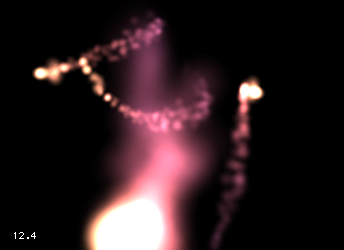
  Soundstream is a screensaver that responds to sound input, whether
  it be ambient room noise, your voice, or your iTunes music.
  Flurry-like particles move about the darkened screen, shifting in
  color as they go. Any sounds registered by your microphone cause the
  particles to expand in size and brightness as they move. The degree
  to which the particles enlarge, brighten, or shift in color is
  related to the volume of the input. You can control the number of
  particles, whether they exist in 2D or 3D space, and the sensitivity
  of the sound responsiveness. If you like Apple's built-in Flurry
  screensaver, you'll love Soundstream. After the initial fun of
  yelling at my computer to watch the particles explode, I discovered
  the subtler pleasure of seeing the sounds of my house visualized
  onscreen.

<http://www.pcheese.net/software/soundstream/>


  6) iSight ScreenSavers

<http://www.tidbits.com/resources/2008-10/iSight-water.png>

  The iSight Screensavers collection ($4.99 shareware) is a group of
  six screensavers that utilize input from your iSight camera, or any
  other QuickTime-compatible camera, to morph through various effects
  (not unlike the effects within iChat or Photo Booth). The six
  effects include Fluid, Particles, Champagne, Fire, Water, and
  Flipping Grid. I found the most impressive of these to be Fluid and
  Water - though it's worth trying all of them out. Like Soundstream,
  the iSight Screensavers are cool because they constantly respond to
  the real time input rather than merely drawing from a finite set of
  options.

<http://majicjungle.com/screensavers.html>


  7) TimeLapse Screensaver

<http://www.tidbits.com/resources/2008-10/Timelapse1.png>
<http://www.tidbits.com/resources/2008-10/Timelapse2.png>

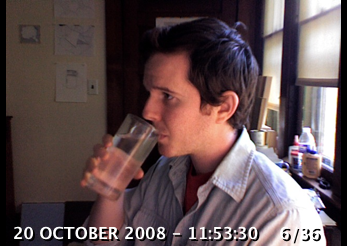
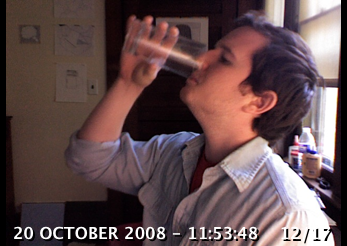
  TimeLapse is my favorite input-based screensaver. Like the iSight
  Screensavers, it requires either an iSight camera or another
  QuickTime-compatible camera. Once launched, TimeLapse begins taking
  photos at designated intervals. Slowly, with the addition of each
  new photo, it builds a time lapse animation. The screensaver shows
  the animation in a loop, each time adding the recently acquired
  photo or photos onto the end. Capture intervals, storage limits, and
  playback speed are all adjustable. It's wonderful to see yourself
  and your space captured in a time-lapse animation - and should you
  leave your computer for a while, it's a fun way to catch up on what
  happened while you were gone.

<http://2005to2007.fabrica.it/project.php?id=393>


  8) Harry Potter Photo Show

<http://www.tidbits.com/resources/2008-10/HarryPotter-slideshow.png>

  Many people enjoy using Apple's photo screensaver as a way to
  shuffle through their digital photo collections. The Harry Potter
  Photo Show screensaver offers a fun twist on that basic concept.
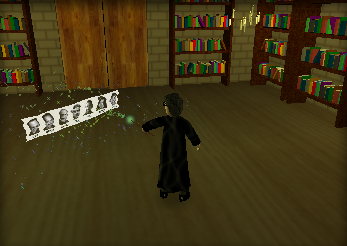
  When launched, Harry wanders around a Hogwarts library casting your
  photos as spells with his wand (above you can see Harry casting the
  TidBITS masthead). The photos hang in the air flittering and
  flickering as you would expect a good spell would do. You can adjust
  the music, lighting quality, source folder, and how the sparks that
  shoot out of Harry's wand act when casting. Despite the mediocre
  animation - Harry looks a bit like a claymation Muppet and moves
  around woodenly - it's surprisingly enjoyable to see him zap your
  pictures with his wand.

<http://uselesscreations.com/mac/harrypotter/>


  9) Pong Saver

<http://www.tidbits.com/resources/2008-10/Pong-Saver.png>

  If you often find yourself yearning for the video game aesthetics of
  yore, you might enjoy this simple but amusing adaptation of a clock
  screensaver. In Pong Saver, the score between the two sides reflects
  the time in either a 24 hour or 12 hour notation. A hint for you
  gamblers out there: Don't place any bets on the hour hand side - it
  almost always loses to the minute hand side.

<http://rogueamoeba.com/freebies/>


  10) LotsaEscher

<http://www.tidbits.com/resources/2008-10/LotsaEscher.png>

  Many people are familiar with the mind-bending illustrations of M.C.
  Escher. The LotsaEscher screensaver takes a dizzying journey into
  the heart of Escher's 1956 lithograph "Print Gallery." The
  screensaver is based on the work of Hendrik Lenstra and Bart de
  Smit, who, through an analysis of the mathematical structure of the
  image, were able to uncover the mystery of the blurry white hole in
  the center of the drawing, and were able to create a Droste image -
  an image that contains itself in miniature. The screensaver zooms
  infinitely into various versions of picture - you can select which
  one in the Options panel. It's a vertigo-inducing way to spend some
  time.

<http://wakaba.c3.cx/s/lotsablankers/lotsaescher.html>
<http://escherdroste.math.leidenuniv.nl/>
<http://en.wikipedia.org/wiki/Droste_effect>


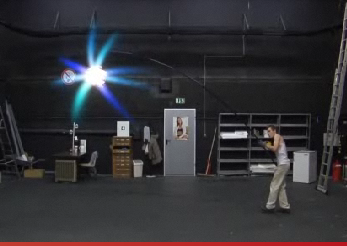
  11) Flurry Spoof

<http://www.tidbits.com/resources/2008-10/Flurry-spoof.png>

  There's no point in downloading this gag screensaver, which is an
  advertisement for the German jobsintown.de employment service; just
  watch the preview on the site. It's a great spoof of Apple's popular
  Flurry screensaver.

<http://www.avocada.de/2008/en/jobsintown/screensaver/>


**More Screensavers** -- As you might imagine this list only begins to
  scratch the surface of the screensaver universe. If you're looking
  for more, I recommend checking out Pure Mac Screensavers and
  XScreenSaver as good starting points. Pure Mac Screensavers has a
  wide variety of interesting programs - some of which made this list.
  It's easy to navigate and many of the screensavers on the site are
  worth trying out. There's also MacScreensavers, though this site
  seems oriented toward promotional and pop-culture screensavers, most
  of which are unimpressive examples of the screensaver genre.

<http://www.pure-mac.com/screensaver.html>
<http://www.jwz.org/xscreensaver/>
<http://www.macscreensavers.com/>

  XScreenSaver was the standard screensaver collection on most Linux
  and Unix machines running the X11 Window System. The first version
  was released in 1992, and was ported to Mac OS X in 2006. Here
  you'll find a wide array of older screensavers with some old school
  graphics and some endearingly simple premises. (Thanks to reader Dan
  O'Donnell for the tip on XScreenSaver.)

  Oh, and if in your explorations you come across any screensavers
  that seem interesting and weren't touched on here, I'd love to hear
  about them. Happy screensaver searching! Enjoy!


TidBITS Watchlist: Notable Software Updates for 23-Feb-09
---------------------------------------------------------
  by Doug McLean <[email protected]>
  article link: <http://db.tidbits.com/article/10079>

  ScreenFlow 1.5 from Telestream is the latest version of the highly
  regarded screencasting software for Mac OS X 10.5 Leopard. Changes
  include titling and text support that enables users to add text
  objects directly to the timeline, customizable mouse pointers, ten
  new audio effects, the capability to mix mono microphones to stereo,
  and integration with Telestream's Flip4Mac WMV which lends Windows
  Media support. The update also addresses two critical bugs that
  cause crashes after upgrading to Quicktime 7.6 - one when importing
  QuickTime content, and one when exporting to your Apple TV, iPod, or
  iPhone. The full list of bug fixes is available (as a PDF document)
  from Telestream's Web site. ($99 new, free update, 6.2 MB)

<http://www.telestream.net/screen-flow/overview.htm>
<http://www.telestream.net/flip4mac-wmv/overview.htm>
<http://www.telestream.net/download-files/screenflow/rel_ScreenFlow_1.5.1.pdf>

  MercuryMover 2.0.3 from Helium Foot Software is a minor maintenance
  update to the keyboard shortcut utility for moving and resizing
  windows. Issues that have been resolved include incompatibility with
  Nvidia video cards, poor interface layout on smaller displays,
  windows incorrectly centering when display sizes change, and the
  frontmost application not being properly restored when dismissing
  MercuryMover with its hot key. ($20, free update, 867 KB)

<http://www.heliumfoot.com/mercurymover/>

  TextExpander 2.5.2 from SmileOnMyMac updates the typing shortcut
  utility with several new features and some minor bug fixes. The
  latest version enables users to create snippets from shell scripts,
  assign those snippets abbreviations, and then trigger the shell
  scripts with those abbreviations. Also new is improved format
  handling when creating snippets from the clipboard, and a fix for a
  bug that causes problems with updating URL-based snippet groups.
  ($29.95 new, free update, 3.6 MB)

<http://www.smileonmymac.com/TextExpander/>

  MacBook SMC Update 1.3 from Apple is a specific firmware update for
  the 2009 white polycarbonate MacBook. SMC stands for System
  Management Controller, a micro controller located on the logic board
  that is responsible for the computer's power functions. As such, the
  update addresses issues causing slow startup times when starting up
  from battery power only. (Free update, 4.3 MB).

<http://support.apple.com/downloads/MacBook_SMC_Update_1_3>

  WireTap Studio 1.0.8 from Ambrosia Software is a minor update to the
  tool for recording and editing audio on your Mac. The update brings
  enhanced editor capabilities, improved handling of large files, a
  fix for an issue that prevents new recordings from appearing after
  creating or updating a library, a fix for a bug that causes problems
  in LivePreview when opening particular file formats, and improved
  support for iPhone exports. ($69 new, free update, 30.8 MB)

<http://www.ambrosiasw.com/utilities/wiretap/>

  Things 1.0.4 from Cultured Code is a maintenance update to the
  Getting Things Done-inspired task manager. In the latest version,
  adding a new task to a completed project now marks the project as
  incomplete, adding a new task to a logged project now marks the task
  as logged, and marking a task as uncompleted in a completed project
  now marks the project as uncompleted. Additionally, dragging items
  from the Trash to another area now marks those items as active. The
  update also improves reliability and support for iPhone sync.
  ($49.95 new, free update, 4.3 MB).

<http://culturedcode.com/things/>

  The ConceptDraw WebWave plug-in from CS Odessa is a new plug-in for
  ConceptDraw Pro 8. ConceptDraw WebWave enables users to plan and
  design Web sites quickly through Web site prototyping, page mock-up
  creation, and site-mapping. The plug-in offers Web site content and
  documentation functionality, site structure planning capabilities, a
  Color Generator that enables users to design color schemes, and
  access to additional Web-specific objects and template libraries.
  ConceptDraw WebWave is also capable of managing project resources
  with its capability to assign resources and generate to-do lists.
  ($99 when purchased with the $249 ConceptDraw Pro 8, not available
  for separate purchase)

<http://www.conceptdraw.com/en/products/webwave/>
<http://www.conceptdraw.com/en/products/cd5/>


ExtraBITS for 23-Feb-09
-----------------------
  by TidBITS Staff <[email protected]>
  article link: <http://db.tidbits.com/article/10089>

**XRoad's Map Apps Boast Turn-by-Turn GPS Directions** -- Despite the
  belief that Apple wouldn't allow turn-by-turn directions in an
  iPhone app, the recently released version 1.2 of XRoad's G-Map U.S.
  West and G-Map U.S. East adds that feature. Unfortunately, still
  absent are voice prompts, which XRoad attributes to Apple's
  prohibitive policies. The two apps, covering the eastern and western
  halves of the United States, are $19.99 each. (Posted 2009-02-19)

<http://www.macrumors.com/2009/02/19/turn-by-turn-iphone-gps-app-already-available-in-itunes/>


**Search the Web without a Browser** -- Still launching a Web browser
  every time you need to do a quick Web search? There may be other,
  quicker ways to get the information you need, as Joe Kissell
  explains in this Macworld article. (Posted 2009-02-18)

<http://www.macworld.com/article/138782/2009/02/searchnobrowser.html>


**Improve Your Google Searches** -- If you're using Google to search
  the Web and not finding the results you're looking for, you may just
  need to refine your searches a bit. In this Macworld article, Joe
  Kissell provides some Google search tips. (Posted 2009-02-18)

<http://www.macworld.com/article/138777/2009/02/searchgoogle.html>


**Go Beyond Google Searches** -- Believe it or not, there are other
  (and sometimes more effective) ways to find information on the Web
  than using the Google search box built into your browser. Joe
  Kissell explores some of the interesting alternatives in this
  Macworld article. (Posted 2009-02-17)

<http://www.macworld.com/article/138781/2009/02/beyondgoogle.html>


**Mobile Web Usability Stinks** -- Let's be real. Browsing the Web on
  a mobile phone, even an iPhone, is a lousy experience in comparison
  with using a full-fledged browser on a Mac. Jakob Nielsen explains
  the problems and offers suggestions on how to improve mobile Web
  usability in his Alertbox column. (Posted 2009-02-17)

<http://www.useit.com/alertbox/mobile-usability.html>


**The Tao of Backup** -- The software this 12-year-old site was
  developed to promote may be long gone, but its lessons about backup
  are timeless. "Remember, Grasshopper, to believe in one's backups is
  one thing. To have to use them is another." (Posted 2009-02-17)

<http://www.taobackup.com/>


Hot Topics in TidBITS Talk for 23-Feb-09
----------------------------------------
  by Jeff Carlson <[email protected]>
  article link: <http://db.tidbits.com/article/10088>

**Microsoft Store** -- Readers envision what Microsoft's newly
  announced retail stores will be like. (3 messages)

<http://emperor.tidbits.com/TidBITS/Talk/2470>


**Time to kiss Eudora goodbye? Now what?** As Eudora continues to age,
  are Mail and Entourage the only viable replacements? What about
  Gmail? (72 messages)

<http://emperor.tidbits.com/TidBITS/Talk/2471>


**Liquid Submersion Indicators Reveal Accidental Dips** -- Apple can
  tell if your iPod, iPhone, or laptop has been exposed to liquid. (3
  messages)

<http://emperor.tidbits.com/TidBITS/Talk/2473>


**Western Digital Passport Studio for G4 laptop?** A reader is looking
  for portable storage to accompany his PowerBook or iBook, and hoping
  for suggestions. (8 messages)

<http://emperor.tidbits.com/TidBITS/Talk/2474>


**BSD UNIX - Basis for OS X?** If you want to poke around under the
  hood of Mac OS X, be prepared to learn a host of different Unix
  flavors. (15 messages)

<http://emperor.tidbits.com/TidBITS/Talk/2478>


**Stolen Laptops Redux** -- After having two laptops stolen from a
  hotel room in London, a reader wants to know what can be done to
  restore his data and prevent future thefts. See what others do to
  protect their precious electronics. (9 messages)

<http://emperor.tidbits.com/TidBITS/Talk/2479>


**Get a Free, Non-Expiring .Mac Address for iChat** -- With other
  types of addresses compatible with iChat (such as AIM, Jabber, and
  Google Talk), what's the benefit of getting a free .Mac address? (3
  messages)

<http://emperor.tidbits.com/TidBITS/Talk/2480>


**Free Hotmail POP3 Access Now Available in U.S. Too** -- Hotmail's
  POP access does not appear to be active for all users, which could
  be why a reader can't get it to work. (2 messages)

<http://emperor.tidbits.com/TidBITS/Talk/2481>


$$

This is TidBITS, a free weekly technology newsletter providing timely
news, insightful analysis, and in-depth reviews to the Macintosh and
Internet communities. Feel free to forward to friends; better still,
please ask them to subscribe!

Non-profit, non-commercial publications and Web sites may reprint or
link to articles if full credit is given. Others please contact us. We
do not guarantee accuracy of articles. Caveat lector. Publication,
product, and company names may be registered trademarks of their
companies. TidBITS ISSN 1090-7017.

Copyright 2009 TidBITS: Reuse governed by Creative Commons license.

Contact us at:    <[email protected]>
TidBITS Web site: <http://www.tidbits.com/>
License terms:    <http://www.tidbits.com/terms/>
Full text search: <http://www.tidbits.com/search/>
Subscriptions:    <http://www.tidbits.com/about/list.html>
Account help:     <http://www.tidbits.com/about/account-help.html>


--
If you want to unsubscribe or change your address, use this link
http://emperor.tidbits.com/webx?unsub@@.3c557dc4!u=306a67f9