TidBITS#969/16-Mar-09
=====================
  Issue link: <http://db.tidbits.com/issue/969>
  It's an iPod, iTunes, and iPhone issue this week, thanks to Apple's
  release of the new 3rd generation iPod shuffle (so small it moves
  the buttons to the earbud cord) and iTunes 8.1. But Apple also
  enhanced the App Store so reviews are now associated with
  application versions, making it easier for iPhone and iPod touch
  owners to pick good apps. Matt Neuburg also tells the truly silly
  story of what he had to go through to download an audio book from
  his local library, and Dennis Wurster passes on a workaround for
  anyone who needs to print labels from the PayPal shopping cart.
  Other notable software releases this week include CopyPaste Pro 2.0,
  Front Row 2.1.7, and NTFS for Mac OS X 7.0.

Articles
    3rd Generation iPod shuffle Shrinks, Gets Mouthy
    iTunes 8.1 Enhances DJ Capabilities
    In Search of iTunes 8.1's Autofill
    App Store Reviews Now Distinguish Versions
    Printing Shipping Labels from PayPal's Shopping Cart
    A Silly Saga: How I Downloaded an Audio Book from My Library
    TidBITS Watchlist: Notable Software Updates for 16-Mar-09
    ExtraBITS for 16-Mar-09
    Hot Topics in TidBITS Talk for 16-Mar-09


------------ This issue of TidBITS sponsored in part by: --------------

* READERS LIKE YOU! Support TidBITS with a contribution today!
  <http://www.tidbits.com/about/support/contributors.html>
  Special thanks this week to Jim McIntosh, Norman A. Cohen,
  James Parker, and Masaya Higashijima for their generous support!

* Fetch Softworks: Fetch 5.3 has WebView, the easy way
  to view files in a browser and copy Web addresses from Fetch.
  Also a new look for Leopard, droplet shortcuts, and more.
  Download your free trial version! <http://fetchsoftworks.com/>

* WebCrossing Neighbors Creates Private Social Networks
  Create a complete social network with your company or group's
  own look. Scalable, extensible and extremely customizable.
  Take a guided tour today <http://www.webcrossing.com/tour>

* Bare Bones Software's BBEdit 9.1 -- A burly upgrade introducing new
  capabilities like Projects, non-modal Find and Multi-File Search,
  editing in browsers, text completion, Scratchpad, new Ruby module,
  better JavaScript, ObjC, Obj-C++, YAML <http://barebones.com/>

* MARK/SPACE, INC: If you have a smartphone, we can sync it!
  Sync your address book, calendar, notes, music, pictures, and
  more from your BlackBerry, Windows Mobile or Palm OS mobile
  phone to your Mac. <http://www.markspace.com/bits>

* 25% off VMware Fusion 2, the preferred way to run Windows on
  your Mac. Now only $59.99 when you enter "FusionSpring09"
  at checkout. Offer valid through 11:59PM PT on March 31, 2009.
  Visit: <http://www.tidbits.com/about/support/vmware-fusion.html>

* Microsoft's MacBU: Supporting Mac users with Office 2008.
  Straighten up your Office with the latest updates to Word,
  Excel, PowerPoint, and Entourage. Update today at Mactopia!
  <http://www.microsoft.com/mac/downloads.mspx>

* ConceptDraw Office adds real business power to Microsoft Office
  and Apple's iWork. Whether you need project management, business
  graphics, or mind mapping, it's all easily created on your Mac!
  Buy today for only $499! <http://www.conceptdraw.com/tb>

* Speak up with MacSpeech Dictate! Get the all-new MacSpeech
  Dictate with spelling and phrase training. Speech recognition
  so good, about the only thing it can't do is speak for you.
  Learn more: <http://www.tidbits.com/about/support/macspeech.html>

---------- Help support TidBITS by supporting our sponsors ------------


3rd Generation iPod shuffle Shrinks, Gets Mouthy
------------------------------------------------
  by Doug McLean <[email protected]>
  article link: <http://db.tidbits.com/article/10133>

  A few years ago, Saturday Night Live's Weekend Update featured an
  appearance by "Steve Jobs" wherein he presented progressively
  smaller iPods, ending with the iPod invisa, an iPod so small that it
  was invisible yet was capable of storing, among other things, "every
  photo ever taken."

<http://nerdnirvana.org/2006/05/02/saturday-night-live-the-ipod-invisa/>

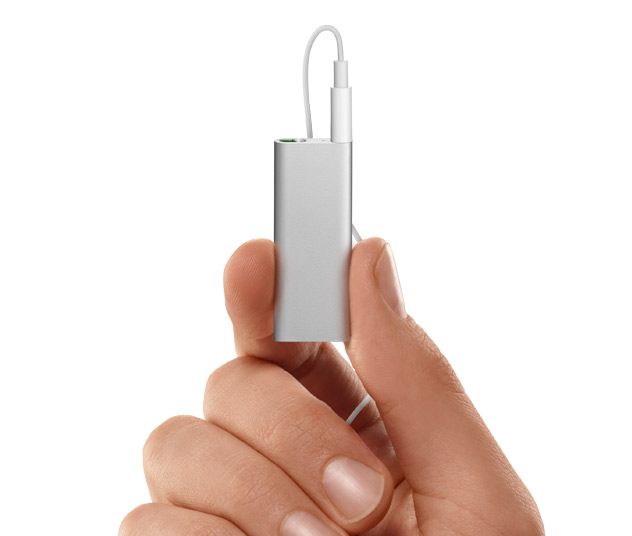
  Apple's announcement of the 3rd generation iPod shuffle contains
  echoes of that ridiculous skit, with the updated iPod shuffle
  measuring half the size of the previous iPod shuffle design. Apple
  says the new shuffle is now smaller than a AA battery. The drop in
  size is coupled with a fourfold increase in storage capacity, to 4
  GB, or, as Apple touts, up to 1,000 songs (depending on song length
  and encoding rate of course).

<http://www.tidbits.com/resources/2009-03/ipodshuffle.jpeg>


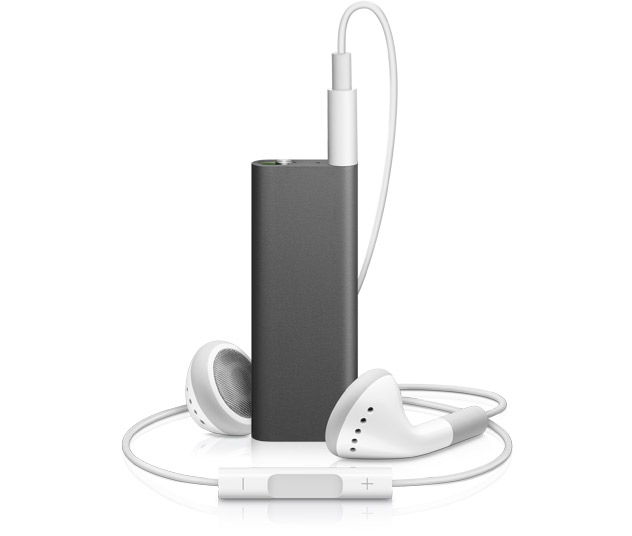
**Lost Buttons** -- The reduced form factor has led to the relocation
  of the player controls from the casing to the earbud cord. The cord
  - similar to the one that ships with the iPod touch - has three
  buttons enabling users to play/pause, increase/reduce volume, skip
  to the next/previous track, fast-forward/reverse, get song
  information, and change the playlist. The only button now located on
  the case is the power/play-mode slider.

<http://www.tidbits.com/resources/2009-03/ipodshuffle2.jpeg>

  The click-patterns for skipping to tracks, or fast-forwarding and
  reversing aren't intuitive, and while they're listed in the
  documentation, many people probably won't bother to read through
  that. Here are the important ones: Double-click for next track,
  triple-click for previous track, double-click-and-hold for
  fast-forward, and finally, triple-click and hold for rewind.

  Users who prefer third-party headphones are already bemoaning the
  change for the limits they anticipate it will place on their
  headphone options. However, Greg Joswiak, Apple's vice president of
  iPod and iPhone product marketing, has said Apple has been working
  with accessory makers to ensure there are various compatible
  headphone options, especially sports-oriented ones. More
  importantly, he told the Telegraph, "There will also be adapter
  cables available, so you can use your existing headphones with the
  new shuffle too."

<http://www.telegraph.co.uk/scienceandtechnology/technology/apple/4973346/Apple-launches-new-talking-iPod-shuffle.html>

  Additionally, if you use your own headphones, the iPod shuffle will
  start playing when you plug them in, and stop playing when you
  unplug them. As might be expected, you won't be able to adjust the
  volume, skip tracks, or pause playback.


**Speak to Me** -- Another major addition to the iPod shuffle is
  VoiceOver, a feature that enables your iPod to audibly announce the
  name of the song, artist, or playlist you've selected. Like the
  earbud buttons, VoiceOver helps Apple justify reducing the player
  size beyond even the previous minuscule size.

  While this functionality is impressive, it should be noted that the
  iPod isn't actually performing the text-to-speech operation.
  Instead, iTunes is synthesizing the speech, while the iPod is just
  mixing the song and announcement audio. (This is how the
  fourth-generation iPod nano provides spoken-word menus for those
  with vision difficulties.)

  The Guided Tour video, available from Apple's iPod shuffle page,
  gives a nice sense of how VoiceOver actually works. Holding down on
  the center button of the earbud controls prompts VoiceOver to say
  the song and artist information, without interrupting playback.
  Continuing to hold down on that button tells VoiceOver to list your
  playlists, enabling you to choose a new playlist by clicking the
  center button when the one you want is named.

<http://www.apple.com/ipodshuffle/>

  Apple claims VoiceOver will automatically recognize which language
  you speak (presumably deducing this from your iTunes information),
  though should you want to change the language you can do so via
  iTunes. Currently the feature supports 14 languages including
  English, Czech, Dutch, French, German, Greek, Italian, Japanese,
  Mandarin Chinese, Polish, Portuguese, Spanish, Swedish, and Turkish.

  Perhaps it will be a long time before any iPod has enough processing
  power for this, but we'd like to see the voice-based interface taken
  one step further, granting the user control through speaking into a
  microphone mounted on the earbud wires, much like the iPhone's
  earbuds. It would need to recognize only a very small set of
  commands - play, pause, next, previous, etc. - and would be a
  welcome option for people listening to iPods while exercising or
  performing tasks that occupy their hands. But anyone caught talking
  to an iPod in a crowded airport could be glared at for extreme
  boorishness.

  Although choosy users may be temporarily upset about the inability
  to use their favorite headphones, many people will undoubtedly love
  the new iPod shuffle's reduced size, earbud-based player controls,
  expanded storage space, support for playlists, and VoiceOver
  support. Overall, this is a welcome and forward-looking update to
  the least expensive iPod model.

  The iPod shuffle comes in either black or silver anodized aluminum
  and has a built-in stainless steel clip. Apple claims a 10 hour
  battery life. It requires iTunes 8.1, which was released the day of
  the announcement.

  The 3rd generation iPod shuffle retails for $79 and is available
  now. The 2nd generation iPod shuffle, which comes in five colors and
  offers 1 GB of storage, remains available for $49, although there's
  no telling how long Apple's supplies will hold out.

<http://store.apple.com/us/browse/home/shop_ipod/family/ipod_shuffle>
<http://store.apple.com/us/browse/home/shop_ipod/family/ipod_shuffle_2gen>


iTunes 8.1 Enhances DJ Capabilities
-----------------------------------
  by Adam C. Engst <[email protected]>, Doug McLean <[email protected]>
  article link: <http://db.tidbits.com/article/10134>

  In stating that the 3rd generation iPod shuffle would require iTunes
  8.1 many hours before the software actually appeared, Apple
  uncharacteristically let the cat out of the bag about a
  more-than-minor update. The latest version of iTunes, while
  obviously including support for the new iPod shuffle, also includes
  notable updates to Party Shuffle (now called iTunes DJ) and more.

<http://www.apple.com/itunes/overview/>


**iTunes DJ** -- iTunes 8.1 renames the longstanding Party Shuffle
  feature to iTunes DJ, and makes the feature more social by allowing
  anyone on your Wi-Fi network with an iPhone or iPod touch and
  Apple's Remote app to request songs or vote on other requested
  songs. iPhone and iPod touch users must update to Remote 1.2 to be
  able to access a shared iTunes DJ, but at that point, they can see
  the entire iTunes DJ source list on the host Mac and vote for
  favorite songs. A single vote is enough to move a song to the top of
  the playlist, but if multiple people are voting, songs with more
  votes float to the top. You can't vote against a song.

<http://www.tidbits.com/resources/2009-03/iTunes-DJ-Remote-app.jpg>

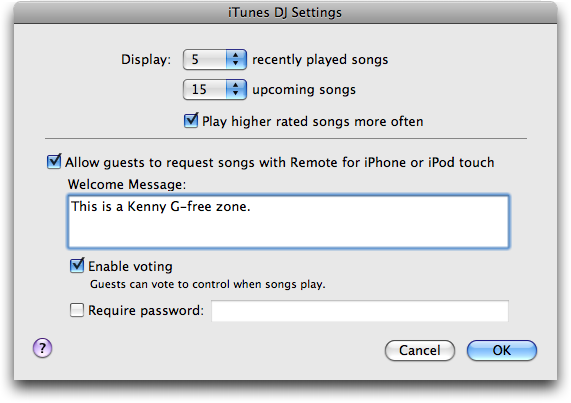
  Within iTunes, the iTunes DJ feature gains its own set of
  preferences that enable you to send a welcome message, turn voting
  on or off, or require that users enter a password to gain access.

<http://www.tidbits.com/resources/2009-03/iTunes-DJ-settings.png>

  As much as iTunes DJ is a wildly cool feature that will undoubtedly
  be popular in clubs and at big parties, assuming whoever is in
  charge of the music is willing to let guests participate, it's
  unlikely to be particularly useful outside of large gatherings. That
  said, some people have suggested that iTunes DJ and the Remote app
  turn iTunes into a personal jukebox as well; I guess I don't have
  time to interact with my music that specifically.


**Other Improvements** -- Apple claims iTunes 8.1 is faster when
  handling tasks such as loading large libraries, navigating the
  iTunes Store, and syncing devices. Apple hasn't said how much
  speedier these tasks will be, just that they are noticeably
  improved. We haven't noticed significant improvements, and accessing
  different parts of the iTunes Store still feels a lot slower than
  loading Web pages in Safari.

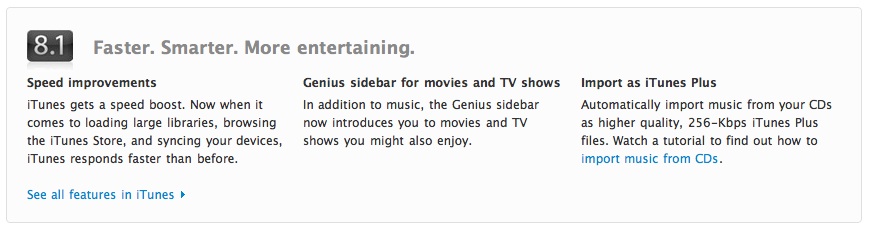
  iTunes now automatically converts music from CDs as "iTunes Plus"
  files - meaning AAC format at 256 Kbps - which are higher quality
  than the previously standard files encoded at 128 Kbps.

  Parental controls have been extended to control iTunes U and the
  iTunes Store separately, so teenagers of older iTunes users can sit
  in on lectures in iTunes U without being allowed to sneak off to the
  iTunes Store to listen to whatever racket those kids consider music
  these days.

  Perhaps most significantly, the Autofill feature, previously
  available only for the iPod shuffle, is now available for all iPods.
  You can control whether or not Autofill replaces all items on each
  sync, if it chooses items randomly, and if it prefers higher rated
  songs. A slider enables you to reserve space for disk use -
  otherwise Autofill automatically selects the amount of music that
  will fit on the destination iPod so you don't have to play a
  guessing game. From what we can tell in initial use, Autofill
  appears to honor podcast settings, which is good, and overall
  Autofill looks as though it will be extremely welcome for those of
  us who have more music than fits on our iPods. However, enabling
  Autofill isn't obvious; see "In Search of iTunes 8.1's Autofill,"
  2009-03-13.

<http://www.tidbits.com/resources/2009-03/iTunes-Autofill-Settings.png>
<http://db.tidbits.com/article/10136>

  Oddly, the Genius sidebar, introduced in iTunes 8.0 as a way for
  iTunes to recommend new songs, was supposed to have been extended to
  include television and movie recommendations - it was mentioned in
  the release notes and Apple had even updated the iTunes Web pages to
  discuss it. Alas, the feature was apparently pulled at the last
  minute, since Genius in iTunes 8.1 still says, "Genius sidebar only
  works with music. Select a song in your library to see related
  music." Perhaps we'll be seeing iTunes 8.1.1 soon.

<http://www.tidbits.com/resources/2009-03/Genius-promo.jpg>

  iTunes 8.1 requires Mac OS X 10.4.10 or later, and works all the way
  back to Macs with PowerPC G3 processors. It's a 63.4 MB download and
  is available via Software Update or from Apple's Web site.

<http://www.apple.com/itunes/download/>


In Search of iTunes 8.1's Autofill
----------------------------------
  by Michael E. Cohen <[email protected]>
  article link: <http://db.tidbits.com/article/10136>

  The recently released iTunes 8.1 makes Autofill available to all
  iPods, instead of just the iPod shuffle. Autofill makes filling your
  iPod with music easy, automatically selecting the amount of music
  that will fit so you don't have to guess. While Autofill performs
  this task beautifully, it's not at all obvious how to gain access to
  the feature for your iPod (or iPhone).

  Here are the steps you must follow to take advantage of Autofill in
  iTunes 8.1:

  1. Connect your iPod to your computer.

  2. In the iTunes source list (that's the sidebar on the left), click
  the icon of your iPod.

  3. At the top of the main iTunes pane, click the Summary tab.

  4. Near the bottom of the Summary info pane, enable the "Manually
  manage music and videos" checkbox.

<http://www.tidbits.com/resources/2009-03/iTunes-Manually-Manage-Music.png>

  5. Return to the source list, click the triangle to the left of your
  iPod to reveal its contents, and then click the Music icon below it.

  And there you have it: at the bottom of the iTunes window, a new
  pane appears with an Autofill button, a Settings button, and a menu
  from which you can choose a source  for the Autofill operation.

<http://www.tidbits.com/resources/2009-03/iTunes-Autofill-pane.png>

  Easy as pi - if you calculate pi on an abacus (which you may have
  found yourself with the inexplicable urge to do last Saturday,
  National Pi Day). Seriously, while the Autofill feature is most
  welcome, the method by which you access it is serpentine. Here are
  some things Apple should consider if they want to improve the user
  experience:

<http://www.piday.org/>

* Don't require five steps to get access to an "ease of use" feature;
  that's four more steps than is necessary.

* Don't make the user click through three screens of iTunes Help to
  get to the Autofill instructions.

* Don't require the user to set something to "manual" in order to
  access an "auto" feature.

* Don't make the user click a Settings button just to see the
  feature's current settings: there's plenty of room in the Autofill
  pane to display them.

* Don't make the feature's settings ambiguous. For example, does
  "Replace all items when Autofilling" also mean photos will be
  replaced? What about TV shows? Podcasts?

  Why do I get the feeling that this pie is not completely baked?
  Hopefully, Apple will take some of my advice and make it easier to
  access this otherwise handy feature.


  [Being the author of "Take Control of Syncing Data in Leopard,"
  Michael E. Cohen cares very deeply about all topics related to
  synchronization.]

<http://www.takecontrolbooks.com/leopard-syncing?pt=TB969>


App Store Reviews Now Distinguish Versions
------------------------------------------
  by Doug McLean <[email protected]>
  article link: <http://db.tidbits.com/article/10135>

  Imagine if, in the iTunes Store, reviews for "The Dark Knight," the
  acclaimed latest installment of the Batman series, were diluted with
  complaints about the widely panned 1997 "Batman and Robin." It would
  be wildly confusing and annoying - sure, both movies have the
  Batmobile, the Batcave, and Batman himself, but they're completely
  different films. While no analogy is perfect, I think you can see
  what I'm getting at.

  Until now, the iPhone App Store lacked a way for reviewers to
  distinguish between which version of an app they were reviewing.
  Thus, developers were continually punished for previous bugs or
  mistakes, even after correcting them in subsequent versions. With
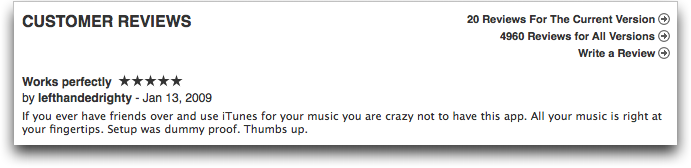
  the updated review policy, customers are presented with two
  different sets of user reviews: Reviews for the Current Version, and
  Reviews for All Versions.

<http://www.tidbits.com/resources/2009-03/App-Store-reviews.png>

  Presumably, once an app is updated, the reviews and ratings for the
  formerly current version will be integrated into the reviews and
  ratings for all versions. That will likely make it impossible to
  compare the new version with the immediately preceding version.
  While that might have been handy in some cases, it's mostly
  irrelevant, since you can only purchase the latest version anyway.

  The change has been generally well-received by iPhone developers.
  Shane Crawford of Alta Vida, developer of the Babelingo translation
  app, said, "I think that the changes linking a review to an app
  version as well as a date are long overdue. Those are great
  changes." However, Crawford was less certain about the way the App
  Store obscures the average star rating for previous versions.

<http://ibabelingo.com/ >

  David Sinclair of Dejal Systems, developer of the SmileDial visual
  dialing app, called the change "a most welcome enhancement," and
  went on to say, "Often, reviews mention deficiencies that are
  addressed in subsequent versions, but without a version number (and
  to a lesser extent, a date), potential customers have no real way of
  knowing if that comment is still relevant."

<http://www.dejal.com/smiledial/>

  Another small update to the App Store is the capability to sort
  reviews by Most Helpful, Most Favorable, Most Critical, and Most
  Recent. This brings the App Store into line with other online stores
  such as Amazon.com, which give customers greater control when
  sifting through reviews. Amazon still has an edge here, enabling
  customers to view the Most Helpful Favorable and Most Helpful
  Critical reviews in a side-by-side comparison. Apple might think
  about extending this same functionality to the App Store.

<http://www.amazon.com/Kindle-Amazons-Wireless-Reading-Generation/product-reviews/B00154JDAI/ref=cm_cr_dp_all_summary?ie=UTF8&showViewpoints=1&sortBy=bySubmissionDateDescending
 >

  Shane Crawford also suggested that Apple consider removing the
  prompt to review an app when the user deletes it, since that's a
  point at which most users are thinking negatively. Adam Talcott of
  Atomic Powered, developer of the Napkin Genius sketching app, echoed
  this sentiment, saying, "What I'd really like to see Apple focus on
  is making it easier for users to rate applications they like and not
  just those they delete."

<http://www.atomicpowered.net/iphone/napkingenius/>

  Since the review-on-removal prompt surveys a biased population,
  Apple should work on ways to prevent the data from being skewed in
  this manner. One solution would be simply to remove the prompt, but
  a more constructive approach might involve creating a time- or
  activation-based request-for-review prompt for those continuing to
  use an app over the long term. Either way, it's an issue on
  developers' minds - and one which Apple should find a way of
  addressing.

  This isn't the first time Apple has taken steps to improve the App
  Store's review process and policy. In September 2008, Apple began
  requiring that App Store reviewers had actually downloaded the
  application they sought to evaluate, in an attempt to prevent trash
  talk reviews (see "Apple Changes App Store Customer Review Policy,"
  2008-10-07). Apple took another major step towards cleaning up the
  review sections when it removed all of the remaining non-customer
  reviews a few weeks ago, effectively lowering review counts for most
  apps, but also often resulting in higher average ratings.

<http://db.tidbits.com/article/9800>
<http://www.macworld.com/article/139081/2009/02/apple_purges_noncustomer_reviews_from_the_app_store.html>

  As we've noted recently (see "High App Spending Points to iPhone
  Lock-in," 2009-03-06), it truly is in Apple's best interest to
  improve the health of the App Store, and implicit in that is
  ensuring that the review process reflects consumer opinion as
  clearly as possible. The decision to distinguish between reviews of
  different versions is thus a smart move in the right direction.

<http://db.tidbits.com/article/10098>


Printing Shipping Labels from PayPal's Shopping Cart
----------------------------------------------------
  by Dennis Wurster <[email protected]>
  article link: <http://db.tidbits.com/article/9905>

  A client of mine recently set up a simple shopping cart from PayPal.
  He sells a small widget that he invented, and he handles the packing
  and shipping himself.

  In general, PayPal makes it easy to print shipping labels that
  include a barcode for delivery confirmation and electronic postage.
  It's a convenient way to save time at the post office for people
  like my client who do a lot of mailing.

<http://www.labelcity.com/mmEONLINE/Images/99019_400.JPG>

  PayPal's Java-based label printing software - an applet embedded in
  a Web page - consists of a window that displays the label that it
  plans to print, along with three buttons. One button selects a
  printer, another prints a preview image with a watermark, and the
  last one prints the official label and deducts the postage amount
  from your PayPal balance.

  I was optimistic about using a Dymo LabelWriter Twin Turbo for this
  purpose. But no matter what I tried, I couldn't get the labels to
  print in the desired orientation. I wanted landscape but they would
  print only as portrait. Traditionally, a Mac user would solve this
  problem by adjusting the paper orientation in the Page Setup dialog.
  In this case, while doing so changed the way the browser would print
  the entire Web page, it had no effect upon the embedded Java applet.

<http://global.dymo.com/enUS/Categories/LabelWriter_Printers.html>

  Unfortunately, according to PayPal's support pages, "label printers
  are not currently supported on Macintosh computers." That is, if you
  want to print a shipping label from a Mac using a label printer
  you're out of luck.

  Fortunately, I discovered an effective workaround that mitigates
  that gloomy position. After a little bit of experimentation, we're
  now printing shipping labels just fine using the Dymo LabelWriter
  Twin Turbo. Other Dymo units that support the "1-Part Internet
  Postage Label" (SKU 99019) should work just as well.

  The trickiest part of the problem is that PayPal's embedded Java
  applet doesn't present a standard Print dialog. Once you click the
  Print Label button in the applet, the label printer immediately
  dispenses the label - incorrectly printed.

  To wrestle control of the printing process, I needed to interrupt
  PayPal's Java applet before it could communicate with the label
  printer. I reasoned that printing to an intermediate PDF file would
  be a good start.

  However, this wasn't as straightforward as it would be from a normal
  Macintosh application. Again, I didn't have a standard Print dialog
  to work with. What I needed was a virtual printer that would take a
  print job and turn it into a PDF file. As long as PayPal's applet
  would print to this virtual printer, I could do whatever I wanted
  with the result.

  Although Adobe's Acrobat Professional installs a virtual printer
  that can make PDFs, it costs $449 and is overkill for this
  particular need. After a little Googling, I found the free CUPS-PDF
  and followed its directions to create a virtual printer that prints
  directly to a PDF file. Then, I directed PayPal to print labels
  using this virtual printer. The first test worked perfectly,
  outputting a PDF file into a folder on the desktop.

<http://www.codepoetry.net/projects/cups-pdf-for-mosx>

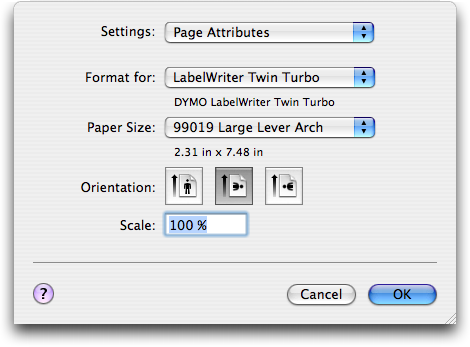
  After that, I opened the PDF file in Preview, where I was finally
  able to adjust the orientation to landscape in the Page Setup dialog
  and select the proper label from the Paper Size pop-up menu.
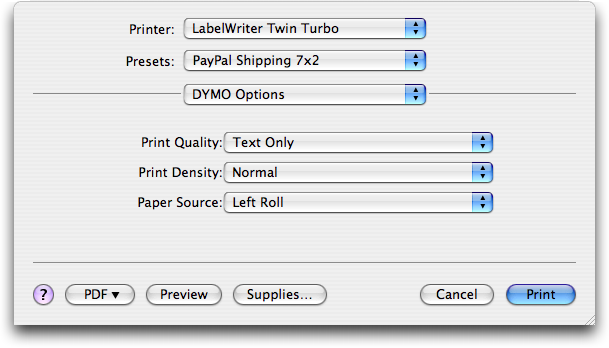
  Finally, I clicked the Print button in Preview's Print dialog, and
  the Dymo LabelWriter Twin Turbo dutifully printed the label, just as
  I wanted it. Success!

<http://www.tidbits.com/resources/2008-12/Page-Setup.png>
<http://www.tidbits.com/resources/2008-12/Print-dialog.png>

  Until PayPal updates their label printing applet to work properly
  with Mac-connected label printers, I suggest using this method. It
  requires an extra step, but any label at all is better than
  believing PayPal's claim that it's impossible.


  [Dennis Wurster provides Mac-focused expertise to businesses in and
  around Rochester, NY. He has written for Ziff-Davis's "Mac
  Administrator's Journal" and presented at the User Group Leadership
  Conference. Dennis is a certified Apple Product Professional and
  currently blogs the solutions he discovers at Mac Smarts.]

<http://www.macsmarts.com/>


A Silly Saga: How I Downloaded an Audio Book from My Library
------------------------------------------------------------
  by Matt Neuburg <[email protected]>
  article link: <http://db.tidbits.com/article/10123>

  Audio books are a great way to pass the time while running, driving,
  or falling asleep. So, a couple of years ago, when I heard that
  libraries were distributing audio books over the Internet, I was
  ecstatic. But I was then disappointed to learn that the whole system
  was Windows-only. (This seems to be the rule throughout much of the
  United States; if you consult your local library system's online
  catalog, you'll probably find that, if it provides downloadable
  audio books, it operates through NetLibrary, just like mine, and has
  the same restrictions.) The reason seems to have to do with the
  perceived need for digital rights management. Apparently, only
  Windows has the necessary built-in technology to prevent the user
  from "stealing" an audio book downloaded from a library. I actually
  considered running Windows on my Intel-based MacBook, just to get
  these audio books, but decided it wasn't worth the trouble.

<http://library.netlibrary.com/AudiobooksAtAGlance.aspx>

  Then in late 2008 came the exciting announcement that the privilege
  of obtaining audio books online from libraries had been extended to
  Mac users, through a free application called OverDrive Media
  Console. I downloaded the app, and dashed off (virtually, in my
  browser) to my local library's Web site to view my choice of audio
  books. After some confusion, it turned out that my access was
  enabled through a third-party site, the Black Gold Cooperative
  Library System. (Once again, you may well find that your local
  library, too, if it has a Mac-enabled set of downloadable audio
  books, operates through OverDrive, though the details of how you
  obtain the books may differ).

<http://www.overdrive.com/aboutus/getArticle.aspx?newsArticleID=20081119>
<http://www.overdrive.com/software/omc/>
<http://www.vencolibrary.org/eaudio.html>
<http://blackgold.lib.overdrive.com/>

  So, what was my experience like? It was pretty silly.


**The Agony and the Silliness** -- First, it turned out that there
  wasn't much I was interested in - there are fewer than 200 titles to
  choose from. (Some library!)

  Then, when I did find something I wanted to listen to, I couldn't
  just download it. I had to "place a hold" on it. Some further
  digging showed why: Black Gold was treating these audio books as if
  they were physical objects being borrowed from a physical library,
  and only one person at a time could have each one. This was as far
  as I could get: "You have successfully placed a hold on the selected
  title. You will receive an email when the selected title becomes
  available for checkout. Once you receive the email, you will have 4
  days to check out the selected title."

  Several weeks passed, and finally I received the promised email.
  Returning to the Black Gold site, I found that I still couldn't
  download the audio book. Instead, I had to click "Add to Cart," as
  if I were shopping for socks. On the cart page was this warning:
  "Please note: Titles added to your cart will remain there for 30
  minutes before they are returned to the library's collection. Please
  be sure to complete your checkout within this timeframe to avoid
  losing access to your desired title(s)."

  The next step was to click "Proceed to Checkout" (it is sounding
  more and more like buying socks, isn't it?). But I still didn't get
  to download the book. First, I had to pass through a "Terms of
  Service" page (which of course I didn't read, since no one ever
  does). Then I had to proceed to the "Confirm Checkout" page, where I
  _still_ didn't get to download the book; all I was doing here was
  confirming that I wanted to download the book, something I had
  already said about half a dozen times that I wanted to do. I did,
  however, learn on this page more about the terms of "borrowing" an
  audio book: I could check out a maximum of 4 at a time - not that
  this site even had 4 books I cared about - and the lending period
  was 14 days. (I wondered: What happens after 14 days? Will the file
  lose its ability to play? Will my iPod self-destruct?)

  At last I arrived at the download page, and clicked the link there;
  but I _still_ couldn't download the book! What I had downloaded
  turned out to be a tiny ".odm" file. It was not at all clear what to
  do with this, but after a while I realized what you're supposed to
  do: you open this file with OverDrive Media Console, and _it_
  performs the actual download for you, placing the MP3 files in
  ~/Documents/My Media/MP3 Audiobooks.


**Who Put the D in the DRM?** Sillier and sillier. First you make me
  wait for weeks. Then you force me to add the book to a fictitious
  cart, instead of downloading it. Then you tell me that I must
  immediately download it or it will be removed from my cart? So why
  didn't you just let me download it in the first place?

  Without sinking into the mire of perennial arguments over DRM and
  our outmoded, corporate-minded copyright laws, this much seems
  obvious to me. There are no originals in this story, so there is
  nothing to protect. When you download an MP3 file, you are not
  borrowing a physical object which no one else can have as long as
  it's in your possession. It's digital, and what you download is, by
  its very nature, a copy even before you receive it. Therefore, this
  pretense that you can't "have" the MP3 file until all other users
  have "finished" with it, that it must be placed in a "cart" and
  retrieved within a certain time frame, and that you can "keep" the
  file for only a limited amount of time, is just a lot of
  inconvenient flapdoodle.

  But the icing on the silliness cake is what happened after my 14
  days were up - nothing! It's true that when starting up OverDrive
  Media Console, I encountered a dialog stating that items in my
  "media library" had "expired." It said, "Under the terms of the
  license agreement and terms of use, you are required to
  delete/destroy all copies of expired titles, including those
  transferred to portable devices and other media." I then had to
  click a Delete button in order to proceed, and sure enough, those
  files were deleted from my MP3 Audiobooks folder.

  But of course I had copied those files. The copies, elsewhere on my
  computer, and on a different computer, and on my iPod, were not
  deleted, and they still play perfectly well. There isn't actually
  any DRM in this story at all! So what on earth was all the fuss
  about?


**Kooky Kabuki** -- Here's my theory. The library has bought audio
  books in digital form from some publisher, and can do so only by
  satisfying the publisher that this is not a direct route to
  unlimited copying all over the universe. Let's leave aside the
  question of whether this is a reasonable concern on the publisher's
  part (I happen to think it is not, because digital wants to be free,
  as in free-as-a-bird), and just accept that this is how libraries
  and publishers do business.

  We can find support for this theory in the following tale. A couple
  of years ago, I borrowed a cassette tape (remember those?) of an
  audio book from my library. My first move, when I got it home, was
  to play the tape into my computer and turn the resulting digital
  file into MP3s - not to steal it, but in order to listen to it. I
  listened to it (on an iPod on a long driving trip), and then deleted
  the files. But part of the tape was damaged, and it occurred to me
  that I could help prevent this kind of thing. Our library is tiny
  and works mostly through volunteers, so I went to a library
  administrator and said: "How would you like me to digitize your
  cassette library for you, to prevent further deterioration and to
  make it easier for borrowers to listen?" They were horrified and
  sent me scurrying from the building. Clearly, libraries are not
  allowed to think like this. They deal in physical copies, and making
  a new physical copy is illegal.

  Returning to my downloadable audio book experience, let's contrast
  the procedure for a Windows user. A Windows user can download a WMA
  audio book instantly from the library Web site without passing
  through a third-party application. But the resulting WMA file _does_
  have true embedded DRM: only certain recent versions of Windows
  Media Player, and certain approved handheld devices, can play the
  file at all. So there's sufficient control maintained over the
  file's playability (and, I'm assuming, its lifetime) to satisfy all
  the parties concerned.

<http://www.microsoft.com/windows/windowsmedia/player/10/default.aspx>
<http://www.microsoft.com/windows/windowsmedia/player/10/devicesupport.aspx>

  Now, there is a DRM mechanism on the Mac (iTunes and authorized AAC
  files), and iTunes movie rentals even add a lifetime playability
  mechanism. But this works through the iTunes Store, so presumably
  the distributors of these audio books can't use it. Thus they are
  left with _no_ DRM mechanism. Therefore, they compromise in a
  different way: they force the user to participate in a Kabuki drama
  intended to instill a notion that what's being downloaded _is_ a
  physical object that only one user at a time can borrow for a
  limited time. It's DRM by hypnosis! Apparently, such hypnosis is
  sufficient to satisfy all parties that the relevant laws are being
  obeyed. But the hypnosis involved is really only self-hypnosis.
  Someone, somewhere, is kidding no one but himself. Maybe that's why
  the selection of available MP3 downloads is so poor; perhaps they
  are providing access only to books that aren't selling anyway, so
  they don't really care what happens to them after all.


TidBITS Watchlist: Notable Software Updates for 16-Mar-09
---------------------------------------------------------
  by Doug McLean <[email protected]>, Joe Kissell <[email protected]>
  article link: <http://db.tidbits.com/article/10137>

  CopyPaste Pro 2.0 from Script Software is the latest version of the
  longstanding multiple clipboard utility. Changes include new
  instantly available palettes for Clip History and Clip Archives, a
  clipboard editor called Bean, new drag-and-drop functionality, a
  major update to the manual, a refreshed interface, improved
  performance, and newly available Danish, Japanese and German
  translations. ($30, free update, 3.7 MB)

<http://www.scriptsoftware.com/copypaste/>

  Front Row 2.1.7 from Apple is an update to the media center software
  featured on all Macs and Apple TV. The update provides compatibility
  with the recently released iTunes 8.1, and is available via Software
  Update and the Apple Support Downloads page. (Free update, 12.6 MB)

<http://support.apple.com/downloads/Front_Row_2_1_7>

  NTFS for Mac OS X 7.0 from Paragon Software is an update to the
  software that provides Mac users read/write access to files stored
  on NTFS-formatted volumes, such as those used by Boot Camp (optional
  with Windows XP; mandatory with Windows Vista). The latest version
  gives Boot Camp users transparent access to their Mac volumes
  formatted using HFS/HFS+, provides an alternative means of
  restarting in Windows, and offers enhanced NTFS performance and
  reliability under Mac OS X. ($39.95, 2.9 MB)

<http://www.paragon-software.com/home/ntfs-mac/>


ExtraBITS for 16-Mar-09
-----------------------
  by TidBITS Staff <[email protected]>
  article link: <http://db.tidbits.com/article/10138>

**'Take Control of iWeb '08' Updated for MobileMe and Twitter** -- For
  people still using iWeb '08, we have released a free update to "Take
  Control of iWeb: iLife '08 Edition." (If you own it, click Check for
  Updates in your copy to update.) In it, author Steve Sande swaps
  .Mac for MobileMe and explains how to add a Twitter feed to an iWeb
  page. The iWeb '09 edition of the book is also underway and will be
  a free update for anyone buying the '08 edition in 2009. (Posted
  2009-03-16)

<http://www.takecontrolbooks.com/iweb?pt=TB969>


**Mini DisplayPort to Dual-Link DVI Adapter Causing Problems?** --
  Michael Tsai, the Macintosh developer behind such utilities as
  SpamSieve and DropDMG, discusses on his blog his problems in getting
  a Mini DisplayPort to Dual-Link DVI Adapter to work properly with
  his 15-inch MacBook Pro. According to Tsai, the $99 adapter,
  released back in December 2008, creates various screen distortions
  and Apple, while acknowledging the issue, has yet to provide a
  solution. (Posted 2009-03-09)

<http://mjtsai.com/blog/2009/03/06/macbook-pro-mini-displayport-dual-link-dvi/>


**Security Glitch in Google Docs** -- A number of users recently
  received notice from Google that some of their Google Documents had
  been accidentally shared with collaborators who had previously
  lacked access. The security glitch, apparently affecting .05 percent
  of all Google Docs, underscores the concerns some have with
  cloud-based computing, though others have noted that documents
  stored on stolen laptops have also been implicated in significant
  security and privacy breaches. (Posted 2009-03-09)

<http://news.cnet.com/8301-17939_109-10191463-2.html>


**Doug Talks iMacs and Safari 4 on Tech Night Owl Live** -- Making his
  maiden voyage into the world of Internet radio, Doug McLean spoke
  with Gene Steinberg of the Tech Night Owl Live (in the second third
  of the 05-Mar-09 show) about the refreshed iMac line, the recently
  updated Safari browser, and what his Apple dream machine would look
  like. (Posted 2009-03-09)

<http://www.podtrac.com/pts/redirect.mp3/media.blubrry.com/nightowllive/www.techbroadcasting.com/podcasts/nightowl_090305.mp3>


Hot Topics in TidBITS Talk for 16-Mar-09
----------------------------------------
  by Jeff Carlson <[email protected]>
  article link: <http://db.tidbits.com/article/10139>

**Answers to Questions about Updated Apple Base Stations** -- Is the
  capability to determine the best wireless network a feature
  exclusive to Apple's newest AirPort Extreme, or can other dual-band
  routers do the same? (2 messages)

<http://emperor.tidbits.com/TidBITS/Talk/2513>


**Hands on with a Dual Network AirPort Extreme Base Station** --
  Apple's wireless gear has the capability to prioritize types of
  incoming data, but the feature isn't implemented. (4 messages)

<http://emperor.tidbits.com/TidBITS/Talk/2514>


**iPhone apps** -- A reader can't view search results in iTunes for
  the App Store. (3 messages)

<http://emperor.tidbits.com/TidBITS/Talk/2516>


**Memory stick problem** -- A driver bug is likely to blame for a
  crash when copying large files to a memory stick. (2 messages)

<http://emperor.tidbits.com/TidBITS/Talk/2517>


**Recycling Floppies** -- What's the best way to dispose of old unused
  floppy disks, and the cases they're stored in? (3 messages)

<http://emperor.tidbits.com/TidBITS/Talk/2519>


**3rd Generation iPod shuffle Shrinks, Gets Mouthy** -- Readers
  discuss the new controller-embedded headphones that come with the
  iPod shuffle, and whether other headphones can be used instead
  (namely, ones that don't fall out of your ears when running). (8
  messages)

<http://emperor.tidbits.com/TidBITS/Talk/2522>


**MailForge vs. Eudora** -- With MailForge apparently nearing release
  status, how will it compare to the venerable Eudora? (5 messages)

<http://emperor.tidbits.com/TidBITS/Talk/2523>


**Macs for elderly neighbors** -- What Macs are good models to
  recommend to elderly neighbors who haven't used computers in years?
  (6 messages)

<http://emperor.tidbits.com/TidBITS/Talk/2524>


**Mac Pro Pricing** -- Readers look at the pricing of various
  configuration options for the new Mac Pro. (2 messages)

<http://emperor.tidbits.com/TidBITS/Talk/2525>


**Spam** -- After a spammer penetrated the TidBITS defenses (curses!),
  the question of what to do about unsolicited email is raised again.
  (15 messages)

<http://emperor.tidbits.com/TidBITS/Talk/2526>


$$

This is TidBITS, a free weekly technology newsletter providing timely
news, insightful analysis, and in-depth reviews to the Macintosh and
Internet communities. Feel free to forward to friends; better still,
please ask them to subscribe!

Non-profit, non-commercial publications and Web sites may reprint or
link to articles if full credit is given. Others please contact us. We
do not guarantee accuracy of articles. Caveat lector. Publication,
product, and company names may be registered trademarks of their
companies. TidBITS ISSN 1090-7017.

Copyright 2009 TidBITS: Reuse governed by Creative Commons license.

Contact us at:    <[email protected]>
TidBITS Web site: <http://www.tidbits.com/>
License terms:    <http://www.tidbits.com/terms/>
Full text search: <http://www.tidbits.com/search/>
Subscriptions:    <http://www.tidbits.com/about/list.html>
Account help:     <http://www.tidbits.com/about/account-help.html>


--
If you want to unsubscribe or change your address, use this link
http://emperor.tidbits.com/webx?unsub@@.3c557dc4!u=306a67f9