TidBITS#970/23-Mar-09
=====================
  Issue link: <http://db.tidbits.com/issue/970>
  Two years ago, who would have thought there would be so much
  excitement over copy and paste? Apple last week previewed the iPhone
  3.0 software, highlighting new features and making iPhone developers
  realize they won't be sleeping much until the new operating system
  is released. This issue also focuses on interesting new products: we
  look at the resuscitated EMC Retrospect 8 and Bare Bones Software's
  clever WeatherCal. In other news, the latest AirPort firmware may
  solve lingering Time Capsule problems, Sony receives 500,000 free
  public domain ebooks from Google, Kodak starts charging for its free
  service (which may not be as bad as it sounds, according to Glenn
  Fleishman), and Adam points out Guy Kawasaki's new MyAlltop service.
  Other software releases worthy of brief mention this week include
  Espresso 1.0, PDFpen 4.1.1, and Apple's Mini DisplayPort to VGA
  Firmware Update.

Articles
    MyAlltop Enables Personal News Aggregation
    AirPort Firmware May Resolve Time Capsule Disk Problems
    Sony Reader Gets 500,000 Free Public Domain Titles from Google
    Kodak Gallery Joins Parade of Free-with-Payment Services
    WeatherCal Inserts Updating Forecasts into iCal
    Apple Previews iPhone 3.0 Software
    EMC Ships Modernized Retrospect 8
    TidBITS Watchlist: Notable Software Updates for 23-Mar-09
    ExtraBITS for 23-Mar-09
    Hot Topics in TidBITS Talk for 23-Mar-09


------------ This issue of TidBITS sponsored in part by: --------------

* READERS LIKE YOU! Support TidBITS with a contribution today!
  <http://www.tidbits.com/about/support/contributors.html>
  Special thanks this week to Alia Michaels, Michael Scriven,
  Callitrope, and William G. Collins Jr. for their generous support!

* Fetch Softworks: With Fetch 5.3, FTP and SFTP are simpler
  than ever. Use it on Mac OS X to upload, download, mirror,
  and manage your Web site, eBay images, and data sets.
  Download your free trial version! <http://fetchsoftworks.com/>

* WebCrossing Neighbors Creates Private Social Networks
  Create a complete social network with your company or group's
  own look. Scalable, extensible and extremely customizable.
  Take a guided tour today <http://www.webcrossing.com/tour>

* MARK/SPACE, INC: Take it with you! The Missing Sync makes
  it easy to synchronize contacts, calendars, notes, photos
  and more from your Mac to your BlackBerry, Palm OS, or
  Windows Mobile phone. <http://markspace.com/bits>

* 25% off VMware Fusion 2, the preferred way to run Windows on
  your Mac. Now only $59.99 when you enter "FusionSpring09"
  at checkout. Offer valid through 11:59PM PT on March 31, 2009.
  Visit: <http://www.tidbits.com/about/support/vmware-fusion.html>

* Microsoft's MacBU: Supporting Mac users with Office 2008.
  Is your Office up-to-date? Make sure you're running the latest
  versions of Word, Excel, PowerPoint, and Entourage by choosing
  Check for Updates from the Help menu of any Office application!

* ConceptDraw Office adds real business power to Microsoft Office
  and Apple's iWork. Whether you need project management, business
  graphics, or mind mapping, it's all easily created on your Mac!
  Buy today for only $499! <http://www.conceptdraw.com/tb>

* MacSpeech Dictate -- unleash the power of your voice with
  award-winning speech recognition solutions for the Mac.
  It's so easy to use - just talk! Now with spelling and
  phrase training. <http://tidbits.com/about/support/macspeech.html>

---------- Help support TidBITS by supporting our sponsors ------------


MyAlltop Enables Personal News Aggregation
------------------------------------------
  by Adam C. Engst <[email protected]>
  article link: <http://db.tidbits.com/article/10143>

  It's always interesting to see what ex-Apple evangelist Guy Kawasaki
  is up to, something that's a bit easier now that he's become a
  prolific user of Twitter. Over the last year, he's been focusing on
  his news aggregation site Alltop, adding a vast number of categories
  ranging from arthritis to zoology, from bacon to yoga. But as much
  as the expansion has been great for making it easier for readers to
  find blogs and publications that cover their favorite topics, it has
  become a bit overwhelming - after all, do you really want to read 17
  blogs about bacon?

<http://twitter.com/guykawasaki>
<http://alltop.com/>

  So the latest addition to Alltop is one that will help users rely on
  the site's category lists as a source from which to pick a
  manageable number of sites to track. Once you create your own
  MyAlltop account and log in, you can click a plus (+) link next to
  each site listed in Alltop to add it to your own MyAlltop page.
  Apart from the added capability to arrange the news feeds in
  whatever order you desire, your MyAlltop page works just like any
  other Alltop page, showing the five latest headlines and a snippet
  in a pop-up window when you mouse over a headline. Clicking a
  headline opens the page in a new tab or window. And, as a nice
  touch, you can share MyAlltop pages, so you can see what your
  friends are reading right now - see my MyAlltop page for an example.

<http://my.alltop.com/adamengst>


AirPort Firmware May Resolve Time Capsule Disk Problems
-------------------------------------------------------
  by Glenn Fleishman <[email protected]>
  article link: <http://db.tidbits.com/article/10151>

  The 7.4.1 firmware update for all Apple 802.11n AirPort base
  stations - any model released since 2007 - combined with Mac OS X
  10.5.6 may fix Time Capsule disk corruption problems that some
  people have experienced. Colleagues Shawn King (Your Mac Life) and
  John Gruber (Daring Fireball) have recently explained to me problems
  they had with Time Machine disk image integrity and kernel panics. I
  also saw repeated disk image corruption in my testing last year.

<http://support.apple.com/downloads/Time_Capsule_and_AirPort_Base_Station_Firmware_Update_7_4_1>
<http://support.apple.com/kb/HT3466>
<http://www.yourmaclifeshow.com/>
<http://daringfireball.net/>

  While Apple provided no details on how or why corruption might occur
  in disk images that Time Machine writes to a Time Capsule internal
  or external drive, this update is designed to avoid problems that
  led to such corruption. If that sounds overly circumspect, well, we
  are talking about Apple here, but I was assured that a small number
  of edge cases like mine should now be resolved. (Note that Apple
  still officially supports only external drives connected to a Time
  Capsule for Time Machine backups, not drives connected to an AirPort
  Extreme Base Station.)

  One piece of advice if you've had problems in the past: Back up any
  existing Time Machine disk images to an external disk using the
  Archive feature in Disk Utility, erase them from the drive, and
  start fresh with new Time Machine backups.

  In some cases, mounting the Time Capsule volume via AFP, launching
  Disk Utility, dragging the corrupted disk image into the program,
  and then using the Disk First Aid > Repair Disk feature may correct
  errors, although it could take many hours for a large backup disk. I
  recommend the fresh start approach for most people, though.

  Time Machine works as an incremental backup system, writing all
  files on a selected system to a disk image in a first pass, and then
  creating only copies of files that have changed each hour while Time
  Machine is active.

  But Time Machine also creates what's effectively a snapshot of a
  hard drive for each backup, which necessitates making vast numbers
  of hard links, which reference any unchanged files. This can be
  difficult to do reliably over a network and may have been part of
  the trouble with corruption occurring over time.


Sony Reader Gets 500,000 Free Public Domain Titles from Google
--------------------------------------------------------------
  by Glenn Fleishman <[email protected]>
  article link: <http://db.tidbits.com/article/10152>

  Google is further exposing some of the 7 million books it has
  scanned from academic collections by making 500,000 titles with no
  remaining copyright protection available to Sony for its electronic
  book device, the Reader Digital Book. Reports indicate that only
  books from 1922 or earlier are included, as 1922 is the latest date
  for which public domain status is entirely clear. (Many works
  published after 1922 are also in the public domain, but each work
  must be researched individually to determine its status.)

<http://www.nytimes.com/2009/03/19/technology/19sony.html?partner=rss&emc=rss>
<http://ebookstore.sony.com/reader/>
<http://www.copyright.cornell.edu/public_domain/>

  Earlier this year, Google added an option to view but not download 2
  million public domain books on the iPhone; see "More Ebooks
  Available for the iPhone/iPod touch," 2009-02-09. That's more like a
  Pandora stream than an iTunes song purchase.

<http://db.tidbits.com/article/10059>

  Google's program to scan books ran afoul of publishers' and authors'
  concerns about the right to scan and archive titles, and the
  legality of snippets being displayed from these scanned works. A
  preliminary settlement between Google and various interested parties
  should make millions of books available for viewing, printing,
  download, and purchase in the coming months; these titles could also
  wind up being available for the Reader Digital Book. (See "Authors
  and Publishers Settle with Google Book Search," 2008-10-29.)

<http://www.authorsguild.org/advocacy/articles/settlement-resources.html>
<http://db.tidbits.com/article/9837>

  It would seem that Google has chosen to side with Sony instead of
  Amazon in the nascent ebook reader world. The Wall Street Journal
  notes Sony said its Reader Digital Book sales are at 400,000 and
  reported that Citigroup estimated Amazon Kindle sales at 500,000.
  That sales level seems quite good for a new category of consumer
  device, but it's nowhere close to the 17 million iPhones and 13
  million iPod touches that Apple has sold so far over a similar
  period. (The original iPhone and Sony Reader were both introduced on
  the same day in June 2007, the iPod touch in September 2007, and the
  Amazon Kindle in November 2007.)

  The Kindle 2, introduced in February 2009, improves on the design of
  the original device and has a faster screen refresh ("Kindle 2
  Improves Design, Not Features," 2009-02-26). Amazon released Kindle
  for iPhone shortly after the Kindle 2 hardware ("Amazon Releases
  Kindle Software for iPhone," 2009-03-03). Amazon offers 245,000
  books for sale along with subscriptions to dozens of magazines and
  newspapers, and hundreds of blogs. The iPhone software can download
  only books, not subscriptions. That may change with Apple's iPhone
  3.0 software, which will enable in-application subscriptions and
  purchases ("Apple Previews iPhone 3.0 Software," 2009-03-17).

<http://www.amazon.com/dp/B00154JDAI/?tag=tidbitselectro00>
<http://db.tidbits.com/article/10097>
<http://db.tidbits.com/article/10116>
<http://db.tidbits.com/article/10144>

  Lest we forget, the volunteers of Project Gutenberg have been
  assiduously typing, scanning, and correcting out-of-copyright works
  for many years. Project Gutenberg's catalog, now containing over
  28,000 books, includes downloads in text and other formats,
  including a DRM-free ePub format that both the Reader Digital Book
  and Kindle 2 can handle. Affiliated and partner projects bring
  Project Gutenberg's grand total to 100,000 titles.

<http://www.gutenberg.org/>

  While Project Gutenberg has a fraction of what Google has made
  available, the quality should be higher, as works have been prepared
  for accuracy instead of volume, and represent works more likely to
  be interesting to a modern audience than just historians and
  researchers.


Kodak Gallery Joins Parade of Free-with-Payment Services
--------------------------------------------------------
  by Glenn Fleishman <[email protected]>
  article link: <http://db.tidbits.com/article/10156>

  My wife's United Airlines frequent flyer miles disappeared one day
  without us noticing. The equivalent of several hundred dollars of
  miles went poof because she hadn't flown on the airline or its
  partners for a while, used her United Visa credit card, or engaged
  in any commerce in which miles were transferred to or from her
  account.

  Frequent-flyer programs have generally switched to an
  expiration-without-activity policy, like United's, a change that's
  sweeping across not just loyalty rewards but all services in which
  something free is offered as an incentive. Companies realize that
  some people simply aren't worth the disk space needed for their
  accounts and information.

<http://www.united.com/press/detail/0,6862,57394,00.html>

  It turns out that it may be more valuable to shed less-profitable or
  no-revenue customers than to keep them on the books, instead
  focusing on those who pay recurring fees. Free is for loyal
  customers (who generate income in other ways), not for the casual
  user.

  Chris Anderson, Wired's editor-in-chief and the author of the
  upcoming "Free!", wrote eloquently more than a year ago about why
  free makes sense for businesses - but also when it does not. Free -
  as a business model - typically makes sense when a company can
  obtain value from users in other incremental ways, from advertising
  to premium upgrades to subscription fees.

<http://www.wired.com/techbiz/it/magazine/16-03/ff_free?currentPage=all>

  Kodak Gallery (originally called Ofoto and later Kodak EasyShare
  Gallery) has become the latest firm to tie strings to a previously
  free service. The online photo-sharing and print-ordering service
  sets no limits on the size of photos uploaded (it notes that 10 MB
  is the highest size beyond which improved print detail won't be
  seen), nor on what you store. (Sadly, the service also dropped its
  film processing service that combined photo finishing and digital
  scanning.)

  In the past, Kodak would store photos indefinitely at no charge.
  Now, Kodak has imposed the equivalent of a yearly service fee made
  through a purchase. Storage is free for 90 days after creation of an
  account. For accounts with less than 2 GB of stored photos, you must
  spend at least $4.99 over 12 months; for more than 2 GB, spend
  $19.99.

<http://www.kodakgallery.com/TermsOfService.jsp>

  In regard to this policy, Kodak is out in front among well-known
  photo sites. Shutterfly says it has never deleted a photo, offers
  unlimited storage, and allows unlimited upload size per photo
  (though it recommends 10 MB as the biggest file, too). In contrast,
  Flickr's free mode is quite limited: 100 MB in uploads per month,
  with only the most recent 200 shown, and resolution restrictions.
  But Flickr (owned by Yahoo) doesn't delete photos; a Pro upgrade
  makes an entire library available again. Kodak and Shutterfly have
  no paid option for consumers; Flickr charges $24.95 per year for
  unlimited uploads and storage (up to 20 MB per photo).

<http://shutterfly-2.custhelp.com/cgi-bin/helpfly.cfg/php/enduser/std_adp.php?p_faqid=521>
<http://www.flickr.com/help/limits/#65>

  This is another good reason to keep a set of all images and
  documents you create on your own hard drive and to back them up
  regularly. If you have photos stored only on a photo-sharing service
  or a document stored only on Google Docs, you're tempting fate.

  It's inevitable that we'll see more of this sort of behavior.
  Despite storage, processing power, and bandwidth becoming ever less
  expensive, having a million customers who spend nothing isn't as
  valuable as 50,000 who spend regularly. As Web advertising dollars
  have shrunk from click fatigue and the declining economy, focusing
  on the most loyal users may help companies shed overhead while
  increasing the average revenue per user. A million ad impressions
  sold at $10 per thousand views ($10,000) doesn't add up as fast or
  come as easily as 1,000 subscribers at $10 per month.

  We're seeing this trend emerge from many directions, where free
  services with the assumption of ad revenue aren't sufficient.
  Newspapers and magazines, for instance, are increasingly interested
  in charging for access, especially to a greater array of content and
  customized services, after more than a decade of mostly giving
  everything away.

  For instance, the Hearst newspaper chain recently stopped the
  presses on the 136-year-old Seattle Post-Intelligencer's print
  edition in favor of an online-only newsgathering and aggregation
  operation with a fraction of the reporting staff. Hearst is
  considering a move to a subscription service for the P-I and other
  newspapers. Hearst is still trying to figure out, however, precisely
  what it can offer that people will pay for. Likewise, cable operator
  Cablevision bought New York Newsday last year and is considering
  forgoing page views in favor of recurring subscriber revenue.

<http://www.seattlepi.com/>
<http://blogs.wsj.com/digits/2009/02/27/hearst-to-begin-charging-for-digital-news/>
<http://seekingalpha.com/article/123207-cablevision-s-newsday-to-lead-paid-content-charge-bad-move>

  This doesn't mean that the Internet will suddenly see the doors of
  professionally produced big media sites slammed shut, nor will every
  hosting service kick out their least-profitable customers. But it's
  a change in the wind that's worth sniffing.


WeatherCal Inserts Updating Forecasts into iCal
-----------------------------------------------
  by Adam C. Engst <[email protected]>
  article link: <http://db.tidbits.com/article/10147>

  No, it doesn't do grep. Long-time developer Bare Bones Software has
  branched out from feature-rich applications like BBEdit and
  Mailsmith with the $10 WeatherCal, a System Preferences pane that
  has a single purpose in life: to populate iCal with weather
  forecasts so you can better plan for upcoming local events and trips
  to far-off spots.

<http://www.barebones.com/products/weathercal/>

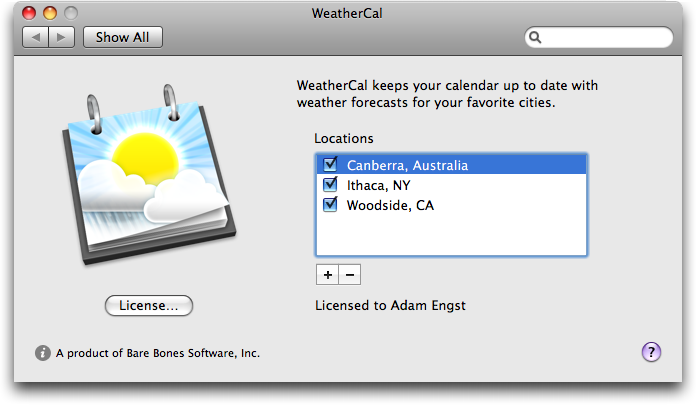
  WeatherCal's interface is minimal, letting users create calendars
  for multiple locations by clicking the plus (+) button. You can find
  locations by name, ZIP code, and airport code, but WeatherCal
  automatically creates a default location by reading the location
  from the entry you've designated as "My Card" in Address Book. You
  can edit each location's name as desired, and deselecting a
  location's checkbox removes its events from your calendar without
  deleting the calendar itself. Removing a calendar entirely is merely
  a matter of selecting it and clicking the minus (-) button.

<http://www.tidbits.com/resources/2009-03/WeatherCal-pane.png>

  Once configured, WeatherCal creates a normal iCal calendar for each
  location, displaying the current conditions for the current day and
  a simplified forecast for the next five days. (Bare Bones tells me
  that sometimes the weather feeds provide more than five days of
  forecasts for U.S. locations, and sometimes less than that for
  international locations.) As with all other iCal calendars, you can
  set the color of the calendar by selecting it in iCal, pressing
  Command-I, and choosing a new color from the pop-up menu.

<http://www.tidbits.com/resources/2009-03/WeatherCal-in-iCal.png>

  Double-click one of WeatherCal's events and you'll see a URL that
  will load the Weather Underground Web page for that location, making
  additional information a mere three clicks and an application change
  away.

  The calendars are rolling, meaning that you'll only ever see events
  for the current day and the next five days; WeatherCal tidies up
  after itself so you don't have past weather conditions cluttering
  your calendar.

  Being normal iCal calendars, they'll also sync to your iPhone or
  iPod, and will display with any iCal-savvy utilities like Second
  Gear's Today, which provides an at-a-glance view of your events and
  tasks in iCal.

<http://secondgearllc.com/today/>

  And well, that's it. WeatherCal is a one-trick pony, but it's a
  clever trick, and a useful one to boot. With it, you can easily
  tell, when making plans for next weekend, if the weather is likely
  to be amenable for a picnic. And if the drivers in your area freak
  out with a little rain or snow, knowing the forecast when making
  plans for a meeting across town next week could save you from an
  unpleasant traffic jam. Or, if you're planning a trip to Macworld
  Expo next year, adding San Francisco to your calendar ahead of time
  will give you a sense of how to pack.

  Obviously, there are a ton of ways to find weather information on
  the Internet these days, but context is king, and having weather
  information in your face while you're making plans is, in my mind,
  worth 10 bucks. WeatherCal requires Mac OS X 10.5 or later, and is a
  2.6 MB download.

  I'm a minor weather geek, to the point where I regularly check out
  the Ithaca Climate Page on the Web and buy the Ithaca Weather
  Calendar each year for its updated almanac information. From that
  standpoint, I can see a few features Bare Bones could implement for
  WeatherCal 2.0. iCal events have a Notes field that would be perfect
  for textual forecast information, for instance. (Bare Bones said
  that parsing that information in a reliable fashion is non-trivial.)
  Plus, since WeatherCal knows current conditions, it could optionally
  create another calendar in iCal with the high and low temperature
  for each day, enabling users to go back to see what the weather was
  like in the past. Nevertheless, these are trivial suggestions -
  WeatherCal seems fully baked as it stands, and I look forward to
  using it throughout the upcoming seasons.

<http://www.nrcc.cornell.edu/climate/ithaca/>


Apple Previews iPhone 3.0 Software
----------------------------------
  by TidBITS Staff <[email protected]>
  article link: <http://db.tidbits.com/article/10144>

  At a special press event at its headquarters, Apple previewed the
  new iPhone 3.0 software, which adds the long-awaited push
  notification capability, support for subscriptions and purchases
  within applications, and copy and paste, among much else.

  The software will be available this summer and will be free for
  iPhone users, while iPod touch users will pay $9.95 for the upgrade.
  Apple made a beta available to all those enrolled in the iPhone
  developer program following its morning announcement.


**iPhone Stats** -- With sales of 13.7 million iPhones in 2008, Apple
  exceeded its goal of 10 million unit sales. That makes for a total
  of 30 million iPhone OS devices sold to date, comprising 17 million
  iPhones and 13 million iPod touches.

  This is the first time Apple has broken out the iPod touch numbers,
  which were previously only a matter of speculation. This news should
  be reassuring to developers, as they can count on a much larger
  universe of potential buyers. Applications that work best or only
  over Wi-Fi also clearly have a significant audience.

  The App Store has been doing well too, and Apple says that it now
  contains more than 25,000 apps (the number after subtracting
  flashlight, calculator, and Twitter apps wasn't mentioned). Even
  more impressive, 800 million apps have been downloaded in the 8
  months that the App Store has been open, though the company didn't
  enumerate the difference between paid and free apps.

  On the developer side, there are now 50,000 members in the paid
  developer program, and the iPhone SDK has been downloaded over
  800,000 times. Apple claimed that 60 percent of iPhone developers
  are new to Apple platforms. Apple also made a point of noting that
  the App Store is a meritocracy, serving big and small developers
  alike. Although Apple has been improving the App Store of late (see
  "App Store Reviews Now Distinguish Versions," 2009-03-12), many
  developers still feel as though it's impossible to stand out among
  so many applications. According to Apple, 96 percent of apps
  submitted are approved, and 98 percent of those are approved within
  7 days or less.

<http://db.tidbits.com/article/10135>


**App Store Changes** -- One frustration among iPhone developers has
  been the rigidity of application sales models. For example,
  publishers have asked for the ability to offer subscriptions. Scott
  Forstall, Apple's senior vice president of iPhone software, gave as
  an example a game that comes with 10 levels, with the option to
  purchase additional levels separately. He continued, "Today we're
  supporting all of these additional business models."

  In-App purchasing will enable renewable subscriptions, the purchase
  of individual items (such as books in a bookstore or new levels of a
  game), and other add-ons within programs distributed via the App
  Store. iTunes will be used to handle the transaction, and Apple will
  offer the same split on sales: 70 percent of fees collected for
  In-App sales will go to the developer.

  However, only paid apps can charge for add-ons: a developer won't be
  able to offer a free application and then charge for additional
  content (which means we're likely to see even more $0.99 apps, but
  the developers will have a greater opportunity to recoup development
  costs). Several demos during the event showcased the capability to
  add extras, such as a $0.99 rocket launcher for the first-person
  shooter game LiveFire.


**Bluetooth and Bonjour** -- The iPhone 3.0 software adds 1,000 APIs,
  the hooks that enable third-party software developers to tie into
  functions in the operating system.

  The new iPhone 3.0 software will add peer-to-peer connectivity,
  using automatic discovery via Bonjour and Bluetooth to find nearby
  devices and services. This will allow for networked games, among
  other uses. No pairing is required, which can be an irritating
  process in Bluetooth.

  Peer-to-peer networking should also allow software that can exchange
  files and enable forms of chat and whiteboard collaboration.
  (SubEthaEdit for iPhone, anyone?) Although you almost certainly
  won't be able to transfer music files across a peer-to-peer
  connection, Apple said that music streaming would be possible.

  Programmers will also be able to talk directly to devices connected
  to the iPhone dock connector, which will allow a host of additional
  accessories that go beyond the passive audio-output and charging
  options available today. Apple offered the example of a
  blood-pressure cuff that could send live data through a network
  connection, or customized equalizer controls for attached speakers.

  Stereo Bluetooth support will allow the use of Bluetooth headphones.
  This missing feature was rather peculiar, because the software,
  connection, and processing components were already present in the
  iPhone 3G. Apple may have felt that battery usage wasn't tuned
  enough for the option until now. The original iPhone won't gain this
  feature, unfortunately, presumably due to lacking necessary hardware
  bits.


**Unfolding Maps** -- Maps, one of the most popular built-in apps, has
  been made more ecumenical, with developers now offered hooks that
  allow them to embed maps directly within their own apps. All the
  standard map features will be available, such as pinch, zoom, and
  location data, but developers will have to provide their own map
  data, and won't be able to access the Google-derived Maps app.
  However, Google offers a variety of licensing models for its map
  data, and we suspect Google will provide an App Store developer
  offering.

  Developers can also tap into reverse geocoding, which allows an
  address to be derived from a point on a map, useful for navigating
  strange cities or figuring out what address you're at when lost, as
  well as tagging photos with more specific information than a set of
  coordinates and a city name.

  Forstall also said that developers will be able to use location data
  for turn-by-turn directions. Turn-by-turn data, according to those
  who develop GPS hardware, requires a refresh of at least one new set
  of location information per second, which the iPhone with GPS should
  be capable of. Look for iPhone navigation apps from GPS companies
  like Garmin, TomTom, and Magellan.


**Push Me, Pull You** -- Months after Apple's initial promise, push
  notification capability will finally be available to developers.
  With push notifications, programs can capture specific events and
  display them much in the way the iPhone's built-in apps display SMS
  messages and updates to the Contacts and Calendar apps.

  Forstall said that Apple had to redesign its entire push
  architecture to achieve the miserly use of battery life that the
  company desired. As originally explained a year ago, push
  notifications require a developer to send messages through an Apple
  server that then manages their distribution to individual iPhones.
  Push requires customization for nearly each carrier Apple works
  with, and that work is currently underway, Forstall said.

  Apple has not yet mentioned whether it plans to charge developers
  for blocks of push messages, which would appropriately pair the
  technology with subscription services or high-value applications.


**Other APIs** -- Additional APIs will give developers access to the
  built-in proximity sensor that Apple uses to dim the iPhone display
  when it's used against one's face for calling, access to the iPod
  library, firewall tunneling for streaming audio and video
  (corporations are going to love this), data detectors that identify
  embedded data in Web pages, and voice-over-IP features.

  Apple has also added an email "sheet," which will enable developers
  to have their software send email without quitting the active
  application and launching the built-in Mail program.


**User Improvements** -- At last! Apple finally brings 1984 technology
  to the iPhone with the addition of copy and paste. The feature works
  through a sequence of taps and drags and will work across all
  applications with a global clipboard. Or rather, it becomes
  available for developers to add; initial comments from some
  developers indicate that doing so may not be trivial in all
  situations. When asked in a Q&A session following the announcement
  why copy and paste took so long, Apple said it was hard to combine
  simplicity, security, and cross-application support.

  Double-tapping a word brings up a pop-up menu with commands for Cut,
  Copy, and Paste, while draggable icons let you make changes in the
  selected text. Tapping twice in an empty area brings up a menu with
  commands for Select, Select All, and Paste. Shaking the device
  triggers an undo prompt.

  Content can be selected and copied in any enabled text area, as well
  as from Web pages. Copy and paste also apparently extends to images
  in the Photos application. You can select multiple images in a new
  mode, and then copy and paste them into the Mail program.

  The iPhone 3.0 software will also collect all kinds of messages into
  a new Messages app, including SMS text messages and new supported
  MMS messages (Multimedia Messaging Service), MMS enables certain
  forms of attachments to be sent over the iPhone's cellular
  connection. Apple will use MMS to allow business card information,
  location data, and other data to be transferred and stored. MMS is
  typically pricey, and may be irrelevant for some users given Apple's
  rich email support.

  Turning the iPhone on its side makes Safari switch to landscape mode
  now, but in the iPhone 3.0 software, other Apple apps such as Mail
  and Notes will also gain support for landscape mode. It will be
  especially helpful in those two, since the wide landscape keyboard
  is easier to type on than the portrait keyboard.

  A new Voice Memos app will let you record notes to yourself using
  the built-in microphone or an external mic. Several third-party
  applications previously added this feature to the iPhone with
  varying levels of sophistication.

  Search capabilities have been added to a number of applications,
  including Contacts, Mail (where it can search message headers, but
  not message bodies), Calendar, iPod, and Notes. But Apple has gone
  further, adding a Spotlight app that can search across all supported
  apps, something that becomes more necessary as the number of apps on
  an iPhone increases.

  The new software adds what Apple described as "auto-login" for Wi-Fi
  hotspots, which would appear to replace the functionality in
  programs like Easy Wi-Fi from Devicescape. It's unclear whether
  Apple has licensed and incorporated such software or if it has its
  own approach, nor is it clear what the interface settings for such
  logins will look like.

  Finally, although it was mentioned only in the Q&A session at the
  end, tethering will apparently be supported in the iPhone 3.0
  software. That will allow a MacBook, for instance, to access the
  Internet using an iPhone's cell data connection.


**Still Missing** -- Despite the significantly increased support for
  Bluetooth, when questioned about the necessary Bluetooth "human
  interface device" profile, which generically supports wireless
  keyboards, mice, and other pointing devices, Apple said there was
  nothing to announce. This lack has been a point of contention for
  many iPhone and iPod touch users who would like to rely on the
  diminutive device while traveling, but who need to be able to type
  for real, not with the clumsy virtual keyboard. It's especially
  galling because the necessary Bluetooth profile is built into Mac OS
  X; if the iPhone is a complete "OS X," the profile is there and
  turned off.

  Although push notifications will undoubtedly be welcome, Apple is
  implementing them instead of allowing apps to run in the background,
  claiming that tests with an instant messaging app running in the
  background on BlackBerry and Windows Mobile devices reduced standby
  time by 80 percent. In contrast, using push notifications reduced
  standby time by only 23 percent. Plus, Apple claimed that background
  processes could hurt overall performance. And while these criticisms
  are all true, it's always a little depressing to see Apple basically
  say, "It's too hard." instead of coming up with an innovative
  solution to a problem that push notification won't fully address.

  On the App Store side, although Apple made a point of discussing all
  sorts of great new business models that will be available, no
  mention was made of the desire on the part of developers to be able
  to offer free demo versions that expire after a certain number of
  uses or a particular time period. We can only hope that this was
  merely an oversight during the presentation and that the support
  actually is included given Scott Forstall's claim that Apple is
  supporting "all these additional business models."

  Support for Adobe's Flash technology is still missing, and in the
  Q&A session at the end, Apple merely said that there were no
  announcements about Flash, but that there were plenty of alternative
  methods of distributing video that don't require Flash. Many
  analysts and developers have described Flash's heavy processor use
  as being a battery drain, and Apple has attempted to bar uses that
  would dramatically shorten typical battery life.


**Coming Soon** -- When will we be able to play with all this good
  stuff? The developer beta of the iPhone 3.0 software is available
  now, so all developers in the beta program can get started right
  away.

  The rest of us will have to wait for the iPhone 3.0 software to ship
  "this summer," which means June, July, or August. It's seldom wise
  to assume the earliest possible date that counts as "summer."

  The update will be free for all iPhone owners, including people who
  bought the original iPhone, but once again, it will cost $9.95 for
  the iPod touch. The original iPhone, although it can run the iPhone
  3.0 software, won't be able to take advantage of all its features
  due to hardware limitations. We'll see just how significant those
  limitations are when it ships, and if it's incentive for owners of
  the original iPhone to upgrade. Of course, by then, it's possible
  Apple will have another revision of the iPhone hardware out as well.


EMC Ships Modernized Retrospect 8
---------------------------------
  by Adam C. Engst <[email protected]>
  article link: <http://db.tidbits.com/article/10159>

  I can't tell you how happy I am to hear that EMC has finally shipped
  Retrospect 8. The previous version for the Mac, version 6.1, has
  been crumbling around the edges, and I've restricted myself to using
  it for only a few specific situations where it has continued to work
  fine. But for my primary backups, I've switched to a combination of
  Time Machine, CrashPlan, and Carbon Copy Cloner. Time Machine
  provides quick recovery of unexpectedly corrupted files, CrashPlan
  gives me offsite backups, and Carbon Copy Cloner makes identical
  duplicates. But these programs haven't given me the warm fuzzy
  feelings I used to have when Retrospect was in its prime.

<http://www.retrospect.com/products/software/retroformac/>

  I liked Retrospect because it worked hard to ensure that every byte
  of a backup was copied and verified, logging everything clearly so
  you could tell exactly what was going on. Many years ago, Craig
  Isaacs, then the vice president of sales and marketing for Dantz
  Development, told me a story about a large company that complained
  to Dantz because Retrospect had started reporting verification
  errors in backing up. When Dantz investigated, it turned out that
  the company had upgraded a Cisco router to new firmware, and that
  there was a bug in the new firmware that would silently drop one out
  of every million packets transferred through the router (when this
  story happened, a million packets was a rather larger number than it
  would be today). The problem went unnoticed until Retrospect started
  reporting the errors. Even a single bit lost during copying of a
  file could cause irretrievable corruption, and I always appreciated
  the fact that Retrospect wouldn't allow that to happen to my data.

  When Dantz Development was bought by EMC, the Mac version of
  Retrospect languished, receiving only minimal development for some
  years. Cracks in Retrospect's architecture started to show during
  the evolution of Mac OS X, and crashes in the main Retrospect
  application and odd behavior in the Retrospect Clients used for
  network backups became commonplace. Luckily, about a year ago, EMC
  reformed the Macintosh development team, even luring some of the
  ex-Dantz people back, and Retrospect 8 has been in active
  development ever since. Now, at long last, EMC has released
  Retrospect 8, a complete rewrite that will hopefully return
  Retrospect to its former grandeur. Let's look at what's new in
  Retrospect 8, but do note that this is not a review, merely an
  overview of what EMC says is there with some comparison to what was
  previously available in Retrospect 6.1.

<http://kb.dantz.com/display/2n/articleDirect/index.asp?aid=9710&r=0.3788721>
<http://kb.dantz.com/display/2n/articleDirect/index.asp?aid=9712&r=0.4124414>


**Architecture and Interface** -- Retrospect 8 introduces a new
  tripartite architecture: a Retrospect engine that handles all the
  actual backup work on a backup server Mac, a Retrospect console
  application that provides the user interface, and a Retrospect
  Client application installed on client computers. The goal is to
  enable a network administrator to use the Retrospect console
  application to control one or more Retrospect engines, wherever they
  may be located on an organization's network.

  The Retrospect console application offers a completely new interface
  designed from the ground up and using native Mac OS X interface
  elements. This should make it easier for users unfamiliar with
  Retrospect to get started, a criticism often leveled at the previous
  versions.

  Other interface improvements include custom reports that
  automatically update with current information and better email
  notification of successful events, failed events, and media
  requests. New assistants walk users through setting up immediate and
  scheduled operations, and a redesigned rules interface makes it
  easier to select specific files.


**Performance** -- One of the major problems faced by the previous
  versions of Retrospect was that only a single task could execute at
  once, meaning that an initial backup of a new Mac or a slow backup
  over the Internet would block regular backups of other machines.
  Plus, if you were in the middle of a backup, you couldn't restore a
  file without first stopping the backup.

  Retrospect 8 eliminates those bottlenecks. It can now perform up to
  eight backup, copy, and restore operations simultaneously, depending
  on the amount of RAM available and your edition license (it's
  available only for Retrospect Single Server and Multi Server, not
  Retrospect Desktop - more on the editions shortly).

  Retrospect 8 also supports multiple processors and multiple cores,
  and features improved throughput to storage devices, which should
  result in significantly faster performance on Intel-based Macs and
  modern backup media.


**New Backup Capabilities** -- When previous versions of Retrospect
  were designed, hard disks were relatively small, and tape was the
  preferred backup media for even small office networks. Now that hard
  disks provide by far the best cost per gigabyte, Retrospect 8 has
  significantly improved its support for backups to hard disk. A new
  Disk Media set lets you combine multiple volumes - including direct
  and network-attached disks, removable cartridge drives, and even
  flash media - into a single logical destination for backups.

  In the other direction, you can also specify the amount of space on
  a disk that can be used by a Disk Media set, and Retrospect 8 can
  perform "disk grooming," which deletes older versions of files to
  make room for new ones. You set how many older versions to save.
  This is highly welcome, since in previous versions, the only way to
  keep using a disk after it filled up was to delete its contents and
  start over.

  Also new in Retrospect 8 are staged backups, which let you stage
  backups first to fast hard drives and later copy them to other disks
  or tapes for archival or offsite backups. Whether with normal or
  staged backups, Retrospect copies only files that don't already
  exist on the destination.

  Retrospect has always been able to verify files by re-reading files
  and performing a byte-for-byte verification pass. But that's slow
  and increases network traffic, so Retrospect 8 offers a new media
  verification option that calculates MD5 checksums during backup and
  uses them to verify that the data written matches the checksum
  without having to re-read the source data.

<http://en.wikipedia.org/wiki/MD5>

  Retrospect 8 now offers five different levels of security for your
  backed-up data, starting with a simple password with no encryption
  and moving through increasingly strong encryption: SimpleCrypt, DES,
  AES-128, and AES-256. The stronger the encryption, the slower your
  backups will be.

  For larger installations relying on tape drives, Retrospect 8 can
  now read and track tape barcodes for members of Tape Media sets, has
  faster media slot scanning, and can schedule tape drive cleaning
  automatically. It also supports more storage devices than previous
  versions, and an add-on makes it possible to write to two tape
  drives simultaneously.

  Finally, although Retrospect's basic approach of using a dumb client
  to send data to a smart server application hasn't changed,
  Retrospect 8 now offers Wake-on-LAN support for Mac clients (but not
  yet Windows clients), so the Retrospect engine can wake up sleeping
  Macs right before a backup is scheduled to start. Other improvements
  include support for multiple network interfaces, advanced
  preferences to adjust network timeout values, and automatic client
  login.


**What's Missing** -- As much as these features are welcome, it's
  clear that EMC has more coming, even in the very near term. Notable
  among Retrospect 8's known limitations is lack of PowerPC support
  for the Retrospect engine and console applications. EMC promises
  this for an April 2009 release, and it will be extremely welcome,
  since many companies and organizations prefer to use a somewhat
  older Mac as a backup server. Even I can't do more than test
  Retrospect 8 until it works with PowerPC-based Macs, since my backup
  server is a Power Mac G5.

  For those upgrading from previous versions of Retrospect, there's
  essentially no connection between the two - Retrospect 8 does not
  import your previous configuration or read the contents of older
  backup sets. As such, you'll need to set everything up from scratch
  and keep your old installation of Retrospect available for
  restoration needs. Be sure to disable the older version's backup
  operations so there's no conflict for a particular Retrospect
  Client. Although the capability to read old backup sets is in the
  works, I find that it's often a good idea to set things up from
  scratch anyway, as a way of eliminating historical oddities.

  Also missing is support for backing up to a file stored on an FTP
  server, which some people used as a way to move backups offsite.
  Although EMC is promising this for a future update, I'd rather see
  them put some effort into the kind of offsite backup that CrashPlan
  enables. Then again, CrashPlan can do what it does only by comparing
  versions of files and transferring just the bits that have changed,
  which radically reduces the amount of data transferred. Since
  Retrospect continues to copy entire files on each execution, it
  would need to transfer far more data.

  Complete documentation isn't yet available for Retrospect 8,
  presumably because EMC didn't wish to hold up the release of a
  functional program while the manual was being completed.

  Finally, Retrospect Clients running on Mac OS X 10.2.8 and Mac OS 9
  are not currently supported, although EMC is looking into what would
  be necessary to support these older systems.


**Editions and Upgrades** -- Because Retrospect is used by
  organizations ranging from the single user with multiple Macs all
  the way up to massive companies, there are a number of different
  licensing options that also vary based on whether you're buying new
  or upgrading older versions.

<http://www.retrospect.com/en/buy/buy_step1.dtml?platform=macintosh&family=retrospect>
<http://www.retrospect.com/upgrade/matrix/#mac>

* Retrospect Desktop 3 User: This edition is designed for individual
  users and small offices, and comes with three licenses for
  Retrospect Client. It costs $129 new, or $249 with one year of
  support and maintenance. Owners of Retrospect Express 4.3 or
  Retrospect Desktop 4.3 and later can upgrade for $59, or pay $179
  for the upgrade and a year of support and maintenance.

* Retrospect Single Server: This edition is designed for small to
  midsize organizations with a single backup server. With 20 licenses
  for Retrospect Client, it costs $479, or $609 with a year of support
  and maintenance. A version with unlimited clients and a year of
  support costs $809. Upgrades from Retrospect Workgroup 4.3 or later
  cost $279 for 20 clients; adding a year of support increases the
  price to $409. An unlimited client upgrade costs $539.

* Retrospect Multi Server: This edition is designed for larger
  organizations that need more than one server running Retrospect and
  an unlimited number of clients. It costs $1,669 and includes a year
  of support and maintenance. Upgrades from Retrospect Workgroup 4.3
  or Retrospect Server 4.3 and later cost $939.

* Retrospect Client: Licenses for additional Retrospect Clients are
  available at $39 for a 1-pack, $149 for a 5-pack, and $299 for a
  10-pack. You can upgrade a previous 1-user client for $19, a 5-user
  client pack for $69, and a 10-user client pack for $119.


**Let the Testing Begin** -- Although I'm heartened by the fact that
  some of the original Dantz people are working on Retrospect 8, the
  complete rewrite means that I won't have the same level of comfort
  with Retrospect 8 as I had with previous versions until I've used it
  successfully for some time in real world scenarios. Our backup
  expert, Joe Kissell, will also be putting Retrospect 8 through its
  paces for coverage in "Take Control of Mac OS X Backups," so we will
  be reporting on our experiences in the future.

<http://www.takecontrolbooks.com/backup-macosx?pt=TB970>

  But that caution aside, it's great to have Retrospect 8 back in the
  Mac market, and the added competition can only encourage programs
  like Time Machine, CrashPlan, and others to continue to
  differentiate themselves and improve further.


TidBITS Watchlist: Notable Software Updates for 23-Mar-09
---------------------------------------------------------
  by Doug McLean <[email protected]>
  article link: <http://db.tidbits.com/article/10148>

  Espresso 1.0 from MacRabbit is the first release of the company's
  much-anticipated Web authoring application, which is designed to
  provide an elegant workflow for Web developers and designers.
  Espresso supports HTML, CSS, XML, JavaScript, and PHP, and can
  publish to Web sites using FTP, SFTP, FTP/SSL, or Amazon's S3
  service. It features quick editing, projects for handling full
  sites, and live previews so you don't have to reload constantly. A
  plug-in architecture may help users extend Espresso in the future.
  (59.95 euros, 49.95 euros if you own CSSEdit 2, 8.8 MB)

<http://macrabbit.com/espresso/>


  PDFpen 4.1 and PDFpenPro 4.1 from SmileOnMyMac are the latest
  versions of the PDF editing utilities. Both version updates feature
  a number of undisclosed bug fixes and add support for Sparkle - the
  open source Mac OS X framework designed to simplify distributing
  software updates. ($49.95/$99.95, free updates, 13 MB/13.2 MB)

<http://www.smileonmymac.com/PDFpen/>
<http://www.smileonmymac.com/PDFpenPro/>
<http://sparkle.andymatuschak.org/>


  Mini DisplayPort to VGA Firmware Update from Apple addresses
  longstanding performance and compatibility issues with the Mini
  DisplayPort to VGA Adapter on Mini DisplayPort-enabled Macs. The
  problems addressed include intermittent screen flickering and, in
  some cases, no video output appearing at all. More information
  regarding the update and steps to install it is available from
  Apple's Web site. (Free update, 11.4 MB)

<http://support.apple.com/downloads/_Mini_DisplayPort_to_VGA_Firmware_Update>
<http://mjtsai.com/blog/2009/03/06/macbook-pro-mini-displayport-dual-link-dvi/>
<http://support.apple.com/kb/HT3492>


ExtraBITS for 23-Mar-09
-----------------------
  by TidBITS Staff <[email protected]>
  article link: <http://db.tidbits.com/article/10157>

**Safari Exploited in 10 Seconds in Security Contest** -- Security
  researcher Charlie Miller has cut his time to "pwn" (take full
  control of an operating system via an exploit) from 2 minutes to 10
  seconds at the CanSecWest PWN2OWN contest. He was sitting on a
  previously discovered exploit that he had pre-loaded onto a remote
  Web site. When a fully patched Mac OS X system connected to the
  site, he was in charge. He won $5,000 and the exploited MacBook.
  Miller's find and two other Safari exploits will be turned over to
  Apple without prior disclosure by TippingPoint, the firm that
  sponsored the contest. (Posted 2009-03-20)

<http://www.computerworld.com/action/article.do?command=viewArticleBasic&articleId=9129978&intsrc=news_ts_head>


**Mixing Older, Newer AirPort WDS Networks** -- Ted Landau went
  through a lot of Option key pressing to figure out how to integrate
  a new simultaneous dual-band AirPort Extreme Base Station with his
  older mix of 802.11n (rectangular) and 802.11g (saucer) AirPort base
  stations. He explains how at MacFixIt. (Posted 2009-03-20)

<http://www.macfixit.com/article.php?story=20090320130754107>


**HD Movies Now Available through iTunes** -- Apple is now offering
  high-definition movies for purchase (but not rent) via iTunes.
  Previously, only the Apple TV provided the means to watch rented
  (with no option to purchase) HD movies. HD commands a $5 premium
  over standard-definition purchases, with a little over a dozen
  titles currently available. (Link goes to the iTunes Store.) (Posted
  2009-03-19)

<http://itunes.apple.com/WebObjects/MZStore.woa/wa/viewCustomPage?name=pageHDMovies>


**AT&T to Offer Contract-Free iPhone** -- According to The Boy Genius
  Report, AT&T will start offering the iPhone for sale without a
  contract, starting 26-Mar-09. The commitment-free 8 GB and 16 GB
  models will retail for $599 and $699 (that's $400 more than the
  subsidized price!), and will be available only to existing customers
  who wish to add a line, purchase a gift, or upgrade (presumably from
  a different AT&T phone). (Posted 2009-03-19)

<http://www.boygeniusreport.com/2009/03/18/att-bringin-sexy-back-offering-iphone-3g-at-no-commitment-price-no-activation/>


**Apple Updates AirPort Design Guide** -- Apple has revised its guide
  for planning and building Wi-Fi networks, formerly called "Designing
  AirPort Networks." The new guide, "Apple AirPort Networks," is a
  fairly in-depth effort at explaining with step-by-step instructions
  how to configure Apple base stations for various kinds of networks
  and tasks. (Posted 2009-03-18)

<http://manuals.info.apple.com/en_US/Apple_AirPort_Networks_Early2009.pdf>


**Cables: The Bane of Technological Existence** -- An elegant
  graphical recounting of illustrator Christoph Niemann's
  "can't-live-with-them, can't-live-without-them" relationship with
  cables, in the New York Times. For anyone who wishes to differ, we
  have a box of SCSI cables for you. (Posted 2009-03-18)

<http://niemann.blogs.nytimes.com/2009/03/16/my-life-with-cables/>


**iPhones Causing Courtroom Chaos** -- Jurors researching and sharing
  trial information via the iPhone and other mobile devices is proving
  to be a serious and widespread problem for many courts. Several
  major cases have had to declare mistrials after jurors were
  discovered to be posting trial information via Twitter and Facebook,
  and looking up trial-related information via Google. While jurors
  breaking rules via the Internet is nothing new, the widespread
  adoption of devices like the iPhone has made it far easier and more
  common. (Posted 2009-03-17)

<http://www.nytimes.com/2009/03/18/us/18juries.html>


Hot Topics in TidBITS Talk for 23-Mar-09
----------------------------------------
  by Jeff Carlson <[email protected]>
  article link: <http://db.tidbits.com/article/10160>

**External Hard Drives** -- Readers solicit opinions on different hard
  drive manufacturers in an attempt to find the best solution for
  using Time Machine. (4 messages)

<http://emperor.tidbits.com/TidBITS/Talk/2529>


**AirPort Problem** -- The recent AirPort firmware update has caused
  problems for some readers, and the AirPort Express blinking lights
  continue to cause confusion. (7 messages)

<http://emperor.tidbits.com/TidBITS/Talk/2531>


**Locating original files in iTunes automatically** -- Has iTunes lost
  track of many songs whose files haven't moved? SuperSync may be the
  solution. (2 messages)

<http://emperor.tidbits.com/TidBITS/Talk/2535>


**In Search of iTunes 8.1** -- Readers report problems with the latest
  update to iTunes. (5 messages)

<http://emperor.tidbits.com/TidBITS/Talk/2536>


**Windows to Mac software failures?** Companies that have tried to
  port Windows applications to the Mac have had a mixed bag of
  success. (52 messages)

<http://emperor.tidbits.com/TidBITS/Talk/2538>


**AirTunes stutter with AirPort Express 802.11n optical out** --
  Playing music via AirTunes is problematic for some readers using the
  latest version of iTunes. (2 messages)

<http://emperor.tidbits.com/TidBITS/Talk/2541>


**iPhone 3.0 and Cut/Copy/Paste** -- Readers compare the
  just-announced copy-and-paste functionality on the forthcoming
  iPhone 3.0 update with the implementation on the Newton. (15
  messages)

<http://emperor.tidbits.com/TidBITS/Talk/2542>


**WeatherCal Inserts Updating Forecasts into iCal** -- Readers take
  Bare Bones Software's latest offering for a spin and discuss
  alternatives. (11 messages)

<http://emperor.tidbits.com/TidBITS/Talk/2543>


**SpamSieve** -- Isn't it great when the developer of software you use
  is also a contributor to TidBITS Talk? A reader gets help with his
  spam filtering software, straight from the source. (3 messages)

<http://emperor.tidbits.com/TidBITS/Talk/2546>


$$

This is TidBITS, a free weekly technology newsletter providing timely
news, insightful analysis, and in-depth reviews to the Macintosh and
Internet communities. Feel free to forward to friends; better still,
please ask them to subscribe!

Non-profit, non-commercial publications and Web sites may reprint or
link to articles if full credit is given. Others please contact us. We
do not guarantee accuracy of articles. Caveat lector. Publication,
product, and company names may be registered trademarks of their
companies. TidBITS ISSN 1090-7017.

Copyright 2009 TidBITS: Reuse governed by Creative Commons license.

Contact us at:    <[email protected]>
TidBITS Web site: <http://www.tidbits.com/>
License terms:    <http://www.tidbits.com/terms/>
Full text search: <http://www.tidbits.com/search/>
Subscriptions:    <http://www.tidbits.com/about/list.html>
Account help:     <http://www.tidbits.com/about/account-help.html>


--
If you want to unsubscribe or change your address, use this link
http://emperor.tidbits.com/webx?unsub@@.3c557dc4!u=306a67f9