TidBITS#975/20-Apr-09
=====================
  Issue link: <http://db.tidbits.com/issue/975>
  This week's issue has an emphasis on security, though in more
  practical ways than usual. Wondering what the fuss is about the "Mac
  botnet" stories last week? Rich Mogull explains that it's nothing
  new and lays out five tips for how to evaluate Mac security stories.
  For Microsoft Office users, there's a security update that's worth
  getting, along with the news that Office 2004 will hit its
  end-of-life date on 13-Oct-09. On the data security side of the
  fence, Joe Kissell describes the newest online backup service to hit
  the Mac, Backblaze. We also just released the latest version of
  "Take Control of Your Wi-Fi Security," co-authored by Glenn
  Fleishman and Adam Engst. But we're not above having some fun, so
  we're pleased that Julio Ojeda-Zapata joined us to compare three new
  Twitter clients: the just-released Tweetie and the still-beta Nambu
  and Lounge. Interesting software releases this week include Airfoil
  Speakers Touch, which turns an iPhone or iPod touch into a wireless
  audio receiver, along with Drive Genius 2.1.1, Server Admin Tools
  10.5.6v1.1, iMovie 8.0.2, Aperture 2.1.3, and SpamSieve 2.7.4.

Articles
    Microsoft Office 2008 12.1.7 and 2004 11.5.4 Updates
    Make Your iPhone or iPod touch an Audio Receiver
    Backblaze Publicly Launches Online Backup Service for Macs
    Take Control News: Is Your Wireless Network Secure?
    Five Tips for Reading Mac Security Stories
    Navigating the Next Generation of Mac Twitter Apps
    TidBITS Watchlist: Notable Software Updates for 20-Apr-09
    ExtraBITS for 20-Apr-09
    Hot Topics in TidBITS Talk for 20-Apr-09


------------ This issue of TidBITS sponsored in part by: --------------

* READERS LIKE YOU! Support TidBITS with a contribution today!
  <http://www.tidbits.com/about/support/contributors.html>
  Special thanks this week to Edward Reid, Mark Whitcombe,
  Kerry Hughes, and Margaret Betty Lindley for their generous support!

* Fetch Softworks: Fetch 5.3 has WebView, the easy way
  to view files in a browser and copy Web addresses from Fetch.
  Also a new look for Leopard, droplet shortcuts, and more.
  Download your free trial version! <http://fetchsoftworks.com/>

* WebCrossing Neighbors Creates Private Social Networks
  Create a complete social network with your company or group's
  own look. Scalable, extensible and extremely customizable.
  Take a guided tour today <http://www.webcrossing.com/tour>

* MARK/SPACE, INC: Take it with you! The Missing Sync makes
  it easy to synchronize contacts, calendars, notes, photos
  and more from your Mac to your BlackBerry, Palm OS, or
  Windows Mobile phone. <http://markspace.com/bits>

* VMware Fusion. The most seamless way to run Windows on
  your Mac. Backed by nearly a decade of proven virtualization
  technology. Try VMware Fusion today for only $79.99.
  Visit: <http://www.tidbits.com/about/support/vmware-fusion.html>

* Microsoft's MacBU: Supporting Mac users with Office 2008.
  Is your Office up-to-date? Make sure you're running the latest
  versions of Word, Excel, PowerPoint, and Entourage by choosing
  Check for Updates from the Help menu of any Office application!

* ConceptDraw Office adds real business power to Microsoft Office
  and Apple's iWork. Whether you need project management, business
  graphics, or mind mapping, it's all easily created on your Mac!
  Buy today for only $499! <http://www.conceptdraw.com/tb>

* It's time to speak up with MacSpeech Dictate! Get the all-new
  MacSpeech Dictate with spelling and phrase training. Speech
  Recognition so good, the only thing it can't do is speak for you.
  Learn more at <http://tidbits.com/about/support/macspeech.html>

---------- Help support TidBITS by supporting our sponsors ------------


Microsoft Office 2008 12.1.7 and 2004 11.5.4 Updates
----------------------------------------------------
  by Doug McLean <[email protected]>
  article link: <http://db.tidbits.com/article/10213>

  Microsoft has released its latest updates for Office 2008 and Office
  2004, fixing a critical security issue in both versions and
  reportedly improving performance. According to Microsoft, both
  updates address vulnerabilities in Excel that could allow remote
  code execution if you were to open a specially crafted malicious
  Excel file. While both updates also claim performance enhancements,
  no specific changes are mentioned in the release notes.

<http://www.microsoft.com/technet/security/bulletin/ms09-009.mspx>

  The Microsoft Office 2008 for Mac 12.1.7 Update requires Mac OS X
  10.4.9 or later, and that you have already installed the 12.1.0
  update (the updater is a combo updater, meaning it contains all
  fixes since 12.1.0). It's a 267.7 MB download from Microsoft's Web
  site, and is also available via the Microsoft AutoUpdate utility
  launched by choosing Check for Updates from any Office 2008
  application.

<http://www.microsoft.com/downloads/details.aspx?FamilyID=f6e407eb-11a5-433f-8006-4b822953ca98>

  Some users have been reporting problems echoing those of previous
  updaters, in particular the error message, "You cannot install
  Office 2008 12.1.7 Update on this volume. A version of the software
  required to install this update was not found on this volume."
  Installation steps and advice for circumventing this issue are
  available on the Entourage Help Blog.

<http://blog.entourage.mvps.org/2009/04/microsoft_office_2008_for_mac_1217_updat.html>

  The Microsoft Office 2004 for Mac 11.5.4 Update requires Mac OS X
  10.2.8 or later, and that you've previously installed the Microsoft
  Office 2004 for Mac 11.5.3 Update. It's a 9.7 MB download from
  Microsoft's Web site and is also available via the Office 2004
  version of Microsoft AutoUpdate.

<http://www.microsoft.com/downloads/details.aspx?familyid=52271140-89be-4b9c-baa2-cea09097d703>

  A final note: Microsoft tells us that Office 2004 will reach the end
  of its supported life as of 13-Oct-09, and will thus no longer
  receive any updates. Microsoft's lengthy commitment to updating the
  now five-year-old software suite has been appreciated, but alas, all
  good things must come to an end.


Make Your iPhone or iPod touch an Audio Receiver
------------------------------------------------
  by Doug McLean <[email protected]>
  article link: <http://db.tidbits.com/article/10222>

  Audio software developer Rogue Amoeba has announced the release of
  AirFoil Speakers Touch, an app for the iPhone and iPod touch that
  extends the capabilities of the previously available AirFoil
  application. AirFoil, available for the Mac and Windows, enables
  users to share audio from their computers to AirPort Express base
  stations, Apple TVs, Macs, PCs, and Linux boxes. The application
  syncs audio playback across devices, and can share files from a
  variety of sources including iTunes, RealPlayer, Spotify, and even
  Web-based sources like Pandora or Last.fm. (Without Airfoil, you can
  play music wirelessly only to an AirPort Express, and only from
  iTunes.)

<http://www.rogueamoeba.com/airfoil/mac/>
<http://www.rogueamoeba.com/airfoil/windows>

  AirFoil Speakers Touch now extends those capabilities to the iPhone
  and iPod touch. You can plug in headphones or dock your device to a
  speaker to listen in on the wirelessly shared playback. This is
  great for listening to audio that comes from a source other than
  iTunes or for streaming audio from iTunes to an iPhone or iPod touch
  that lacks space for the audio files.

<http://www.rogueamoeba.com/airfoil/iphone/>

  AirFoil Speakers Touch is currently available as a free download
  from the App Store, and works in conjunction with Airfoil for Mac or
  Windows (both $25), which are available for download via Rogue
  Amoeba's Web site. Whether you're already a fan of AirFoil or are
  newly searching for a way to untether your audio, AirFoil Speakers
  Touch is worth checking out.


Backblaze Publicly Launches Online Backup Service for Macs
----------------------------------------------------------
  by Joe Kissell <[email protected]>
  article link: <http://db.tidbits.com/article/10206>

  Several months ago, I wrote about a new online backup service called
  Backblaze, which at that time was available to Mac users only in a
  beta form, by private invitation (see "Backblaze Launches Mac Beta
  of Online Backup Service," 2008-12-09). After extensive beta
  testing, and a few much-requested modifications, the company has now
  finally opened the service to everyone. If you've been thinking
  about using online backups, or if you've tried another service and
  been disappointed, Backblaze may well be worth a look.

<http://www.backblaze.com/>
<http://db.tidbits.com/article/9921>

  Like several other online backup systems, Backblaze uses Mac client
  software to back up your files, compressed and encrypted, to secure
  servers over the Internet. It operates continuously in the
  background, automatically uploading new data as you create or modify
  it. You can restore data by selecting files and folders in a
  Web-based interface and downloading a Zip file, or by requesting
  that the company send your data overnight by FedEx on DVD ($99 for
  up to 4.2 GB of data) or on a USB hard drive ($189 for a 500 GB hard
  drive, up from 160 GB during the beta program).

  One of the key changes the company made during its beta program was
  adding support for resource forks on Mac files, including full
  de-duplication of resource fork data. In addition, the company says
  it correctly backs up and restores each file's type, creator,
  creation date, and modification date, and that packages (or
  bundles), such as those used to store iPhoto libraries, are handled
  correctly. All of this should be good news to users who have found
  these features lacking in Mozy, a similar but better-known backup
  service.

<http://mozy.com/>

  Among the numerous other changes in the 1.0 release (or 1.0.0.134,
  to be exact) are greatly improved support for external drives (which
  the software now tracks even after they're disconnected), more
  helpful notifications and reports, improved translations into
  several different languages, performance and compression
  enhancements, and more intelligent exclusion of cache and temporary
  data. Backblaze now also includes an uninstaller.

  For users who participated in beta testing, Backblaze should
  automatically and silently update its client software in the
  background. New users can download the software (a 3.6 MB file) from
  the Backblaze Web site. Setup is a matter of running the installer,
  entering your email address, and choosing a password. No other
  configuration is required, although users can manually exclude any
  folders, volumes, or file types they don't want to back up.

<https://www.backblaze.com/download_mac.htm>

  Backblaze charges $5 per month, or $50 per year (which works out to
  $4.17 per month) for unlimited data storage, and the company offers
  a 15-day free trial.


Take Control News: Is Your Wireless Network Secure?
---------------------------------------------------
  by Adam C. Engst <[email protected]>
  article link: <http://db.tidbits.com/article/10207>

  We've just released a new version of "Take Control of Your Wi-Fi
  Security," penned jointly by wireless networking guru Glenn
  Fleishman and Take Control publisher Adam Engst. The ebook is aimed
  at anyone who is running a home or small-office wireless network and
  who wants to set up and maintain an appropriate security level for
  their needs and budget. Glenn and Adam have been publishing articles
  and books about wireless security for ages, so this new version
  contains the distilled essence of years of thinking about the topic,
  along with fresh material to bring their discussions up to date for
  2009. They have added the latest details relating to Mac OS X 10.5
  Leopard, current recommendations for setting up WPA and WPS
  security, and steps for configuring guest networking with Apple's
  recently released base stations. To ensure that your wireless
  network is appropriately secure, pick up a copy of the $10 ebook.

<http://www.takecontrolbooks.com/wifi-security?pt=TB975>

  Although the last update to "Take Control of Your Wi-Fi Security"
  came in October 2007, we're still making this version a free update
  for anyone who owns a previous edition of the ebook. In your
  existing PDF, click Check for Updates on the first page to access a
  download link.

  "Take Control of Your Wi-Fi Security" helps you assess your
  real-world security risk, and aids in evaluating the likelihood of a
  security-related problem, the potential severity of a break-in, and
  the opportunity cost of securing your wireless network. It then goes
  on to explain the pros and cons of various security techniques,
  explaining how to implement the best ones to secure your network and
  your data in transit. It covers Mac OS X, Windows XP, and Windows
  Vista.


Five Tips for Reading Mac Security Stories
------------------------------------------
  by Rich Mogull <[email protected]>
  article link: <http://db.tidbits.com/article/10218>

  Some days it seems the entire world is waiting with bated breath for
  the eventual fall from grace of the long-vaunted Macintosh security.
  From industry publications to the mainstream press, even the
  slightest Mac security hiccup spurs an onslaught of articles,
  debates, and even the occasional cable news headline. Some stories
  declare us invulnerable to attacks, while others give the impression
  that by the time you jump up from your armchair and rush to your
  Mac, it will already be infected and funneling your life's savings
  and family photos to Nigerian spammers. For us Mac users it can be
  difficult to discern the lines between truth, hype, and outright
  fantasy.

  As someone who spends most of his time reading, writing, and
  speaking about security, there are five things I tend to look for in
  Mac security news to cut to the heart of the story. After all the
  hype in recent days over the "Mac botnet," I thought it was time to
  share some of my skeptical tricks.


**Is the Story Based on a Vendor Press Release?** Many security
  vendors provide the computing community an invaluable service by
  releasing vulnerability and exploit information uncovered by their
  research and incident response teams. While this information is
  incredibly helpful in learning about and evaluating new security
  threats, it also comes with a dark side: Vendor marketing
  departments often see these discoveries as a great way to scare
  people into buying their products.

  They issue press releases to draw as much attention to the problem
  as possible, hoping it will bring more users to their products
  (since they can always, of course, protect against the new risk).
  These releases would fade into the ether if it weren't for a press
  hungry for readers. Everyone loves a good scare story, and it
  becomes the digital media equivalent of "if it bleeds, it leads."

  When I read any story involving some new kind of security threat,
  the first thing I look for is the source of the story. If I see
  nothing but quotes from a security vendor, or a straight reprint of
  a press release (an all-too-common practice), my skepticism meter
  usually starts to peak. (For the record, I don't consider the
  vendors malicious or deceptive, but when you truly believe in your
  product it comes with a certain bias.)


**Is the Story Really New?** Security stories often percolate for
  months, or even years, in the industry press before breaking out
  into more mainstream publications. Even within the industry press,
  we sometimes see a small group of incidents constantly repurposed in
  new articles, typically with a healthy dose of additional hyperbole.

  The Mac botnet story that flooded the press last week is a classic
  example of an old story experiencing an unjustified rebirth. The
  malicious software initially appeared back in January 2009, hidden
  inside pirated versions of iWork '09 and Adobe Photoshop CS4.

  The story was revived as additional information came to light, but
  it was unfortunately misinterpreted by many as some new kind of
  attack. The malicious software was demonstrating some interesting
  behavior, but nothing in the story indicated any additional risk to
  users. A quick Google search will usually reveal the root of the
  story, and help determine if you face a new risk.


**Is the Security Issue Really New?** It's not uncommon to see a
  string of security stories that are all essentially about the same
  root problem. This happens regularly even in the security industry;
  once a new vulnerability or exploit becomes public there's a
  never-ending string of variants as different bad guys try to
  circumvent our security defenses. But these variants are typically
  different colors on the same body, and don't indicate any increased
  risk over the original.

  For example, some Mac malware hides itself as a fake video player on
  adult Web sites, and we saw a few new versions appear last year.
  This social engineering trick - hiding malware inside an
  innocuous-looking application aimed at prurient interests - has been
  around nearly as long as people have been looking at digital
  pictures of other people who aren't wearing clothes. When I read
  stories that seem to spin old news, or describe a variant of a
  well-known problem, I start looking at them a little more
  skeptically.

  I'm generally unimpressed by any story that involves tricking a user
  into manually installing malicious software. On occasion we see a
  particularly creative deception, and I might be concerned if the
  malicious software was hiding in a mainstream application, but
  getting someone to install something evil on their system is a fault
  with the human brain, not their operating system of choice.


**What's the Mechanism of Action?** With any security risk there has
  to be some sort of mechanism of action. Sometimes it's a new
  vulnerability in our operating system or software, other times it's
  a new method of attack. If the news story doesn't offer any details
  on the mechanism of action, I start looking at it more skeptically
  and will start hunting down sources to determine what's really going
  on. Once I do identify the mechanism, I can usually determine the
  level of risk.

  For example, as we discussed above, I tend to be less concerned
  about software that requires manual installation, unless it's hidden
  itself in an extremely common source that affects a large portion of
  the community. (Yes, you could argue hiding malware in an adult
  video player hits a large portion of the community, but that's not
  something we talk about in polite publications). If I see something
  that works only under a limited set of uncommon circumstances, the
  risk is usually low.

  However, when I see something that allows an attacker to take over
  your system via an email message, by getting you to view a malicious
  Web page, via a network attack on a common port or other common
  service, I become more concerned.

  First ask yourself how it works (what's the mechanism of attack?),
  then how bad it is (what does it damage, or allow the attacker to
  do?), and then who it affects (any Mac user, or just those running
  some obscure software?). Admittedly, you need a bit of knowledge to
  make these interpretations, but you don't always have to be a
  security expert to figure out many of the basics.

  Going back to our Mac botnet story, it was mentioned, if not clear,
  in every article that the malicious software hid itself _only_
  inside pirated versions of iWork '09 and Photoshop CS4. Unless you
  downloaded those illegally, or grabbed a (possibly illegal) version
  from a friend, you were safe. End of story.


**Does the Story Defend Mac Security Based Solely on History?** We Mac
  users have it pretty good. We face only the smallest fraction of the
  security risk endured by our Windows brethren. But just because we
  live in a nicer neighborhood doesn't mean we are immune from risk.
  For many years Mac OS X did have an inherent security advantage over
  Windows, but for those who understand the technologies within the
  operating systems, those days are long past.

  The latest version of Windows (Vista, not that most people use it)
  is provably more secure in the lab than the latest version of Mac OS
  X 10.5 Leopard. Leopard lacks proper implementation of the new
  anti-exploitation technologies included in Vista, and, based on the
  number of Apple security patches, experiences easily as many
  vulnerabilities.

  When I see articles that defend Mac OS X based on the lack of
  Mac-specific malicious software, and not on current technical
  capabilities, cybercrime dynamics, or attack methods, I tend to be
  skeptical.

  Mac OS X's Unix core was a powerful security defense for many years,
  especially the requirement to enter a password before installing
  most kinds of software, but modern attack methods are able to
  circumvent that protection. On the upside, Apple started adding some
  of these technologies to Mac OS X in Leopard (albeit incompletely),
  and if they finish the implementation, and continue to add new
  security features, the odds are we will never face the same security
  risk as Windows users.


**You Can Do It** -- The need for computer security long ago passed
  from a minor annoyance to something that could affect our personal
  and financial safety. Just as disasters, crime, and tales of tragedy
  tend to dominate the news, stories of information security failures
  never fail to grab the headlines. When it's a story with the
  potential to topple a media darling like Apple, you can bet the
  article will be right up there next to the latest celebrity
  embarrassment. But with a little consideration of these five tips,
  you can evaluate the reality level of any given security story.


Navigating the Next Generation of Mac Twitter Apps
--------------------------------------------------
  by Julio Ojeda-Zapata <[email protected]>
  article link: <http://db.tidbits.com/article/10219>

  As a Twitter addict and power user, I have long been on the lookout
  for killer desktop software to turbocharge my microblogging. Yet,
  again and again, I've been disappointed. While I love Twitter apps
  for the iPhone, nothing on the Mac has ever quite satisfied me.

  A recent crop of Mac-based Twitter clients, however, gives me reason
  to hope that my days of tweeting from a Web browser might, at last,
  be numbered. The recent releases of Tweetie, Lounge, and Nambu
  provide power and flexibility, along with the elegance and flair Mac
  users demand.

  Tweetie is the hottest news here. Released today, the Atebits app by
  Loren Brichter is a companion to the popular Tweetie for iPhone.
  I've been working with pre-release builds of the Mac version for
  more than a week and appreciate how it masks power-user features
  with its minimalist facade - the same formula that has made Tweetie
  such a hit on the iPhone. Despite one major issue I will describe
  shortly, the desktop version of Tweetie is growing on me.

<http://www.atebits.com/tweetie-mac>
<http://www.atebits.com/tweetie-iphone>

  Nambu and Lounge also look appealing, even though they remain in
  beta form and suffer a few nagging issues. These three are more
  capable than simple apps like Iconfactory's Twitterrific, which many
  love but others find limiting. As a result, these next-generation
  Twitter programs have the potential to become Twitterverse
  dashboards for Twitteraholic superusers.

<http://www.nambu.com/>
<http://loungeapp.com/mac/>
<http://iconfactory.com/software/twitterrific>

  The new Mac apps are also, well, _Mac_ apps. This can't be said of
  the feature-rich but un-Mac-like Twhirl, Seesmic Desktop, and
  TweetDeck, which run atop Adobe AIR software that also enables their
  use on Windows PCs. Many Apple aesthetes loathe AIR apps for their
  odd appearances and interface behavior.

<http://www.twhirl.org/>
<http://www.tweetdeck.com/>
<http://desktop.seesmic.com/>

  Note that Nambu and Lounge also are available in iPhone
  incarnations, but only the Lounge apps are meant to be used as a
  combo.

<http://itunes.com/apps/nambu>
<http://itunes.com/apps/lounge>

  So has my dream Twitter app for the Mac finally come? To find out, I
  spent tons of time tweeting with Nambu, Lounge, and Tweetie, and
  gathered impressions from a few friends.


**Nambu** -- An Apple-centric friend of mine recently test-drove the
  tricked-out TweetDeck but couldn't stomach the experience. Never
  mind that its multi-column makeup allows for such customizations as
  Twitter groups, keyword tracking, and optional Facebook-friend
  monitoring. He found the AIR application aesthetically revolting. (I
  suspect he'd detest the new, TweetDeck-style Seesmic Desktop, as
  well.)

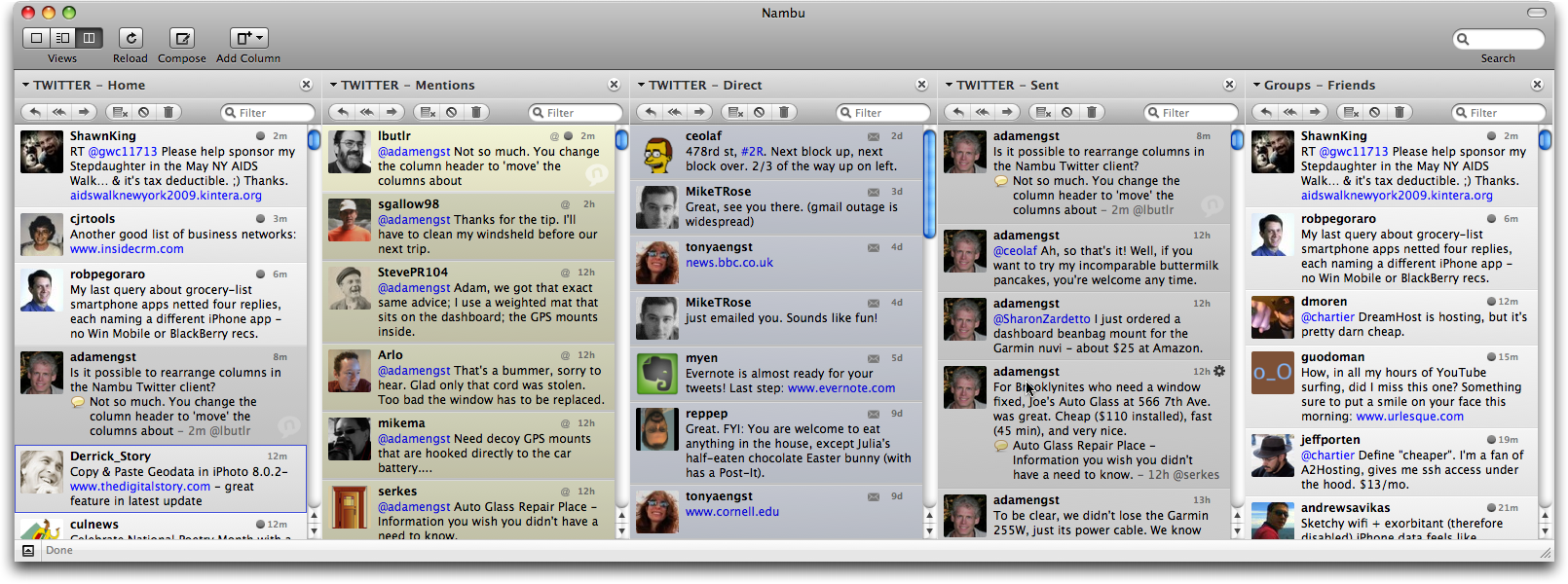
  So he was thrilled when I turned him on to Nambu. Like TweetDeck, it
  has multiple columns that show a user's primary Twitter-friend
  timeline, private (or "direct") messages, public mentions of that
  user's Twitter handle, and so on. As with TweetDeck, subgroups of
  favorite Twitter friends are readily placed in their own columns. So
  are columns displaying custom searches or trends.

<http://www.tidbits.com/resources/2009-04/Nambu-window.png>

  For my pal, Nambu has the added benefit of a Mac-like look and feel.
  And while it lacks Facebook access, it does boast support for
  FriendFeed and identi.ca accounts (at least, that's the promise;
  both were grayed out in the beta versions I evaluated for this
  article).

  Nambu surpasses TweetDeck in some ways. It supports multiple Twitter
  accounts, for one thing. Those like me who juggle more than one
  account can get all column-crazy with Nambu, setting up as many
  viewing options as the widths of our displays will permit.

  The app has other nice touches like Twitter-name autocompleting in
  the composing field, along with the now-common features such as URL
  shortening and TwitPic posting. Each column has a word-filtering
  field to narrow down the tweets that appear within. Double-click in
  the blank area in any tweet to reply to it, or double-click the
  author's picture to open a window with that person's info. There is
  even conversation threading in the main interface, with replies
  embedded beneath the original tweets.

  Nambu really shines with its alternate-view options. Its second
  option provides a Mail-like view with a sidebar showing icons for
  all key functions. A third option distills Twitter into a single
  river of information. With three Nambu modes, you can use the app as
  the mood strikes you.

  But my pal is no longer happy with Nambu, due to its "often-flaky
  personality," he said. Another pal said Nambu "is crazy slow and
  kept pushing me over 100 requests per hour no matter how I set the
  time interval." (He's referring to limits Twitter places on client
  software to keep from overtaxing the ever-shaky service.) He is back
  to using the AIR-based Twhirl.

  If Nambu can work through its problems, however, it has promise for
  those who require the most malleability and control in their Twitter
  use.


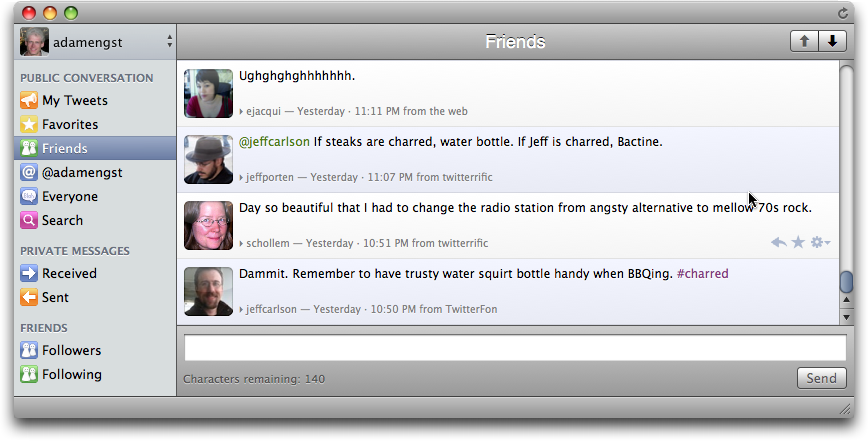
**Lounge** -- Taking a simpler approach than Nambu, Lounge offers only
  a single mode with a main window and a sidebar. This sports
  colorful, whimsical buttons for "My Tweets" (your tweets), replies
  (which pulls up all public mentions of your Twitter handle), private
  or "direct" messages, favorites, search and the like. You can easily
  add search buttons with customized criteria.

<http://www.tidbits.com/resources/2009-04/Lounge-window.png>

  Clicking tweets or direct messages (DMs) in the main window expands
  them to show the author's details. Each of these entries also sports
  a minimalist row of buttons (invisible until your pointer hovers
  nearby) for retweeting, DM-ing and other tasks.

  The top-left corner of the Lounge interface is a drop-down menu for
  switching among two or more Twitter accounts (which, at press time,
  could be added but not deleted). The tweet-composing field is at the
  bottom, a la Nambu, with a similar name-autocompletion feature.
  Lounge, like Nambu, supports Growl notifications that alert you to
  new replies and so on.

<http://growl.info/>

  Lounge, though, is a work in progress. It's a performance laggard,
  and it lacks obvious features like URL shortening or picture posting
  via TwitPic or a similar service. Forget about setting up subgroups,
  customizing your interface, or doing keyword filtering. Judged on
  its own, Lounge might be regarded as a Twitter-app also-ran.

  But developer Goose Apps is deploying a possibly groundbreaking
  feature: Twitter syncing. That's where Lounge for iPhone comes in.

  Nearly identical to its Mac sibling in appearance and functionality,
  the mobile app is intended to be wielded in tandem with the desktop
  incarnation. Customized searches set up on the Mac application, for
  instance, would show up on the iPhone app, or vice versa. Tweets
  viewed in one place would be marked as viewed in the other place.

  This all sounds great, but there was a catch as I finished this
  article: An updated version of the iPhone app with that syncing
  capability enabled had been submitted to the App Store but not yet
  gone live, so I don't know how well the syncing works. I'm eager to
  find out.


**Tweetie** -- The iPhone version of Tweetie has been my favorite
  mobile Twitter app for a bit because of its near-perfect blend of
  simplicity and complexity. It does not pack in features like
  Twittelator Pro but is far more capable than Twitterrific for
  iPhone. It feels... just right.

  So, like thousands of other Mac-using Twitteraholics, I'm ecstatic
  that a desktop version of Tweetie has arrived. Deceptively simple in
  appearance, Tweetie for Mac is a worthy rival to Nambu and Lounge,
  even though it does not match them feature for feature. That has
  been the genius of developer Loren Brichter - he seems to know just
  what to integrate, in terms of raw functionality, and what to leave
  out.

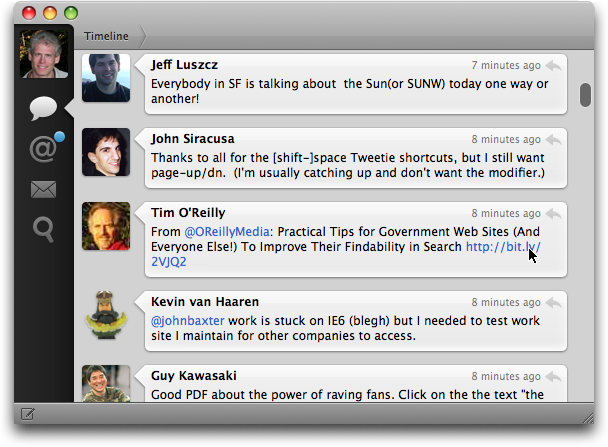
  Tweetie is a triumph of Macintosh interface design. Consisting of a
  single vertical window with just four toolbar buttons (the main
  timeline, replies, direct messages and searching), it boasts the
  kind of clean and elegant appearance I crave in a Macintosh
  application.

<http://www.tidbits.com/resources/2009-04/Tweetie-window.png>

  It's snappy, too. After my time with the lumbering Nambu and Lounge,
  I am astounded at the speed with which Tweetie operates. When I
  scroll downward to the last tweet in the viewing window, Tweetie
  promptly fetches the next batch of tweets in the timeline.

  Moving from one toolbar option to another triggers a vertical
  fast-slide effect I find delightful. Click a user's avatar or name
  and a fade-zoom effect reveals his or her particulars. More
  fast-sliding (horizontal, now) moves you among that user's tweets,
  favorites, and info.

  Double-click a public reply and the entire back-and-forth
  conversation is revealed in threaded form. Your private exchanges
  also are threaded (but, strangely, with iChat-style color bubbles
  that deviate jarringly from Tweetie's otherwise-consistent interface
  guidelines).

  Though Tweetie lets you drill deep into the Twitterverse via
  willy-nilly clicking, it will always guide you back to your point of
  origin. It does this cleverly by displaying every step you took,
  each as its own clickable hyperlink, along the top edge of the
  application window.

  The tweet-posting interface is even more minimalist; it's a little
  window that swoops to the center of the Mac desktop (via a
  customized keyboard combo, if you like). This is a swell touch,
  especially when you do not want to be distracted by the tweeting of
  others. Tweetie lets you send direct messages in a similar fashion,
  and the posting window opens with an autocomplete field for entering
  the recipient's user name.

  Tweetie does clever things with photos, too. Click a TwitPic link or
  a user's avatar photo within his or her info page, and the enlarged
  image appears in a slick-looking standalone window that zooms to the
  center of the Mac screen. You can easily upload photographs by
  dropping them into the posting window; they are then pushed up to
  the any of four photo-hosting services Tweetie supports.

  Tweetie handles Twitter searches with grace, as well. A pull-down
  menu shows recent searches as well as Twitter trends. And, in a nice
  touch, searches can be opened in their own standalone windows (handy
  for monitoring hashtag-fests, for instance).

  Tweetie, like Nambu and Lounge, supports multiple Twitter accounts,
  though not groups like Nambu and TweetDeck. For those who like to
  follow a fair number of people but focus on subsets, this may be a
  significant lack. As an alternative that might work for some people,
  Brichter suggests creating a separate Twitter account.

<http://blog.atebits.com/2009/02/twitter-groups>

  It's with Tweetie's multiple-account functionality that I ran into
  trouble: On several of the Macs I used, I was unable to enter a
  second or third Twitter account after a set-up routine that asked me
  for an initial identity. This is the first time I've run into an
  issue like this, with any Twitter app. Brichter said he's aware of
  the glitch, which others have run into in the release version, and
  is working on it. (As I filed this article, he appeared to be making
  headway since I was able to get my accounts into the program with a
  bit of persistence.)

  On Macs that did take more than one account, I could easily move
  among these via avatar icons displayed in the toolbar (and
  double-clicking any of these fade-zoomed me to the info page for
  that account). The avatar icons can be reordered in Tweetie's
  preferences.

  There are other things I'd like to see in Tweetie, such as support
  for Growl notifications, grouping features, and a refresh button.
  Brichter is fighting his users on these last two, and I grudgingly
  compliment him on this; making strict, smart calls about what to put
  into Macintosh software, and what to leave out in spite of user
  pressure, is how fine applications get made.

  As for notifications, Tweetie has a sweet-looking menu bar item that
  turns from neutral gray to glowing blue when there's new activity
  (this can be customized to include or omit new tweet, reply or DM
  notifications). You can click the menu bar icon to hide and show
  Tweetie's main window.

  So, has my dream Twitter desktop app arrived? I think so, and thy
  name is Tweetie, assuming that multiple account glitch will be fixed
  soon. (Lounge's syncing potential has me intrigued, though.)

  I'm hardly alone in embracing this Mac companion to the celebrated
  Tweetie for iPhone. There was an unbelievable amount of Twitter
  chatter about the Mac app in the days before its release. I have a
  hunch Twitter diehards using Windows will be extremely jealous
  today.

  [Julio Ojeda-Zapata is the author of "Twitter Means Business: How
  Microblogging Can Help or Hurt Your Company" (learn about the book
  at twitin.biz), as well as a consumer-technology columnist at the
  St. Paul (Minn.) Pioneer Press. Get his latest writing at
  yourtechweblog.com and twincities.com/techtestdrive.]

<http://twitin.biz/>
<http://yourtechweblog.com/>
<http://twincities.com/techtestdrive>


TidBITS Watchlist: Notable Software Updates for 20-Apr-09
---------------------------------------------------------
  by Doug McLean <[email protected]>, Jeff Carlson <[email protected]>
  article link: <http://db.tidbits.com/article/10208>

  Drive Genius 2.1.1 from Prosoft Engineering is the latest update to
  the popular disk utility software. Changes include enhanced
  defragmentation capabilities, improved performance, and updates for
  Apple's latest boot disc technology. ($99 new, free update from 2.0)

<http://prosofteng.com/products/drive_genius.php>

  Server Admin Tools 10.5.6v1.1 from Apple updates the collection of
  Mac OS X's server administration tools with a handful of
  improvements described in decent release notes. When deploying a
  system image, System Image Utility no longer generates identical
  local KDC files on the target computers. Also fixed is a bug causing
  Server Admin to stop responding when propagating permissions on a
  folder that's not located on the boot volume. Finally, both
  utilities have added NetBoot/NetInstall model filters for the latest
  Apple notebooks. The update is available via Software Update or as a
  standalone download. (Free, 92.7 MB)

<http://support.apple.com/downloads/Server_Admin_Tools_10_5_6v1_1>
<http://support.apple.com/kb/HT3314>

  iMovie 8.0.2 from Apple fixes two specific issues: Projects with a
  file size of 0 KB could make iMovie quit unexpectedly at launch, and
  full-screen mode was not available on some systems. Kudos to Apple
  for including that information in the release notes. The update is
  available via Software Update or as a standalone download. (Free
  update, 24.1 MB)

<http://support.apple.com/downloads/iMovie_8_0_2>

  Aperture 2.1.3 from Apple is a bug fix update that focuses on a few
  areas. Importing from a Nikon camera directly to the computer now
  displays the correct thumbnails in the Import window. A problem
  where unwanted duplicates could appear after rebuilding the Aperture
  library has been fixed, as has an issue where the Relocate and
  Consolidate commands were not available. See Apple's release notes
  for more information on dealing with those circumstances. The update
  is available via Software Update or as a standalone download. (Free
  update, 49.4 MB)

<http://support.apple.com/downloads/Aperture_2_1_3>
<http://support.apple.com/kb/TS2683>

  SpamSieve 2.7.4 from C-Command Software is a maintenance update to
  the powerful Bayesian spam filtering software. Changes include
  enhanced compatibility with the latest developer build of Mac OS X
  10.6 Snow Leopard, better error handling by the Entourage installer,
  revised troubleshooting instructions, and an improved capability to
  recover from corpus files damaged by disk errors. Additionally, two
  minor message-related bugs have been fixed, and the crash reporter
  has been improved to warn before sending reports without email
  addresses, as well as to accept the Enter key for clicking the Send
  Report button. ($30 new, free update, 5.8 MB)

<http://c-command.com/spamsieve/>


ExtraBITS for 20-Apr-09
-----------------------
  by TidBITS Staff <[email protected]>
  article link: <http://db.tidbits.com/article/10220>

**Oracle to Buy Sun Microsystems for $7.4 Billion** -- In a surprise
  move, database developer Oracle has agreed to acquire hardware maker
  Sun Microsystems for $7.4 billion, taking over after talks between
  Sun and IBM failed. Despite this merging of computer industry
  heavyweights, the effect on the Mac world will likely be relatively
  minimal, with the main question being the future advancement of
  Sun's Java and MySQL technologies. (Posted 2009-04-20)

<http://www.oracle.com/sun/>


**YouTube Adds Premium Content Section** -- YouTube, in what appears
  to be an effort to compete with sites like Hulu, has launched a
  premium content section that includes movies and television shows.
  YouTube's owner, Google, has announced the initial content will be
  provided by studios including Sony, CBS, MGM, Lionsgate, Starz, and
  the BBC. The new material will be available free of charge, and
  supported by the recently announced Google TV Ads. While Google
  hopes the new section will garner extra revenue, the user-generated
  content for which YouTube became known will remain the main focus of
  the site. (Posted 2009-04-18)

<http://arstechnica.com/media/news/2009/04/youtube-to-gain-premium-movie-tv-section.ars>
<http://www.google.com/adwords/tvads/>


**Apple Leads in Customer Satisfaction Survey** -- CNET reports that
  Apple recently topped the list of computer companies in a customer
  satisfaction survey conducted by Forrester Research. The survey,
  comprising almost 4,600 consumer responses regarding 113 companies
  in 12 different industries, found that Apple received an overall
  satisfaction rating of 80 percent. Though Apple may outperform its
  peers (second-place Gateway scored only 66 percent), it does so in
  an industry that receives poor ratings overall; according to the
  survey, PC companies are only slightly better liked than insurance
  companies and cable providers. Nevertheless, these rankings are
  interesting in light of recent Microsoft ads targeting Apple, and
  the company's response to them. (Posted 2009-04-18)

<http://news.cnet.com/8301-13579_3-10222213-37.html>
<http://www.macworld.com/article/140063/2009/04/applerespond.html>


**iPod touch Storms the Battlefield** -- Newsweek reports that the
  United States Army has begun equipping soldiers with iPod touch
  devices for use in language and gesture translation, analysis of
  data from satellites and drones, and more. (Posted 2009-04-18)

<http://www.newsweek.com/id/194623>


**O'Reilly Shares App Store Stats** -- Interested in data that goes
  beyond the fact that Apple is closing in on the billionth iPhone app
  downloaded from the App Store? Ben Lorica shares some interesting
  statistics about iPhone apps on the O'Reilly Radar blog. (Posted
  2009-04-18)

<http://radar.oreilly.com/2009/04/itunes-app-store-billionth-download.html>


**CinemaView Offers First Mini DisplayPort Compatible Monitors** --
  CinemaView has announced that it is releasing the first non-Apple
  Mini DisplayPort-compatible monitors. The company is currently
  offering 19, 21, and 24-inch models for $299, $399, and $499
  respectively. With cast aluminum construction, and black-bordered
  optical glass fronts, the displays capture some semblance of Apple's
  design, and with the 24-inch model being $400 cheaper, these
  monitors might become attractive alternatives to Apple's high-end
  Cinema Displays. (Posted 2009-04-14)

<http://www.cinemaview.com/models.html>


**Apple to Offer $899 20-inch iMac to Schools** -- Ars Technica is
  reporting that Apple has updated the lowest rung of its educational
  desktop offerings from the otherwise-obsolete 17-inch white
  polycarbonate iMac to a 20-inch aluminum model. The updated model
  includes a 2.0 GHz Intel Core 2 Duo processor, 1 GB RAM, a 160 GB
  hard drive, a SuperDrive, and Nvidia GeForce 9400M graphics
  processor - quite an upgrade considering the price will remain at
  $899. Unfortunately for most of us, this deal remains available only
  for schools and not for individuals. (Posted 2009-04-14)

<http://arstechnica.com/apple/news/2009/04/apple-now-offering-20-inch-education-imac-for-899.ars>


**Rich Mogull Interviewed by The New York Times** -- Rich Mogull,
  computer security expert and TidBITS Security Editor, was recently
  interviewed by the New York Times Gadgetwise blog. In the wake of
  the Conficker virus scare, New York Times blogger Riva Richmond
  asked Rich about security on the Mac, and how Apple users can stay
  safe. The interview piqued enough interest to prompt a followup
  article as well. (Posted 2009-04-14)

<http://gadgetwise.blogs.nytimes.com/2009/04/07/macs-arent-safer-just-a-smaller-target/>
<http://gadgetwise.blogs.nytimes.com/2009/04/10/mac-security-part-ii-its-a-numbers-game/>


**Microsoft Office 2008 Available in 30-Day Trial Edition** -- Trial
  software is commonplace on the Internet these days, but it's not so
  easy to do with massive suites like Microsoft Office that are
  generally sold through resellers. Microsoft has now made a 30-day
  trial version of Office 2008 for Mac available, though downloading
  it requires running through a cart and registering with Microsoft
  for periodic followup messages. You can unsubscribe later, if you
  wish. It's a 545 MB download. (Posted 2009-04-14)

<http://www.microsoft.com/mac/products/Office2008/trial-download.mspx>


**Post Notes to Evernote via Twitter** -- If you use the note-taking
  service Evernote and the microblogging/discussion service Twitter,
  you can now have specific tweets saved to your Evernote account
  (available via the Web, the Mac, the iPhone, and more). Not
  groundbreaking, but a nice way to link two popular Internet
  services. (Posted 2009-04-14)

<http://blog.evernote.com/2009/04/14/evernote_twitter/>


**Apple's Countdown to One Billion Apps** -- Apple is on the verge of
  selling the one billionth app in the iTunes App Store. To celebrate
  the occasion, any customer purchasing an app between 12:01 AM
  10-Apr-09 and when the one billionth app is sold will be entered
  into a contest with the chance to win a $10,000 iTunes gift card, an
  iPod touch, a Time Capsule, or a MacBook Pro. A list of the official
  contest rules is available on Apple's Web site. (Posted 2009-04-10)

<http://www.apple.com/itunes/billion-app-countdown/>
<http://www.apple.com/itunes/billion-app-countdown/rules.html>


**The Little App Factory $1,000 Prize Giveaway** -- In celebration of
  its app, iPodRip, having now transfered over one billion songs, The
  Little App Factory has announced a giveaway contest featuring $1,000
  worth of prizes. The contest, running until 01-May-09, will grant
  nine winners an iPod touch, nano, shuffle, or a $50 gift certificate
  to the iTunes Store, as well as a free copy of iPodRip. All prizes
  will also be exchangeable for their retail value's worth of iTunes
  Store gift certificates. Contestants can enter by email, Twitter, or
  blogging - or by all three! (Posted 2009-04-08)

<http://ipodrip.com/giveaway/>


**iPod Scammer Pleads Guilty** -- Here's how not to run a business
  that's geared towards taking advantage of the popularity of Apple's
  iPod shuffle. The owner of an iPod repair shop has pled guilty to
  fraudulently obtaining and reselling 9,000 iPod shuffles. (Posted
  2009-04-06)

<http://www.forbes.com/feeds/ap/2009/04/06/ap6261118.html>


Hot Topics in TidBITS Talk for 20-Apr-09
----------------------------------------
  by Jeff Carlson <[email protected]>
  article link: <http://db.tidbits.com/article/10221>

**Problems setting up FTP server in Leopard** -- Could the problem
  getting an FTP server to work stem from a software configuration
  error, or is an ISP blocking the connection for security reasons?
  (11 messages)

<http://emperor.tidbits.com/TidBITS/Talk/2593>


**IMAP Client for Mail Backup** -- A few methods allow local backup of
  IMAP email, which is a good way to protect data in case of an ISP
  meltdown. (3 messages)

<http://emperor.tidbits.com/TidBITS/Talk/2594>


**Backblaze Publicly Launches Online Backup Service for Macs** -- A
  reader is concerned that Backblaze may not provide secure backups.
  (6 messages)

<http://emperor.tidbits.com/TidBITS/Talk/2595>


**10 Undocumented Changes in iPhoto '09 8.0.2** -- The latest version
  of iPhoto handles addresses for its Faces feature in odd ways. (9
  messages)

<http://emperor.tidbits.com/TidBITS/Talk/2599>


**iPhones down under** -- After accepting a job offer in New Zealand,
  a reader wonders whether his new iPhone can be used there. (8
  messages)

<http://emperor.tidbits.com/TidBITS/Talk/2600>


**Sound recording tapes** -- What's required to digitize old
  reel-to-reel Scotch Sound Recording Tapes from the early 1950s? (11
  messages)

<http://emperor.tidbits.com/TidBITS/Talk/2601>


**Pop Up Folders Replacement Software?** -- FinderPop, FolderGlance,
  or a system preference in Mac OS X may be able to replicate the
  behavior of the early Mac OS program Pop Up Folders. (5 messages)

<http://emperor.tidbits.com/TidBITS/Talk/2603>


**When iPhone Pushes, Text Message Fees Fall** -- A reader in Europe
  provides additional information about sending - and paying for -
  text messages from mobile phones. (1 message)

<http://emperor.tidbits.com/TidBITS/Talk/2604>


**AppleScript Problem** -- Readers tap the dusty archives of their
  AppleScript memories to solve a problem under Mac OS 8.6. (2
  messages)

<http://emperor.tidbits.com/TidBITS/Talk/2605>


$$

This is TidBITS, a free weekly technology newsletter providing timely
news, insightful analysis, and in-depth reviews to the Macintosh and
Internet communities. Feel free to forward to friends; better still,
please ask them to subscribe!

Non-profit, non-commercial publications and Web sites may reprint or
link to articles if full credit is given. Others please contact us. We
do not guarantee accuracy of articles. Caveat lector. Publication,
product, and company names may be registered trademarks of their
companies. TidBITS ISSN 1090-7017.

Copyright 2009 TidBITS: Reuse governed by Creative Commons license.

Contact us at:    <[email protected]>
TidBITS Web site: <http://www.tidbits.com/>
License terms:    <http://www.tidbits.com/terms/>
Full text search: <http://www.tidbits.com/search/>
Subscriptions:    <http://www.tidbits.com/about/list.html>
Account help:     <http://www.tidbits.com/about/account-help.html>


--
If you want to unsubscribe or change your address, use this link
http://emperor.tidbits.com/webx?unsub@@.3c557dc4!u=306a67f9