TidBITS#974/13-Apr-09
=====================
  Issue link: <http://db.tidbits.com/issue/974>
  Apple giveth, and Apple taketh away. In the "giveth" department,
  Apple last week released an updated Xserve model with improved
  performance and a fascinating SSD option. On the "taketh away" side
  of things, Apple removed DRM from all music sold through the iTunes
  Store, dropped one-size-fits-all music pricing, and announced that
  the .Mac HomePage Web application would disappear in a few months.
  Also in this issue, Glenn Fleishman opines that the addition of push
  notifications to the iPhone could drive a nail into the coffin of
  usurious SMS message costs, Doug McLean looks at the new features of
  the DroboPro storage device, and Adam pokes deep within iPhoto '09
  to reveal ten important changes that Apple has left undocumented.
  Notable software releases this week include VMware Fusion 2.0.4,
  WireTap Studio 1.0.11, WireTap Anywhere 1.0.4, Snapz Pro X 2.1.4,
  TweetDeck v0.25, PDFpen 4.1.2, HoudahGeo 2.2, and Dialectic 1.4.

Articles
    iTunes Drops DRM from Music, Initiates Tiered Pricing
    .Mac HomePage Web Application To Be Discontinued
    DroboPro Offers Improved Capacity and Connectivity
    Apple Updates Xserve with "Nehalem" Xeon Processors
    When iPhone Pushes, Text Message Fees Fall
    10 Undocumented Changes in iPhoto '09 8.0.2
    TidBITS Watchlist: Notable Software Updates for 13-Apr-09
    Hot Topics in TidBITS Talk for 13-Apr-09


------------ This issue of TidBITS sponsored in part by: --------------

* READERS LIKE YOU! Support TidBITS with a contribution today!
  <http://www.tidbits.com/about/support/contributors.html>
  Special thanks this week to Richard Smith, Stonewall Ballard,
  Hilary Bok, and Carolyn Beale Hill for their generous support!

* Fetch Softworks: Fetch 5.3 has a new look for Leopard,
  and new support for Leopard technologies. And you can
  upload with the oldest technology of all, Copy and Paste!
  Download your free trial version! <http://fetchsoftworks.com/>

* WebCrossing Neighbors Creates Private Social Networks
  Create a complete social network with your company or group's
  own look. Scalable, extensible and extremely customizable.
  Take a guided tour today <http://www.webcrossing.com/tour>

* Bare Bones Software's BBEdit 9.1 -- A burly upgrade introducing new
  capabilities like Projects, non-modal Find and Multi-File Search,
  editing in browsers, text completion, Scratchpad, new Ruby module,
  better JavaScript, ObjC, Obj-C++, YAML <http://barebones.com/>

* MARK/SPACE, INC: If you have a smartphone, we can sync it!
  Sync your address book, calendar, notes, music, pictures, and
  more from your BlackBerry, Windows Mobile or Palm OS mobile
  phone to your Mac. <http://www.markspace.com/bits>

* VMware Fusion. The most seamless way to run Windows on
  your Mac. Backed by nearly a decade of proven virtualization
  technology. Try VMware Fusion today for only $59.99.
  Visit: <http://www.tidbits.com/about/support/vmware-fusion.html>

* Microsoft's MacBU: Supporting Mac users with Office 2008.
  Straighten up your Office with the latest updates to Word,
  Excel, PowerPoint, and Entourage. Update today at Mactopia!
  <http://www.microsoft.com/mac/downloads.mspx>

* ConceptDraw Office adds real business power to Microsoft Office
  and Apple's iWork. Whether you need project management, business
  graphics, or mind mapping, it's all easily created on your Mac!
  Buy today for only $499! <http://www.conceptdraw.com/tb>

* MacSpeech Dictate -- unleash the power of your voice with
  award-winning speech recognition solutions for the Mac.
  It's so easy to use - just talk! Now with spelling and
  phrase training. <http://tidbits.com/about/support/macspeech.html>

---------- Help support TidBITS by supporting our sponsors ------------


iTunes Drops DRM from Music, Initiates Tiered Pricing
------------------------------------------------------
  by Doug McLean <[email protected]>
  article link: <http://db.tidbits.com/article/10199>

  During Apple's keynote speech at the 2009 Macworld Expo, Phil
  Schiller, senior vice president of worldwide product marketing,
  announced that the company would be removing digital rights
  management from all of the music offered in the iTunes Store, and
  would implement a new tiered pricing system (for more details, see
  "Apple Moves to Unprotected Music, Tiered Prices", 2009-01-06).
  Apple's FairPlay DRM limited music sold through iTunes to recognized
  devices. On the day of the announcement, 06-Jan-09, Apple removed
  DRM from 8 million songs in iTunes, but that still left an
  additional 2 million songs to be switched over. Apple has now made
  good on its promise in full by removing DRM from all music in
  iTunes.

<http://db.tidbits.com/article/9980>

  In addition to removing DRM from music sold through iTunes, all
  songs now use 256 Kbps AAC encoding, which was found previously only
  in the subset of Apple's catalog known as iTunes Plus. The previous
  bit rate, 128 Kbps, will no longer be available. Users will also
  have the ability to upgrade previously purchased music to this
  higher quality DRM-free format at the rate of $0.30 per song and
  $0.60 per music video. To upgrade your existing music, click the
  Upgrade to iTunes Plus link on the iTunes Store front page.

  Reports on TidBITS Talk indicate that the switch isn't 100-percent
  complete, with some songs having been removed from the iTunes Store
  (possibly because Apple couldn't acquire resale rights for DRM-free
  versions) and others simply not yet available in iTunes Plus format.
  After upgrading, you can determine whether you have any of these
  tracks by creating a smart playlist that looks for "Kind contains
  protected" and "Kind contains audio".

<http://emperor.tidbits.com/TidBITS/Talk/2585>

  Lastly, Apple has implemented a tiered pricing system. Previously
  all songs were available at the flat price of $0.99, though
  purchasing full albums could sometimes result in a discount. Now,
  songs are available at $0.69, $0.99, or $1.29. Apple has not
  commented on how exactly song prices are determined, though Schiller
  did note during his presentation back in January that there are more
  $0.69 songs than $1.29 songs.


.Mac HomePage Web Application To Be Discontinued
------------------------------------------------
  by Doug McLean <[email protected]>
  article link: <http://db.tidbits.com/article/10201>

  Apple has announced that on 07-Jul-09 it will discontinue the .Mac
  HomePage Web application as a method for adding and editing content
  on .Mac-hosted Web pages. HomePage is a legacy feature of the .Mac
  service that enables users to publish simple Web pages using their
  .Mac account; old versions of iPhoto also created photo albums that
  could be edited via HomePage.

<http://support.apple.com/kb/HT2049>

  While all .Mac Web pages will remain accessible at their current
  URLs (as long as you maintain an active MobileMe membership), they
  will become unmodifiable via the HomePage Web application after
  07-Jul-09. However, you will still be able to modify HTML files in
  your iDisk's Sites folder. Plus, if you want to remove any content
  after 07-Jul-09, you'll have to delete the files manually from your
  iDisk, since the HomePage Web app will disappear.

  In lieu of HomePage, Apple recommends that existing MobileMe users
  use iWeb (included with iLife '06 and later versions) to publish new
  pages to their MobileMe accounts. Additionally, MobileMe members may
  use iPhoto or iMovie to publish photos and movies directly to
  MobileMe Gallery. Instructions for migrating HomePage photos and
  movies to MobileMe Gallery can be found on Apple's Web site.

<http://support.apple.com/kb/HT3484>
<http://support.apple.com/kb/HT3485>

  Finally, while Apple has not officially confirmed it, some users
  posting on Apple forums say that Apple support techs have indicated
  that HTML pages published via .Mac and made using tools other than
  HomePage or iWeb will continue to work via their current URLs.


DroboPro Offers Improved Capacity and Connectivity
---------------------------------------------------
  by Doug McLean <[email protected]>
  article link: <http://db.tidbits.com/article/10198>

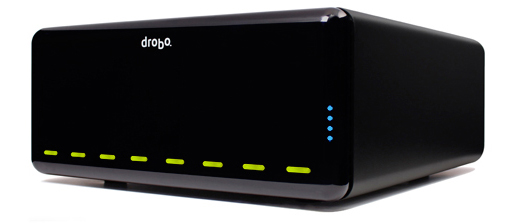
  Data Robotics has announced the latest model in its lineup of smart
  storage units: the DroboPro. The latest model increases storage
  capacity and connectivity options, while maintaining the trademark
  features of the original Drobo, such as hot swapping, smart volumes,
  and RAID-based protection against data loss.

<http://www.drobo.com/products/drobopro/>
<http://www.drobo.com/products/drobo.php>

  Aimed at creative professionals and IT administrators, the DroboPro
  doubles the bay capacity of the original model, enabling users to
  insert up to eight bare hard drives for raw data storage of up to 16
  TB. 3.5-inch SATA I and SATA II hard disk drives are supported, and
  you can mix and match disk brands, capacities, and speeds, something
  that's generally not possible with RAID boxes. The DroboPro also
  offers a triple interface, adding a gigabit Ethernet port that
  enables iSCSI transfers while retaining the USB 2.0 and FireWire 800
  ports of the second-generation Drobo, which remains available.
  Despite the addition of the Ethernet port, the contents of a
  DroboPro cannot be shared across a network directly, as the
  company's DroboShare add-on makes possible, although the DroboPro's
  host computer can make its data available on the network.

<http://www.tidbits.com/resources/2009-04/DroboPro.jpg>
<http://drobo.com/products/droboshare.php>

  Aside from these performance enhancements, the DroboPro continues to
  offer the flagship Drobo features. Drobo units intelligently handle
  tasks like swapping out disks during data transfers, and create and
  juggle a pool of virtual disk space. The company's BeyondRAID
  technology allows other features beyond hot-swapping disks, such as
  re-ordering volumes on the fly, mixing drive capacities, and storage
  virtualization, which reports the largest possible volume size to
  the computer so the Drobo's actual capacity can be increased or
  decreased without updating the computer's file system. BeyondRAID
  can also cope with hard drive failures automatically, alerting users
  to the presence of a failing disk and attempting to route around bad
  sectors if possible.

<http://drobo.com/resources/beyondraid.php>

  With its added storage capacity, dual disk redundancy is now
  available for the DroboPro. The original Drobo creates a RAID that
  protects you against the failure of a _single_ disk by spreading
  your data across multiple disks. With dual disk redundancy, the
  DroboPro can protect data even if _two_ of your disks fail
  simultaneously, allowing you to continue running without
  interruption (though popping new disks into the DroboPro in place of
  the failed disks would be a good idea). Using dual disk redundancy
  reduces your active storage space even more for data protection, so
  if you start running out of disk space and don't absolutely require
  dual disk redundancy, you can switch back to single disk redundancy
  in Drobo's software utility. Data Robotics tries to make all this as
  easy as possible, simplifying what can often be fairly complicated
  disk management.

  All this self-managing RAID business protects against data loss, but
  it considerably reduces your storage space in comparison to bringing
  the same number of drives online individually. A calculator
  available on the Data Robotics Web site determines what actual
  storage volume a DroboPro would provide depending on the number and
  size of the drives you plan to install into it.

<http://www.drobo.com/calculator/drobopro.php>

  The DroboPro is available unpopulated or pre-populated with Data
  Robotics-installed disks (sold, unsurprisingly, at higher prices
  than at independent retailers). Without any drives installed, the
  eight-bay DroboPro costs $1,299. The second-generation Drobo, with
  bays for four drives, remains available for $499.


Apple Updates Xserve with "Nehalem" Xeon Processors
---------------------------------------------------
  by Adam C. Engst <[email protected]>
  article link: <http://db.tidbits.com/article/10197>

  Apple has released a major update to its rack-mounted Xserve, taking
  advantage of the significantly increased processing power of the
  latest Intel "Nehalem" Xeon processors and new system architecture
  used in the recently refreshed Mac Pro (see "New Mac Pro Uses Intel
  'Nehalem' Xeon Processors," 2009-03-03).

<http://www.apple.com/xserve/>
<http://db.tidbits.com/article/10111>

  Power-saving and performance-enhancing technologies that first saw
  the light of day in the Mac Pro should be especially welcome in the
  Xserve, whose non-stop use makes power savings important. In
  particular, TurboBoost enables the Xserve to shut down idle cores
  and boost the clock speed of active cores, and Hyper-Threading
  allows two threads to run simultaneously on each core, providing a
  more-efficient use of resources without needing more physical (and
  thus power-consuming) cores. Thanks to the new processors and
  architecture, Apple is claiming an 89 percent improvement in
  performance per watt over the previous-generation Xserve and a 19
  percent reduction in idle power use.

<http://www.apple.com/xserve/features/architecture.html>
<http://www.apple.com/xserve/performance.html>

  The new Xserve comes in two basic configurations, a quad-core model
  with one 2.26 GHz quad-core Intel Xeon processor for $2,999 and an
  8-core model with a pair of 2.26 GHz quad-core Intel Xeon processors
  for $3,599. The 8-core model can be upgraded to a pair of 2.66 GHz
  Xeon processors for $1,400 or a pair of 2.93 GHz Xeon processors for
  $2,600. Each processor has 8 MB of shared L3 cache and its own
  three-channel integrated memory controller to reduce memory latency
  and improve performance.

  Both Xserve models default to 3 GB of 1066 MHz DDR3 ECC RAM, but the
  two models differ in RAM expansion options. The quad-core model has
  only 6 DIMM slots for RAM. Apple's maximum build-to-order
  configuration maxes out at 12 GB. The 8-core model has 12 DIMM
  slots, but Apple will sell you only up to 24 GB of RAM, not the full
  48 GB that would theoretically be supported. That may be because Mac
  OS X Server 10.5 supports only 32 GB of RAM; I suspect that limit
  will disappear in Snow Leopard Server.

<http://www.apple.com/xserve/specs.html>

  The Xserve ships by default with a single 160 GB SATA Apple Drive
  Module in one of three drive bays. For the moment, the Apple Store
  allows you to configure an Xserve only with either a 160 GB SATA ADM
  or a 1 TB SATA ADM, but the onboard SATA/SAS controller also
  supports 15,000 RPM SAS drive modules. Oddly, you must buy SAS ADMs
  separately from the Apple Store, which seems like an unnecessary
  hassle. As before, you can replace the SATA/SAS controller with an
  Xserve RAID Card for $700. For more information about Apple Drive
  Modules, see "Going Deep Inside Xserve Apple Drive Modules"
  (2009-03-27).

<http://db.tidbits.com/article/10166>

  But what's innovative about the new Xserve in terms of storage is an
  optional 128 GB solid-state drive for $500. If added to the Xserve,
  the 128 GB SSD is automatically configured as the boot drive and
  doesn't take up one of the Xserve's drive bays. According to Apple,
  the SSD consumes less than 1 watt of power, compared to 12 to 18
  watts for typical drives. Plus, the SSD reportedly features
  random-access performance that's up to 20 times faster than a SAS
  drive and up to 48 times faster than a SATA drive. Apple makes no
  claims about reliability, but it would also seem likely that the
  lack of moving parts would make a solid-state drive less prone to
  hardware failures; perhaps there isn't yet enough data to say that
  about SSDs.

  Video support on the Xserve is now provided by the Nvidia GeForce GT
  120 with 256 MB of GDDR3 memory. In keeping with Apple's model-line
  push, the Nvidia card offers only Mini DisplayPort output, thus
  requiring adapters - sold separately - to connect to VGA or DVI
  monitors.

  Relying on Mini DisplayPort in the Xserve feels like a mistake,
  since no data center will be using Mini DisplayPort-equipped
  monitors. Chuck Goolsbee of the Web hosting and colocation firm
  digital.forest, agreed, "Switching to Mini DisplayPort for video is
  unwise, as no KVM sold today is Mini DisplayPort-compatible. That
  means adapters will be required, adding to the costs of deployment
  and complicating troubleshooting, which often is done remotely."

  Other standard features include an unlimited client version of Mac
  OS X Server 10.5, an 8x SuperDrive, two PCI Express 2.0 x16
  expansion slots, two independent gigabit Ethernet ports, two
  FireWire 800 ports, two USB 2.0 ports on the back and one on the
  front, and a DB-9 RS-232 serial port. Dual redundant power supplies
  remain optional.

  Physically, it appears that Apple chose not to respond to criticisms
  of the Xserve industrial design, making the new Xserve nearly
  identical to the previous Xserve (see "New Xserve Goes Eight-Core
  Too," 2008-01-08). Digital.forest's Goolsbee commented, "Apple
  hasn't addressed the weaknesses of the Xserve's case design compared
  to similar offerings from competitors in the server space. It's
  still way too deep, and it still lacks a video port at the front of
  the unit."

<http://www.apple.com/xserve/design.html>
<http://db.tidbits.com/article/9382>

  The Xserve's 30-inch (76.2 cm) depth forces awkward spacing in
  standard racks, and the lack of front-mounted video (and FireWire)
  ports complicates arranging Xserves in "hot" and "cold" aisles that
  provide significantly more-efficient cooling. (Arranging servers
  such that adjacent aisles have the backs of servers facing each
  other creates a "hot" aisle that can be contained from the
  front-facing "cold" aisles. With contained "hot" aisles, requiring
  user access to the back of the Xserve is troublesome, both for the
  technicians doing the work and for maintaining the cooling.)

  This isn't rocket science - many, if not most, rack-mounted servers
  from the likes of IBM, Dell, and HP replicate user-focused ports
  like USB, video, and FireWire on both the front and back panels, and
  relegate system-focused ports like Ethernet and power to the back
  panel.

  Overall, the new Xserve offers extremely welcome performance
  improvements, and it's excellent to see Apple putting so much
  thought into reducing power requirements at the system architecture
  level. Plus, the optional solid-state drive is a fabulous addition.
  But it's too bad that Apple didn't rethink the Xserve's physical
  design with regard to the overall environment in which Xserves
  commonly operate.


When iPhone Pushes, Text Message Fees Fall
------------------------------------------
  by Glenn Fleishman <[email protected]>
  article link: <http://db.tidbits.com/article/10203>

  Text messages cost phone companies nearly nothing to deliver, and
  yet messages are billed at rates a thousand times their actual
  expense. This has become well known, even as carriers in the United
  States have raised pay-as-you-go rates for SMS (Short Message
  Service) from 10 to 20 cents a pop in the last year. (Randall Stross
  explained it well in a New York Times column in December 2008.)

<http://www.nytimes.com/2008/12/28/business/28digi.htm>

  It doesn't have to be that way. A revolution is brewing from the
  inside. When phones - specifically the iPhone - can notify their
  owners of incoming messages in a way that parallels SMS, how can
  such a ridiculous pricing structure continue to stand?


**A Message You Can't Refuse** -- Text messages use cellular network
  control channels, and, at no more than 160 characters per message
  plus some routing information, consume a handful of terabytes a day
  spread across all U.S. carriers' entire network systems. (The cell
  industry trade group says U.S. cell users sent 1 trillion SMS
  messages in 2008, or about 3 billion a day. Double that for the
  bandwidth to send and to receive, multiply by 150 characters, and
  you get 3 TB per day. But divide that by the number of base stations
  in urban areas, and you get only megabytes per day each.)

  In handling all the administrative trivia of allowing hundreds of
  millions of cell phones to communicate via hundreds of thousands of
  base stations, these control channels pass far more data than text
  messages consume. Even assuming some additional cost to carry the
  current volume, a text message might cost a fraction of a cent in
  separate expense - say .01 cent or 1/10,000th of a dollar.

  Why do we pay so much when we have various instant messaging
  services at our disposal? I have AIM on my iPhone, iChat and Skype
  on my Mac, Google Talk in my Web browser, and Twitterrific on my Mac
  and iPhone. But I still use SMS myself, even though my AT&T plan
  limits me to 200 incoming and outgoing messages a month.

<http://phobos.apple.com/WebObjects/MZStore.woa/wa/viewSoftware?id=281704574&mt=8>
<http://www.skype.com/download/skype/macosx/>
<http://www.google.com/talk/>
<http://iconfactory.com/software/twitterrific>

  Why SMS then? Because it's an almost guaranteed disruption.
  Recipients have to pay attention. Phones are designed by default to
  annoy us with SMS, and we generally like that for this particular
  category of notification. (If not, most phones let you turn off
  buzzing or chirping notification.)

  SMS is also an always-available store-and-forward system. If your
  phone is off or out of cellular range, messages appear when you come
  back online. Whenever you're on a cell network (which is almost
  always for most people), SMS deliveries can happen.

  Finally, SMS works with nearly all cell phones, from the cheapest on
  up, and among all major U.S. cellular networks. American carriers
  made great strides a few years ago to ensure delivery and provide
  standard pricing regardless of originating and receiving networks.

  To combat overage charges, instead of allowing subscribers to stop
  receiving SMS messages, carriers added all-you-can-eat plans from
  $10 to $20 per month. Carriers make much more from you sending 2,000
  texts at $10 a month than 200 texts at $5 per month, so it's good
  for them.

  The reason companies charge so much is because we pay it. We don't
  have to text.

  (In fact, if you don't want to get an SMS, it's rather hard to avoid
  it. Some parental monitoring add-on packages from cell carriers
  allow limits to be set. Ostensibly, you can call a carrier to ask
  SMS reception to be turned off, but posts in cell forums make that
  sound like a frustrating proposition.)


**Push Off, Eh?** But what if a service existed that would alert you
  on your iPhone when a message arrived from another service? A
  message that was included in your unlimited cellular data plan or
  could also be received via any Wi-Fi network to which you were
  connected? Where's your precious text messaging now, cellular
  carriers? (Evil laugh here.)

  In fact, that's precisely what Apple will offer when the company
  finally launches push notifications for the iPhone 3.0 release. (See
  "Apple Previews iPhone 3.0 Software," 2009-03-17.)

<http://db.tidbits.com/article/10144>

  All it takes is one killer application that provides push
  notifications and ties into a common messaging platform, and several
  such applications are waiting in the wings. Skype is already
  available for the iPhone (see "Skype Coming to iPhone," 2009-03-30),
  with calls available over Wi-Fi and chat over Wi-Fi and cellular
  networks. Twitter and other platforms have APIs which have been used
  in conjunction with iPhone applications, too.

<http://db.tidbits.com/article/10175>

  Take my primary use of SMS. If I can text my wife via a direct
  message on Twitter and have a notification pop up on her iPhone,
  there is essentially no difference between an SMS message and that
  Twitter message.

  There are more than 400 million registered, active Skype users, tens
  of millions of Twitter users, and billions of combined accounts at
  various instant messaging services. Yes, there's more management
  involved in reaching someone other than knowing their phone number,
  an "address" that works worldwide with no additional interface. But
  mind the cost.

  We don't know yet whether Apple will charge developers a fee for
  push notifications. There has been no public discussion, but I have
  a hard time believing that developers will be allowed to distribute
  an unlimited number of push notifications for free, given that these
  notifications must be mediated by Apple's servers.

  I'd be happy to be wrong about this, but it seems that Apple will
  either need to limit the number of notifications per user or
  notifications per developer unless it charges a fee to deliver high
  numbers of messages and shares that revenue with carriers. Of
  course, these push messages will be so short as to represent
  negligible data channel traffic. Sounds familiar, no?

  Apple also doesn't appear to be guaranteeing that push notifications
  will arrive. From what I can tell, it will be a best-effort system:
  Apple will try to deliver all messages, and hold messages for later
  delivery to devices that can't be reached. But some push
  notifications may never arrive, and that's where SMS seems to shine.

  I also wonder whether carriers outside the United States will balk
  at supporting an easy method of eroding their high-margin SMS
  services. Deutsche Telekom has already said that Skype for iPhone is
  an unacceptable abuse of its service, whether over 3G (where it
  doesn't work) or over Deutsche Telekom's Wi-Fi hotspot network.
  Deutsche Telekom claims that the problem is network usage, not a
  subversion of high-cost calls. Still, one could imagine a carrier
  making the same pretense about push messaging, too.

  I don't like to peer into a crystal ball much, as I'm generally a
  reporter of what I see, rather than a prognosticator about what I
  can't know. But there's a huge tension created when people find
  themselves paying either 20 cents a message or up to $20 per month
  for an essentially cost-free service.

  If Apple could shift the utility of SMS to another delivery
  mechanism that has a similar ease and reach with far less cost, at
  least iPhone and iPod touch owners might wave goodbye to SMS's
  egregious fees.


10 Undocumented Changes in iPhoto '09 8.0.2
-------------------------------------------
  by Adam C. Engst <[email protected]>
  article link: <http://db.tidbits.com/article/10204>

  I know we're starting to sound a bit like a broken record in our
  criticism of Apple's patronizingly minimal release notes. However,
  this isn't selfish whining - you, the users of Apple software, are
  the people who are hurt by Apple's refusal to describe exactly what
  changes from version to version of different programs, iPhoto in
  this case.

  Sure, some changes are things that will simply work better the next
  time you perform that particular task in iPhoto. But with other
  actions, as the saying goes, once burned, twice shy. For instance,
  in the initial release of iPhoto '08, if you dragged an iPhoto
  library package onto iPhoto's Dock icon to open it, iPhoto instead
  imported the contents into the current iPhoto library. That was
  horrible behavior, and after seeing it happen once, who would ever
  try it again? Well, I did, when I was updating that page in my
  "iPhoto '09 Visual QuickStart Guide" for Peachpit (which I've just
  handed in to Peachpit, and will also be turning into an ebook soon
  too), and I was happy to discover that Apple had indeed fixed this
  egregious error.

<http://www.amazon.com/dp/0321601319/?tag=tidbitselectro00>

  So what follows are my top ten undocumented changes in iPhoto, some
  of which appeared in iPhoto '09 8.0 (that's Apple's official name
  and version number, confusing as it is), and others of which changed
  between the initial release of iPhoto '09 and iPhoto '09 8.0.2, the
  most recent release. If you've found any other significant changes,
  do let me know!


**Open iPhoto Libraries Directly** -- In earlier versions of iPhoto,
  there were a number of tricks for switching among different iPhoto
  libraries, most recently holding down the Option key when launching
  iPhoto and choosing an iPhoto library in a standard Open dialog. You
  might ask, "Why can't I simply double-click an iPhoto library
  package file to open it, or open it as I would any other file?" Like
  so many other things with iPhoto (remember how many years it took
  before iPhoto let us name photos directly, rather than just in the
  Information pane?), this basic concept eluded the iPhoto team for a
  while.

  Apple has finally seen the light, and with iPhoto '09, iPhoto
  library packages act like normal documents. You can double-click
  them to open, drag them to iPhoto's icon in the Dock, or open as you
  would any other document. iPhoto can be running or not - it doesn't
  matter, and it remembers your last-opened library on subsequent
  launches of the iPhoto application. In my testing, iPhoto will
  occasionally become a bit confused and will still prompt you to
  select the double-clicked iPhoto library package again in a custom
  Open dialog (often with duplicated entries), but overall, it works
  cleanly.


**Sharing via the Shared Folder** -- Another major annoyance with
  versions of iPhoto prior to iPhoto '09 was that you couldn't just
  put your iPhoto Library in the /Users/Shared folder to share it
  among multiple accounts on the same Mac, since iPhoto always set the
  permissions on thumbnails to the account that imported the photos,
  preventing other accounts from editing those photos and having the
  edits reflected in the thumbnails.

  That limitation has now been fixed in iPhoto '09, so you can share
  an iPhoto library merely by moving it to /Users/Shared and then
  double-clicking it to open in iPhoto from each account. You may be
  prompted to repair permissions on the first access - click the
  Repair button to do that. Note that this also works for storing an
  iPhoto library on an external hard disk that's shared among users or
  on a network volume for access across a fast network.

  Only one person may access a shared iPhoto library at a time.


**Movies in Slideshows** -- In another one of those inexplicable
  lapses, iPhoto '09 still can't play movies internally;
  double-clicking a movie opens it in QuickTime Player. But it does
  have one new movie-related capability - movies can play in iPhoto
  '09's totally revamped slideshows. Just add them as you would a
  photo, and when the slideshow gets to them, they'll play in their
  entirety before the slideshow moves on to the next photo.


**Thumbnails in Slideshows** -- This feature falls into the category
  of something so subtle that you might never notice it. When you play
  a slideshow in iPhoto '09, moving the mouse pointer causes the
  slideshow controls to appear, as before. But if you move the mouse
  pointer to the bottom of the screen, a row of thumbnails appears,
  with a white outline sliding left to right that shows the currently
  displayed photos. You can even drag the white outline to jump around
  in the slideshow. (iPhoto does display the thumbnails very briefly
  before it shows the slideshow theme picker dialog, so at least
  there's a possibility that you'd discover it on your own.)


**Faces Plus Address Book Equals Facebook** -- In the first two
  versions of iPhoto '09, when you named an unrecognized face, iPhoto
  would autocomplete the name from previous entries, but that was it.
  Starting with iPhoto '09 8.0.2, iPhoto also suggests names from the
  contents of Address Book, complete with email addresses.

  If you've already created a name in iPhoto, you'll see two entries
  for that name in the menu of suggestions, whenever you're naming a
  face. To solve this, rename the person's snapshot in the Faces
  corkboard, selecting the suggestion from Address Book. In my testing
  in iPhoto '09 8.0.2, this works only if the original name in iPhoto
  differs from the name from Address Book, so you may need to rename
  the snapshot to a different name first, then connect it with the
  Address Book entry. Once you've connected the snapshot's name with
  the Address Book entry, you can change the snapshot's name to
  anything you like, and it will retain the full name and email
  address from Address Book.

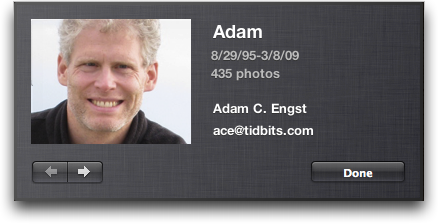
  No one will miss noticing this addition, but you may not realize why
  it's important. When uploading photos to Facebook, for them to
  receive tags linking to the Facebook profiles of the people pictured
  in the photos, you must have each person's email address in the
  Information dialog (select a snapshot in the Faces corkboard and
  either click the i button or press Command-I). It's important that
  it be the email address the person has used for Facebook, so check
  their profile if you're unsure of which email address to use in
  iPhoto.

<http://www.tidbits.com/resources/2009-04/Faces-Info-dialog.png>

  The full name field is also important when uploading to Facebook.
  You probably want to refer to family and close friends purely by
  first name in iPhoto, but when you upload to Facebook, iPhoto uses
  the full name field, so "Tonya" becomes "Tonya Engst" on Facebook.


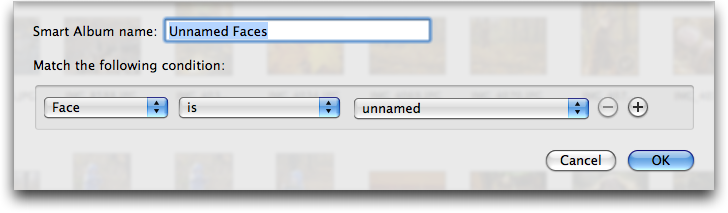
**Make Unnamed Faces Smart Album** -- Another highly welcome feature
  that's new in iPhoto '09 8.0.2 is the enhancement of iPhoto's smart
  album capabilities with regard to faces. In iPhoto '09 8.0, there
  was a Name criterion, and you could enter text to match against. Now
  the Name criterion has been renamed to Face, and when you choose
  either Is or Is Not as the match, you get a pop-up menu to choose
  from. The first item in that pop-up menu is "unnamed," so if you
  choose it, you get a smart album that contains all the photos for
  which iPhoto has detected faces, but to which you haven't yet
  assigned names.

<http://www.tidbits.com/resources/2009-04/Unnamed-Faces-smart-album.png>

  As an added bonus, once you name each face in a photo while in that
  album, iPhoto updates the album on the fly, immediately removing the
  now-named photo from the album and displaying the next photo with an
  unnamed face.

  One more thing. iPhoto sometimes identifies random objects or
  textures as faces. When it does that, just click the X button in the
  corner of the white rectangle surrounding the thing that isn't a
  face to remove it. Deleting incorrect face rectangles (or even
  rectangles around the faces of people you don't know) will remove
  the photos from your Unnamed Faces smart album.


**Naming Suggested Faces Directly** -- You're training iPhoto to
  recognize your friend Sally's face, so you double-click her snapshot
  on the Faces corkboard, and click the Confirm Name button to confirm
  or reject photos that iPhoto suggests might also contain Sally's
  face. Let's say iPhoto does a good job with Sally, and most of the
  suggested photos are indeed her, but one or two are of Sally's
  sister Jane. Starting with iPhoto '09 8.0.2, you can Control-click
  one of the close-ups of Jane, choose the Name command from the
  contextual menu, and enter Jane's name. Previously, you would only
  have been able to reject the pictures of Jane while training iPhoto
  to recognize Sally.

<http://www.tidbits.com/resources/2009-04/Naming-faces-directly.png>


**Detect Missing Faces** -- In organize mode, if you Control-click a
  photo or selection of photos, the contextual menu as of iPhoto '09
  8.0.2 contains a new command: Detect Missing Faces. My understanding
  is that sometimes iPhoto does a poor job at identifying faces in
  pictures on its initial scan, and this command lets you force it to
  run again on a subset of your collection, with less stringent
  guidelines. I've tried using Detect Missing Faces on photos that
  contain faces that iPhoto didn't identify the first time, but only
  once in a number of attempts did it actually detect a previously
  missed face. Oh, and for reasons known only to Apple, the little
  lozenge that appears under faces that you haven't yet named now
  contains the text "unnamed" instead of "unknown face." Go figure.


**Rescan for Location** -- Also new in the contextual menu that
  appears when you Control-click a photo in iPhoto '09 8.0.2 is a
  Rescan for Location command. Although I haven't been able test this,
  I believe that the point of this command is to enable iPhoto to pick
  up geotags that are added to photos by third-party tools like Houdah
  Software's HoudahGeo and Ovolab's GeoPhoto. I also gather that
  iPhoto '09 8.0.2 now allows you to enter latitude and longitude
  values directly when geotagging photos. Personally, I'm waiting for
  a GPS-enabled Canon PowerShot camera before I get more involved with
  Places.

<http://www.houdah.com/houdahGeo/>
<http://www.ovolab.com/geophoto/>


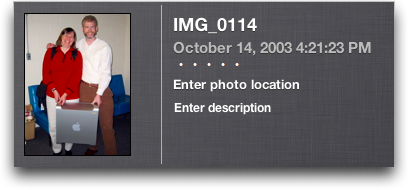
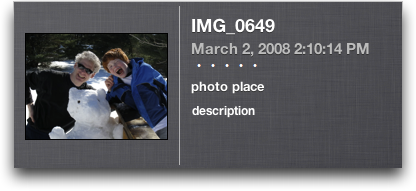
**Descriptions, Not Commands?** Last, and absolutely least, Apple made
  several truly minor changes in the new black Information dialogs
  that debuted in iPhoto '09 for photos and face snapshots. Initially,
  iPhoto used imperative tags: "Enter photo location," "Enter
  description," "Enter full name," and "Enter email address." Starting
  with iPhoto '09 8.0.2, Apple switched to purely descriptive tags
  that lack the capitalized "Enter" command: "photo place,"
  "description," "full name," and "email address."

<http://www.tidbits.com/resources/2009-04/Info-dialog-80.png>
<http://www.tidbits.com/resources/2009-04/Info-dialog-802.png>

  Most people should be able to figure this out, and once you've
  entered a full name or an email address in those fields, you'll know
  how to do it in the future. But overall, I think losing the "Enter"
  command is a move in the wrong direction, especially since these new
  black Information dialogs indicate that something is a
  user-addressable field only with bright white text (gray text is
  read-only) and with a field border that appears only on mouse-over.
  It may be attractive, but it's not very discoverable, and the text
  change makes it worse.


TidBITS Watchlist: Notable Software Updates for 13-Apr-09
---------------------------------------------------------
  by Doug McLean <[email protected]>
  article link: <http://db.tidbits.com/article/10200>

  VMware Fusion 2.0.4 from VMware is a stability and security update
  to the popular Windows virtualization software. The latest version
  addresses a critical vulnerability in the virtual machine display
  that could enable a guest operating system to run code on the host.
  ($79.99, free update, 186 MB)

<http://www.vmware.com/products/fusion/>

  WireTap Studio 1.0.11, WireTap Anywhere 1.0.4, and Snapz Pro X 2.1.4
  from Ambrosia Software update the company's core productivity tools
  for the upcoming Mac OS X 10.5.7. A shared framework among the
  applications has been updated, which maintains compatibility with
  the latest Mac hardware and supports the next maintenance release of
  Mac OS X. (WireTap Studio retails for $69, WireTap Anywhere for
  $129, and Snapz Pro X for $69; free updates)

<http://www.ambrosiasw.com/utilities/wiretap/>
<http://www.ambrosiasw.com/utilities/wta/>
<http://www.ambrosiasw.com/utilities/snapzprox/>

  TweetDeck v0.25 from Iain Dodsworth updates the popular Twitter
  client with a fix for a memory leak, short URL previews, Twitpic
  thumbnails, recording and sharing capabilities for 12seconds videos,
  and added Facebook integration. Also new is the option to have
  usernames auto-complete in the tweet box, the option to include
  hashtags automatically when replying to messages, and the removal of
  the capability to direct message oneself. (Free, 2.1 MB)

<http://www.tweetdeck.com/beta/>
<http://12seconds.tv/>

  PDFpen 4.1.2 and PDFpenPro 4.1.2 from SmileOnMyMac are the latest
  versions of the company's PDF editing utilities. Both version
  updates have added a new item in the File menu, Mail Document, that
  enables users to send the PDF document they're working on via email.
  When selected, the feature opens a new email message and
  automatically attaches the PDF to it. ($49.95/$99.95, free updates,
  12.2 MB/12.4 MB)

<http://www.smileonmymac.com/PDFpen/>
<http://www.smileonmymac.com/PDFpenPro/>

  HoudahGeo 2.2 from Houdah Software updates the photo geocoding
  software with a handful of new features. Changes include the
  capability to write directly into the iPhoto '09 Places database,
  all-new map based geocoding, a track library, access to Lightroom 2
  folders, offline bookmark geocoding, and automatic altitude
  information. ($30 new, free update, 4.7 MB)

<http://www.houdah.com/houdahGeo/>

  Dialectic 1.4 from JNSoftware is a maintenance update to the phone
  dialing utility. In the latest version, the Google Voice Dial Method
  has replaced the GrandCentral Dial Method, the Fritz!Box Dial
  Method's dialing has been improved, Daylite tasks can now be
  integrated when making and receiving calls, and the Firefox
  extension has been improved to add automatic highlighting and
  hyperlinking of phone numbers when pages load. Also, several bugs
  have been fixed, including one that caused dialing to fail when
  using some VoIP Methods such as BroadVoice or ViaTalk, and one that
  sometimes created an errant incoming task in Daylight when making
  outgoing calls. Finally, several minor code optimizations and
  improvements have been made, and the documentation has been updated.
  ($25, free update, 6.2 MB)

<http://www.jonn8.com/dialectic/>


Hot Topics in TidBITS Talk for 13-Apr-09
----------------------------------------
  by Jeff Carlson <[email protected]>
  article link: <http://db.tidbits.com/article/10205>

**Mac compatibility of Garmin Forerunner 305** -- Garmin claims Mac
  compatibility, but has anyone actually tried it? And what about
  other options? (9 messages)

<http://emperor.tidbits.com/TidBITS/Talk/2577>


**DVDs or hard disk for archiving photos?** Readers discuss the best
  ways to archive digital photos, including online backup services.
  (29 messages)

<http://emperor.tidbits.com/TidBITS/Talk/2578>


**Ten Surprising Uses of BBEdit** -- A reader contributes an eleventh
  surprising use of Bare Bones Software's text editing powerhouse. (1
  message)

<http://emperor.tidbits.com/TidBITS/Talk/2580>


**Slides Publisher for Screen Saver** -- Miss the old .Mac slideshow
  feature that enabled you to publish photos that someone else's
  screen saver would use? A reader figured out a way to get it working
  again. (4 messages)

<http://emperor.tidbits.com/TidBITS/Talk/2581>


**When will a new MacBook Pro 15 come?** What's the likelihood that
  Apple will release a new MacBook Pro soon? (13 messages)

<http://emperor.tidbits.com/TidBITS/Talk/2582>


**"Save As" in Leopard's Mail.app, v 3.5** -- The Safari 4.0 beta may
  be interfering with the capability to save plain text and RTF files
  from Mail messages. (11 messages)

<http://emperor.tidbits.com/TidBITS/Talk/2583>


**iTunes Drops DRM, Initiates Tiered Pricing** -- Now that Apple is
  offering DRM-free music, it's possible to upgrade (for a fee)
  existing songs to the higher-quality versions. But not all may be
  available for upgrade. (8 messages)

<http://emperor.tidbits.com/TidBITS/Talk/2585>


**.Mac HomePage Web Application To Be Discontinued** -- Readers
  clarify details about Apple's decision to remove the capability to
  create Web pages online. (2 messages)

<http://emperor.tidbits.com/TidBITS/Talk/2588>


**10 Undocumented Changes in iPhoto** -- It's possible to merge two
  Faces sets that share similar name information. (3 messages)

<http://emperor.tidbits.com/TidBITS/Talk/2590>


$$

This is TidBITS, a free weekly technology newsletter providing timely
news, insightful analysis, and in-depth reviews to the Macintosh and
Internet communities. Feel free to forward to friends; better still,
please ask them to subscribe!

Non-profit, non-commercial publications and Web sites may reprint or
link to articles if full credit is given. Others please contact us. We
do not guarantee accuracy of articles. Caveat lector. Publication,
product, and company names may be registered trademarks of their
companies. TidBITS ISSN 1090-7017.

Copyright 2009 TidBITS: Reuse governed by Creative Commons license.

Contact us at:    <[email protected]>
TidBITS Web site: <http://www.tidbits.com/>
License terms:    <http://www.tidbits.com/terms/>
Full text search: <http://www.tidbits.com/search/>
Subscriptions:    <http://www.tidbits.com/about/list.html>
Account help:     <http://www.tidbits.com/about/account-help.html>


--
If you want to unsubscribe or change your address, use this link
http://emperor.tidbits.com/webx?unsub@@.3c557dc4!u=306a67f9