TidBITS#980/01-Jun-09
=====================
  Issue link: <http://db.tidbits.com/issue/980>
  After a week off, we have oodles of Mac- and iPhone-related content
  for you. Rich Mogull leads off with an explanation of how to protect
  yourself from a five-month-old Java vulnerability, and Jeff Carlson
  suggests that the just-released iTunes 8.2 may mean that we'll see
  an iPhone 3.0 Software release at WWDC. Matt Neuburg waxes poetic
  about how ClickToFlash speeds up Safari, Adam explains how to expand
  password-protected Zip archives and passes on news of a
  straightforward Mac software bundle, and Glenn walks through AT&T's
  roadmap for faster cellular data connectivity. We were busy with
  ebooks during our TidBITS hiatus, so if you haven't already seen
  them, check out Adam's new "iPhoto '09: Visual QuickStart Guide,"
  along with Joe Kissell's "Take Control of Maintaining Your Mac,
  Second Edition" and "Take Control of Troubleshooting Your Mac"
  version 1.1 update. Notable software releases since our last issue
  include iWork '09 9.0.2, MacBook Pro SMC Firmware Update 1.3,
  MacSpeech Dictate 1.5.1, HoudahSpot 2.5, Cover Stream 2.6, Little
  Snitch 2.1.3, BusySync 2.2, Checkup 2.2, TextExpander 2.6.2, Adium
  1.3.4, and Dialectic 1.4.1.

Articles
    Protect Yourself from the Mac OS X Java Vulnerability
    iTunes 8.2 Ships, Hints at iPhone 3.0 at WWDC?
    Two New Ebooks on Maintaining and Troubleshooting Your Mac
    New Ebook Offers Complete iPhoto Documentation
    Expanding Password-Protected Archives
    ClickToFlash Spiffs the Safari Experience
    TheMacBundles.com Offers Alternative Approach to Bundle Deals
    AT&T Plans for Mobile Data Onslaught
    TidBITS Watchlist: Notable Software Updates for 01-Jun-09
    ExtraBITS for 01-Jun-09
    Hot Topics in TidBITS Talk for 01-Jun-09


------------ This issue of TidBITS sponsored in part by: --------------

* READERS LIKE YOU! Support TidBITS with a contribution today!
  <http://www.tidbits.com/about/support/contributors.html>
  Special thanks this week to Dave Geldart, Andrew Watson,
  Robin Armstrong, and Samson W. Tu for their generous support!

* Fetch Softworks: Fetch 5.3 has WebView, the easy way
  to view files in a browser and copy Web addresses from Fetch.
  Also a new look for Leopard, droplet shortcuts, and more.
  Download your free trial version! <http://fetchsoftworks.com/>

* WebCrossing Neighbors Creates Private Social Networks
  Create a complete social network with your company or group's
  own look. Scalable, extensible and extremely customizable.
  Take a guided tour today <http://www.webcrossing.com/tour>

* Bare Bones Software's BBEdit 9.2 -- A burly upgrade with new
  Sleep command, LassoScript support, plus enhancements to Projects
  and core features like Find and Multi-File Search windows,
  editing in browsers, and text completion. <http://barebones.com/>

* THE MISSING SYNC: Take it with you! The Missing Sync makes
  it easy to synchronize contacts, calendars, notes, photos
  and more from your Mac to your BlackBerry, HTC, Treo,
  iPhone and other phones. <http://www.markspace.com/bits>

* VMware Fusion. The most seamless way to run Windows on
  your Mac. Backed by nearly a decade of proven virtualization
  technology. Try VMware Fusion today for only $79.99.
  Visit: <http://www.tidbits.com/about/support/vmware-fusion.html>

* Microsoft's MacBU: Supporting Mac users with Office 2008.
  Straighten up your Office with the latest updates to Word,
  Excel, PowerPoint, and Entourage. Update today at Mactopia!
  <http://www.microsoft.com/mac/downloads.mspx>

* MacSpeech Dictate -- unleash the power of your voice with
  award-winning speech recognition solutions for the Mac.
  It's so easy to use - just talk! Now with spelling and
  phrase training. <http://tidbits.com/about/support/macspeech.html>

---------- Help support TidBITS by supporting our sponsors ------------


Protect Yourself from the Mac OS X Java Vulnerability
-----------------------------------------------------
  by Rich Mogull <[email protected]>
  article link: <http://db.tidbits.com/article/10292>

  One of the great things about Macs is how Apple has included a
  wealth of free and open-source tools in Mac OS X. This collection
  includes both major portions of the operating system (much of Mac OS
  X's Unix core), and numerous additional applications and components.
  Windows file sharing, printing, and even Safari are all based on
  open-source tools also used on other platforms. While this provides
  us with immeasurable benefits, it does present some potential
  liabilities on the security front. Like all software, these open
  source components occasionally suffer from security vulnerabilities,
  but since Apple doesn't control them, Apple can't necessarily make
  code fixes quickly, if at all.

  This disconnect can result in a major security issue for Macs (and
  iPhones) when the vulnerability is patched for other platforms, but
  Apple fails to provide a fix. Apple has an unfortunate history of
  leaving some of these vulnerabilities unpatched for months, as is
  the case with a five-month-old vulnerability in Java.

  As reported by researcher Landon Fuller, Mac OS X is vulnerable to a
  Java flaw that could allow an attacker to execute arbitrary code
  under the logged-in user's account. While perhaps not as bad as full
  administrative access, it still allows an attacker plenty of
  latitude to perform all sorts of nefarious activity on your system.

<http://landonf.bikemonkey.org/code/macosx/CVE-2008-5353.20090519.html>

  While an attacker could technically trick you into downloading and
  running a malicious program written in Java, it's far easier for
  them to trick you into visiting a malicious Web site and take over
  your system when your browser automatically runs their "bad" Java
  applet. Attackers have developed ways to sneak these onto even
  trusted Web sites, so merely sticking with known safe sites isn't
  sufficient to stay secure. Landon includes a demonstration exploit
  on his site, which clearly shows how an attacker could take over
  your system.

  The best way to protect yourself is to turn off Java in your Web
  browser. This will break some Web sites, but until Apple provides a
  fix it's the only way to protect yourself.

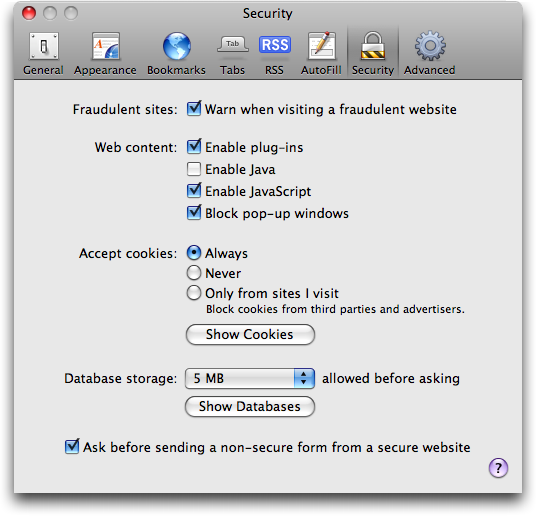
  To disable Java in Safari, go into Preferences and disable "Open
  safe files after downloading." Then click the Security tab, and
  uncheck "Enable Java."

<http://www.tidbits.com/resources/2009-05/Safari-java-disabled.png>

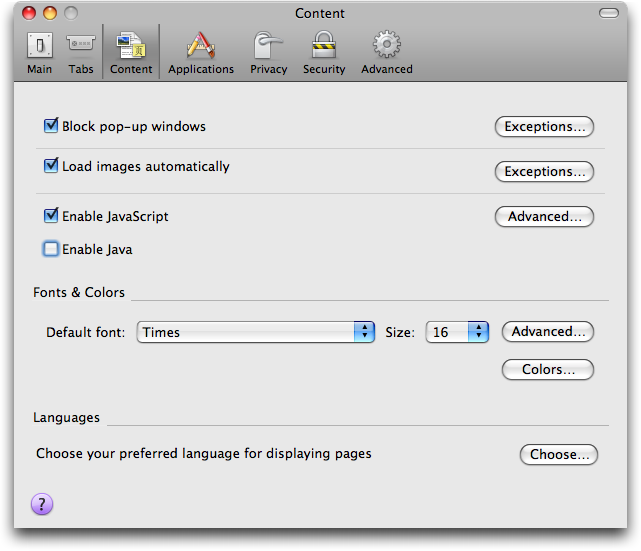
  To disable Java in Firefox, select Preferences and then the Content
  tab. As with Safari, uncheck "Enable Java."

<http://www.tidbits.com/resources/2009-05/Firefox-java-disabled.png>

  Hopefully Apple will fix this soon, and stop leaving Mac users
  vulnerable to security flaws already fixed on other platforms.


iTunes 8.2 Ships, Hints at iPhone 3.0 at WWDC?
----------------------------------------------
  by Jeff Carlson <[email protected]>
  article link: <http://db.tidbits.com/article/10315>

  Apple has released iTunes 8.2, an update that "now supports iPhone
  or iPod touch with the iPhone 3.0 Software Update." The extremely
  brief release note also indicates that iTunes 8.2 includes many
  unspecified accessibility improvements and bug fixes; a security
  vulnerability involving itms: URLs has also been addressed. It's
  available via Software Update or as a standalone 77.3 MB download.

<http://support.apple.com/kb/HT3592>
<http://www.apple.com/itunes/download/>

  What's interesting about this update is the timing, coming one week
  before Apple's Worldwide Developer Conference (WWDC). The iPhone 3.0
  software will be the star attraction, and developers have been
  working with betas for a couple of months. Could Apple be planning
  to release the final version of the iPhone 3.0 software to coincide
  with the event, ahead of a rumored iPhone hardware update? When the
  iPhone 2.0 software was released on the same day as the iPhone 3G
  (which was also the day Apple switched .Mac to MobileMe), Apple's
  servers crumbled under the load of activations (see "iPhone 3G: On
  the Line in Seattle," 2008-07-13). So I can see the case in
  separating the software and hardware releases, even if it means
  owners of the original iPhone and the iPhone 3G get to install the
  new operating system before new units running it appear.

<http://developer.apple.com/wwdc/>
<http://www.apple.com/iphone/preview-iphone-os/>
<http://db.tidbits.com/article/9691>

  More likely, I think, is that Apple released iPhone 3.0
  compatibility so developers can test live interactions between
  iTunes and the new software before iPhone 3.0 ships. With a larger
  share of the market, tens of thousands of developers, and more
  competition (such as from the Palm Pre, which is due to ship two
  days before WWDC), Apple doesn't want the same type of fiasco as
  last year's MobileMe release (see "Apple Claims MobileMe Mail Fully
  Restored," 2008-07-30).

<http://db.tidbits.com/article/9715>

  Also released today was QuickTime 7.6.2, which provides support for
  iTunes 8.2 and fixes a number of security vulnerabilities related to
  viewing malformed media types. It's also available via Software
  Update or as standalone downloads for Mac OS X 10.5 Leopard (57 MB),
  Mac OS X 10.4 Tiger (48 MB) or Windows (20.9 MB).

<http://support.apple.com/downloads/QuickTime_7_6_2_for_Mac>
<http://support.apple.com/kb/HT3591>
<http://www.apple.com/quicktime/download>
<http://support.apple.com/downloads/QuickTime_7_6_2_for_Windows>


Two New Ebooks on Maintaining and Troubleshooting Your Mac
----------------------------------------------------------
  by Adam C. Engst <[email protected]>
  article link: <http://db.tidbits.com/article/10294>

  We've just released a pair of ebooks, both by Joe Kissell, that help
  you keep your Mac running well. The first, "Take Control of
  Maintaining Your Mac, Second Edition" looks at how to start on the
  right foot with keeping your Mac running smoothly, and then it
  explains weekly, monthly, and yearly tasks that anyone can perform
  easily to enjoy peak performance and avoid pesky problems. Along
  with telling you what to do, it includes a section about what not to
  do, explaining several time-consuming tasks that don't provide any
  real benefits.

<http://www.takecontrolbooks.com/maintaining-mac?pt=TB980>

  The second ebook, "Take Control of Troubleshooting Your Mac,"
  version 1.1, goes beyond maintenance to teach you how to solve any
  problems that might pop up. In particular, you'll learn how to
  perform 17 specific problem-solving tasks (including clearing
  caches, running disk-repair utilities, and checking your RAM), how
  to solve 9 common problems (including printer problems, mouse
  problems, and Mac-won't-turn-on problems), and how to proceed if you
  encounter a novel problem.

<http://www.takecontrolbooks.com/troubleshooting-mac?pt=TB980>

  In both cases, Joe has updated the ebooks for the latest versions of
  Mac OS X, and for the latest versions of various utilities that play
  a role in Mac maintenance and troubleshooting.

  You can buy either ebook separately for $10, or (at the links above)
  look for "Special Discount" options that let you save 20 percent if
  you buy both ebooks together.

  Those who own the first edition of "Take Control of Maintaining Your
  Mac" can upgrade for half off (or free if you purchased in 2009),
  and those who already own "Take Control of Troubleshooting Your Mac"
  get a free update. We've sent all sorts of email about the updates;
  if you didn't receive an email message about upgrading, open your
  PDF and click Check for Updates on the cover (page 1) for update
  details.


New Ebook Offers Complete iPhoto Documentation
----------------------------------------------
  by Adam C. Engst <[email protected]>
  article link: <http://db.tidbits.com/article/10306>

  Every year or so, Apple releases a new version of iPhoto, and I
  squeeze in the workload of researching and writing my "iPhoto Visual
  QuickStart Guide" for Peachpit Press. (I'm not sure where the time
  comes from, but Tonya and Tristan get major credit for taking up the
  slack.) But the work is done, Peachpit has printed the 240-page
  "iPhoto '09: Visual QuickStart Guide" and distributed it to
  bookstores, and I've converted it into a true ebook, with a fully
  hotlinked table of contents and index, hotlinks for internal page
  references, bookmarks to every page, and live Web links. I also
  increased the page size (and thus the font size) to make it easier
  to read onscreen on modern displays.

<http://www.takecontrolbooks.com/iphoto09-vqs?pt=TB980>

  So if you're looking for complete documentation about iPhoto '09,
  with coverage of new features such as Faces and Places; publishing
  of photos to Facebook, Flickr, and MobileMe; themed slideshows;
  enhanced editing capabilities; and more, you can now get it in ebook
  form for only $15. If you'd prefer a full-color print copy, that's
  available too from Amazon; click the Buy Print Book button on the
  page linked above.

  As with previous editions, "iPhoto '09: Visual QuickStart Guide"
  uses step-by-step instructions paired with screenshots to illustrate
  all of iPhoto's capabilities. Chapters cover:

* Importing photos and managing multiple iPhoto libraries
* Organizing photos with albums, smart albums, and keywords
* Automatic identification of people in your photos via Faces
* Marking where your photos were taken for use in Places
* Editing photos with iPhoto '09's improved tools
* Making themed slideshows with still images and movies
* Publishing photos to many different Web sites
* Sharing photos via email and on CD
* Printing photos, and making cards, books, and calendars
* Troubleshooting and solving common problems

  If you bought an ebook version of a previous edition from the Take
  Control cart, you can upgrade for 20 percent off - open the PDF of
  your existing ebook to the first page and click Check for Updates.


Expanding Password-Protected Archives
-------------------------------------
  by Adam C. Engst <[email protected]>
  article link: <http://db.tidbits.com/article/10296>

  My aunt recently purchased a book on how to learn Spanish that came
  with a bunch of downloadable audio files. However, the files were
  compressed in Zip archives that used a simple password from the book
  itself. She knew the password, but when she downloaded the files
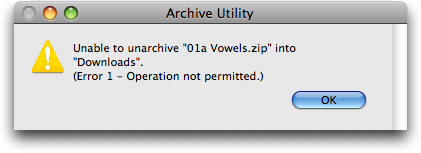
  using Safari, Mac OS X's Archive Utility sprang into action, tried
  to expand the Zip archives, and promptly threw a completely
  meaningless error dialog.

<http://www.tidbits.com/resources/2009-05/Archive-Utility-error-dialog.png>

  Stumped by the error dialog, my aunt asked me what to do. For
  someone like me who has been using the Mac for years, the solution
  was obvious: use a free copy of Smith Micro's StuffIt Expander to
  expand the file, since StuffIt Expander is perfectly capable of
  expanding password-protected archives. When I thought about it from
  her point of view, however, I could see how the problem would seem
  daunting, especially since the Web page that provided the downloads
  hadn't offered any suggestions for utilities to use.

<http://my.smithmicro.com/mac/stuffit/expander.html>

  Curious if there were other programs that would meet my aunt's needs
  as well, I poked around a bit and came across The Unarchiver,
  another free program that claims to expand many more formats than
  Mac OS X's built-in Archive Utility. When I tested it with a
  password-protected Zip archive, it too performed admirably.

<http://wakaba.c3.cx/s/apps/unarchiver.html>

  I'm sure there are other options out there too, but how many free
  utilities do you need for the same simple task? Perhaps Snow Leopard
  will feature a more-capable Archive Utility that can handle more
  formats and password-protected archives, putting this minor
  confusion to rest once and for all.


ClickToFlash Spiffs the Safari Experience
-----------------------------------------
  by Matt Neuburg <[email protected]>
  article link: <http://db.tidbits.com/article/10303>

  Why didn't someone tell me about this sooner? ClickToFlash is a free
  WebKit plug-in that does one thing and does it extremely well: it
  blocks Flash content from loading in your Safari Web pages. This
  causes Safari to render Web pages much faster.

  Other Web browsers already have ways to achieve something similar
  (in Camino you can check "Block Flash animations" and "Block web
  advertising", and of course Firefox's vast repertory of plug-ins
  form a universe unto themselves), but this is the first time I've
  seen something that works so well for Safari. It also works in any
  other browsers that use WebKit, such as OmniWeb. Note that
  ClickToFlash doesn't just suppress the _drawing_ (rendering) of
  Flash content; it suppresses its _loading_ altogether. That's why
  pages are rendered faster: there is actually less material to
  download from the Internet.

  The really elegant thing about ClickToFlash is that it doesn't block
  Flash indiscriminately or permanently. In place of the Flash
  content, a nice gray-gradient rectangle saying "Flash" appears; when
  you Control-click that rectangle (or click a gear icon in the
  upper-left corner), you get a contextual menu that lets you load
  that one piece of Flash content or all the Flash content on the
  page, or add the source URL to a whitelist so that its content
  always loads. There is even a Preferences dialog where you can
  perform more advanced settings.

  ClickToFlash was originally written anonymously and maintained at
  Google Code. It was taken down, but the code was open source, and it
  had been picked up by occasional TidBITS contributor Jonathan "Wolf"
  Rentzsch. The code remains open source, and Rentzsch is hosting it
  through GitHub, an open multi-node version control system; this
  means that anyone can fork the code, contributing changes on one
  branch that are not present on another. In short, there are various
  versions of ClickToFlash floating around. But Rentzsch maintains a
  kind of mastery and routinely incorporates improvements contributed
  by others.

<http://code.google.com/>
<http://db.tidbits.com/author/Jonathan%20Rentzsch>
<http://github.com/>

  To install ClickToFlash, go to Rentzsch's GitHub page, scroll down
  to where it says "Download ClickToFlash 1.4.2 here" (or whatever the
  current version is), and click those words. (That's because you
  probably want an installer, not a copy of the source code; of course
  you can download the source code too if you like.) Double-click the
  downloaded .zip file to unzip it; double-click the resulting .pkg
  file to run the installer. The result is a .webplugin bundle in your
  ~/Library/Internet Plug-Ins folder; so to uninstall ClickToFlash,
  just remove that bundle.

<http://github.com/rentzsch/clicktoflash/tree/master>

  ClickToFlash is not a haxie, since the .webplugin mechanism is
  perfectly standard (look in the top-level /Library/Internet Plug-Ins
  folder and you'll see a bunch of them). However, it is a little
  tricky, because it must not only detect Flash content in advance and
  interfere with its loading, but must also enable Flash content on
  demand. To do this (and I am now just reproducing Peter Hosey's
  explanation), it declares itself as a handler of the
  "application/x-shockwave-flash" MIME type, blocking that kind of
  embedded object, but when you ask to view the content, it changes
  the Web page so that object is now declared as belonging to the
  "application/futuresplash" MIME type. When that content loads, it is
  handled and rendered by the Adobe Flash Player plug-in. The trick
  here is that Flash Player declares itself as a handler of both MIME
  types, but all Flash content is declared as
  "application/x-shockwave-flash" - so that "application/futuresplash"
  is effectively unused, except by ClickToFlash. As long as that
  situation continues, ClickToFlash will keep working (though I
  suspect that some Web pages will present unusual challenges that
  must be worked around individually).

<http://boredzo.org/blog/archives/2009-01-29/how-clicktoflash-works>

  It turns out that a _lot_ of stuff out there, even static content
  that appears to be just a drawing, is actually Flash. And all that
  Flash content has been causing my Web browsing to sag rather
  drastically. But not any more! My browser is now lean and mean,
  thanks to ClickToFlash.

  ClickToFlash currently requires Mac OS X 10.5 Leopard, but I suspect
  that compatibility with 10.4 Tiger may be coming soon.


TheMacBundles.com Offers Alternative Approach to Bundle Deals
-------------------------------------------------------------
  by Adam C. Engst <[email protected]>
  article link: <http://db.tidbits.com/article/10311>

  Over the last few years, several groups, most notably MacHeist and
  MacUpdate, have taken to offering bundles of Mac software for what
  seems like insanely low prices. But while these bundles have proven
  popular with Mac users, they've also generated controversy among the
  developer community. In an attempt to address these concerns,
  shareware developer Steve Becker, working with long-time ecommerce
  site Kagi, has launched an alternative site - TheMacBundles.com.

<http://themacbundles.com/>

  The MacHeist and MacUpdate bundles have been undeniably popular with
  Mac users, who see them as a way to buy a couple of great
  applications at a discount, with the rest of the programs thrown in
  as a possible bonus. (The bundles usually contain a few marquee
  applications, a number of pieces of software that you might have
  heard of before, and several apps that are entirely unknown.) On the
  downside, the licenses that users receive aren't always eligible for
  discounted upgrades. Since the developers don't earn much on each
  bundle sale, it makes sense to charge full price for upgrades (and
  to have an upgrade come out not long after the bundle promotion
  ends).

  Among the Macintosh developer community, the bundles were initially
  controversial, since with the first MacHeist bundle, the
  participating developers reportedly earned only a flat fee.
  Subsequent MacHeist and the MacUpdate bundles involved small
  percentages to developers, so although the earnings per sale were
  still very low, developers could share in the success of the
  promotion. That said, even with percentage deals, at least some
  developers had to agree to caps that limited their earnings, with
  much of the profit going to the middleman.

  Other criticisms included the concern that the practice of
  "unlocking" key applications only when enough copies of the bundle
  had been sold felt shady (because early buyers were purchasing on
  the assumption they would receive everything in the bundle), that
  some of the marketing practices were troubling (like MacHeist
  encouraging users to post advertising messages on Twitter), and that
  discounting the prices of items in the bundle by so much devalued
  software in general.

  Despite these criticisms, plenty of developers have been interested
  in participating, because the bundles provide significant exposure
  to new customers, generating some income and making it easier to
  market updates and new products to those people in the future.

  With TheMacBundles.com, Steve Becker has attempted to address the
  various concerns surrounding previous bundle promotions in a number
  of ways, most notably:

* All the products included are the latest versions of well-known,
  high-quality applications. The programs included in the first bundle
  meet this criteria: GraphicConverter, DragThing, Default Folder X,
  Spell Catcher X, HoudahSpot, Mariner Write, Cover Stream, and
  Becker's own iPrint (all for $49.95).

* Apart from small order processing and administrative costs
  (transaction fees, bandwidth, and so on), all the proceeds from
  bundle sales are split among the developers, so the developers earn
  a lot more per bundle and there's no middleman earning a profit.

* Bundle customers are entitled to reduced price upgrades and the same
  level of support as those buying the software for full price.

* There are no games with unlocking desirable applications after a
  certain sales volume has been reached; the closest that
  TheMacBundles.com gets to generating hype is offering Baseline as a
  bonus only to the first 2,000 customers and running the promotion
  only for a limited time (two weeks, in this case).

  The only criticism that still applies to TheMacBundles.com is that
  such inexpensive bundles devalue Macintosh software in general,
  which could in turn lead to sufficiently reduced profits that
  developers would abandon the platform. I don't agree with that
  concern - there are few enough bundles and so much Mac software that
  I can't see anyone delaying the purchase of a desired application on
  the off chance that it might appear in a bundle in the future. I
  worry more about marketplaces like Apple's App Store, where
  head-to-head competition among relatively similar apps has caused
  prices to drop to unprecedented levels - a bundle of 10 popular
  iPhone apps wouldn't even approach the price of a single Mac
  program.

  While Steve Becker is attempting to set TheMacBundles.com apart from
  the other bundle promotions available, the reality is that the
  competition is only for the dollar of the Macintosh consumer, since
  the bundled software varies widely.

  For instance, the current MacUpdate Promo Spring Bundle includes 11
  applications for $49.99, including Circus Ponies NoteBook, TechTool
  Pro, and Parallels Desktop. If you want those applications, great,
  but there's nothing stopping you from buying the TheMacBundles.com
  bundle for GraphicConverter, DragThing, Default Folder X, and Spell
  Catcher X as well.

<http://www.mupromo.com/deal/852/5801/bundle>


AT&T Plans for Mobile Data Onslaught
------------------------------------
  by Glenn Fleishman <[email protected]>
  article link: <http://db.tidbits.com/article/10305>

  On 27-May-09, AT&T announced a slew of wireless network upgrades,
  all designed to make its 3G networks perform better, while laying
  the groundwork for its future 4G (fourth-generation) data service
  due in a couple of years. The iPhone 3G - and a near-term update to
  that model - is clearly the driving factor.

<http://www.att.com/gen/press-room?pid=4800&cdvn=news&newsarticleid=26835>

  All reports indicate that iPhone users consume a ton more bandwidth
  than other smartphone users, likely because the iPhone from its
  start had many more network-intensive features that work better than
  competitors' (such as the Safari browser versus RIM's BlackBerry
  browser). One report said that 2G EDGE traffic skyrocketed in San
  Francisco following the mid-2007 original iPhone launch.

  Given that tethering - using a phone like a broadband modem to
  provide Internet connectivity to a laptop - will also be part of
  iPhone 3.0 software (for older and newer devices alike), more
  capacity is needed for that bump in usage, too.

  In the United States, iPhone 3G uses AT&T's HSPA (High Speed Packet
  Access) network, which supports raw data rates up to 3.6 Mbps and
  effective rates as fast as 1.7 Mbps to phones and laptops. With
  millions of U.S. iPhone 3G users, AT&T's network has in places and
  at times become stressed out.

  Add to that AT&T's plan to start rolling out later this year the 7.2
  Mbps flavor of HSPA - requiring new phones and laptop cards - and
  you can see why the company needs to elaborate on how its data
  network will continue to improve.

  The announcement has a ton of technical detail in it, rare for
  corporate communications, but it can be distilled into a few salient
  changes.


**Cellular Expansion** -- Cellular networks are deployed in, well,
  _cells_: a honeycomb of overlapping base stations. Each cell has
  some kind of backhaul that carries voice and network bits back to a
  central network, and radio gear that operates in various licensed
  frequencies.

  AT&T's plan chips away at all the pieces that overwhelm cells with
  traffic:

* Better indoor coverage. AT&T has licensed spectrum in two major
  bands: around 850 MHz and 1900 MHz. Lower frequencies travel farther
  than higher frequencies when using the same transmitter power, and
  850 MHz penetrates into homes and buildings far better than 1900
  MHz. AT&T said it already uses 850 MHz for 3G service across half
  its coverage area, and will be adding it to more markets. (The 850
  MHz frequencies were tied up with analog and early digital services
  until a year ago.)

* More cellular bandwidth for 3G. By adding 850 MHz transmitters, AT&T
  is also adding more available frequencies in those markets. That
  means fewer phones, laptops, and other devices use each channel,
  making more capacity available for each user and allowing more users
  overall. (This is actually quite similar to adding Wi-Fi base
  stations to reduce overloading of Wi-Fi, just with many more
  channels and much more complexity.)

* More backhaul. AT&T will add more capacity to its cells, bringing in
  more fiber-optic cabling and other forms of bandwidth. Clusters of
  cellular base stations on a tower might once have had a T-1 line
  (1.544 Mbps) of backhaul back when GPRS (about 50 Kbps) or EDGE
  (about 200 Kbps) were the fastest rates. Now, a cell could have 10
  Mbps or more of capacity, and be constrained entirely by backhaul.
  AT&T needs more backhaul also for its 4G LTE (Long Term Evolution)
  service which it will start testing in 2010, and offer commercially
  in some areas in 2011. LTE can have raw data rates from 20 Mbps to
  100 Mbps, depending on a lot of factors; individual users could see
  4 to 8 Mbps downstream. (LTE will use a new set of frequencies and
  new licenses for those.)

* More cell towers. The company plans to add 2,100 more sites. In
  remote areas, more sites mean more coverage at fastest rates. In
  dense cities, more towers mean that each base station can reduce its
  power and make smaller cells, which means fewer users on each base
  station.

* Tiny base stations called _femtocells_. AT&T hasn't kept it much of
  a secret that it has a femtocell in testing, which is a base station
  designed to work in a home or small business, and which plugs into a
  subscriber's own bandwidth. Femtocells have tiny coverage areas, but
  improve indoor coverage and don't consume AT&T's bandwidth. AT&T's
  3G MicroCell (pricing not announced) will handle 3G voice and data.
  If it follows Sprint's lead, the femtocell will come with an
  unlimited voice plan for calls made or received via the base
  station. Sprint's plan is $100 for the femtocell with a 2-year
  contract, $5 per month for service, and $10 or $20 (individual or
  family) for unlimited U.S. calling.

  These changes should dramatically boost 3G coverage, quality, and
  availability, all complaints that have been leveled against AT&T's
  network. On the flip side, the company's recent earnings
  announcement showed it has the lowest churn (new customer to lost
  customer ratio) in the industry. The network has already improved,
  but it must improve further.


**Wi-Fi Fills in Network Gaps, Boosts Bandwidth** -- AT&T is also no
  stranger to Wi-Fi, and at the Wall Street Journal's All Things D
  conference, the company's CEO, Randall Stephenson, spoke rather
  strongly about how Wi-Fi is a way to bridge customers' expectations
  for true broadband when they go mobile before future 4G networks are
  in place to meet those expectations.

<http://d7.allthingsd.com/20090527/randall-stephenson/>

  The advantage of Wi-Fi for AT&T is clear when you combine a
  perceived disadvantage with a known advantage. Wi-Fi typically
  operates over very small areas: tens of thousands of square feet. A
  cell base station can cover over hundreds of thousands of square
  feet. But the current HSPA speed is limited to 3.6 Mbps raw or 1.7
  Mbps effective, whereas 802.11g Wi-Fi (found in smartphones) tops
  out at a raw rate of 54 Mbps or roughly 20 Mbps effective. (Cellular
  carriers use shorter-range base stations called _microcells_ and
  _picocells_ to cover dead areas and inside buildings, too, but the
  main network is built of cells that cover large areas.)


  Last year, AT&T purchased Wayport, a firm that AT&T used as a
  contractor to run Wi-Fi hotspots that AT&T had signed up. Wayport
  had its own contract with McDonald's, where it has built out nearly
  10,000 locations in the United States. In February 2008, AT&T also
  acquired the contract for Starbucks, which covers about 7,000 U.S.
  outlets.

  In all, AT&T now says it has 20,000 hotspots in its domestic
  network, all of which are available at no cost to any AT&T DSL or
  fiber subscriber via a laptop or other device, as well as any 3G
  LaptopConnect mobile broadband subscriber. The hotspots are also
  included in iPhone and some BlackBerry (with Wi-Fi) service plans as
  well.

  AT&T's current system of gaining access at a hotspot from a
  smartphone requires using a gateway page, entering your phone
  number, waiting for a (free) SMS message, and then following a link.
  The company promises seamless roaming in the future, though, which
  might be integrated into the upcoming iPhone 3.0 software. (For now,
  I recommend the $1 Devicescape software for iPhone, Easy Wi-Fi for
  AT&T, which automates the login process to a single click.)

<http://itunes.apple.com/WebObjects/MZStore.woa/wa/viewSoftware?id=296273148&mt=8>

  Note, too, that while AT&T is giving away access to its hotspot
  network to its existing subscribers, and conserving cash by moving
  bandwidth use onto that network, it also sells hotspot access to
  non-network subscribers ($20 per month) and day trippers ($4 per
  day). AT&T also works with roaming partners like T-Mobile, with some
  fee settlement involved for each session. (The $20-per-month plan
  includes 20,000 domestic and 50,000 non-U.S. hotspots.)

<http://www.att.com/gen/general?pid=5949>

  The press release has a fascinating side note that AT&T is serious
  about using Wi-Fi, because the company said it "can create permanent
  or temporary extended Wi-Fi zones in areas with high 3G network use,
  like a grouping of hotels or a festival."

  This again demonstrates the benefit of throwing Wi-Fi into the mix.
  At a fixed location, availability everywhere in the country isn't
  important, just at the venue. With Wi-Fi's short range, AT&T could
  install 50 Wi-Fi access points covering several city blocks or a
  large park with 20 Mbps per point - that adds up to 1 Gbps across
  the network.

  A cell base station, by contrast, would cover the entire area, and
  have just a few Mbps available. (Cell carriers do send out portable
  cell base stations, too: COLTs - "cellular on light trucks" - and
  COWs - "cellular on wheels.")

<http://www.corp.att.com/ndr/exercises_2007q4_photos.html>


**Signaling the Next iPhone** -- Without reading too many tea leaves
  or following too many rumors, AT&T's announcement signals a few
  likely developments for the next iPhone 3G.

  The next model, which may be announced at WWDC and released shortly
  afterwards, will almost certainly have a 7.2 Mbps HSPA chip. Such
  technology is widely available, and I can't see Apple releasing a
  new iPhone without it, given AT&T's upgrade plan.

  The iPhone could also have an 802.11n chip in it - not the
  full-blown radio found in a Mac, but a simpler version called
  _single-stream N_, in which speed is boosted as much as 50 to 100
  percent, and which has dual-band (2.4 and 5 GHz) support. This would
  help iPhones perform better on 802.11n networks, and would probably
  be paired with AT&T upgrading its hotspot network to 802.11n as
  well. (See my Wi-Fi Networking News article, "Does the iPhone Need
  802.11n?" for the technical details.)

<http://wifinetnews.com/archives/2009/03/iphone_80211n_necessity.html>

  If the iPhone has an improved camera and allows video recording
  (according to rumors), that's more data to be transferred, and
  boosting both Wi-Fi and 3G speeds, as well as 3G network capacity,
  makes a ton of sense as well.

  At the very least, AT&T has laid the foundation for a much more
  robust and higher-capacity network. Its smartphone contracts don't
  specify a maximum limit of monthly 3G usage, and that means the sky
  - or its capacity - is literally the limit.


TidBITS Watchlist: Notable Software Updates for 01-Jun-09
---------------------------------------------------------
  by Doug McLean <[email protected]>
  article link: <http://db.tidbits.com/article/10290>

  iWork '09 9.0.2 from Apple is a maintenance update that "improves
  reliability when saving some iWork documents and when playing some
  presentations more than once per Keynote session." ($79 new, free
  update, 42.75 MB)

<http://support.apple.com/downloads/iWork_09_9_0_2>

  MacBook Pro SMC Firmware Update 1.3 from Apple is designed to adjust
  the fan behavior of 15-inch and 17-inch MacBook Pro laptops when
  "running under high workload conditions." Apple doesn't specify
  which specific MacBook Pro models are affected, and also notes on
  its "EFI and SMC firmware updates for Intel-based Macs" Web page
  that Software Update may not be displayed automatically. If you own
  a MacBook Pro, you should download and run the installer, which
  reports whether your machine is affected. (Free, 833 KB)

<http://support.apple.com/downloads/MacBook_Pro_SMC_Firmware_Update_1_3>
<http://support.apple.com/kb/HT1237>

  MacSpeech Dictate 1.5.1 from MacSpeech is a minor maintenance update
  for the recently upgraded speech recognition utility. Several
  crashing bugs have been fixed, including one that occurred when
  editing words with hyphens, one resulting from creating a profile
  when focus was last in TextEdit, one resulting from creating a
  localized UK profile, and one that was caused by altering certain
  kinds of documents, including Excel files. Also, to reduce customer
  confusion, older licenses are now identified as such in the License
  dialog text. ($199 new, free update)

<http://www.macspeech.com/>

  HoudahSpot 2.5 from Houdah Software is a significant update to the
  file search tool that provides an alternate front end to Spotlight.
  This version adds a new "any text" search criterion that is also
  available from the BlitzSearch feature, the capability to view
  results as a grid of icons in Grid View or using CoverFlow in
  CoverFlow view, and the capability to listen to audio files with
  Leopard's Quick Look. Also, two bugs have been fixed: one that
  prevented never-opened files from being found and another that
  sometimes caused criteria changes made via drag-and-drop to be
  ignored. ($25 new, free update, 3 MB)

<http://www.houdah.com/houdahSpot/>

  Cover Stream 2.6 from Snarb.tk is the latest version of the iTunes
  controller for Mac OS X. The update adds a pop-up control panel,
  improved podcast support, a Feedback Reporter for reporting of
  troubleshooting issues, an enhanced launch utility, the capability
  to shuffle when in Jukebox mode, and a handful of minor bug fixes.
  (14.95 euros, free update, 2.4 MB)

<http://www.coverstream.net/>

  Little Snitch 2.1.3 from Objective Development is an update to the
  network-data security tool. Changes include added support for
  network user accounts and enhanced functionality for Back Up Rules.
  Also, several bugs have been fixed, including one that caused system
  freezes when logging into a network user account, one that caused an
  influx of mDNSResponder connection alerts, and one that caused a
  crashing issue with the application's installer. ($29.95, free
  update, 2.3 MB)

<http://www.obdev.at/products/littlesnitch/>

  BusySync 2.2 from BusyMac is a maintenance update to the iCal
  synchronization software. Changes include faster syncing with iCal,
  compatibility with the forthcoming BusyCal, and a handful of fixes
  for unspecified Google-syncing bugs. ($25, free update, 2.6 MB)

<http://www.busymac.com/>

  CheckUp 2.2 from App4mac is a maintenance update to the multipurpose
  maintenance utility. Changes include added support for the most
  recently released Macs, an added oscilloscope graph for network and
  processors, and information on FireWire, USB, Wi-Fi, Ethernet, and
  Bluetooth. Also, the latest version has been tested for
  compatibility with current betas of Windows 7 and Mac OS X 10.6 Snow
  Leopard, and has received a handful of unspecified bug fixes. (19
  euros, free update, 17.8 MB)

<http://www.app4mac.com/store/index.php?target=products&product_id=7>

  TextExpander 2.6.2 from SmileOnMyMac is a maintenance update to the
  typing shortcut utility. Changes include enhanced menu performance,
  reduced memory usage in Mac OS X 10.5, improved rich text imports,
  added Internet Productivity snippets, and the capability via new
  shortcuts to create a Digg toolbar link and to validate a URL copied
  to the clipboard. ($29.95 new, free update, 3.6 MB)

<http://www.smileonmymac.com/TextExpander/>

  Adium 1.3.4 is the latest version of the open-source instant
  messaging client that supports multiple protocols. Changes include
  an updated libpurple (the core for several messaging clients), and
  an updated Facebook chat plug-in that fixes an issue wherein
  Facebook would utilize too much bandwidth when connecting to a
  server. The Adium team also announced the release of Adium 1.4 beta
  which, among other improvements, adds support for IRC and Twitter.
  Adium 1.4 beta is available only for users of Mac OS X 10.5 or
  later. (Free, 21.2 MB)

<http://adium.im/>
<http://beta.adium.im/>

  Dialectic 1.4.1 from JNSoftware is a minor maintenance update to the
  phone dialing utility. Changes include new AppleScript commands for
  pausing and restoring incoming call detection, a fix for a bug that
  caused incorrect dialing strings to be sent to the user's iPhone
  when using a comma pause, and a fix for a bug that prevented
  multiple windows from tiling correctly. ($25, free update, 6.2 MB)

<http://www.jonn8.com/dialectic/>


ExtraBITS for 01-Jun-09
-----------------------
  by TidBITS Staff <[email protected]>
  article link: <http://db.tidbits.com/article/10309>

**Hulu Comes to a Desktop Near You** -- Macworld reports that Hulu,
  the streaming media giant sponsored by NBC and FOX, has released a
  new desktop client for both Mac and Windows. The software,
  compatible with the Apple Remote, has received favorable reviews
  thus far for its design and functionality. With no browser needed,
  Hulu Desktop can be more easily integrated into a home entertainment
  setup, and offers an enticing substitute for traditional cable TV.
  (Posted 2009-06-01)

<http://www.macworld.com/article/140839/2009/05/hulu_releases_desktop_client_for_mac_and_pc.html>


**The Macalope Disembowels ComputerWorld Security Article** -- By day,
  TidBITS Security Editor Rich Mogull runs the Securosis site, which
  is hosting an article by the pseudonymous Macalope that dissects
  ComputerWorld's recent troll bait article about Mac security. Read
  it, it's funny. (Posted 2009-05-28)

<http://securosis.com/blog/the-government-must-save-our-children-from-apple/>


**Jeff Carlson Discusses Apple Genius on Your Mac Life** -- What makes
  Apple a "genius" company: software, hardware, marketing? Jeff
  Carlson plays Pick Your Topic with Shawn King on Your Mac Life.
  (Posted 2009-05-27)

<http://yourmaclifeshow.com/inthenews/2009/05/26/worldwide-photo-walking-and-pick-your-topic>


**Apple Spiffs Up White MacBook's Specs** -- Demonstrating a continued
  commitment to the low end of its notebook ladder, Apple has again
  quietly bumped the specs for the $999 white polycarbonate MacBook.
  Changes include a 2.13 GHz Intel Core 2 Duo processor (up from 2.0
  GHz), 2 GB 800 MHz DDR2 SDRAM (up from 2 GB 667 MHz DDR2 SDRAM), and
  a 160 GB hard drive (up from 120 GB). (Posted 2009-05-27)

<http://www.apple.com/macbook/white/specs.html>


**Free iPod with Apple's Back to School Promotion** -- From 27-May-09
  through 08-Sep-09, any Mac purchased with an education discount
  comes with a rebate for up to $229 - the cost of an 8 GB iPod touch.
  If eligible customers want an iPod nano, classic, or shuffle
  instead, they will be granted a rebate for the corresponding
  purchase price. (Posted 2009-05-27)

<http://store.apple.com/us/browse/campaigns/back_to_school>


**Mac Clone Maker Psystar Files for Bankruptcy** -- Psystar, the
  company that has been selling Mac OS-based computers, has filed for
  bankruptcy protection, citing the economic climate and increased
  component costs. Apple's lawsuit over copyright against the
  resilient company is put on hold during the bankruptcy proceedings.
  (Posted 2009-05-26)

<http://www.macworld.com/article/140785/2009/05/psystar_bankruptcy.html?lsrc=rss_weblogs_macuser>


**New Yorker Cover Drawn With iPhone** -- Artist Jorge Colombo
  designed the cover for this week's New Yorker magazine using nothing
  but his iPhone and the painting app Brushes. Thanks to the help of
  Brushes Viewer, an app that captures and replays each mark made in
  Brushes, you can watch the cover image being drawn, step by step.
  (Posted 2009-05-26)

<http://www.newyorker.com/online/blogs/tny/2009/05/jorge-colombo-iphone-cover.html>


**Adam Discusses GPS Accuracy Issues on Your Mac Life** -- Shawn King
  was curious about our coverage of the possible GPS accuracy
  problems, so Adam joined him on the Your Mac Life radio show to talk
  about how the problem came about and how it might be solved. Toward
  the end, the conversation turned slightly into issues of privacy,
  due to the mistaken impression some people have that they can be
  tracked by GPS satellites. (Posted 2009-05-21)

<http://www.yourmaclifeshow.com/archives/2009/05/19/gps-failure-david-and-goliath-and-freeway>


**Palm Pre to Arrive 06-Jun-09 for $299** -- The Palm Pre, potentially
  the only serious competitor to Apple's iPhone, will be available
  06-Jun-09 for $299. (Palm and Sprint are advertising the price as
  "starting at $199," but that price includes a $100 mail-in rebate.
  Buyers must pay $299 to get the phone and sign up for a two-year
  service plan, which must include an unlimited data option.) Sprint
  is the exclusive carrier in the United States, the Pre's only market
  at launch. Will people line up for the Pre as they did for the
  iPhone? Coming two days before WWDC, all eyes will be on Palm and
  Apple. (Posted 2009-05-19)

<http://www.palm.com/us/products/phones/pre/>


**Beware MobileMe Phishing Scam** -- TUAW is reporting on a phishing
  scam disguised as a renewal notification from MobileMe. The scam
  comes in the form of an email message claiming that the user's
  account's credit card information is incorrect and must be updated
  before renewal. Moral of the story? Never, ever, click a link or
  button in an email message asking for financial or personal
  information. (Posted 2009-05-19)

<http://www.tuaw.com/2009/05/18/beware-of-mobileme-phishing-scam/>


**The Low-Down on WolframAlpha** -- Been hearing about the new
  computational search engine WolframAlpha, but aren't exactly sure
  what it's all about? Peter Cohen at Macworld has the skinny on the
  latest development in the world of search. (Posted 2009-05-19)

<http://www.macworld.com/article/140668/2009/05/alpha.html>


Hot Topics in TidBITS Talk for 01-Jun-09
----------------------------------------
  by Jeff Carlson <[email protected]>
  article link: <http://db.tidbits.com/article/10312>

**Anyone else out there having problems with AIM on iChat?** Could
  iChat problems stem from the latest Mac OS X update, or is the
  problem with AIM? Also, readers comment on video chat quality
  between iChat and Skype. (4 messages)

<http://emperor.tidbits.com/TidBITS/Talk/2657>


**Heads Up - Phishing attempt** -- Learn what to do when you suspect
  an email is a phishing attempt in Apple Mail. (3 messages)

<http://emperor.tidbits.com/TidBITS/Talk/2658>


**Creating table of contents of HTML document** -- It's possible to
  make a table of content from HTML, but not trivial. (11 messages)

<http://emperor.tidbits.com/TidBITS/Talk/2659>


**Preserving old Eudora messages in a new mail system** -- Eudora
  stores its messages in text-only mailbox files, so getting to the
  content later is easy. (1 message)

<http://emperor.tidbits.com/TidBITS/Talk/2661>


**2G iPod Touch and Wi-Fi** -- An iPod touch stops connecting to any
  Wi-Fi networks, leading some to suspect it's a bad unit. (4
  messages)

<http://emperor.tidbits.com/TidBITS/Talk/2662>


**Apple USB external modem/fax & 10.5.7** -- Faxing problems cropped
  up after installing Mac OS X 10.5.7, though the issues may have been
  present earlier. (2 messages)

<http://emperor.tidbits.com/TidBITS/Talk/2663>


**Multi hard disk enclosure** -- A reader is looking for
  recommendations for moving four internal hard disks into a single
  external enclosure. (11 messages)

<http://emperor.tidbits.com/TidBITS/Talk/2664>


**USB 8 GB memory stick not being recognized** -- What can you do to
  force a Mac to read a recalcitrant USB memory drive? (4 messages)

<http://emperor.tidbits.com/TidBITS/Talk/2667>


**Connecting an Apple Universal Dock: I am baffled!** The latest
  version of Apple's dock for connecting an iPod or iPhone is
  confusing, and lacking ports offered by earlier models. (8 messages)

<http://emperor.tidbits.com/TidBITS/Talk/2668>


**Wireless Hub Query** -- Readers share their experiences with
  wireless USB hubs. (3 messages)

<http://emperor.tidbits.com/TidBITS/Talk/2670>


**Wishlist for Finder Searches** -- There are several ways to find
  files in the Finder, but the interface makes it a slow endeavor. (13
  messages)

<http://emperor.tidbits.com/TidBITS/Talk/2671>


**How does a MacBook handle heat at high processor loads** -- Newer
  MacBooks and MacBook Pros seem to run cooler. Keeping them on a flat
  surface with airflow definitely helps. (8 messages)

<http://emperor.tidbits.com/TidBITS/Talk/2673>


**MacBook pricing** -- Prompted by Microsoft's latest ad campaign,
  readers discuss the price and features of the MacBook versus
  Windows-based laptops. (12 messages)

<http://emperor.tidbits.com/TidBITS/Talk/2675>


**USB flash drive woes** -- The way a USB drive is formatted can
  greatly affect its performance. (3 messages)

<http://emperor.tidbits.com/TidBITS/Talk/2679>


**Nationwide Insurance iPhone App** -- This software helps you record
  the details of an auto accident at the scene; is it actually
  helpful? (4 messages)

<http://emperor.tidbits.com/TidBITS/Talk/2681>


**How to Reformat a New External Hard Disk** -- Readers discuss issues
  related to formatting boot disks for the Mac. (9 messages)

<http://emperor.tidbits.com/TidBITS/Talk/2682>


$$

This is TidBITS, a free weekly technology newsletter providing timely
news, insightful analysis, and in-depth reviews to the Macintosh and
Internet communities. Feel free to forward to friends; better still,
please ask them to subscribe!

Non-profit, non-commercial publications and Web sites may reprint or
link to articles if full credit is given. Others please contact us. We
do not guarantee accuracy of articles. Caveat lector. Publication,
product, and company names may be registered trademarks of their
companies. TidBITS ISSN 1090-7017.

Copyright 2009 TidBITS: Reuse governed by Creative Commons license.

Contact us at:    <[email protected]>
TidBITS Web site: <http://www.tidbits.com/>
License terms:    <http://www.tidbits.com/terms/>
Full text search: <http://www.tidbits.com/search/>
Subscriptions:    <http://www.tidbits.com/about/list.html>
Account help:     <http://www.tidbits.com/about/account-help.html>


--
If you want to unsubscribe or change your address, use this link
http://emperor.tidbits.com/webx?unsub@@.3c557dc4!u=306a67f9