TidBITS#982/15-Jun-09
=====================
  Issue link: <http://db.tidbits.com/issue/982>
As the excitement dies down from Apple's WWDC announcements, we're
once again flitting among topics. Rich Mogull draws on his years of
security analyst work to offer five suggestions for how Apple could
improve Mac and iPhone security, made all the more timely by Apple
finally fixing a 9-month-old Java vulnerability today. Rich also
explains how you might be able to get better upgrade pricing on an
iPhone 3G S, Doug McLean reveals that the new 13- and 15-inch
MacBook Pros can boot from their new SD card slots and examines the
world of artistic iPhone photography, Glenn Fleishman looks at the
latest Wi-Fi SD card from Eye-Fi, and Adam reviews a tool that lets
you post photo links to Twitter from within iPhoto. We also cover
the release of Microsoft Office 2008 12.19 and 2004 11.5.5, and
glance at the releases of Firefox 3.0.11, Script Debugger 4.5.3, and
1Password 2.9.19.
Articles
Apple Patches Nine-Month-Old Java Vulnerabilities
Office 2008 12.1.9 and Office 2004 11.5.5 Updates
New MacBook Pros Boot From SD Cards
Eye-Fi Pro Card Adds Raw Uploads, Computer Transfers
iPhoto2Twitter Simplifies Tweeting Photos
Five Ways Apple Can Improve Mac and iPhone Security
Call AT&T for the Best iPhone Upgrade Price
The Art of iPhone Photography
TidBITS Watchlist: Notable Software Updates for 15-Jun-09
ExtraBITS for 15-Jun-09
Hot Topics in TidBITS Talk for 15-Jun-09
------------ This issue of TidBITS sponsored in part by: --------------
* READERS LIKE YOU! Support TidBITS with a contribution today!
<http://www.tidbits.com/about/support/contributors.html>
Special thanks this week to David L. Ballenger, Harold Appel,
James Pistrang, and Sita Likuski for their generous support!
* Fetch Softworks: Fetch 5.5 has new support for Mac OS X
10.5 Leopard technologies like Quick Look. And you can
upload with the oldest technology of all, Copy and Paste!
Download your free trial version! <http://fetchsoftworks.com/>
* WebCrossing Neighbors Creates Private Social Networks
Create a complete social network with your company or group's
own look. Scalable, extensible and extremely customizable.
Take a guided tour today <http://www.webcrossing.com/tour>
* Bare Bones Software's BBEdit 9.2 -- A burly upgrade with new
Sleep command, LassoScript support, plus enhancements to Projects
and core features like Find and Multi-File Search windows,
editing in browsers, and text completion. <http://barebones.com/>
* THE MISSING SYNC: If you have a smartphone, we can sync it!
Sync your address book, calendar, notes, music, pictures, and
more between your BlackBerry, Windows Mobile, Symbian OS or
Palm OS phone and your Mac. <http://www.markspace.com/bits>
* VMware Fusion. The most seamless way to run Windows on
your Mac. Backed by nearly a decade of proven virtualization
technology. Try VMware Fusion today for only $79.99.
Visit: <http://www.tidbits.com/about/support/vmware-fusion.html>
* Microsoft's MacBU: Supporting Mac users with Office 2008.
Straighten up your Office with the latest updates to Word,
Excel, PowerPoint, and Entourage. Update today at Mactopia!
<http://www.microsoft.com/mac/downloads.mspx>
* Speak up with MacSpeech Dictate! Get the all-new MacSpeech
Dictate with spelling and phrase training. Speech recognition
so good, about the only thing it can't do is speak for you.
Learn more: <http://www.tidbits.com/about/support/macspeech.html>
---------- Help support TidBITS by supporting our sponsors ------------
Apple Patches Nine-Month-Old Java Vulnerabilities
-------------------------------------------------
by Glenn Fleishman <[email protected]>
article link: <http://db.tidbits.com/article/10352>
Fixes for a number of serious vulnerabilities in the version of Java
in Mac OS X 10.4 and 10.5 were released by Apple today - about six
months after Sun Microsystems released updated packages for all
other platforms that Sun supports, including Windows. Apple releases
its own updated versions of Java for Mac OS X.
<http://support.apple.com/kb/HT3179>
<http://www.java.com/en/download/manual.jsp>
As Rich Mogull discussed in "Protect Yourself from the Mac OS X Java
Vulnerability" (2009-05-20), the flaws could allow a Java applet on
a malicious Web site to execute arbitrary code on your computer,
among other vulnerabilities. To work around the problem, Rich
explained how to disable Java in Safari and Firefox. Rich also
chided Apple for leaving such a major hole unpatched for so long.
<http://db.tidbits.com/article/10292>
The Java updates can be retrieved via Software Update, or at Apple's
Support Download site. The updates are listed for the last or latest
releases of Leopard and Tiger: Mac OS X 10.5.7 (158 MB) and Mac OS X
10.4.11 (80 MB). No restart is required, but all browsers should be
quit before installing the updates.
<http://support.apple.com/downloads/Java_for_Mac_OS_X_10_5_Update_4>
<http://support.apple.com/downloads/Java_for_Mac_OS_X_10_4__Release_9>
Office 2008 12.1.9 and Office 2004 11.5.5 Updates
-------------------------------------------------
by Doug McLean <[email protected]>
article link: <http://db.tidbits.com/article/10341>
Microsoft has released its latest updates for Office 2008 and Office
2004, as well as its Open XML File Format Converter, fixing critical
security issues in each program. According to Microsoft, all three
updates address two vulnerabilities in Word that could allow remote
code execution if you were to open a specially crafted malicious
Word file.
<http://support.microsoft.com/kb/971822>
<http://support.microsoft.com/kb/969661>
<http://support.microsoft.com/kb/971824>
The updates block this vulnerability by altering the way Word opens
and parses files. The Office 2008 update also "readies Office 2008
for Mac for the installation of Microsoft Entourage 2008 for Mac,
Web Services Edition, and must be installed before Entourage 2008,
Web Services Edition is installed." That version of Entourage, which
brings enhanced compatibility to servers running Exchange 2007
Service Pack 1 or later by connecting via the Exchange Web Services
format instead of via WebDAV, is currently in beta and expected for
final release later this year.
The Microsoft Office 2008 for Mac 12.1.9 Update requires Mac OS X
10.4.9 or later, and that you have already installed the 12.1.0
update (the updater is a combo updater, meaning it contains all
fixes since 12.1.0). It's a 268 MB download from Microsoft's Web
site, and is also available via the Microsoft AutoUpdate utility
launched by choosing Check for Updates from any Office 2008
application.
The Microsoft Office 2004 for Mac 11.5.5 Update requires Mac OS X
10.2.8 or later, and that you've previously installed the Microsoft
Office 2004 for Mac 11.5.4 Update. It's a 59 MB download from
Microsoft's Web site and is also available via the Office 2004
version of Microsoft AutoUpdate.
The Microsoft Open XML File Format Converter for Mac 1.0.3 requires
Mac OS X 10.4.9 or later, and that you are running Office 2004
11.4.0 or later, or Office X 10.1.9 or later. Microsoft recommends
that you install the Office 2004 11.5.5 update prior to the Open XML
Converter installation. It's a 45 MB download from Microsoft's Web
site, and is also available via the Office 2004 version of Microsoft
AutoUpdate.
New MacBook Pros Boot From SD Cards
-----------------------------------
by Doug McLean <[email protected]>
article link: <http://db.tidbits.com/article/10344>
When Apple announced the swapping of the ExpressCard slot on the
15-inch MacBook Pro for an SD (Secure Digital) memory card slot, the
few users of ExpressCard-compatible peripherals - at least those
other than SD card readers - were understandably disappointed.
(Apple claimed that only a "single-digit" percentage of MacBook Pro
users used the ExpressCard slot.) For most people, the addition of
the SD slot is welcome, since the majority of consumer-level digital
cameras use SD cards for storage. Nevertheless, it didn't seem like
that big of a deal either way.
<http://en.wikipedia.org/wiki/Secure_Digital_card>
However, a recent Apple KnowledgeBase article reveals an extremely
useful and previously unmentioned feature of the SD card slot: users
can boot the Mac from an SD card with Mac OS X installed on it.
<http://support.apple.com/kb/HT3553>
To make a bootable SD card, you must first change the default
partition table to GUID using Disk Utility, and format the card to
use the Mac OS Extended file format (as opposed to the FAT32 file
format). You can then install Mac OS X onto the device, enabling it
to boot the Mac, which could be very handy in a troubleshooting
situation.
The MacBook Pro SD card slot accepts cards that conform to the SD
1.x and 2.x standards. This includes Standard SD cards, which hold
between 4 MB and 4 GB; SDHC cards, which hold between 4 GB and 32
GB; and the older MMC cards. MiniSD, MicroSD, MiniSDHC and MicroSDHC
cards can work if used with adapters that enable the cards to
conform to the necessary physical configuration. While the MacBook
Pro can read (but not boot from) cards that use the FAT32 file
format (the standard for most SD cards), cards that use the exFAT
system will not work.
Eye-Fi Pro Card Adds Raw Uploads, Computer Transfers
----------------------------------------------------
by Glenn Fleishman <[email protected]>
article link: <http://db.tidbits.com/article/10339>
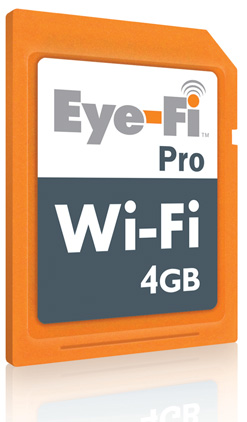
Eye-Fi has updated its line of Secure Digital (SD) Wi-Fi cards with
the Eye-Fi Pro, which adds support for raw format image files. The
new model ($150 for a 4 GB card) can also use ad hoc networking, a
computer-to-computer Wi-Fi transfer method supported by Mac OS X and
all desktop operating systems.
<http://www.eye.fi/cards/pro.html>
<http://www.tidbits.com/resources/2009-06/Eye-Fi-Pro.jpg>
For initial configuration, you connect the card to the Mac or a
Windows system via an included USB card reader, after which you can
set preferences and enter Wi-Fi network passwords. Several models,
including the Eye-Fi Pro, are automatically configured to connect to
any of 10,000 AT&T Wayport hotspots in the United States. (One
year's service is included; each subsequent year costs $15.)
The card works independently of the camera; the camera is, in fact,
unaware that anything is different about the card. All five models
of Eye-Fi (which vary in features, and start at $50 for the basic
Home version) automatically transfer files whenever they encounter a
Wi-Fi network that matches one in the card's profile.
Professional - and many regular - photographers prefer to use raw
image formats, as raw images retain as much as possible of the data
captured by a sensor without being processed into something more
palatable. Raw isn't exactly a standard, but major image-editing
software can interpret and convert the various (often proprietary)
formats used by camera makers. Except for this new Eye-Fi Pro, the
Eye-Fi cards can't transfer raw images, though they are stored on
the card normally.
Ad hoc networking, another new feature, lets you send images from
the Eye-Fi Pro to a Mac or other computer without having a base
station nearby. Ad hoc networking is a special mode in the 802.11
protocols that allows communication among computers and other
devices without a central coordinating hub. Mac OS X is unique in
having both ad hoc networking (AirPort menu > Create Network) and
Internet sharing over Wi-Fi, which simulates a hardware base station
(Sharing preferences pane > Internet Sharing). By adding support for
ad hoc networking, the Eye-Fi Pro becomes more useful for anyone
wanting to dump photos to a Mac while shooting far from a Wi-Fi
network.
Eye-Fi also upgraded all cards, old and new, to include Selective
Transfer, a feature that lets you choose which images and videos (on
cards that support video uploads) to transfer. Previously, every
photo or video would be uploaded automatically. This new option lets
you tag images with a camera's protected or locking feature (which
varies by camera), and only locked/protected photos are then
uploaded.
With all of these changes, it seems like Eye-Fi has addressed
several of TidBITS publisher Adam Engst's complaints in "Why I Hate
the Eye-Fi Share Wireless SD Card," 2008-08-18.
<http://db.tidbits.com/article/9737>
* Uploading other than JPEG images: The Pro model handles videos and
raw files; the Explore Video model ($100) uploads videos.
* Selecting which pictures to transfer: The Selective Transfer feature
adds this option, which prevents all photos from being transferred
or uploaded to a photo-sharing service.
I wrote a contrasting article at the same time as Adam's (see "Why I
Like the Eye-Fi Explore Wireless SD Card," 2008-08-18) and nearly
all my remaining provisos about the Eye-Fi have been taken care of.
<http://db.tidbits.com/article/9738>
There are still plenty of items left on Adam's list, many of which
require camera makers to work with Eye-Fi to integrate the card's
options into camera firmware. Companies that make cameras seem to
not quite understand the way in which their users want to use Wi-Fi.
Even the cleverest of Wi-Fi-enabled cameras is a pure frustration
compared to any Eye-Fi card.
iPhoto2Twitter Simplifies Tweeting Photos
-----------------------------------------
by Adam C. Engst <[email protected]>
article link: <http://db.tidbits.com/article/10338>
All the Twitter clients for the iPhone that I've seen make it easy
to take a photo and post it to Twitter (via a service like TwitPic).
Many of the Twitter clients on the Mac have features for posting
photos too, but they often revolve around selecting files, which
isn't easy if all your photos are in iPhoto. And it's a bit silly to
import your normal digital camera's photos to iPhoto, and then sync
them to the iPhone just to post to Twitter.
<http://twitpic.com/>
(Tip: In iPhoto, to view a photo's file in the Finder, Control-click
it and choose Show File from the contextual menu that appears. You
can then drag the file's icon into an Open dialog to upload it to
TwitPic, for instance, but whatever you do, don't move or rename
that file!)
Blue Crowbar Software has just come out with another simple solution
to this problem: iPhoto2Twitter, an iPhoto export plug-in that posts
a selected photo to Twitter via TwitPic.
<http://www.bluecrowbar.com/software/iphoto2twitter/>
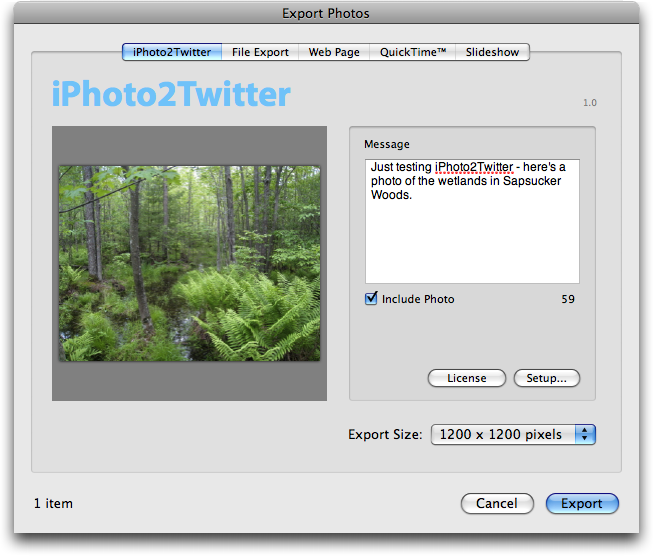
Once iPhoto2Twitter is installed, select the photo you want to post
to Twitter, choose File > Export (Command-Shift-E), click the
iPhoto2Twitter button, enter a message, choose an export size, and
click the Export button. iPhoto2Twitter posts your photo to TwitPic
and the message, with a link to the photo, to Twitter.
<http://www.tidbits.com/resources/2009-06/iPhoto2Twitter.png>
Of course, the first time you use iPhoto2Twitter, you must click the
Setup button to enter your Twitter login credentials; it can also
pull Twitter login credentials from your keychain, making it easy to
switch among accounts.
That's really all there is to it - iPhoto2Twitter is a one-trick
pony, but if you've avoided posting photos to Twitter because of a
lack of integration with iPhoto, or if you just prefer to think
about photos when you're already in iPhoto, iPhoto2Twitter is ideal.
iPhoto2Twitter requires Mac OS X 10.5 Leopard and works with iPhoto
'08 and iPhoto '09. It costs 4.95 euros and is a 566 KB download.
Blue Crowbar Software also offers Aperture2Twitter, which provides
the same functionality for Aperture 2 and costs 5.95 euros.
<http://www.bluecrowbar.com/software/aperture2twitter/>
Five Ways Apple Can Improve Mac and iPhone Security
---------------------------------------------------
by Rich Mogull <[email protected]>
article link: <http://db.tidbits.com/article/10321>
Over the past few weeks we've seen significant developments, both
positive and negative, in how Apple approaches security. On the
negative side is Apple's laggard response to providing a patch for a
nine-month-old Java vulnerability that was fixed on other major
platforms six months ago - and which the company finally fixed today
(see "Protect Yourself from the Mac OS X Java Vulnerability,"
2009-05-20, and "Apple Patches Nine-Month Old Java Vulnerabilities,"
2009-06-15). On the positive side is Apple's recent decision to hire
Ivan Krstic, the engineer behind the well-respected security
architecture for the One Laptop Per Child (OLPC) program.
<http://db.tidbits.com/article/10292>
<http://db.tidbits.com/article/10352>
<http://arstechnica.com/apple/news/2009/05/apple-hires-former-olpc-security-head-to-harden-mac-os-x.ars>
These developments seem almost contradictory, on one side failing to
manage one of the most basic security issues faced by a software
vendor, and on the other hiring a leading mind in engineering
software security. It's clear that Apple considers security
important, but that the company also struggles to execute
effectively when faced with security challenges.
With the impending release of the next versions of both Mac OS X and
the iPhone operating system, it seems a good time to evaluate how
Apple could improve their security program. Rather than focusing on
narrow issues of specific vulnerabilities or incidents, or offering
mere criticism, I humbly present a few suggestions on how Apple can
become a leader in consumer computing security over the long haul.
**Appoint and Empower a Chief Security Officer (CSO)** -- Apple
currently lacks both a public face for their security efforts and a
single internal executive dedicated to security. But two positions
aren't necessary: a Chief Security Officer (CSO) at a major software
vendor like Apple can be both external evangelist and internal
security manager, so Apple should hire such a person right away.
Apple's CSO would play a number of roles, including communicating
about Apple's security efforts externally, directing responses to
new vulnerabilities and other security issues, coordinating internal
secure development efforts, and participating in product development
to ensure security is appropriately considered and integrated into
new products.
None of this will work if the CSO is merely a figurehead, and this
must be an executive management position with the budget, staff, and
authority to get the job done. Ideally, the CSO will be a member of
the inner circle of Apple executives that drives the company
forward, so as to avoid the position becoming marginalized in
company politics.
**Adopt a Secure Software Development Program** -- Software is
surprisingly difficult to design and program securely. Modern
software is rarely built completely from scratch, relying heavily on
various frameworks, code libraries, and third-party components. Even
when software is designed from the ground up, few developers focus
on security or have extensive secure development training. And even
when you have well-trained developers, human error ensures they will
never produce a perfectly secure product.
In response to these challenges, some software vendors have adopted
special security development programs and processes (often called
"secure software development" or the "secure software development
lifecycle"). These techniques are extremely effective at reducing
the number and severity of bugs that result in security
vulnerabilities, and they are slowly becoming standard practice
throughout large organizations and product vendors. Security
development programs usually have the added benefit of improving
overall software quality and reducing the number of costly patches a
vendor releases.
Based on a variety of sources, we know that Apple does not have a
formal security program, and as such fails to catch vulnerabilities
that would otherwise be prevented before product releases.
To address this lack, Apple should integrate secure software
development into all internal development efforts. This includes
programmer training, development standards, design requirements,
threat modeling, code review, use of security testing tools,
specialized pre-release testing, and root cause analysis for
post-release bugs.
**Establish a Proactive Security Response Team** -- Although Apple
does have dedicated security engineers, and a small product security
team, there is no public security response team to manage externally
reported vulnerabilities or other security issues in a consistent
and coherent fashion. Based on public handling of certain security
issues it appears that the current product security team lacks
sufficient resources or influence to effectively manage all Apple
security issues in a consistent and coherent fashion.
An enhanced Apple security response team would manage communications
with external researchers reporting vulnerabilities and the internal
developers that develop the fixes. Since Apple relies so much on
third-party software, much of it open source, the security response
team would also track and coordinate security responses for these
products. This could enable Apple to manage security issues like the
recent Java and DNS flaws proactively, so Apple users are no longer
exposed even after these components have been fixed by their
programmers.
Having spent years working with both researchers and vendors, I've
learned that a communicative security response team typically
generates goodwill with researchers reporting bugs, and is more
likely to avoid messy disclosure situations that place users at
risk.
**Manage Vulnerabilities in Included Third-party Software** -- As I've
mentioned multiple times, one of Apple's most significant security
problems lies with patching versions of third-party software (much
of it open source) included in Apple products. Apple has a history
of patching these components long after fixes are released on other
platforms (examples include Java, Samba, Apache, and DNS, and even
Apple's own open-source WebKit and mDNS).
This is more than merely a roadmap for an attacker, it's an
unimpeded highway straight to your Mac. For example, the world's
most popular free penetration testing (hacking) tool, Metasploit,
can now target Mac OS X specifically, and functional attacks (for
any platform) are typically available for Metasploit only hours or
days after new patches are released.
<http://metasploit.com/>
As the barriers to exploiting new vulnerabilities continue to drop,
Apple absolutely can't afford to leave its customers exposed. The
solution to this is a formal program to track vulnerabilities
reported in third-party components, and to work with internal
development teams to integrate fixes as they become available.
Apple's CSO and security response team would become responsible for
actively engaging with these external developers, and for ensuring
Apple is able to release fixes in a timely manner.
**Complete the Implementation of Anti-Exploitation Technologies** --
With the release of Mac OS X 10.5 Leopard, Apple began to include a
collection of what are known as "anti-exploitation technologies."
Even if Apple adopts all of my suggestions above, that still won't
eliminate all security vulnerabilities in our systems. Heck, even if
all Apple software is perfectly secure, we'll still see
vulnerabilities in the non-Apple software we purchase for our Macs
and iPhones.
Anti-exploitation technologies assume that vulnerabilities are
inevitable, and try to prevent attackers from taking advantage of
them to hurt our systems. Sandboxing, library randomization,
no-execute flags (which tie to special hardware hooks inside our
Intel-based Macs), and stack protection are all partially
implemented in Mac OS X, but these implementations are either
incomplete or flawed in ways that nearly eliminate their security
advantages.
As Microsoft is learning, it's also important to enforce these
controls in individual applications, not just the operating system,
so a single Web browser plug-in like Flash or Java can't circumvent
anti-exploitation technologies. Apple is in a stronger position to
enforce these rules than Microsoft, thus better protecting Mac and
iPhone users. Rumor is we may see some of these advances in the
upcoming Snow Leopard release of Mac OS X, which would be a positive
development.
It's inarguable that using Apple products today is currently a
relatively safe experience, but there are early signs that if Apple
doesn't start to do a better job with security policies and
architecture, we customers may be at greater risk down the road. I
didn't write this article because I'm worried about the security of
all seven of my Macs this week, but because I'd like to continue to
enjoy safe computing for the foreseeable future. By following these
suggestions Apple could extend its current (if not entirely
deserved) reputation for security to become a long-term leader in
consumer computing security.
Call AT&T for the Best iPhone Upgrade Price
-------------------------------------------
by Rich Mogull <[email protected]>
article link: <http://db.tidbits.com/article/10350>
When Apple announced that the new iPhone 3G S pricing would be the
same as that of the iPhone 3G at its launch, applause could be heard
far beyond the Worldwide Developers Conference presentation hall.
Since users moving from the original iPhone to the iPhone 3G last
year weren't charged any penalties for upgrading in mid-contract,
many people assumed Apple had cut some sort of deal with AT&T to put
shiny new iPhones in the hands of early adopters. But within hours
after the announcement, we learned that most iPhone 3G owners
wouldn't qualify for discounted pricing on launch day, or, in many
cases, for an additional 6 months or more.
Most existing AT&T iPhone customers who don't qualify at the
$199/$299 price points (for the 16 GB or 32 GB models) can still
purchase an iPhone 3G S for "early upgrade" pricing of $399/$499.
Customers who bought their phones too recently even for that pricing
can upgrade for full retail price at $599/$699. To confuse the
situation even more, eligibility for the different tiers of upgrade
pricing isn't as simple as how long you've had your phone... and in
some cases AT&T's system for determining eligibility makes mistakes.
**Wireless Subsidies and iPhone Pricing** -- In the United States and
many other countries, we rarely pay the full price for our mobile
phones. These ubiquitous computing devices pack an incredible amount
of technology into a pocket-sized package, and that's especially
true of powerful smartphones like the iPhone or BlackBerry. Since
mobile providers make most of their profits on our monthly
subscriptions, they subsidize the cost of the phones to hook us on
technologies that will steer us toward more-expensive plans. Devices
lose their cutting-edge appeal over time in comparison with new
models, so the carriers re-hook us with additional subsidies as our
contracts come close to expiring. It makes sense that mobile
carriers want to recoup any losses incurred when they sell us phones
below cost. (Mobile phones aren't the only devices sold at a loss;
most gaming platforms like the Microsoft Xbox 360 and Sony
PlayStation 3 are initially sold below the cost to make them, with
the manufacturers making it up with the residuals paid by game
sales.)
The original iPhone was sold without any subsidies, and thus when
the iPhone 3G was released in July 2008, AT&T was able to offer
subsidized pricing to anyone who wanted to upgrade (and lock in to a
new, 2-year contract). All the original iPhones were sold at full
retail price, so AT&T didn't have any gap to make up.
Since the iPhone 3G _was_ subsidized, AT&T wants to recover its
costs on the phone, which is why the company isn't offering the
full, discounted prices to all existing iPhone users. While we might
argue that AT&T is missing a golden opportunity to build brand
loyalty before it loses its exclusive contract with Apple, or
perhaps the company might want to make up for the lack of MMS,
tethering, or faster network supported by the iPhone 3G S, we can't
argue that AT&T is being unfair for wanting to recover the capital
outlay on discounted phones. But AT&T uses more than contract age to
determine when users qualify for phone upgrades, which is creating
confusion as the horde of iPhone addicts prepares to mass-migrate on
a single day.
**A Tale of Two iPhone Families** -- Like many iPhone addicts, once
the iPhone 3G S was announced, I quickly logged into Apple's online
iPhone store to reserve my model. I saw that I qualified only for
the early upgrade pricing of $499 for the 32 GB model, sighed in
disappointment, and made my reservation. I assumed pricing was
directly tied to the age of my contract, but then I started to
notice reports that upgrade eligibility didn't seem to be tied
directly to contract expiration date. A couple days later, I also
realized that we are a two-iPhone family, with my wife using my
original, unsubsidized model, and perhaps we could upgrade that
phone more quickly.
<https://buyiphone.apple.com/>
I decided to call AT&T directly to check my status, and that one
call saved me hundreds of dollars. The online iPhone store shows you
only your _current_ pricing for a single line, not potential pricing
for other phones on the same account, or when you qualify for the
fully subsidized price. I learned that my wife's iPhone was
immediately eligible for an upgrade, and my iPhone 3G (purchased on
launch day in July 2008) would be eligible on 12-Jul-09; less than a
month later, and only 12 months after purchase. I'd be able to
upgrade one phone on launch day (swapping SIM cards after the fact,
since my wife isn't nearly as geeky as I am), and we could upgrade
the second a few weeks later. With a fairly new baby, we are looking
forward to the improved photo and video capabilities of the iPhone
3G S - otherwise we would have kept my current iPhone 3G.
TidBITS contributor Chris Pepper encountered a completely different
situation. Like me, he's in a two-iPhone family with an iPhone 3G
for himself and an original model handed down to his wife (we do
wonder how our wives put up with us at times). We've both been on
AT&T for about the same length of time, although I used a BlackBerry
for my first 5 months. We're on different AT&T family plans, but we
pay within $20 a month of each other.
When Chris called in, the AT&T customer representatives informed him
that _neither_ of his lines was eligible for upgrades until his
contract expiration dates. He was required to pay the higher early
upgrade pricing even on his original, unsubsidized iPhone. At one
point Chris and I were on the phone at the same time, talking to
different AT&T representatives as we shared our findings over iChat.
Despite our circumstances being extremely similar, our upgrade
situations were very different.
**Investigating Further** -- After Chris and I compared results, I put
out a call on Twitter and email to find out what other people were
experiencing. The results were all over the map, with users in very
similar circumstances (including the same subscription price tier)
reporting very different upgrade eligibility dates. Fellow TidBITS
editor Glenn Fleishman and I started to compare notes, and it became
clear that contract date, last upgrade date, and price plan weren't
the only factors involved in determining iPhone upgrade pricing.
I contacted AT&T representative Seth Bloom, who responded
immediately to clear up the confusion. It turns out that phone
upgrade eligibility, for the iPhone or any other hardware, is tied
to overall account history, using a number of factors. Seth said,
"The main factor is how far you are into your contract. You will likely be
eligible in the latter part of it. We also look as such things as how promptly
you pay your bill, the date of your last subsidized handset, etc. Please note,
though, that all of these factors simply add up to how early (i.e., prior to
the end of the contract) AT&T can give another subsidized device to an iPhone
customer.
"Customers can check their eligibility at http://www.att.com/iPhone or by
visiting any of our company-owned retail stores. If you're not currently
eligible, we'll give you the date you may qualify. You also can call *639# from
your AT&T handset and receive a text with information about your upgrade
eligibility."
**A Mistake Was Made** -- This made a lot of sense. AT&T, like any
company, has higher and lower value customers. High value customers
tend to receive greater incentives to stay with the company. Since I
was paying, on average, $240 more a year than Chris, it's
understandable that I would be able to upgrade sooner. But this
still doesn't explain why Chris couldn't upgrade his completely
unsubsidized iPhone on launch day. AT&T didn't pay a dime for it,
and thus has no costs to recoup.
Chris called AT&T back for a third time and managed to get through
to a supervisor who realized something was wrong on Chris's account.
By AT&T's own policies, Chris should qualify for the full upgrade
discount on his wife's older iPhone. The supervisor escalated
Chris's case, and he should hear back in the next couple of days.
Since none of us have access to AT&T's eligibility algorithm,
there's no way to predict anyone's eligibility for a discounted
iPhone without checking with the source. I personally assumed I
would qualify only after my contract expired, and I'm glad I called
in to learn I was eligible immediately on one line, with the second
following less than a month later. Chris learned that there was a
problem with his account, and he will now likely be eligible to
upgrade at least his older iPhone on launch day.
**Call for the Best Price** -- If you don't know, for sure, that
you're getting the $199/$299 pricing, we recommend that you call
AT&T, stop by a store, or check their online system for your upgrade
eligibility date. If you think it's wrong, especially if you have an
original iPhone, ask to talk to a supervisor and see if there might
be a mistake on your account.
<http://www.att.com/iPhone>
And if you happen to be in Phoenix on June 19th, look for me in line
bright and early at the Biltmore Apple Store.
The Art of iPhone Photography
-----------------------------
by Doug McLean <[email protected]>
article link: <http://db.tidbits.com/article/10289>
It's common knowledge: the iPhone's 2-megapixel camera is nothing
special. It was unimpressive when it shipped, and every day it
suffers more and more in comparison with modern point-and-shoot
cameras, or even the latest camera phones. The common feature
wishlist among users is long, with many hungering for more
megapixels, video capabilities, zoom, and autofocus. While the
camera is certainly a much-appreciated convenience, it doesn't lend
itself to taking the kind of breathtaking pictures we expect from
modern digital cameras. (And yes, the 3-megapixel camera in the
iPhone 3G S should be an improvement; we'll know more about that
soon.)
But because of its convenience, the iPhone camera, like many mobile
phone cameras, is often used merely as a kind of visual text message
- the photo might not look great, but it gets the point across.
People use it effectively to send images via email or Twitter that
say, "Look at this giant burger I'm about to scarf," or even
"There's a plane in the Hudson!" And it works pretty well with
Evernote for visual reminders.
<http://twitpic.com/135xa>
<http://evernote.com/>
But, as we'll see, the iPhone camera's technical limitations haven't
prevented some artists from making great art with it, much the way
artists have long produced amazing images using old or unusual
photographic equipment.
**iPhone Photo Pioneers** -- There's a rich history of photographers
using crude or basic tools, like pinhole or Holga cameras, to
produce beautiful and memorable images. In many respects, those
leading the charge of iPhone photo enthusiasm are seizing upon this
tradition, though, ironically, their "crude" tool happens to be an
expensive and sophisticated piece of technology. Among the leaders
of this pack are a professional photographer, a self-described
amateur, and a passionate online group of committed hobbyists.
<http://photo.net/pinhole/pinhole.htm>
<http://microsites.lomography.com/holga/history>
Chase Jarvis is a professional photographer based in Seattle,
Washington. In addition to running a photography studio that has
garnered a slew of press and recognition, Jarvis has taken to using
his iPhone for making images whose origins you would never suspect.
<http://www.chasejarvis.com/#s=0&mi=2&pt=1Ï=10000&p=5&a=0&at=0>
<http://press.chasejarvis.com/press/>
<http://www.tidbits.com/resources/2009-05/Jarvis.png>
"The best camera is the one that's with you," Jarvis writes, "As
such, I take between 1 and 1000 iPhone images every day..." He goes
on to say he uses only native iPhone apps for editing instead of the
expected choice, Photoshop. Considering the crisp edges, bold
colors, and dynamic compositions in his photos, it's a claim that
can be hard to believe.
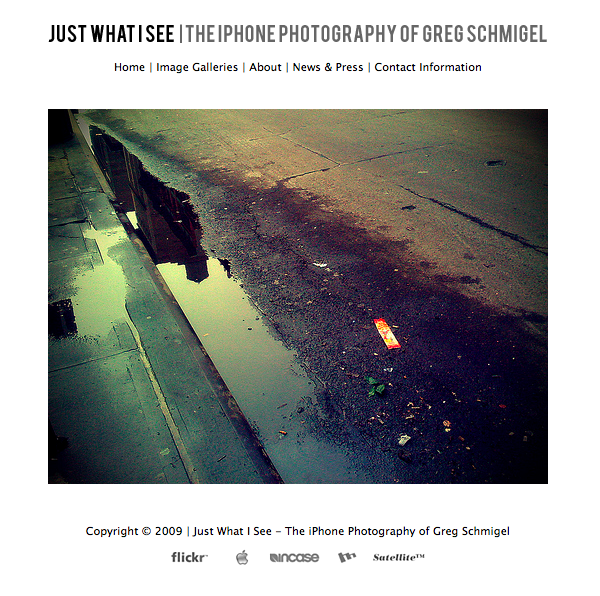
Greg Schmigel - a self-described amateur living in Maryland - is
another well known name in the world of iPhoneography. While
Schmigel is humble about his involvement in the medium, his Web site
Just What I See has attracted much attention. Boasting hundreds of
iPhone photos, most focusing on people in public places, Schmigel's
site is a contemplation on the ephemeral beauty of the everyday.
<http://morristsai.com/2008/05/iphone-photography-in-the-hand.html>
<http://www.justwhatisee.com/>
<http://www.tidbits.com/resources/2009-05/schmigel_site.png>
Another pool of iPhone camera talent gathers on Flickr, the iPhone
Photography Group. With a collection of nearly 6,000 photos and over
250 active members from around the world, the Flickr group is an
excellent spot to expand your conception of what an iPhone photo can
look like.
<http://www.flickr.com/groups/iphonephotography/>
**Tools of the Trade** -- At first glance, I couldn't figure out how
many of these photos were made with the iPhone, but reading these
sites made it clear that many were edited and enhanced using iPhone
photo apps. This, of course, is good news since it means that you
too can achieve similar results without ever leaving your iPhone or
purchasing expensive photo manipulation applications for the Mac.
The most popular apps, the ones that were referenced repeatedly in
the Flickr group and whose effects became easy to spot, were
CameraBag, ToyCamera, Photonasis, Photo fx, and TiltShift. They
enable users to apply various filters to alter the appearance of a
photo. For example, Camera Bag offers filters that "age" a photo and
replicate the appearance of, say, a Polaroid from the 1980s, or a
crisp black-and-white shot from the 1960s. Similarly, ToyCamera
approximates the warm lo-fi effects attained by, well, cheap toy
cameras.
<http://itunes.com/apps/camerabag>
<http://itunes.com/apps/toycamera>
<http://itunes.com/apps/photonasis>
<http://itunes.com/apps/photofx>
<http://itunes.com/apps/tiltshift>
TiltShift offers only one effect, but it's an intriguing one that
replicates the effects of tilt shift photography, which can result
in creating pictures that appear to be photographs of miniature
versions of the real thing.
<http://en.wikipedia.org/wiki/Tilt-shift_photography>
<http://www.tidbits.com/resources/2009-05/tiltshift.jpg>
These sorts of apps are widely popular for their capability to
emulate various camera effects and aesthetics. In fact, at least one
app has actually been rejected from the App Store for replicating
too well a set of proprietary camera effects. The Poladroid phone
app, developed by Paul Ladroid, was rejected for containing features
that "resemble Polaroid photographs." Given the number of validated
apps containing similar features, this one will have to be chalked
up to Apple's sometimes opaque review process (see "Developers Could
Turn Away from iPhone App Store", 2008-09-25).
<http://www.poladroid.net/news-Poladroid_for_iPhone_rejected_by_APPLE-15.html>
<http://db.tidbits.com/article/9784>
One last app worth mentioning is Stepcase's Darkroom (previously
called Steadycam). Darkroom is interesting in that it helps you to
take clearer pictures by using your iPhone's accelerometer. When you
press the shutter button on your iPhone, Darkroom waits till your
accelerometer reads as being relatively stable before it snaps the
shot - resulting in a clearer photograph, especially in low-light
situations. Another app called Night Camera does exactly the same
thing.
<http://itunes.com/apps/steadycam>
<http://itunes.com/apps/nightcamera>
For more information on the world of iPhone photography and the apps
that populate it, check out the iPhoneography Blog.
<http://www.iphoneography.com/>
**Time-Traveling with Cameras** -- One thing I couldn't help but
notice after looking at hundreds of iPhone photographs is the
apparent desire to mimic older photographic forms, techniques, and
equipment. As I mentioned, apps like CameraBag enable users to
transform their photographs into what appear to be images from
another era.
Maybe the explanation for this phenomenon is a simple one: that
low-resolution images taken with the iPhone are well suited to
impersonate other forms of low-end photography? Yet perhaps the
reason lies deeper; in the sudden and magical transformation from a
mundane image to one with historical aura. Maybe it's the wonder of
time travel that's implied - I may not be able to build a time
machine, but I can make it look like I was 25 years old in 1970. Or
it's possibly just another face of the collective nostalgia we seem
to have for our childhood eras.
Whatever the reason, it is curious that these effects are so
ubiquitously utilized by users of what is one of the most innovative
and forward-thinking technological devices we've seen in recent
years.
Of particular curiosity to me is that many of the images I came
across replicated the appearance of Polaroid instant film - an apt
ancestor of the iPhone photograph given its instantaneous nature.
But this relationship is also peculiar given that Polaroid, the
company, announced this past year it will no longer continue making
instant film. The digital camera undoubtedly killed demand for
physical instant film. Yet, people still seem to want exactly the
aesthetic that their new tools put to out to pasture. It's a strange
example of new technology destroying the old, only to come to
resemble it. It raises a funny question: in 10 years will artists be
replicating the blurry pixelated quality of the 2-megapixel iPhone
camera from which most people now seek to escape?
<http://thelede.blogs.nytimes.com/2008/02/08/polaroid-abandons-instant-photography/>
TidBITS Watchlist: Notable Software Updates for 15-Jun-09
---------------------------------------------------------
by Doug McLean <[email protected]>
article link: <http://db.tidbits.com/article/10340>
Firefox 3.0.11 from Mozilla is a security and stability update to
the popular Web browser. Several critical security vulnerabilities
that could be exploited to run arbitrary code have been repaired.
Other more minor security vulnerabilities have also been addressed,
as well as an issue causing the bookmark database to become
corrupted. Finally, several problems with the SQLite internal
database have been fixed. (Free update, 17.2 MB)
<http://www.mozilla.com/en-US/>
<http://www.mozilla.org/security/known-vulnerabilities/firefox30.html#firefox3.0.11>
Script Debugger 4.5.3 from Late Night Software is a maintenance
update to the AppleScript authoring environment. Changes include the
pasting of object specifiers as a series of nested tell blocks
instead of one object reference, an improved Balance command,
automatic closing of AppleScript blocks, and the capability to
continue when Script Debugger detects duplicate symbols coming from
your libraries. Also several issues have been fixed including a
hanging bug that occurred when viewing the InDesign dictionary, a
bug that blocked auto-close and balance when unbalanced characters
appeared in a style comment, and a bug that caused references to
'path' outside of a tell block to create incorrect 4-character
codes. ($199 new, free update, 10.8 MB)
<http://www.latenightsw.com/sd4/>
1Password 2.9.19 from Agile Web Solutions is a minor compatibility
update to the password syncing utility. The latest version brings
full support for Safari 4 on Mac OS X 10.4 Tiger and 10.5 Leopard.
($39.95 new, free update, 11.8 MB)
<http://agilewebsolutions.com/products/1Password>
ExtraBITS for 15-Jun-09
-----------------------
by TidBITS Staff <[email protected]>
article link: <http://db.tidbits.com/article/10349>
**No More Prepaid GoPhone Plans for the iPhone** -- According to a
TUAW article by Erica Sadun, anyone using AT&T's prepaid GoPhone
plan to avoid the 2-year contract will be forced to switch to a
normal contract to maintain 3G data access. It's unclear how many
iPhone users have jumped through the necessary hoops to use a
GoPhone plan, but if you're among that group, you might want to
upgrade to an iPhone 3G S just so there's some upside to being
forced into a 2-year contract. (Posted 2009-06-15)
<http://www.tuaw.com/2009/06/15/atandt-to-discontinue-prepaid-iphone-plans/>
**Adam Recaps WWDC in a Cowtown MUG Video Chat** -- In this three-part
MacNotables video podcast, Adam and host Chuck Joiner talk with the
members of the Cowtown Macintosh User Group in Fort Worth, Texas,
about Apple's announcements at the Worldwide Developers Conference.
(It's in three parts to make the downloads more manageable.) (Posted
2009-06-15)
<http://www.macnotables.com/wordpress/macnotables-920-adam-engst-and-chuck-joiner-discuss-wwdc-announcements-with-the-cowtown-mac-user-group-part-1/>
**Apple's WWDC App Wall** -- Why should I have gone to WWDC when I was
able to get all the news from home? To check out Apple's wildly cool
App Wall in person! TechCrunch has posted some pictures and video of
the pulsating wall of apps - a four-by-five grid of 30-inch Cinema
Displays jam-packed with iPhone app icons. Each time an app was
purchased in the store, its icon pulsed on the wall. (Posted
2009-06-12)
<http://www.techcrunch.com/2009/06/08/apples-cool-matrix-style-app-wall/>
**Glenn and Adam Discuss AirPort Networking on MacVoices** -- Listen
in as Glenn Fleishman and Adam Engst chat with MacVoices host Chuck
Joiner about both the latest developments with Apple's AirPort
wireless networking devices and what's new in the world of Wi-Fi
security. (Posted 2009-06-12)
<http://www.macvoices.com/wordpress/macvoices-976-glenn-fleishman-and-adam-engst-take-control-of-airport-80211n-networks-and-wifi-security/>
**Adam Talks Through WWDC News on Your Mac Life** -- Tune in to this
week's Your Mac Life show to listen to Adam and host Shawn King talk
through all of what went down at the Worldwide Developers
Conference. And yes, the Twitter hype is real - Shawn did get Adam
to swear on the air. (Posted 2009-06-11)
<http://yourmaclifeshow.com/archives/2009/06/09/wwdc-pick-topic>
**iPhone 3G S Specs Revealed** -- Wired is reporting that T-Mobile (in
the Netherlands) has let the cat out of the bag with regard to the
technical specs of the iPhone 3G S. Apple has been keeping the exact
details of the new phone's chipset under wraps, but now we know the
deal: 256 MB of RAM for the OS, twice that of the original iPhone,
and a 600 MHz processor, up from 412 MHz. (Posted 2009-06-11)
<http://www.wired.com/gadgetlab/2009/06/t-mobile-accidentally-posts-secret-iphone-3g-s-specs/>
**Apple's WWDC Keynote Video Now Available** -- By now you've probably
read oodles of reports about Apple's keynote presentation at this
year's Worldwide Developers Conference. But if you want to see how
it all went down, or want to watch the many iPhone OS 3.0 app demos,
Apple has posted a QuickTime video of the presentation. (Posted
2009-06-09)
<http://events.apple.com.edgesuite.net/0906paowdnv/event/>
Hot Topics in TidBITS Talk for 15-Jun-09
----------------------------------------
by Jeff Carlson <[email protected]>
article link: <http://db.tidbits.com/article/10351>
**One "Trick," One Quirk in Microsoft's Bing** -- Readers share their
experiences with, and thoughts about, Bing, Microsoft's new search
engine. (43 messages)
<http://emperor.tidbits.com/TidBITS/Talk/2699>
**iTunes 8.2 not syncing podcasts correctly to iPhone** -- A smart
album in iTunes 8.2 explains odd podcast sync behavior. (4 messages)
<http://emperor.tidbits.com/TidBITS/Talk/2700>
**New iPhone 3GS Boosts Power, Performance, and More** -- Readers
attempt to figure out AT&T's opaque upgrade policies for the iPhone
3G S. (5 messages)
<http://emperor.tidbits.com/TidBITS/Talk/2701>
**Apple Previews Snow Leopard for September Release** -- Snow
Leopard's slimmed size and welcome $29 upgrade price attract
discussion. (4 messages)
<http://emperor.tidbits.com/TidBITS/Talk/2702>
**iPhone 3.0--Icon limit** -- One welcome improvement in the iPhone
3.0 software is support for more application screens. (5 messages)
<http://emperor.tidbits.com/TidBITS/Talk/2703>
**Safari 4 "Favorites"** -- Safari 4's Top Sites feature could be
useful, but not if you already have a system for going to your
favorite sites. (2 messages)
<http://emperor.tidbits.com/TidBITS/Talk/2705>
**The "other" Apple announcement on June 8** -- Apple's use of
adaptive HTTP streaming invites comparison with how QuickTime
currently streams content. (3 messages)
<http://emperor.tidbits.com/TidBITS/Talk/2707>
**MobileMe calendar sync problem** -- When MobileMe gets confused, it
seems to do it in a big way. A reader details how he has tried to
get calendar sync working, to no avail. Another reader reports
success with Apple's help. (2 messages)
<http://emperor.tidbits.com/TidBITS/Talk/2708>
**One unfortunate shortcoming of the new MacBook Pro** -- The new
MacBook Pro design takes us back to removing lots of screws of
varying lengths in order to open the case and upgrade RAM or the
hard disk. (3 messages)
<http://emperor.tidbits.com/TidBITS/Talk/2709>
**How to use a Mac with websites that require Internet Explorer** --
What's the best way to access a Web site that requires Internet
Explorer from a Mac? (7 messages)
<http://emperor.tidbits.com/TidBITS/Talk/2710>
$$
This is TidBITS, a free weekly technology newsletter providing timely
news, insightful analysis, and in-depth reviews to the Macintosh and
Internet communities. Feel free to forward to friends; better still,
please ask them to subscribe!
Non-profit, non-commercial publications and Web sites may reprint or
link to articles if full credit is given. Others please contact us. We
do not guarantee accuracy of articles. Caveat lector. Publication,
product, and company names may be registered trademarks of their
companies. TidBITS ISSN 1090-7017.
Copyright 2009 TidBITS: Reuse governed by Creative Commons license.
Contact us at: <[email protected]>
TidBITS Web site: <http://www.tidbits.com/>
License terms: <http://www.tidbits.com/terms/>
Full text search: <http://www.tidbits.com/search/>
Subscriptions: <http://www.tidbits.com/about/list.html>
Account help: <http://www.tidbits.com/about/account-help.html>
--
If you want to unsubscribe or change your address, use this link
http://emperor.tidbits.com/webx?unsub@@.3c557dc4!u=306a67f9