TidBITS#986/13-Jul-09
=====================
  Issue link: <http://db.tidbits.com/issue/986>
  As summer starts to set in here, things are slowing down a bit, so
  we have a few longer articles you can sit back and read at your
  leisure. Adam and Glenn team up for a look at what Google's
  forthcoming Chrome OS could mean for Apple, Matt Neuburg contributes
  a detailed look at Cocoatech's Path Finder 5, and Jeff Carlson finds
  himself sucked into etymological enjoyment at Wordnik. Be sure to
  check out our ExtraBITS links this week, along with our coverage of
  the releases of Safari 4.0.2, Default Folder X 4.2.1, VLC 1.0, and
  Electric Sheep 2.7.

Articles
    Wordnik Encourages Word Exploration
    Path Finder 5 Beats the Finder's Pants Off
    Google Chrome OS to Power Netbooks in 2010
    TidBITS Watchlist: Notable Software Updates for 13-Jul-09
    ExtraBITS for 13-Jul-09
    Hot Topics in TidBITS Talk for 13-Jul-09


------------ This issue of TidBITS sponsored in part by: --------------

* READERS LIKE YOU! Support TidBITS with a contribution today!
  <http://www.tidbits.com/about/support/contributors.html>
  Special thanks this week to Skip Hayes, Charles Watts-Jones,
  and Charles Robert Hayden-Gilbert for their generous support!

* Get Fetch 5.5 for free! Fetch Softworks makes Fetch, the original
  Macintosh FTP client, free for educational and charitable use.
  Fetch 5.5 lets you edit and Quick Look all kinds of files.
  Apply today at <http://fetchsoftworks.com/fetch/free>!

* WebCrossing Neighbors Creates Private Social Networks
  Create a complete social network with your company or group's
  own look. Scalable, extensible and extremely customizable.
  Take a guided tour today <http://www.webcrossing.com/tour>

* Bare Bones Software's BBEdit 9.2 -- A burly upgrade with new
  Sleep command, LassoScript support, plus enhancements to Projects
  and core features like Find and Multi-File Search windows,
  editing in browsers, and text completion. <http://barebones.com/>

* THE MISSING SYNC: Take it with you! The Missing Sync makes
  it easy to synchronize contacts, calendars, notes, photos
  and more from your Mac to your BlackBerry, HTC, Treo,
  iPhone and other phones. <http://www.markspace.com/bits>

* VMware Fusion. The most seamless way to run Windows on
  your Mac. Backed by nearly a decade of proven virtualization
  technology. Try VMware Fusion today for only $79.99.
  Visit: <http://www.tidbits.com/about/support/vmware-fusion.html>

* Microsoft's MacBU: Supporting Mac users with Office 2008.
  Straighten up your Office with the latest updates to Word,
  Excel, PowerPoint, and Entourage. Update today at Mactopia!
  <http://www.microsoft.com/mac/downloads.mspx>

* Speak up with MacSpeech Dictate! Get the all-new MacSpeech
  Dictate with spelling and phrase training. Speech recognition
  so good, about the only thing it can't do is speak for you.
  Learn more: <http://www.tidbits.com/about/support/macspeech.html>

---------- Help support TidBITS by supporting our sponsors ------------


Wordnik Encourages Word Exploration
-----------------------------------
  by Jeff Carlson <[email protected]>
  article link: <http://db.tidbits.com/article/10377>

  Despite being packed with information, dictionaries receive scant
  attention these days. You look up a word to check its spelling or
  definition, maybe skim its etymology, and then return to what you
  were doing. But if you consult the Wordnik Web site, you could
  easily find yourself embarking on a languorous exploration of the
  English language.

<http://www.wordnik.com/words/etymology>
<http://www.wordnik.com/>
<http://www.wordnik.com/words/languorous>

  Wordnik provides definitions from the American Heritage Dictionary
  of the English Language, Fourth Edition; the Century Dictionary;
  WordNet 3.0; and the GNU version of The Collaborative International
  Dictionary of English. Synonyms and antonyms are pulled from Roget's
  II: The New Thesaurus, Third Edition, and Allen's Synonyms and
  Antonyms. Definitions from Webster's Unabridged 1913 edition also
  occasionally make appearances.

<http://www.global-language.com/CENTURY/>
<http://wordnet.princeton.edu/>
<http://www.ibiblio.org/webster/>

  There's much more to a word than its definition, of course, and
  Wordnik supplements the basic information in several additional
  ways. Most prominent are examples of the word in use, pulled from
  titles available from Project Gutenberg. Passages appear at the
  top-left corner of the page, providing the word in several contexts.
  I think this approach is a great idea, because a definition alone
  may not always give you a sense of how the word is used.

<http://www.gutenberg.org/wiki/Main_Page>

  Wordnik also includes audio pronunciations read by a deep-toned man
  from American Heritage. If you create a free Wordnik account, you
  can record your own pronunciations (as well as take other actions
  such as adding notes and suggesting related words). I noticed that
  kerfuffle didn't have a pronunciation, so I recorded one. (I also
  realized after consulting Wordnik that I'd always pronounced it
  "kerfluffle" with an extraneous L in the middle.)

<http://www.wordnik.com/words/kerfuffle>

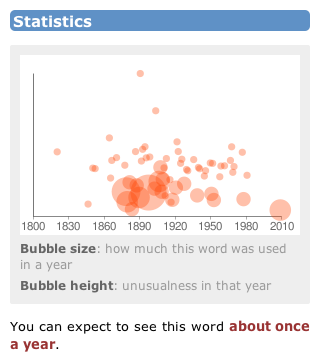
  A Statistics graph, when available, displays the frequency a word
  has been used each year dating back to 1800, with an indication of
  how unusual its usage was for that year. Wordnik appears to be doing
  the calculating itself, but it's unclear where the source data is
  coming from.

<http://www.tidbits.com/resources/2009-06/wordnik_stats.png>

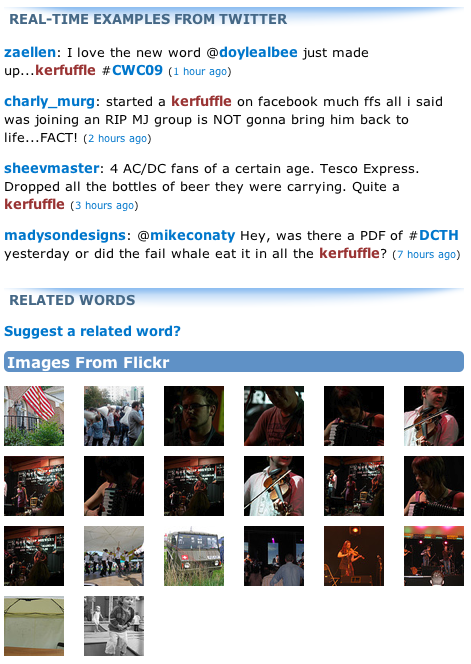
  For a more modern take, Wordnik grabs real-time examples of the word
  from Twitter, as well as images from Flickr that contain the word as
  a tag. The site also tells you how many times a word has been looked
  up, which is a neat indication of which words people are using or
  exploring. And, no doubt because it's possible, some words include
  anagrams and their point values in Scrabble.

<http://www.tidbits.com/resources/2009-06/wordnik_twitter.png>

  Although Wordnik claims a database of 1.7 million words, many words
  are bound to not appear (or are not recognized as real words).
  Instead of putting up a generic "word not found" error page, Wordnik
  uses its tools to locate instances of the word online. Even if you
  can't suss out the precise definition, the additional context can be
  a ginormous help in determining its meaning. This approach can also
  apply to people: "jeff carlson" displays recent appearances of my
  name in Twitter plus two photos from Flickr.

<http://www.wordnik.com/words/suss>
<http://www.wordnik.com/words/ginormous>
<http://www.wordnik.com/words/jeff%20carlson>

  You also have to admire a service that openly discloses its plans
  for world domination in its FAQ: "We figure that once we have at
  least some information for every word in English, updated in real
  time, world domination will just fall in our laps." Somewhat oddly
  in light of their baldly stated plans for world domination, the
  Wordnik folks don't currently have specific plans to add languages
  other than English, though their PR representative said they were
  "excited to explore those options."

<http://www.wordnik.com/pages/faq>

  Wordnik proves you don't have to be a lexicographer or vocabulist to
  appreciate and play with language. But be careful, because you could
  find yourself happily absorbed in the site for hours.

<http://www.wordnik.com/words/lexicographer>
<http://www.wordnik.com/words/vocabulist>


Path Finder 5 Beats the Finder's Pants Off
------------------------------------------
  by Matt Neuburg <[email protected]>
  article link: <http://db.tidbits.com/article/10380>

  The Mac OS X Finder is a sitting duck for criticism, so I won't bore
  you with an attempt to list its faults; indeed, after so many years,
  I'm usually numb to it, like a bad smell that one stops noticing.
  But the other day, when I was swearing with particular vehemence at
  the Finder - was it because the Get Info size of a certain folder
  was mysteriously much smaller than the combined Get Info sizes of
  its contents, or because the Open With contextual menu for a file
  was failing to display the application I wanted to open it with? - I
  threw in the towel and decided to give Cocoatech's Path Finder
  another try.

<http://www.cocoatech.com/>

  This has proved to be one of my more fortunate moves. I had looked
  at Path Finder 4 several years ago; it was good, but I found it
  rather flaky, and it had some deplorable habits (such as silently
  installing things I didn't want installed - see "Are Input Managers
  the Work of the Devil?," 2006-02-20). Nonetheless, my earlier review
  ("Path Finder 4 Still Shows the Way," 2006-02-06) is largely
  positive; and my current reaction is much more strongly positive.
  I've been using Path Finder 5.1.3 for several weeks now, and, quite
  without regard to the relative merits of the Finder and Path Finder,
  I'm astonished at how much more fluid and productive I am with Path
  Finder. To be sure, first I had to resign myself to the fact that
  Path Finder 5 is Leopard-only; but suddenly (nudged along by a
  hardware disaster that I won't go into here) so am I. The program
  has behaved completely reliably, and I also find the new Path
  Finder's design more rational and supple than ever before.

<http://db.tidbits.com/article/8430>
<http://db.tidbits.com/article/8411>

  If you, too, are weary of the Mac OS X Finder's frustrating
  shortcomings, its lack of intelligence, nimbleness, and
  complaisance, then you owe it to yourself to give Path Finder 5 a
  try. Sure, you can go on holding your breath waiting to see whether
  Snow Leopard can work miracles (see "Apple Previews Snow Leopard for
  September Release," 2009-06-08), if that's your idea of a good time;
  but most of us need to get stuff done _now_. With Cocoatech's Path
  Finder, we can.

<http://db.tidbits.com/article/10335>


**One Window To Rule Them All** -- You know how, in the Finder, you
  are constantly opening new windows? It's partly because you need to
  work in a new place but you want to be able to get back later to the
  old place. Also, to copy or move a file from folder A to folder B,
  you usually prefer to see both places simultaneously and then, when
  they are positioned just so, perform the drag. Similarly, to Get
  Info about a Finder item, you open a secondary Info window. The
  first thing to get used to with Path Finder is that although you
  _can_ make more than one window, you rarely need to; the optimal use
  pattern is a single great big window (on, optimally, your great big
  monitor).

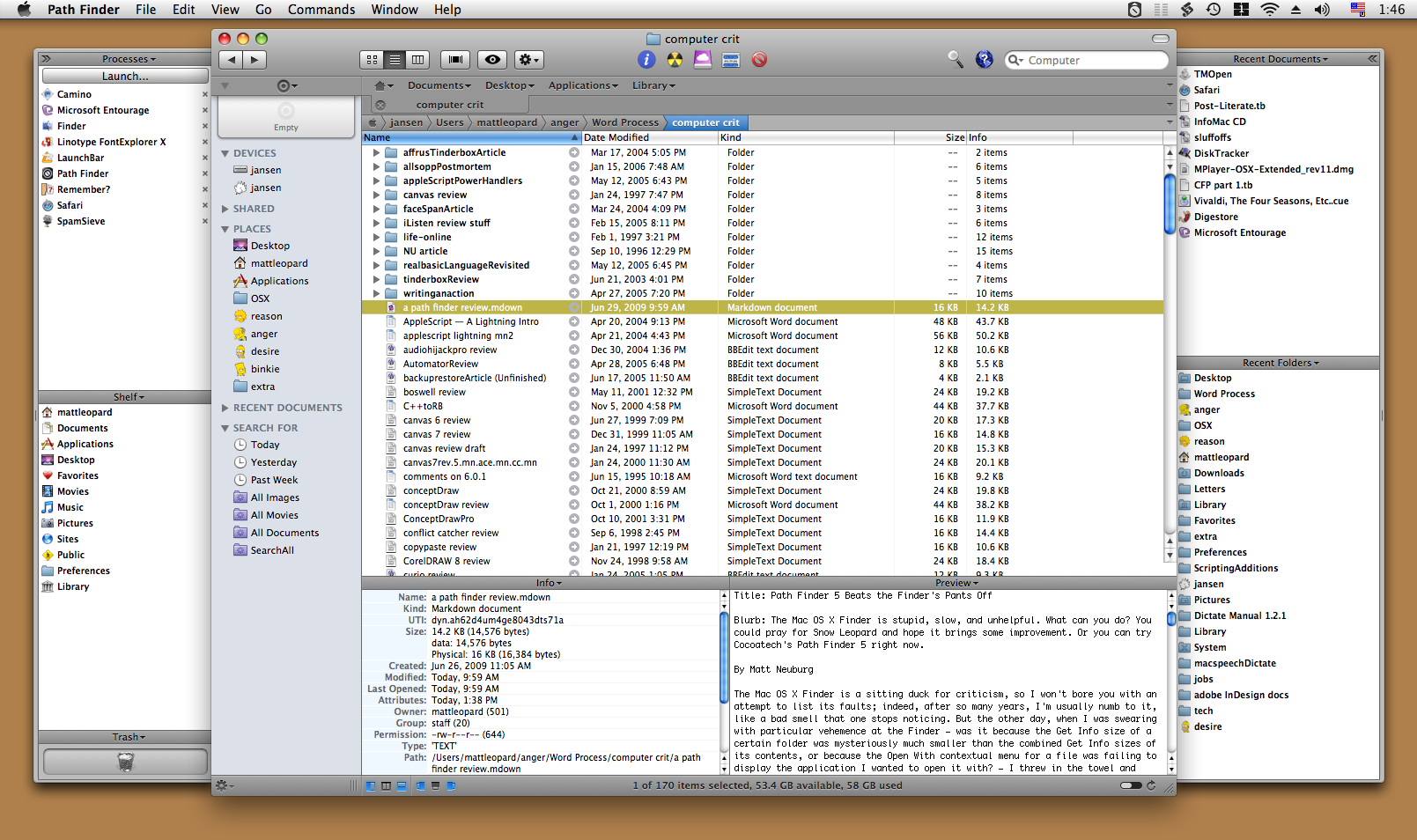
  One reason for this is Path Finder's clever window layout. It looks
  somewhat like a Finder window, with a list of files and folders in
  the middle, a toolbar at the top, and something reminiscent of the
  Finder's sidebar off to the left. But then the window optionally
  spreads its wings like a bird and reveals two drawers, one on each
  side, each containing two panes with extra functionality. Plus, the
  main part of the window optionally splits, with two panes of further
  functionality in the lower part.

<http://www.tidbits.com/resources/2009-06/pathfinder.png>

  What goes into each pane is up to you, and you can change it at any
  time. Path Finder's genius here is the inclusion of a bunch of what
  it calls "modules." Each module can be a separate window, but it can
  also be slotted into a drawer or main window pane. Thus, for
  example, at the moment I have something close to the default layout,
  with the Processes and Shelf modules on the left, Recent Documents
  and Recent Folders on the right, and Info and Preview at the bottom.
  But the header of each pane is a pop-up menu listing all the
  modules, so I can just choose, say, Attributes from the Recent
  Folders pane header, and now that pane shows Attributes instead of
  Recent Folders. Or, a pane can display the contents of a particular
  folder.

  Thus, the whole arrangement is completely flexible. You don't need
  to have all these panes showing at once, or ever; you might be
  content with just one drawer and its two panes, hiding the other
  drawer and lower panes more or less permanently. There's little
  penalty for doing so, because it's so easy to change what module or
  folder each visible pane displays (and if you really had to, you
  could open a module as a separate window momentarily, remember).
  There are as many Path Finder window layouts as there are users, who
  seem to take a peculiar pleasure in posting screen shots at the
  Cocoatech forum.

<http://forum.cocoatech.com/>


**Jump and Drag** -- Meanwhile, the main part of the window, the list
  of files and folders, can of course be viewed as Icons, List, or
  Columns; if Smart Sorting is switched on, these are clumped
  alphabetically into applications, packages, folders, and files, plus
  you can display invisibles. List view offers columns the Finder
  never dreamed of, such as Extension and Permissions (and all views
  let you sort by such information), and the various views have a
  wonderful array of options; aliases can be italic (does that bring
  back any memories?), and invisibles, if shown, can be dimmed. One of
  my favorite touches is that in Column view, you are not
  automatically "targeting" the last column: for example, when you
  choose Edit > Select All, you select everything in the column you
  are actually working in - unlike the Finder, where what column
  Select All selects depends, maddeningly, on whether you started with
  a file or a folder.

  Amazingly great navigation tools let you nip around your disk and
  folder hierarchy. Above, there's a customizable toolbar of folder
  names, where each name summons a hierarchical folder-and-file menu;
  plus there's a Path Navigator bar that shows where you are, and lets
  you easily jump up _and back down_ the hierarchy. To the left is the
  sidebar, customizable much like the Finder's sidebar, except that
  you can set up multiple sidebars and switch amongst them. (The Shelf
  module is similar.)

  The Back and Forward buttons behave like Safari's, displaying a
  pop-down list of places you can go back or forward to. Again like
  Safari, a folder can be expressed as a tab, so if you're jumping
  frequently amongst certain folders you can keep them all open as
  tabs at the top of the main window. And, as icing on the cake, the
  main window can be split horizontally, so that it lists the contents
  of two different folders at once.

  If you can see a folder's name _anywhere_ in the interface, you can
  drag Finder items onto it as a way of moving or copying them. A tab,
  an item along the Path Navigator, a Recent Folder listing, it
  doesn't matter: if you can see its name or icon, it's a drag target.
  And if all of that isn't enough for you to be able to move a file
  from one place to another with exquisite ease and without opening a
  second window in advance, there is also the marvelous Drop Stack,
  where you can just drop things you intend to move, accumulating them
  to be dragged out later when you're viewing the target folder.


**Ways of Seeing, Ways of Knowing** -- Path Finder tells and shows me
  things the Finder refuses to reveal. Being a power-user type of guy,
  I could find out such things by switching to some other application,
  such as the Terminal; but with Path Finder, I don't have to.

  For example, a .cue file is a text file that accompanies a sound
  file to describe its tracks. Because my .cue files are set to open
  with a sound-file player such as Cog, the Finder's Preview and Quick
  Look display of such a file is just an icon. Path Finder's Preview
  module, however, happily displays the text. (For files that are not
  text, the Hex module still permits what can be a useful peek at the
  contents.)

<http://cogx.org/>

  There is lots to know about a file that the Finder's Get Info won't
  tell you. Path Finder's Info module displays a file's four-letter
  type and creator codes, and its wonderful Spotlight Metadata module
  tells you its creation and modification dates _including seconds_
  (something I often need to know), as well as its uniform type
  identifiers and (for an application) its bundle identifier. Plus you
  can see its ownership and permissions properly, as the Terminal
  would display them.

  If you do need to switch to the Terminal, you can do it inside Path
  Finder. Path Finder's Terminal module starts out with the directory
  you're currently viewing as its working directory. But don't switch
  to the Terminal just because you need to use Subversion (svn),
  because Path Finder also has a Subversion module, so you can commit
  a file or update a working copy with the mere click of a button.

  Path Finder also provides many built-in "reports" that it will
  gladly construct for you as text documents (displaying them in its
  own built-in text editor). The Selected Items report emits the Info
  and Spotlight Metadata for whatever is currently selected. You can
  have a directory listing; Path Finder doesn't know whether you want
  file names, Unix pathnames, or file URLs, so guess what? It gives
  you all three! You can get a list of current processes and lots of
  information about them, learn what's on the various system
  pasteboards, and much more, including some real developer functions
  like sampling a beachballed application or getting a class dump.

  The Finder's inability to find things is a long-standing joke; Path
  Finder gives you _three_ ways of finding. The simplest and most
  brilliant is filtering: you type into the search field and the list
  of files in the current folder is reduced to those whose names (or
  extensions or kind) contain the string you're typing. This is
  absolutely splendid, because often this is exactly the kind of
  finding I want to do. You can also search manually, similar to
  EasyFind (see "EasyFind 4.0: It's Easy, It Finds, It's Free,"
  2007-10-11); or you can use Spotlight (but the interface to this is
  limited and I don't recommend it; I prefer my own NotLight, or the
  built-in Spotlight interface).

<http://db.tidbits.com/article/9231>
<http://www.tidbits.com/matt/>


**Utility Knife, Swiss Army Knife** -- Path Finder also provides such
  miscellaneous Finder-based features as burning a CD, connecting to
  an iDisk or other server, or taking a screenshot. Often it does
  these things better, of course; for instance, you can compress a
  file in various formats, including StuffIt. Some of these features
  turn out to be quite tricky to implement; in a recent interview,
  developer Steve Gehrman reveals that he really had to dig in order
  to make Connect to Server list SMB shares. But the result is that if
  Path Finder has a secret goal of letting you avoid use of the Finder
  entirely if you really want to, it has succeeded admirably.

<http://theappleblog.com/2009/06/25/interview-steve-gehrman-of-path-findercocoatech/>

  Path Finder does too many miscellaneous additional cool things to
  list, but here are some of my favorites. There are dialogs in which
  you can rename a file, select files, or alter selected files'
  extensions. You can make a symbolic link (which sometimes works
  better than an alias). The Open With menu lists not only
  applications that claim this file's type but also all running
  applications (brilliant!), plus all applications in the Applications
  folder. You can copy the selection's pathname to the clipboard in
  any of a number of different formats, a huge timesaver. You can
  email the selected file (perhaps compressing first). You can create
  or edit a disk image. You can (careful, now!) launch an application
  as root. Oh, and I'm not even going to try to describe the wonderful
  iTunes Browser module; you have to see it for yourself to believe
  it.


**What's Not Up? Docs!** Path Finder has a lot of features, and I
  haven't mentioned them all. This is in part because Path Finder has
  a _lot_ of features, and in part because, to be quite honest, I
  don't _know_ what all of them are. And _that_ is because (indulge
  me, please, while I relieve my frustration by ranting) Path Finder
  has _no gosh-darned documentation_! Oh, yes, something does appear
  when you choose Path Finder Help from its Help menu, but it's
  utterly useless: a page of press-release advertising copy and a
  couple of pages mostly boasting of differences between this version
  and the previous one.

  To cite just one example of the online help's breathless,
  meaningless prose: "Path Finder 3 introduced the Shelf, a sidebar in
  the Path Finder window that provided fast access to directories,
  applications, or files in a conveniently located pane. The Shelf
  works in a similar way to the Finder's Places feature, but with a
  twist. In Path Finder 5 we've expanded this concept immensely with
  the introduction of Zones." Notice all the advertising:
  "conveniently," "fast", "expanded immensely." But there is no
  explanation of what the "twist" is or what a "Zone" is supposed to
  be.

  Online help, let me remind you (and by "you" I mean Cocoatech),
  should not advertise a product - otiose in any case, since I'm
  already using it; it should tell you _how_ to use the program and
  _what_ the program does. So most of what I have said here about Path
  Finder is based on a combination of experimentation and guesswork;
  I'm sure it does lots of things I haven't discovered, and may
  _never_ discover thanks to the lack of documentation.


**Conclusion** -- Path Finder is an amazing program, clear evidence of
  the persistence and dedication of a single programmer. Sure, I could
  nitpick about things I think could use improvement - why don't all
  dates include seconds, why can't I eliminate relative dates
  throughout, why can't recent applications be associated with their
  own recent documents (as with LaunchBar; see "Curing Your LaunchBar
  Addiction," 2007-08-06), why isn't the selection restored when you
  return to a previous folder - but these are mere quibbles. When you
  consider how useful Path Finder is, how it not only improves upon
  the Finder but embraces many other third-party utilities, all in one
  convenient place, the price of $39.95 ($19.95 to upgrade from Path
  Finder 4) seems eminently fair. Download the 30-day full-featured
  trial and see for yourself. Path Finder requires Mac OS X 10.5
  Leopard or higher, and is said to work on Snow Leopard as well.

<http://db.tidbits.com/article/9094>
<http://www.cocoatech.com/download>


Google Chrome OS to Power Netbooks in 2010
------------------------------------------
  by Adam C. Engst <[email protected]>, Glenn Fleishman <[email protected]>
  article link: <http://db.tidbits.com/article/10400>

  Is it 1994 again? Google's announcement of Google Chrome OS, a
  stripped-down, open-source operating system optimized for
  inexpensive netbooks, reminds those of us with medium-length
  memories of the epic Netscape/Microsoft battle of the mid-1990s, and
  it raises questions about Google and Apple competing in the future.
  Chrome OS will reportedly become available in the second half of
  2010 and is being announced now because Google is starting to have
  discussions with partners and will soon be working with the open
  source community.

<http://googleblog.blogspot.com/2009/07/introducing-google-chrome-os.html>
<http://news.cnet.com/2100-1023-218169.html>


**Netscape and Microsoft** -- Microsoft's entry into Internet
  applications and businesses started in 1995 in response to
  Netscape's success in creating a widely used Web browser (Netscape
  Navigator) and a burgeoning ecosystem around it. At the time, it
  seemed possible that Netscape could grow large and sophisticated
  enough to extend the browser into a full operating system,
  challenging both the nascent Windows 95 and well-established
  Macintosh System 7.5. (We even joked in a 1996 April Fools issue
  about Swedish students developing a Netscape plug-in that provided a
  full Unix implementation within the Netscape Navigator browser
  window (see "WebCommando Moves In," 1996-04-01). Like many of our
  April Fools articles, this has now come true, in the form of JPC, an
  x86 emulator written in Java.)

<http://db.tidbits.com/article/1072>
<http://www-jpc.physics.ox.ac.uk/home_home.html>

  Numerous smart people at the time said that if Netscape could just
  add print drivers and a way to boot into the browser, a thin OS
  could meet the needs of a lot of people. We've often contended - and
  some research shows - that most people use a computer largely for
  email, Web browsing, and video streaming.

  In retrospect, there were several problems. Netscape had hardly any
  revenue and massive losses on the books. The company wasn't able to
  sustain its efforts against Microsoft's might - the details of which
  turned into many lawsuits, appeals, and settlements - and eventually
  became a footnote in history.

  More important, the local area network and Internet infrastructure
  weren't sufficiently complete in the late 1990s for a netbook-like
  device running a thin OS to compete with even a modestly configured
  computer of the time. Dial-up connections didn't provide sufficient
  bandwidth, Web applications were slow and clumsy, Wi-Fi didn't yet
  exist, and people didn't yet have the experience of running
  applications via a Web browser.


**Fast Forward to Google Today** -- Although Netscape is no more, the
  world has changed. High-speed Internet access is commonplace in the
  United States and even more so in other countries. Indoor Wi-Fi,
  Wi-Fi hotspots, and 3G cell data service are widespread, if not
  quite ubiquitous, eliminating the need for any cables to connect.
  And Web applications are an everyday experience for a vast number of
  people. But the main thing that's changed is the meteoric rise of
  Google.

  Google doesn't suffer the financial or market disadvantages that
  Netscape did. The company has vast revenue and huge net earnings. It
  has dominated the paid search market, but also has significant
  entries in email hosting, Web applications, and a host of smaller
  businesses. It even developed its own Web browser, Chrome, to free
  it from reliance on browsers from companies that might not be
  friendly to Google forever. Helpfully, Google's Web applications are
  based on open standards and don't require Chrome at all, the exact
  opposite of Microsoft's efforts long ago to push the proprietary
  ActiveX in Internet Explorer for Web-based applications.

<http://en.wikipedia.org/wiki/Google_chrome>

  Google also has the advantage of today's modern Linux "platform," a
  combination of free software, open-source software, and variously
  licensed other software on top of a robust kernel. The company also
  already has mobile- and desktop-tuned versions of its various Web
  applications, like Gmail, Google Docs, and Google Calendar. (Reports
  that say Google is building its operating system from scratch are
  overblown; the company has an enormous foundation to build on.)

  Here's the thing - plenty of people already use netbooks to access
  Google Web apps in lieu of traditional desktop software. A netbook
  with a good browser and a robust network connection runs Web apps
  faster than native programs. Chrome, Safari 4, Internet Explorer 8,
  and Firefox 3.5 have all gone to great efforts to improve JavaScript
  performance, because it tends to be the bottleneck for Web apps.


**What about Microsoft?** In 2008, netbook sales passed 10 million
  units. But what are those netbooks also running? Mostly Windows.
  Microsoft's role in the netbook explosion has been continuing to
  sell Windows XP. In its latest (and almost certainly last) version,
  Service Pack 3, Windows XP works reasonably well, although it's
  still a security nightmare.

  (Based on the success of netbooks, Windows 7 will have some kind of
  netbook edition, although details on pricing and issues like the
  maximum screen size to be eligible to run the netbook edition - yes,
  Microsoft is that picky - are apparently still being resolved.)

  While some netbooks are sold with Linux, no company offers a Linux
  experience that's as good as Windows XP, if you exclude the hassle
  of keeping Windows XP secure and functioning. Whatever your opinion
  of Windows, it is a complete desktop operating system, and most of
  the Linux graphical interfaces aren't suitable for a mass audience.

  That's where Google sees an opening. A $300 netbook running Windows
  XP still needs anti-virus, firewall, anti-spyware, and other
  software to keep it secure. All that background software slows down
  an already deliberately low-powered netbook, and generally involves
  yearly subscription costs to keep it all up to date.

  With Chrome OS, Google can provide a Linux-based alternative to
  Windows XP on netbooks, focusing on making the underlying security
  architecture of the operating system robust enough to eliminate the
  problems with viruses and other malware. And, undoubtedly, much of
  the win comes from having the majority of the user experience
  mediated through the Web - the interface will be essentially a Web
  browser. In the process, Google will crib from all the lessons
  learned from other operating systems, and its own work as part of
  the Open Handset Alliance on Android, the mobile OS it was
  instrumental in launching.

<http://www.openhandsetalliance.com/>

  Google said that Android won't be affected by Chrome OS. Android is
  tailored for devices that have small screens, a variety of input
  mechanisms, extreme battery requirements, and processors that are
  even lower-powered than those in netbooks. It's possible that
  Android and Chrome OS could at some point converge into a single
  platform, but we can see the advantages of developing a netbook
  operating system separately from a mobile one.

<http://en.wikipedia.org/wiki/Android_%28operating_system%29>

  If Chrome OS is successful, a more likely direction would be toward
  larger-screen laptops and desktops. After all, the most common
  computer activities - Web browsing, email, word processing,
  spreadsheets, simple databases, managing photos, streaming video -
  can all be done in a Web application these days.

  The poetic justice in all this? Netscape invented JavaScript and
  Microsoft developed the JavaScript XML call that allows AJAX to work
  along with Dynamic HTML, which enables Web pages to have real
  interactivity. Almost by accident, the two firms made Google's Web
  apps possible. The step into an operating system is thus quite a
  small one, though it's one that Microsoft may one day regret having
  helped Google achieve.

<http://www.alexhopmann.com/xmlhttp.htm>
<http://en.wikipedia.org/wiki/Dynamic_HTML>


**Google versus Apple** -- Enough about Google and Microsoft - how
  might Chrome OS impact Apple? Apple has been talking about the
  netbook space for a few months, and rumors have been flying that the
  company may produce a tablet Mac or a large-screen iPod touch to
  compete with the tremendously limited netbooks currently for sale.

  With Chrome OS, Google and Apple may finally end up competing
  head-to-head, though in an unusual way. Apple ties OS X to Macintosh
  and iPhone hardware, which helps somewhat with security and a lot
  with usability. But the major change that Apple made with the iPhone
  was to allow third-party applications to be sold for the iPhone
  solely through the App Store. This has created a burgeoning
  marketplace, and despite Apple's awkward rejection policies, one
  that for the most part works fairly well.

  The success of the App Store is why we suspect that it's more likely
  Apple's netbook-killer will be in the iPod touch line rather than
  the MacBook line. Although Mac OS X and the Macintosh won't be going
  away any time soon, it seems as though Apple is focusing more
  attention on the more-bounded iPhone OS, where the company can earn
  money on hardware _and_ by taking a cut of all software sales and
  in-application revenue.

  In contrast, Google is making Chrome OS both open source and free to
  netbook makers. Netbook makers without any relationship with Google
  could even take the open-source code and mix up custom versions.
  Google will make its money through display advertising and hosted
  services, and could cut an ad-split deal with netbook makers as an
  incentive. Google has such deals with Apple, Mozilla, and others for
  the ad views on browser search results already. It's thus in
  Google's interest to distribute Chrome OS as widely as possible.

  The final irony? When Apple initially suggested that Web apps were
  the future for the iPhone, Mac developers revolted, because they
  were coming from the desktop application mindset, where you sell and
  support standalone software, and because Apple's own apps enjoyed
  features that Web apps couldn't provide. When Google suggests that
  Web apps are the future for netbooks, Web developers are rejoicing,
  because they understand the Web app mindset already and can look
  forward to being first-class citizens alongside Google.


TidBITS Watchlist: Notable Software Updates for 13-Jul-09
---------------------------------------------------------
  by Doug McLean <[email protected]>
  article link: <http://db.tidbits.com/article/10402>

  Safari 4.0.2 from Apple is a minor security and stability update to
  the browser. The update enhances the Nitro JavaScript engine's
  stability, and addresses basic cross-site scripting vulnerabilities
  that could stem from visiting maliciously crafted Web sites and
  result in application crashes, arbitrary code execution, or
  cross-site scripting attacks. Apple recommends the update for all
  Safari users. The update can be downloaded via Software Update or
  from Apple's Safari Download page. (Free, 40.2 MB)

<http://www.apple.com/safari/download/>

  Default Folder X 4.2.1 from St. Clair Software is a minor update to
  the Open and Save dialog-enhancement utility. Changes include new
  pop-up file previews, improved support for the OpenMeta tagging
  standard, and support for Path Finder. Also, the Rebound feature has
  been refreshed, and a handful of unspecified compatibility issues
  have been addressed. ($34.95 new, free update, 11.1 MB)

<http://www.stclairsoft.com/DefaultFolderX/>

  VLC 1.0 from VideoLAN is the first official release of the
  open-source multimedia framework and player that offers wide support
  for various video types. The player also features live recording
  capabilities, frame by frame support, and full-screen video scaling.
  A lengthy list of features is available on VideoLAN's Web site.
  (Free, 19 MB)

<http://www.videolan.org/vlc/>
<http://www.videolan.org/vlc/features.html>

  Electric Sheep 2.7 from Scott Draves is the latest version of the
  dazzling community-based screensaver. The update brings an enhanced
  client, higher resolution, an improved codec, new frame
  interpolation modes that can adjust playback speeds, and a new
  server with greater capacity. To learn more about Electric Sheep,
  see "Top 10 Screensavers for the 21st Century," 2009-02-23. (Free,
  4.9 MB)

<http://community.sheepserver.net/upgrade>
<http://db.tidbits.com/article/9845>


ExtraBITS for 13-Jul-09
-----------------------
  by TidBITS Staff <[email protected]>
  article link: <http://db.tidbits.com/article/10407>

**Craig Hockenberry: What's Still Wrong with the App Store** -- As the
  anniversary of the App Store approaches, outspoken iPhone developer
  Craig Hockenberry touches on the things Apple has improved with the
  App Store in the last year and then goes in depth on the significant
  issues that he and other iPhone developers still face. (Posted
  2009-07-13)

<http://furbo.org/2009/07/10/year-two/>


**Quicken For Mac Delayed Until 2010** -- Intuit has announced that
  the release date for the Mac-compatible version of their flagship
  product, Quicken Financial Life, has been pushed back to February
  2010. The company had originally announced plans for an updated Mac
  version at Macworld Expo in January 2008. While customers are bound
  to be disappointed by the lengthy wait, Intuit says the delay
  results from efforts to better satisfy Mac users after receiving
  substantial feedback from beta testing. (Posted 2009-07-10)

<http://blog.quicken.intuit.com/2009/07/09/quicken-for-mac-coming-in-february-2010/>


**Joe's Top Password Tips** -- In this three-part article in Macworld,
  Joe Kissell shares some valuable password advice: how to create
  stronger passwords, how to manage passwords, and how to remember
  passwords (with or without the help of software). (Posted
  2009-07-08)

<http://www.macworld.com/article/141561/2009/07/passwordtips.html>


**Going Green(er) with the iPhone** -- When TidBITS editor Rich Mogull
  convinced his old college professor - now a sustainability
  researcher - to switch to the iPhone, he never realized he was
  helping save the environment. Learn how to "reduce and reuse" the
  iPhone way. (Posted 2009-07-08)

<http://carbon-pros.com/blog1/2009/07/do_more_with_less.html>


**Happy Birthday, App Store!** -- It's been just one year since Apple
  launched the phenomenally successful iTunes App Store, and the
  company is celebrating. Within the iTunes Store, Apple has created a
  page highlighting some of the company's favorite apps, choosing from
  the over-50,000 apps currently available. (Link opens in iTunes.)
  (Posted 2009-07-07)

<http://itunes.apple.com/WebObjects/MZStore.woa/wa/viewCustomPage?name=pageAppStoreTurns1>


**Google Apps Finally Leave Beta** -- Google has announced that the
  Google Apps suite - Gmail, Google Calendar, and Google Docs - will
  finally lose the "beta" designation that had ceased to mean, well,
  much of anything. (Gmail alone was in beta for 5 years.) Just as
  Google's "beta" tag had become meaningless, coming out of beta is
  equally devoid of meaning, with the change happening because Google
  came to appreciate that large enterprises are uninterested in using
  software that sounds as though it's still being tested. Users fond
  of Gmail's beta logo can re-enable it via Gmail Labs. (Posted
  2009-07-07)

<http://googleblog.blogspot.com/2009/07/google-apps-is-out-of-beta-yes-really.html>


**Macs Free from China's Web Filtering** -- Macworld is reporting on
  China's recently passed law requiring all PCs sold in the country to
  be equipped with the filtering program Green Dam Youth Escort,
  controversial for its capability to block "sensitive political
  material." Yet, for the time being, Macs are exempt from the Web
  filtering as there is no Mac version of the software - an unusual
  advantage to being a minority platform. (Posted 2009-07-06)

<http://www.macworld.com/article/141518/2009/07/filteringsoftware.html>


Hot Topics in TidBITS Talk for 13-Jul-09
----------------------------------------
  by Jeff Carlson <[email protected]>
  article link: <http://db.tidbits.com/article/10406>

**New in-article TidBITS commenting system** -- TidBITS Talk readers
  continue to engage an active discussion of the new commenting
  system, and how it affects TidBITS Talk. (41 messages)

<http://emperor.tidbits.com/TidBITS/Talk/2745>


**Gmail Inbox glitch** -- A reader's Gmail account is delivering some
  messages to All Mail but not the Inbox. (2 messages)

<http://emperor.tidbits.com/TidBITS/Talk/2749>


**Exporting an SMS message to a text file from iPhone** -- The iPhone
  OS 3.0 allows copy and paste of SMS messages, but The Missing Sync
  for iPhone can also store SMS messages on the Mac. (8 messages)

<http://emperor.tidbits.com/TidBITS/Talk/2750>


**Mac OS X shutdown vs sleep mode - Really Power and Surge** -- You've
  heard of a lightning strike "frying" computer equipment? Here's how
  it happens, and what factors help prevent it. (3 messages)

<http://emperor.tidbits.com/TidBITS/Talk/2751>


**Unwanted keyboard shortcuts** -- How can you disable a built-in
  keyboard shortcut like F12 for activating Dashboard? (15 messages)

<http://emperor.tidbits.com/TidBITS/Talk/2753>


**Looking for SkypePhone recommendations** -- A reader is looking for
  a physical phone to use with Skype. (20 messages)

<http://emperor.tidbits.com/TidBITS/Talk/2754>


**Social networks outside the USA** -- Are Twitter and Facebook as
  popular internationally, or do other social networking services hold
  sway in other countries? (14 messages)

<http://emperor.tidbits.com/TidBITS/Talk/2755>


**Windows on Mac** -- With all the versions of Windows XP out there,
  which one should you buy to install on Boot Camp? (2 messages)

<http://emperor.tidbits.com/TidBITS/Talk/2756>


$$

This is TidBITS, a free weekly technology newsletter providing timely
news, insightful analysis, and in-depth reviews to the Macintosh and
Internet communities. Feel free to forward to friends; better still,
please ask them to subscribe!

Non-profit, non-commercial publications and Web sites may reprint or
link to articles if full credit is given. Others please contact us. We
do not guarantee accuracy of articles. Caveat lector. Publication,
product, and company names may be registered trademarks of their
companies. TidBITS ISSN 1090-7017.

Copyright 2009 TidBITS: Reuse governed by Creative Commons license.

Contact us at:    <[email protected]>
TidBITS Web site: <http://www.tidbits.com/>
License terms:    <http://www.tidbits.com/terms/>
Full text search: <http://www.tidbits.com/search/>
Subscriptions:    <http://www.tidbits.com/about/list.html>
Account help:     <http://www.tidbits.com/about/account-help.html>


--
If you want to unsubscribe or change your address, use this link
http://emperor.tidbits.com/webx?unsub@@.3c557dc4!u=306a67f9