TidBITS#985/06-Jul-09
=====================
  Issue link: <http://db.tidbits.com/issue/985>
  We have three main articles for you this week. First, Adam peers at
  the new Firefox 3.5 to see how its new features stack up. Second,
  Jeff Carlson shares the step-by-step process of how he replaced the
  broken screen of his wife's iPhone 3G. And third, Adam introduces
  the new TidBITS Commenting System, which makes it easy for readers
  to add comments directly to our articles. We also cover Steve Jobs's
  return to work and an important update for a number of Garmin GPS
  models. Notable software releases this week include PasswordWallet
  4.4.7, Cocktail 4.4, PDFpen 4.1.4, iPhoto 8.0.4 Update, Nisus Writer
  Pro 1.3, MacSpeech Dictate 1.5.2, Typinator 3.5, and MacBook Air SMC
  Firmware Update 1.2.

Articles
    Take Control News: 50%-Off Sale Ending 07-Jul-09
    Apple: Jobs Back on the Job
    Garmin Issues Software Update for Widespread Problem
    Introducing the TidBITS Commenting System
    Firefox 3.5 Improves Performance, Privacy, and Standards Support
    How to Replace a Cracked iPhone 3G Screen
    TidBITS Watchlist: Notable Software Updates for 06-Jul-09
    ExtraBITS for 06-Jul-09
    Hot Topics in TidBITS Talk for 06-Jul-09


------------ This issue of TidBITS sponsored in part by: --------------

* READERS LIKE YOU! Support TidBITS with a contribution today!
  <http://www.tidbits.com/about/support/contributors.html>
  Special thanks this week to EMC Retrospect, Howard Heaton,
  Nello Lucchesi, and Carl R. Mockler for their generous support!

* Fetch Softworks: Fetch 5.5 makes FTP and SFTP easy!
  Upload, download, mirror, and manage your Web site. Dozens of
  new features to make file transfers easier and more reliable.
  Get your free trial version at <http://fetchsoftworks.com/>!

* WebCrossing Neighbors Creates Private Social Networks
  Create a complete social network with your company or group's
  own look. Scalable, extensible and extremely customizable.
  Take a guided tour today <http://www.webcrossing.com/tour>

* THE MISSING SYNC: If you have a smartphone, we can sync it!
  Sync your address book, calendar, notes, music, pictures, and
  more between your BlackBerry, Windows Mobile, Symbian OS or
  Palm OS phone and your Mac. <http://www.markspace.com/bits>

* VMware Fusion. The most seamless way to run Windows on
  your Mac. Backed by nearly a decade of proven virtualization
  technology. Try VMware Fusion today for only $79.99.
  Visit: <http://www.tidbits.com/about/support/vmware-fusion.html>

* Microsoft's MacBU: Supporting Mac users with Office 2008.
  Is your Office up-to-date? Make sure you're running the latest
  versions of Word, Excel, PowerPoint, and Entourage by choosing
  Check for Updates from the Help menu of any Office application!

* It's time to speak up with MacSpeech Dictate! Get the all-new
  MacSpeech Dictate with spelling and phrase training. Speech
  Recognition so good, the only thing it can't do is speak for you.
  Learn more at <http://tidbits.com/about/support/macspeech.html>

---------- Help support TidBITS by supporting our sponsors ------------


Take Control News: 50%-Off Sale Ending 07-Jul-09
------------------------------------------------
  by Adam C. Engst <[email protected]>
  article link: <http://db.tidbits.com/article/10399>

  It's not uncommon for people to tell us that they've fallen slightly
  behind on reading their TidBITS issues, so we wanted to remind
  anyone who missed last week's issue that our 50-percent-off sale on
  all Take Control ebooks and Macworld Superguides continues through
  the end of Tuesday, 07-Jul-09. For more information, see "Take
  Control Sale: 50% Off All Ebooks" (2009-06-29).

<http://www.takecontrolbooks.com/catalog-alpha?cp=CPN90629J4TH&pt=TB985>
<http://db.tidbits.com/article/10382>


Apple: Jobs Back on the Job
---------------------------
  by Adam C. Engst <[email protected]>
  article link: <http://db.tidbits.com/article/10387>

  Apple has informed a number of press outlets that CEO Steve Jobs has
  returned to work on schedule after his six month medical leave of
  absence (see "Steve Jobs Takes Medical Leave Until June,"
  2009-01-14). According to spokesperson Katie Cotton, for the time
  being he will work several days a week at Apple's Cupertino campus,
  and from his home office the remaining days. Apple's COO Tim Cook
  has been handling day-to-day operations in Jobs's absence.

<http://www.macworld.com/article/141443/2009/06/job_returns.html>
<http://db.tidbits.com/article/10004>

  Jobs's medical leave was, according to him, necessary to deal with
  an unspecified hormone imbalance that left him physically gaunt.
  More recently, it has come to light that he received a liver
  transplant at the Methodist University Hospital Transplant Institute
  of Memphis, Tennessee. With Jobs's permission, the hospital
  announced that the procedure had taken place, though they did not
  specify when it occurred.

<http://methodisthealth.org/methodist/About+Us/Newsroom/News/Steve+Jobs+Receives+Liver+Transplant>

  We at TidBITS, though happy to see Jobs make a timely and hopefully
  healthy return to Apple, remain distressed at the incessant
  nattering over his health. While there's no question that Jobs
  brings vision and marketing savvy to Apple, the company's
  performance over the last six months shows that he is by no means
  indispensable. In that time, Apple posted the company's best
  non-holiday-quarter revenue and earnings ever, shipped the iPhone
  3GS and iPhone OS 3.0 plus significant updates to the entire Mac
  line, and saw its stock rise from under $80 per share to more than
  $140 per share. Those are not the actions of a company struggling
  with the absence of a charismatic leader.


Garmin Issues Software Update for Widespread Problem
----------------------------------------------------
  by Doug McLean <[email protected]>
  article link: <http://db.tidbits.com/article/10386>

  Garmin, the GPS device giant, has issued a mandatory update targeted
  at correcting a widespread updating bug that renders them either
  useless or entirely inoperable. The bug causes affected GPS units to
  attempt to update their firmware repeatedly, and then either to shut
  down or lose their GPS satellite signal. Affected devices include
  the nuvi 7x5 series, nuvi 800 series, nuvi 8x5 series, zumo 660,
  GPSMAP 620 and GPSMAP 640.

  If you own a Garmin nuvi 7x5 series device that is no longer able to
  receive a GPS satellite signal, you may download the firmware update
  immediately via Garmin's WebUpdater. Owners of other affected Garmin
  devices will be able to access the update in the near future, also
  through the WebUpdater. Registered users will receive notification
  of the availability of these updates via email.

<http://www8.garmin.com/products/webupdater/howtoinstall.jsp>

  On the other hand, if your Garmin nuvi 7x5 series device is no
  longer able to power on, a return authorization is required so you
  can send the unit back to Garmin for repair under warranty. To
  request a return authorization, follow the steps listed on this page
  in Garmin's Knowledge Base.

<http://iqc.garmin.com/eCustomer/KODSelfService/request.do?create=kb:garmin&view()=c%7Bdc1fbbc0-6187-11de-69a8-000000000000%7D>


Introducing the TidBITS Commenting System
-----------------------------------------
  by Adam C. Engst <[email protected]>
  article link: <http://db.tidbits.com/article/10394>

  After weeks of discussion, design, and development, Glenn Fleishman
  and Jeff Carlson and I are pleased to unveil our new TidBITS
  Commenting System (TCS). For many years, we've had the TidBITS Talk
  mailing list for discussions of our articles. We've tried to
  integrate it more tightly with our articles, but it's difficult to
  connect email and a Web-based content management system in a
  reliable and coherent fashion that doesn't require constant
  intervention.

<http://db.tidbits.com/article/10394#comments>

  In the meantime, nearly every other publication and blog has added a
  commenting feature. But commenting systems have suffered their own
  growing pains, caused largely by the need to deal with spambots and
  trolls, and it's become sufficiently onerous to use many commenting
  systems that we no longer bother. (Trolls are people who
  specifically pick fights to make others respond; they often have no
  stake in the opinion they're stating.)

  So we thought about what we wanted in a commenting system, and after
  many discussions and design tests, we've come up with one that we
  quite like. It has worked well in testing and in a quiet rollout
  last week, and we'll see how it scales as more people start using
  it.

  On the TidBITS home page and each of our section pages, each article
  summary now displays the number of comments in the metadata line
  beneath it, and each full article shows the number of comments at
  the top. In either case, clicking the word "Comments" takes you to
  the comments section at the bottom of the article.


**Lightweight, Yet Secure** -- Our first goal with the TCS was that it
  be easy to use. Twitter has been successful largely because it's so
  easy to post tweets. You don't have to worry about writing much or
  formatting your text, and your tweet appears immediately. Since
  we've put untold hours of work into moderating our TidBITS Talk
  discussion list, we wanted a system where posts could appear
  immediately, without any intervention on our part. Moderation was
  good for stopping spam and keeping discussions on track, but forcing
  people to wait hours or days for their posts to appear isn't ideal.

  The problem with immediate posting, of course, is comment spam.
  Spammers have figured out how to write comment bots that do nothing
  but fill up commenting systems with link-filled posts as a way of
  attracting a few clicks and gaming search engine rankings. Most
  comment systems we saw dealt with this by either requiring users to
  type a CAPTCHA for each post or to set up an account before posting.
  CAPTCHAs have their place, as do accounts, but for a quick comment,
  both were more than we wanted to use for the TCS. (We use CAPTCHAs
  if you want to post a tip or send email to a TidBITS author.)

<http://recaptcha.net/captcha.html>

  Instead, the first time you comment on an article by clicking the
  "Add a comment" link, it asks you for your name and your email
  address in addition to your comment. The TCS then generates an email
  message to you, asking you to click a link in the message to post
  your comment on the site. Clicking the link tells us that the email
  address you entered is valid and that it's your address. That gives
  us enough confidence to allow your post to appear on the site. It
  won't stop trolls, of course, but I'll go into more detail on how we
  can deal with that problem shortly.

  Confirming via email for each comment would be tedious, so the TCS
  also sets a cookie in your Web browser when you click that
  confirmation link. Thanks to that cookie, the TCS then knows who you
  are and doesn't require confirmation of any subsequent posts, as
  long as you use the same browser and don't delete your cookies.
  Posting comments becomes even easier, too, because identified users
  don't have to enter their names and email addresses in the Post
  Comment dialog.

  If you post a comment from another computer or another browser, you
  must confirm via email again, but as long as you use the same email
  address, the TCS will know that you're the same person in multiple
  browsers. We have to store your email address in our database for
  this to work, but your address isn't displayed in any way, so
  there's no worry about it being harvested by spam trawlers. For
  information about how we treat private information, see our privacy
  policy.

<http://db.tidbits.com/privacy.html>

  Maintaining this lightweight identity is important because we give
  identified users the ability to edit their own posts. So, let's say
  you submit a comment and notice as soon as it's posted that it has a
  typo in it. Click the Edit button and you can make a change
  instantly and repost your edited comment. The ability to edit your
  own posts lasts for 7 days, after which the TCS locks the posts
  down.

  There's one other neat little trick that Glenn added toward the end.
  What if you enter your name incorrectly, or more or less formally
  than feels appropriate once you see it on the page? Just click your
  name (a subtle yellow highlight appears when you mouse over it) and
  enter a new one. Simple and unobtrusive.


**Threaded Discussions** -- Another of our goals with the TCS was that
  it be threaded, but again in a lightweight way. Some commenting
  systems are entirely flat, which is fine when there are relatively
  few comments per article, and where the comments seldom refer to
  each other. But once there are a lot of comments and they start
  referencing one another (often with manual email-style quoting), it
  gets out of hand. Threaded systems are less common, probably because
  they're harder to write, and they often suffer from design problems
  that make it difficult to group related messages in your head while
  reading.

  We addressed these concerns in the TCS in several ways. To add a
  top-level comment, click the "Add a comment" link at the bottom of
  any article. But if you want to reply to a particular comment, click
  its Reply button instead, after which your comment will be indented
  under its parent and any previous replies; it also has a different
  background color.

  Jeff's design for this is intentionally minimal. He created two
  light background colors that match with the rest of the site color
  scheme, and each level of threading uses a different color. So the
  top-level comments always use the light purple, the second-level
  replies use a light blue, third-level replies go back to the light
  purple, and so on. This has the effect of subtly grouping replies to
  a particular comment and making it clear when levels are changing
  without hitting you over the head with an outline.

  Although it's not specifically related to the threading, we also
  implemented a 1,000-character limit on comments. The idea is not so
  much to prevent people from writing a lot (though it will have that
  effect), but to encourage people to keep comments concise and to the
  point. Instead of one long comment that addresses an issue in the
  article, and responds to several other comments, we'd prefer that
  you post a short comment for each topic, replying directly to other
  comments as necessary to maintain the structure.

  Right now, there's no way to collapse replies into their parent, but
  if threads start to grow long enough to need a way to condense them,
  we'll look into adding it.


**Preventing Abuse** -- The final design goal with the TCS was to keep
  it easy to use without opening ourselves up to comment spam or
  trolls. Our abuse-prevention features include:

* The email-based verification for the first time a person posts,
  which should stop most spambots.

* An AJAX-intensive interface that will hopefully resist being
  controlled through automation.

* Admin-level controls that allow us to edit a comment, delete a
  comment, prevent a user from posting new comments, and block a user
  (deleting that user's posts) entirely. Although we don't plan to use
  a heavy hand, we won't put up with anything that's abusive.

* Email notification for several staff members of the actual comments,
  so we can see what's being posted quickly and act on it if need be.

* Automatic disabling of comments on articles older than 30 days,
  since few people are likely to see comments on old articles, and it
  lessens the risk to our massive article database if something does
  break through our safeguards.

* A master switch to turn comments off for the entire site. This is
  our "Oh no!" fallback if we see abuse happening and need time to
  figure out the best way to stop it technically.

  Honestly, though, I believe the main thing that will help keep our
  comments clean is the TidBITS audience. I've been distressed by the
  behavior I see (and hear my colleagues complain about) at other
  sites, but we just don't have those problems with TidBITS Talk and
  direct email responses from TidBITS readers. Universally, TidBITS
  readers are polite and thoughtful, even when they don't agree with
  something we've written.

  My hope is, therefore, that by having useful, considered comments by
  long-time TidBITS readers setting the tone, people who are new to
  TidBITS will respond in kind. And if we see comments that are
  abusive or wildly off topic or just plain icky, we'll delete them as
  soon as we notice.


**Whither TidBITS Talk?** The release of the TCS raises the question
  of what will be happening with our TidBITS Talk mailing list. For
  the moment, all will continue as it has, although we're hoping that
  the combination of some mail server changes and traffic diverted to
  the TCS will allow us to stop moderating posts from subscribed
  users. We'd still look at anything from someone who wasn't on the
  list, mostly to prevent spam.

  We anticipate that TidBITS Talk will remain useful as a place to
  have more-involved discussions about topics that are perhaps only
  peripherally related to an article, or that are about a topic about
  which we haven't yet written an article. As such, we don't have any
  plans to change it in the near future, and we'll play it by ear
  going forward.


**Future Plans** -- We've already started to keep a list of things we
  want to consider adding to the TCS in the future, such as including
  comment links in our email issues, optionally informing authors of
  comments on their articles, allowing user-level email notifications
  of new comments, and some sort of integration with Twitter. We're
  not committing to any of these ideas, and we're open to others, so
  if you have a particular suggestion, leave a comment!


Firefox 3.5 Improves Performance, Privacy, and Standards Support
----------------------------------------------------------------
  by Adam C. Engst <[email protected]>
  article link: <http://db.tidbits.com/article/10390>

  Mozilla has thrown back the curtains on Firefox 3.5, a significant
  update to the most popular Web browser that's independent of
  operating system makers. The tagline for the new browser is "Faster,
  Safer, Smarter, Better," and in initial testing, its new and
  enhanced features indeed appear to improve an already good
  experience.

<http://www.mozilla.com/en-US/firefox/>


**Faster** -- Firefox 3.5 includes a new JavaScript engine called
  TraceMonkey, which is supposed to provide up to twice the
  performance of Firefox 3.0, and over ten times the performance of
  Firefox 2. (I see hardly any visitors to TidBITS still using Firefox
  2.)

<https://wiki.mozilla.org/JavaScript:TraceMonkey>

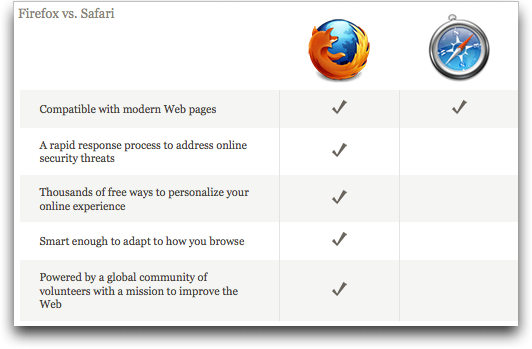
  Although Mozilla provides a chart comparing Firefox 3.5 with Safari
  4, results on performance are not included. That leads me to believe
  that Safari 4 remains the current speed champ. Nonetheless, Firefox
  3.5 does feel notably snappier when working with
  JavaScript-intensive sites like Google Docs. Even the TidBITS site
  feels faster, which makes sense, given our increasing use of
  JavaScript to add features and improve ease-of-use.

  Page rendering in general is also faster, thanks to a new version of
  the Gecko engine with "speculative parsing" that can load resources
  (such as scripts) in parallel with the rest of the page. I wouldn't
  trust rendering speed benchmarks, since there are so many real-world
  bottlenecks that change the standard user experience, but in my
  short usage of Firefox 3.5, it definitely feels faster.


**Safer** -- Security is increasingly important on the Internet, and
  Firefox has long had a number of essential security features,
  including a pop-up blocker, a constantly updated database of
  phishing sites, automated updates to fix vulnerabilities, detailed
  site information (click the site's favicon in the address bar), and
  more.

<http://www.mozilla.com/en-US/firefox/features/#security>

  New in Firefox 3.5 is a private browsing mode (Tools > Start Private
  Browsing) that avoids recording Web history, form entries and
  searches, downloads, passwords, cookies, and cache files (though
  bookmarks you create in private browsing mode are retained). Since
  it's easy to switch in and out of private browsing mode, there's
  little downside to using it when you wish to keep nosy kids from
  seeing where you were shopping for birthday presents. (Yeah, I know
  what people will really use it for, but this is a family
  publication.)

<http://support.mozilla.com/en-US/kb/Private+Browsing>

  If you forget to turn on private browsing, you can still at least
  ask Firefox to forget where you've been. This feature, also new in
  Firefox 3.5, is a bit tricky to find. Choose History > Show All
  History, and in the Library window that appears, search for the site
  you want Firefox to forget. Once you find it, Control-click it and
  choose Forget About This Site from the contextual menu that appears.
  That site will be erased from your browsing history, though cookies
  (and possibly other information, like form entries) remain.

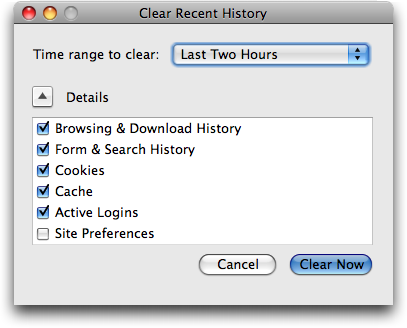
  Firefox 3.5 also converts the previous Clear Private Data dialog to
  a Clear Recent History dialog (Tools > Clear Recent History), adding
  the capability to control the time span over which data will be
  deleted, perfect for clearing out what you've been doing on a public
  computer for the last few hours.

<http://www.tidbits.com/resources/2009-07/Clear-Recent-History.png>


**Smarter, Better** -- It's a little hard to know what Mozilla was
  getting at with these words, but Firefox 3.5 reportedly improved the
  "Awesome Bar" (the address field, into which you can type nearly
  anything and get back something useful), the way you can tag
  bookmarks, and the extremely helpful session restore capability.
  It's unclear exactly what changes were made there. More concrete is
  the improvement to Firefox's tabbed browsing. You can now drag a tab
  out of a window to create a new window with that tab's contents, a
  notable omission in Firefox 3.0.

  Firefox 3.5 also introduces location-aware browsing, an optional
  feature that allows Firefox to share information about your location
  with Web sites. Mozilla is riding on the coattails of Google, which
  developed the Geolocation API and submitted it to the W3C standards
  consortium. As with iPhone apps, you're asked each time a Web site
  requests access to your location so it's not a privacy concern.

<http://www.mozilla.com/en-US/firefox/geolocation/>

  Geolocation works both by checking your IP address and scanning for
  any wireless networks within range of your computer, so its accuracy
  will range from a few meters to a few miles (all it knows about me
  so far while I use a computer inside my home is that I'm in Ithaca,
  NY).

  A Web site could request your location from your browser via
  JavaScript, but it's unlikely that a Web site would ask for this
  when you load a page. More likely, you'll click on a "Find stores"
  or "Where am I?" link. Firefox would then display the location
  request at the top of the page, much as it asks if you want a
  password to be saved.

<http://www.tidbits.com/resources/2009-07/Location-query.png>

  I can't really see location-aware browsing being all that important,
  given that when I want location-specific information, I'm usually
  using my iPhone somewhere other than at my desk. And even when I'm
  travelling with my MacBook, I imagine I'd turn to the iPhone first
  for location-specific information. For those without location-savvy
  phones, this feature could be useful when you're using a coffee
  shop, library, or hotel network in an unfamiliar area.

  Mozilla also put a lot of effort into Firefox's support for modern
  Web standards. Firefox 3.5 now supports downloadable fonts, HTML 5's
  audio and video elements, the HTML 5 offline resource spec,
  drag-and-drop within and between Web sites, CSS media queries for
  media-dependent style sheets, multi-threading for speeding up Web
  applications, and more. As usual, these improvements won't mean much
  until they're adopted by Web developers for sites you use, and such
  changes tend to happen slowly because of the large number of people
  who don't (or can't) upgrade from old browsers.

<https://developer.mozilla.org/En/Firefox_3.5_for_developers>


**Comparing with Safari 4** -- Since I'm using a Mac, Mozilla's site
  showed me a comparison of Firefox 3.5 and Safari 4, rather than
  Firefox 3.5 and Internet Explorer 8. It acknowledges that Safari 4
  does an excellent job with modern Web standards, but then gives
  Firefox the nod in speed of response to security vulnerabilities,
  number of add-ons, and adaptive capabilities.

<http://www.tidbits.com/resources/2009-07/Firefox-vs-Safari.png>

  That seems fair: security updates to Firefox do appear more quickly
  than updates to Safari; Firefox does have far more add-ons that
  extend its functionality; and Firefox's "Awesome Bar" really is far
  better than Safari's "Smart Address Field," simply because you can
  enter anything in Firefox's address field and it will do something
  intelligent (display bookmarks or recently visited sites, go
  directly to the correct site, or run a Google search). In contrast,
  typing in Safari 4's address field can access only your bookmarks
  and history, and only those by URL, rather than by name or content.

  Although I appreciate Safari 4's speed, I stayed with Firefox 3.0
  and am now happy to use 3.5. For my purposes, Firefox's "Awesome
  Bar" (I just can't bring myself to type those words outside of
  quotes) is the key differentiating factor. Being a writer, I think
  in words and I direct them through my fingers on the keyboard, so
  it's important to me to be able to navigate the Web via text. Also
  important to me is Firefox's capability to restore sessions
  automatically after relaunching. Safari offers a History > Reopen
  All Windows From Last Session command, but I don't want to have to
  remember to do that after every restart.

  I recommend you take a look at Firefox 3.5. If nothing else, it's
  good to have multiple Web browsers around when dealing with badly
  coded sites. I also like using multiple browsers when testing how
  Web pages render and how a site behaves when I'm logged in versus
  when not.

  But here's one suggestion. The main drawback that kept me from
  switching among browsers in the past was my bookmarks - I don't use
  a lot, but I rely heavily on those I do have. There's a free utility
  called Xmarks (previously known as Foxmarks) that backs up and
  synchronizes your bookmarks between Firefox and Safari (it also
  works with Internet Explorer). Thanks to Xmarks, I can be certain
  that Firefox and Safari always have exactly the same set of
  bookmarks across all my Macs, which makes it easy to use any browser
  at any time. Although Xmarks doesn't claim compatibility with
  Firefox 3.5 or Safari 4 yet, I was able to install it for Safari 4
  on my MacBook and use it to sync bookmarks back and forth with
  Firefox 3.5. Your mileage may vary until Xmarks announces official
  support.

<http://www.xmarks.com/>

  Firefox 3.5 for Mac OS X requires Mac OS X 10.4 or later. Note that
  a number of add-ons will be disabled by the update; in the past,
  add-on developers have responded quickly with updates. It's a 17.6
  MB download.


How to Replace a Cracked iPhone 3G Screen
-----------------------------------------
  by Jeff Carlson <[email protected]>
  article link: <http://db.tidbits.com/article/10389>

  Since having a child last year, my wife and I often find ourselves
  confirming that gravity does, in fact, continue to function well.
  Our toddler trips, sits down abruptly, and drops things from all
  heights as one would expect from someone still figuring out how her
  body is working.

  You can see where this is going.

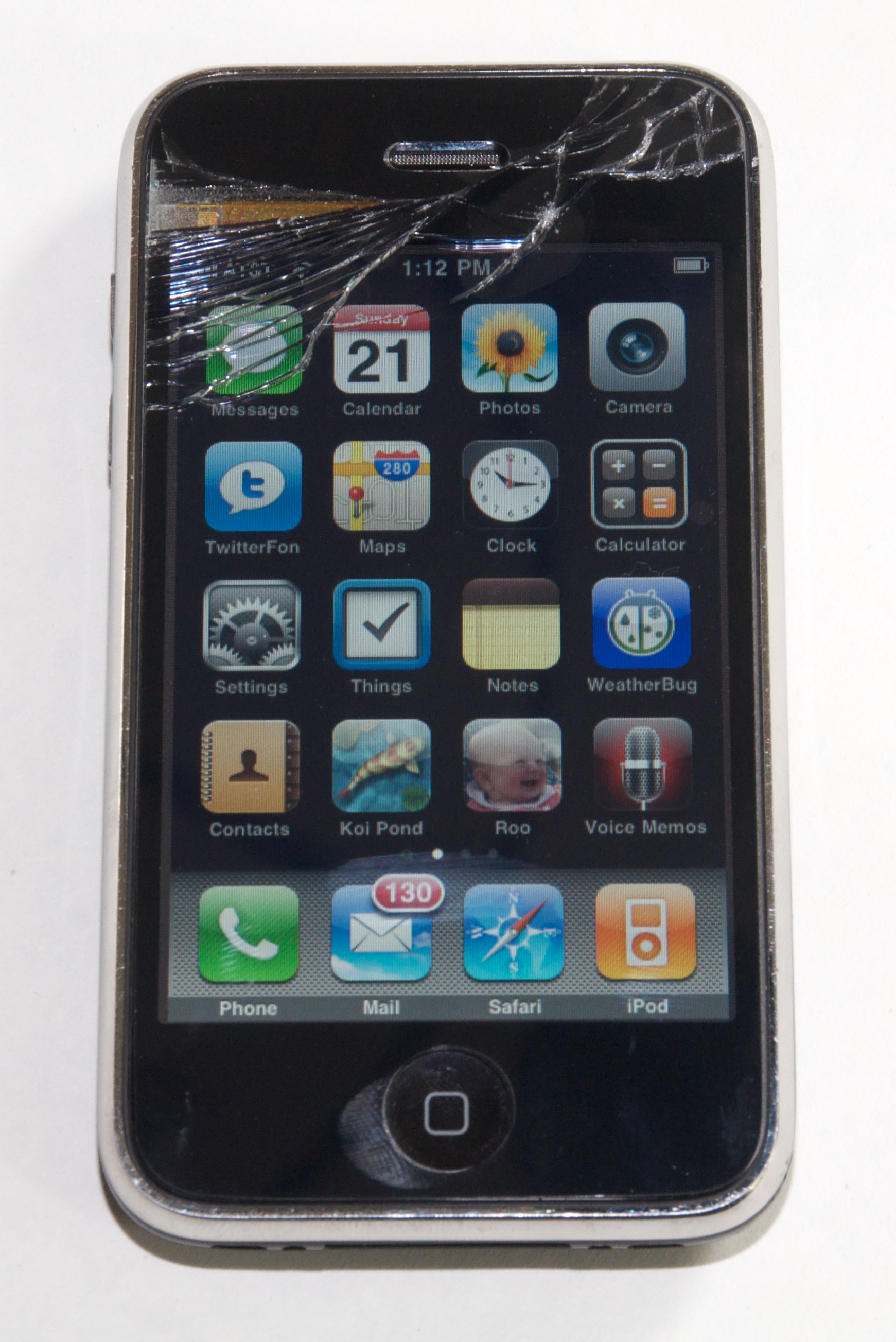
  One day recently, my daughter reached for something shiny and swiped
  the corner of my wife's iPhone 3G, spinning it off the table and
  onto one of its corners against the floor. The top portion of the
  glass screen fractured, but the phone was still usable. To keep
  glass shards out of my wife's ear when using the phone, I
  immediately applied an Artwizz ScratchStopper, a plastic film
  designed to protect the iPhone's screen.

<http://www.tidbits.com/resources/2009-06/iphonescreen_cracked.jpg>
<http://artwizz.com/317+M52087573ab0.html>

  Next, I researched the options. Although the phone was still under
  its original warranty, according to Apple's iPhone Service FAQ the
  "Limited Warranty for iPhone excludes coverage for damage resulting
  from accident, disassembly, unauthorized service and unauthorized
  modifications." The other Apple option was to get Out-of-Warranty
  service, which costs $199 and results in a replacement (refurbished
  or new) iPhone. (According to Jim Dalrymple at The Loop, Apple is
  now offering screen-replacement services _onsite_ at Apple retail
  stores, which also costs $199, since it would be a non-warranty
  repair. That means the repair can be done without having to send it
  in or be given a replacement.) We could have also bought a new
  iPhone 3GS, but since this iPhone 3G wasn't yet a year old, it
  didn't qualify for AT&T's least-expensive pricing.

<http://www.apple.com/support/iphone/service/faq/#warranty4>
<http://www.loopinsight.com/2009/07/02/apple-retail-stores-can-now-replace-broken-iphone-screens/>

  Instead, I turned to the
  do-it-yourself-and-risk-destroying-the-whole-thing approach. A few
  minutes of searching Google led me to 3G Cracked Glass.com. Site
  owner Tim Dupree has put together links to companies other than
  Apple who can do the repair and where to get parts yourself, as well
  as a tutorial video on making the repair. Although the video lacks
  narration (which Dupree notes will be added later), I found it
  helpful to watch someone disassemble the iPhone. For about $80 and
  four hours of my time (working slowly and deliberately), I
  successfully fixed the screen myself.

<http://3gcrackedglass.com/>

  (If you're reading this article on the Web, click any image to view
  a larger version.)


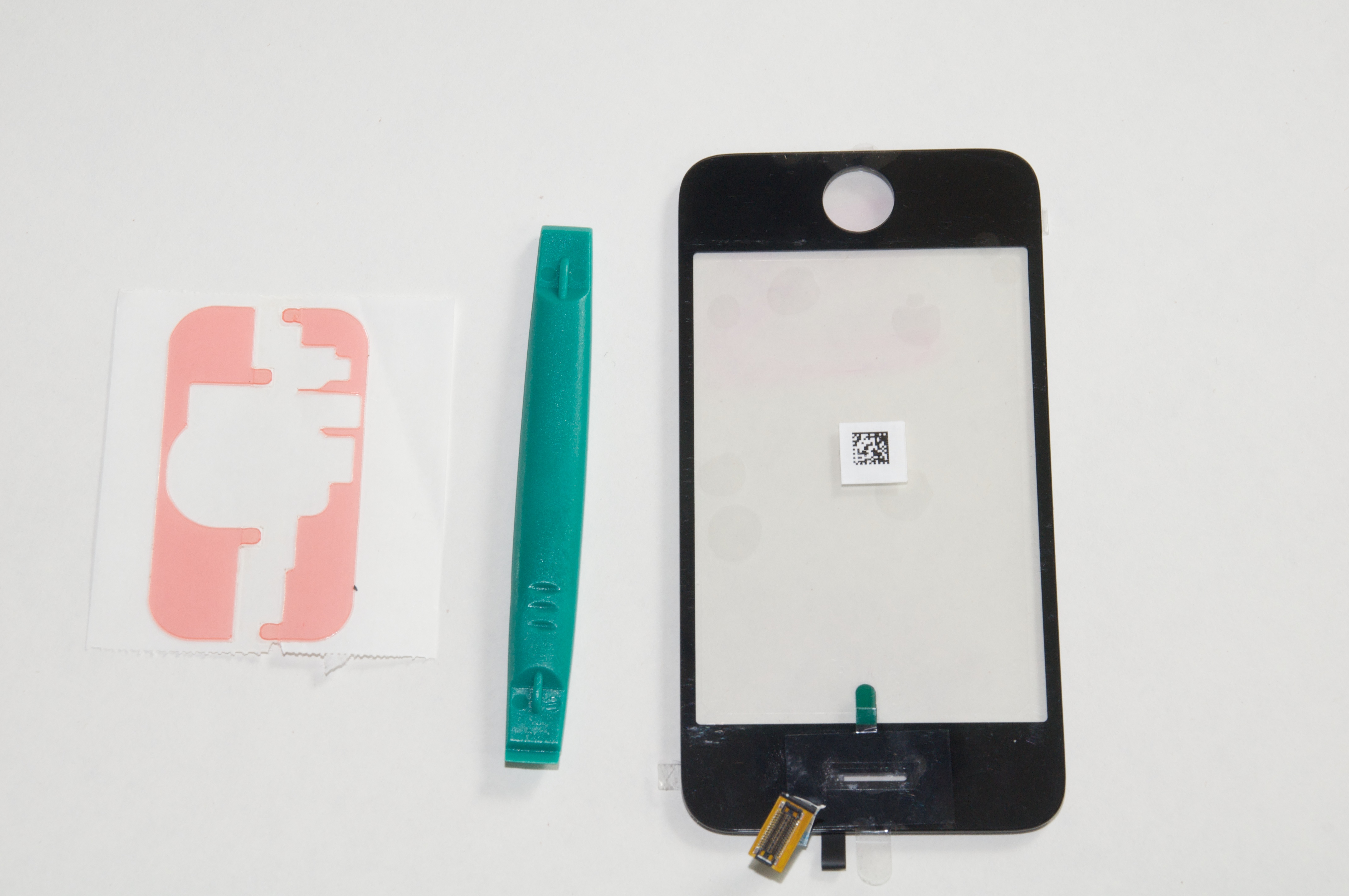
**The Parts** -- I purchased the iPhone 3G Digitizer and Front Glass
  with Adhesive Kit from Mission Repair for $59. Taking this route is
  more advanced than ordering a $119 kit that includes the digitizer,
  glass, and frame. In hindsight, the latter would have made for a
  much easier repair, but I was trying to do it myself without
  spending a lot of money. I had resigned myself to the likelihood
  that if I messed up and damaged the iPhone, I'd be paying $199 to
  replace it, so I wanted to reduce the cost of learning my
  limitations to $59.

<http://www.missionrepair.com/ProductDetails.asp?ProductCode=822-4033&Click=15003>

  I also bought a case opener tool from AX Micro Solutions
  (Directfix.com) for $3.99. Yes, it's just a molded piece of plastic,
  and I also ended up paying $3.99 for shipping, and it's silly that I
  had to go to a second merchant to get the part. However, I don't
  have a lot of tools, and the thought of using a bare X-Acto knife to
  pry open the iPhone didn't sound like a great idea. Within a week or
  so, I had the tools in hand.

<http://www.gethightech.com/Merchant2/merchant.mvc?Screen=PROD&Product_Code=XX1521&Category_Code=IPHONE>
<http://www.tidbits.com/resources/2009-06/iphonescreen_replacement.jpg>

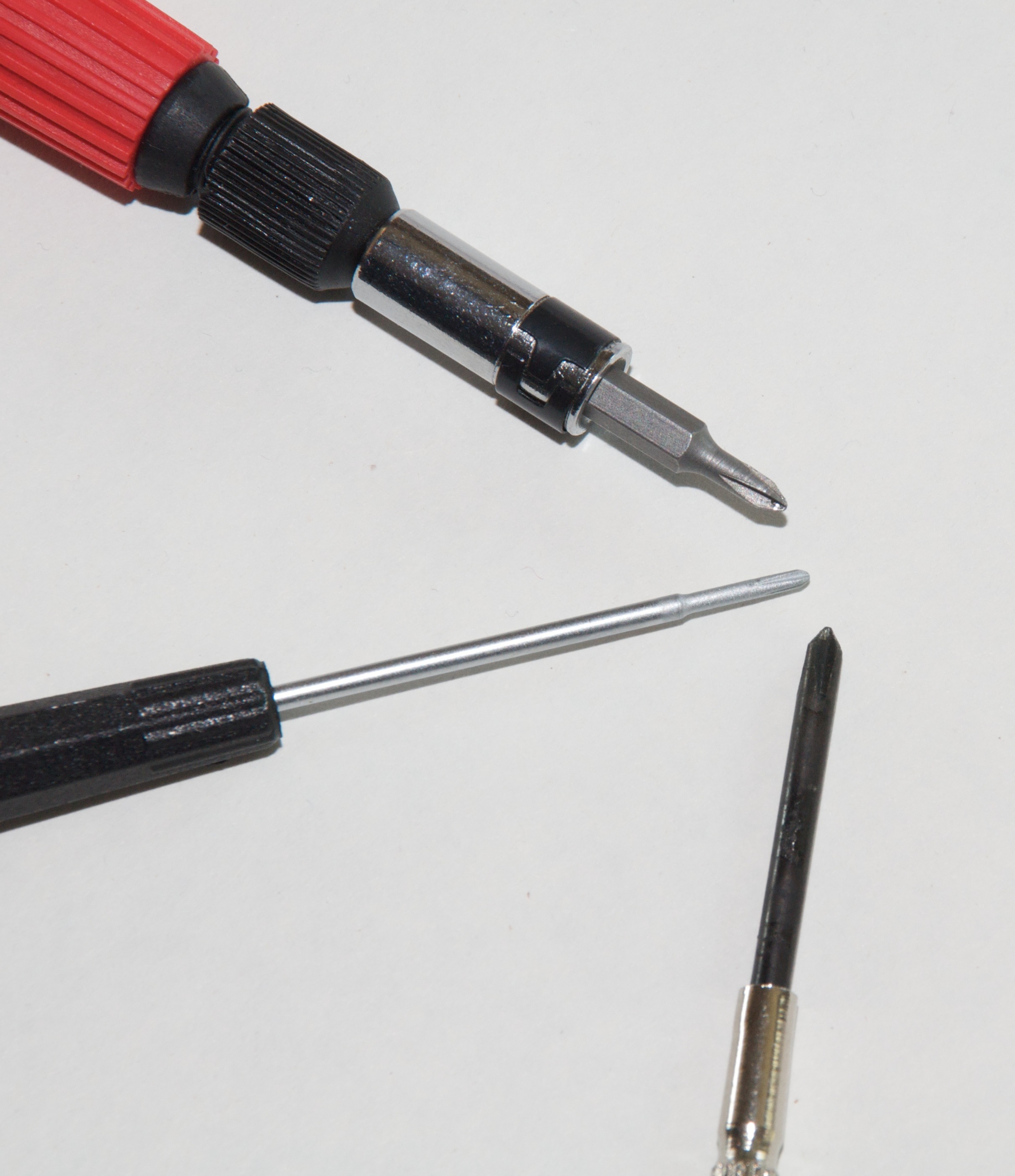
  I also assembled the other tools I'd need: the SIM removal tool that
  came with the iPhone, or a small paperclip; a small Phillips
  screwdriver; a pair of tweezers; a cup to hold the incredibly tiny
  screws; and a small knife (more on that later). The screwdriver
  turned out to be a sticking point, because none of mine were small
  enough. You need a size #000 Phillips head (the middle one in the
  photo below). I ended up purchasing one at Amazon for about $6 with
  free Amazon Prime shipping, because not even my local Radio Shack
  carried one that small.

<http://www.tidbits.com/resources/2009-06/iphonescreen_screwdrivers.jpg>
<http://www.amazon.com/gp/product/B000T9QZ1K?tidbitselectro00>

  Performing the screen replacement isn't particularly difficult, as
  long as you're patient and comfortable working with small
  electronics. Also keep in mind that doing so voids your warranty and
  introduces the possibility that you could damage other components if
  you're not careful.

  That said, here are the steps to replace a damaged screen on an
  iPhone 3G. Although I suspect that the steps are similar for an
  iPhone 3GS, I haven't opened mine, so I can't be sure. I've included
  photos where appropriate, but I also highly recommend that you watch
  the video at 3G Cracked Glass as you go along. You can find several
  other videos on YouTube, too.


**Open the Case** -- Turn off the iPhone's power and pull out the SIM
  card from the top of the device. Next, remove the two screws on the
  bottom, located on each side of the dock connector.

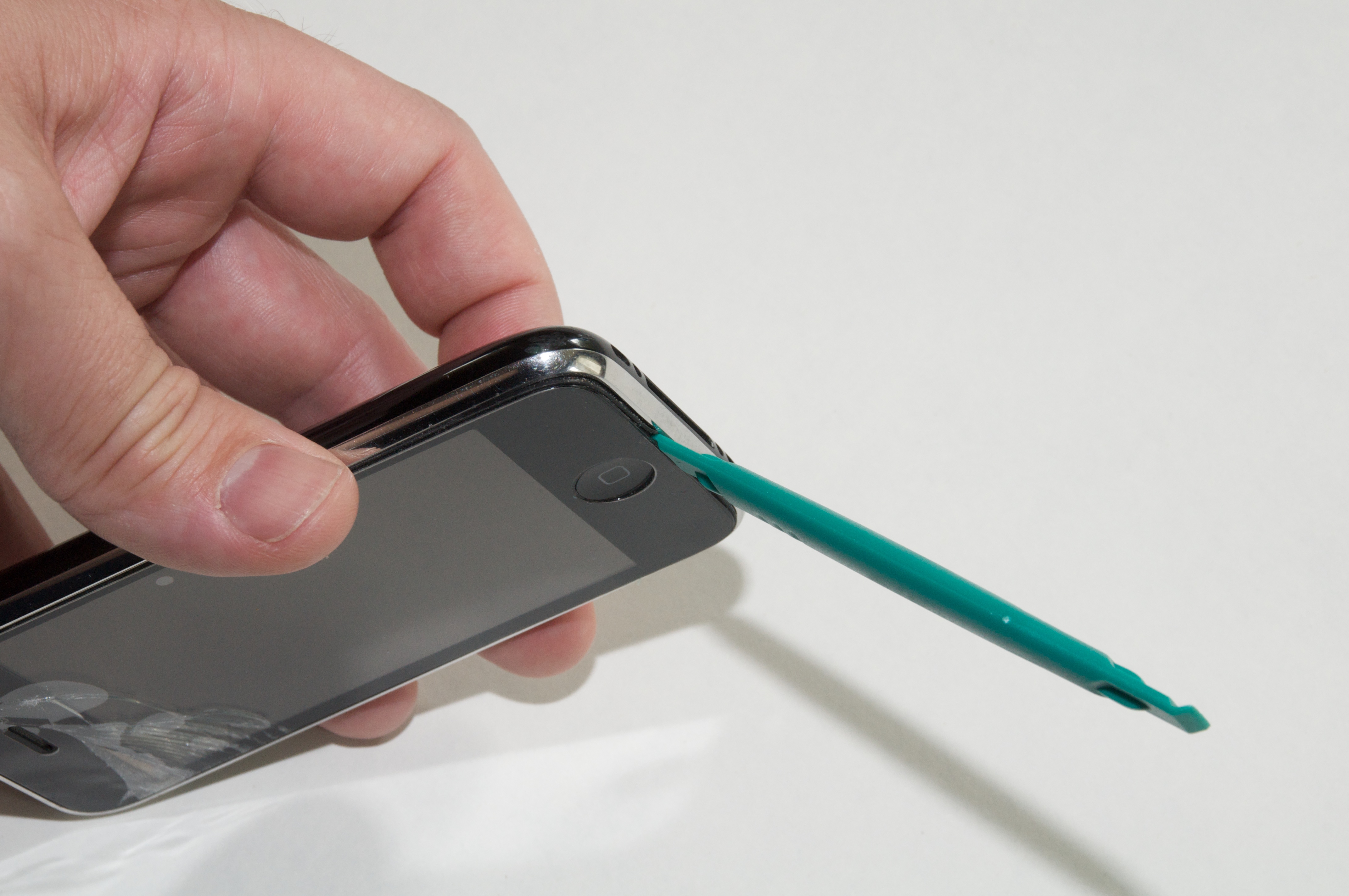
  The iPhone is tightly built, so simply prying it open seems almost
  impossible. Furthermore, the case doesn't come apart at the seam
  separating the metal frame and the plastic back. Instead, press the
  edge of the pry tool into the seam just below the Home button.

<http://www.tidbits.com/resources/2009-06/iphonescreen_prytool.jpg>

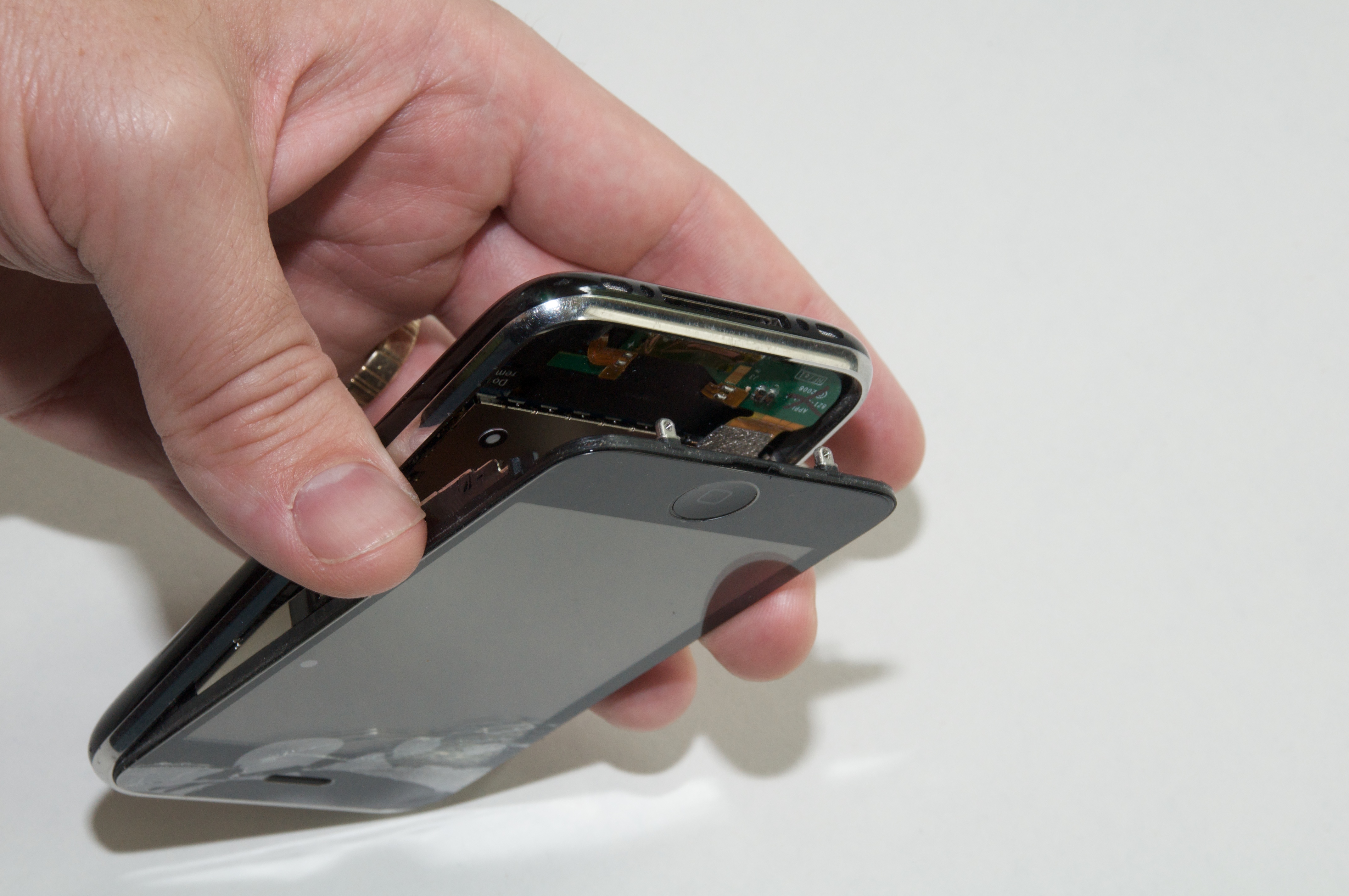
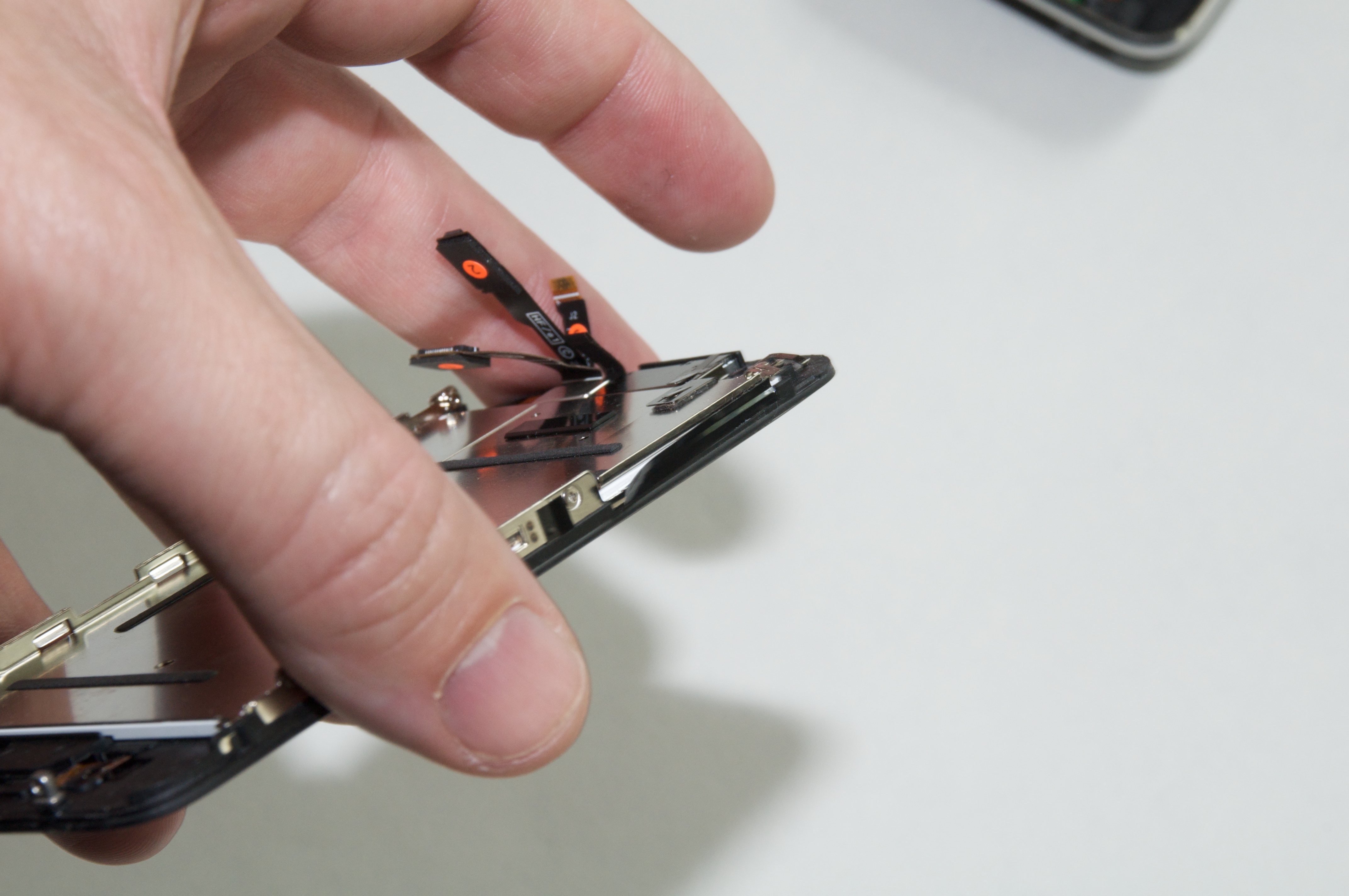
  Gently pry the screen up, but don't pull it off entirely yet,
  because three cables connect the screen to the lower section.

<http://www.tidbits.com/resources/2009-06/iphonescreen_pry_screen.jpg>

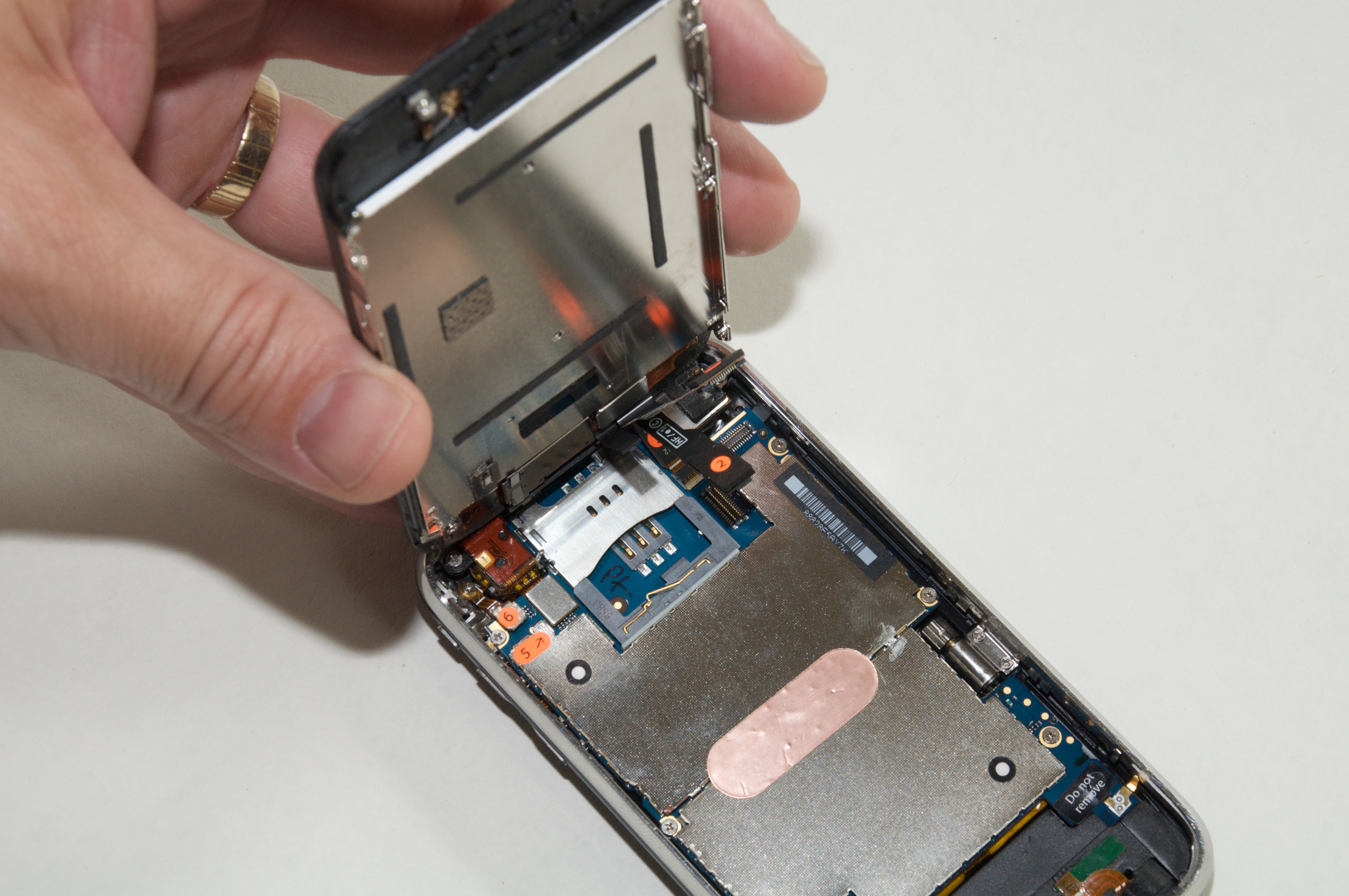
  Using the pry tool or your fingers (if your fingers are small
  enough), remove connectors 1 and 2; for me, connector 1 lifted off
  by itself as I pulled the screen up, and connector 2 popped up when
  I placed the pry tool under its lip and gave it a little twist.
  Number 3 is actually a ribbon that's anchored by a connector on the
  base. To disconnect it, use the pry tool to flip up the white latch
  and then pull the ribbon out. Set the base aside.

<http://www.tidbits.com/resources/2009-06/iphonescreen_connectors.jpg>


**Remove the LCD Assembly** -- Next you need to separate the screen
  frame from the LCD assembly. Using tweezers, pull off the black
  strips of tape on the left and right edges of the frame.

<http://www.tidbits.com/resources/2009-06/iphonescreen_tape.jpg>

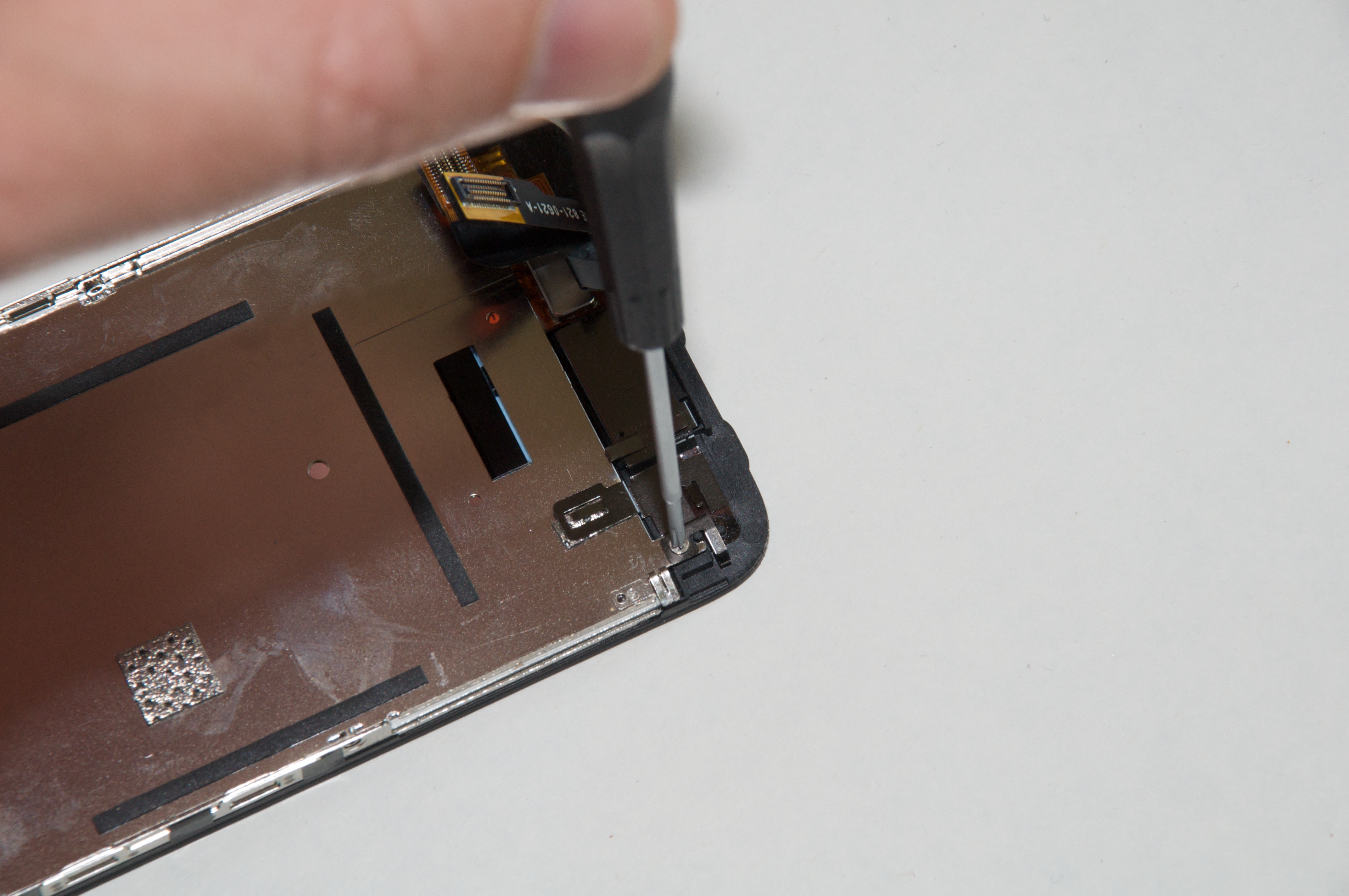
  That exposes five screws for you to remove. One other screw is
  located at the top of the LCD assembly near the connecting cables.

<http://www.tidbits.com/resources/2009-06/iphonescreen_lastscrew.jpg>

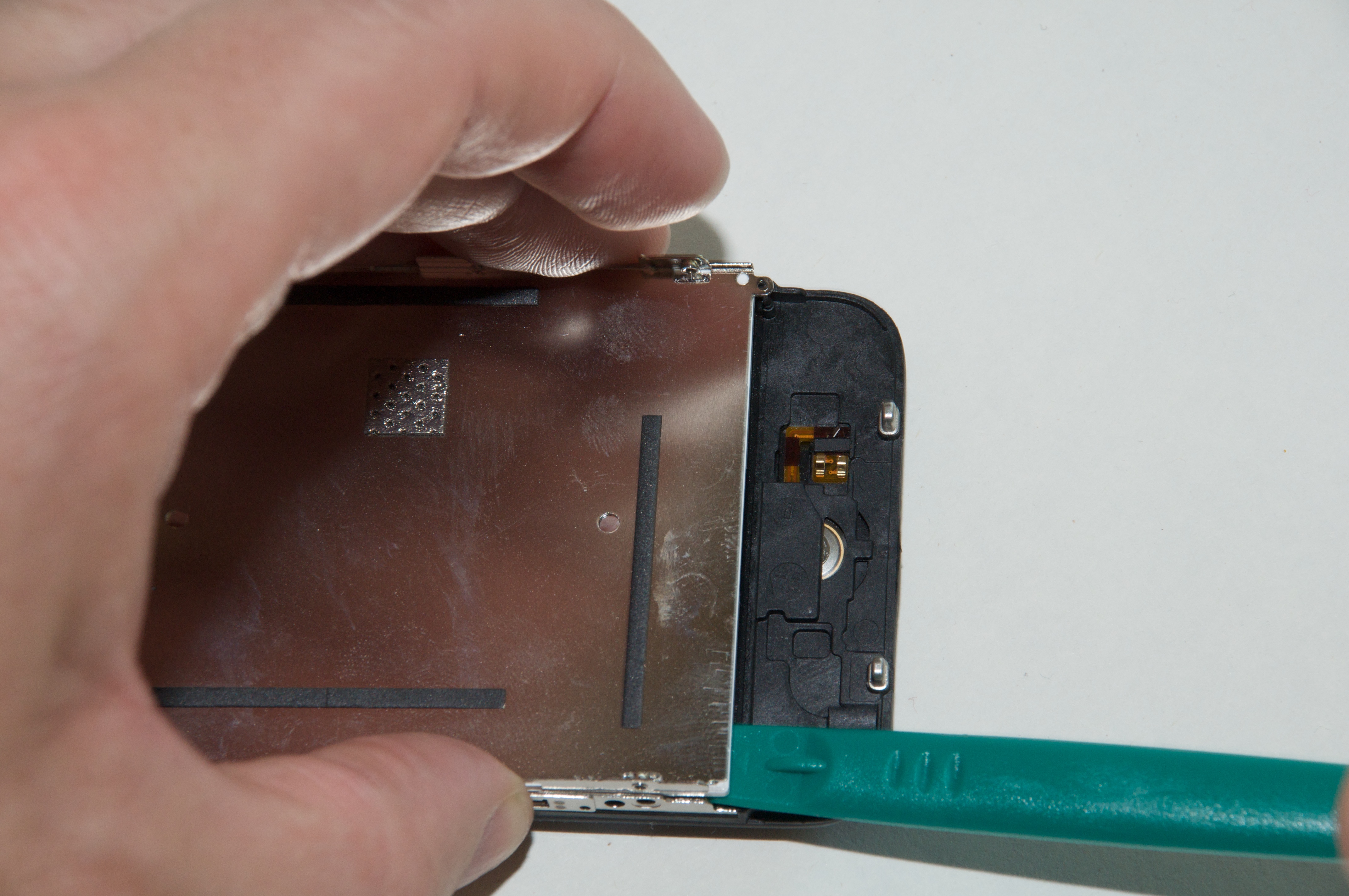
  Use the pry tool to _gently_ - so as not to damage it - remove the
  LCD assembly from the glass; it lifts slightly and then slides out.
  Set the LCD assembly aside.

<http://www.tidbits.com/resources/2009-06/iphonescreen_pry_lcd.jpg>


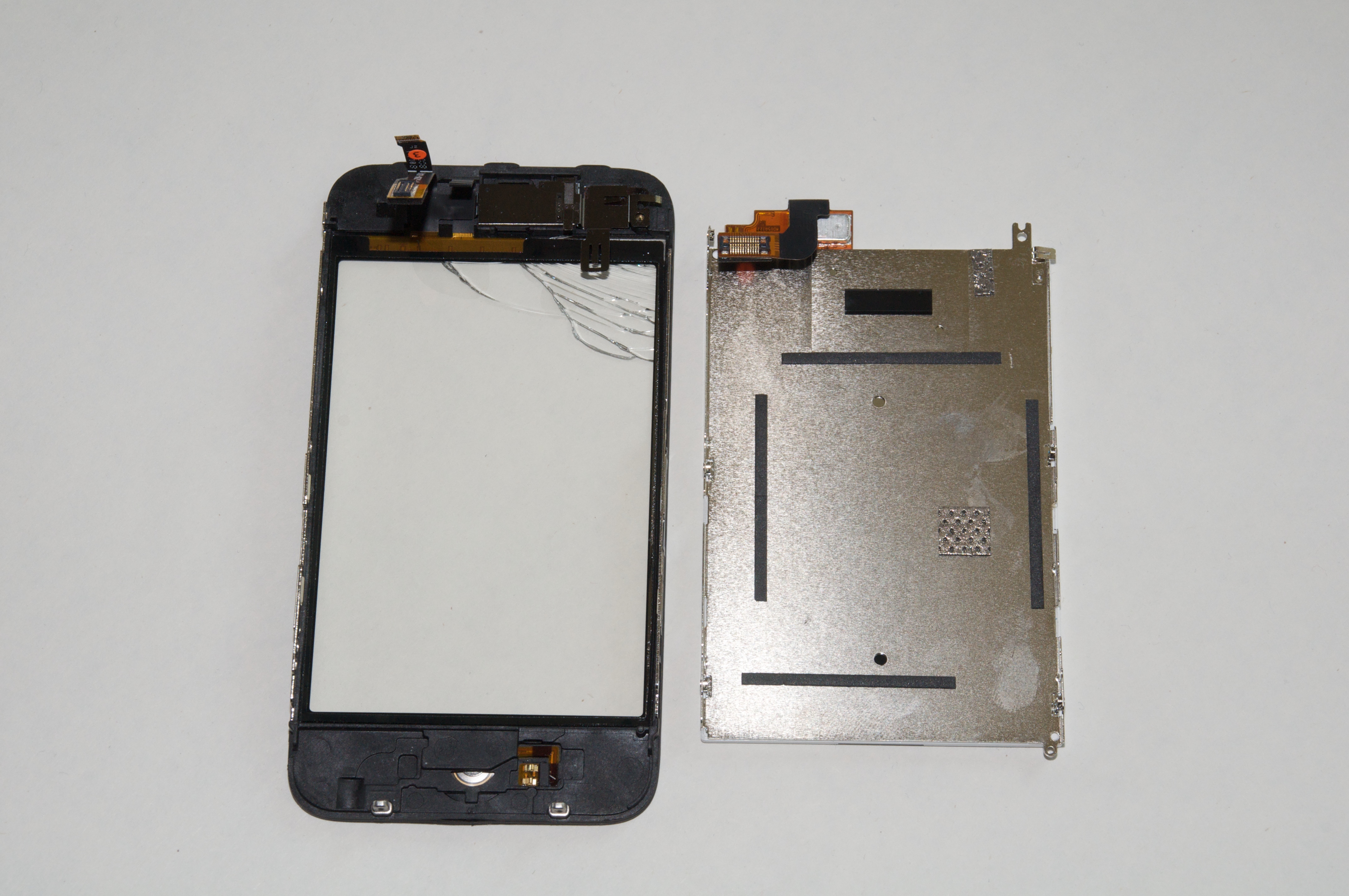
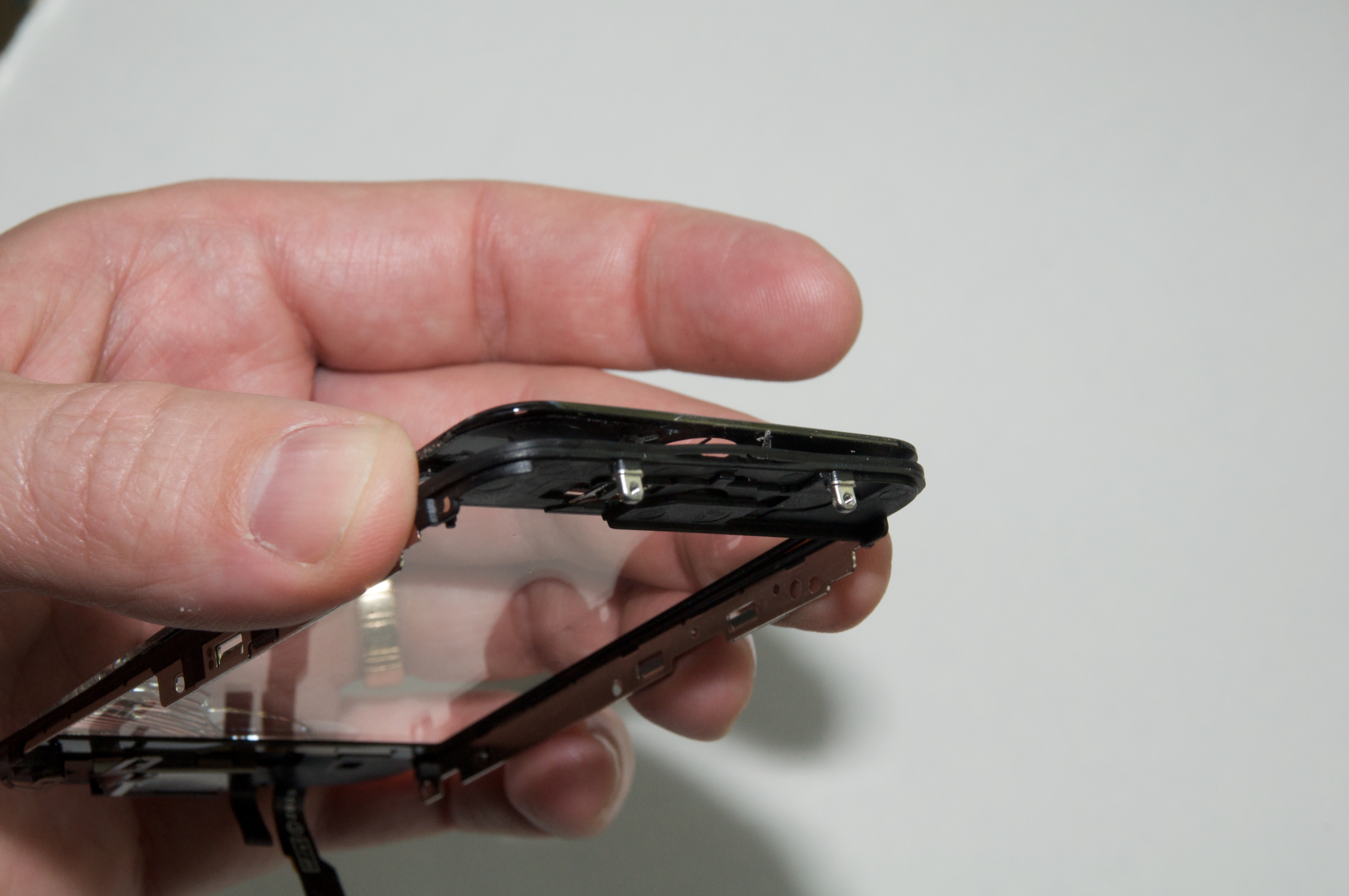
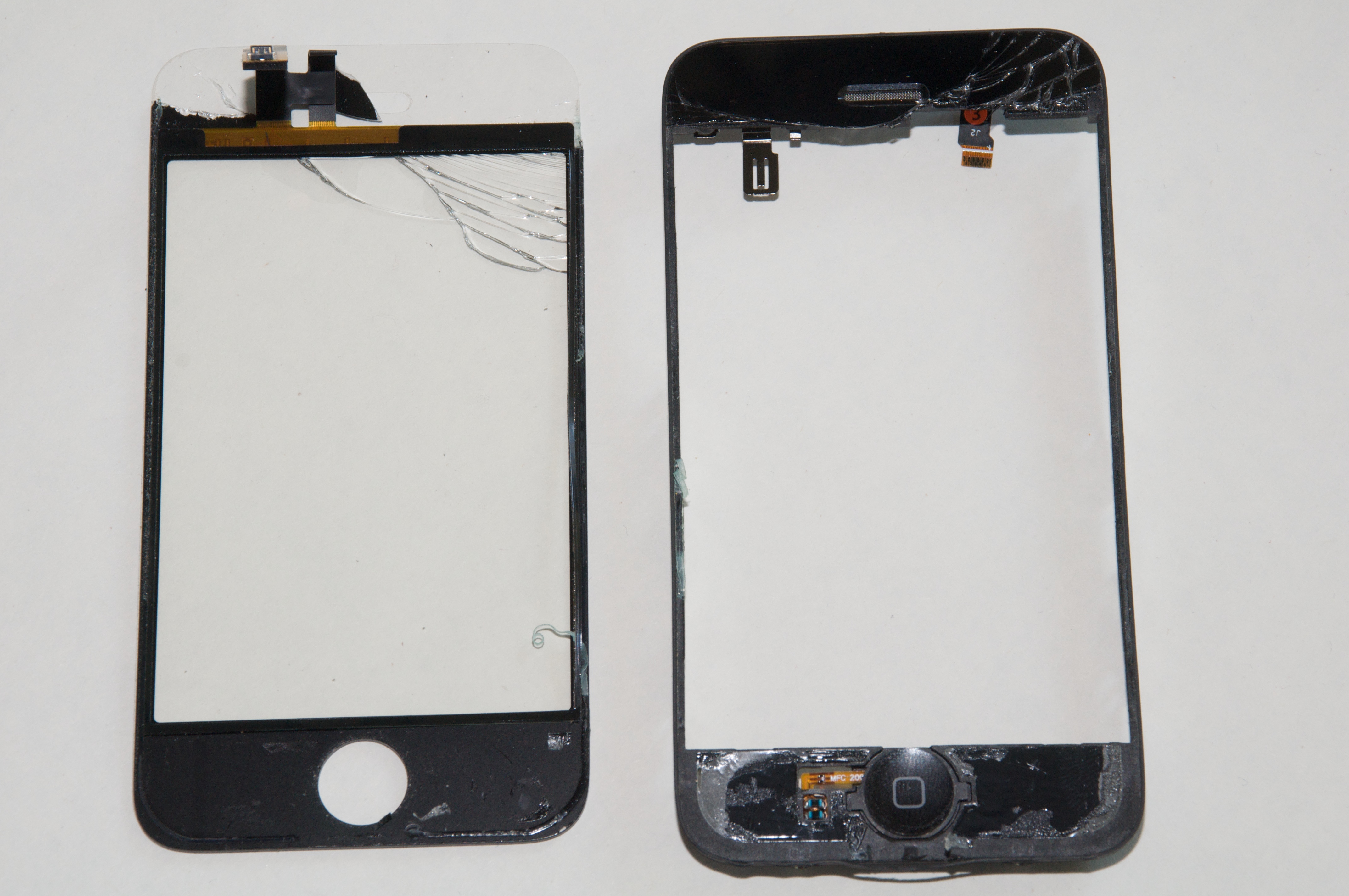
**Separate the Glass** -- The hardest part of the entire replacement
  process is pulling the screen frame from the glass. The two sections
  are held together by adhesive, and initially appear to be just one
  fused part. (This step is confusing in the 3G Cracked Glass video,
  because the narration is not yet in place.)

<http://www.tidbits.com/resources/2009-06/iphonescreen_frame_lcd.jpg>

  I slid a knife edge into the space behind the rubber seal where I
  originally pried the case apart. (An X-Acto knife will work, but I
  used a tiny Swiss Army knife.) Once I got some purchase, I gently
  twisted the knife blade to separate the pieces. Some tutorials on
  the Internet suggest using a hair dryer to heat and soften the
  adhesive, but I didn't need to try that approach.

<http://www.tidbits.com/resources/2009-06/iphonescreen_pryframe.jpg>

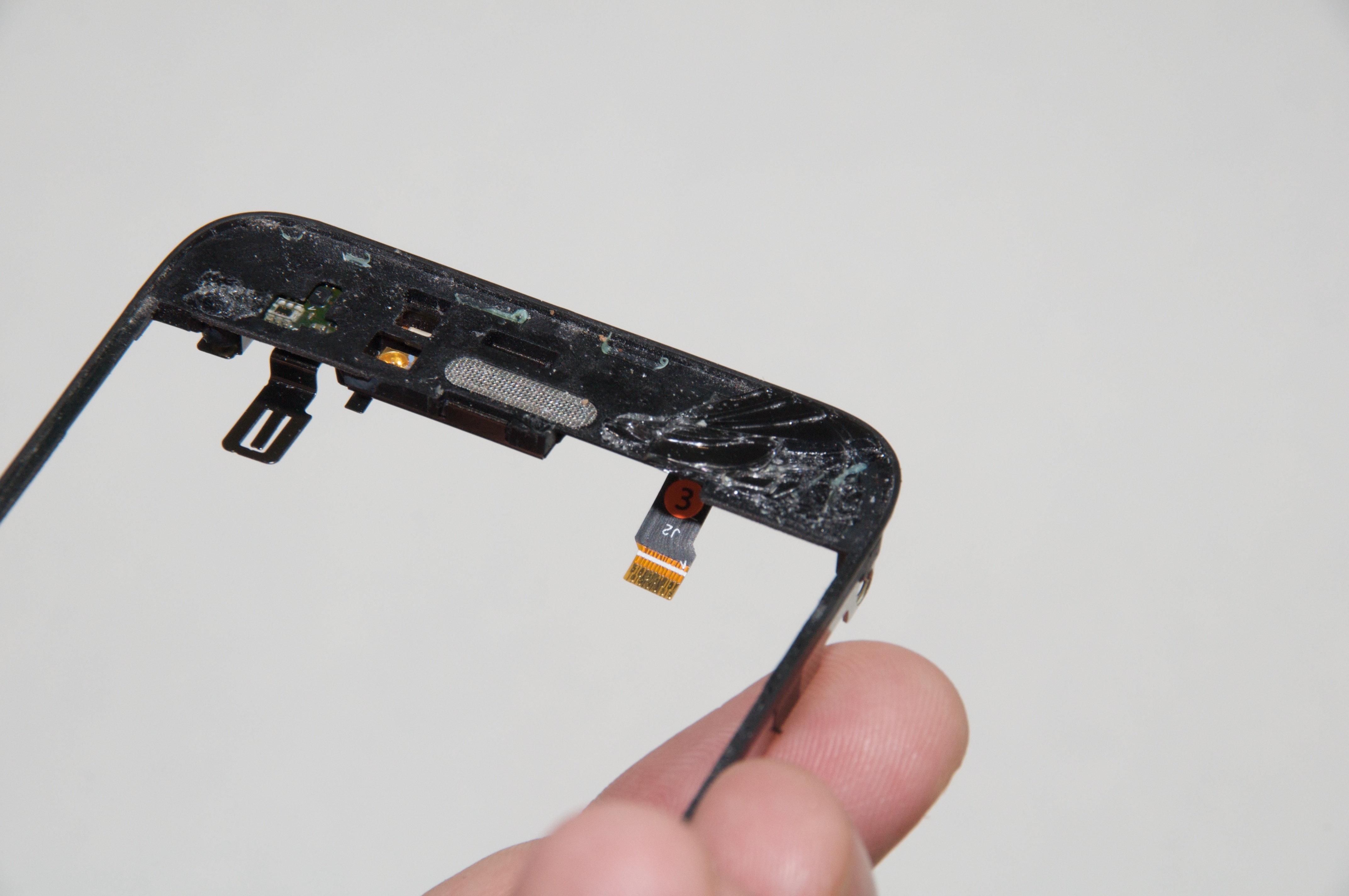
  Due to the broken glass, the screen did not separate from the frame
  in one clean piece. I had to pick apart the top section to remove
  it. However, the adhesive is applied in sheets, so if you can get
  the knife edge under the adhesive layer, the broken glass may come
  up together like peeling a hard-boiled egg.

<http://www.tidbits.com/resources/2009-06/iphonescreen_glassremoval2.jpg>

  Once the glass and frame are separated, remove any remaining
  adhesive from the frame.

<http://www.tidbits.com/resources/2009-06/iphonescreen_glassremoval.jpg>


**Attach the New Screen** -- With the old screen removed, it's time to
  start rebuilding the iPhone. The new adhesive is double-sided, so
  apply it to the top and bottom sections of the frame and then remove
  the backing.

  Insert the new screen into the new frame, making sure to pass the
  connecting cables on the replacement screen through the frame's
  opening. Oh, and don't forget to peel away the clear plastic that
  protects the inside of the screen.

  Lastly, carefully press the new screen into place against the
  adhesive so you get a tight fit.


**Reassemble the iPhone** -- After the replacement screen is attached
  to the frame, reverse the steps above for reassembling the phone:
  slide the LCD assembly into place, replace the screws, reconnect the
  cables, and seat the screen assembly into the iPhone's body. Pay
  attention when reconnecting the cables: at one point I must have
  nudged connector 4, because the Home button didn't work when I put
  everything back together. Opening the iPhone again to fasten the
  connector was much easier the second time around, however.

  My wife's iPhone 3G now looks as good as new, and I didn't have to
  fall back on my alternate plan of paying Apple for a replacement. I
  hope I don't have to put my new screen-fixing skills to work again,
  but if gravity should assert itself, I'll be ready.


TidBITS Watchlist: Notable Software Updates for 06-Jul-09
---------------------------------------------------------
  by Doug McLean <[email protected]>
  article link: <http://db.tidbits.com/article/10388>

  PasswordWallet 4.4.7  from Selznick Scientific Software is a minor
  update to the longstanding password management utility. Changes
  include enhanced VoiceOver support for visually impaired users,
  compatibility with Palm Pre HTML exporting, the capability to share
  passwords between records, the closing of helper apps upon quitting
  PasswordWallet, and auto-typing support for JIS keyboards. The
  company has also released Password Wallet 4.4.7 for the iPhone with
  a number of new features and usability tweaks. ($20, free update,
  5.1 MB)

<http://www.selznick.com/products/passwordwallet/>

  Cocktail 4.4 from Maintain is a substantial update to the general
  purpose maintenance utility. The update adds the capability to reset
  Access Control lists and  home directory permissions, greater
  control over Time Machine's backup intervals and settings, improved
  support for additional network interfaces, compatibility with Safari
  4, and the capability to disable Safari 4's Web page previews.
  ($14.95, 1.9 MB)

<http://www.maintain.se/cocktail/>

  PDFpen 4.1.4 and PDFpenPro 4.1.4 from SmileOnMyMac are the latest
  versions of the company's PDF editing utilities. Both version
  updates have improved performance speeds for larger PDF documents
  and added an OCR AppleScript document property that enables users to
  write scripts for paperless workflows. Unspecified minor features
  and bug fixes are also included. ($49.95/$99.95, free updates, 12
  MB/12.2 MB)

<http://www.smileonmymac.com/PDFpen/>
<http://www.smileonmymac.com/PDFpenPro/>

  iPhoto 8.0.4 Update from Apple addresses an infrequent crashing bug
  related to photos imported into a previous version of the
  application. The update also fixes some incorrectly labeled names in
  the Places feature. The update is recommended for all users of
  iPhoto '09 and is available for download via Software Update or from
  the Apple Support Downloads page. (Free update, 102.27 MB)

<http://support.apple.com/downloads/iPhoto_8_0_4_Update>

  Nisus Writer Pro 1.3 from Nisus Software is a fairly major update to
  the increasingly powerful word processor. New features include a new
  Document Manager, a style library, a selection history that enables
  users to skip to previous editing spots, the capability to make any
  menu into a toolbar item, additions to the Nisus Macro Language, and
  the capability to attach an active document to a Mail or Entourage
  email message. For more detail on the huge number of other changes
  and bug fixes, see Nisus Writer Pro's release notes.  ($79 new, free
  update, 118 MB)

<http://nisus.com/pro/>
<http://nisus.com/pro/releasenotes.php>

  MacSpeech Dictate 1.5.2 from MacSpeech is a minor maintenance update
  for the speech recognition utility. The update mainly improves
  compatibility for Safari 4 by enabling versioned commands to appear
  for newer versions of the same application. ($199 new, free update)

<http://www.macspeech.com/>

  Typinator 3.5 from Ergonis Software is a significant update to the
  auto-typing and auto-correcting utility, focusing on under-the-hood
  enhancements. Changes include a new expansion technique that
  increases replacement speed and improves compatibility with other
  applications (it requires Mac OS X 10.5.5 or later). Also new is
  improved cursor positioning speed, support for custom user sounds,
  and a handful of bug fixes, including one that would cause the
  program to freeze under Mac OS X 10.4.x. A full list of changes can
  be found on Ergonis's Web site. (19.99 euros new, free update for
  purchases within 2 years, 2.7 MB)

<http://www.ergonis.com/products/typinator/>
<http://www.ergonis.com/products/typinator/history.html>

  MacBook Air SMC Firmware Update 1.2 from Apple "adds compatibility
  for the latest service replacement batteries." SMC stands for System
  Management Controller, a micro-controller located on the logic board
  that's responsible for the computer's power functions. To install
  the update, follow the instructions in the updater application that
  automatically launches after the installer has closed
  (/Application/Utilities/MacBook Air SMC Firmware Update.app). (Free,
  623 KB)

<http://www.apple.com/downloads/macosx/apple/firmware_hardware/macbookairsmcfirmwareupdate12.html>
<http://support.apple.com/kb/HT2368>


ExtraBITS for 06-Jul-09
-----------------------
  by TidBITS Staff <[email protected]>
  article link: <http://db.tidbits.com/article/10397>

**Apple Patching Serious SMS Vulnerability on iPhone** -- Security
  researcher Charlie Miller has discovered a way to attack and control
  an iPhone using only SMS messages. Don't worry, the details aren't
  public yet, and Apple should have a patch soon. (Posted 2009-07-03)

<http://tech.yahoo.com/news/pcworld/20090702/tc_pcworld/applepatchingserioussmsvulnerabilityoniphone>


**Apple Provides MacBooks to Maine Students** -- Ars Technica is
  reporting on Apple's deal with Maine's Learning Technology
  Initiative to provide every middle- and high-schooler in the state
  with a MacBook. The arrangement is rooted in the success of an
  earlier initiative that gave every 7th and 8th grader in Maine an
  iBook. Apple will provide 64,000 MacBooks (adding to the 37,000
  already in circulation), educational software, professional
  development for educators, and tech support for $100 million over
  four years. (Posted 2009-07-02)

<http://arstechnica.com/apple/news/2009/07/maine-negotiates-to-gives-macbooks-to-all-712-graders.ars>


**iPhone Recording Studio** -- What's a touring band to do when
  they've got a new song, but nowhere to record it? Use the iPhone!
  The Loop is reporting on pop band The 88 using an iPhone to record a
  new track while touring with the B-52s. The 88 mainly relied on Four
  Track, a $9.99 app that emulates a four track recorder with
  impressive results. The song, "Love is the Thing," is available on
  iTunes. (Posted 2009-07-01)

<http://www.loopinsight.com/2009/06/30/the-88s-new-single-recorded-entirely-on-the-iphone/>
<http://itunes.apple.com/WebObjects/MZStore.woa/wa/viewAlbum?id=321285228&s=143441>


Hot Topics in TidBITS Talk for 06-Jul-09
----------------------------------------
  by Jeff Carlson <[email protected]>
  article link: <http://db.tidbits.com/article/10398>

**Why AT&T Has a Lock on the iPhone** -- Glenn Fleishman's article on
  why you won't see an iPhone on Verizon (or other networks in the
  United States) generates discussion of data capacity, coverage area,
  and hardware. (17 messages)

<http://emperor.tidbits.com/TidBITS/Talk/2736>


**Persistent Safari problem - unable to enter text in form fields** --
  Incompatible add-ons for Safari 4 may be the cause of someone not
  being able to enter text into fields. (2 messages)

<http://emperor.tidbits.com/TidBITS/Talk/2737>


**iPhone Spyware** -- The way Apple has set up iPhone applications and
  the App Store makes it hard to believe a spyware app exists (unless
  your iPhone is jailbroken). However, a known vulnerability in SMS
  messaging does present an opportunity for attack. (9 messages)

<http://emperor.tidbits.com/TidBITS/Talk/2740>


**3GS Upgrade Madness** -- A reader shares his infuriating story about
  trying to upgrade two iPhone 3G phones. (12 messages)

<http://emperor.tidbits.com/TidBITS/Talk/2741>


**Which Mac would be the closest equivalent to the iPhone 3GS?** -- Is
  the iPhone 3GS akin to a PowerBook G4 in processing power? (4
  messages)

<http://emperor.tidbits.com/TidBITS/Talk/2742>


**New in-article TidBITS commenting system** -- TidBITS Talk readers
  wonder how the comments will impact the mailing list. (Why yes, this
  is a summary description of a discussion thread about a commenting
  system!) (13 messages)

<http://emperor.tidbits.com/TidBITS/Talk/2745>


$$

This is TidBITS, a free weekly technology newsletter providing timely
news, insightful analysis, and in-depth reviews to the Macintosh and
Internet communities. Feel free to forward to friends; better still,
please ask them to subscribe!

Non-profit, non-commercial publications and Web sites may reprint or
link to articles if full credit is given. Others please contact us. We
do not guarantee accuracy of articles. Caveat lector. Publication,
product, and company names may be registered trademarks of their
companies. TidBITS ISSN 1090-7017.

Copyright 2009 TidBITS: Reuse governed by Creative Commons license.

Contact us at:    <[email protected]>
TidBITS Web site: <http://www.tidbits.com/>
License terms:    <http://www.tidbits.com/terms/>
Full text search: <http://www.tidbits.com/search/>
Subscriptions:    <http://www.tidbits.com/about/list.html>
Account help:     <http://www.tidbits.com/about/account-help.html>


--
If you want to unsubscribe or change your address, use this link
http://emperor.tidbits.com/webx?unsub@@.3c557dc4!u=306a67f9