Hi Christopher,

Thanks for sharing a little more about your project. I see the distinction
now: fantasy vs reality. Even so, your solution does give me pause for
thought, and the answers you've been getting to your questions may well
have application for what I'm doing as well. Also, your comment about being
"half-distracted" is something I should take onboard as well, as I fully
expect the end users of my system will be on the phone or deeply in some
other communication with their Contact at the time they are capturing data
into the system. So thanks again, your fantasy project may well have
bearing on a real-world system!
Hegart.


On Monday, 4 April 2016 04:01:28 UTC+12, Christopher Londrie wrote:
>
> I think that's partly because my end goals are slightly different. I need
> the ability to generate these while half-distracted and from specific and
> custom lists, and then have them instantly available.  Most time I won't
> need to generate in bulk.  This means a button I can press and dump out a
> quick answer is perfect for running a tabletop game and needing to generate
> a new patron for my players.  Yours feels far more heavy duty!
>
> On Saturday, April 2, 2016 at 5:28:24 PM UTC-5, Hegart Dmishiv wrote:
>>
>> Hi Christopher,
>>
>> Sorry, I don't have any answers for your questions, but I just wanted to
>> say that I was impressed with what you've done here. I've spent the last
>> week or two trying to achieve something similar, except I'm using a
>> Google Sheets spreadsheet
>> <https://docs.google.com/spreadsheets/d/1341Gky9t1hXHVKFxB8RsCfVrsKEQN2ok0adGoSpEZzE/edit?usp=sharing>
>>
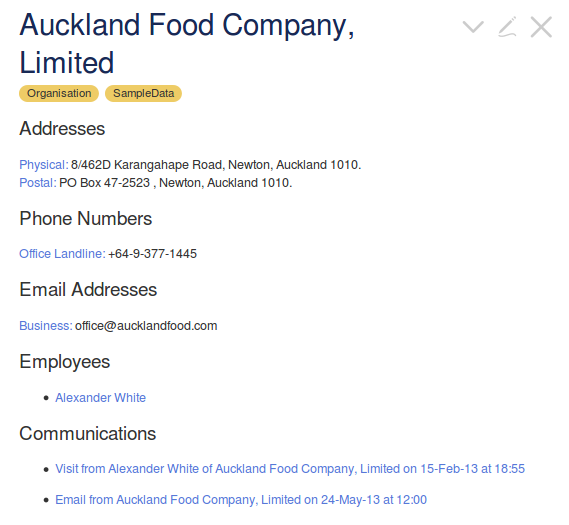
>> as my source data, and creating pseudo-random company tiddlers
>> <https://dl.dropboxusercontent.com/s/odu3my97ujyxz4h/SampleData-testing.html>,
>>
>> with pseudo-random contact details, employees, and just today I've added
>> individual communications with those companies, as per the screenshot
>> example below.
>>
>>
>> <https://dl.dropboxusercontent.com/s/xsm4emv70c35z8l/160403_auckland_food_company_sampledata_example.png>
>> I'm doing this for my *{{DesignWrite}}*
>> <https://dl.dropboxusercontent.com/s/tk91wqty552z6z1/designwrite.html>
>> semester
>> project
>> <https://dl.dropboxusercontent.com/s/tk91wqty552z6z1/designwrite.html#SemesterProject>,
>>
>> TiddlyCRM
>> <https://groups.google.com/forum/#!searchin/tiddlywiki/CRM/tiddlywiki/9PSw_3OsyyE/qsq9prjaHgAJ>.
>>
>> I hadn't considered using TobiBeer's *random[ ]* filter plugin for this
>> before. I guess the main difference between your solution and mine is that
>> you have to have the tiddlers in your wiki first to create new random ones
>> from them. Mine starts with a completely blank TiddlyWiki, and I just
>> import the tiddlers from JSON files, via the CSV to JSON converter
>> <http://www.convertcsv.com/csv-to-json.htm>, from the spreadsheet.
>> Interesting to see a different approach to this. Thanks for sharing.
>>
>> Hegart.
>>
>>
>>
>> On Sunday, 3 April 2016 09:49:29 UTC+12, Christopher Londrie wrote:
>>>
>>> I'm able to do this at all thanks to Tobias Beer's really easy to use
>>> "Random" plugin. http://tobibeer.github.io/tw5-plugins/#random
>>>
>>>
>>> <!-- Generating a random corp -->
>>>
>>> <!-- Generate the First Name from tiddlers starting with GenSource: that
>>> also have the tags "Corp" and "FirstName" and use the "corpname" field as
>>> the value -->
>>> <$set name="FirstName"
>>> filter="[prefix[GenSource:]tag[Corp]tag[FirstName]field[corpname]random[]]">
>>>
>>> <!-- Generate the Last Name from tiddlers starting with GenSource: that
>>> also have the tags "Corp" and "LastName" and use the "corpname" field as
>>> the value -->
>>> <$set name="LastName"
>>> filter="[prefix[GenSource:]tag[Corp]tag[LastName]field[corpname]random[]]">
>>>
>>> <!-- Preview the Generate Corp -->
>>> <table>
>>> <tr><th>Name </th> <td><<FirstName>></td></tr>
>>> </table>
>>>
>>> <!-- Create New Tiddler with the generated information prefilled -->
>>> <$button>Generate Corp
>>> <$action-sendmessage $message="tm-new-tiddler"
>>> title="Corp:"<<FirstName>> tags="Corp Corp:<<FirstName>>-<<LastName>>"/>
>>> </$button>
>>> </$set>
>>>
>>> This is my current batch of code, I've got it partially working but am
>>> stumped on a few things:
>>>
>>> 1) If I remove the field[corpname] I'm able to successfully pull the
>>> titles of the GenSource: tiddler(s), however with it, I get null as a
>>> result, I've made absolutely sure that I've made no spelling mistakes and
>>> the GenSource tiddler does indeed have that field, am I specifying this
>>> wrong?
>>>
>>> 2) How do I properly insert tags using the variables, they're considered
>>> literal inside the quotes, and ignored outside of them.
>>>
>>> 3) Am I going about this in an absurd manner?
>>>
>>

--
You received this message because you are subscribed to the Google Groups
"TiddlyWiki" group.
To unsubscribe from this group and stop receiving emails from it, send an email
to [email protected].
To post to this group, send email to [email protected].
Visit this group at https://groups.google.com/group/tiddlywiki.
To view this discussion on the web visit
https://groups.google.com/d/msgid/tiddlywiki/6949cd15-bdd0-4538-ac55-b0e40cc2d768%40googlegroups.com.
For more options, visit https://groups.google.com/d/optout.