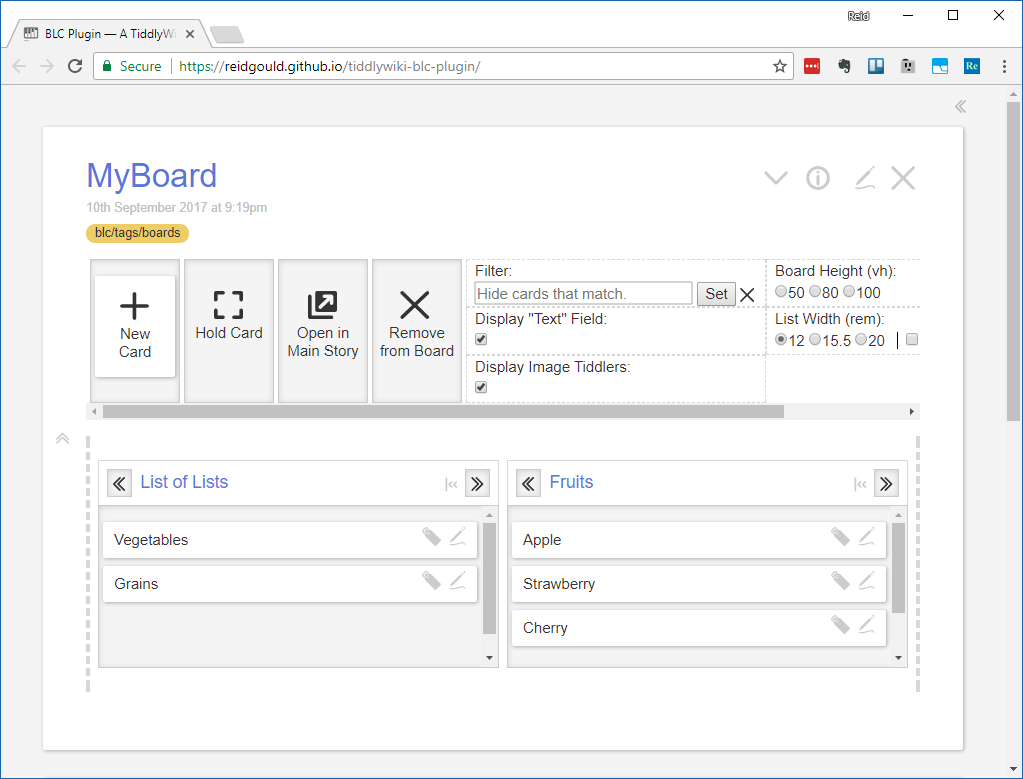
Thanks Read that makes sense.

Some more Ideas,
It could be an advantage to have a more obvious "list drop zone" so that
until people learn that dropping onto the >> and << symbols is the list
management technique.

Perhaps you could hide the following behind a matching area called Display
settings


Then add another area as a drop list zone, Tiddlers dropped there become
lists (at the end of the existing lists)

Also the above display settings could have a toggle to display the board
"menu area" either above or below the lists and cards.

Dont feel obliged to replay. Are you in my Sydney Time zone?

Thanks
Tony


On Monday, September 11, 2017 at 1:16:44 PM UTC+10, Reid Gould wrote:
>
> Tony,
>
> Since every list or card is really just a plain old tiddler, all the same
> methods of creation work for lists. This includes dragging the "New Card"
> onto the list areas! It will open the tiddler in the main story so you can
> title it, but you will see when you return to the board that it is in the
> position where you placed the "New Card". Personally, I don't like being
> scrolled away from my board, so my personal favorite method is just to make
> a new card at the top of my first list so it is convenient to title, then
> drag it into the desired position among the lists. Of course any other
> existing tiddler with any sort of text content that it may already contain
> can also be dragged from the main story to act as a list, you just won't
> see the body of the text displayed so its up to you what makes sense to use
> that way or not to.
>
> - Reid
>
> On Sunday, September 10, 2017 at 9:55:25 PM UTC-5, TonyM wrote:
>>
>> Reid,
>>
>> Thanks, Got it now, I love that feature.
>>
>> I can batch questions/suggestions for later but here is a few,
>>
>>
>>    1. I know see how the the double left and right icons work, by
>>    dropping things on them, perhaps another icon would help indicate this
>> more.
>>    2. What is the main way to create a new list on an existing board?
>>    alternative ways?
>>
>> Keep up the great work
>>
>>
>> Tony
>>
>> On Monday, September 11, 2017 at 12:27:05 PM UTC+10, Reid Gould wrote:
>>>
>>> Tony,
>>>
>>> The workflow I have in mind is that if one has several lists, several
>>> can be dragged to become cards inside of one list:
>>>
>>>
>>> <https://lh3.googleusercontent.com/-02YBprY29vE/WbXzC_SaFnI/AAAAAAAADo4/J9Txz43U83wbAidSHfgboScSGcw6-XlAQCLcBGAs/s1600/blc%2Bbetween%2Bexample%2B1%2Bmarked.PNG>
>>>
>>>
>>> After this example the board would appear as seen in the following
>>> image. Then the same tiddlers that were lists, now seen as cards, can be
>>> dragged to the drop areas to either side of the list titles to place them
>>> back into a list position:
>>>
>>>
>>> <https://lh3.googleusercontent.com/-z11GaxBkH7Q/WbXzgKv-lCI/AAAAAAAADo8/XO7h2-VPUUUW2U3F1dflEeO4dEaBDjEgACLcBGAs/s1600/blc%2Bbetween%2Bexample%2B2%2Bmarked.PNG>
>>>
>>>
>>> After moving the one indicated in the example, the board would appear as
>>> seen here:
>>>
>>>
>>> <https://lh3.googleusercontent.com/-m5-Lk4z2AA4/WbX0AM7ALcI/AAAAAAAADpA/1VCFIOq_1vAAjMq0tLgbQwngQZTWSifLgCLcBGAs/s1600/blc%2Bbetween%2Bexample%2B3.PNG>
>>>
>>>
>>> I am planning on turning the User Guide into a useful tour of various
>>> ways like this to use the plugin. Packing in features can mean there is
>>> enough to discover that a little documentation and training is necessary.
>>> Let me know your thoughts!
>>>
>>>
>>> - Reid
>>>
>>>
>>> On Sunday, September 10, 2017 at 9:07:50 PM UTC-5, TonyM wrote:
>>>>
>>>> Reid,
>>>>
>>>> Please tell me how to remove a list from a list of Lists? Where is the
>>>> list position? so I can "move back into list position".
>>>>
>>>> Regards
>>>> Tony
>>>>
>>>> On Monday, September 11, 2017 at 4:26:01 AM UTC+10, Reid Gould wrote:
>>>>>
>>>>>
>>>>> To anyone still following,
>>>>>
>>>>> A new version is online at the same link
>>>>> <https://reidgould.github.io/tiddlywiki-blc-plugin/> above!
>>>>> I've worked out a number of critical bugs, you should no longer see
>>>>> cards landing in places different from where they were dropped. All the
>>>>> features visible in the control banner are fully functional, plus a few
>>>>> more including:
>>>>>
>>>>>    - Collapsible lists! The button on the right hand side of the list
>>>>>    title will collapse your list to a thin view so that the cards do not
>>>>>    display, but you can still drag cards into that list. One use might be
>>>>> for
>>>>>    a "Done" list that over time could get very long. Collapsing the list
>>>>> will
>>>>>    reduce lag in the interface and keep distractions away.
>>>>>    - A filter field for the user to type any TW filter that hides any
>>>>>    card that matches, so you can focus in on only what you want to see.
>>>>>    - Ability to hide the normal "text" field on cards, so that you
>>>>>    can use BLC even when content is large. You can use the BLC
>>>>> "shorttext"
>>>>>    field for a summary paragraph containing only plain text, or only see
>>>>> the
>>>>>    title of the card. Cards with hidden text fields show an attachment
>>>>> icon at
>>>>>    the bottom right.
>>>>>    - Ability to hide display of image tiddlers.
>>>>>    - Options for the total board height and list width, including an
>>>>>    option to limit list width to a maximum value.
>>>>>    - Ability to drag tiddlers between card and list positions. Try
>>>>>    making several lists with some cards inside, then drag them all into a
>>>>>    "list of lists" to stow them out of the way as cards, but keep them
>>>>> easily
>>>>>    accessible to move back into list position.
>>>>>
>>>>> Remember, BLC is still in beta. Don't use it in a permanent
>>>>> installation YET. I will soon be requesting code review over in the dev
>>>>> group, and will let everyone know when it hits version 1.
>>>>>
>>>>> Thanks to everyone for responding with your encouragement and
>>>>> suggestions, keep it coming and let me know about any bugs or issues you
>>>>> find when testing.
>>>>>
>>>>> One last thing! I think the name "BLC" is a little boring. Do you all
>>>>> have any better ideas of what we could call this thing? Please share!
>>>>>
>>>>> - Reid
>>>>>
>>>>>
>>>>> On Saturday, September 2, 2017 at 10:07:47 AM UTC-5, Reid Gould wrote:
>>>>>>
>>>>>> BLC Plugin sees it's first light of day!
>>>>>>
>>>>>> The wiki: User Guide and Demo
>>>>>> <https://reidgould.github.io/tiddlywiki-blc-plugin/>
>>>>>> Source on GitHub:  https://github.com/reidgould/tiddlywiki-blc-plugin
>>>>>>
>>>>>> Trello style cards and lists are very important to my methods, but I
>>>>>> can't stand not owning my own data. So when I discovered how
>>>>>> fantastically
>>>>>> hackable TiddlyWiki is, I made this! It uses normal TW tags and list
>>>>>> fields
>>>>>> and if you already have those relationships established, you just need
>>>>>> to
>>>>>> transclude the template into your text and it will show you your
>>>>>> existing
>>>>>> tiddlers in board, list, card style.
>>>>>>
>>>>>> WARNING: This is still in quite early development and is very much
>>>>>> not stable. I'm partway through a refactor of the macros I'm using for
>>>>>> listops and they have some bugs.
>>>>>>
>>>>>> Still, it's starting to become something, so I'm sharing it now
>>>>>> hoping for some feedback from you more experienced users. I'd welcome
>>>>>> issues on the GitHub page, or any sort of suggestions here on the forum.
>>>>>>
>>>>>> Thanks to all the people who made this awesome little tool!
>>>>>>
>>>>>> - Reid
>>>>>>
>>>>>>
>>>>>>

--
You received this message because you are subscribed to the Google Groups
"TiddlyWiki" group.
To unsubscribe from this group and stop receiving emails from it, send an email
to [email protected].
To post to this group, send email to [email protected].
Visit this group at https://groups.google.com/group/tiddlywiki.
To view this discussion on the web visit
https://groups.google.com/d/msgid/tiddlywiki/b4c9b664-0676-416c-875e-b2ae08d879d4%40googlegroups.com.
For more options, visit https://groups.google.com/d/optout.