David,

Search for $:/config/EditTemplateFields/Visibility/text and open the
advanced edit.
You will then see it listed in one of the tabs and can click on it to open.

Also if you stop to think about the code mirror editor, with its line
numbers, highlights and other features it can not be a simple text field.
Hence the need to toggle it off if you use something such as an external
editor browser plugin that uses a simple textarea to work.

Regards
Tony

On Thursday, 3 January 2019 17:36:09 UTC+11, David Nebauer wrote:
>
> Mark S., I have to confess something embarrassing. After trawling through
> scads of TW documentation and related internet posts, I have seen hundreds
> of references to opening tiddlers with notation like
> "$:/config/EditTemplateFields/Visibility/text", but I have no idea how to
> do it. Can you give me a pointer?
>
> David.
>
> On Thursday, 3 January 2019 15:30:26 UTC+9:30, Mark S. wrote:
>>
>> I suspect that it is the iframe that is used to contain the text field
>> that is blocking the action.
>>
>> You can try an experiment. Open tiddler
>>
>> $:/config/EditTemplateFields/Visibility/text
>>
>> and change the text to "show". Now the text field will appear down with
>> the other fields (only a bigger box). From that text field box try
>> launching your external editor.
>>
>> Good luck!
>> -- Mark
>>
>> On Wednesday, January 2, 2019 at 8:46:35 PM UTC-8, David Nebauer wrote:
>>>
>>> The web browser I'm using with TW, qutebrowser
>>> <https://github.com/qutebrowser/qutebrowser> has a mechanism for
>>> opening an external editor when filling in forms fields. When creating a
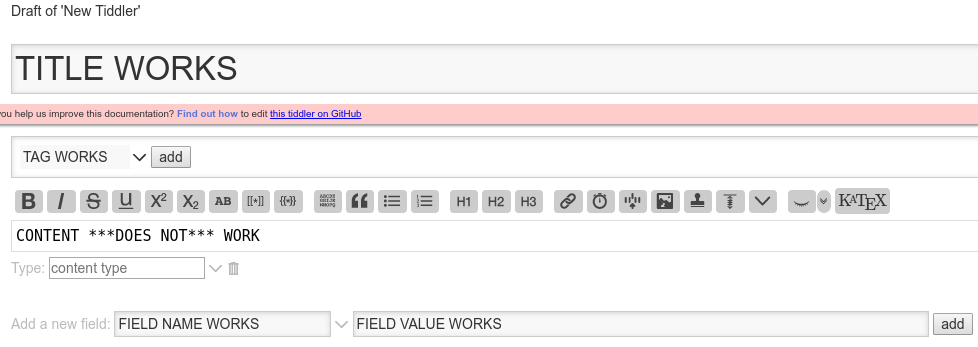
>>> new tiddler this mechanism works with every editable field *except* for
>>> the content field, which is obviously the field for which an external
>>> editor would be most useful:
>>>
>>>
>>> [image: new-tiddler]
>>> <https://user-images.githubusercontent.com/1834722/50620388-82513c00-0f46-11e9-81fb-f9f6dd47699a.png>
>>>
>>> In order to troubleshoot this at the browser end I need to understand
>>> what is different about the content field in comparison with the other
>>> fields.
>>>
>>>
>>> If it helps, the mode of failure is that the external editor (gvim)
>>> launches, I enter the content in the editor, and close the editor -- at
>>> this point for all other fields the editor content appears in the browser
>>> form field, but in the case of the content field it remains empty.
>>>
>>> I tried to view the page source but, of course, that showed me the
>>> entire wiki. I don't have sufficient knowledge of TW to wade through that.
>>>
>>>
>>> [I've reported this as a TW github issue
>>> <https://github.com/Jermolene/TiddlyWiki5/issues/3676>, but it since
>>> occurred to me it might be better discussed here.]
>>>
>>

--
You received this message because you are subscribed to the Google Groups
"TiddlyWiki" group.
To unsubscribe from this group and stop receiving emails from it, send an email
to [email protected].
To post to this group, send email to [email protected].
Visit this group at https://groups.google.com/group/tiddlywiki.
To view this discussion on the web visit
https://groups.google.com/d/msgid/tiddlywiki/ef727189-cbdd-4fe5-bd33-4be2f8d0e9ca%40googlegroups.com.
For more options, visit https://groups.google.com/d/optout.