Thanks, Tony M., for pointing me to the advanced search.

You may well be right about the the CodeMirror plugin. Frankly, as far as I
know I've never used any of its features except for hghlighting matching
parentheses, so it won't be a great hardship to do without it.
Regards,
David.

On Thursday, 3 January 2019 16:12:48 UTC+9:30, TonyM wrote:
>
> David,
>
> Search for $:/config/EditTemplateFields/Visibility/text and open the
> advanced edit.
>
> You will then see it listed in one of the tabs and can click on it to open.
>
> Also if you stop to think about the code mirror editor, with its line
> numbers, highlights and other features it can not be a simple text field.
> Hence the need to toggle it off if you use something such as an external
> editor browser plugin that uses a simple textarea to work.
>
> Regards
> Tony
>
> On Thursday, 3 January 2019 17:36:09 UTC+11, David Nebauer wrote:
>>
>> Mark S., I have to confess something embarrassing. After trawling through
>> scads of TW documentation and related internet posts, I have seen hundreds
>> of references to opening tiddlers with notation like
>> "$:/config/EditTemplateFields/Visibility/text", but I have no idea how to
>> do it. Can you give me a pointer?
>>
>> David.
>>
>> On Thursday, 3 January 2019 15:30:26 UTC+9:30, Mark S. wrote:
>>>
>>> I suspect that it is the iframe that is used to contain the text field
>>> that is blocking the action.
>>>
>>> You can try an experiment. Open tiddler
>>>
>>> $:/config/EditTemplateFields/Visibility/text
>>>
>>> and change the text to "show". Now the text field will appear down with
>>> the other fields (only a bigger box). From that text field box try
>>> launching your external editor.
>>>
>>> Good luck!
>>> -- Mark
>>>
>>> On Wednesday, January 2, 2019 at 8:46:35 PM UTC-8, David Nebauer wrote:
>>>>
>>>> The web browser I'm using with TW, qutebrowser
>>>> <https://github.com/qutebrowser/qutebrowser> has a mechanism for
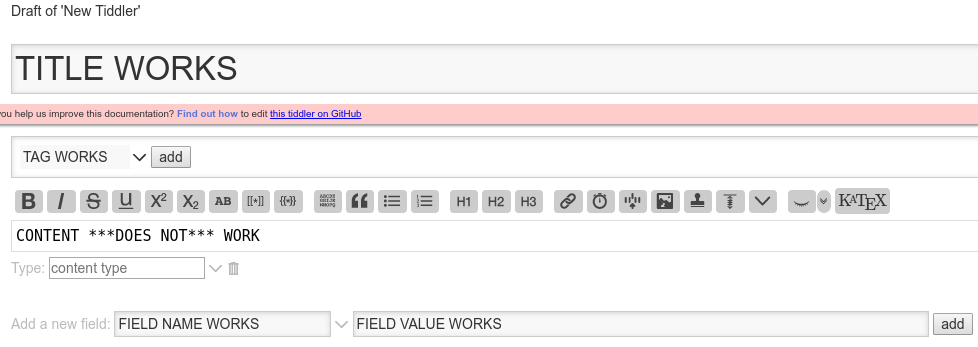
>>>> opening an external editor when filling in forms fields. When creating a
>>>> new tiddler this mechanism works with every editable field *except* for
>>>> the content field, which is obviously the field for which an external
>>>> editor would be most useful:
>>>>
>>>>
>>>> [image: new-tiddler]
>>>> <https://user-images.githubusercontent.com/1834722/50620388-82513c00-0f46-11e9-81fb-f9f6dd47699a.png>
>>>>
>>>> In order to troubleshoot this at the browser end I need to understand
>>>> what is different about the content field in comparison with the other
>>>> fields.
>>>>
>>>>
>>>> If it helps, the mode of failure is that the external editor (gvim)
>>>> launches, I enter the content in the editor, and close the editor -- at
>>>> this point for all other fields the editor content appears in the browser
>>>> form field, but in the case of the content field it remains empty.
>>>>
>>>> I tried to view the page source but, of course, that showed me the
>>>> entire wiki. I don't have sufficient knowledge of TW to wade through that.
>>>>
>>>>
>>>> [I've reported this as a TW github issue
>>>> <https://github.com/Jermolene/TiddlyWiki5/issues/3676>, but it since
>>>> occurred to me it might be better discussed here.]
>>>>
>>>

--
You received this message because you are subscribed to the Google Groups
"TiddlyWiki" group.
To unsubscribe from this group and stop receiving emails from it, send an email
to [email protected].
To post to this group, send email to [email protected].
Visit this group at https://groups.google.com/group/tiddlywiki.
To view this discussion on the web visit
https://groups.google.com/d/msgid/tiddlywiki/89a3892f-eb60-4cfa-9ddf-02f893b5f8e8%40googlegroups.com.
For more options, visit https://groups.google.com/d/optout.