> Tom - I love the idea of taking (a series of) accurately timed photograph(s),
> but have no idea
> how to go about it - can you please explain how you did it for your
> mains-driven clock?
Hi Peter,

During that year I collected lots of mains timing data. There are many ways to
do that; in my case I measured the precise time of every 60th zero-crossing
against my house standard [0]. From that you can make any number of graphs of
accumulated mains time error over a day, or month, or year. Or make histogram
plots of mains frequency distribution. Or ADEV plots, etc. And while those
plots are all technically accurate, they don't emotionally convey the live
jitter and wander that ones sees in a mains sinewave. So that's when I came up
with the goal to make a short time-lapse movie showing how changes in mains
frequency affect a typical wall clock.

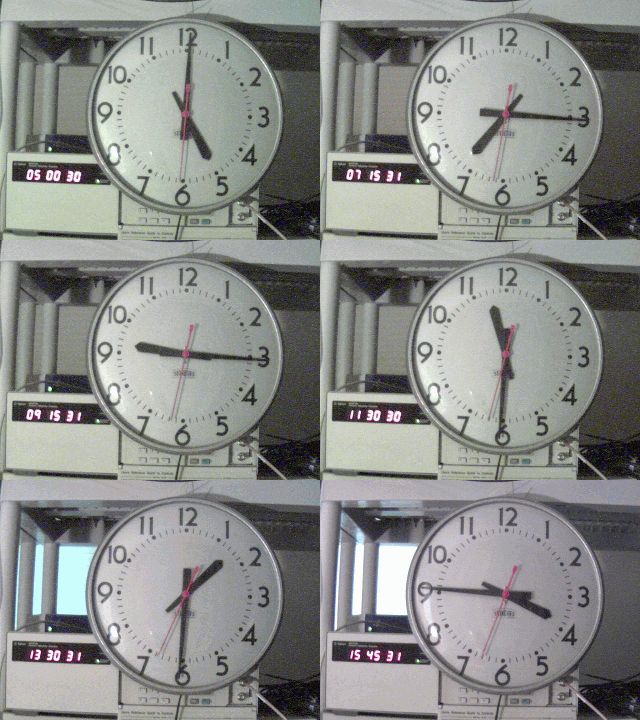
The method was rather crude. I used a tripod and webcam so that each frame
showed both the mains-drive 12h analog clock in the center and a cesium-driven
24h digital clock in the lower left. The window shade in the background
indicated if it was day or night (IIRC that was accidental but it was a nice
touch). To capture an image exactly every 15 minutes, I wrote a PC script that
included a precise timer and URL fetch. It was probably good to 0.1 second of
UTC. I then used an ancient MS program called GIFAnimator.exe to assemble the
individual images into the 1/4 second per frame movie.

You could do the same today using a mix of RPi, NTP, cron, wget/curl, etc. Or
there's probably some cool Python library that does webcam time lapse movies in
one line of code. In my case I used an old Windows XP laptop; the precise timer
was alarm.exe [1], the web fetch tool was url.exe [2], and instead of NTP the
PC jam syncs [3] to NIST every 5 minutes. I wouldn't recommend using these
fragile play tools, but they're out there in my tools directory if you want to
have a look.

/tvb

[0] By "house standard" I mean whatever your best 10 MHz / 1PPS source is at
home; Rb, Cs, GPSDO, etc.
[1] http://leapsecond.com/tools/alarm.c (alarm.exe)
[2] http://leapsecond.com/tools/url.c (url.exe)
[3] http://leapsecond.com/tools/daytime.c (daytime.exe)


----- Original Message -----
From: Peter Vince
To: Tom Van Baak ; [email protected]
Sent: Monday, October 01, 2018 2:14 AM
Subject: Timed photography (was: Re: [time-nuts] A silly question ...)


Tom - I love the idea of taking (a series of) accurately timed photograph(s),
but have no idea how to go about it - can you please explain how you did it for
your mains-driven clock?


   Peter (London)


On Mon, 1 Oct 2018 at 09:39, Tom Van Baak <[email protected]> wrote:
...
> For hourly photos consider using a webcam or smart phone & time-lapse photo
> app.
>
> Here's an example of measuring time drift in mains with a photo every 15
> minutes. Watch how the red seconds hand drifts by up to 4 seconds during the
> day: http://leapsecond.com/pages/tec/mains-clock-ani.gif


_______________________________________________
time-nuts mailing list -- [email protected]
To unsubscribe, go to
http://lists.febo.com/mailman/listinfo/time-nuts_lists.febo.com
and follow the instructions there.