On Wed, May 03, 2017 at 02:15:36PM +0800, Bright Zhao wrote:

> 1. The destination of IPv4 wouldn’t be changed, Yes I agree, that’s the goal
> and final destination for the communication. But during the path, it may be
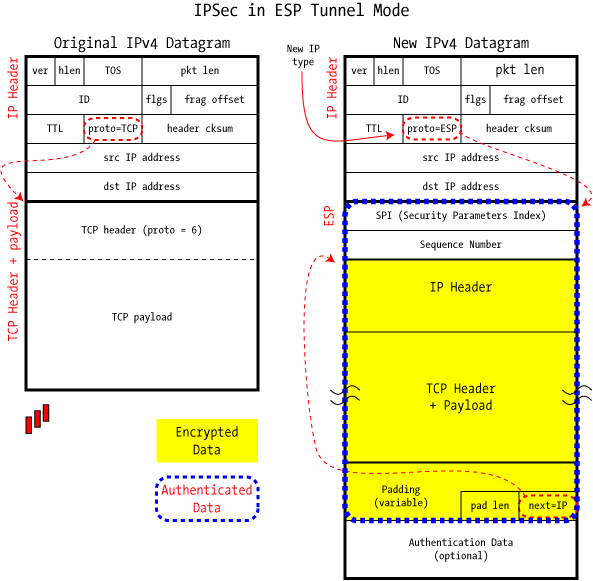
> encapsulated into another packet(tunnel mode), where the outside IP header is
> the physical address, but the inner destination remain unchanged, and I think
> Tinc encapsulates into UDP packet, where the outside S/D IP is the physical
> adapter IP address, but the whole original packet was encapsulated into the
> UDP content part. Conceptually, it’s the same as IPSec site-to-site VPN:
> http://www.unixwiz.net/images/IPSec-ESP-Tunnel-Mode.gif
> <http://www.unixwiz.net/images/IPSec-ESP-Tunnel-Mode.gif>
Yes. But we were talking about traffic and routing inside the tunnels,
that the VPN packets are encapsulated in UDP packets is not relevant.

> 2. Regarding the “via 10.0.0.3”, you’re right, it’s only for Ethernet ARP
> resolution for the next hop. And after my test, my understanding is as below
> for the routing part of Tinc:
>       a. When tinc get up, the tun0 assigned an IP address by tinc-up, let’s
> say 10.0.0.100/24, this will add an direct attached route into host’s route
> table which appears as “10.0.0.0 255.255.255.0 tun0”, which is not deletable;
> this route will enable traffic head to 10.0.0.0/24 will throw into the tun0
> interface

Yes, except that you can delete that route if you want. The route is
just added as a convenience for you by ifconfig.

>       b. Also, if there’s any other traffic need to convey by tinc VPN, you
> just add another route, for example: “ip route 8.8.8.8/32 dev tun0”, and
> actually we don’t need to specify the via, since we only need throw the
> traffic into tun0 interface.

Correct.

>       c. No matter for above a or b, when the traffic send to tun0, from the
> tunnel’s perspective, the source IP will be 10.0.0.100(since routed through
> this interface), and the destination IP will be the one I pinged, which is
> 8.8.8.8
>       d. After above c, then the tinc need to figure out how to encapsulate
> the original packet (S/10.0.0.100 > D/8.8.8.8) into the tunnel and send to
> the other Tinc node. Then I guess Tinc will check “ADD_SUBNET” messages it
> received from the ConnectTo node(learn the whole network), and try to
> encapsulate the original packet into UDP packets, send to the node where its
> subnet of 8.8.8.8 is preferred(weight setting on Subnet)

Correct.

>       e. If Tinc configured by default, then the local host will try to send
> UDP packet directly to the preferred host which advertise 8.8.8.8
>       f. If IndirectData = yes configured everywhere, then the local host
> will always encapsulate the UDP packet to the ConnectTo/aly_hk

Yes.

>          (No matter 8.8.8.8 is advertised or not), if aly_hk doesn’t
> advertise 8.8.8.8, it will check it’s Tinc daemon, to see who advertised
> 8.8.8.8, and then encapsulate UDP to him as the next step to relay

It does matter whether there is a Subnet advertised that includes
8.8.8.8 or not. If the only difference in configuration is whether
IndirectData is set or not, then packets with a given destination IP
address will always be sent to the same node.

> Interestingly, earlier I check the below post for my setup, but now I found,
> the configuration can be simplified into, because tinc-up will make the
> 172.16.1.0/24 to $INTERFACE, and for those two default routes, the via is not
> required as well:
>
> #!/bin/sh
> VPN_GATEWAY=172.16.1.1
> ORIGINAL_GATEWAY=`ip route show | grep ^default | cut -d ' ' -f 2-5`
>
> ip route add $REMOTEADDRESS $ORIGINAL_GATEWAY
> ip route add $VPN_GATEWAY dev $INTERFACE
> ip route add 0.0.0.0/1 via $VPN_GATEWAY dev $INTERFACE
> ip route add 128.0.0.0/1 via $VPN_GATEWAY dev $INTERFACE
>
> https://www.tinc-vpn.org/examples/redirect-gateway/
> <https://www.tinc-vpn.org/examples/redirect-gateway/>

Correct. This is also mentioned at the end of that page.

--
Met vriendelijke groet / with kind regards,
     Guus Sliepen <[email protected]>
 signature.asc
Description: Digital signature
_______________________________________________
tinc mailing list
[email protected]
https://www.tinc-vpn.org/cgi-bin/mailman/listinfo/tinc