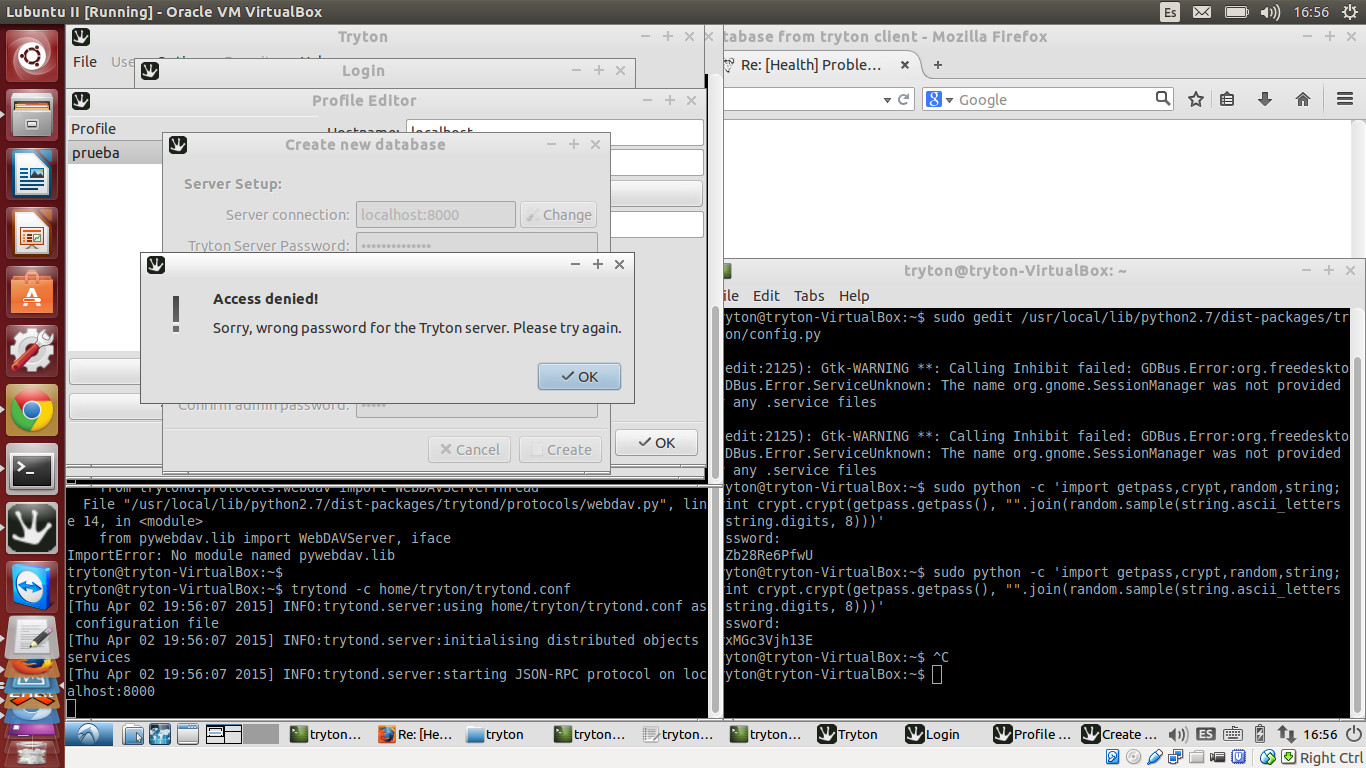
HI, I'm having some issued tryton to make Tryton 3.4 work

On Thursday, April 2, 2015 at 5:10:05 AM UTC-3, [email protected] wrote:
>
> Dear all,
>
> I am trying to get Tryton installed under Ubuntu 14.04 running in a
> virtualbox.
>
In my case, Lubuntu 14.04
> I have already a lot of applications running in this virtualbox such as
> ODOO - OpenERP and SugarCRM.
>
> I have postgresql up and running . Works already for openerp and for
> sugarcrm.
> Me too. auth method set to "trust" through the pg_hb file
> Now I downloaded the tryton-3.4.3.tar.gz and trytond-3.4.2.tar.gz.
>
> I extracted trytond-x.x.x.tar.gz and tryton-x.x.x.targ.gz to directory
> /var/www/tryton
> Now I have the directories /var/www/tryton/trytond and
> /var/www/tryton/tryton
>
> I ran "sudo python setup.py install" in the folder TRYTOND which gave me
> some problems with lxml.
>
> This I managed to solve by installing lxml seperately.
>
> and thereafter ran the install of trytond again which worked.
>
> I now can start the trytond server:
> I just use ./trytond from the trytond-3.xx/bin directory
>


> VirtualBox:/var/www/tryton/trytond-3.4.3/bin$ trytond
> [Thu Apr 02 07:31:14 2015] INFO:trytond.server:using default configuration
> [Thu Apr 02 07:31:14 2015] INFO:trytond.server:initialising distributed
> objects services
> [Thu Apr 02 07:31:15 2015] INFO:trytond.server:starting JSON-RPC protocol
> on localhost:8000
>
> But when I go in a browser to localhost:8000, I can see the message 404 in
> the terminal window.
> 127.0.0.1 - - [02/Apr/2015 07:31:40] code 404, message File not found
> 127.0.0.1 - - [02/Apr/2015 07:31:41] code 404, message File not found
>
> So it looks as if I need to do a lot more, which I started with:
>
> *DIRECTORIES*
> I created following directories:
> Trytond log directory: /var/log/trytond
>
> Trytond pid directory: /var/run/trytond/trytond.pid
>
>
> *TRYTOND.CONF*
> The trytond.conf is not part of the tar-file. Apparently I need to create
> it manually.
> It is not clear where it needs to be stored. I created a folder /etc in
> the directory /var/www/tryton/trytond/
> I stored the trytond.conf in that folder
>
> when I start the server again and go to the browser I still get the same
> message
>
> VirtualBox:/var/www/tryton/trytond-3.4.3/bin$ trytond -c
> /var/www/tryton/trytond-3.4.3/etc/trytond.conf
> [Thu Apr 02 07:35:16 2015] INFO:trytond.server:using
> /var/www/tryton/trytond-3.4.3/etc/trytond.conf as configuration file
> [Thu Apr 02 07:35:16 2015] INFO:trytond.server:initialising distributed
> objects services
> [Thu Apr 02 07:35:16 2015] INFO:trytond.server:starting JSON-RPC protocol
> on localhost:8000
> 127.0.0.1 - - [02/Apr/2015 07:35:25] code 404, message File not found
>


> Same here. This is what I did:
>
I've created the appropriate trytond.conf (following this
<http://doc.tryton.org/3.4/trytond/doc/topics/configuration.html> guide)
and saved it at the user's home
The tryton.conf has the output from the crypto library script
the trytond.conf has the following database header:
uri=postgresql://pgadmin:pgadmin_pwd@localhost:5432
postgresql auth method set to TRUST
I started ./trytond -c home/user/trytond.conf
I'm tryton to create a new db, when prompted with Tryton user pswd I type
the ne I typed when running the crypto script, then give a name to the new
db and set user and password.

Still getting the "Wrong Tryton Admin pasword error "
http://snag.gy/ZlMFN.jpg

> Bottom line my question is whether there is anyone who has gone through
> the same setup and has documented this , and is willing to share this with
> me and others ?
>
If anyone faced this issue before, I can really use some guidance

>
> regards
> Danny
>
>
>