Dear Maria,

I figured it out - I
followed https://code.google.com/p/tryton/wiki/InstallationonopenSUSE
First: you do not have to change the default settings in the PG_HBA file .

You were right by using the URI. The old settings are no longer used
starting Tryton 3.4.

But to be able to create the database from the client, you need to enable
the role 'tryton' for an encrypted password.

postgres=# ALTER ROLE tryton ENCRYPTED PASSWORD 'admin';

ALTER ROLE

postgres=#

Then generate an encrypted password and store it in the trytond.conf file.
Generate the encrypted password as follows, it will ask for a password,
enter 'admin'

python -c 'import getpass,crypt,random,string; print
crypt.crypt(getpass.getpass(), "".join(random.sample(string.ascii_letters +
string.digits, 8)))'

python -c 'import getpass,crypt,random,string; print
crypt.crypt(getpass.getpass(), "".join(random.sample(string.ascii_letters +
string.digits, 8)))'

Password: admin

HBEG/u5QkWWFs


Then add a section in the trytond.conf where you store the super_pwd

[session]

# Session settings

super_pwd = HBEG/u5QkWWFs
This what you need to have in your trytond.conf file.

####################FOR TRYTON 3.4 REPLACED BY URI#######################

[database]

uri = postgresql://tryton:admin@localhost/:5432

#uri = postgresql://tryton:HBEG/u5QkWWFs@localhost/:5432

path = /var/lib/trytond


# The URI to connect to the SQL database (following RFC-3986)

#uri = postgresql://admin:DBAdminPassword@localhost:5432/


# THE PATH where Tryton should store files

#the user running trytond must have write access on this directory

#path = /var/lib/trytond

[session]

# Session settings

super_pwd = HBEG/u5QkWWFs
####################FOR TRYTON 3.4 REPLACED BY URI#######################


First time it did not work when I tried without the line
uri = postgresql://tryton:admin@localhost/:5432

Now I can see that the database is created.

<https://lh3.googleusercontent.com/-wEEVI93yqM8/VR5adkYW_zI/AAAAAAAAAFk/Qj7f9ldVWUk/s1600/database-created.png>

Regards
Danny

On Friday, April 3, 2015 at 12:10:05 AM UTC+2, Maria Cecilia Santos Popper
wrote:
>
> HI, I'm having some issued tryton to make Tryton 3.4 work
>
> On Thursday, April 2, 2015 at 5:10:05 AM UTC-3, [email protected] wrote:
>>
>> Dear all,
>>
>> I am trying to get Tryton installed under Ubuntu 14.04 running in a
>> virtualbox.
>>
> In my case, Lubuntu 14.04
>
>> I have already a lot of applications running in this virtualbox such as
>> ODOO - OpenERP and SugarCRM.
>>
>> I have postgresql up and running . Works already for openerp and for
>> sugarcrm.
>> Me too. auth method set to "trust" through the pg_hb file
>> Now I downloaded the tryton-3.4.3.tar.gz and trytond-3.4.2.tar.gz.
>>
>> I extracted trytond-x.x.x.tar.gz and tryton-x.x.x.targ.gz to directory
>> /var/www/tryton
>> Now I have the directories /var/www/tryton/trytond and
>> /var/www/tryton/tryton
>>
>> I ran "sudo python setup.py install" in the folder TRYTOND which gave me
>> some problems with lxml.
>>
>> This I managed to solve by installing lxml seperately.
>>
>> and thereafter ran the install of trytond again which worked.
>>
>> I now can start the trytond server:
>> I just use ./trytond from the trytond-3.xx/bin directory
>>
>
>
>> VirtualBox:/var/www/tryton/trytond-3.4.3/bin$ trytond
>> [Thu Apr 02 07:31:14 2015] INFO:trytond.server:using default configuration
>> [Thu Apr 02 07:31:14 2015] INFO:trytond.server:initialising distributed
>> objects services
>> [Thu Apr 02 07:31:15 2015] INFO:trytond.server:starting JSON-RPC protocol
>> on localhost:8000
>>
>> But when I go in a browser to localhost:8000, I can see the message 404
>> in the terminal window.
>> 127.0.0.1 - - [02/Apr/2015 07:31:40] code 404, message File not found
>> 127.0.0.1 - - [02/Apr/2015 07:31:41] code 404, message File not found
>>
>> So it looks as if I need to do a lot more, which I started with:
>>
>> *DIRECTORIES*
>> I created following directories:
>> Trytond log directory: /var/log/trytond
>>
>> Trytond pid directory: /var/run/trytond/trytond.pid
>>
>>
>> *TRYTOND.CONF*
>> The trytond.conf is not part of the tar-file. Apparently I need to create
>> it manually.
>> It is not clear where it needs to be stored. I created a folder /etc in
>> the directory /var/www/tryton/trytond/
>> I stored the trytond.conf in that folder
>>
>> when I start the server again and go to the browser I still get the same
>> message
>>
>> VirtualBox:/var/www/tryton/trytond-3.4.3/bin$ trytond -c
>> /var/www/tryton/trytond-3.4.3/etc/trytond.conf
>> [Thu Apr 02 07:35:16 2015] INFO:trytond.server:using
>> /var/www/tryton/trytond-3.4.3/etc/trytond.conf as configuration file
>> [Thu Apr 02 07:35:16 2015] INFO:trytond.server:initialising distributed
>> objects services
>> [Thu Apr 02 07:35:16 2015] INFO:trytond.server:starting JSON-RPC protocol
>> on localhost:8000
>> 127.0.0.1 - - [02/Apr/2015 07:35:25] code 404, message File not found
>>
>
>
>> Same here. This is what I did:
>>
> I've created the appropriate trytond.conf (following this
> <http://doc.tryton.org/3.4/trytond/doc/topics/configuration.html> guide)
> and saved it at the user's home
> The tryton.conf has the output from the crypto library script
> the trytond.conf has the following database header:
> uri=postgresql://pgadmin:pgadmin_pwd@localhost:5432
> postgresql auth method set to TRUST
> I started ./trytond -c home/user/trytond.conf
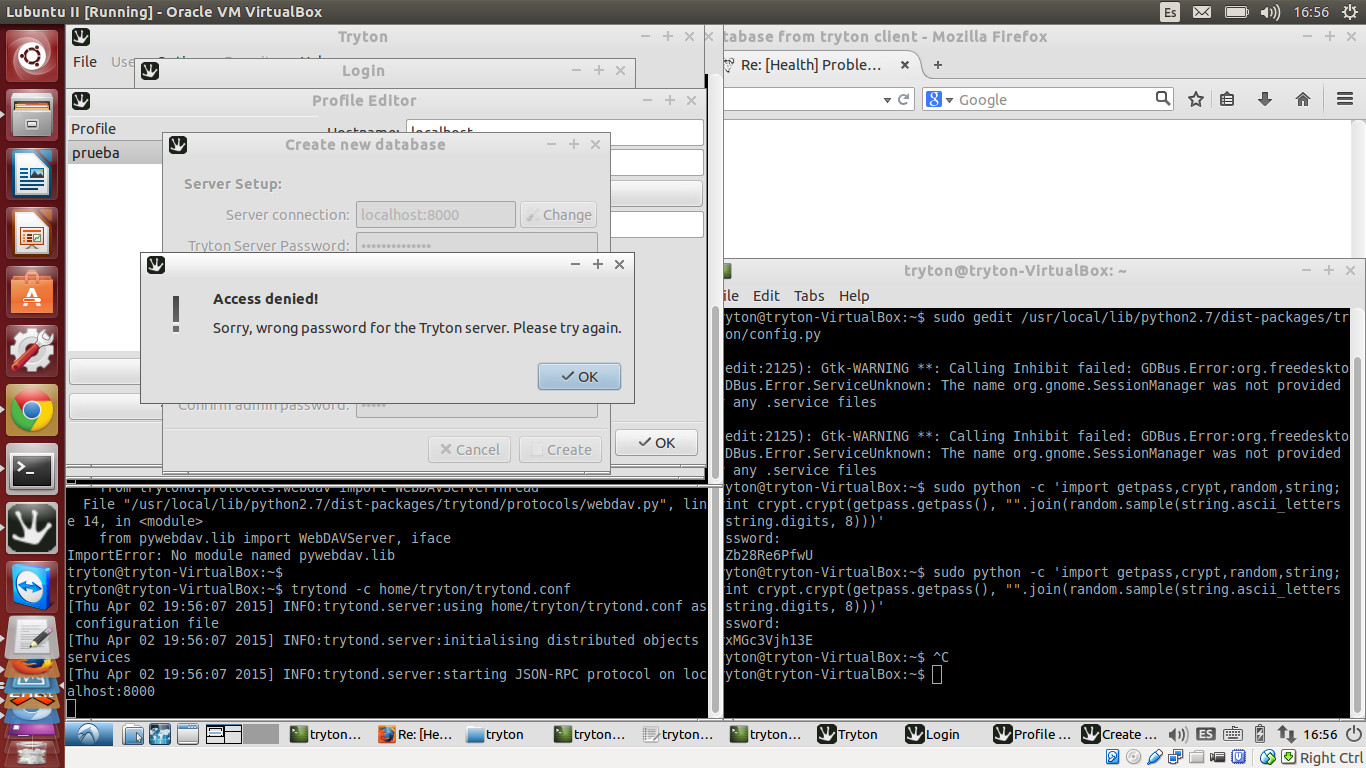
> I'm tryton to create a new db, when prompted with Tryton user pswd I type
> the ne I typed when running the crypto script, then give a name to the new
> db and set user and password.
>
> Still getting the "Wrong Tryton Admin pasword error "
> http://snag.gy/ZlMFN.jpg
>
>> Bottom line my question is whether there is anyone who has gone through
>> the same setup and has documented this , and is willing to share this with
>> me and others ?
>>
> If anyone faced this issue before, I can really use some guidance
>
>>
>> regards
>> Danny
>>
>>
>>