Hello everyone,

I felt it was time to put my money where my mouth is, so here you go:
http://www.ffnn.nl/media/external/ubuntu/usplash/usplash-minimalistic_0.1.deb
What it has:
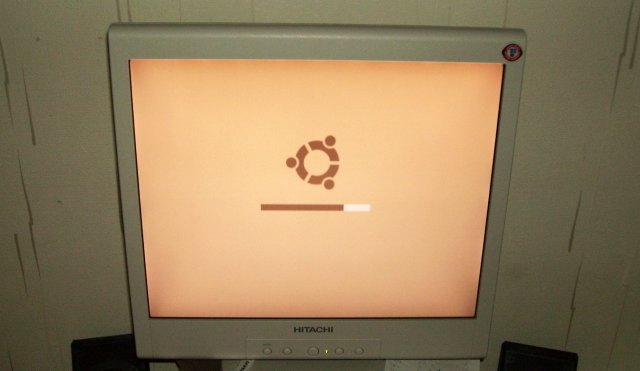
- 100% correct Ubuntu colors
- Sharp antialiased logo
- No text, only "FAIL" if something goes wrong
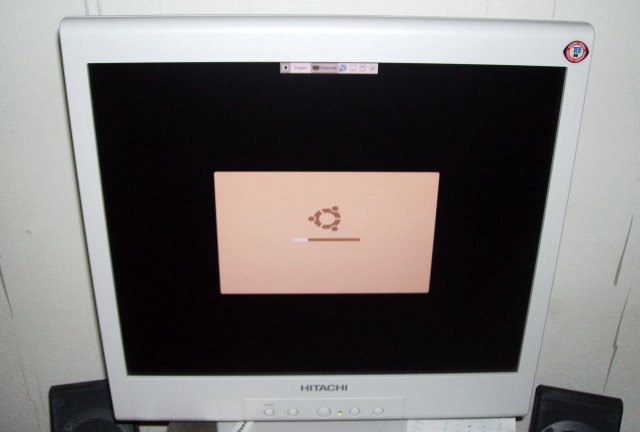
- Graceful fallback if fullscreen is not possible (rounded corners)

It looks like this on a proper screen:
http://www.ffnn.nl/media/external/ubuntu/usplash/minimalistic-working-full.jpg

It looks like this on a non-scaling screen (notice the round corners):
http://www.ffnn.nl/media/external/ubuntu/usplash/minimalistic-working-squashed.jpg

Please test and let me know if it works, what you think and what can be
improved [1] [2].

I'm still a huge supporter of dropping the boot text: no other significant
commercial OS I know of shows techno talk on boot, I think it's time to get
Ubuntu into the 21st century like the others.

I hope I've also disproved a lot of talk about how this can't be done properly
and that I'm unaware of usplash limitations, I've kept them in mind even
before starting my first sketches.

I think I've solved the non-scaling screen issue quite elegantly by adding
rounded corners to the splash, maybe they could be a bit rounder, but I think
they're fine as is. At the moment, you don't really notice them in fullscreen
mode, which is good.

I would really _love_ to get some reports streaming in about this splash
looking bad on someone's hardware so that I can get a reality check.

With kind regards,

Frank Schoep

[1] - Installation can take some time because the installation script needs to
regenerate the initial kernel images.
[2] - If you don't get the new splash after installation, make sure you don't
have any other custom splash screens, otherwise use "sudo update-alternatives
--config usplash-artwork.so" in a console to select "minimalistic.so"

--
ubuntu-art mailing list
[email protected]
https://lists.ubuntu.com/mailman/listinfo/ubuntu-art