I have an idea on how to solve this problem from an UI and usability
point of view:
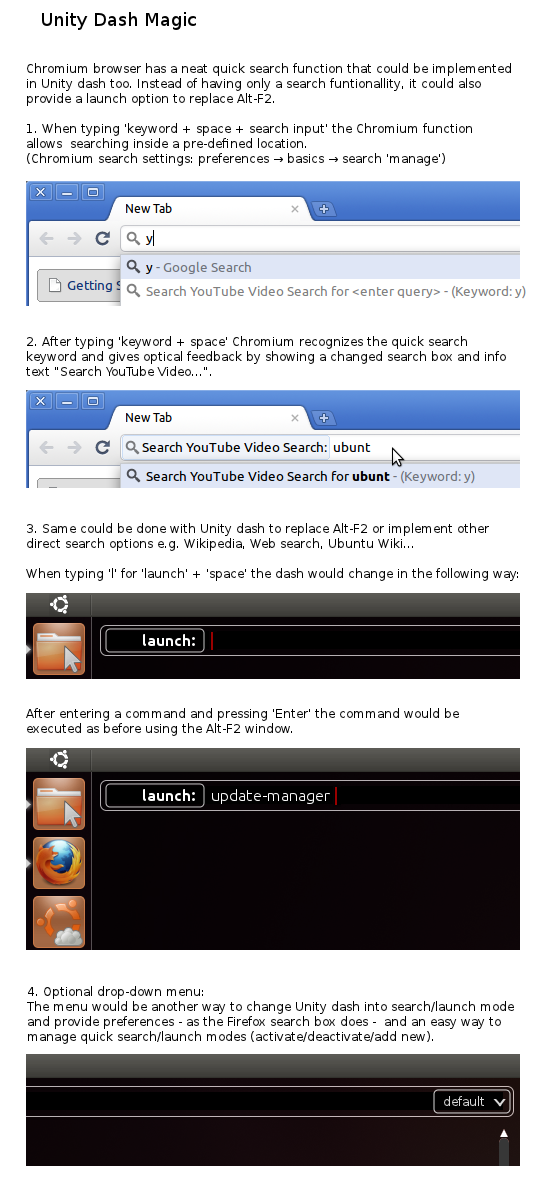
Chromium has this neat 'quick search' feature that enables the user to
search a specific topic by typing  'keyword' + 'space' + 'search input'.
The same could be done with Unity dash, e.g. type 'l update-manager'
('l' for 'launch') to run 'update-manage' as when you pressed Alt-F2 in
the old days.

To get a better idea of what I mean, look at the mock-up.
Implementing this kind of keyword search would open the door to  a lot of other
exiting search features like:
- 'w' for Wikipedia search
- 's' normal Internet search
- documentation search for a special topic like 'p' for python
- user specified keyword' to run - user specified launch/search script → hello
Zeitgeist :)
- and many more...

A similar type of 'specified search terminology' is already used by
Firefox, Chrome and DuckDuckGo in form of '!Bang' keywords. As the
Alt-F2 feature is used mostly by advanced users, I think previous Alt-F2
users would quickly adopt the new procedure.

Pros:
- a consistent and expandable launch/search schema
- idea would extend the Unity dash without interrupting the current interface
- space for a lot of future Unity dash magic

Cons:
- when typing 'character + space' users could accidentally get into special
launch/search mode
- not average user friendly (maybe a small drop-down search option menu as in
Firefox could help out)

** Attachment added: "Mock-up - Unity Dash Magic"

https://bugs.launchpad.net/unity/+bug/580295/+attachment/1868795/+files/Unity%20Dash%20Magic%20-%20An%20Idea.png

--
You received this bug notification because you are a member of Ubuntu
Bugs, which is subscribed to Ubuntu.
https://bugs.launchpad.net/bugs/580295

Title:
  Unity: Alt-F2 not working

--
ubuntu-bugs mailing list
[email protected]
https://lists.ubuntu.com/mailman/listinfo/ubuntu-bugs