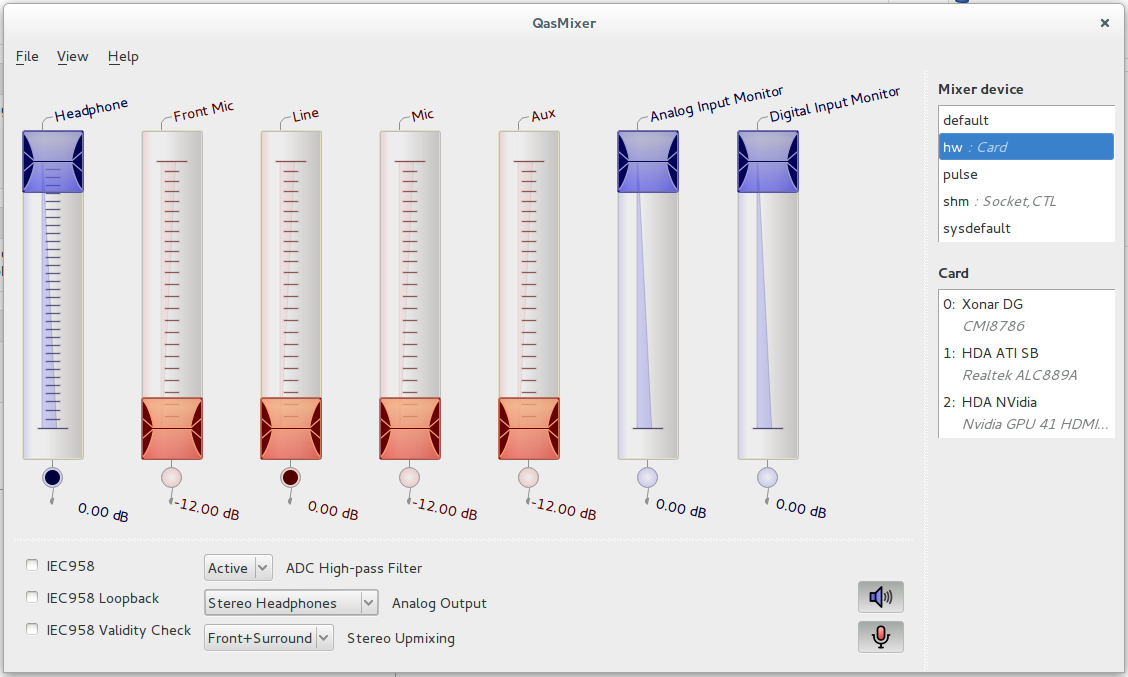
I can confirm that using QasMixer to adjust the configuration settings
fixes the incorrect default configuration.  It looks like Ubuntu
configuration ships by default to send audio on this sound card to the
front ports (if they exist), rather than the rear ports (that always
exist), and then does not provide a clear path to the relevant
configuration setting.  Installing QasMixer allows easy GUI access to
the necessary configuration settings.
This is just my intuition, but it appears to be a bug within the default
"Sound" panel under "Settings": the Input tab correctly lists both the
back and front panel microphones, but the Output tab only lists the back
panel speakers (which actually aren't the back panel speaker jacks, but
instead sends the audio to the front panel jack, as revealed by
QasMixer).  I may be entirely incorrect, perhaps it's a driver issue!

Hope that helps someone?  If I knew anything about programming, I'd take
things apart and look myself.   Since I don't, I figure I'd add as much
detail as I could imagine would be useful in order to help someone else
get up to speed on the issue.  If anyone has any questions or problems,
I've subscribed to this bug report and will (eventually) respond to
requests for more information.


** Attachment added: "QasMixer displaying the relevant settings"

https://bugs.launchpad.net/ubuntu/+source/alsa-driver/+bug/1385770/+attachment/4275520/+files/Screenshot%20from%202014-12-06%2019%3A54%3A42.png

--
You received this bug notification because you are a member of Ubuntu
Bugs, which is subscribed to Ubuntu.
https://bugs.launchpad.net/bugs/1385770

Title:
  [CMI8786 - Xonar DG, playback] No sound at all

To manage notifications about this bug go to:
https://bugs.launchpad.net/ubuntu/+source/alsa-driver/+bug/1385770/+subscriptions

--
ubuntu-bugs mailing list
[email protected]
https://lists.ubuntu.com/mailman/listinfo/ubuntu-bugs