Concerning the issue that if I unplug the ethernet cable, the Network
Manager icon in the systemtray becomes red color and when I plug it
again, it remains red and no connection is detected, I have just
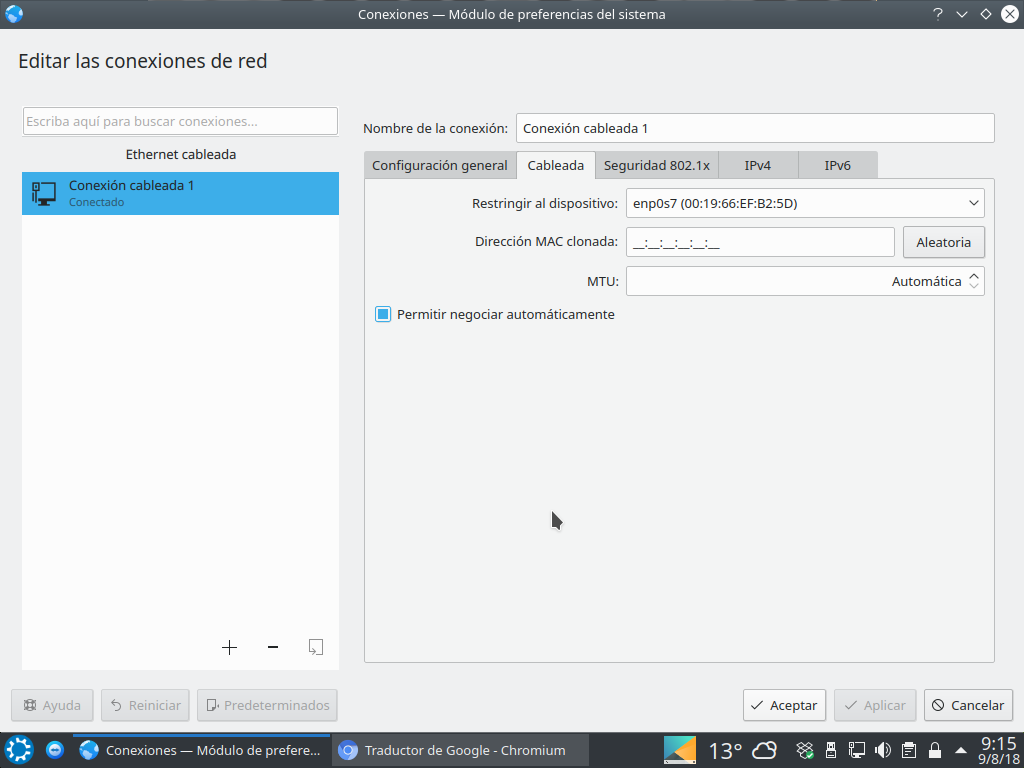
confirmed that if I tick the allow automatic negotiation mark in the
Wired tab of Edit Connections in Network Manager, then now when pluging
the ethernet cable again, the Network Manager icon becomes normal color
again, it detects the ethernet connection and it re-connects
automatically Ok.
I don't know if this option was available before, as I didn't have to
choose such option in previous versions of Kubuntu, but this was not a
bug but a change in the options of Network Manager (and that it's not
marked such option by default).

I attach you a screenshot for reference (in Spanish).

** Attachment added: "Screenshot_20180809_091556.png"

https://bugs.launchpad.net/ubuntu/+source/linux/+bug/1771749/+attachment/5173238/+files/Screenshot_20180809_091556.png

--
You received this bug notification because you are a member of Ubuntu
Bugs, which is subscribed to Ubuntu.
https://bugs.launchpad.net/bugs/1771749

Title:
  Ethernet connection lost after few minutes since starting

To manage notifications about this bug go to:
https://bugs.launchpad.net/ubuntu/+source/linux/+bug/1771749/+subscriptions

--
ubuntu-bugs mailing list
[email protected]
https://lists.ubuntu.com/mailman/listinfo/ubuntu-bugs