Ok,,Thanks so much all of you,,,because of info...

On Wed, Jan 20, 2010 at 3:18 PM, Amarendra Kumar <[email protected]> wrote:
> Your Vista will be there. Just choose not to use entire disk or maximum
> free space options available. Choose here:
>
> http://farm4.static.flickr.com/3630/3363131932_cac22ca5a7.jpg*
>
> "Specify partitions manually (advanced)"
>
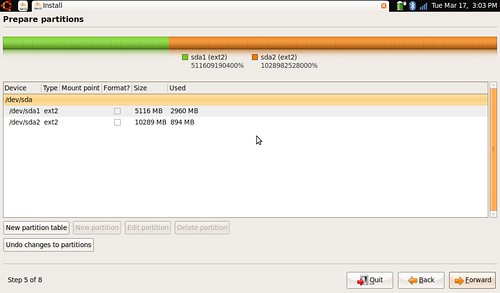
> *Now you have to remember which partition you had created for "Linux
> installation"*. *Select that one from a list like below. Size should be
> the clue.* Do not select Vista partition. :
>
> *http://farm4.static.flickr.com/3621/3363131936_e0e265a10a.jpg*
>
> *Create only one partition as mount point "/". I hope your RAM is more
> than 2GB or even if it's 1GB it's fine. I will suggest not to create
> separate /swap or /home partition. Keep it simple.*
>
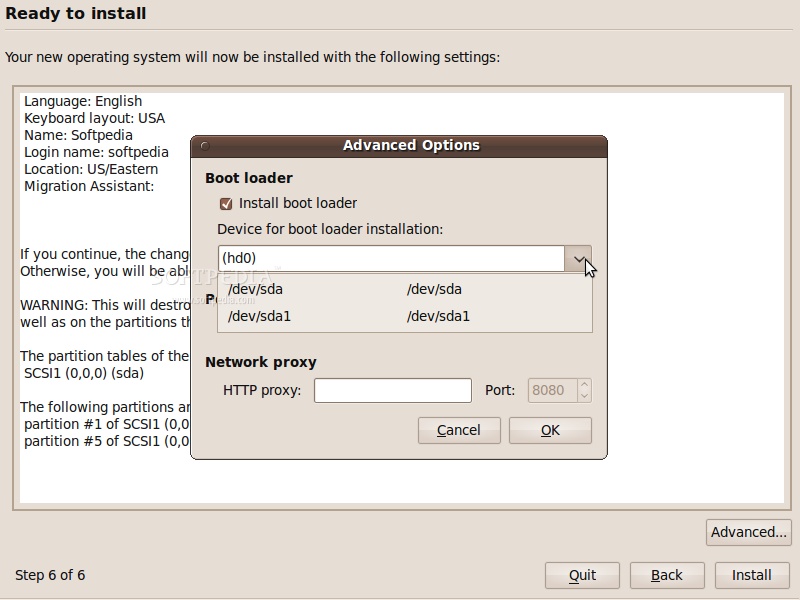
> *While selecting disk for grub install. select your hard disk. should be *
> hd0* if there's only one hard disk connected*. *You will get an option for
> that in* advanced* :
>
>
> http://news.softpedia.com/images/extra/LINUX/large/ubuntu910installation-large_010.jpg
>
> It will detect your Windows installation and next time you reboot, you will
> get a boot menu with both the OSs. If you are able to boot into Ubuntu then
> open a "Terminal" and run this command (only if it didn't detect Windows") :
> *
> (Ignore this step if Windows was in the boot menu)
>
> "sudo update-grub"
> *
> I hope you should be good to go now. *
>
> *PS. that's exactly what did when installing it on a friend's system
> recently.*
>
> *Cheers!!*
>
> *
> On Wed, Jan 20, 2010 at 2:26 PM, Mehdi <[email protected]> wrote:
>
>> Thanks Ramnarayan, I try by using the live Cd in the Office, i will be
>> able to do it at home, but may i ask you that if i want re-install the Linux
>> on my Computer ( already i installed the vista & Linux)
>> First: Vista
>> second: Linux( It should be reinstall)
>> My vista will be remain there or not? what about boot?
>>
>> Note: i have portion & swap just need to reinstall Linux.
>> If my words are not clear please tell me to explain more.
>>
>> Thanks
>>
>>
>>
>> On Wed, Jan 20, 2010 at 1:12 PM, Ramnarayan.K <[email protected]>wrote:
>>
>>> On Wed, Jan 20, 2010 at 1:10 PM, Mehdi <[email protected]> wrote:
>>> >
>>> > Thanks, Man i will try in my Laptop Tonight when i reach home..
>>> >
>>> > Thanks so much for all info..
>>>
>>> just remember on Ubuntu & Linux almost nothing is impossible :-)
>>>
>>> ram
>>>
>>> --
>>>
>>
>>
>> --
>>
>> ubuntu-in mailing list
>> [email protected]
>> https://lists.ubuntu.com/mailman/listinfo/ubuntu-in
>>
>>
>
>
> --
> Amarendra Kumar
> Final Year Undergraduate
> Dept. of IT, NIT Patna
> http://amarendra.web.officelive.com
>
> --
> ubuntu-in mailing list
> [email protected]
> https://lists.ubuntu.com/mailman/listinfo/ubuntu-in
>
>
--
ubuntu-in mailing list
[email protected]
https://lists.ubuntu.com/mailman/listinfo/ubuntu-in