Hi again, all!

I’m following up on this with some guacd logs:
Jan 20 19:46:21 vps-vnc-proxy guacd[14279]: Protocol "vnc" selected
Jan 20 19:46:21 vps-vnc-proxy guacd[14279]: Connection ID is
"$62f15d6f-da12-45d5-990b-84d57e2c3946"
Jan 20 19:46:21 vps-vnc-proxy guacd[14279]: VNC server supports protocol
version 3.8 (viewer 3.8)
Jan 20 19:46:21 vps-vnc-proxy guacd[14279]: We have 1 security types to read
Jan 20 19:46:21 vps-vnc-proxy guacd[14279]: 0) Received security type 1
Jan 20 19:46:21 vps-vnc-proxy guacd[14279]: Selecting security type 1 (0/1 in
the list)
Jan 20 19:46:21 vps-vnc-proxy guacd[14279]: Selected Security Scheme 1
Jan 20 19:46:21 vps-vnc-proxy guacd[14279]: No authentication needed
Jan 20 19:46:21 vps-vnc-proxy guacd[14279]: VNC authentication succeeded
Jan 20 19:46:21 vps-vnc-proxy guacd[14279]: Desktop name "QEMU"
Jan 20 19:46:21 vps-vnc-proxy guacd[14279]: Connected to VNC server, using
protocol version 3.8
Jan 20 19:46:21 vps-vnc-proxy guacd[14279]: VNC server default format:
Jan 20 19:46:21 vps-vnc-proxy guacd[14279]:   32 bits per pixel.
Jan 20 19:46:21 vps-vnc-proxy guacd[14279]:   Least significant byte first in
each pixel.
Jan 20 19:46:21 vps-vnc-proxy guacd[14279]:   TRUE colour: max red 255 green
255 blue 255, shift red 16 green 8 blue 0
Jan 20 19:46:21 vps-vnc-proxy guacd[14279]: Starting client

I’m not immediately seeing anything relevant. I’ve set log_level = debug in
/etc/guacamole/guacd.conf under [daemon].

Anything else I should check, either on the Guacamole server or the connection
target?

Could anyone please report their experiences with Ubuntu 16.04 / CentOS 7
connections over VNC - is it working as expected for you?

Any input would be greatly appreciated :)

Kind regards
Hogne

> 10. jan. 2017 kl. 21.08 skrev Hogne Vevle <[email protected]>:
>
> Hi all,
>
> We are having some strange issues when connecting to machines running Ubuntu
> 16 and CentOS 7 via VNC, where the keyboard mappings will not work properly.
>
> The problem exists both for physical keyboard input and when using the
> on-screen keyboard. Our physical keyboards have Norwegian layouts, and the
> on-screen keyboard has the en-US layout. I have not been able to test using
> an English layout physical keyboard.
>
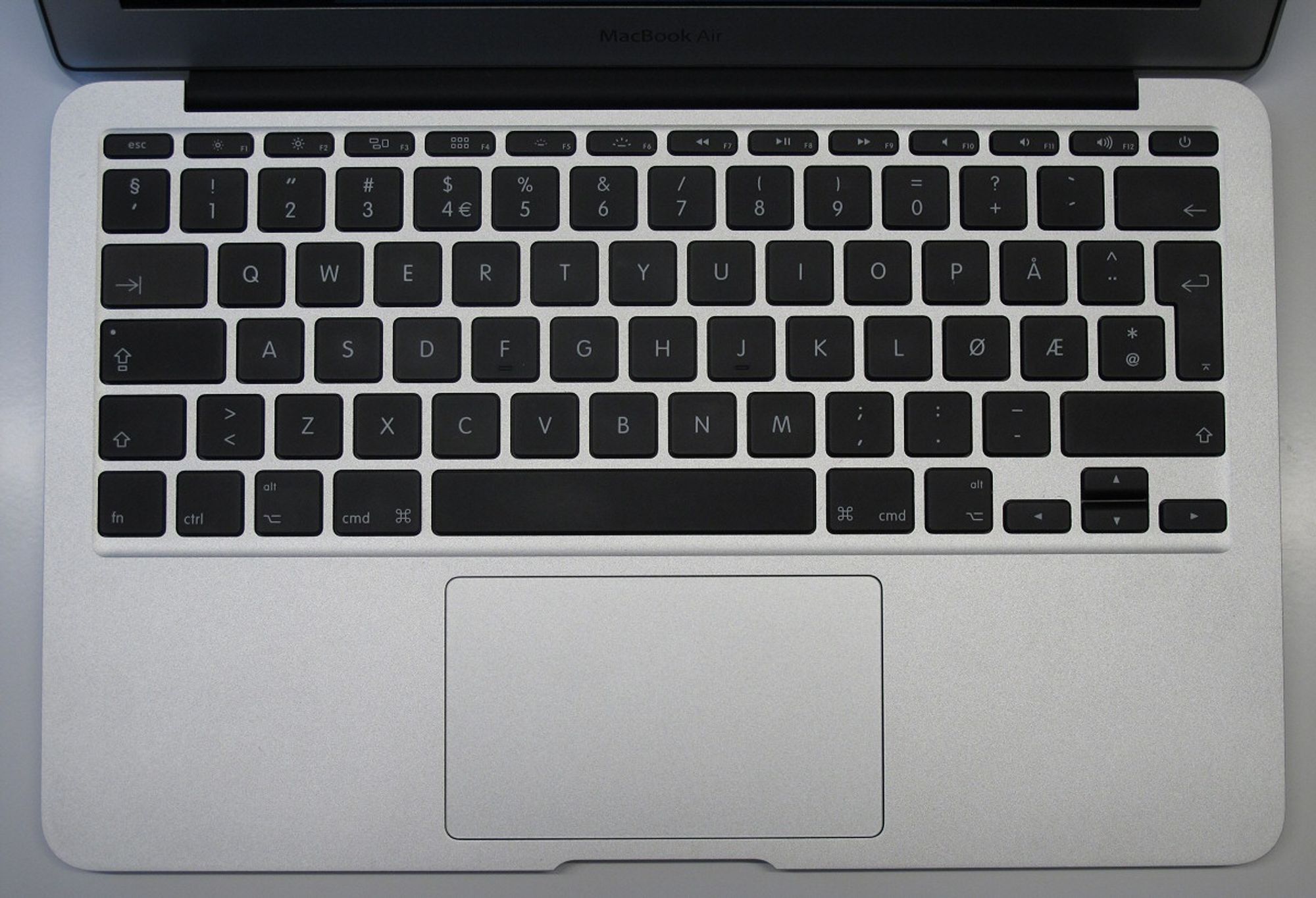
> Examples from a Mac (Norwegian keyboard
> <http://img.gfx.no/958/958819/MacBook_Air_tastatur.jpg>):
> - ‘ (top left, above the tab key) becomes ‘æ'.
> - ‘<' (bottom left, besides Shift) becomes ‘,’
> - ‘-‘ (bottom right, below return key) becomes ‘+'
> - ‘+’ (top right, below F10 and F11) becomes ‘\’
>
> Examples from the on-screen keyboard (en-US):
> - ‘=‘ (below F10) becomes ‘\’
> - ‘\’ (below Backspace) becomes ‘
> - ‘[‘ becomes ‘å’
> - ‘]’ does not work (nothing happens)
> - ‘;’ becomes ‘ø'
>  - ‘`’ (above Tab) becomes ‘|' (pipe)
>
> I can produce examples from a Windows computer tomorrow, if needed.
>
> For other operating systems (e.g. Windows, Debian, CentOS 6 and older, and
> older Ubuntu's) everything works as intended.
>
> Can anyone else reproduce this, or could it be some misconfiguration of the
> machines we are connecting to? (All machines we connect to are VM's, so there
> is a possibility that the cause could be with the VM template we are using,
> if some misconfiguration on the target could cause such an issue).
>
> Kind regards
> Hogne Vevle