On 6/12/19 2:12 PM, aguador wrote:
Does anyone on the list, whether from the DF or a user, know if there
are plans to improve the save dialog?
As it stands, at least on Linux, separate partitions and connected
drives are no longer shown in the dialogue. Saving to such a partition
or drive means navigating there through the root directory. I know that
it is possible to save the location, but this does not help if you are
saving to a new or infrequently used external device.

If needed I will file a request for enhancement because the one step
forward for cloud users brought several steps back for connected
drives.
What Linux are you using, and what version of LibreOffice are you using?

I use Ubuntu Mate 18.04 and LO 6.2.4.2.
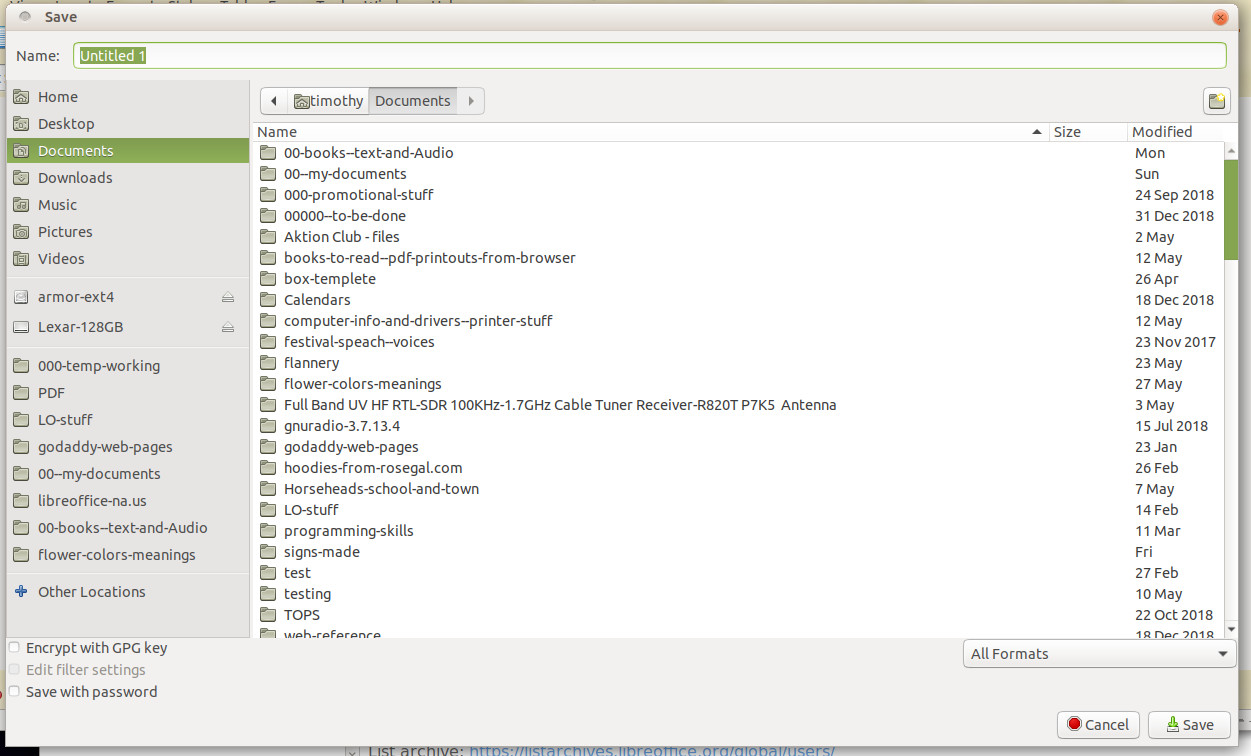
I plugged in a thumb drive and a 2T USB drive. As long as they are
mounted, I have no problems Saving files to it. I do not have to go up
through to "root" to get to the file system / media / user / device
folder / data file - the hard way. The dialog to save the file looks a
lot like the Caja file manager dialog for saving.
Since we cannot include graphics here, I placed a JPG file on one of my
domains that shows you what mine looks like.
http://lungstrom.com/holding/LO-save-screen.jpg
There use to be an option in earlier versions of LO [I think] that asks
if you wanted to use LO's file manager for load/save or the system's
file manager. I do not see dialog in this version.
--
To unsubscribe e-mail to: [email protected]
Problems? https://www.libreoffice.org/get-help/mailing-lists/how-to-unsubscribe/
Posting guidelines + more: https://wiki.documentfoundation.org/Netiquette
List archive: https://listarchives.libreoffice.org/global/users/
Privacy Policy: https://www.documentfoundation.org/privacy