Hi Russell,

Thanks for describing the steps used to generate the keystore and
truststore files.
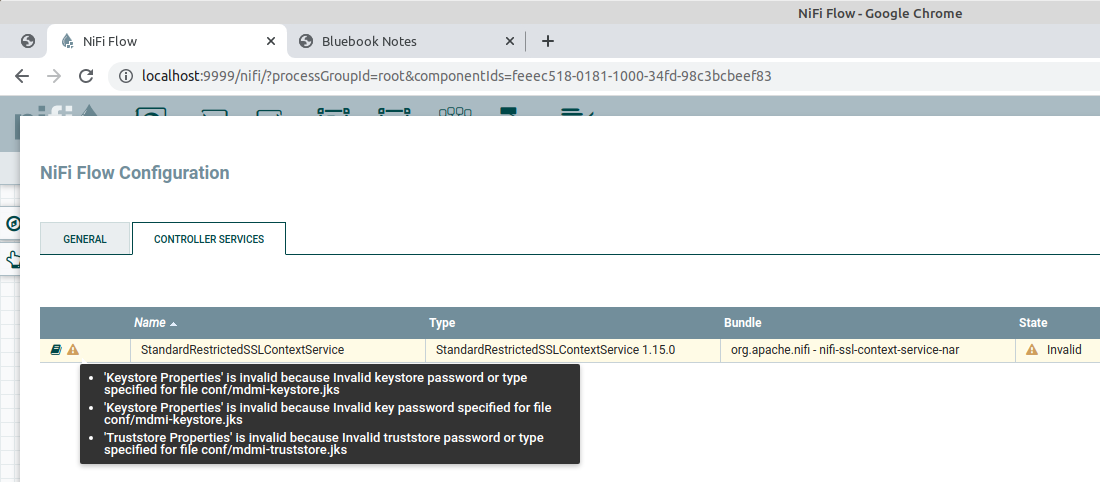
The validation warnings on StandardRestrictedSSLContextService appear to
indicate that the configured password properties do not match the keystore
and truststore passwords.

It would be helpful to enter the password properties again and confirm that
there are no trailing spaces.

The following keytool commands can also be used to verify the passwords:

keytool -list -v -keystore mdmi-keystore.jks
keytool -list -v -keystore mdmi-truststore.jks

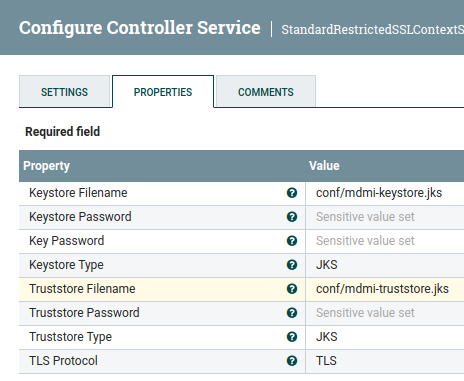
The configuration appears to be correct, so confirming the password on both
files is a good next step.

Regards,
David Handermann

On Wed, Jul 20, 2022 at 5:30 PM Russell Bateman <[email protected]>
wrote:

> I'm trying to set up TLS for a service using *InvokeHTTP* against an
> external-to-NiFi Tomcat-based service and I have configured
> *StandardRestrictedSSLContextService* thus:
>
>
> https://www.javahotchocolate.com/notes/nifi-images/mdmi-standard-ssl-context-service.png
>
> ...which results in the errors shown here:
>
>
> https://www.javahotchocolate.com/notes/nifi-images/s-sslcontextservice.png
>
> Do the NiFi errors mean that "changeit" can't be used as a password?
>
> At the risk of over-simplifying their placement, I dropped them into
> *${NIFI_ROOT}/conf*.
>
> ~/dev/nifi/nifi-1.15.0/conf $ *ll mdmi**
> -rw-rw-r-- 1 russ russ  899 Jul 20 15:40 mdmi-keystore.crt
> -rw-rw-r-- 1 russ russ 2725 Jul 20 15:39 *mdmi-keystore.jks*
> -rw-rw-r-- 1 russ russ 1255 Jul 20 15:53 *mdmi-truststore.jks*
>
> *mdmi-keystore.crt* is self-signed for now and (for now) I have used
> "changeit":
>
> ~/dev/nifi/nifi-1.15.0/conf $ *keytool -genkey -keyalg RSA -alias mdmi
> -keystore mdmi-keystore.jks -validity 365 -keysize 2048*
> Enter keystore password:  changeit
> Re-enter new password:  changeit
> What is your first and last name?
>    ...
>
> ~/dev/nifi/nifi-1.15.0/conf $ *keytool -export -alias mdmi -file
> mdmi-**keystore.crt
> -keystore mdmi-keystore.jks -storepass changeit*
> Certificate stored in file <mdmi-keystore.crt>
> ~/dev/nifi/nifi-1.15.0/conf $ *keytool -import -noprompt -trustcacerts**
> -alias mdmi -file mdmi-keystore.crt -keystore mdmi-truststore.jks**
> -storepass changeit*
> Certificate was added to keystore
>
> This all works fine via curl or Postman outside of NiFi for hitting the
> service (I put the keytool artifacts into *${CATALINA_BASE}/conf* and
> note this in *${CATALINA_BASE}/conf/server.xml*).
>
> When it comes to TLS in NiFi, this is my first rodeo. I'm open to
> suggestions on any other this. Thanks.
>