I would like Apple's <input type="search"> adopted as an official
standard, maintaining Safari compatibility. Attributes are:
onsearch="foo();" - JavaScript function called when the user
initiates a search
incremental - if present, onsearch fires on every keypress, and on
clicking the cancel button; otherwise onsearch fires when pressing Enter
results - if present, shows a little magnifying glass icon, which
helps to visually identify the field as a search box
results=10 - the magnifying glass functions as a drop-down menu
containing a history of the last (whatever number) search terms
autosave="foo" - define a unique name to identify the search history
(so the same history may be shared across multiple search boxes, even
across different domains)
All other attributes of <input type="text"> are also supported,
including placeholder. Apple's implementation adds a cancel (x)
button which appears whenever text has been typed into the box;
clicking the cancel button clears the text without removing focus.
They also use rounded corners to make search boxes visually distinct
from plain text boxes.
Web sites are already implementing some of this functionality through
JavaScript, CSS and graphics. Examples of Apple's visual appearance
(rounded corners and magnifying glass):
http://www.apple.com/
http://www.filemaker.com/
http://www.britannica.com/ (but doesn't hide the cancel button when
value="")
Other examples of search fields with a variety of non-square corners:
http://www.cnet.com/
http://www.myspace.com/
http://wordpress.com/
http://www.target.com/
http://www.lenovo.com/us/en/index.html

Examples of incremental search functionality using AJAX:
http://www.apple.com/
http://www.adobe.com/
At first glance it looks like onsearch (when combined with
incremental) is identical to oninput, but onsearch fires after a
slight delay, so that if the user rapidly types multiple characters,
the search doesn't begin until after a sufficient pause in typing.
For AJAX queries (or CPU-intensive client-side processing), this
behavior is much better than using oninput, which fires for every
single keystroke. Of course the behavior of onsearch could be
emulated through JavaScript, but having onsearch eliminates the need
to reinvent that wheel.
I really like having a little magnifying glass icon that I don't have
to draw myself (or steal from somewhere) and then use crazy CSS
tricks to get it to look like it's inside the search box. The
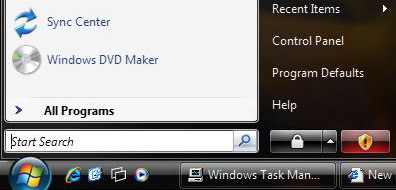
implementation can be platform-specific of course; for example on
Windows the magnifying glass might look like this:
http://justaddwater.dk/wp-content/uploads/2006/01/vista%20search.jpg
and that could be replaced by a cancel button when you start typing:
http://www.tech2.com/media/images/img_3781_vista_search.jpg
Safari has supported these features for some time, and we should not
break compatibility with them:
http://lists.whatwg.org/htdig.cgi/whatwg-whatwg.org/2007-May/011368.html

Google has said they'd like to be compatible with Safari:
http://code.google.com/p/chromium/issues/detail?id=17#c9
The main thing is, if these features were standardized, more sites
would use them instead of trying to come up with something clever on
their own, which would lead to more consistency across sites and a
better user experience.
Comments?

--
Andy Lyttle
[EMAIL PROTECTED]