I successfully broken it by running my CGI script a number of
times.......owhttpd server is working as I can see the devices and data through
the web page.  If I try and cd /tmp/1wire the command just hangs and I cannot
get any response...have to close my ssh session and re-open it.
# ps
  PID  Uid     VmSize Stat Command
    1 root        348 S   /bin/init
    2 root            SW  [keventd]
    3 root            SWN [ksoftirqd_CPU0]
    4 root            SW  [kswapd]
    5 root            SW  [bdflush]
    6 root            SW  [kupdated]
    7 root            SW  [mtdblockd]
    8 root            SW  [khubd]
    9 root            SWN [jffs2_gcd_mtd4]
   12 root            SW  [usb-storage-0]
   14 root            SW  [scsi_eh_0]
   18 root            SW  [sd-mc-thread]
   27 root            SW  [kjournald]
   50 root            DW  [ixp425_csr]
   51 root            SW  [ixp425 ixp0]
   54 root        456 S   /bin/sh
   55 root        500 S   /sbin/syslogd -n
   56 root        448 S   /sbin/klogd -n
  147 root            SW  [kjournald]
  294 root        880 S   /usr/sbin/thttpd -C /etc/thttpd.conf
  318 root        840 S   /usr/sbin/smbd -D
  320 root        544 S   /usr/sbin/smbd -D
  321 root        884 S   /usr/sbin/nmbd -D
  328 root        412 S   /bin/inetd
  346 root        436 S   /usr/sbin/QuickSet
  350 root        480 S   /usr/sbin/USB_Detect
  354 root        392 S   /usr/sbin/USB_Detect
  373 root        528 S   /usr/sbin/crond
  381 root        332 S   /usr/sbin/CheckResetButton
  383 root        356 S   /usr/sbin/CheckPowerButton
  385 root        332 S   /usr/sbin/do_umount
  433 root        732 S   /opt/sbin/sshd
  442 root        868 S   owserver -P /opt/var/run/owserver.pid -u -p 3002
  464 root        868 S   owserver -P /opt/var/run/owserver.pid -u -p 3002
  465 root        868 S   owserver -P /opt/var/run/owserver.pid -u -p 3002
  469 root       1464 S   owfs -P /opt/var/run/owfs.pid -s 3002 /tmp/1wire
  470 root       1464 S   owfs -P /opt/var/run/owfs.pid -s 3002 /tmp/1wire
  473 root       1464 S   owfs -P /opt/var/run/owfs.pid -s 3002 /tmp/1wire
  479 root        480 S   owftpd -P /opt/var/run/owftpd.pid -s 3002 -p 0.0.0.0:
  482 root        480 S   owftpd -P /opt/var/run/owftpd.pid -s 3002 -p 0.0.0.0:
  483 root        480 S   owftpd -P /opt/var/run/owftpd.pid -s 3002 -p 0.0.0.0:
  484 root        480 S   owftpd -P /opt/var/run/owftpd.pid -s 3002 -p 0.0.0.0:
  490 root        772 S   owhttpd -P /opt/var/run/owhttpd.pid -s 3002 -p 3001
  493 root        772 S   owhttpd -P /opt/var/run/owhttpd.pid -s 3002 -p 3001
  494 root        772 S   owhttpd -P /opt/var/run/owhttpd.pid -s 3002 -p 3001
  496 website     716 S   /usr/sbin/thttpd -C /etc/thttpd-website.conf
  520 root        868 S   owserver -P /opt/var/run/owserver.pid -u -p 3002
15011 root       1464 S   owfs -P /opt/var/run/owfs.pid -s 3002 /tmp/1wire
 8867 root       1464 S   owfs -P /opt/var/run/owfs.pid -s 3002 /tmp/1wire
 8868 root       1464 S   owfs -P /opt/var/run/owfs.pid -s 3002 /tmp/1wire
 8869 root       1464 S   owfs -P /opt/var/run/owfs.pid -s 3002 /tmp/1wire
 8870 root       1464 S   owfs -P /opt/var/run/owfs.pid -s 3002 /tmp/1wire
 8871 root       1464 S   owfs -P /opt/var/run/owfs.pid -s 3002 /tmp/1wire
 8872 root       1464 S   owfs -P /opt/var/run/owfs.pid -s 3002 /tmp/1wire
 8873 root       1464 S   owfs -P /opt/var/run/owfs.pid -s 3002 /tmp/1wire
23652 root        992 S   /bin/bash /public/aquaread
23664 root        992 S   /bin/bash /public/aquaread
23671 root        992 S   /bin/bash /public/aquaread
23674 root        992 S   /bin/bash /public/aquaread
23676 root        972 S   /usr/sbin/thttpd -C /etc/thttpd.conf
23678 root        632 S N /opt/bin/awk {printf "%4.2f\n",((($0-1)/1.6)+5.5)} /t
23682 root        992 S   /bin/bash /public/aquaread
23684 root        972 S   /usr/sbin/thttpd -C /etc/thttpd.conf
23686 root        632 S N /opt/bin/awk {printf "%4.2f\n",((($0-1)/1.6)+5.5)} /t
23692 root        992 S   /bin/bash /public/aquaread
23707 root        992 S   /bin/bash /public/aquaread
23711 root        868 S   owserver -P /opt/var/run/owserver.pid -u -p 3002
23804 root       1000 S   /bin/bash /public/aquaread
23810 root        992 S   /bin/bash /public/aquaread
23835 root        992 S   /bin/bash /public/aquaread
23901 root        992 S   /bin/bash /public/aquaread
23903 root        456 S   ls
23910 root        992 S   /bin/bash /public/aquaread
23998 root        992 S   /bin/bash /public/aquaread
24001 root        992 S   /bin/bash /public/aquaread
24004 root        992 S   /bin/bash /public/aquaread
24005 root       1812 S   sshd: [EMAIL PROTECTED]
24007 root        604 S   -sh
24012 root        992 S   /bin/bash /public/aquaread
24015 root        992 S   /bin/bash /public/aquaread
24016 root        600 R   ps


  ----- Original Message -----
  From: Rob Conway
  To: [email protected]
  Sent: Monday, March 12, 2007 10:42 PM
  Subject: Re: [Owfs-developers] Reading 1 wire data every minute with
anNSLU2(SLUG)


  Paul,

  After thinking about this more....I believe it is more likely to screw up if
(at the same time) my script is running and another script / command is trying
to access 1wire data.

  Observations
  a/  I have noticed missing data in my trend files if I have logged into the
slug and have been reading data via the command prompt.  ie When I check
calibrations of my devices I generally do a few manual "cat" commands.  The
next day or so I see my trend files are missing some data around the same time
as I did my calibrations.  The missing data is NOT the same device as I am
calibrating.  My cat command could of been requested at the same time my script
is running.

  b/ The last time it stopped, i was away on business and I think it could of
been the time I logged in via my web page and executed a cgi script.  My web
front end shows trends however I also have a CGI file that just does a read of
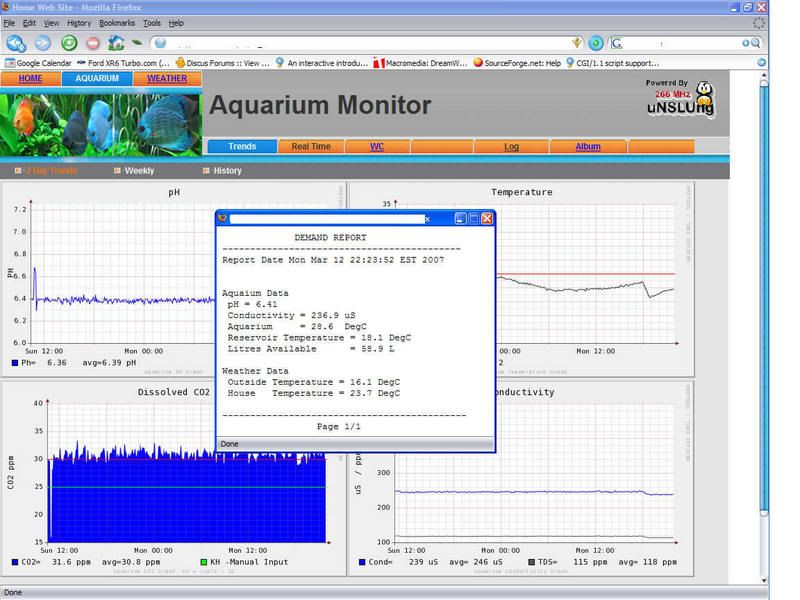
the 1wire uncached data and reports "instantaneous data".  (I ahve included cgi
file below)

  So I am thinking that when the 1wire file systems get hit with two read
requests it is more likely to stop responding.

  See the following CGI script output
  http://img.photobucket.com/albums/v319/rjconway/web1.jpg


  CGI FILE #####################################################################
  #!/bin/bash
  etime=$(/bin/date)

  ### Read 1wire data and convert into engineering units #ph was 2.6667##
  PH=$(/opt/bin/awk '{printf "%4.2f\n",((($0-1)/1.6)+5.5)}'
/tmp/1wire/20.B71F05000000/volt.A)
  US=$(/opt/bin/awk '{printf "%5.1f\n",($0*100)}'
/tmp/1wire/20.B71F05000000/volt.B)
  TempAqua=$(/opt/bin/awk '{printf "%3.1f\n",((($0-1)*5)+20)}'
/tmp/1wire/20.B71F05000000/volt.C)
  LITRES=$(/opt/bin/awk '{printf "%3.1f\n",(($0-2.900)*60)}'
/tmp/1wire/20.952A05000000/volt.D)
  TempOut=$(/opt/bin/awk '{printf "%3.1f\n",($0)}'
/tmp/1wire/28.11BF97000000/temperature)
  TempAmb=$(/opt/bin/awk '{printf "%3.1f\n",($0)}'
/tmp/1wire/28.D70598000000/temperature)
  TempRes=$(/opt/bin/awk '{printf "%3.1f\n",($0)}'
/tmp/1wire/28.A6EE97000000/temperature)

  set -f
  echo Content-type: text/plain
  echo
  echo "             DEMAND REPORT"
  echo -------------------------------------------
  echo Report Date  $etime
  echo
  echo
  echo Aquaium Data
  echo " pH =" $PH
  echo " Conductivity =" $US uS
  echo " Aquarium     = "$TempAqua " DegC"
  echo " Reservoir Temperature = "$TempRes DegC
  echo " Litres Available      = "$LITRES L
  echo
  echo Weather Data
  echo " Outside Temperature =" $TempOut DegC
  echo " House   Temperature =" $TempAmb DegC
  echo
  echo --------------------------------------------
  echo "                 Page 1/1"
  ###############################################################


  ----- Original Message -----
    From: Paul Alfille
    To: [email protected]
    Sent: Monday, March 12, 2007 10:06 PM
    Subject: Re: [Owfs-developers] Reading 1 wire data every minute with
anNSLU2 (SLUG)


    I use an "inittab" script -- it gets automatically restarted. (And a delay
loop).

    Are you running your script against owserver using owshell? Can you tell
what the point of failure is? Is owserver still working after the "crash" --
can you access from another machine. It would be nice to find the underlying
problem.

    Paul Alfille


    On 3/12/07, Rob Conway <[EMAIL PROTECTED]> wrote:
      I am using an NSLU2 (Unslung 6.8), I currently use a simple bash script
to gather 8 off 1wire variables and do some calc's before storing the data in
trend files.  I have it scheduled in crontab to run every 1 minute.  What
happens is that about ~3 times a month the NSLU2 grinds to a halt.  It seems
that my script somehow screws up and I just fill up the slug with scripts never
finishing.  I think its because it cannot access the 1wire file system to read
the data...

      Is this the best way to handle scheduling of scripts, using a 1 minute
crontab entry ?
      I was thinking to just use a loop in a single script and just sleep for
60 seconds...that way if it does screw up at least the NSLU2 will continue to
run.  I could have another script testing a "PID entry" to make sure its still
running and if not just restart it automatically.

      I know its slightly off topic however was keen to see if other NSLU2
-1wire users have implemented the same type of continuous monitoring and what
their maximum uptime was.  The SLUG is lightly loaded and dedicated for data
monitoring with owfs, NTP, thhtpd, and rrdtool....I want to move onto relay
output control  thus trying to sort this problem out for reliability before I
move into closed loop control.

      owfs version as seen from #ipkg list_installed
      owfs - 2.6p1-3 - 1-Wire filesystem (http://owfs.sf.net)
      owlib - 2.6p1-3 - 1-wire library
      fuse-utils - 2.6.0-pre2-3 - Fuse


      ################################################################
      #!/bin/bash
      ###  Force Simultaneous 1wire conversion ###
      echo 1 >/tmp/1wire/simultaneous/voltage
      echo 1 >/tmp/1wire/simultaneous/temperature

      ### Read 1wire data and convert into engineering units ##
      PH=$(/opt/bin/awk '{printf "%4.2f\n",((($0-1)/1.6)+5.5)}'
/tmp/1wire/20.B71F05000000/volt.A)
      US=$(/opt/bin/awk '{printf "%5.1f\n",($0*100)}'
/tmp/1wire/20.B71F05000000/volt.B)
      TempAqua=$(/opt/bin/awk '{printf "%3.1f\n",((($0-1)*5)+20)}'
/tmp/1wire/20.B71F05000000/volt.C)
      LITRES=$(/opt/bin/awk '{printf "%3.1f\n",(($0-2.900)*60)}'
/tmp/1wire/20.952A05000000/volt.D)
      TempOut=$(/opt/bin/awk '{printf "%3.1f\n",($0)}'
/tmp/1wire/28.11BF97000000/temperature)
      TempAmb=$(/opt/bin/awk '{printf "%3.1f\n",($0)}'
/tmp/1wire/28.D70598000000/temperature)
      TempRes=$(/opt/bin/awk '{printf "%3.1f\n",($0)}'
/tmp/1wire/28.A6EE97000000/temperature)
      Accum_flow=$(/opt/bin/awk '{printf "%d\n",($0/4100)}'
/tmp/1wire/uncached/1D.EBEF0900000034/counters.A)

      ### Calculations based upon Data ###
      C12=$(/opt/bin/awk -v PH="$PH" '{printf "%3.1f\n",((3*$0)*(10^(7-PH)))}'
/public/kh_value)
      Todayflow=$(/opt/bin/awk -v AF="$Accum_flow" '{printf "%d\n",(AF-$0)}'
/public/lastflow.txt)
      Weekflow=$(/opt/bin/awk -v AF="$Accum_flow" '{printf "%d\n",(AF-$0)}'
/public/weekflow.txt)

      #################################################################

      cheers rob -Australia

      -------------------------------------------------------------------------
      Take Surveys. Earn Cash. Influence the Future of IT
      Join SourceForge.net's Techsay panel and you'll get the chance to share
your
      opinions on IT & business topics through brief surveys-and earn cash
      http://www.techsay.com/default.php?page=join.php&p=sourceforge&CID=DEVDEV
      _______________________________________________
      Owfs-developers mailing list
      [email protected]
      https://lists.sourceforge.net/lists/listinfo/owfs-developers


----------------------------------------------------------------------------


    -------------------------------------------------------------------------
    Take Surveys. Earn Cash. Influence the Future of IT
    Join SourceForge.net's Techsay panel and you'll get the chance to share your
    opinions on IT & business topics through brief surveys-and earn cash
    http://www.techsay.com/default.php?page=join.php&p=sourceforge&CID=DEVDEV


----------------------------------------------------------------------------


    _______________________________________________
    Owfs-developers mailing list
    [email protected]
    https://lists.sourceforge.net/lists/listinfo/owfs-developers


------------------------------------------------------------------------------


  -------------------------------------------------------------------------
  Take Surveys. Earn Cash. Influence the Future of IT
  Join SourceForge.net's Techsay panel and you'll get the chance to share your
  opinions on IT & business topics through brief surveys-and earn cash
  http://www.techsay.com/default.php?page=join.php&p=sourceforge&CID=DEVDEV


------------------------------------------------------------------------------


  _______________________________________________
  Owfs-developers mailing list
  [email protected]
  https://lists.sourceforge.net/lists/listinfo/owfs-developers
-------------------------------------------------------------------------
Take Surveys. Earn Cash. Influence the Future of IT
Join SourceForge.net's Techsay panel and you'll get the chance to share your
opinions on IT & business topics through brief surveys-and earn cash
http://www.techsay.com/default.php?page=join.php&p=sourceforge&CID=DEVDEV
_______________________________________________
Owfs-developers mailing list
[email protected]
https://lists.sourceforge.net/lists/listinfo/owfs-developers